背景
在 浅解 Junit 4 第一篇:TestClass 一文中,我们探讨了 org.junit.runners.model.TestClass 的功能。在此基础上,我们继续探索 JUnit 4 里的其他核心类。本文会 初步探讨 JUnit 4 如何找到并运行带有 @Test 注解的方法。本文的主角是以下两位
- org.junit.runner.Runner
- org.junit.runners.ParentRunner
要点
对一个测试类 T 而言,我们记
- 与 T 对应的 org.junit.runners.model.TestClass 为 TestClassT
- 与 T 对应的 org.junit.runner.Runner 为 RunnerT
那么
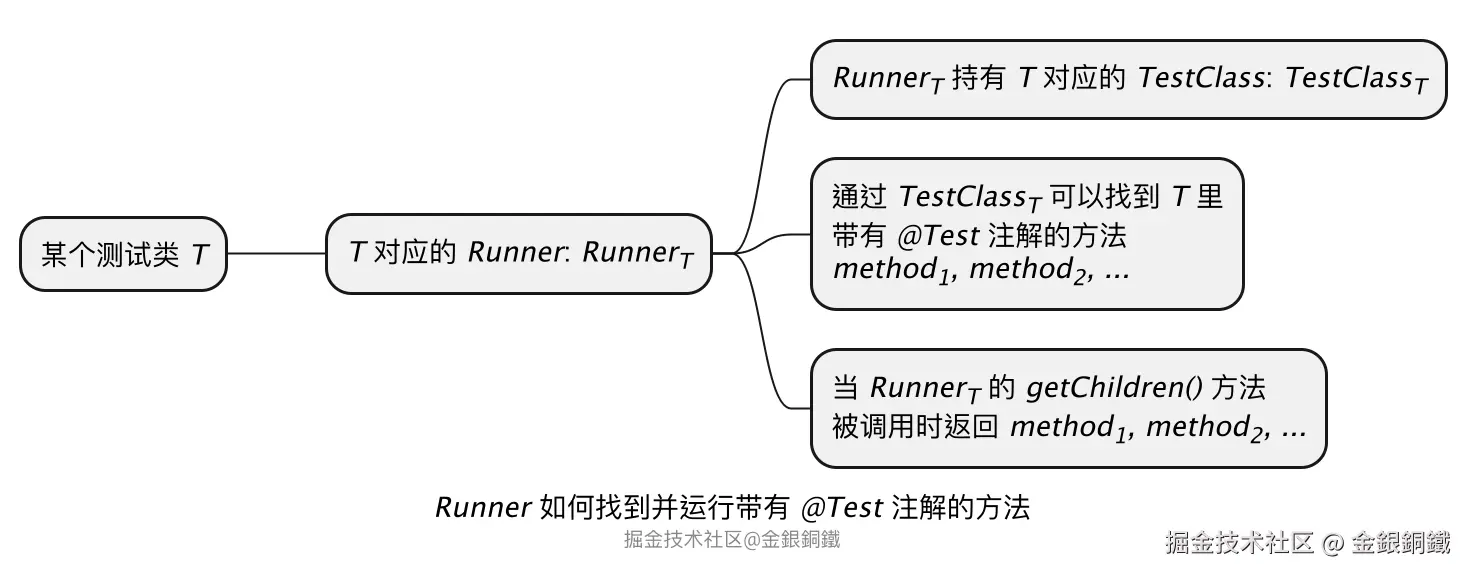
- RunnerT 借助 TestClassT 可以找到 T 中带有
@Test注解的方法 method1,method2,⋯ - RunnerT 负责运行 method1,method2,⋯
正文
一个具体的场景: 用 Nand 来实现 Not/And/Or
说明:完整的代码,下文会提供。这一小节为了行文方便,只用截图和类图进行说明。
在 The Elements of Computing Systems 一书的附录 A 中提到了如下的结论 (只用 Nand 运算符来表示任意的布尔函数 一文中有更多细节)
任何布尔函数都可以用只包含
Nand运算符的表达式表示
基于这一结论,我们可以只用 Nand 来实现 Not/And/Or,相关类图如下
写好 NandGate/NotGate/AndGate/OrGate 这些类的代码后,需要对它们进行测试,对应测试类的类图如下
以 NandGateTest 为例,它有 4 个带有 @Test 注解的方法
如何找到并运行带有 @Test 注解的方法
找到带有 @Test 注解的方法
我们通过 NandGateTest 对应的 TestClass(全称是 org.junit.runners.model.TestClass) 就可以找到这 4 个带有 @Test 注解的方法。思维导图如下 👇
为了便于描述,我们把 NandGateTest 对应的 TestClass 称为 TestClassNandGateTest,4 个带有 @Test 注解的方法分别称为 method1,method2,method3,method4。
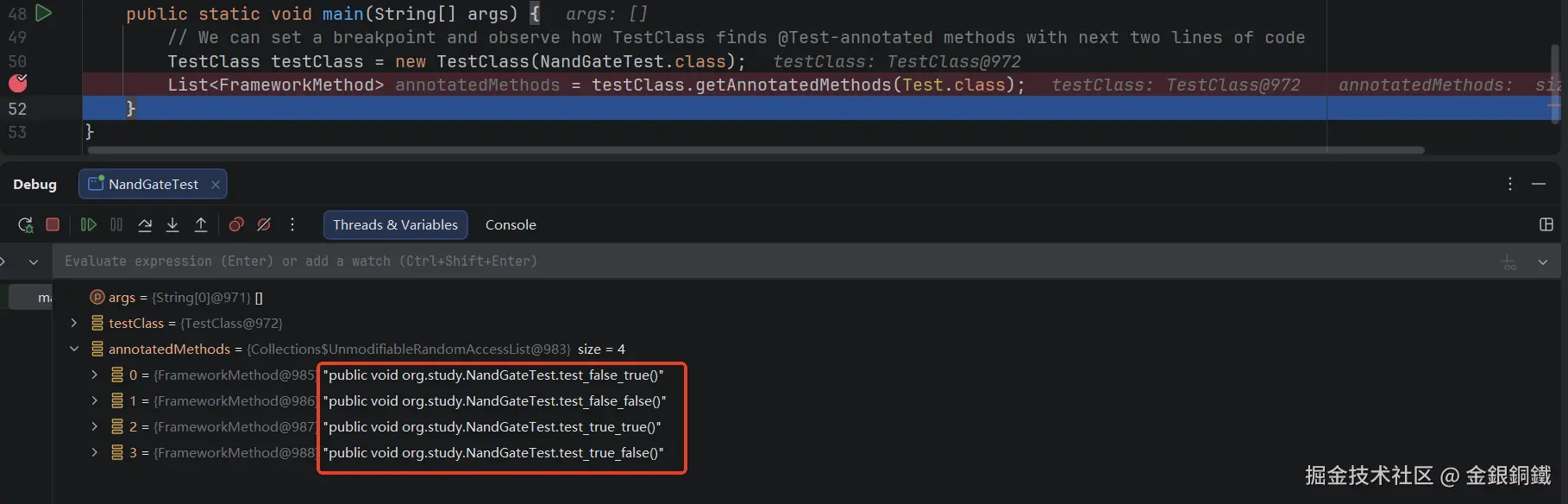
借助 TestClassNandGateTest,我们可以找到 NandGateTest 中带有 @Test 注解的方法,简要的代码如下 👇 (这里就不写完整的 main 方法了)
java
TestClass testClass = new TestClass(NandGateTest.class);
List<FrameworkMethod> annotatedMethods = testClass.getAnnotatedMethods(Test.class);
示例效果如下图所示 👇
运行带有 @Test 注解的方法
但是我们应该如何运行带有 @Test 注解的这些方法呢?
一个思路是:进行更高层的抽象。我们可以定义一个 Runner 类( Runner 可以翻译为 运行器 ,由它来运行测试,所以叫运行器)。 Runner 持有 TestClass, Runner 通过 TestClass 找到带有 @Test 注解的各个方法, Runner 负责运行这些方法。对 NandGateTest 而言,对应的 Runner 可以称为 RunnerNandGateTest。这里的要点如下 👇
- RunnerNandGateTest 持有 TestClassNandGateTest
- RunnerNandGateTest 借助 TestClassNandGateTest 找到 NandGateTest 中所有带有
@Test注解的方法,即- method1
- method2
- method3
- method4
- RunnerNandGateTest 负责运行带有
@Test注解的方法,即- method1
- method2
- method3
- method4
我们可以将 RunnerNandGateTest 看成 亲子结构
- 亲(
parent): RunnerNandGateTest 自身(可以将它自身视为子节点的 容器) - 子(
child): 带有@Test注解的方法,即- method1
- method2
- method3
- method4
思维导图如下(中间的蓝色节点表示 parent,其余节点是 4 个 child)
由于需要处理"查找作为子节点的方法"这样的逻辑,所以可以将 Runner 设计成接口或者抽象类,让它的子类(在 JUnit 4 里,这个子类是 org.junit.runners.ParentRunner)来处理具体的逻辑。下方是一个大大简化了的类图(类图中只画了 Runner 和 ParentRunner 里本文关心的部分)👇
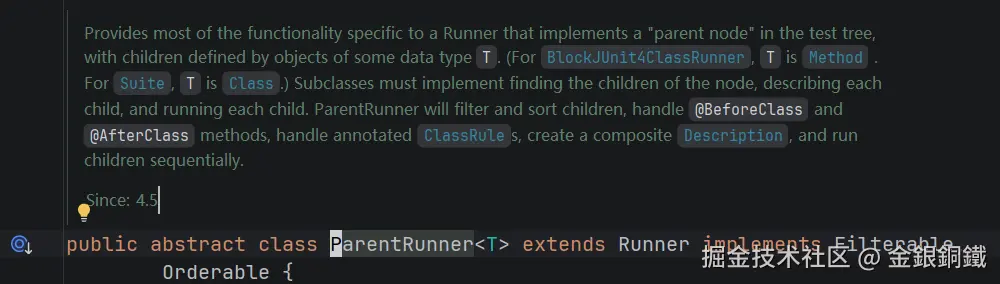
ParentRunner 的 javadoc 的内容如下,可供参考。
java
/**
 * Provides most of the functionality specific to a Runner that implements a
 * "parent node" in the test tree, with children defined by objects of some data
 * type {@code T}. (For {@link BlockJUnit4ClassRunner}, {@code T} is
 * {@link Method} . For {@link Suite}, {@code T} is {@link Class}.) Subclasses
 * must implement finding the children of the node, describing each child, and
 * running each child. ParentRunner will filter and sort children, handle
 * {@code @BeforeClass} and {@code @AfterClass} methods,
 * handle annotated {@link ClassRule}s, create a composite
 * {@link Description}, and run children sequentially.
 *
 * @since 4.5
 */
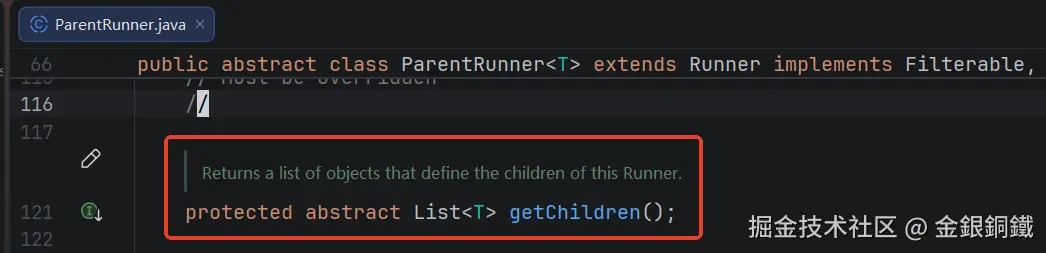
ParentRunner 中定义了抽象方法 getChildren() 👇 通过调用这个方法可以获取子节点组成的 List。
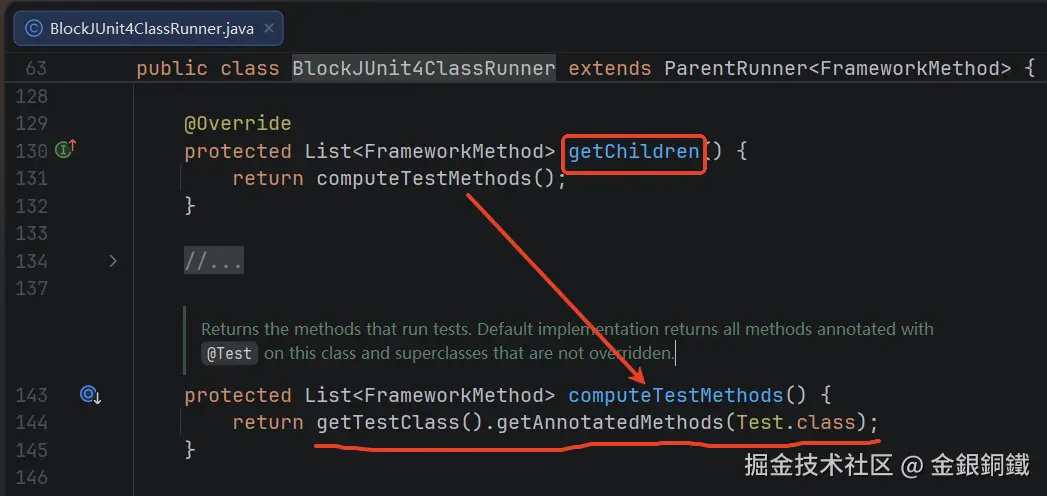
org.junit.runners.BlockJUnit4ClassRunner 是 ParentRunner 的一个子类,它的 getChildren() 方法逻辑如下
相关代码
我创建了一个小项目来以便于学习 JUnit 4,这个项目中包含以下目录/文件(.idea/ 目录与 target/ 目录以及 junit-study.iml 文件均略去)
src/main/java/org/example目录下有以下文件- NandGate.java
- NotGate.java
- AndGate.java
- OrGate.java
src/test/java/org/study目录下有以下文件- NandGateTest.java
- NotGateTest.java
- AndGateTest.java
- OrGateTest.java
pom.xml(在项目顶层)
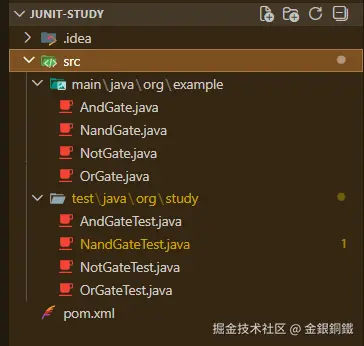
执行以下 shell 命令,就可以生成上述目录/文件(文件内容为空,下文列出了 NandGate.java/NandGateTest.java/pom.xml 等文件的内容,需要手动复制粘贴过去)
bash
mkdir junit-study
cd junit-study

mkdir -p src/main/java/org/example/
mkdir -p src/test/java/org/study/

touch src/main/java/org/example/NotGate.java
touch src/main/java/org/example/OrGate.java
touch src/main/java/org/example/AndGate.java
touch src/main/java/org/example/NandGate.java

touch src/test/java/org/study/NotGateTest.java
touch src/test/java/org/study/NandGateTest.java
touch src/test/java/org/study/AndGateTest.java
touch src/test/java/org/study/OrGateTest.java

touch pom.xml
pom.xml
pom.xml 文件内容如下(因为我们只关注 JUnit 4,所以只有 JUnit 4 的依赖)
xml
<?xml version="1.0" encoding="UTF-8"?>
<project xmlns="http://maven.apache.org/POM/4.0.0"
         xmlns:xsi="http://www.w3.org/2001/XMLSchema-instance"
         xsi:schemaLocation="http://maven.apache.org/POM/4.0.0 http://maven.apache.org/xsd/maven-4.0.0.xsd">
    <modelVersion>4.0.0</modelVersion>

    <groupId>org.example</groupId>
    <artifactId>junit-study</artifactId>
    <version>1.0-SNAPSHOT</version>

    <properties>
        <maven.compiler.source>17</maven.compiler.source>
        <maven.compiler.target>17</maven.compiler.target>
        <project.build.sourceEncoding>UTF-8</project.build.sourceEncoding>
    </properties>
    <dependencies>
        <dependency>
            <groupId>junit</groupId>
            <artifactId>junit</artifactId>
            <version>4.13.2</version>
            <scope>test</scope>
        </dependency>
    </dependencies>

</project>
src/main/java 目录下的各个文件
src/main/java 目录下有如下 4 个 java 文件
- src/main/java/org/example/NotGate.java
- src/main/java/org/example/OrGate.java
- src/main/java/org/example/AndGate.java
- src/main/java/org/example/NandGate.java
它们的内容如下 ⬇️
src/main/java/org/example/NandGate.java ⬇️
java
package org.example;

public class NandGate {
    public boolean calc(boolean a, boolean b) {
        return !a || !b;
    }
}
src/main/java/org/example/NotGate.java ⬇️
java
package org.example;

public class NotGate {
    private final NandGate nandGate = new NandGate();

    /**
     * not(in) = not(in & in) = nand(in, in)
     */
    public boolean calc(boolean in) {
        return nandGate.calc(in, in);
    }
}
src/main/java/org/example/AndGate.java ⬇️
java
package org.example;

public class AndGate {
    private final NandGate nandGate = new NandGate();

    /**
     * and(a, b) = not(not(and(a, b))) = not(nand(a, b))
     */
    public boolean calc(boolean a, boolean b) {
        boolean nandResult = nandGate.calc(a, b);
        return nandGate.calc(nandResult, nandResult);
    }
}
src/main/java/org/example/OrGate.java ⬇️
java
package org.example;

public class OrGate {
    private final NandGate nandGate = new NandGate();

    /**
     * or(a, b)
     * = not(not(or(a, b)))
     * = not(not(a) & not(b))
     * = not(nand(a) & nand(b))
     * = nand(nand(a), nand(b))
     */
    public boolean calc(boolean a, boolean b) {
        boolean notA = nandGate.calc(a, a);
        boolean notB = nandGate.calc(b, b);
        return nandGate.calc(notA, notB);
    }
}
src/test/java 目录下的各个文件
src/test/java 目录下有如下 4 个 java 文件
- src/test/java/org/study/NandGateTest.java
- src/test/java/org/study/NotGateTest.java
- src/test/java/org/study/AndGateTest.java
- src/test/java/org/study/OrGateTest.java
它们的内容如下 ⬇️
src/test/java/org/study/NandGateTest.java ⬇️
java
package org.study;

import org.example.NandGate;
import org.junit.Assert;
import org.junit.Test;
import org.junit.runners.model.FrameworkMethod;
import org.junit.runners.model.TestClass;

import java.util.List;

public class NandGateTest {

    private final NandGate nandGate = new NandGate();

    /**
     * nand(true, true) => false
     */
    @Test
    public void test_true_true() {
        Assert.assertFalse(nandGate.calc(true, true));
    }

    /**
     * nand(true, false) => true
     */
    @Test
    public void test_true_false() {
        Assert.assertTrue(nandGate.calc(true, false));
    }

    /**
     * nand(false, true) => true
     */
    @Test
    public void test_false_true() {
        Assert.assertTrue(nandGate.calc(false, true));
    }

    /**
     * nand(false, false) => true
     */
    @Test
    public void test_false_false() {
        Assert.assertTrue(nandGate.calc(false, false));
    }

    public static void main(String[] args) {
        // We can set a breakpoint and observe how TestClass finds @Test-annotated methods with next two lines of code
        TestClass testClass = new TestClass(NandGateTest.class);
        List<FrameworkMethod> annotatedMethods = testClass.getAnnotatedMethods(Test.class);
    }
}
src/test/java/org/study/NotGateTest.java ⬇️
java
package org.study;

import org.example.NotGate;
import org.junit.Assert;
import org.junit.Test;

public class NotGateTest {

    private final NotGate notGate = new NotGate();

    /**
     * not(true) => false
     */
    @Test
    public void test_true() {
        Assert.assertFalse(notGate.calc(true));
    }

    /**
     * not(false) => true
     */
    @Test
    public void test_false() {
        Assert.assertTrue(notGate.calc(false));
    }
}
src/test/java/org/study/AndGateTest.java ⬇️
java
package org.study;

import org.example.AndGate;
import org.junit.Assert;
import org.junit.Test;

public class AndGateTest {

    private final AndGate andGate = new AndGate();

    /**
     * and(true, true) => true
     */
    @Test
    public void test_true_true() {
        Assert.assertTrue(andGate.calc(true, true));
    }

    /**
     * and(true, false) => false
     */
    @Test
    public void test_true_false() {
        Assert.assertFalse(andGate.calc(true, false));
    }

    /**
     * and(false, true) => false
     */
    @Test
    public void test_false_true() {
        Assert.assertFalse(andGate.calc(false, true));
    }

    /**
     * and(false, false) => false
     */
    @Test
    public void test_false_false() {
        Assert.assertFalse(andGate.calc(false, false));
    }

}
src/test/java/org/study/OrGateTest.java ⬇️
java
package org.study;

import org.example.OrGate;
import org.junit.Assert;
import org.junit.Test;

public class OrGateTest {

    private final OrGate orGate = new OrGate();

    /**
     * or(true, true) => true
     */
    @Test
    public void test_true_true() {
        Assert.assertTrue(orGate.calc(true, true));
    }

    /**
     * or(true, false) => true
     */
    @Test
    public void test_true_false() {
        Assert.assertTrue(orGate.calc(true, false));
    }

    /**
     * or(false, true) => true
     */
    @Test
    public void test_false_true() {
        Assert.assertTrue(orGate.calc(false, true));
    }

    /**
     * or(false, false) => false
     */
    @Test
    public void test_false_false() {
        Assert.assertFalse(orGate.calc(false, false));
    }

}
小结
目前已经出现了三个重要的类 👇
| 类 | 主要作用 | javadoc 截图 |
|---|---|---|
| TestClass | 对测试类进行封装,通过 TestClass 可以找到带有指定注解的字段/方法 |  |
| Runner | 负责运行测试 | 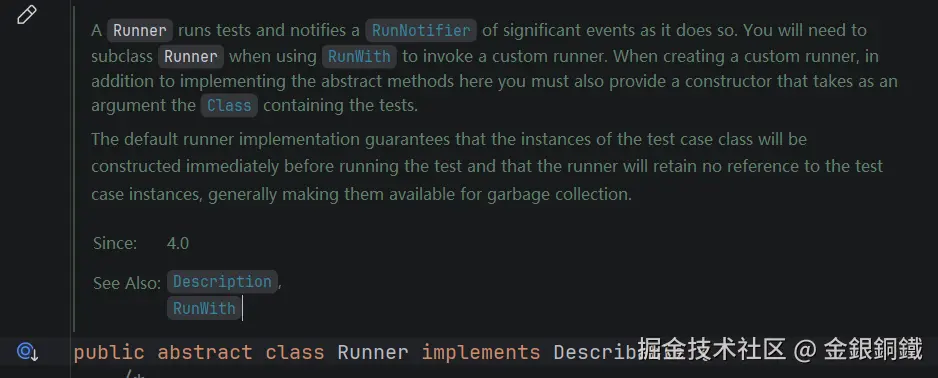 |
| ParentRunner | 如果我们将一个 Runner 视为亲子结构,则可以让这个 Runner 继承 ParentRunner. 典型的子类有 BlockJUnit4ClassRunner Suite |
! |
这三个类的 Fully Qualified Class Name 列举如下 👇
| 类 | Fully Qualified Class Name |
|---|---|
| TestClass | org.junit.runners.model.TestClass |
| Runner | org.junit.runner.Runner |
| ParentRunner | org.junit.runners.ParentRunner |
其他
"要点"里的思维导图是如何画出来的?
我是用 PlantUML 画的,代码如下
pxml
@startmindmap
'https://plantuml.com/mindmap-diagram

caption <i>Runner</i> 如何找到并运行带有 <i>@Test</i> 注解的方法

* 某个测试类 <i>T</i>
** <i>T</i> 对应的 <i>Runner</i>: <i>Runner<sub>T</sub></i>
*** <i>Runner<sub>T</sub></i> 持有 <i>T</i> 对应的 <i>TestClass</i>: <i>TestClass<sub>T</sub></i>
***:通过 <i>TestClass<sub>T</sub></i> 可以找到 <i>T</i> 里
带有 <i>@Test</i> 注解的方法
<i>method<sub>1</sub>, method<sub>2</sub>, ...</i>;
***:当 <i>Runner<sub>T</sub></i> 的 <i>getChildren()</i> 方法
被调用时返回 <i>method<sub>1</sub>, method<sub>2</sub>, ...</i>;

center footer 掘金技术社区@金銀銅鐵

@endmindmap