Nginx变量使用
引用nginx的变量需要添加模块
- nginx的变量可以在配置文件中引用,作为功能判断或者日志等场景使用
- 变量可以分为内置变量 和自定义变量
- 内置变量是由nginx模块自带,通过变量可以获取到众多的与客户端访问相关的值。
升级Nginx支持echo模块
模块获取方法
https://github.com/openresty/echo-nginx-module/tags
添加之前

bash
[root@Nginx ~]# systemctl stop nginx.service

[root@Nginx ~]# tar zxf echo-nginx-module-0.64.tar.gz
[root@Nginx ~]# cd nginx-1.28.1/
[root@Nginx nginx-1.28.1]# make clean	#清理已经生成的Makefile
rm -rf Makefile objs
#重新检测并编译生成Makefile
[root@Nginx nginx-1.28.1]# ./configure  --prefix=/usr/local/nginx --user=nginx --group=nginx --with-http_ssl_module --with-http_v2_module --with-http_realip_module --with-http_stub_status_module --with-http_gzip_static_module --with-pcre --with-stream --with-stream_ssl_module --with-stream_realip_module  --add-module=/root/echo-nginx-module-0.64
[root@Nginx nginx-1.28.1]# make

[root@Nginx nginx-1.28.1]# rm -rf /usr/local/nginx/sbin/nginx
[root@Nginx nginx-1.28.1]# cp objs/nginx /usr/local/nginx/sbin/ -p

#测试是否成功添加
bash
[root@nginx nginx-1.28.1]# vim /usr/local/nginx/conf.d/vhosts.conf
......
location /vars {
        default_type text/html;
        echo $remote_addr;
    }
......

[root@nginx nginx-1.28.1]# nginx -s reload
[root@nginx nginx-1.28.1]# curl www.fjw.org/vars
172.25.254.100
内置变量
以下是常用的内置变量
bash
$remote_addr;
#存放了客户端的地址,注意是客户端的公网IP

$args;
#变量中存放了URL中的所有参数
#例如:https://search.jd.com/Search?keyword=手机&enc=utf-8
#返回结果为: keyword=手机&enc=utf-8

$is_args
#如果有参数为? 否则为空

$document_root;
#保存了针对当前资源的请求的系统根目录,例如:/webdata/nginx/timinglee.org/lee。

$document_uri;
#保存了当前请求中不包含参数的URI,注意是不包含请求的指令
#比如:http://lee.timinglee.org/var?\id=11111会被定义为/var
#返回结果为:/var

$host;
#存放了请求的host名称

limit_rate 10240;
echo $limit_rate;
#如果nginx服务器使用limit_rate配置了显示网络速率,则会显示,如果没有设置, 则显示0

$remote_port;
#客户端请求Nginx服务器时随机打开的端口,这是每个客户端自己的端口

$remote_user;
#已经经过Auth Basic Module验证的用户名

$request_body_file;
#做反向代理时发给后端服务器的本地资源的名称

$request_method;
示例:
#请求资源的方式,GET/PUT/DELETE等

$request_filename;
#当前请求的资源文件的磁盘路径,由root或alias指令与URI请求生成的文件绝对路径,
#如:webdata/nginx/timinglee.org/lee/var/index.html

$request_uri;
#包含请求参数的原始URI,不包含主机名,相当于:$document_uri?$args,
#例如:/main/index.do?id=20190221&partner=search

$scheme;
#请求的协议,例如:http,https,ftp等

$server_protocol;
#保存了客户端请求资源使用的协议的版本,例如:HTTP/1.0,HTTP/1.1,HTTP/2.0等

$server_addr;
#保存了服务器的IP地址

$server_name;
#虚拟主机的主机名

$server_port;
#虚拟主机的端口号

$http_user_agent;
#客户端浏览器的详细信息

$http_cookie;
#客户端的所有cookie信息

$cookie_<name>
#name为任意请求报文首部字部cookie的key名

$http_<name>
#name为任意请求报文首部字段,表示记录请求报文的首部字段,name的对应的首部字段名需要为小写,如果有横线需要替换为下划线
$http_<name>的示例
echo $http_user_agent;
echo $http_host;

$sent_http_<name>
#name为响应报文的首部字段,name的对应的首部字段名需要为小写,如果有横线需要替换为下划线,此变量有问题

$arg_<name>
#此变量存放了URL中的指定参数,name为请求url中指定的参数
实验配置
bash
[root@nginx ~]# vim /usr/local/nginx/conf.d/vhosts.conf
server {
    listen  80;
    server_name www.fy.org;
    root    /web/html;
    location /vars {
            default_type text/html;
            echo $remote_addr;
            echo $args;
            echo $is_args;
            echo $document_root;
            echo $document_uri;
            echo $host;
            echo $remote_port;
            echo $remote_user;
            echo $request_method;
            echo $request_filename;
            echo $request_url;
            echo $scheme;
            echo $server_protocol;
            echo $server_addr;
            echo $server_name;
            echo $server_port;
            echo $server_user_agent;
            echo $http_cookie;
            echo $cookie_key1;
            echo $http_Accept;
            echo $arg_name;
     }
}

#测试
[root@nginx ~]# curl -A "fjwyyy" -b "fjw=a,key1=2" -ufjw:fjw www.fy.org/vars?name=fjw
172.25.254.10
name=fjw
?
/web/html
/vars
www.fy.org
41430
fjw
GET
/web/html/vars
/vars?name=fjw
http
HTTP/1.1
172.25.254.10
www.fy.org
80
fjwyyy
fjw=a,key1=2
2
*/*
fjw
自定义变量
bash
[root@nginx ~]# vim /usr/local/nginx/conf.d/vhosts.conf
server {
    listen  80;
    server_name www.fy.org;
    root    /web/html;
	location /var {
        default_type text/html;
        set $name fjwyyy;
        echo $name;
        set $tomcat_port 8080;		#手动设定
        echo $tomcat_port;
        set	$web_port $server_port	#变量传递
    }
}

#测试
[root@nginx ~]# curl www.fy.org/var
fjwyyy
8080
80
Nginx版本隐藏
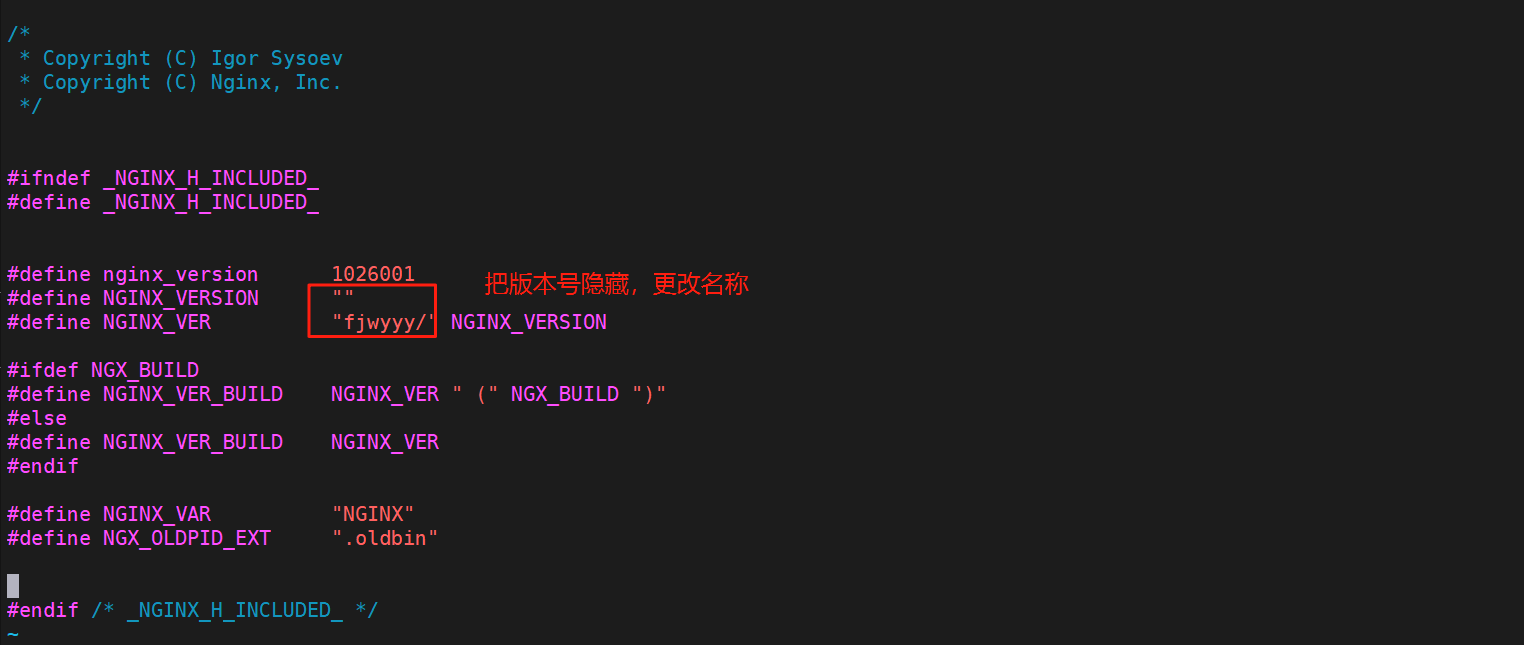
编译前可以对其进行版本隐藏并自定义nginx
bash
[root@nginx nginx-1.26.1]# vim src/core/nginx.h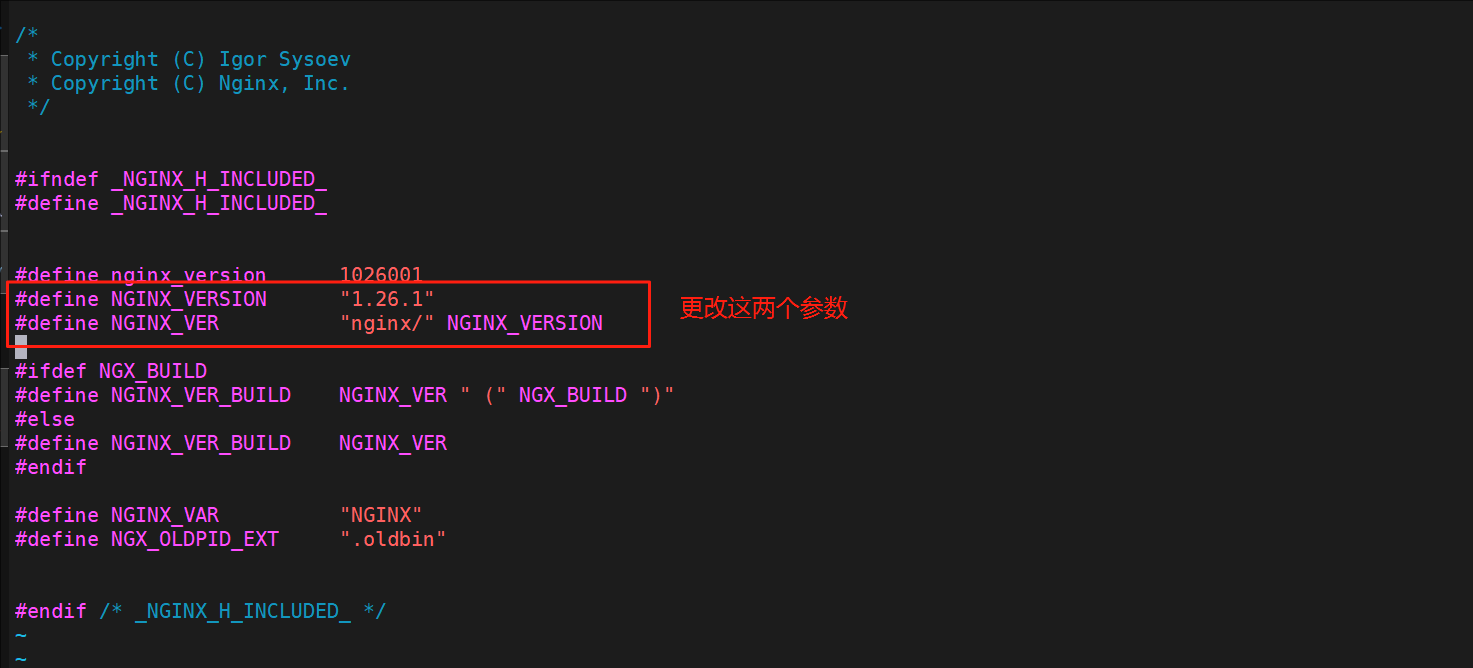
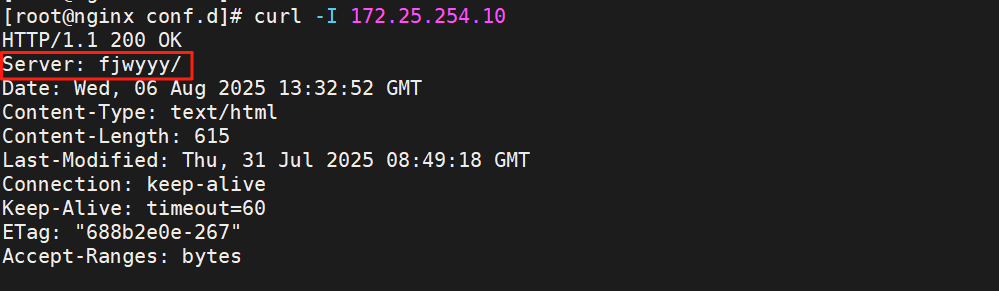
测试
Nginx Rewrite相关功能
什么是rewrite
- Nginx服务器利用 ngx_http_rewrite_module 模块解析和处理rewrite请求
- 此功能依靠 PCRE(perl compatible regular expression),因此编译之前要安装PCRE库
- rewrite是nginx服务器的重要功能之一,用于实现URL的重写,URL的重写是非常有用的功能
- 比如它可以在我们改变网站结构之后,不需要客户端修改原来的书签,也无需其他网站修改我们的 链接,就可以设置为访问
- 另外还可以在一定程度上提高网站的安全性。
if指令
用于条件匹配判断,并根据条件判断结果选择不同的Nginx配置,可以配置在server或location块中进行 配置,Nginx的if语法仅能使用if做单次判断,不支持使用if else或者if elif这样的多重判断
使用正则表达式对变量进行匹配,匹配成功时if指令认为条件为true,否则认为false,变量与表达式之间 使用以下符号链接:
= 			#比较变量和字符串是否相等,相等时if指令认为该条件为true,反之为false
!= 			#比较变量和字符串是否不相等,不相等时if指令认为条件为true,反之为false
~ 			#区分大小写字符,可以通过正则表达式匹配,满足匹配条件为真,不满足匹配条件为假
!~ 			#区分大小写字符,判断是否匹配,不满足匹配条件为真,满足匹配条件为假
~* 			#不区分大小写字符,可以通过正则表达式匹配,满足匹配条件为真,不满足匹配条件为假
!~* 		#不区分大小字符,判断是否匹配,满足匹配条件为假,不满足匹配条件为真
-f 和 !-f 	#判断请求的文件是否存在和是否不存在
-d 和 !-d 	#判断请求的目录是否存在和是否不存在
-x 和 !-x 	#判断文件是否可执行和是否不可执行
-e 和 !-e 	#判断请求的文件或目录是否存在和是否不存在(包括文件,目录,软链接)
#注意:
#如果$变量的值为空字符串或0,则if指令认为该条件为false,其他条件为true
用法示例
bash
[root@nginx nginx-1.28.1]# mkdir /webdir/fjw.org/fjw/html -p
[root@nginx nginx-1.28.1]# echo fjw test > /webdir/fjw.org/fjw/html/index.html

[root@nginx nginx-1.28.1]# vim /usr/local/nginx/conf.d/vhosts.conf
server {
    listen 80;
    server_name www.fjw.org;
    root /webdata/nginx/fjw.org/fjw/html/;

    location / {
        root /webdir/fjw.org/fjw/html;
        if ( $http_user_agent ~ firefox ) {
            return 200 "test if messages";
        }
    }
}

[root@nginx nginx-1.28.1]# nginx -s reload
#测试
[root@nginx nginx-1.28.1]# curl -A "firefox" www.fjw.org
test if messages
[root@nginx nginx-1.28.1]# curl www.fjw.org
fjw test
set指令
指定key并给其定义一个变量,变量可以调用Nginx内置变量赋值给key 另外set定义格式为set $key value,value可以是text, variables和两者的组合,可以用于自定义变量。
用法如下:
bash
[root@nginx nginx-1.28.1]# vim /usr/local/nginx/conf.d/vhosts.conf
server {
    listen 80;
    server_name www.fjw.org;
    root /webdata/nginx/fjw.org/fjw/html/;

    location / {
        set $testname fjw;
        echo $testname;
    }
}

[root@nginx nginx-1.28.1]# nginx -s reload
#测试
[root@nginx nginx-1.28.1]# curl www.fjw.org
fjw
break指令
- 用于中断当前相同作用域(location)中的其他Nginx配置
- 与该指令处于同一作用域的Nginx配置中,位于它前面的配置生效
- 位于后面的 ngx_http_rewrite_module 模块中指令就不再执行
!NOTE
注意: 如果break指令在location块中后续指令还会继续执行,只是不执行 ngx_http_rewrite_module 模块的指令,其它指令还会执行
用法如下:
bash
[root@nginx ~]# vim /usr/local/nginx/conf.d/vhosts.conf
server {
    listen 80;
    server_name www.fjw.org;
    root /webdata/nginx/fjw.org/fjw/html/;

    location / {
        set $test1 fjw1;
        set $test2 fjw2;
        if ($http_user_agent = firefox){
            break;
        }
        set $test3 fjw3;
        echo $test1 $test2 $test3;
    }
}

[root@nginx ~]# nginx -s reload

#测试
[root@nginx ~]# curl www.fjw.org
fjw1 fjw2 fjw3
[root@nginx ~]# curl -A "firefox" www.fjw.org
fjw1 fjw2
return指令
return用于完成对请求的处理,并直接向客户端返回响应状态码,比如:可以指定重定向URL(对于特殊重 定向状态码,301/302等) 或者是指定提示文本内容(对于特殊状态码403/500等),处于此指令后的所有配 置都将不被执行。
bash
[root@nginx ~]# vim /usr/local/nginx/conf.d/vhosts.conf
server {
    listen 80;
    server_name www.fjw.org;
    root /webdata/nginx/fjw.org/fjw/html/;

    location / {
        return 200 "hello world";
    }
}

[root@nginx ~]# nginx -s reload

[root@nginx ~]# curl www.fjw.org
hello worl
rewrite指令
通过正则表达式的匹配来改变URI,可以同时存在一个或多个指令,按照顺序依次对URI进行匹配, rewrite主要是针对用户请求的URL或者是URI做具体处理
正则表达式格式
. #匹配除换行符以外的任意字符
\w #匹配字母或数字或下划线或汉字
\s #匹配任意的空白符
\d #匹配数字
\b #匹配单词的开始或结束
^ #匹配字符串的开始
$ #匹配字符串的结束
* #匹配重复零次或更多次
+ #匹配重复一次或更多次
? #匹配重复零次或一次
(n) #匹配重复n次
{n,} #匹配重复n次或更多次
{n,m} #匹配重复n到m次
*? #匹配重复任意次,但尽可能少重复
+? #匹配重复1次或更多次,但尽可能少重复
?? #匹配重复0次或1次,但尽可能少重复
{n,m}? #匹配重复n到m次,但尽可能少重复
{n,}? #匹配重复n次以上,但尽可能少重复
\W #匹配任意不是字母,数字,下划线,汉字的字符
\S #匹配任意不是空白符的字符
\D #匹配任意非数字的字符
\B #匹配不是单词开头或结束的位置
[^x] #匹配除了x以外的任意字符
[^fjw] #匹配除了fjw 这几个字母以外的任意字符
rewrite flag
利用nginx的rewrite的指令,可以实现url的重新跳转,rewrite有四种不同的flag,分别是redirect(临时 重定向302)、permanent(永久重定向301)、break和last。其中前两种是跳转型的flag,后两种是代理型
- 跳转型指由客户端浏览器重新对新地址进行请求
- 代理型是在WEB服务器内部实现跳转
flag 说明
redirect;
#临时重定向,重写完成后以临时重定向方式直接返回重写后生成的新URL给客户端
#由客户端重新发起请求;使用相对路径,或者http://或https://开头,状态码:302

permanent;
#重写完成后以永久重定向方式直接返回重写后生成的新URL给客户端
#由客户端重新发起请求,状态码:301

break;
#重写完成后,停止对当前URL在当前location中后续的其它重写操作
#而后直接跳转至重写规则配置块之后的其它配置,结束循环,建议在location中使用
#适用于一个URL一次重写

last;
#重写完成后,停止对当前URI在当前location中后续的其它重写操作,
#而后对新的URL启动新一轮重写检查,不建议在location中使用
#适用于一个URL多次重写,要注意避免出现超过十次以及URL重写后返回错误的给用户
redirect与permanent
区别:
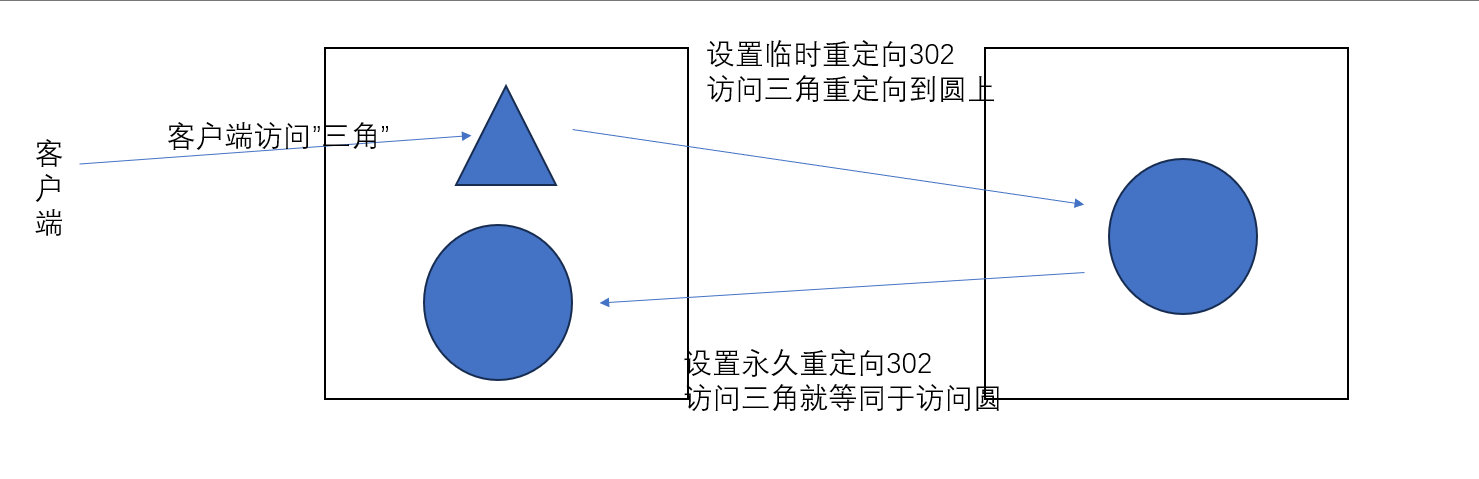
redirect
bash
[root@nginx ~]# vim /usr/local/nginx/conf.d/vhosts.conf
server {
    listen 80;
    server_name www.fjw.org;
    root /webdata/nginx/fjw.org/fjw/html/;

    location / {
        rewrite / http://www.baidu.com redirect;
    }
}

[root@nginx ~]# nginx -s reload

#测试
[root@nginx ~]# curl -I www.fjw.org
HTTP/1.1 302 Moved Temporarily			#定向方式返回值
Server: nginx/1.28.1
Date: Sat, 07 Feb 2026 07:08:13 GMT
Content-Type: text/html
Content-Length: 145
Connection: keep-alive
Keep-Alive: timeout=60
Location: http://www.baidu.com			#定向效果
permanent
bash
[root@nginx ~]# vim /usr/local/nginx/conf.d/vhosts.conf
server {
    listen 80;
    server_name www.fjw.org;
    root /webdata/nginx/fjw.org/fjw/html/;

    location / {
        rewrite / http://www.baidu.com permanent;
    }
}

[root@nginx ~]# nginx -s reload

#测试
[root@nginx ~]# curl -I www.fjw.org
HTTP/1.1 301 Moved Permanently
Server: nginx/1.28.1
Date: Sat, 07 Feb 2026 07:10:44 GMT
Content-Type: text/html
Content-Length: 169
Connection: keep-alive
Keep-Alive: timeout=60
Location: http://www.baidu.com
break与last
- 无 break/last:默认执行完当前 location 所有 rewrite,有return则执行无则匹配 location,URL 是所有 rewrite 叠加结果;
- break:终止后续 rewrite,不重匹配 location,停在当前 location 处理,且不执行return;
- last:终止后续 rewrite,重匹配 location,跳转到新的 location 处理,可以执行return。
生成测试文件,主要为break做对照
bash
[root@nginx ~]# echo old page > /webdata/nginx/fjw.org/fjw/html/old
[root@nginx ~]# echo new page > /webdata/nginx/fjw.org/fjw/html/new
[root@nginx ~]# echo final page > /webdata/nginx/fjw.org/fjw/html/final
1.无 break/last(对照组)
配置 :rewrite ^/old /new;(无任何终止指令)
执行流程:
- 执行第一条 rewrite:
/old→/new; - 继续执行第二条 rewrite:
/new→/final(因为没有终止指令,会执行完所有 rewrite); - 不触发重新匹配 location,留在
/old这个 location; - 执行
return指令,返回响应。 - 因为return存在导致不会跳转到/final这个location,被return响应了正常return不存在会重定向跳转至/final的location中。
bash
[root@nginx ~]# vim /usr/local/nginx/conf.d/vhosts.conf
server {
    listen 80;
    server_name www.fjw.org;
    root /webdata/nginx/fjw.org/fjw/html/;

    location /old {
        rewrite ^/old /new;
        #rewrite ^/old /new break;
        #rewrite ^/old /new last;
        rewrite ^/new /final;

        return 200 "未跳出 /old location,rewrite后内部URI:$uri\n";
    }

    location /new {
        return 200 "匹配到 /new location,rewrite后内部URI:$uri\n";
    }

    location /final {
        return 200 "匹配到 /final location,rewrite后内部URI:$uri\n";
    }
}


[root@nginx ~]# nginx -t
[root@nginx ~]# nginx -s reload

#测试
[root@nginx ~]# curl www.fjw.org/old
未跳出 /old location,rewrite后内部URI:/final
2.加 break(对比组 1)
配置 :rewrite ^/old /new break;
执行流程:
- 执行第一条 rewrite:
/old→/new; - 遇到
break,终止当前 location 内后续所有 rewrite 规则(第二条rewrite ^/new /final不执行); - 不触发重新匹配 location,留在
/old这个 location; - 不执行
return指令,开始查找/new文件或目录下的默认发布文件 - break特性优先查找文件/目录,查找不到返回404,不会运行return
bash
[root@nginx ~]# vim /usr/local/nginx/conf.d/vhosts.conf
server {
    listen 80;
    server_name www.fjw.org;
    root /webdata/nginx/fjw.org/fjw/html/;

    location /old {
        #rewrite ^/old /new;
        rewrite ^/old /new break;
        #rewrite ^/old /new last;
        rewrite ^/new /final;

        return 200 "未跳出 /old location,rewrite后内部URI:$uri\n";
    }

    location /new {
        return 200 "匹配到 /new location,rewrite后内部URI:$uri\n";
    }

    location /final {
        return 200 "匹配到 /final location,rewrite后内部URI:$uri\n";
    }
}

[root@nginx ~]# nginx -t
[root@nginx ~]# nginx -s reload

#测试
[root@nginx ~]# curl www.fjw.org/old
new page
3.加 last(对比组 2)
配置 :rewrite ^/old /new last;
执行流程:
- 执行第一条 rewrite:
/old→/new; - 遇到
last,终止当前 location 内后续所有 rewrite 规则(第二条rewrite ^/new /final不执行); - 触发重新匹配 location:用新 URL
/new匹配到location /new; - 执行
location /new内的return指令,返回响应。
bash
server {
    listen 80;
    server_name www.fjw.org;
    root /webdata/nginx/fjw.org/fjw/html/;

    location /old {
        #rewrite ^/old /new;
        #rewrite ^/old /new break;
        rewrite ^/old /new last;
        rewrite ^/new /final;

        return 200 "未跳出 /old location,rewrite后内部URI:$uri\n";
    }

    location /new {
        return 200 "匹配到 /new location,rewrite后内部URI:$uri\n";
    }

    location /final {
        return 200 "匹配到 /final location,rewrite后内部URI:$uri\n";
    }
}

[root@nginx ~]# nginx -t
[root@nginx ~]# nginx -s reload

#测试
[root@nginx ~]# curl www.fjw.org/old
匹配到 /new location,rewrite后内部URI:/new
三者核心差异对照表
| 指令情况 | 是否执行完当前 location 所有 rewrite | 是否触发重新匹配 location | 最终匹配的 location | 最终 URL | 是否执行return |
|---|---|---|---|---|---|
| 无 break/last | ✅ 是(执行全部) | ✅ 是 | /old | /final | ✅ 是 |
| 加 break | ❌ 否(执行到 break 终止) | ❌ 否 | /old | /new | ❌ 否 |
| 加 last | ❌ 否(执行到 last 终止) | ✅ 是 | /new | /new | ✅ 是 |
!NOTE
break不跳转location但也不执行return,会直接查找匹配到的uri进行查找文件/目录下的发布文件,查找不到返回404
全站加密https
制作key
bash
[root@nginx ~]# mkdir /usr/local/nginx/certs/

[root@nginx ~]# openssl req -newkey rsa:2048 \
> -nodes -sha256 -keyout  /usr/local/nginx/certs/fjw.org.key \
> -x509 -days 365 -out  /usr/local/nginx/certs/fjw.org.crt
编辑配置文件
bash
[root@nginx ~]# vim /usr/local/nginx/conf.d/vhosts.conf
server {
    listen 80;
    listen 443 ssl;
    server_name www.fjw.org;
    root /webdata/nginx/fjw.org/fjw/html/;
    ssl_certificate /usr/local/nginx/certs/fjw.org.crt;
    ssl_certificate_key /usr/local/nginx/certs/fjw.org.key;
    ssl_session_cache shared:sslcache:20m;
    ssl_session_timeout 10m;

    location / {
        if ($scheme = http ){
            rewrite /(.*) https://$host/$1 redirect;
         #return 301 https://$host$request_uri;	#也可以直接使用return直接返回
        }
    }
}

[root@nginx ~]# nginx -s reload

#测试
[root@nginx ~]# curl -kIL www.fjw.org
HTTP/1.1 302 Moved Temporarily
Server: nginx/1.28.1
Date: Sat, 07 Feb 2026 20:40:30 GMT
Content-Type: text/html
Content-Length: 145
Connection: keep-alive
Keep-Alive: timeout=60
Location: https://www.fjw.org/

HTTP/1.1 200 OK
Server: nginx/1.28.1
Date: Sat, 07 Feb 2026 20:40:30 GMT
Content-Type: text/html
Content-Length: 12
Last-Modified: Tue, 03 Feb 2026 00:47:36 GMT
Connection: keep-alive
Keep-Alive: timeout=60
ETag: "698145a8-c"
Accept-Ranges: bytes
判断文件是否存在
bash
[root@nginx ~]# vim /usr/local/nginx/conf.d/vhosts.conf
server {
    listen 80;
    listen 443 ssl;
    server_name www.fjw.org;
    root /webdata/nginx/fjw.org/fjw/html/;
    ssl_certificate /usr/local/nginx/certs/fjw.org.crt;
    ssl_certificate_key /usr/local/nginx/certs/fjw.org.key;
    ssl_session_cache shared:sslcache:20m;
    ssl_session_timeout 10m;

    location / {
        if ($scheme = http ){
            rewrite ^/(.*) https://$host/$1 redirect;
        }

        if ( !-e $request_filename ){
            rewrite ^/(.*) /index.html;
        }
    }
}

[root@nginx ~]# nginx -s reload
#测试
[root@nginx ~]# curl -Lk www.fjw.org
www.fjw.org
[root@nginx ~]# curl -Lk www.fjw.org/fjw
www.fjw.org
[root@nginx ~]# curl -Lk www.fjw.org/666
www.fjw.org
防盗链
防盗链基于客户端携带的referer实现,referer是记录打开一个页面之前记录是从哪个页面跳转过来的标 记信息,如果别人只链接了自己网站图片或某个单独的资源,而不是打开了网站的整个页面,这就是盗 链,referer就是之前的那个网站域名,正常的referer信息有以下几种:
none: 				#请求报文首部没有referer首部,
		 	 		#比如用户直接在浏览器输入域名访问web网站,就没有referer信息。

blocked: 			#请求报文有referer首部,但无有效值,比如为空。

server_names: 		#referer首部中包含本主机名及即nginx 监听的server_name。

arbitrary_string: 	#自定义指定字符串,但可使用*作通配符。示例: *.fjw.org
www.fjw.*

regular expression: #被指定的正则表达式模式匹配到的字符串,要使用~开头,例如:
~*\.baidu\.com
实现盗链
bash
[root@nginx ~]# mkdir /webdata/nginx/fjw.org/fjw/html/img
[root@nginx ~]# mkdir /webdata/nginx/fjw.org/fjw/html/daolian

#在img与daolian目录下放下测试图片

#生成一个测试主机下载httpd服务,导入一个盗链主页
[root@RS1 ~]# dnf install httpd -y
[root@RS1 ~]# systemctl start httpd
[root@RS1 ~]# vim /var/www/html/index.html
<html>
        <head>
                <meta http-equiv=Content-Type content="text/html;charset=utf-8">
                <title>盗链</title>
        </head>

        <body>
                <img src="http://www.fjw.org/img/linux.jpg" >
                <h1 style="color:red">欢迎大家</h1>
                <p><a href=http://www.fjw.org>点击点击点击</a>出门见喜</p>
        </body>

</html>
在浏览器测试访问
访问的图片是别的主机的图片

点击后是www.fjw.org域名的默认发布页

查看nginx日志
bash
[root@nginx ~]# > /usr/local/nginx/logs/access.log
[root@nginx ~]# cat /usr/local/nginx/logs/access.log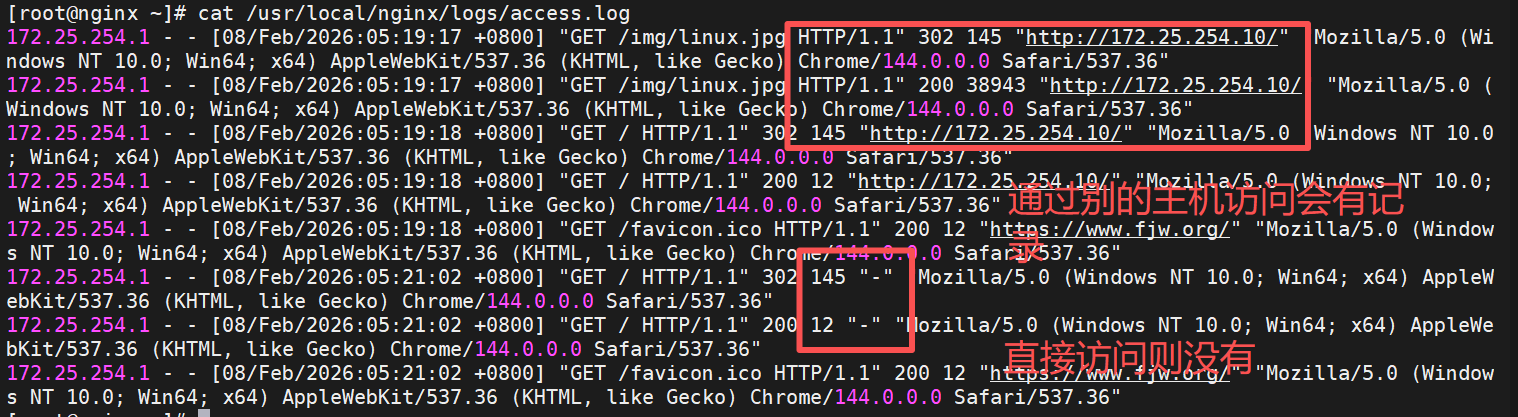
可以查看到http_referer值如果有盗链情况的话
实现防盗链
bash
[root@nginx ~]# vim /usr/local/nginx/conf.d/vhosts.conf
server {
    listen 80;
    server_name www.fjw.org;
    root /webdata/nginx/fjw.org/fjw/html/;

    location / {
        valid_referers none blocked server_names *.fjw.org ~/.baidu/.;
        if ($invalid_referer){
            return 404;
        }
    }

    location /img {
       valid_referers none blocked server_names *.fjw.org ~/.baidu/.;
       if ($invalid_referer){
           rewrite ^/ http://www.fjw.org/daolian/yaya.jpg;
       }
    }
}
使用浏览器访问测试

Nginx反向代理功能
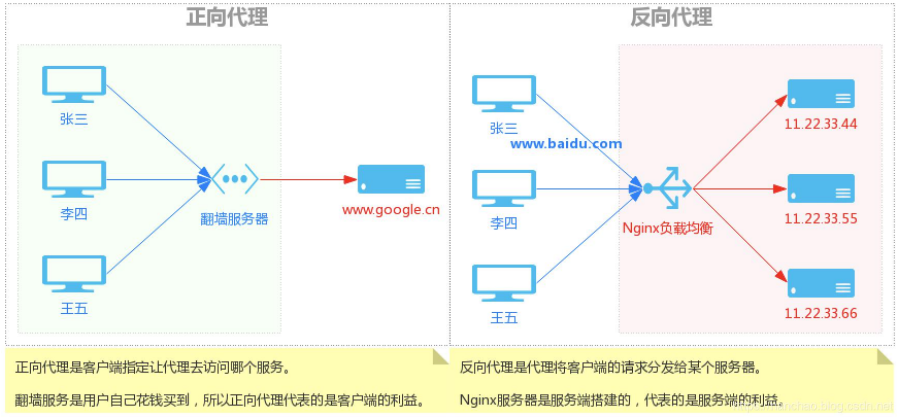
反向代理:reverse proxy,指的是代理外网用户的请求到内部的指定的服务器,并将数据返回给用户的 一种方式,这是用的比较多的一种方式。
Nginx 除了可以在企业提供高性能的web服务之外,另外还可以将 nginx 本身不具备的请求通过某种预 定义的协议转发至其它服务器处理,不同的协议就是Nginx服务器与其他服务器进行通信的一种规范,主 要在不同的场景使用以下模块实现不同的功能
| 模块名称 | 核心定位 | 协议 / 场景 | 对接服务类型 |
|---|---|---|---|
ngx_http_proxy_module |
HTTP/HTTPS 反向代理(最常用) | HTTP 协议 | 后端 HTTP 服务(Tomcat/Java/Node.js) |
ngx_http_upstream_module |
配置后端服务集群(负载均衡) | HTTP 协议 | 配合 ngx_http_proxy_module 使用 |
ngx_stream_proxy_module |
TCP/UDP 四层反向代理 | TCP/UDP 协议(四层) | 非 HTTP 服务(MySQL/Redis/SSH) |
ngx_http_fastcgi_module |
对接 FastCGI 协议服务 | FastCGI 协议 | PHP-FPM(PHP 解析服务) |
ngx_http_uwsgi_module |
对接 uWSGI 协议服务 | uWSGI 协议 | Python WSGI 应用(Django/Flask) |
同构与异构
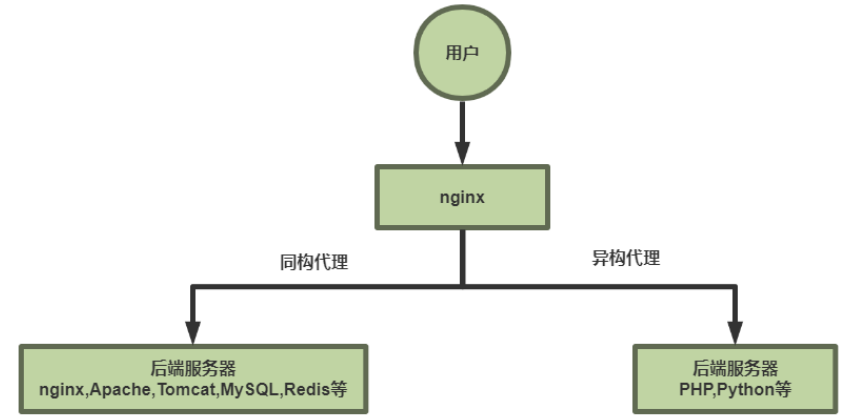
- 同构代理:用户不需要其他程序的参与,直接通过http协议或者tcp协议访问后端服务器
- 异构代理:用户访问的资源时需要经过处理后才能返回的,比如php,python,等等,这种访问资源需 要经过处理才能被访问
七层反向代理
基于ngx_http_proxy_module模块实现
配置简单的代理
实验环境
bash
#172.25.254.10 RS1	172.25.254.20 RS2

[root@RSX ~]# dnf install httpd -y
[root@RSX ~]# systemctl enable --now httpd
[root@RSX ~]# echo RS2 - 172.25.254.20 > /var/www/html/index.html


#测试 在Nginx主机中
[root@nginx ~]# curl  172.25.254.10
RS1 - 172.25.254.10
[root@nginx ~]# curl  172.25.254.20
RS2 - 172.25.254.20
配置反向代理
bash
[root@RS2 ~]# mkdir  /var/www/html/web
[root@RS2 ~]# echo 172.25.254.20 web > /var/www/html/web/index.html

[root@nginx ~]# vim /usr/local/nginx/conf.d/vhosts.conf
server {
    listen 80;
    server_name www.fjw.org;

    location / {
        proxy_pass http://172.25.254.10:80;
    }

    location /web {
        proxy_pass http://172.25.254.20:80;
    }
}

[root@nginx ~]# nginx -s reload

#测试
[root@nginx ~]# curl  172.25.254.20/web/
172.25.254.20 web
[root@nginx ~]# curl  172.25.254.10
RS1 - 172.25.254.10
配置参数
| 参数名 | 默认值 | 核心作用 | 关键说明 / 示例 |
|---|---|---|---|
proxy_pass |
无(必填) | 定义客户端请求转发的后端服务器地址 / 集群 | 1. 后端地址末尾无 / :追加location路径(如location /web + proxy_pass http://172.25.254.30:8080 → 转发到http://172.25.254.30:8080/web),类比root;2. 后端地址末尾有 / :替换location路径(如location /web + proxy_pass http://172.25.254.40:8080/ → 转发到http://172.25.254.40:8080/),类比alias;3. location用正则匹配(~/*)时,proxy_pass后不能加 / |
proxy_hide_header field |
无(默认不隐藏) | 隐藏后端服务器返回的指定响应头,不传递给客户端 | 示例:proxy_hide_header ETag;(隐藏后端的 ETag 响应头) |
proxy_pass_header field |
无(默认不透传 Date/Server 等) | 强制透传后端服务器的指定响应头给客户端 | 示例:proxy_pass_header Server;(透传后端的 Server 响应头) |
proxy_pass_request_body |
on |
控制是否向后端服务器发送 HTTP 请求的实体部分(如 POST 的表单数据) | 默认开启,关闭(off)会导致后端无法接收 POST 数据 |
proxy_pass_request_headers |
on |
控制是否将客户端的请求头转发给后端服务器 | 默认开启,关闭(off)会导致后端丢失 Cookie/Referer 等关键头信息 |
proxy_set_header field value |
无(按需配置) | 修改 / 新增客户端请求头,转发给后端服务器 | 核心场景:proxy_set_header X-Forwarded-For $remote_addr;(传递客户端真实 IP);proxy_set_header Host $host;(传递客户端访问的域名) |
proxy_connect_timeout |
60s |
Nginx 与后端服务器建立 TCP 连接的超时时间 | 超时返回 504 错误,建议调小(如6s),示例:proxy_connect_timeout 6s; |
proxy_read_timeout |
60s |
Nginx 向后端发请求后,等待后端返回响应的超时时间 | 后端处理慢(如大数据查询)可调大,示例:proxy_read_timeout 120s; |
proxy_send_timeout |
60s |
Nginx 向后端发送请求数据的超时时间 | 大文件上传场景可调大,示例:proxy_send_timeout 120s; |
proxy_http_version |
1.0 |
设置 Nginx 代理使用的 HTTP 协议版本 | 长连接场景建议设为1.1(需配合proxy_set_header Connection "";),示例:proxy_http_version 1.1; |
proxy_ignore_client_abort |
off |
客户端中断请求时,是否继续等待后端响应 | off(默认):客户端中断→Nginx 立即中断后端请求,记录 499 日志;on:忽略客户端中断,等待后端响应完成 |
总结
- 核心转发控制 :
proxy_pass是基础,重点关注末尾/的拼接规则,正则匹配场景需禁用/; - 头信息管理 :
proxy_hide_header隐藏后端响应头,proxy_pass_header透传关键头,proxy_set_header传递客户端真实信息(如 IP / 域名); - 超时配置:三个超时参数默认 60s,需按后端服务性能调整(短连接调小,长处理调大);
- 默认行为:请求体 / 请求头默认转发,客户端中断请求默认终止后端处理,无需额外配置即可满足大部分场景。
以下为部分参数的实验
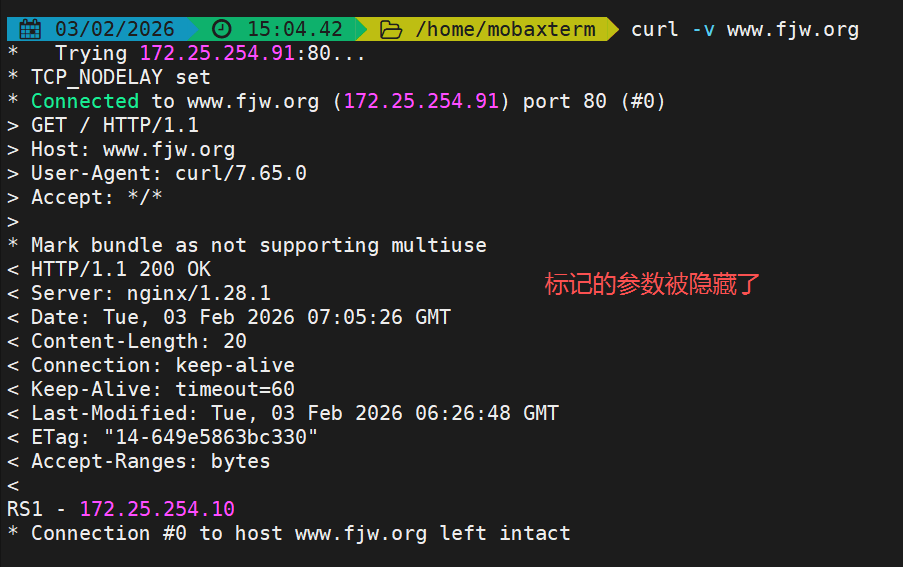
proxy_hide_header filed
bash
[root@nginx ~]#  vim /usr/local/nginx/conf.d/vhosts.conf
server {
    listen 80;
    server_name www.fjw.org;

    location / {
        proxy_pass http://172.25.254.10:80;
        proxy_hide_header Content-Type;
    }

    location /web/ {
        proxy_pass http://172.25.254.20:80;
    }
}

[root@nginx ~]# nginx -s reload
#测试
配置访问前
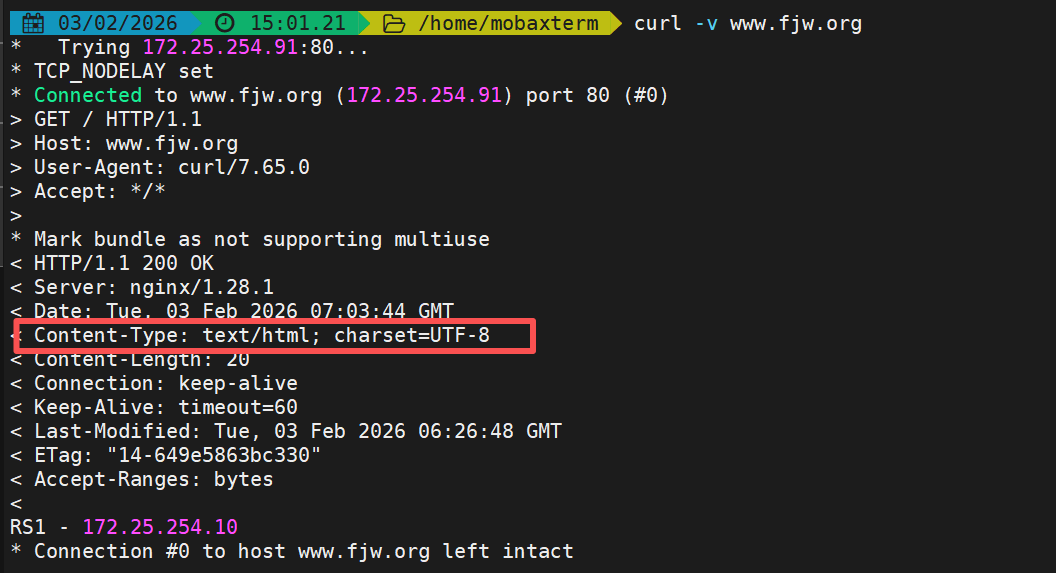
配置访问后
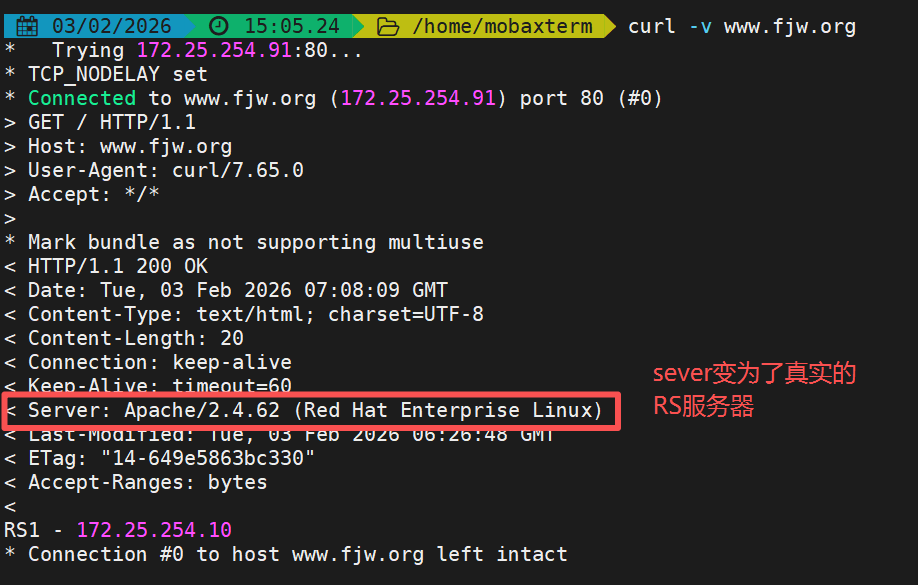
proxy_pass_header field
bash
[root@nginx ~]#  vim /usr/local/nginx/conf.d/vhosts.conf
server {
    listen 80;
    server_name www.fjw.org;

    location / {
        proxy_pass http://172.25.254.10:80;
        proxy_pass_header Server;
    }

    location /web/ {
        proxy_pass http://172.25.254.20:80;
    }
}

[root@nginx ~]# nginx -s reload
配置访问前
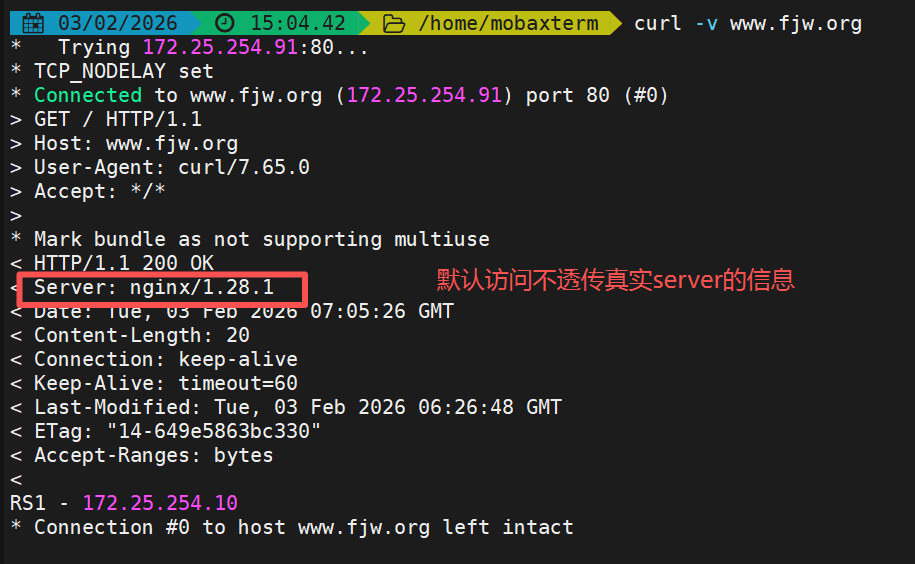
配置访问后
proxy_set_header
bash
[root@RS1 ~]# vim /etc/httpd/conf/httpd.conf
	LogFormat "%h %l %u %t \"%r\" %>s %b \"%{Referer}i\" \"%{User-Agent}i\" \"%{X-Forwarded-For}i\"" combined

[root@RS1 ~]# systemctl restart httpd

[root@nginx ~]#  vim /usr/local/nginx/conf.d/vhosts.conf
server {
    listen 80;
    server_name www.fjw.org;

    location / {
        proxy_pass http://172.25.254.10:80;
        proxy_set_header X-Forwarded-For $remote_addr;	#开启IP透传参数
    }

    location /web/ {
        proxy_pass http://172.25.254.20:80;
    }
}

[root@nginx ~]# nginx -s reload

#测试
[Administrator.DESKTOP-VJ307M3] ➤ curl  www.fjw.org
RS1 - 172.25.254.10

#查看RS日志
[root@RS1 ~]# cat /etc/httpd/logs/access_log
172.25.254.100 - - [03/Feb/2026:15:12:49 +0800] "GET / HTTP/1.0" 200 20 "-" "curl/7.65.0" "172.25.254.1"
实现动静分离
bash
[root@RS1 ~]# dnf install php -y
[root@RS1 ~]# vim /var/www/html/index.php
<?php
    echo RS1 - 172.25.254.10
    phpinfo()
?>

[root@RS1 ~]# systemctl enable --now php-fpm

[root@nginx ~]#  vim /usr/local/nginx/conf.d/vhosts.conf
server {
    listen 80;
    server_name www.fjw.org;

    location ~* \.(php|js)$ {
        proxy_pass  http://172.25.254.10:80;
    }

    location / {
        proxy_pass http://172.25.254.20:80;
    }
}

[root@nginx ~]# nginx -s reload
测试
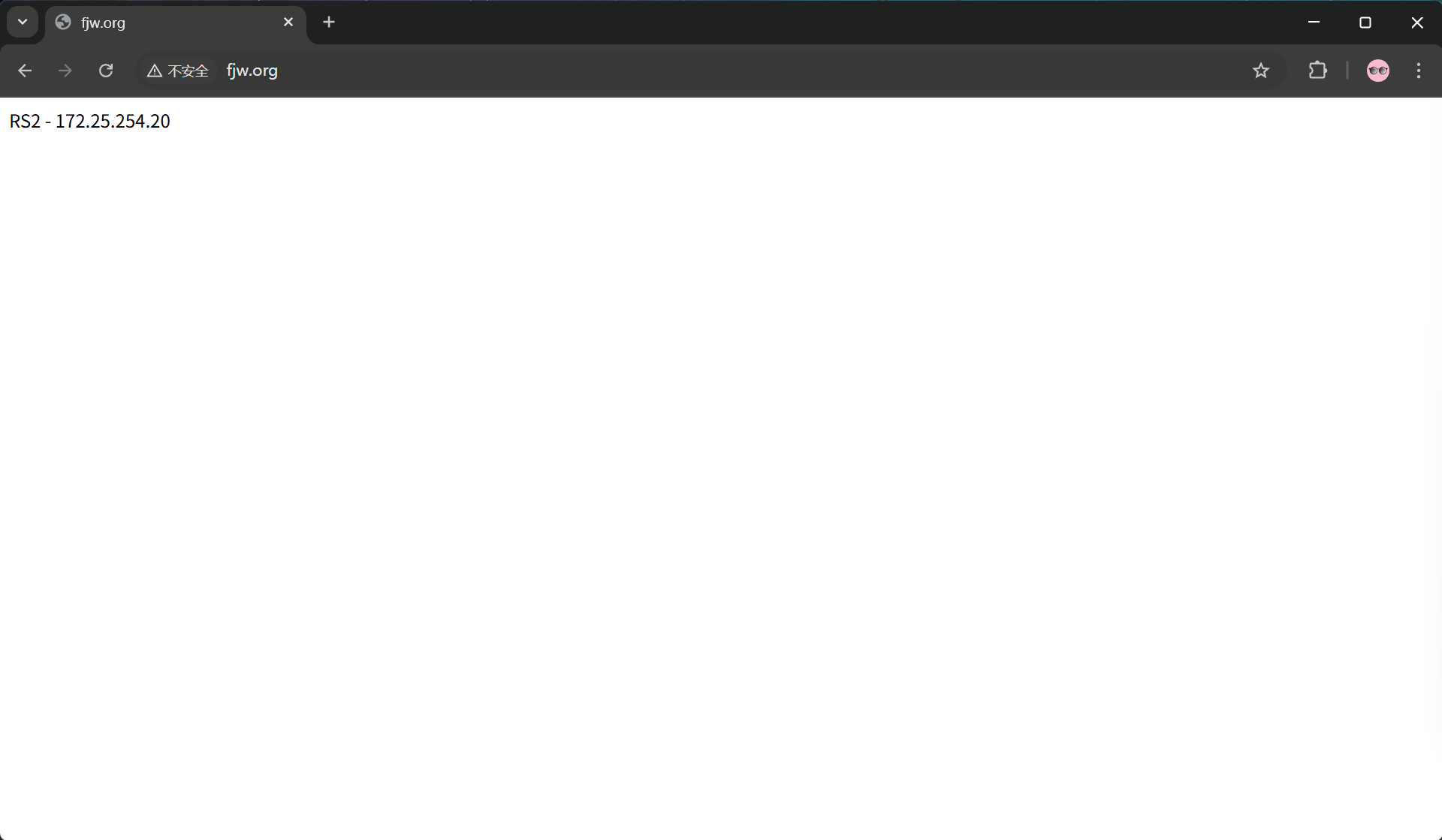
访问静态网页
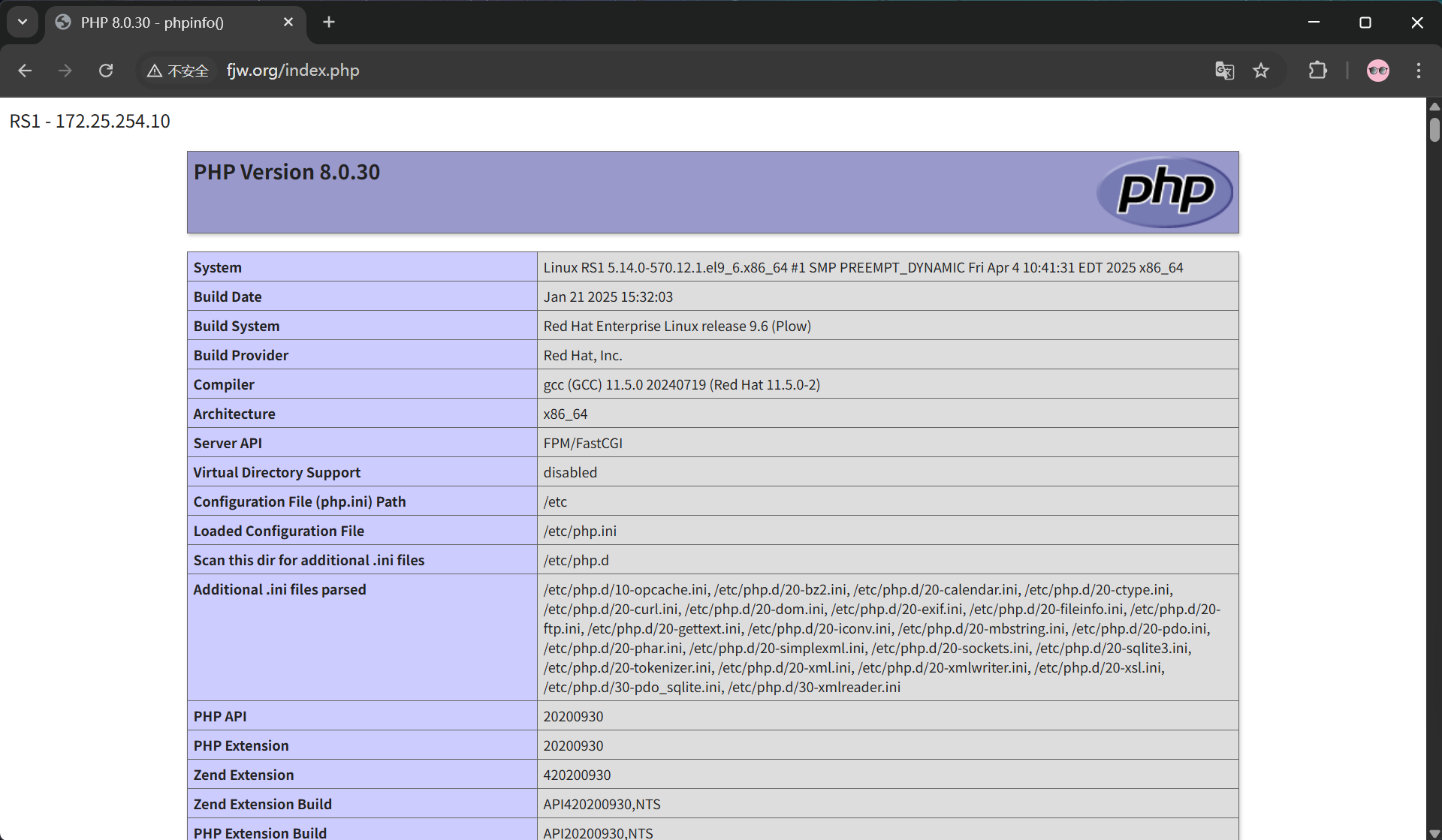
访问动态网页
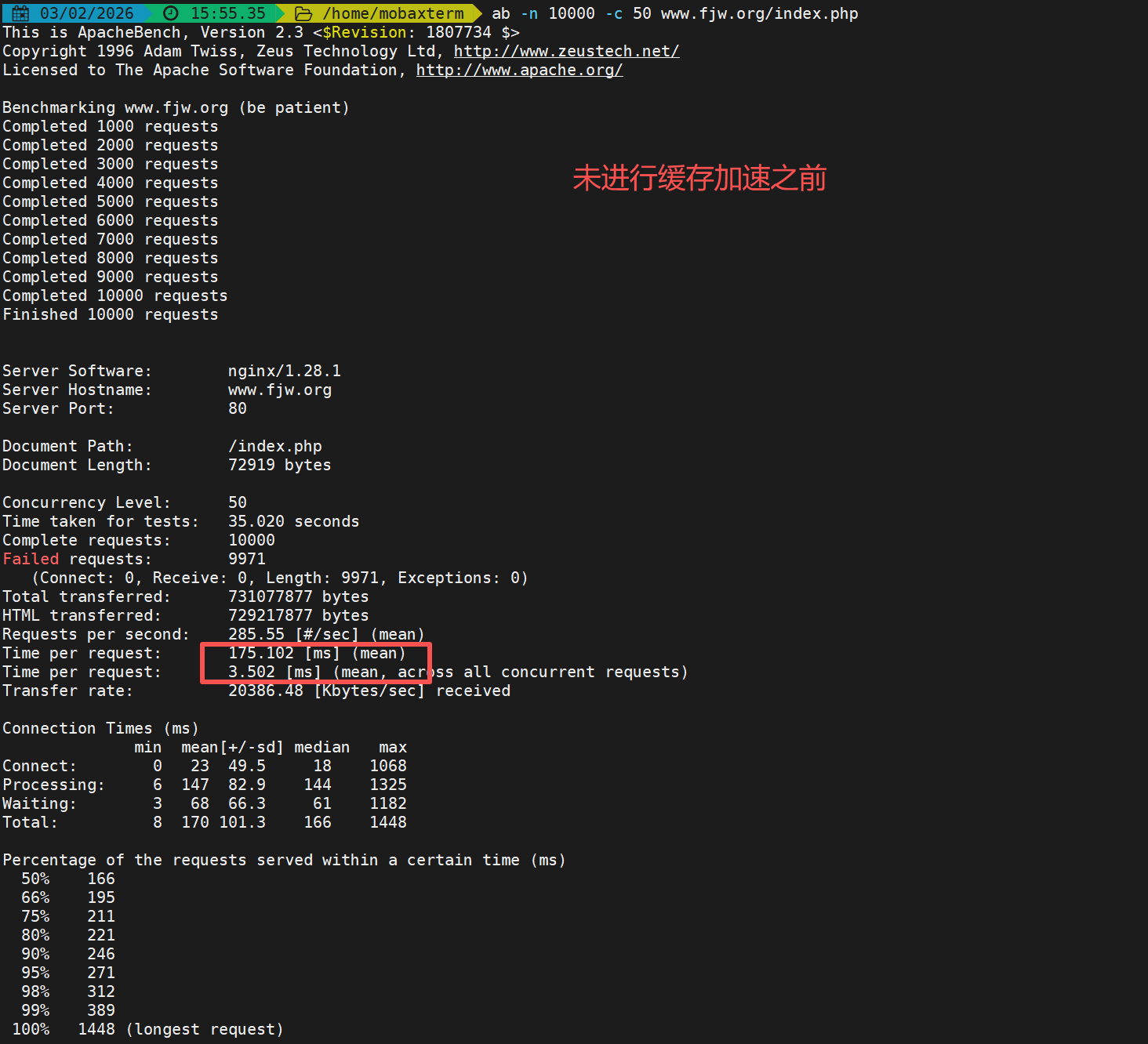
缓存后端动态资源实现加速
配置缓存加速
bash
[root@nginx ~]# vim /usr/local/nginx/conf/nginx.conf
proxy_cache_path /usr/local/nginx/proxy_cache levels=1:2:2 keys_zone=proxycache:20m inactive=120s max_size=1g;

[root@nginx ~]#  vim /usr/local/nginx/conf.d/vhosts.conf
server {
    listen 80;
    server_name www.fjw.org;

    location ~* \.(php|js)$ {
        proxy_pass  http://172.25.254.10:80;
        proxy_cache proxycache;
        proxy_cache_key $request_uri;
        proxy_cache_valid 200 302 301 10m;
        proxy_cache_valid any 1m;
    }

    location / {
        proxy_pass http://172.25.254.20:80;
    }
}

[root@nginx ~]# systemctl restart nginx.service

#缓存之前的目录
[root@nginx ~]# tree  /usr/local/nginx/proxy_cache/
/usr/local/nginx/proxy_cache/

0 directories, 0 files

#进行缓存后查看缓存目录
[root@nginx ~]# tree /usr/local/nginx/proxy_cache/
/usr/local/nginx/proxy_cache/
└── 1
    └── af
        └── 15
            └── e251273eb74a8ee3f661a7af00915af1

3 directories, 1 file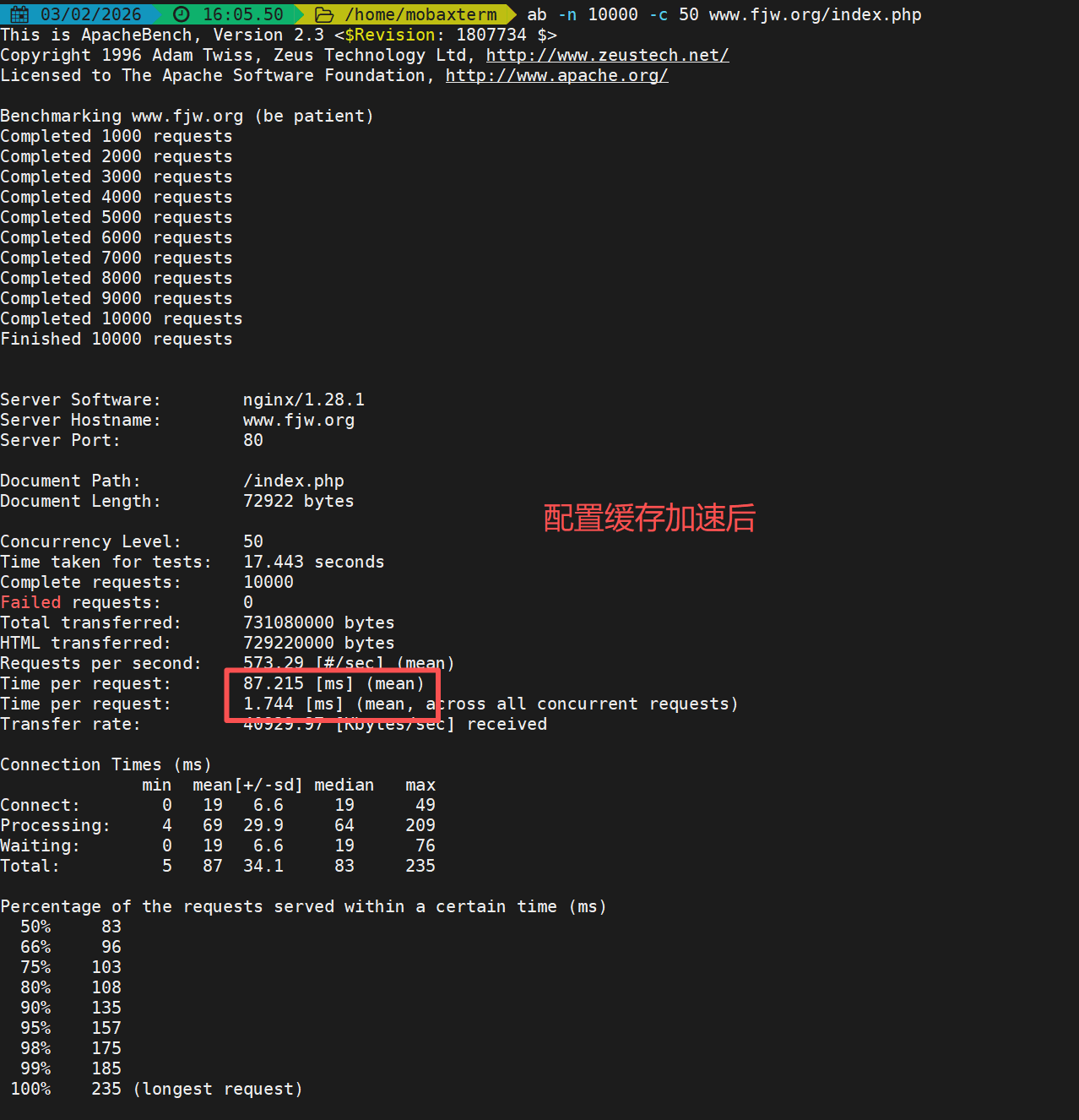
七层反向代理负载均衡
基于ngx_http_proxy_module与ngx_http_upstream_module模块实现
实验环境
172.25.254.100  		#Nginx 代理服务器
172.25.254.10  			#后端web A,Apache部署
172.25.254.20  			#后端web B,Apache部署
配置参数
server 节点核心参数(功能 + 默认值 + 关键说明)
| 参数名 | 默认值 | 核心作用 | 关键说明 |
|---|---|---|---|
weight=number |
1 | 权重控制 | 数值越大,被分配的请求越多,实现加权轮询(类似 LVS 的 WRR/WLC);例如weight=5表示该节点优先级更高 |
max_conns=number |
0(无限制) | 并发连接限制 | 限制当前后端服务器的最大活动连接数,避免单节点过载,Nginx 1.11.5 + 支持 |
max_fails=number |
1 | 故障判定阈值 | 客户端访问时,对选中的后端服务器连续检测失败次数达到该值,即标记为不可用;仅在有客户端请求时触发检测,非周期性探测 |
fail_timeout=time |
10s | 故障恢复检测间隔 | 对已标记为不可用的后端服务器,每隔该时间重试检测;若恢复可用,则重新参与调度 |
backup |
未启用 | 备份服务器 | 所有主服务器不可用时,才会启用该节点,用于容灾兜底 |
down |
未启用 | 手动下线 | 标记服务器为 down 状态,实现平滑下线(维护时使用),不参与请求调度 |
resolve |
未启用 | 域名解析更新 | 当server地址为域名时,域名 A 记录变化后自动应用新 IP,无需重启 Nginx |
实现负载均衡
bash
[root@nginx ~]# vim /usr/local/nginx/conf/nginx.conf
server {
......
include "/usr/local/nginx/conf.d/*.conf";
}

[root@nginx ~]# vim /usr/local/nginx/conf.d/up.conf
upstream webserver {
    server 172.25.254.10:80 weight=1 fail_timeout=15s max_fails=3;
    server 172.25.254.20:80 weight=1 fail_timeout=15s max_fails=3;
    server 172.25.254.100:8888 backup;

}
server {
    listen 80;
    server_name www.fjw.org;

    location ~ / {
        proxy_pass http://webserver;	#反向代理负载均衡集群
    }
}

[root@nginx ~]# vim /usr/local/nginx/conf.d/vhosts.conf
server {
    listen 8888;
    root /usr/local/nginx/errorpage;
    index errormessage;
}

[root@nginx ~]# nginx -s reload
测试
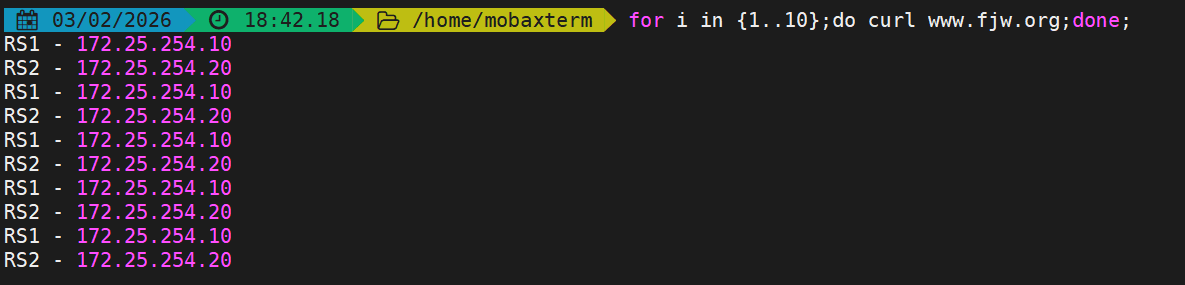
bash
#停止后端RS服务使其访问备用网页
[root@RS1 ~]# systemctl stop httpd.service
[root@RS2 ~]# systemctl stop httpd.service
03/02/2026 18:46.50 /home/mobaxterm curl www.fjw.org
太不巧了,你要访问的页面辞职了!!算法
负载均衡算法(调度策略 + 适用场景)
| 算法语法 | 核心规则 | 适用场景 | 补充特性 |
|---|---|---|---|
| 默认轮询(无显式配置) | 按节点顺序依次分配请求,结合weight实现加权轮询 |
后端节点性能一致、无会话保持需求 | 配置最简单,无需额外声明 |
ip_hash; |
基于客户端remote_addr(IPv4 前 24 位 / 完整 IPv6)哈希,固定请求到同一节点 |
需会话保持(如后端本地 Session、无分布式缓存) | 实现会话绑定,同一局域网 IP 可能集中到同一节点 |
hash KEY [consistent]; |
基于指定 KEY(如$request_uri/$cookie_sessionid)哈希,固定请求到同一节点;加consistent启用 ketama 一致性哈希 |
1. 自定义会话保持(如按 URI/Cookie 绑定);2. 后端为缓存服务器(如 varnish) | 一致性哈希可减少节点变化时的请求重分配,降低缓存失效概率 |
least_conn; |
优先将请求分配给当前并发连接数最少的后端服务器 | 后端请求处理时间差异大(如长连接、慢查询场景) | 负载更均衡,避免单节点过载,类似 LVS 的 WLC 算法 |
以下为算法的实验
ip_hash
bash
[root@nginx ~]# vim /usr/local/nginx/conf.d/up.conf
upstream webserver {
    ip_hash;
    server 172.25.254.10:80 weight=1 fail_timeout=15s max_fails=3;
    server 172.25.254.20:80 weight=1 fail_timeout=15s max_fails=3;
    #server 172.25.254.100:8888 backup;

}
server {
    listen 80;
    server_name www.fjw.org;

    location ~ / {
        proxy_pass http://webserver;
    }
}

[root@nginx ~]# nginx -s reload

#测试
[root@nginx ~]# curl www.fjw.org
RS1 - 172.25.254.10
[root@nginx ~]# curl www.fjw.org
RS1 - 172.25.254.10
[root@nginx ~]# curl www.fjw.org
RS1 - 172.25.254.10
[root@nginx ~]# curl www.fjw.org
RS1 - 172.25.254.10
hash $request_uri consistent;
[root@nginx ~]# vim /usr/local/nginx/conf.d/up.conf
upstream webserver {
    #ip_hash;
    hash $request_uri consistent;
    server 172.25.254.10:80 weight=1 fail_timeout=15s max_fails=3;
    server 172.25.254.20:80 weight=1 fail_timeout=15s max_fails=3;
    #server 172.25.254.100:8888 backup;

}
server {
    listen 80;
    server_name www.fjw.org;

    location ~ / {
        proxy_pass http://webserver;
    }
}

[root@nginx ~]# nginx -s reload

#测试
[root@nginx ~]# curl www.fjw.org/web1/index.html
RS1
[root@nginx ~]# curl www.fjw.org/web2/index.html
RS2
[root@nginx ~]# curl www.fjw.org/web3/index.html
RS2
least_conn;
bash
[root@nginx ~]# vim /usr/local/nginx/conf.d/up.conf
upstream webserver {
    #ip_hash;
    #hash $request_uri consistent;
    least_conn;
    server 172.25.254.10:80 weight=1 fail_timeout=15s max_fails=3;
    server 172.25.254.20:80 weight=1 fail_timeout=15s max_fails=3;
    #server 172.25.254.100:8888 backup;

}
server {
    listen 80;
    server_name www.fjw.org;

    location ~ / {
        proxy_pass http://webserver;
    }
}

[root@nginx ~]# nginx -s reload

#测试
[root@nginx ~]# curl www.fjw.org
RS1 - 172.25.254.10
[root@nginx ~]# curl www.fjw.org
RS2 - 172.25.254.20
[root@nginx ~]# curl www.fjw.org
RS1 - 172.25.254.10
[root@nginx ~]# curl www.fjw.org
RS2 - 172.25.254.20
hash $cookie_value;
bash
[root@nginx ~]# vim /usr/local/nginx/conf.d/up.conf
upstream webserver {
    #ip_hash;
    #hash $request_uri consistent;
    #least_conn;
    hash $cookie_fjw;
    server 172.25.254.10:80 weight=1 fail_timeout=15s max_fails=3;
    server 172.25.254.20:80 weight=1 fail_timeout=15s max_fails=3;
    #server 172.25.254.100:8888 backup;

}
server {
    listen 80;
    server_name www.fjw.org;

    location ~ / {
        proxy_pass http://webserver;
    }
}

[root@nginx ~]# nginx -s reload

#测试
[root@nginx ~]# curl -b fjw=1 www.fjw.org
RS1 - 172.25.254.10
[root@nginx ~]# curl -b fjw=2 www.fjw.org
RS2 - 172.25.254.20
[root@nginx ~]# curl -b fjw=3 www.fjw.org
RS1 - 172.25.254.10
[root@nginx ~]# curl -b fjw=4 www.fjw.org
RS1 - 172.25.254.10
[root@nginx ~]# curl -b fjw=5 www.fjw.org
RS2 - 172.25.254.20
七层与四层的参数对比
| 配置维度 | 七层反向代理(HTTP/HTTPS) | 四层反向代理(TCP/UDP) |
|---|---|---|
| 核心配置块 | ✅ 放在 http {} 内部 |
✅ 放在 stream {} 内部(与http平级) |
| 内部配置结构 | ✅ 有 server {} → location {}(多层嵌套) |
✅ 只有 server {},无location(关键差异) |
| 依赖模块 | ✅ ngx_http_proxy_module、ngx_http_upstream_module | ✅ ngx_stream_proxy_module |
| 监听指令(listen) | ✅ 支持:listen 80;、listen 443 ssl;、http2;支持多域名区分 |
✅ 支持:listen 3306;、listen 6379 udp;;❌ 不支持ssl、server_name |
| 转发指令(proxy_pass) | ✅ 支持:加/不加 /(路径替换/追加);支持代理到http/https;可配合location路由 |
✅ 仅支持:IP:端口 或 upstream集群名;❌ 不能带路径、不能加/;只做透传 |
| upstream集群(共有参数) | ✅ 支持:server、weight、max_fails、fail_timeout、backup、down、least_conn、hash $remote_addr | ✅ 支持:与七层完全一致(上述共有参数) |
| upstream集群(独有参数) | ✅ 独有:ip_hash;、hash $cookie_xxx;、hash $request_uri;(依赖HTTP解析) |
❌ 无独有参数;❌ 不支持ip_hash、cookie/URI哈希(无法解析HTTP) |
| 请求头/响应头操作 | ✅ 独有:proxy_set_header、proxy_hide_header、proxy_pass_header、proxy_pass_request_headers/body | ❌ 完全不支持(无法解析HTTP头信息) |
| 超时参数 | ✅ 支持:proxy_connect_timeout、proxy_read_timeout、proxy_send_timeout、proxy_http_version(独有) |
✅ 支持:proxy_connect_timeout、proxy_read_timeout、proxy_send_timeout、proxy_timeout(独有,会话空闲超时);❌ 无proxy_http_version |
| SSL卸载(解密) | ✅ 支持:可配置ssl_certificate、ssl_certificate_key,实现HTTPS解密 | ❌ 不支持(仅透传TCP流,不解密SSL) |
| 路由能力 | ✅ 支持:按路径(/api)、后缀(.php)、正则路由(location匹配) | ❌ 不支持路由;一个server对应一个端口,无法按路径拆分 |
| 支持协议 | ✅ 仅支持:HTTP、HTTPS | ✅ 支持:所有TCP、UDP协议(MySQL、Redis、SSH等) |
四层反向代理
基于ngx_stream_proxy_module模块实现
建立子配置文件避免主配置文件杂乱
bash
[root@nginx ~]# vim /usr/local/nginx/conf/nginx.conf
include "/usr/local/nginx/conf.d/tcp/*.conf";	#与http同级
四层反向代理配置示例
bash
[root@nginx ~]# vim /usr/local/nginx/conf.d/tcp/proxy.conf
# 四层代理需放在stream块中(和http块同级)
stream {
    # MySQL代理
    server {
        listen 3306; # 监听本机3306端口
        # 转发到后端MySQL服务器
        proxy_pass 172.25.254.50:3306;
        # 四层超时配置
        proxy_connect_timeout 5s;
        proxy_timeout 300s;
    }

    # Redis代理(UDP示例)
    server {
        listen 6379 udp; # 监听UDP 6379
        proxy_pass 172.25.254.60:6379;
    }
}
四层反向代理负载均衡
基于ngx_stream_proxy_module和ngx_http_upstream_module模块实现
bash
[root@nginx ~]# vim /usr/local/nginx/conf/nginx.conf
include "/usr/local/nginx/conf.d/tcp/*.conf";	#与http同级
tcp四层负载-mysql
配置后端实验环境
bash
[root@RS1 ~]# dnf install mariadb-server -y
[root@RS2 ~]# dnf install mariadb-server -y

[root@RS1 ~]# vim /etc/my.cnf.d/mariadb-server.cnf
server-id=10
[root@RS2 ~]# vim /etc/my.cnf.d/mariadb-server.cnf
server-id=20

[root@RS1 ~]# systemctl enable --now mariadb
[root@RS2 ~]# systemctl enable --now mariadb

[root@RS1 ~]# mysql -e "CREATE USER fjw@'%' IDENTIFIED BY 'fjw';"
[root@RS1 ~]# mysql -e "GRANT ALL ON *.* TO fjw@'%';
[root@RS2 ~]# mysql -e "CREATE USER fjw@'%' IDENTIFIED BY 'fjw';"
[root@RS2 ~]# mysql -e "GRANT ALL ON *.* TO fjw@'%';"
配置tcp负载
bash
[root@nginx ~]# vim /usr/local/nginx/conf.d/tcp/up.conf
stream {
  upstream mysql_server {
    server 172.25.254.10:3306  max_fails=3 fail_timeout=30s;
    server 172.25.254.20:3306  max_fails=3 fail_timeout=30s;
  }

  server {
    listen 172.25.254.100:3306;
    proxy_pass mysql_server;
    proxy_connect_timeout 30s;			# 连接后端超时时间
    proxy_timeout 300s;					# 长连接空闲超时(适配MySQL)
    proxy_socket_keepalive on;    		# 启用TCP keepalive,避免长连接断开
  }
}

[root@nginx ~]# nginx -s reload
在客户端进行测试
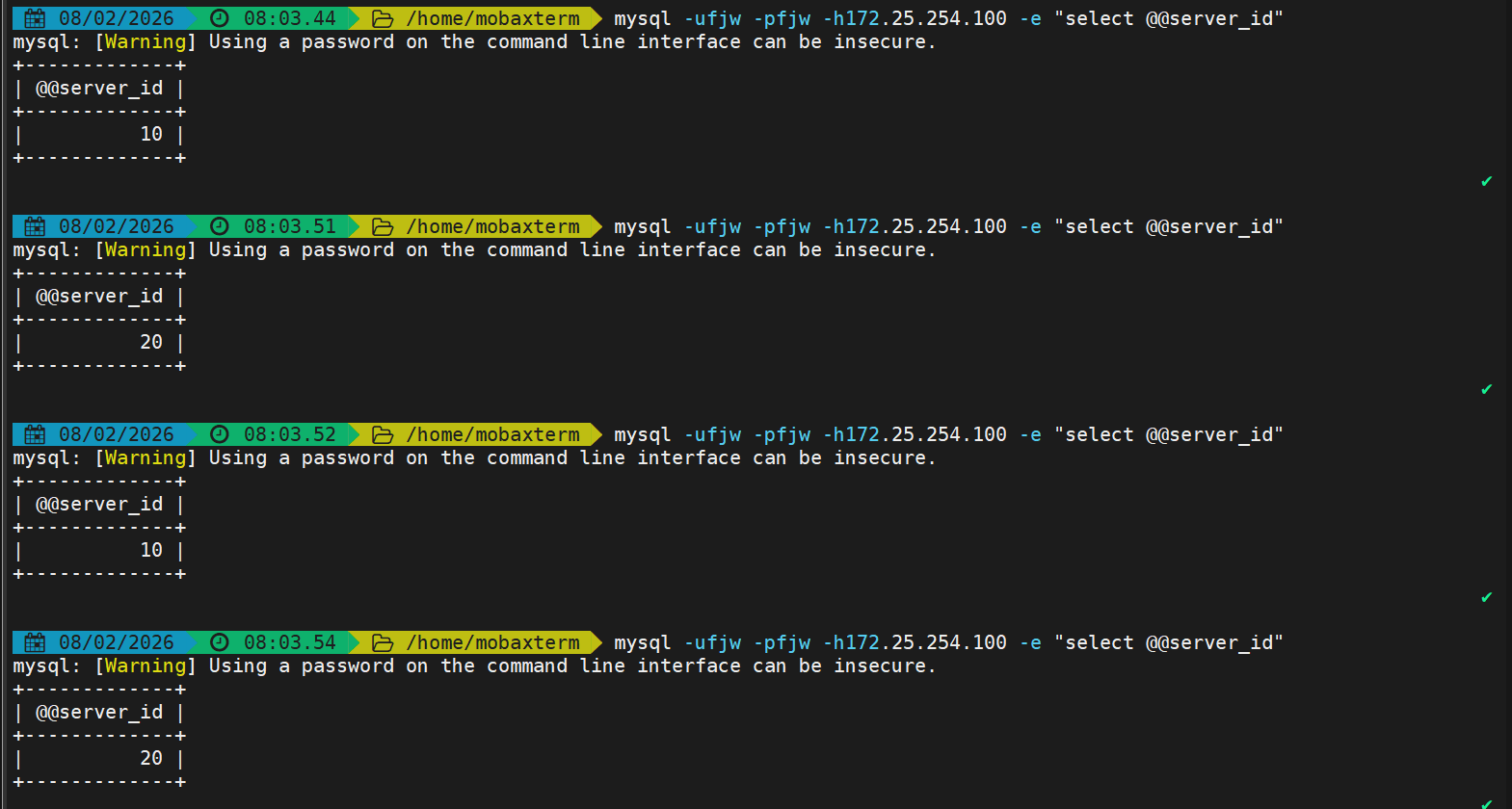
udp四层负载-dns
配置后端实验环境
bash
[root@RS1 ~]# dnf install bind -y
[root@RS2 ~]# dnf install bind -y

[root@RS1 ~]# vim /etc/named.conf
[root@RS2 ~]# vim /etc/named.conf

options {
//      listen-on port 53 { 127.0.0.1; };			#注释掉使用默认参数
//      listen-on-v6 port 53 { ::1; };
        directory       "/var/named";
        dump-file       "/var/named/data/cache_dump.db";
        statistics-file "/var/named/data/named_stats.txt";
        memstatistics-file "/var/named/data/named_mem_stats.txt";
        secroots-file   "/var/named/data/named.secroots";
        recursing-file  "/var/named/data/named.recursing";
//      allow-query     { localhost; };
        dnssec-validation no;

[root@RS1 ~]# vim /etc/named.rfc1912.zones
[root@RS2 ~]# vim /etc/named.rfc1912.zones
#在末尾添加
zone "fjw.org" IN {
    type master;
    file "fjw.org.zone";
    allow-update { none; };
};

[root@RS1 ~]# cd /var/named/
[root@RS2 ~]# cd /var/named/
[root@RS1 named]# cp -p named.localhost fjw.org.zone
[root@RS2 named]# cp -p named.localhost fjw.org.zone

[root@RS1 named]# vim fjw.org.zone
$TTL 1D
@   IN SOA  dns.fjw.org rname.invalid. (
                    0   ; serial
                    1D  ; refresh
                    1H  ; retry
                    1W  ; expire
                    3H )    ; minimum
       NS  dns.fjw.org
dns    A   172.25.254.10
test   A   172.25.254.66

[root@RS1 named]# systemctl enable --now named

[root@RS2 named]# vim fjw.org.zone
$TTL 1D
@   IN SOA  dns.fjw.org rname.invalid. (
                    0   ; serial
                    1D  ; refresh
                    1H  ; retry
                    1W  ; expire
                    3H )    ; minimum
       NS  dns.fjw.org
dns    A   172.25.254.20
test   A   172.25.254.66

[root@RS2 named]# systemctl enable --now named
配置udp负载
bash
[root@nginx ~]# vim /usr/local/nginx/conf.d/tcp/up.conf
stream {
  upstream mysql_server {
    server 172.25.254.10:3306  max_fails=3 fail_timeout=30s;
    server 172.25.254.20:3306  max_fails=3 fail_timeout=30s;
  }

  upstream dns_server{
    server 172.25.254.10:53 max_fails=3 fail_timeout=30s;
    server 172.25.254.20:53 max_fails=3 fail_timeout=30s;
  }

  server {
    listen 172.25.254.100:3306;
    proxy_pass mysql_server;
    proxy_connect_timeout 30s;
    proxy_timeout 300s;
    proxy_socket_keepalive on;
  }

  server {
    listen 172.25.254.100:53 udp;
    proxy_pass dns_server;
    proxy_timeout 1s;						# DNS请求超时时间(1s适配DNS快速响应特性)
    proxy_responses 1;						# UDP必配:等待后端1个响应后关闭连接
    error_log logs/dns.log;
  }
}

[root@nginx ~]# nginx -s reload
测试
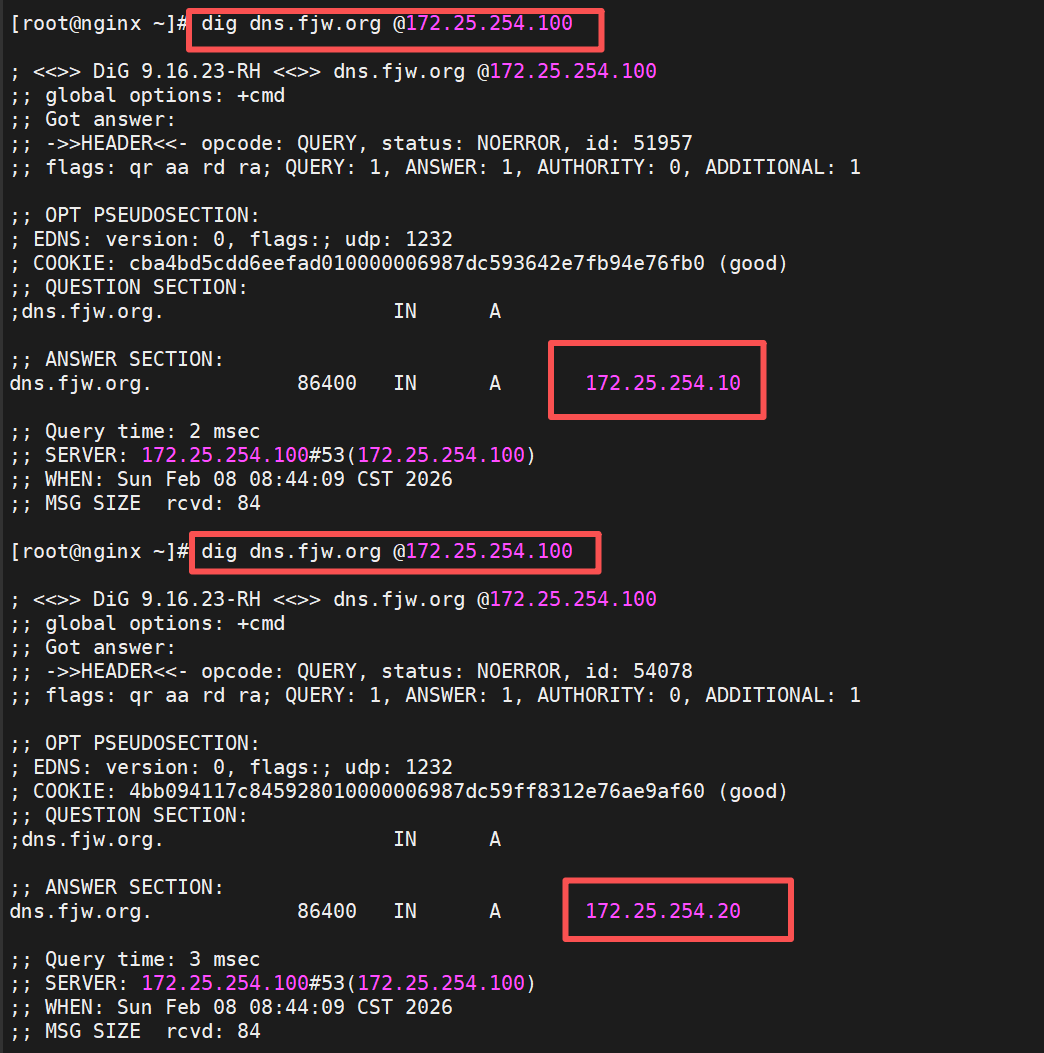
FastCGI
Nginx基于模块ngx_http_fastcgi_module实现通过fastcgi协议将指定的客户端请求转发至php-fpm处理,其配置指令参数如下:
fastcgi_pass address:port;
#转发请求到后端服务器,address为后端的fastcgi server的地址,可用位置:localhost, if in localhost

fastcgi_index name;
#fastcgi默认的主页资源,示例:fastcgi_index index.php;

fastcgi_param value;
#设置传递给FastCGI服务器的参数值,可以是文本,变量或组合,可用于将Nginx的内置变量赋值给自定义key
有以下值等;
fastcgi_param REMOTE_ADDR $remote_addr; #客户端源IP
fastcgi_param REMOTE_PORT $remote_port; #客户端源端口
fastcgi_param SERVER_ADDR $server_addr; #请求的服务器IP地址
fastcgi_param SERVER_PORT $server_port; #请求的服务器端口
fastcgi_param SERVER_NAME $server_name; #请求的server name
#可以通过include fastcgi.conf;参数来作为环境配置参数
#fastcgi.conf此文件都包含了预设的FastCGI环境变量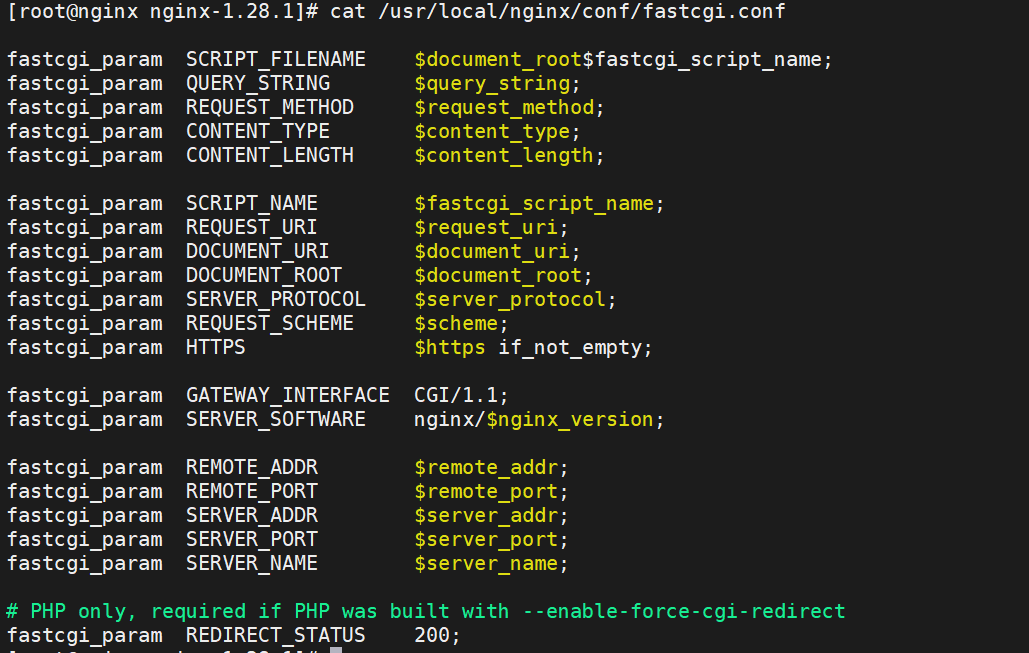
以下为简洁的默认配置示例
bash
server {
        listen 80;
        server_name php.fjw.org;
        root /webdir/fjw.org/php/html;
        location ~ \.php$ {
        fastcgi_pass 127.0.0.1:9000;
        fastcgi_index index.php;
        include fastcgi.conf;
        }
}
php源码编译安装
1.下载源码包
bash
[root@nginx ~]# wget https://www.php.net/distributions/php-8.3.30.tar.gz
[root@nginx ~]# wget https://mirrors.aliyun.com/rockylinux/9.7/devel/x86_64/os/Packages/o/oniguruma-devel-6.9.6-1.el9.6.x86_64.rpm     #下载依赖包
2.解压并编译
bash
[root@nginx ~]# tar zxf php-8.3.30.tar.gz

#下载依赖包
[root@nginx ~]# dnf install gcc systemd-devel-252-51.el9.x86_64 libxml2-devel.x86_64 sqlite-devel.x86_64  libcurl-devel.x86_64  libpng-devel.x86_64 oniguruma-devel-6.9.6-1.el9.6.x86_64.rpm -y

[root@nginx php-8.3.30]# ./configure \
--prefix=/usr/local/php \		#安装路径
--with-config-file-path=/usr/local/php/etc \	#指定配置路径
--enable-fpm  \			#用cgi方式启动程序
--with-fpm-user=nginx \	#指定运行用户身份
--with-fpm-group=nginx \
--with-curl \			#打开curl浏览器支持
--with-iconv \			#启用iconv函数,转换字符编码
--with-mhash \			#mhash加密方式扩展库
--with-zlib \			#支持zlib库,用于压缩http压缩传输
--with-openssl \		#支持ssl加密
--enable-mysqlnd \		#mysql数据库
--with-mysqli \
--with-pdo-mysql \
--disable-debug \		#关闭debug功能
--enable-sockets \		#支持套接字访问
--enable-soap \			#支持soap扩展协议
--enable-xml \			#支持xml
--enable-ftp \			#支持ftp
--enable-gd \			#支持gd库
--enable-exif \			#支持图片元数据
--enable-mbstring \		#支持多字节字符串
--enable-bcmath \		#打开图片大小调整,用到zabbix监控的时候用到了这个模块
--with-fpm-systemd		#支持systemctl 管理cgi

[root@nginx php-8.3.30]# make && make instsall
3.配置优化php
bash
[root@nginx ~]# cd /usr/local/php/etc
[root@nginx etc]# cp php-fpm.conf.default php-fpm.conf	#复制模板
[root@nginx etc]# vim php-fpm.conf
#去掉注释
pid = run/php-fpm.pid 		#指定pid文件存放位置

[root@nginx etc]# cd php-fpm.d/
[root@nginx php-fpm.d]# cp www.conf.default www.conf
[root@nginx php-fpm.d]# vim www.conf
41 listen = 0.0.0.0:9000	#可以修改端口

#生成主配置文件
[root@nginx php-8.3.30]# cp php.ini-production /usr/local/php/etc/php.ini
[root@nginx ~]# vim /usr/local/php/etc/php.ini
989 date.timezone = Asia/Shanghai #修改时区

#生成启动文件
[root@nginx etc]# cp ~/php-8.3.30/sapi/fpm/php-fpm.service /lib/systemd/system/
[root@nginx etc]# vim /lib/systemd/system/php-fpm.service
#ProtectSystem=full 		#注释该内容
[root@nginx etc]# systemctl daemon-reload
[root@nginx etc]# systemctl enable --now php-fpm.service
[root@nginx etc]# netstat -antlupe | grep php
tcp        0      0 127.0.0.1:9000          0.0.0.0:*               LISTEN      0          120615     147595/php-fpm: mas
Nginx整合php
生成默认发布目录与默认发布文件
bash
[root@nginx ~]# mkdir /webdir/fjw.org/php/html -p
[root@nginx ~]# echo php.fjw.org > /webdir/fjw.org/php/html/index.html
[root@nginx ~]# cat > /webdir/fjw.org/php/html/index.php << eof
> <?php
>     phpinfo();
> ?>
> eof
编辑配置文件
bash
[root@nginx ~]# vim /usr/local/nginx/conf/nginx.conf
server {
......
include "/usr/local/nginx/conf.d/*.conf";
}

[root@nginx ~]# vim /usr/local/nginx/conf.d/php.conf
server {
    listen 80;
    server_name php.fjw.org;
    root /webdir/fjw.org/php/html;
    location ~ \.php$ {
        fastcgi_pass 127.0.0.1:9000;
        fastcgi_index index.php;
        include fastcgi.conf;
    }
}

[root@nginx ~]# nginx -s reload
测试
访问默认静态页面

访问动态php页面
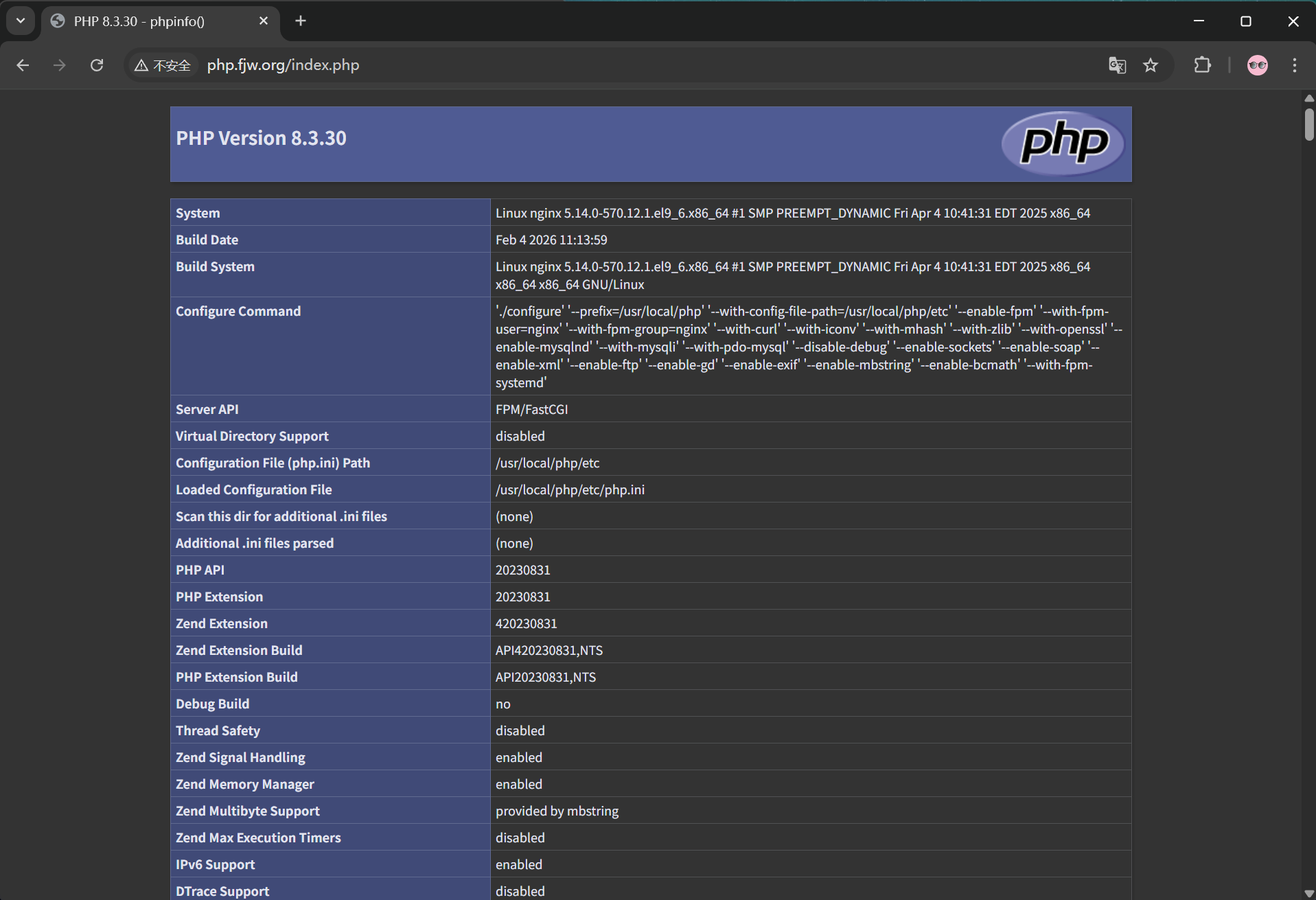
php扩展缓存模块
软件下载:http://pecl.php.net/package/memcache
架构图
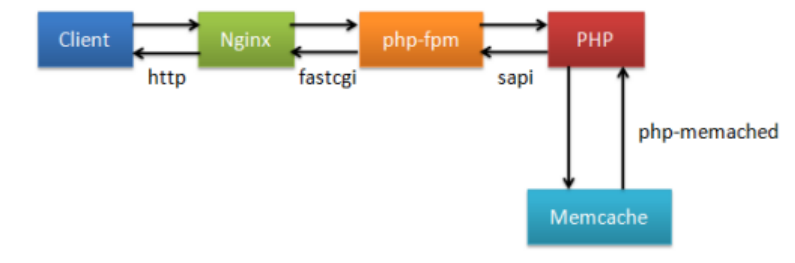
原理是利用利用memcache实现php的缓存加速,memcache可替换为任意nosql数据库例如redis
安装php扩展模块memcache
bash
#下载软件包后进行解压
[root@nginx ~]# tar zxf memcache-8.2.tgz
#安装php扩展编译软件,生产编译配置
[root@nginx ~]# cd memcache-8.2/
[root@nginx memcache-8.2]# dnf install autoconf -y
[root@nginx memcache-8.2]# phpize
[root@nginx memcache-8.2]# ./configure  && make && make install

#编译完成后查看是否有插件存在
[root@nginx memcache-8.2]# ls /usr/local/php/lib/php/extensions/no-debug-non-zts-20230831/
memcache.so  opcache.so

#编辑php配置文件
[root@nginx memcache-8.2]# vim /usr/local/php/etc/php.ini
939  extension=memcache			#开启支持memcache

#重启服务并查看是否支持memcache模块
[root@Nginx memcache-8.2]# systemctl restart php-fpm.service
[root@Nginx memcache-8.2]# php -m  | grep memcache
memcache
安装memcached
bash
[root@nginx ~]# dnf install memcached.x86_64 -y.配置memcache配置memcached
bash
[root@nginx nginx-1.28.1]# cat /etc/sysconfig/memcached
PORT="11211"
USER="memcached"
MAXCONN="1024"
CACHESIZE="64"
OPTIONS="-l 127.0.0.1,::1"

[root@nginx ~]# systemctl enable --now memcached.service

[root@nginx ~]# netstat -antlupe | grep memcache
tcp        0      0 0.0.0.0:11211           0.0.0.0:*               LISTEN      991        437305     166169/memcached
tcp6       0      0 ::1:11211               :::*                    LISTEN      991        437306     166169/memcached
测试缓存
bash
[root@nginx memcache-8.2]# vim memcache.php		#memcache缓存状态页
define('ADMIN_USERNAME','admin');   // Admin Username
define('ADMIN_PASSWORD','fjw');     // Admin Password
$MEMCACHE_SERVERS[] = '172.25.254.100:11211'; // add more as an array
#$MEMCACHE_SERVERS[] = 'mymemcache-server2:11211'; // add more as an array

[root@nginx memcache-8.2]# cp -p memcache.php /webdir/fjw.org/php/html/
[root@nginx memcache-8.2]# cp -p example.php /webdir/fjw.org/php/html/	#缓存测试文件

#测试
http://php.fjw.org/memcache.php			#数据页面,在浏览器中可以直接访问
[root@nginx memcache-8.2]# ab -n 1000 -c 300  php.fjw.org/example.php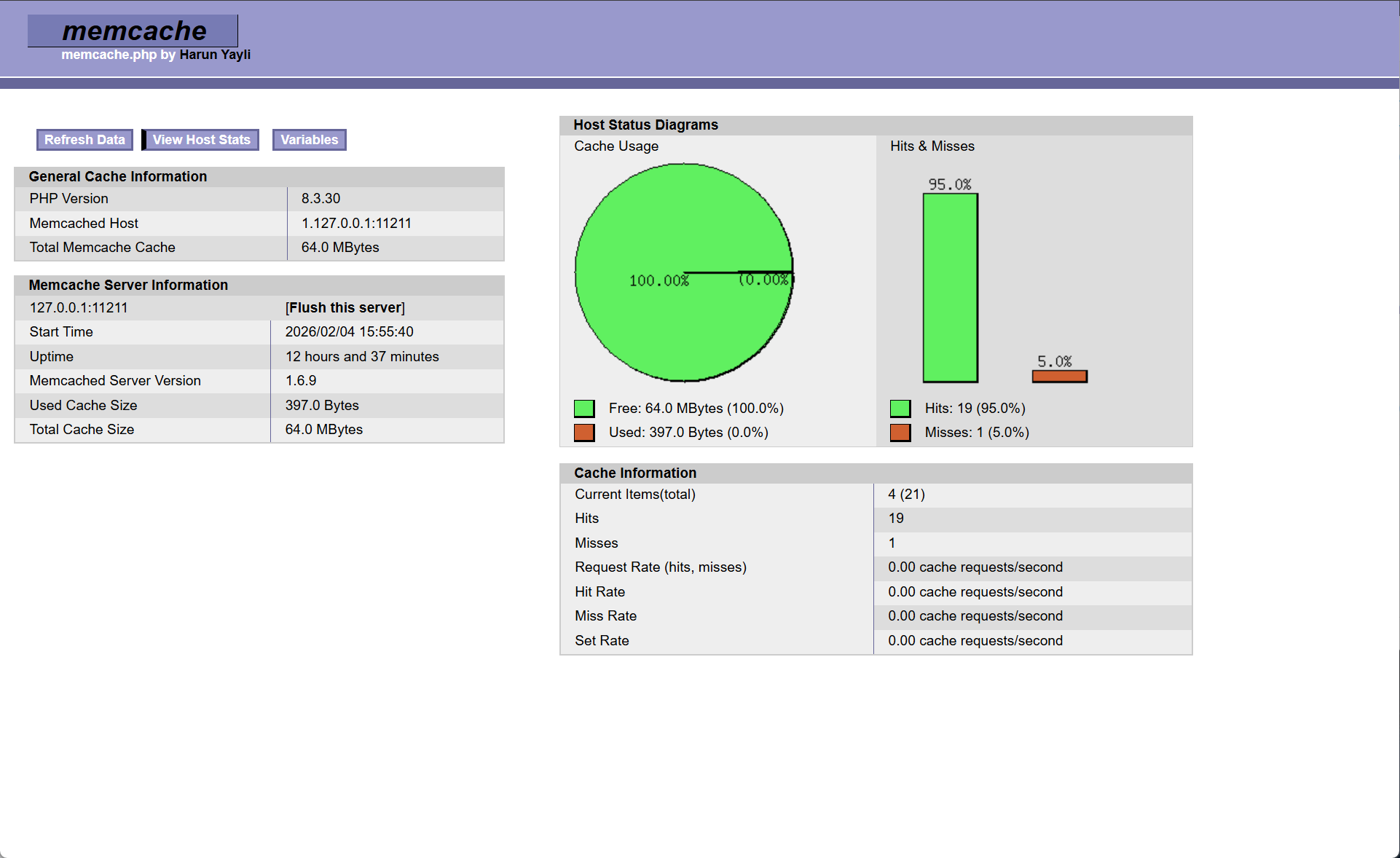
可以看到被缓存后的文件都是直接走缓存而不会再次处理php文件
测试性能
bash
[root@nginx ~]# ab -n 1000 -c 200 php.fjw.org/index.php	#未连接缓存的文件
@@@内容忽略@@@
Complete requests:      1000
Failed requests:        107

[root@nginx ~]# ab -n 1000 -c 200 php.fjw.org/example.php #连接缓存的文件
@@@内容忽略@@@
Complete requests:      1000
Failed requests:        0
php高速缓存
- 由于php扩展缓存是通过php配置来实现缓存,可以通过nginx直接对接memcache来实现缓存节省开销当有缓存时直接访问memcahe而不走php;
- 利用memcache实现php的缓存加速;
- 原理是让nginx直接取访问memcache的缓存如果存在缓存而不去访问php-fpm再访问memcache,当memcache没有缓存才访问php-fpm处理文件后存入缓存返回给nginx。
架构图
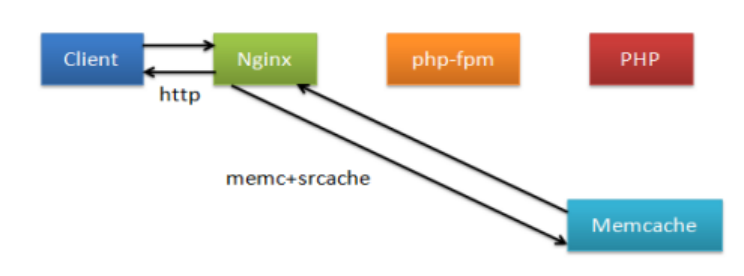
实现nginx直接访问memcache需要两个模块
- srcache-nginx-module 缓存获取
- memc-nginx-module memcache读写
重新编译nginx添加模块
bash
[root@nginx ~]# systemctl stop nginx.service

[root@nginx ~]# tar zxf memc-nginx-module-0.20.tar.gz
[root@nginx ~]# tar zxf srcache-nginx-module-0.33.tar.gz
#切换到nginx源码包清除Makefile
[root@nginx ~]# cd nginx-1.28.1/
[root@nginx nginx-1.28.1]# make clean

#添加模块重新编译
[root@nginx nginx-1.28.1]# ./configure  --prefix=/usr/local/nginx --user=nginx --group=nginx --with-http_ssl_module --with-http_v2_module --with-http_realip_module --with-http_stub_status_module --with-http_gzip_static_module --with-pcre --with-stream --with-stream_ssl_module --with-stream_realip_module --add-module=/root/echo-nginx-module-0.64  --add-module=/root/memc-nginx-module-0.20 --add-module=/root/srcache-nginx-module-0.33

#编译但不拷贝文件到系统路径
[root@nginx nginx-1.28.1]# make
更换二进制文件
bash
[root@nginx nginx-1.28.1]# rm -rf /usr/local/nginx/sbin/nginx
[root@nginx nginx-1.28.1]# cp -p objs/nginx /usr/local/nginx/sbin/

#查看是否添加成功
编辑nginx整合memcache
bash
[root@nginx ~]# vim /usr/local/nginx/conf.d/php.conf
upstream memcache {
   server 127.0.0.1:11211;
   keepalive 512;
}

server {
        listen 80;
        server_name php.fjw.org;
        root /webdir/fjw.org/php/html;

        location /memc {
        	internal;			# 标记该 location 仅能被 Nginx 内部调用,不接受外部直接访问
        	# Memcache 连接/读写超时时间(均为 100 毫秒)
        	memc_connect_timeout 100ms;
       	 	memc_send_timeout 100ms;
        	memc_read_timeout 100ms;
        	# 设置 Memcache 的缓存键:值为请求的查询字符串(如 ?id=1 的部分)
        	set $memc_key $query_string;
        	# 设置缓存过期时间:300 秒(5 分钟)
        	set $memc_exptime 300;
         	# 将请求转发到上面定义的 memcache 上游服务
        	memc_pass memcache;
        }

        location ~ \.php$ {
        	 # 定义缓存键:URL 路径 + 查询参数(比如 /index.php?id=1)
        	set $key $uri$args;
        	# 读取缓存:从 /memc 接口获取 $key 对应的缓存数据
        	srcache_fetch GET /memc $key;
        	# 写入缓存:将 PHP 解析后的响应结果通过 /memc 接口存入 $key
        	srcache_store PUT /memc $key;
        	fastcgi_pass 127.0.0.1:9000;
        	fastcgi_index index.php;
        	include fastcgi.conf;
        }
}

[root@nginx ~]# nginx -s reload
参数详解
bash
set $key $uri$args:定义最终的缓存键 = 访问路径($uri,如 /index.php) + 查询参数($args,如 id=1),确保不同页面 / 参数的缓存唯一。

srcache_fetch GET /memc $key:读取缓存:请求 PHP 文件时,先通过 /memc 接口从 Memcache 读取 $key 对应的缓存,如果缓存存在,直接返回缓存内容,不走 PHP-FPM 解析。

srcache_store PUT /memc $key:写入缓存:如果缓存不存在,Nginx 会先让 PHP-FPM 解析 PHP 文件,然后将解析后的响应结果通过 /memc 接口存入 Memcache,供后续请求使用。
测试
bash
#重启memcache并访问没有缓存的php文件查看缓存命中
[root@nginx ~]# systemctl restart memcached.service
[root@nginx ~]# ab -n 1000 -c 100 php.fjw.org/index.php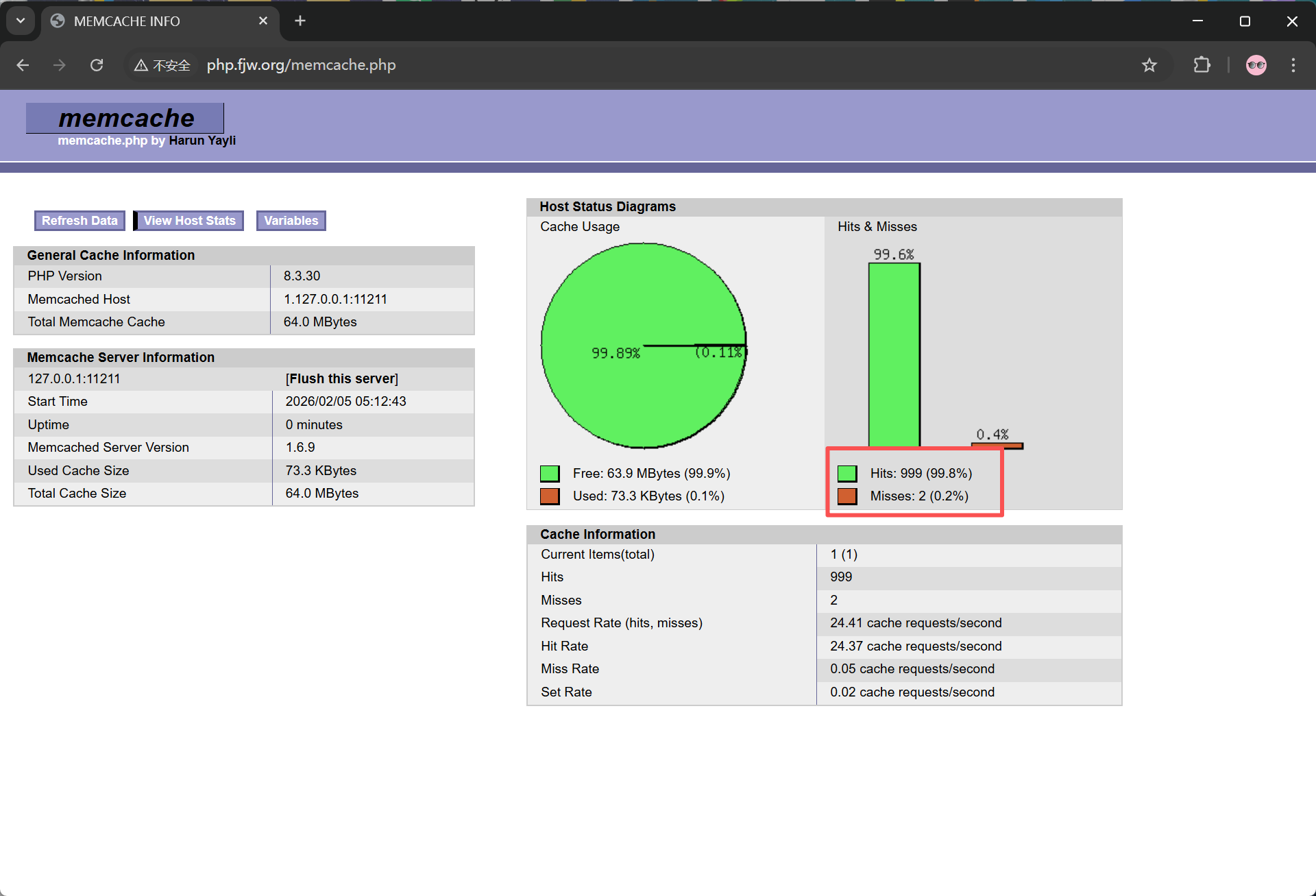 如图所示只有第一次访问未命中缓存后续缓存后都走缓存
Nginx二开版本openresty
OpenResty® 是一个基于 Nginx 与 Lua 的高性能 Web 平台,其内部集成了大量精良的 Lua 库、第三方 模块以及大多数的依赖项。用于方便地搭建能够处理超高并发、扩展性极高的动态 Web 应用、Web 服 务和动态网关。
nginx的其它的二次发行版:
Tengine:由淘宝网发起的Web服务器项目。它在Nginx的基础上,针对大访问量网站的需求,添加 了很多高级功能和特性。Tengine的性能和稳定性已经在大型的网站如淘宝网,天猫商城等得到了 很好的检验。它的最终目标是打造一个高效、稳定、安全、易用的Web平台。从2011年12月开始, Tengine成为一个开源项目官网: http://tengine.taobao.org/
编译安装openresty
安装依赖
bash
[root@webserver ~]# dnf install gcc pcre-devel openssl-devel perl zlib-devel -y编译安装
bash
[root@webserver ~]# wget https://openresty.org/download/openresty-1.27.1.2.tar.gz
[root@webserver ~]# tar zxf openresty-1.27.1.2.tar.gz
[root@webserver ~]# cd openresty-1.27.1.2/
[root@webserver ~]# useradd -r -s /sbin/nologin nginx

#检查环境
[root@webserver openresty-1.27.1.2]# ./configure --prefix=/usr/local/openresty --user=nginx --group=nginx --with-http_ssl_module --with-http_v2_module --with-http_realip_module --with-http_stub_status_module --with-http_gzip_static_module --with-pcre --with-stream --with-stream_ssl_module --with-stream_realip_module

[root@webserver openresty-1.27.1.2]# gmake && gmake install
添加PATH环境变量
bash
[root@webserver openresty-1.27.1.2]# vim ~/.bash_profile
export PATH=$PATH:/usr/local/openresty/bin

[root@webserver openresty-1.27.1.2]# source  ~/.bash_profile

[root@webserver openresty-1.27.1.2]# openresty -v
nginx version: openresty/1.27.1.2
发布测试页面
bash
[root@webserver openresty-1.27.1.2]# echo hello openresty > /usr/local/openresty/nginx/html/index.html
[root@webserver openresty-1.27.1.2]# curl 172.25.254.200
hello openresty
默认测试页