【Day0】我开发了一款"诗意"待办软件:MoonTask(附源码+工程化思路)
Github
https://github.com/MoonPointer-Byte/MoonTask
前言
市面上的 Todo 软件很多,但大多繁杂。我希望有一款工具,既能记录每日任务,又能在我完成工作后,给我一句古诗词作为精神奖励。于是,MoonTask 诞生了。
本文将分享如何使用 Python + CustomTkinter 开发这款桌面应用,并重点介绍如何将一个简单的脚本进行工程化拆分。
🎬 效果演示
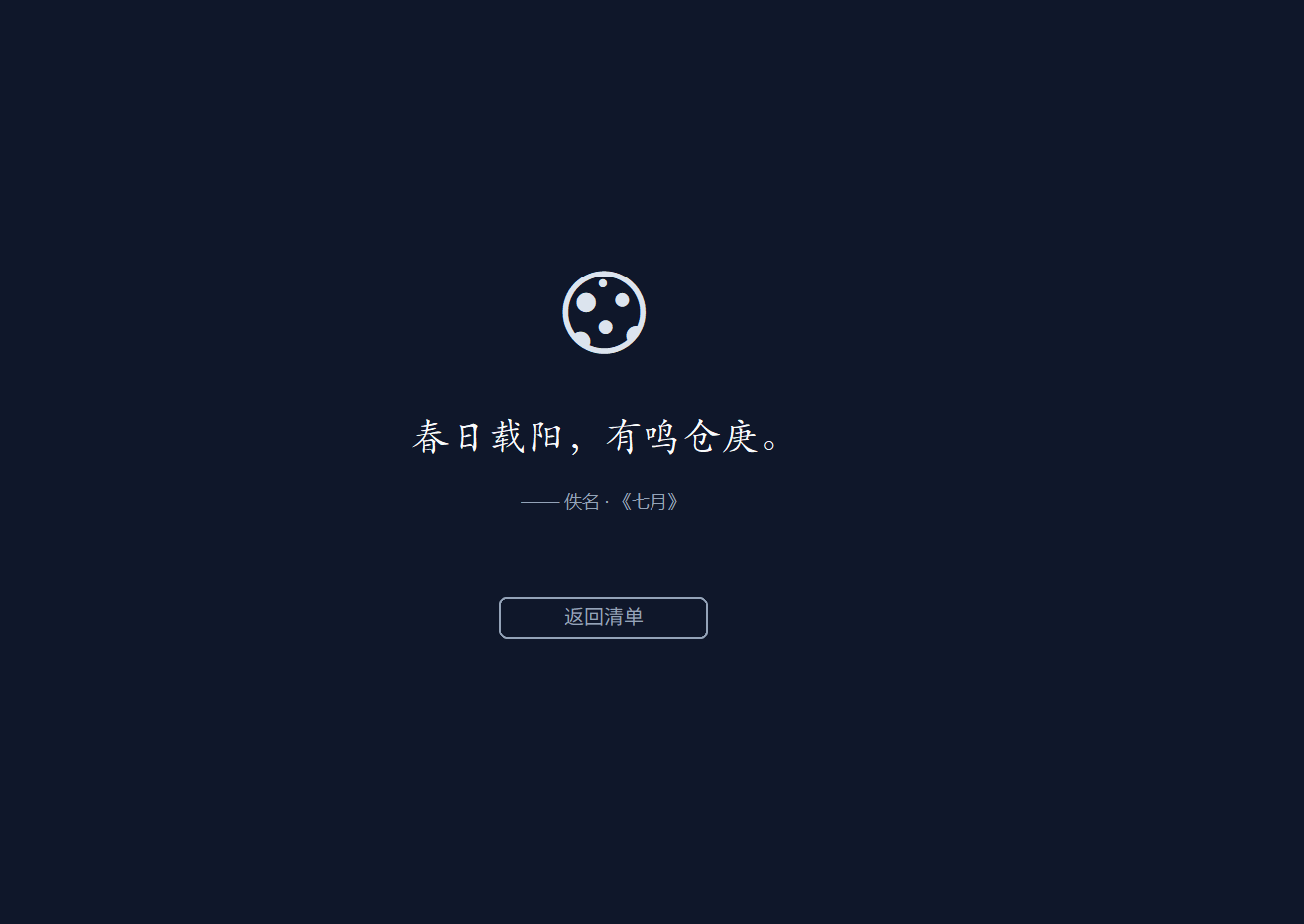
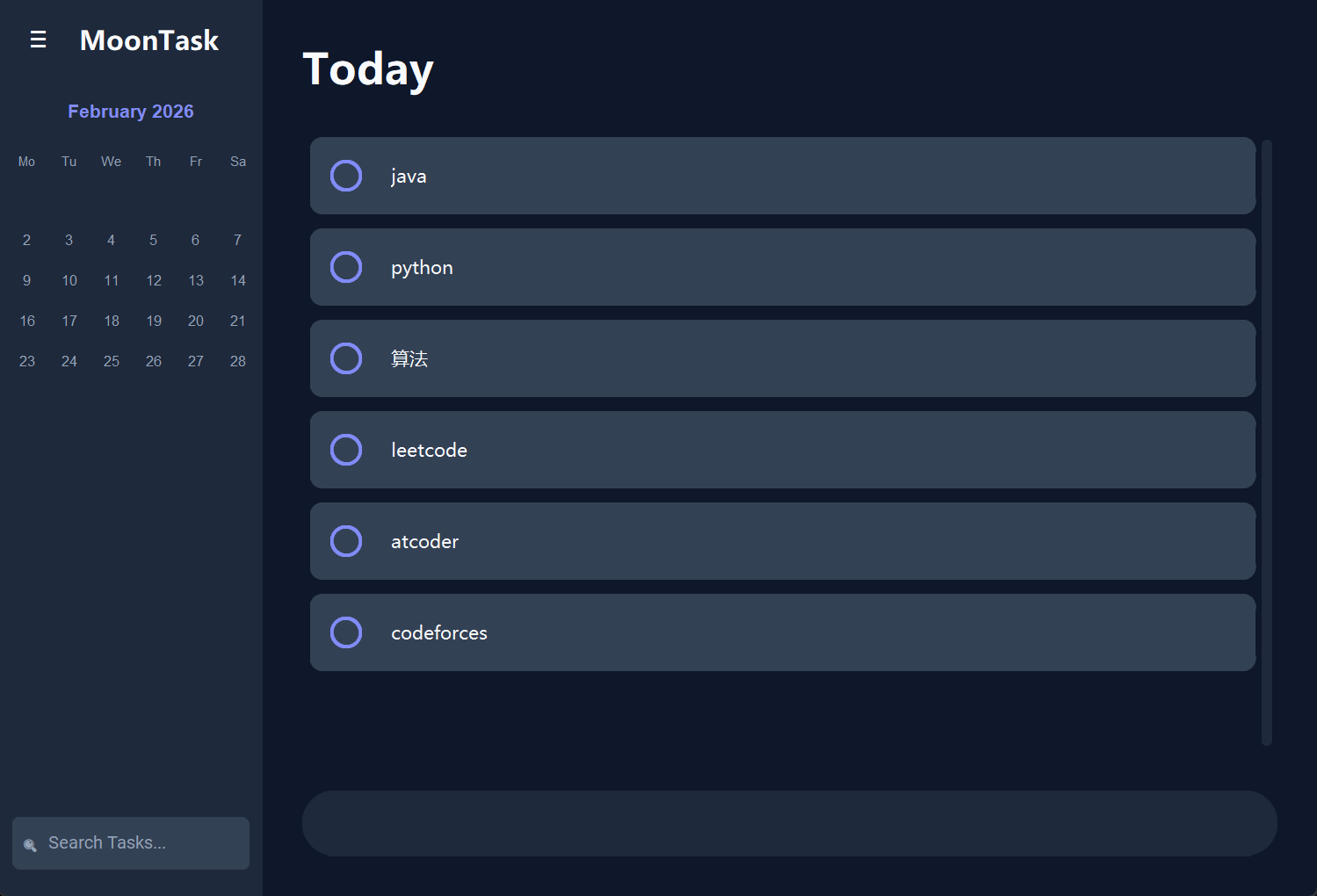
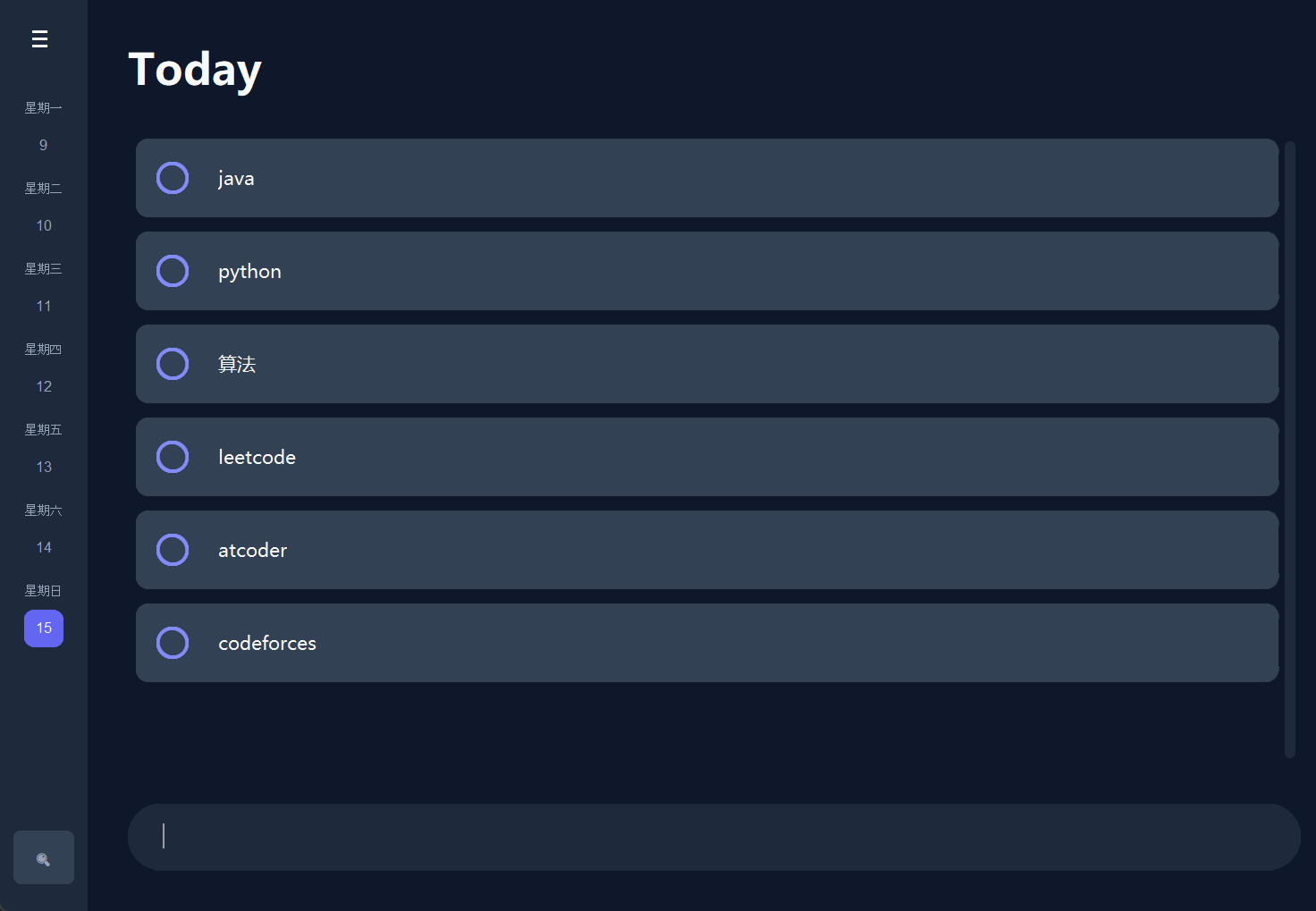
🛠️ 技术栈
- 语言: Python 3.12
- GUI 框架: CustomTkinter (Tkinter 的现代化封装)
- 数据存储: JSON
- 网络请求: Requests (对接今日诗词 API)
💡 核心功能实现
1. 工程化目录结构
为了避免"面条代码",我将项目拆分为 MVC 模式的变体:
main.py: 程序入口components.py: 存放日历、卡片等 UI 组件utils.py: 处理数据 IO 和 API 请求theme.py: 统一管理配色
2. 可折叠日历逻辑
日历组件不仅要显示日期,还需要支持"周视图"和"月视图"切换。
核心逻辑在于:当折叠时,利用 datetime 计算当前选中日期所在的那一周,只渲染那 7 个按钮。
python
# 核心代码片段
if not self.is_expanded:
    # 筛选出包含当前选中日期的那一周
    cal = [week for week in cal if target_day in week]
3. 多线程获取诗词
为了防止网络请求卡死界面,我使用了 threading:
def fetch_poem(self, callback):
    def run():
        # 请求 API ...
        callback(result)
    threading.Thread(target=run, daemon=True).start()
🚀 如何打包
使用 PyInstaller 将其打包为独立 exe:
pip install pyinstaller
pyinstaller --noconsole --onefile --name="MoonTask" main.py
📝 结语
MoonTask 不仅仅是一个工具,更是一种生活方式。希望这个开源项目能帮助到想学习 Python GUI 开发的朋友。
完整源码已开源,欢迎 Star!
部分核心代码
components.py
python
import customtkinter as ctk
import calendar
from datetime import datetime
from theme import THEME, FONTS
from utils import PoetryManager


class SmoothSidebar(ctk.CTkFrame):
    def __init__(self, master, on_date_select, on_search_click, **kwargs):
        super().__init__(master, fg_color=THEME["sidebar"], corner_radius=0, **kwargs)
        self.on_date_select = on_date_select
        self.on_search_click = on_search_click
        self.expanded_width = 270
        self.collapsed_width = 65
        self.current_width = self.expanded_width
        self.is_expanded = True
        self.animation_running = False

        self.selected_date_obj = datetime.now()

        self.grid_propagate(False)
        self.pack_propagate(False)

        self.top_frame = ctk.CTkFrame(self, fg_color="transparent", height=50)
        self.top_frame.pack(fill="x", pady=10)

        self.menu_btn = ctk.CTkButton(
            self.top_frame, text="≡", width=40, height=40,
            fg_color="transparent", hover_color=THEME["hover"],
            font=FONTS["icon_lg"], text_color=THEME["text_main"],
            command=self.toggle_sidebar
        )
        self.menu_btn.pack(side="left", padx=(10, 5))

        self.logo_lbl = ctk.CTkLabel(self.top_frame, text="MoonTask", font=FONTS["title"],
                                     text_color=THEME["text_main"])
        self.logo_lbl.pack(side="left", padx=5)

        self.content_frame = ctk.CTkFrame(self, fg_color="transparent")
        self.content_frame.pack(fill="both", expand=True, padx=5, pady=5)

        self.render_expanded_view()
        self.search_btn = ctk.CTkButton(
            self, text="🔍  Search Tasks...", fg_color=THEME["card"],
            text_color=THEME["text_dim"], hover_color=THEME["hover"],
            height=40, anchor="w", command=self.on_search_click
        )
        self.search_btn.pack(side="bottom", fill="x", padx=10, pady=20)

    def toggle_sidebar(self):
        if self.animation_running: return

        self.clear_content()

        target = self.collapsed_width if self.is_expanded else self.expanded_width
        step = -25 if self.is_expanded else 25

        self.is_expanded = not self.is_expanded
        if not self.is_expanded:
            self.logo_lbl.pack_forget()
            self.search_btn.configure(text="🔍", width=40, anchor="center")

        self.animate(target, step, callback=self.on_animation_end)

    def animate(self, target, step, callback):
        self.animation_running = True

        if (step < 0 and self.current_width > target) or (step > 0 and self.current_width < target):
            self.current_width += step
            self.configure(width=self.current_width)
            self.update_idletasks()
            self.after(10, lambda: self.animate(target, step, callback))
        else:
            self.current_width = target
            self.configure(width=target)
            self.animation_running = False
            if callback: callback()

    def on_animation_end(self):
        if self.is_expanded:
            self.logo_lbl.pack(side="left", padx=5)
            self.search_btn.configure(text="🔍  Search Tasks...", width=200, anchor="w")
            self.render_expanded_view()
        else:
            self.render_collapsed_view()

    def clear_content(self):
        for widget in self.content_frame.winfo_children():
            widget.destroy()

    def render_expanded_view(self):
        self.clear_content()

        # 月份标题
        ctk.CTkLabel(self.content_frame, text=self.selected_date_obj.strftime("%B %Y"),
                     font=("Arial", 14, "bold"), text_color=THEME["accent"]).pack(pady=(5, 10))

        grid = ctk.CTkFrame(self.content_frame, fg_color="transparent")
        grid.pack()

        # 星期头
        for i, d in enumerate(["Mo", "Tu", "We", "Th", "Fr", "Sa", "Su"]):
            ctk.CTkLabel(grid, text=d, width=28, text_color=THEME["text_dim"], font=("Arial", 10)).grid(row=0, column=i)

        cal = calendar.monthcalendar(self.selected_date_obj.year, self.selected_date_obj.month)
        for r, week in enumerate(cal):
            for c, day in enumerate(week):
                if day != 0:
                    self.create_day_btn(grid, day, r + 1, c)

    def render_collapsed_view(self):
        self.clear_content()

        cal = calendar.monthcalendar(self.selected_date_obj.year, self.selected_date_obj.month)
        target_day = self.selected_date_obj.day
        current_week = []
        for week in cal:
            if target_day in week:
                current_week = week
                break

        if not current_week: return

        days_str = ["星期一", "星期二", "星期三", "星期四", "星期五", "星期六", "星期日"]
        for i, day in enumerate(current_week):
            if day != 0:
                row = ctk.CTkFrame(self.content_frame, fg_color="transparent")
                row.pack(pady=2)
                ctk.CTkLabel(row, text=days_str[i], font=("Arial", 9), text_color=THEME["text_dim"]).pack()
                self.create_day_btn(row, day, 0, 0, pack_mode=True)

    def create_day_btn(self, parent, day, r, c, pack_mode=False):
        d_str = f"{self.selected_date_obj.year}-{self.selected_date_obj.month:02d}-{day:02d}"
        now = datetime.now()
        is_today = (
                    self.selected_date_obj.year == now.year and self.selected_date_obj.month == now.month and day == now.day)
        is_selected = (day == self.selected_date_obj.day)

        fg = THEME["today_highlight"] if is_today else "transparent"
        fg = THEME["selected"] if is_selected else fg
        txt = "#FFF" if (is_today or is_selected) else THEME["text_dim"]
        btn = ctk.CTkButton(
            parent, text=str(day), width=28, height=28, fg_color=fg,
            text_color=txt, corner_radius=8, font=("Arial", 11),
            hover_color=THEME["hover"],
            command=lambda d=d_str: self.handle_click(d)
        )
        if pack_mode:
            btn.pack()
        else:
            btn.grid(row=r, column=c, padx=1, pady=1)

    def handle_click(self, date_str):
        self.selected_date_obj = datetime.strptime(date_str, "%Y-%m-%d")
        if self.is_expanded:
            self.render_expanded_view()
        else:
            self.render_collapsed_view()
        self.on_date_select(date_str)


class CelebrationFrame(ctk.CTkFrame):
    def __init__(self, master, reset_command, **kwargs):
        super().__init__(master, fg_color=THEME["bg"], **kwargs)
        self.reset_command = reset_command
        self.poem_manager = PoetryManager()

        center = ctk.CTkFrame(self, fg_color="transparent")
        center.place(relx=0.5, rely=0.5, anchor="center")

        ctk.CTkLabel(center, text="🌕", font=("Arial", 64)).pack(pady=(0, 20))
        self.poem_content = ctk.CTkLabel(center, text="...", font=FONTS["poem"], text_color=THEME["text_main"],
                                         wraplength=500, justify="center")
        self.poem_content.pack(pady=15)
        self.poem_info = ctk.CTkLabel(center, text="", font=("Microsoft YaHei UI", 12), text_color=THEME["text_dim"])
        self.poem_info.pack(pady=(0, 30))

        ctk.CTkButton(center, text="返回清单", fg_color="transparent", border_width=1, border_color=THEME["text_dim"],
                      text_color=THEME["text_dim"], command=self.reset_command).pack(pady=20)

    def refresh(self):
        self.poem_content.configure(text="正在寻觅佳句...")
        self.poem_manager.fetch_poem(self.update_ui)

    def update_ui(self, data):
        self.poem_content.configure(text=data.get("content", ""))
        self.poem_info.configure(text=f"------ {data.get('author', '')} · 《{data.get('origin', '')}》")
main.py
python
# main.py
import customtkinter as ctk
from datetime import datetime
from theme import THEME, FONTS
from utils import DataManager
from components import SmoothSidebar, CelebrationFrame


class MoonTaskApp(ctk.CTk):
    def __init__(self):
        super().__init__()
        self.title("MoonTask Desktop Pro")
        self.geometry("1000x680")
        self.configure(fg_color=THEME["bg"])

        self.data = DataManager.load_data()
        self.current_date = datetime.now().strftime("%Y-%m-%d")

        # 布局配置
        self.grid_columnconfigure(0, weight=0)  # 侧边栏列 (宽度由侧边栏组件自己控制)
        self.grid_columnconfigure(1, weight=1)  # 主内容列
        self.grid_rowconfigure(0, weight=1)

        self.setup_ui()
        self.refresh_task_list()

    def setup_ui(self):
        # 1. 侧边栏
        self.sidebar = SmoothSidebar(
            self,
            on_date_select=self.switch_date,
            on_search_click=self.handle_search
        )
        self.sidebar.grid(row=0, column=0, sticky="nsew")

        # 2. 主区域
        self.main_area = ctk.CTkFrame(self, fg_color="transparent")
        self.main_area.grid(row=0, column=1, sticky="nsew", padx=30, pady=30)

        # 标题
        self.date_title = ctk.CTkLabel(self.main_area, text="Today", font=("Microsoft YaHei UI", 32, "bold"),
                                       text_color=THEME["text_main"])
        self.date_title.pack(anchor="w", pady=(0, 20))

        # 任务滚动区
        self.scroll_frame = ctk.CTkScrollableFrame(self.main_area, fg_color="transparent",
                                                   scrollbar_button_color=THEME["sidebar"])
        self.scroll_frame.pack(fill="both", expand=True)

        # 输入框
        input_frame = ctk.CTkFrame(self.main_area, fg_color=THEME["sidebar"], height=60, corner_radius=30)
        input_frame.pack(fill="x", pady=(20, 0))

        self.entry = ctk.CTkEntry(input_frame, placeholder_text="Add a new task...", border_width=0,
                                  fg_color="transparent",
                                  text_color=THEME["text_main"], font=FONTS["main"], height=50)
        self.entry.pack(side="left", fill="x", expand=True, padx=20)
        self.entry.bind("<Return>", lambda e: self.add_task())

        # 祝贺遮罩
        self.celebration = CelebrationFrame(self, reset_command=self.hide_celebration)

    def switch_date(self, date_str):
        self.current_date = date_str
        self.date_title.configure(text=date_str if date_str != datetime.now().strftime("%Y-%m-%d") else "Today")
        self.refresh_task_list()
        self.hide_celebration()

    def handle_search(self):
        print("Search button clicked! Implement your search logic here.")
        dialog = ctk.CTkInputDialog(text="Search tasks:", title="Search")
        query = dialog.get_input()
        print(f"Searching for: {query}")

    def refresh_task_list(self):
        for w in self.scroll_frame.winfo_children(): w.destroy()
        tasks = self.data.get(self.current_date, [])
        for t in tasks: self.create_task_row(t)

    def create_task_row(self, text):
        f = ctk.CTkFrame(self.scroll_frame, fg_color=THEME["card"], corner_radius=10)
        f.pack(fill="x", pady=5)
        ctk.CTkCheckBox(f, text="", width=24, height=24, corner_radius=12, fg_color=THEME["accent"],
                        border_color=THEME["accent"],
                        hover_color=THEME["gold"], command=lambda: self.complete_task(text, f)).pack(side="left",
                                                                                                     padx=15, pady=15)
        ctk.CTkLabel(f, text=text, font=FONTS["main"], text_color=THEME["text_main"]).pack(side="left", pady=15)

    def add_task(self):
        text = self.entry.get().strip()
        if not text: return
        if self.current_date not in self.data: self.data[self.current_date] = []
        self.data[self.current_date].append(text)
        DataManager.save_data(self.data)
        self.refresh_task_list()
        self.entry.delete(0, "end")

    def complete_task(self, text, widget):
        self.after(500, lambda: self._remove(text, widget))

    def _remove(self, text, widget):
        if text in self.data.get(self.current_date, []):
            self.data[self.current_date].remove(text)
        widget.destroy()
        DataManager.save_data(self.data)

        if self.current_date == datetime.now().strftime("%Y-%m-%d") and not self.data[self.current_date]:
            self.celebration.place(relx=0, rely=0, relwidth=1, relheight=1)
            self.celebration.refresh()

    def hide_celebration(self):
        self.celebration.place_forget()


if __name__ == "__main__":
    ctk.set_appearance_mode("Dark")
    app = MoonTaskApp()
    app.mainloop()