文章目录
- 常见问题与解决方案
-
- [问题1:`git clone` 后本地无工程代码](#问题1:
git clone后本地无工程代码) - [问题2:`git pull` 或 `git merge` 时提示文件将被覆盖](#问题2:
git pull或git merge时提示文件将被覆盖) -
- 方法一:放弃本地修改(不可恢复)
- [方法二:使用 `git stash` 暂存更改](#方法二:使用
git stash暂存更改)
- [问题3:`git pull` 时未指定分支报错](#问题3:
git pull时未指定分支报错) - [问题4:Windows 下 Git 中文乱码](#问题4:Windows 下 Git 中文乱码)
- [问题1:`git clone` 后本地无工程代码](#问题1:
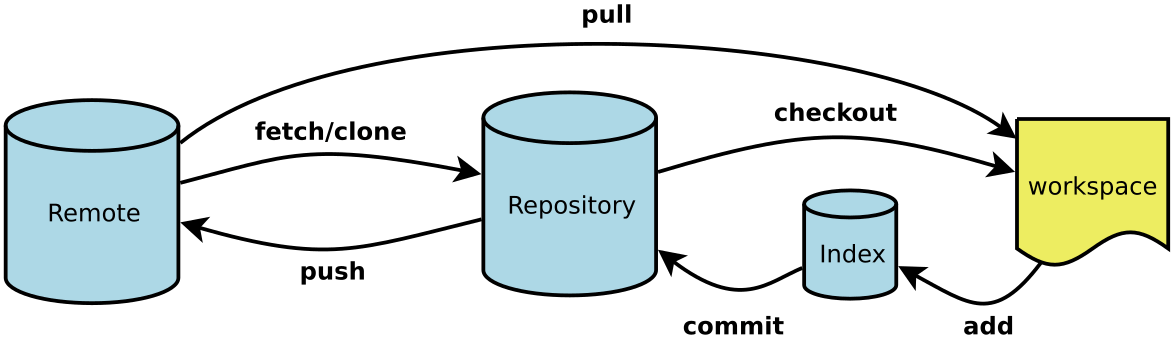
常见问题与解决方案
问题1:git clone 后本地无工程代码
问题描述
执行 git clone [URL] 后,在本地工作区未看到或找不到项目代码。
原因
git clone 仅将远程仓库拉取至本地,但未自动创建和切换至对应的工作分支,因此工作区中不显示文件。
解决方案
拉取远程分支并同时创建本地分支:
bash
# 1. 查看远程仓库信息
git remote
# 2. 拉取指定远程分支并创建对应的本地分支
git checkout -b [本地分支名] [远程仓库名]/[远程分支名]问题2:git pull 或 git merge 时提示文件将被覆盖
报错信息示例
bash
error: Your local changes to the following files would be overwritten by merge:
	.gitignore
	GameServerDev/script/script_server/dbfiles/DECISION_TAB.LOG
Please commit your changes or stash them before you merge.
Aborting
解决方案
方法一:放弃本地修改(不可恢复)
此操作会彻底丢弃所有未提交的更改,请谨慎使用。
bash
git reset --hard说明:
git reset --hard将工作区与暂存区完全回退到上一次提交状态,并清除所有未提交的变更。
方法二:使用 git stash 暂存更改
-
保存当前工作进度:
bashgit stash # 或添加说明信息 git stash save "暂存说明" -
执行拉取或合并操作。
-
恢复暂存的内容:
bashgit stash pop # 恢复并删除栈顶记录 # 或 git stash apply # 恢复但保留栈顶记录 -
相关管理命令:
bashgit stash list # 查看所有暂存记录 git stash clear # 清空所有暂存记录
问题3:git pull 时未指定分支报错
报错信息示例
bash
You asked to pull from the remote 'origin', but did not specify a branch.
Because this is not the default configured remote for your current branch,
you must specify a branch on the command line.
原因
当前本地分支未与远程分支建立跟踪关系。
解决方案
将本地分支与远程分支关联:
bash
git branch --set-upstream-to=[远程仓库名]/[远程分支名] [本地分支名]问题4:Windows 下 Git 中文乱码
解决方案
在 Git Bash 中执行以下命令进行全局配置:
bash
git config --global core.quotepath false
git config --global gui.encoding utf-8
git config --global i18n.commit.encoding utf-8
git config --global i18n.logoutputencoding utf-8
说明:以上设置可解决大部分 Windows 环境下中文文件名和日志内容显示乱码的问题。