介绍
马哈鱼数据血缘分析工具(英文名称为 Gudu SQLFlow )是一款用于分析 SQL 语句,并发现其中数据血缘关系的分析软件,经常和元数据管理工具一起使用,是企业数据治理的基础工具。
而Datahub是一款流式数据处理平台,核心功能是实时收集、存储、处理和分发数据,支持构建实时分析和应用,并且也支持进行数据血缘分析。
本篇文章主要介绍如何将SQLFlow工具产生的血缘导入到Datahub平台中。
一个示例 SQL 语句
我们利用下面这个稍微有点复杂的 SQL 语句来演示如何利用 Gudu SQLFlow 快速获取各种数据血缘关系,如果你有更复杂的 SQL 语句或者存储过程 (stored procedure) 需要处理,那么更需要一个像 Gudu SQLFlow 这样的数据血缘分析工具。
sql
select data.*, location.remote
from (
	select e.last_name, e.department_id, d.department_name
	from employees e
	left outer join department d
		on (e.department_id = d.department_id)
) data inner join
(
	select s.remote,s.department_id
	from source s
	inner join location l
	on s.location_id = l.id
) location on data.department_id = location.department_id;
该 SQL 包含两个子查询:
子查询 1:data
来源表:
- employees
- department
输出字段:
- last_name
- department_id
- department_name
连接方式:
sql
employees LEFT JOIN department
ON employees.department_id = department.department_id
子查询 2:location
来源表:
- source
- location
输出字段:
- remote
- department_id
连接方式:
sql
source INNER JOIN location
ON source.location_id = location.id
最终查询
最终输出表(图中为 RS-1)来源于:
sql
data INNER JOIN location
ON data.department_id = location.department_id
最终字段:
- last_name
- department_id
- department_name
- remote
使用SQLFlow分析血缘
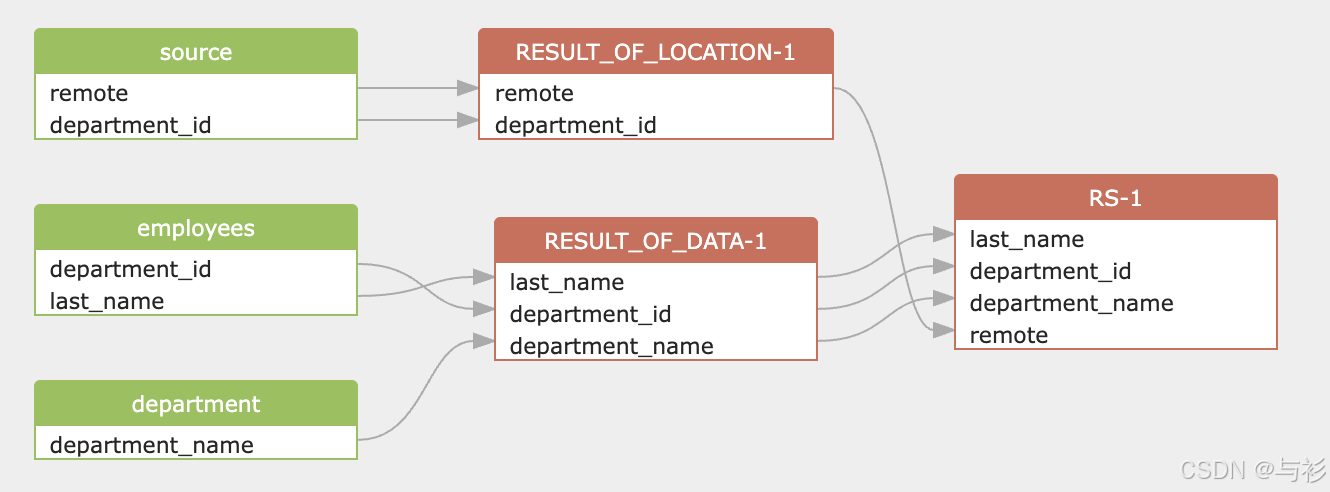
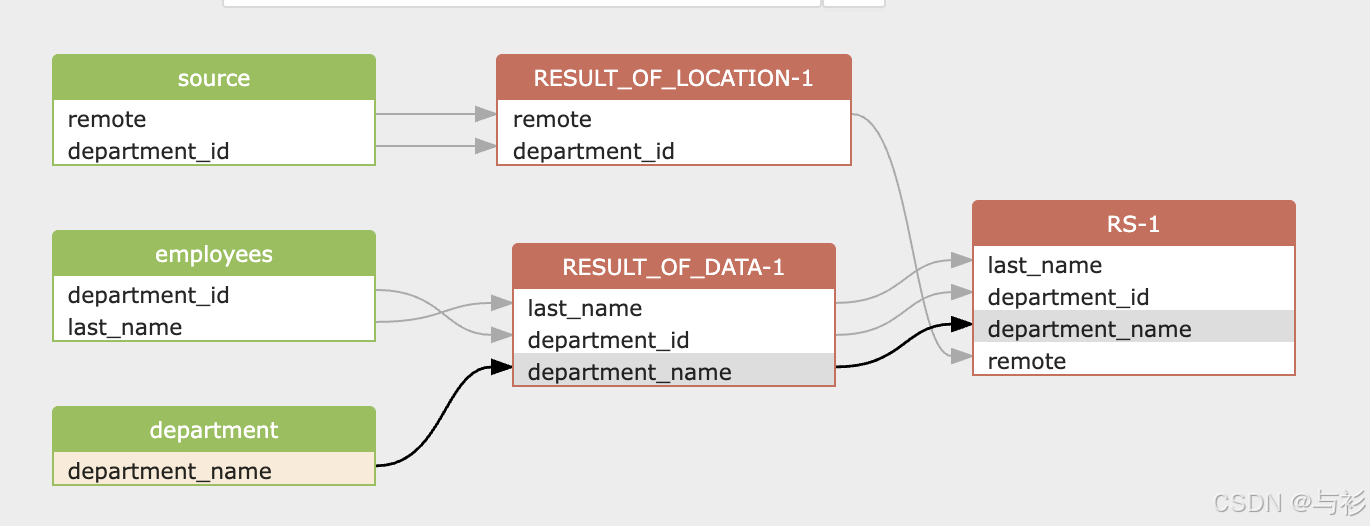
我们的目标是需要知道顶层的 select list 中包含哪些字段(column),并且这些字段的源数据来自其它哪些表和字段。SQLFLow分析的血缘结果如图:
表级血缘关系
从图中可以看出,最终结果表 RS-1 的上游来源共有四张表:
- employees
- department
- source
- location
血缘路径如下:
employees ──┐
             ├── RESULT_OF_DATA-1 ──┐
department ─┘                       │
                                     ├── RS-1
source ─────┐                        │
             ├── RESULT_OF_LOCATION-1┘
location ────┘
说明:
- employees 和 department 共同生成中间结果 RESULT_OF_DATA-1
- source 和 location 共同生成中间结果 RESULT_OF_LOCATION-1
- 两个中间结果通过 department_id 再次关联,生成最终表 RS-1
字段级血缘关系
根据血缘图,可以明确每个字段的来源。
1️⃣ last_name
来源路径:
employees.last_name → RESULT_OF_DATA-1.last_name → RS-1.last_name最终字段来源于 employees 表。
2️⃣ department_id
该字段有两条来源路径:
employees.department_id
source.department_id
血缘关系:
employees.department_id → RESULT_OF_DATA-1.department_id
source.department_id → RESULT_OF_LOCATION-1.department_id
最终在 RS-1 中作为 join 条件字段存在。
3️⃣ department_name
来源路径:
department.department_name → RESULT_OF_DATA-1.department_name → RS-1.department_name最终来源于 department 表。
4️⃣ remote
来源路径:
source.remote → RESULT_OF_LOCATION-1.remote → RS-1.remote最终来源于 source 表。
血缘特征总结
该 SQL 的血缘特点:
- 存在两个独立子查询
- 每个子查询内部有 Join
- 子查询结果再次 Join
- 存在字段透传(data.*)
- 存在跨层级字段传递
血缘图完整体现了:
- 表级依赖关系
- 字段级来源路径
- 多层 Join 结构
- 中间结果节点
将SQLFLow血缘导入Datahub
-
先将SQLFLow的血缘导出到本地:
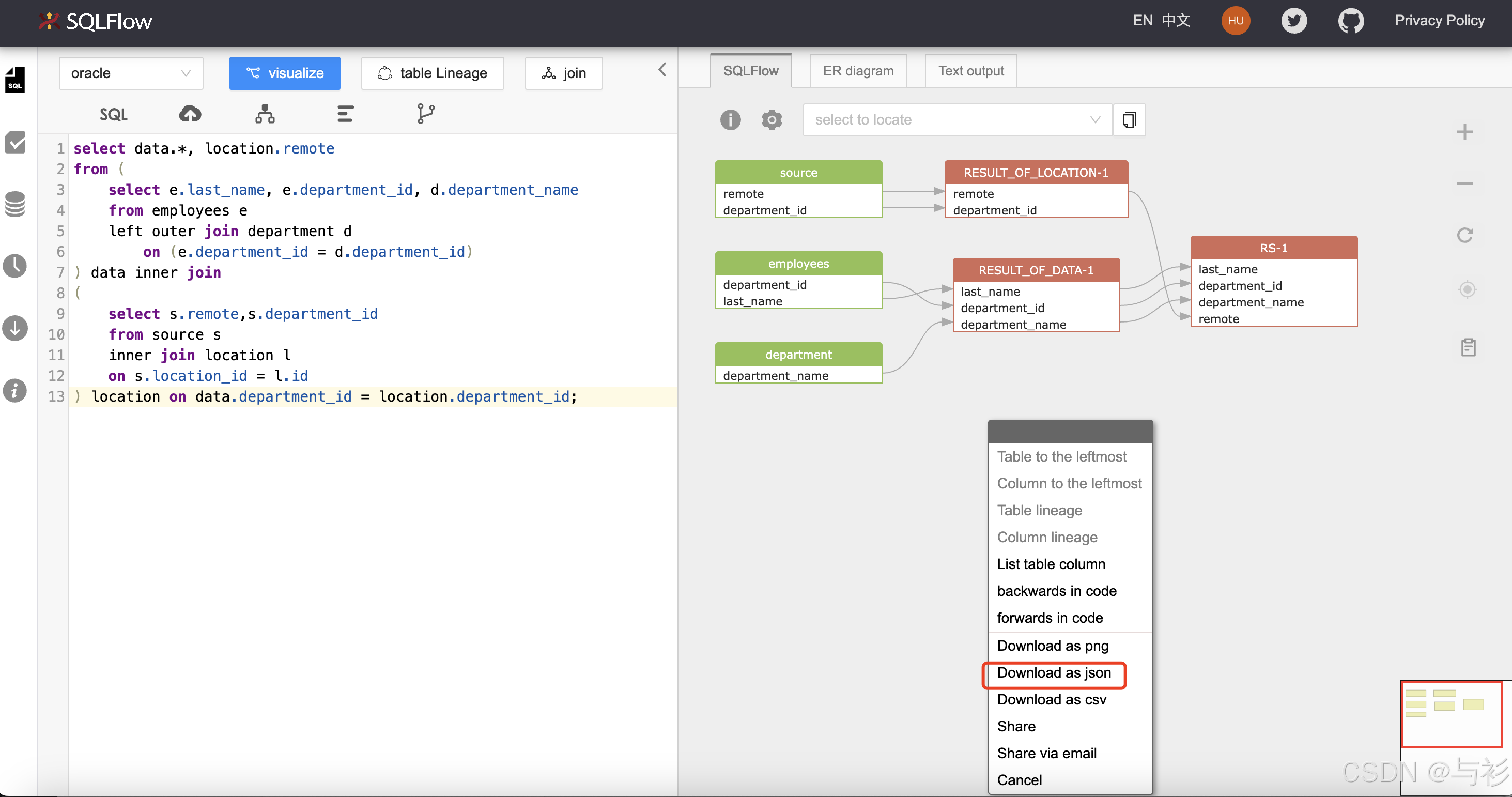
导出后的文件例如:
oracle_1771415869013.json -
使用下面的脚本导入血缘:
py
import json
import sys

from datahub.emitter.rest_emitter import DatahubRestEmitter
from datahub.metadata.schema_classes import (
    UpstreamLineageClass,
    UpstreamClass,
    DatasetPropertiesClass,
    ChangeTypeClass,
)
from datahub.emitter.mcp import MetadataChangeProposalWrapper

emitter = DatahubRestEmitter("http://localhost:8080")


def build_dataset_urn(table_name):
    table_name = table_name.lower()
    return f"urn:li:dataset:(urn:li:dataPlatform:oracle,{table_name},PROD)"


def main(file_path):
    with open(file_path, "r") as f:
        data = json.load(f)

    relationships = data["data"]["sqlflow"]["relationships"]

    created_tables = set()

    for rel in relationships:
        target_table = rel["target"]["parentName"]

        for src in rel["sources"]:
            source_table = src["parentName"]

            source_urn = build_dataset_urn(source_table)
            target_urn = build_dataset_urn(target_table)

            # 1️⃣ 创建 source dataset(避免页面不显示)
            if source_table not in created_tables:
                mcp_source = MetadataChangeProposalWrapper(
                    entityUrn=source_urn,
                    entityType="dataset",
                    aspect=DatasetPropertiesClass(
                        description="Imported from sqlflow"
                    ),
                    aspectName="datasetProperties",
                    changeType=ChangeTypeClass.UPSERT,
                )
                emitter.emit(mcp_source)
                created_tables.add(source_table)

            # 2️⃣ 创建 target dataset
            if target_table not in created_tables:
                mcp_target = MetadataChangeProposalWrapper(
                    entityUrn=target_urn,
                    entityType="dataset",
                    aspect=DatasetPropertiesClass(
                        description="Imported from sqlflow"
                    ),
                    aspectName="datasetProperties",
                    changeType=ChangeTypeClass.UPSERT,
                )
                emitter.emit(mcp_target)
                created_tables.add(target_table)

            # 3️⃣ 建立血缘(source -> target)
            lineage = UpstreamLineageClass(
                upstreams=[
                    UpstreamClass(
                        dataset=source_urn,
                        type="TRANSFORMED",
                    )
                ]
            )

            mcp_lineage = MetadataChangeProposalWrapper(
                entityUrn=target_urn,
                entityType="dataset",
                aspect=lineage,
                aspectName="upstreamLineage",
                changeType=ChangeTypeClass.UPSERT,
            )

            emitter.emit(mcp_lineage)

    print("Lineage uploaded successfully!")


if __name__ == "__main__":
    main(sys.argv[1])
执行命令:
sh
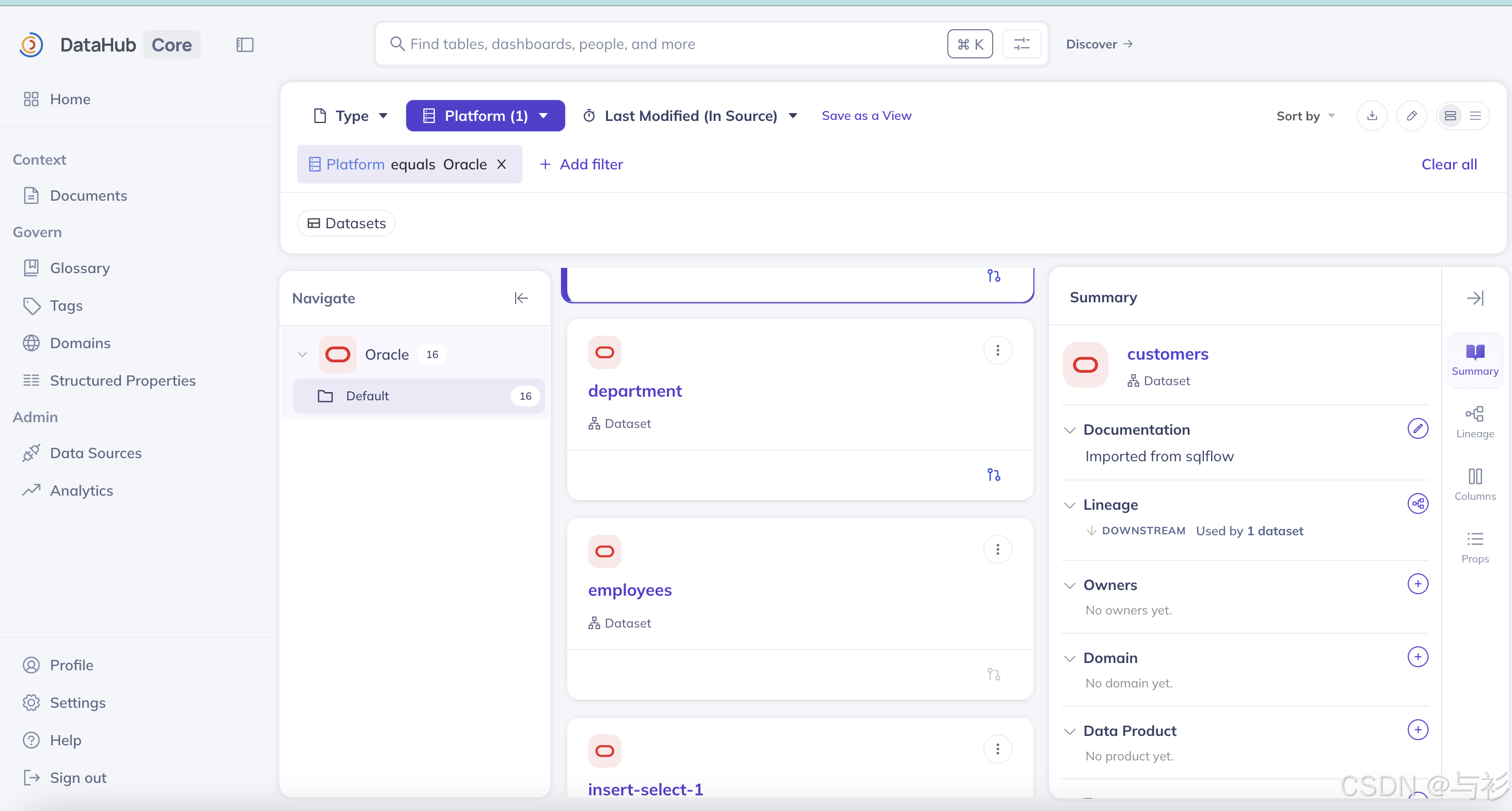
python convert.py oracle_1771415869013.json导入成功后,在datahub页面中可以看到如下的结果:
其中,例如 department 字段的表级别血缘结果如下:
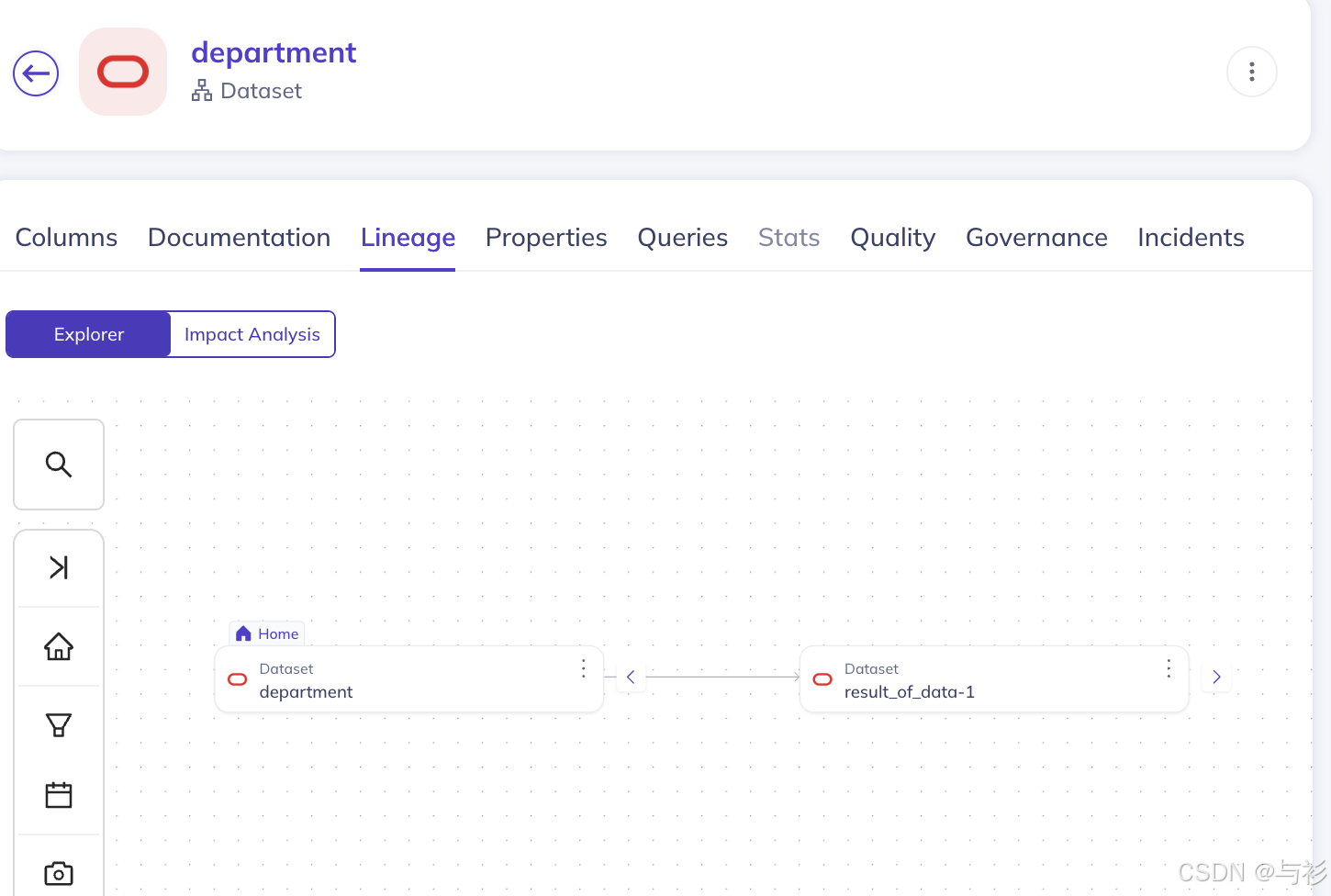
和SQLFlow的表级别血缘一致:
总结我们可以在SQLFlow中分析详细的到字段级别的血缘,也可以将SQLFlow分析的结果导入到Datahub中查看表级别的血缘。
参考
马哈鱼数据血缘关系分析工具中文网站: https://www.sqlflow.cn
马哈鱼数据血缘关系分析工具英文网站: https://docs.gudusoft.com
马哈鱼数据血缘关系分析工具在线使用: https://sqlflow.gudusoft.com