前言
欢迎加入开源鸿蒙跨平台社区:https://openharmonycrossplatform.csdn.net
开发插件的过程中,最头疼的不是写代码,而是出了问题不知道哪里错了。MethodChannel 通信跨越了 Dart 和 ArkTS 两个运行时,一个方法调用可能在任何一层出问题。这篇分享我在适配 secure_application 过程中积累的调试技巧和排查经验。
一、日志规范与 TAG 管理
1.1 TAG 定义
typescript
const TAG = "SecureApplicationPlugin";所有日志都带 TAG 前缀,方便在海量日志中过滤。
1.2 Log 级别使用规范
typescript
// 信息日志:正常流程的关键节点
Log.i(TAG, "Got main window successfully");
Log.i(TAG, "Window privacy mode set to: " + isPrivacy);
Log.i(TAG, "Lifecycle callback registered");

// 错误日志:异常和失败
Log.e(TAG, "Failed to get main window: " + JSON.stringify(err));
Log.e(TAG, "Failed to set window privacy mode: " + JSON.stringify(err));| 级别 | 方法 | 用途 | 示例 |
|---|---|---|---|
| Info | Log.i |
正常流程节点 | 窗口获取成功、隐私模式设置成功 |
| Error | Log.e |
异常和失败 | API 调用失败、参数解析错误 |
| Debug | Log.d |
详细调试信息 | 方法调用参数、状态变化 |
| Warn | Log.w |
潜在问题 | 空值降级、重试操作 |
1.3 关键日志点
typescript
// 插件生命周期
Log.i(TAG, "Plugin attached to engine");
Log.i(TAG, "Plugin detached from engine");

// 窗口管理
Log.i(TAG, "Got main window successfully");
Log.i(TAG, "Window event callback registered");
Log.i(TAG, "Window event callback unregistered");

// 隐私模式
Log.i(TAG, "Window privacy mode set to: " + isPrivacy);

// 生命周期回调
Log.i(TAG, "Application came to foreground");
Log.i(TAG, "Application went to background");
Log.i(TAG, "Window became inactive");

// 方法调用
Log.i(TAG, "onMethodCall: " + call.method);
📌 建议:在开发阶段多加日志,发布前可以移除 Debug 级别的日志,保留 Info 和 Error 级别。
二、DevEco Studio 日志查看
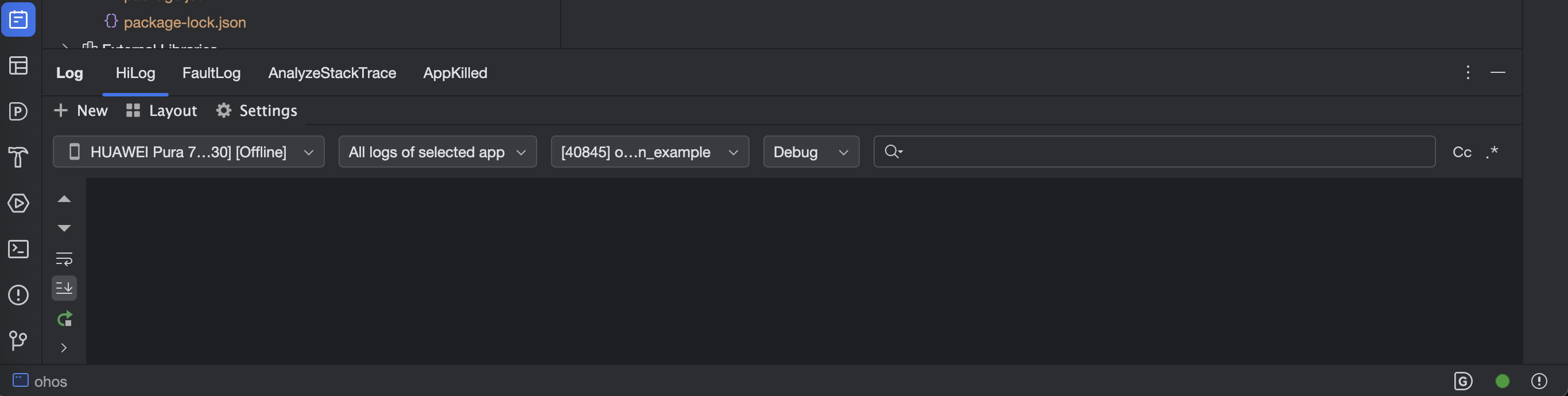
2.1 HiLog 面板
DevEco Studio 内置了 HiLog 面板,类似 Android Studio 的 Logcat:
- 打开 DevEco Studio
- 底部工具栏 → HiLog
- 在搜索框输入
SecureApplicationPlugin - 选择日志级别过滤
2.2 过滤技巧
| 过滤方式 | 语法 | 示例 |
|---|---|---|
| TAG 过滤 | 直接输入 TAG | SecureApplicationPlugin |
| 级别过滤 | 选择下拉菜单 | Info / Error / Debug |
| 关键词过滤 | 输入关键词 | privacy mode |
| 正则过滤 | 使用正则表达式 | Window.*failed |
2.3 常用过滤组合
# 只看 secure_application 的日志
TAG: SecureApplicationPlugin

# 只看错误
TAG: SecureApplicationPlugin + Level: Error

# 看 MethodChannel 通信
TAG: SecureApplicationPlugin + 关键词: onMethodCall

# 看窗口事件
TAG: SecureApplicationPlugin + 关键词: Window
三、hdc hilog 命令行日志
3.1 基本用法
bash
# 实时查看所有日志
hdc hilog

# 过滤 TAG
hdc hilog | grep SecureApplicationPlugin

# 只看错误
hdc hilog | grep "SecureApplicationPlugin" | grep -i "error\|fail"

# 保存到文件
hdc hilog | grep SecureApplicationPlugin > secure_app_log.txt
3.2 高级过滤
bash
# 同时看 Flutter 和插件日志
hdc hilog | grep -E "SecureApplicationPlugin|flutter"

# 看 MethodChannel 通信(两端)
hdc hilog | grep -E "SecureApplicationPlugin|MethodChannel"

# 带时间戳过滤
hdc hilog -T "2024-01-15 10:00:00" | grep SecureApplicationPlugin
3.3 清除日志缓冲
bash
# 清除旧日志,从头开始
hdc hilog -r
hdc hilog | grep SecureApplicationPlugin
四、MethodChannel 通信调试
4.1 在原生端添加方法调用日志
typescript
onMethodCall(call: MethodCall, result: MethodResult): void {
  Log.i(TAG, "onMethodCall: method=" + call.method + ", args=" + JSON.stringify(call.args));

  switch (call.method) {
    case "secure":
      Log.i(TAG, "Processing secure command");
      // ...
      Log.i(TAG, "Secure command completed");
      break;
    // ...
  }
}
4.2 在 Dart 端添加调用日志
dart
class SecureApplicationNative {
  static Future secure() {
    print('[SecureApp] Dart → Native: secure');
    return _channel.invokeMethod('secure');
  }

  static Future open() {
    print('[SecureApp] Dart → Native: open');
    return _channel.invokeMethod('open');
  }
}
4.3 通信断点调试
在 DevEco Studio 中可以在 ArkTS 代码中设置断点:
- 打开
SecureApplicationPlugin.ets - 在
onMethodCall的 switch 语句处设置断点 - 从 Dart 层触发方法调用
- 断点命中后检查
call.method和call.args
⚠️ 注意:ArkTS 断点调试和 Flutter 的 Dart 断点调试不能同时使用。需要分别调试。
五、常见问题排查
5.1 问题一:隐私模式不生效
症状:调用 secure() 后截屏仍然正常
排查步骤:
bash
# 1. 检查方法是否被调用
hdc hilog | grep "onMethodCall.*secure"

# 2. 检查隐私模式是否设置成功
hdc hilog | grep "Window privacy mode"

# 3. 检查窗口是否获取成功
hdc hilog | grep "Got main window"

# 4. 检查是否有错误
hdc hilog | grep "SecureApplicationPlugin" | grep -i "fail\|error"| 日志结果 | 问题定位 | 解决方案 |
|---|---|---|
| 没有 onMethodCall 日志 | MethodChannel 未连接 | 检查通道名称是否一致 |
| 有 onMethodCall 但没有 privacy mode | setPrivacyMode 未执行 | 检查 mainWindow 是否为 null |
| 有 privacy mode 但有 error | API 调用失败 | 检查错误码 |
| 所有日志正常 | 可能是设备不支持 | 检查 API 版本 |
5.2 问题二:锁定不触发
症状:切后台后没有显示模糊遮罩
排查步骤:
bash
# 1. 检查窗口事件是否触发
hdc hilog | grep "Window became inactive"

# 2. 检查生命周期回调是否触发
hdc hilog | grep "Application went to background"

# 3. 检查 secured 状态
hdc hilog | grep "Processing secure command"| 日志结果 | 问题定位 | 解决方案 |
|---|---|---|
| 没有 inactive 日志 | 窗口事件未注册 | 检查 registerWindowEventCallback |
| 有 inactive 但没有 lock | this.secured 为 false | 确认调用了 secure() |
| 有 lock 通知 | Dart 层问题 | 检查 Dart 层的 lockIfSecured |
5.3 问题三:遮罩不显示
症状:锁定状态但看不到模糊遮罩
排查步骤:
dart
// 在 SecureGate 中添加调试日志
void _sercureNotified() {
  print('[SecureGate] locked=${_secureApplicationController!.locked}');
  if (_lock == false && _secureApplicationController!.locked == true) {
    print('[SecureGate] Showing blur overlay');
    _lock = true;
    _gateVisibility.value = 1;
  }
}| 问题 | 原因 | 解决 |
|---|---|---|
| SecureGate 没有被包裹 | Widget 树结构问题 | 确认 SecureGate 在 SecureApplication 内部 |
| blurr=0 | 模糊强度为0 | 调高 blurr 值 |
| opacity=0 | 完全透明 | 调高 opacity 值 |
| Controller 未连接 | Provider 查找失败 | 确认 SecureApplicationProvider 在上层 |
5.4 问题四:热重载后行为异常
症状:热重载后回调重复触发或不触发
排查步骤:
bash
# 检查是否有重复的注册日志
hdc hilog | grep "callback registered"

# 预期:每次热重载后只有一组注册日志
# 异常:多组注册日志(说明旧回调没有注销)
解决 :确认 onDetachedFromEngine 正确注销了所有回调。
六、调试工具推荐
6.1 Flutter DevTools
bash
# 启动 DevTools
flutter run -d ohos_device --observatory-port=8888
# 在浏览器打开 DevTools URL| 功能 | 用途 |
|---|---|
| Widget Inspector | 检查 SecureGate 的 Widget 树 |
| Timeline | 查看动画帧率 |
| Memory | 检查内存泄漏 |
| Logging | 查看 Dart 层日志 |
6.2 DevEco Studio Profiler
| 功能 | 用途 |
|---|---|
| CPU Profiler | 检查原生端 CPU 使用 |
| Memory Profiler | 检查原生端内存 |
| HiLog | 查看系统日志 |
6.3 自定义调试工具
dart
// 添加一个调试面板
class SecureDebugPanel extends StatelessWidget {
  @override
  Widget build(BuildContext context) {
    final controller = SecureApplicationProvider.of(context);
    return Column(
      children: [
        Text('secured: ${controller?.secured}'),
        Text('locked: ${controller?.locked}'),
        Text('paused: ${controller?.paused}'),
        Text('authenticated: ${controller?.authenticated}'),
      ],
    );
  }
}
七、排查检查清单
7.1 通用检查清单
- 通道名称 "secure_application" 两端一致
- pubspec.yaml 中 ohos 平台已声明
- oh-package.json5 中 name 正确
- index.ets 导出路径正确
- 设备 API 版本 >= 20
- hdc 连接正常
7.2 隐私模式检查清单
- getMainWindow 成功(日志确认)
- setWindowPrivacyMode 成功(日志确认)
- secure() 被调用(日志确认)
- 无错误日志
7.3 锁定功能检查清单
- 窗口事件回调已注册(日志确认)
- 生命周期回调已注册(日志确认)
- secured 状态为 true
- channel 不为 null
- Dart 层收到 lock 通知
总结
本文分享了 secure_application 适配过程中的调试技巧:
- 日志规范:TAG 统一、级别分明、关键节点全覆盖
- HiLog 过滤:DevEco Studio 面板 + hdc 命令行
- MethodChannel 调试:两端加日志、断点调试
- 四个常见问题:隐私模式不生效、锁定不触发、遮罩不显示、热重载异常
- 排查检查清单:通用、隐私模式、锁定功能三个维度
下一篇我们讲性能影响与优化策略------BackdropFilter 的 GPU 开销和窗口事件的频率控制。
如果这篇文章对你有帮助,欢迎点赞👍、收藏⭐、关注🔔,你的支持是我持续创作的动力!
相关资源:
- HiLog 使用指南
- hdc 工具文档
- Flutter DevTools
- DevEco Studio 调试指南
- secure_application OpenHarmony 源码
- ArkTS 调试技巧
- Flutter 日志最佳实践
- 开源鸿蒙跨平台社区
DevEco Studio HiLog 日志面板