文章目录
-
- [一、onTouchIntercept 核心概念](#一、onTouchIntercept 核心概念)
-
- [1.1 触摸事件分发流程](#1.1 触摸事件分发流程)
- [1.2 API 定义](#1.2 API 定义)
- [1.3 HitTestMode 枚举详解](#1.3 HitTestMode 枚举详解)
- [1.4 四种模式对比速查](#1.4 四种模式对比速查)
- [1.5 使用限制速查](#1.5 使用限制速查)
- 二、基础用法:四种模式演示
-
- [2.1 Default ------ 默认行为](#2.1 Default —— 默认行为)
- [2.2 Block ------ 拦截模式](#2.2 Block —— 拦截模式)
- [2.3 Transparent ------ 透明穿透](#2.3 Transparent —— 透明穿透)
- [2.4 None ------ 完全禁用](#2.4 None —— 完全禁用)
- 三、可运行完整示例:四模式交互对比
-
- [3.1 功能说明](#3.1 功能说明)
- 四、进阶:基于坐标的动态分区拦截
-
- [4.1 左右分区拦截](#4.1 左右分区拦截)
- [4.2 圆形有效区域(不规则形状)](#4.2 圆形有效区域(不规则形状))
- 五、实战场景:多层叠加透明穿透
-
- [5.1 场景说明](#5.1 场景说明)
- 六、综合实战:四场景触摸拦截演示页面
-
- [6.1 功能说明](#6.1 功能说明)
- [6.2 完整可运行代码](#6.2 完整可运行代码)
- 总结
一、onTouchIntercept 核心概念
1.1 触摸事件分发流程
理解 onTouchIntercept 之前,需要先了解 ArkUI 触摸事件的分发流程:
用户手指触碰屏幕
       ↓
  HitTest 命中测试(从根节点向叶节点遍历)
       ↓
  onTouchIntercept 回调触发(API 12+)
  ↓(返回 HitTestMode)
  Default  → 自身响应,子组件继续测试
  Block    → 自身拦截,子组件不再接收
  Transparent → 跳过自身,子组件正常测试
  None     → 自身和子组件均不参与
       ↓
  确定事件消费组件
       ↓
  onTouch / onClick / 手势回调触发
1.2 API 定义
onTouchIntercept 是 ArkUI 组件通用属性(Universal Attribute),可链式调用在任意组件上:
typescript
// 接口签名
onTouchIntercept(callback: (event: TouchEvent) => HitTestMode): T| 参数 | 类型 | 说明 |
|---|---|---|
callback |
(event: TouchEvent) => HitTestMode |
触摸命中测试前的拦截回调,必须同步返回 HitTestMode |
| 返回值 | 当前组件实例 T |
支持链式调用 |
版本说明 :
onTouchIntercept从 API version 12 开始支持;在attributeModifier中调用需 API version 20。
1.3 HitTestMode 枚举详解
HitTestMode 是 onTouchIntercept 回调的返回值类型,共四种模式:
| 枚举值 | 数值 | 含义 | 子组件是否受影响 |
|---|---|---|---|
HitTestMode.Default |
0 | 默认:组件自身可响应,子组件正常参与命中测试 | 不受影响(正常) |
HitTestMode.Block |
1 | 拦截 :组件自身响应,且阻止子组件参与命中测试 | 子组件不可响应 |
HitTestMode.Transparent |
2 | 透明 :组件自身不响应,子组件正常参与命中测试 | 不受影响(正常) |
HitTestMode.None |
3 | 禁用 :组件自身和子组件均不响应 | 子组件也不响应 |
核心区别 :
DefaultvsBlock的差异在于子组件是否受阻 ;TransparentvsNone的差异在于子组件是否仍可响应。
1.4 四种模式对比速查
触点
  │
  ▼ 命中 Column(绑定了 onTouchIntercept)

  返回 Default    → ✅ Column 自身响应  ✅ 子组件正常响应
  返回 Block      → ✅ Column 自身响应  ❌ 子组件不响应
  返回 Transparent→ ❌ Column 自身不响应 ✅ 子组件正常响应
  返回 None       → ❌ Column 自身不响应 ❌ 子组件不响应
1.5 使用限制速查
| 限制项 | 说明 |
|---|---|
| 必须同步返回 | 回调必须同步 返回 HitTestMode,禁止异步操作,否则按 Default 处理 |
| 避免耗时操作 | 回调在 HitTest 阶段执行,耗时会导致触摸响应延迟/卡顿 |
| 版本要求 | API 12+;attributeModifier 中使用需 API 20+ |
| 事件流顺序 | 与高阶手势(拖拽、多指)同用时需注意事件流顺序,避免互相干扰 |
二、基础用法:四种模式演示
2.1 Default ------ 默认行为
typescript
// Default:自身可响应,子组件也可响应(正常行为)
Column() {
  Text('子组件(可点击)')
    .onClick(() => console.info('子组件点击'))
}
.backgroundColor('#E3F2FD')
.onTouchIntercept((event: TouchEvent) => {
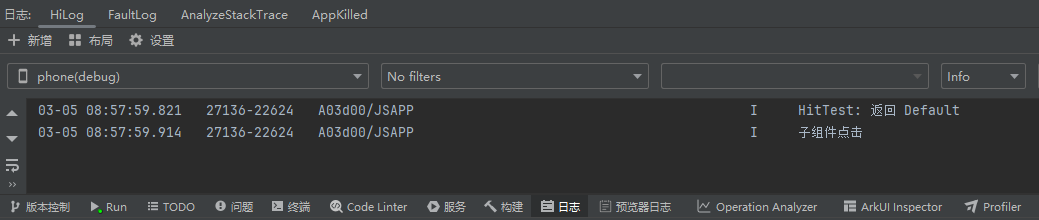
  console.info('HitTest: 返回 Default')
  return HitTestMode.Default  // 自身和子组件均正常
})
.onClick(() => console.info('Column 点击'))
运行效果如图,当点击组件控制台打印:
2.2 Block ------ 拦截模式
typescript
// Block:Column 拦截,子组件 Text 点击失效
Column() {
  Text('子组件(被拦截,点击无效)')
    .onClick(() => console.info('这行不会触发'))
}
.backgroundColor('#FFEBEE')
.onTouchIntercept((event: TouchEvent) => {
  console.info('HitTest: 返回 Block,子组件被拦截')
  return HitTestMode.Block  // 拦截,子组件不可响应
})
.onClick(() => console.info('Column 拦截了所有触摸'))
当点击元素,控制台打印:

2.3 Transparent ------ 透明穿透
typescript
// Transparent:Column 自身不响应,子组件正常响应
Column() {
  Text('子组件(可点击,Column 透明)')
    .onClick(() => console.info('子组件正常触发'))
}
.backgroundColor('#E8F5E9')
.onTouchIntercept((event: TouchEvent) => {
  console.info('HitTest: 返回 Transparent,Column 透明')
  return HitTestMode.Transparent  // 自身透明,子组件正常
})
.onClick(() => console.info('这行不会触发'))
点击组件,控制台输出如图所示:

2.4 None ------ 完全禁用
typescript
// None:Column 和子组件全部不响应
Column() {
  Text('子组件(也无法点击)')
    .onClick(() => console.info('不会触发'))
}
.backgroundColor('#FFF9C4')
.onTouchIntercept((event: TouchEvent) => {
  console.info('HitTest: 返回 None,全部禁用')
  return HitTestMode.None  // 自身和子组件均不响应
})
.onClick(() => console.info('不会触发'))
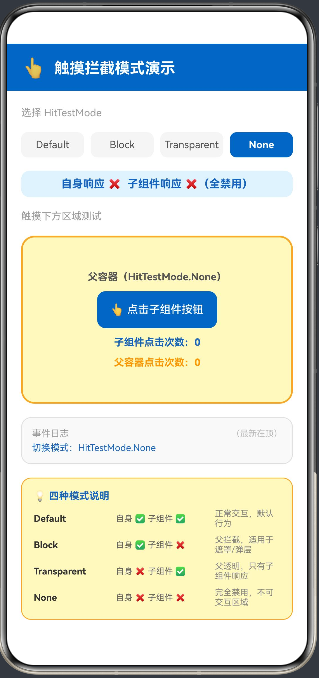
三、可运行完整示例:四模式交互对比
3.1 功能说明
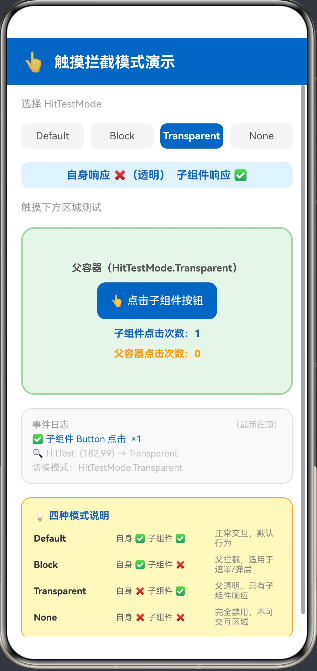
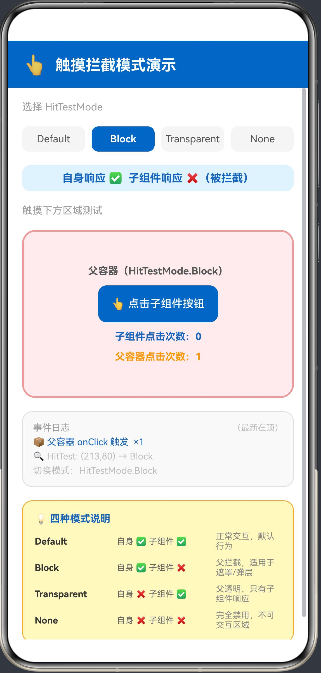
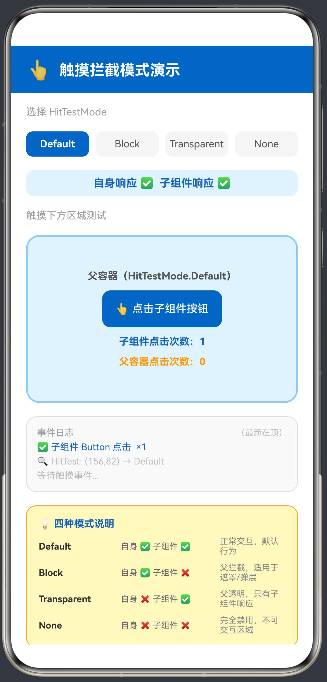
以下示例提供四个可切换的演示卡片,分别展示 HitTestMode 四种模式的实际效果,并实时记录事件触发日志:
typescript
// entry/src/main/ets/pages/Index.ets
@Entry
@Component
struct HitTestModeDemo {
  @State selectedMode: number = 0  // 0=Default, 1=Block, 2=Transparent, 3=None
  @State eventLog: string[] = ['等待触摸事件...']
  @State parentClickCount: number = 0
  @State childClickCount: number = 0

  private modeNames: string[] = ['Default', 'Block', 'Transparent', 'None']
  private modeColors: string[] = ['#E3F2FD', '#FFEBEE', '#E8F5E9', '#FFF9C4']
  private modeBorderColors: string[] = ['#90CAF9', '#EF9A9A', '#A5D6A7', '#F9A825']
  private modeDescriptions: string[] = [
    '自身响应 ✅  子组件响应 ✅',
    '自身响应 ✅  子组件响应 ❌(被拦截)',
    '自身响应 ❌(透明)  子组件响应 ✅',
    '自身响应 ❌  子组件响应 ❌(全禁用)'
  ]

  private getHitMode(): HitTestMode {
    switch (this.selectedMode) {
      case 0: return HitTestMode.Default
      case 1: return HitTestMode.Block
      case 2: return HitTestMode.Transparent
      case 3: return HitTestMode.None
      default: return HitTestMode.Default
    }
  }

  private appendLog(msg: string): void {
    this.eventLog = [msg, ...this.eventLog.slice(0, 9)]
  }

  build() {
    Column({ space: 0 }) {
      // 标题栏
      Row({ space: 10 }) {
        Text('👆').fontSize(22)
        Text('触摸拦截模式演示').fontSize(18).fontWeight(FontWeight.Bold).fontColor(Color.White)
      }
      .width('100%').padding({ left: 20, right: 20, top: 16, bottom: 14 })
      .backgroundColor('#1565C0').justifyContent(FlexAlign.Start)

      Scroll() {
        Column({ space: 16 }) {
          // 模式选择
          Text('选择 HitTestMode').fontSize(12).fontColor('#9E9E9E').width('90%').margin({ top: 16 })
          Row({ space: 8 }) {
            ForEach(this.modeNames, (name: string, idx: number) => {
              Text(name)
                .fontSize(12).layoutWeight(1).textAlign(TextAlign.Center)
                .padding({ top: 8, bottom: 8 })
                .backgroundColor(this.selectedMode === idx ? '#1565C0' : '#F5F5F5')
                .fontColor(this.selectedMode === idx ? Color.White : '#555555')
                .fontWeight(this.selectedMode === idx ? FontWeight.Bold : FontWeight.Normal)
                .borderRadius(8)
                .animation({ duration: 150, curve: Curve.EaseOut })
                .onClick(() => {
                  this.selectedMode = idx
                  this.parentClickCount = 0
                  this.childClickCount = 0
                  this.eventLog = [`切换模式:HitTestMode.${name}`]
                })
            })
          }.width('90%')

          // 当前模式说明
          Text(this.modeDescriptions[this.selectedMode])
            .fontSize(13).fontColor('#1565C0').fontWeight(FontWeight.Bold)
            .width('90%').textAlign(TextAlign.Center)
            .padding({ top: 8, bottom: 8, left: 12, right: 12 })
            .backgroundColor('#E3F2FD').borderRadius(10)

          // 演示区
          Text('触摸下方区域测试').fontSize(12).fontColor('#9E9E9E').width('90%')

          // 父容器(绑定 onTouchIntercept)
          Stack({ alignContent: Alignment.Center }) {
            Column({ space: 0 }) {}
              .width('100%').height('100%')
              .backgroundColor(this.modeColors[this.selectedMode])
              .borderRadius(16)
              .border({ width: 2, color: this.modeBorderColors[this.selectedMode], style: BorderStyle.Solid })
              .animation({ duration: 200, curve: Curve.EaseOut })

            Column({ space: 10 }) {
              Text(`父容器(HitTestMode.${this.modeNames[this.selectedMode]})`)
                .fontSize(12).fontColor('#555555').fontWeight(FontWeight.Bold)

              // 子组件(Button)
              Button('👆 点击子组件按钮')
                .height(44).fontSize(13).borderRadius(10)
                .backgroundColor('#1565C0').fontColor(Color.White)
                .onClick(() => {
                  this.childClickCount++
                  this.appendLog(`✅ 子组件 Button 点击  ×${this.childClickCount}`)
                })

              Text(`子组件点击次数:${this.childClickCount}`)
                .fontSize(12).fontColor('#1565C0').fontWeight(FontWeight.Bold)
              Text(`父容器点击次数:${this.parentClickCount}`)
                .fontSize(12).fontColor('#FF9800').fontWeight(FontWeight.Bold)
            }
            .justifyContent(FlexAlign.Center)
          }
          .width('90%').height(200)
          .onTouchIntercept((event: TouchEvent) => {
            const x = event.touches[0]?.x ?? 0
            const y = event.touches[0]?.y ?? 0
            this.appendLog(`🔍 HitTest: (${x.toFixed(0)},${y.toFixed(0)}) → ${this.modeNames[this.selectedMode]}`)
            return this.getHitMode()
          })
          .onClick(() => {
            this.parentClickCount++
            this.appendLog(`📦 父容器 onClick 触发  ×${this.parentClickCount}`)
          })

          // 事件日志
          Column({ space: 4 }) {
            Row() {
              Text('事件日志').fontSize(11).fontColor('#9E9E9E').layoutWeight(1)
              Text('(最新在顶)').fontSize(10).fontColor('#BDBDBD')
            }.width('100%')
            ForEach(this.eventLog, (item: string, idx: number) => {
              Text(item)
                .fontSize(11).fontColor(idx === 0 ? '#1565C0' : '#BDBDBD').width('100%')
            })
          }
          .width('90%').padding(12).backgroundColor('#F9F9F9').borderRadius(12)
          .border({ width: 1, color: '#E0E0E0', style: BorderStyle.Solid })
          .alignItems(HorizontalAlign.Start)

          // 模式说明卡片
          Column({ space: 8 }) {
            Text('💡 四种模式说明').fontSize(12).fontWeight(FontWeight.Bold).fontColor('#1565C0')
            ForEach([
              ['Default', '自身 ✅ 子组件 ✅', '正常交互,默认行为'],
              ['Block', '自身 ✅ 子组件 ❌', '父拦截,适用于遮罩/弹层'],
              ['Transparent', '自身 ❌ 子组件 ✅', '父透明,只有子组件响应'],
              ['None', '自身 ❌ 子组件 ❌', '完全禁用,不可交互区域'],
            ], (row: string[]) => {
              Row({ space: 8 }) {
                Text(row[0]).fontSize(11).fontWeight(FontWeight.Bold).fontColor('#333333').width(90)
                Text(row[1]).fontSize(10).fontColor('#666666').width(110)
                Text(row[2]).fontSize(10).fontColor('#888888').layoutWeight(1)
              }.width('100%')
            })
          }
          .width('90%').padding(14).backgroundColor('#FFF9C4').borderRadius(12)
          .border({ width: 1, color: '#F9A825', style: BorderStyle.Solid })
          .alignItems(HorizontalAlign.Start)
        }
        .width('100%').alignItems(HorizontalAlign.Center).padding({ bottom: 24 })
      }
      .layoutWeight(1).width('100%')
    }
    .width('100%').height('100%').backgroundColor(Color.White)
  }
}
运行效果如图:
四、进阶:基于坐标的动态分区拦截
4.1 左右分区拦截
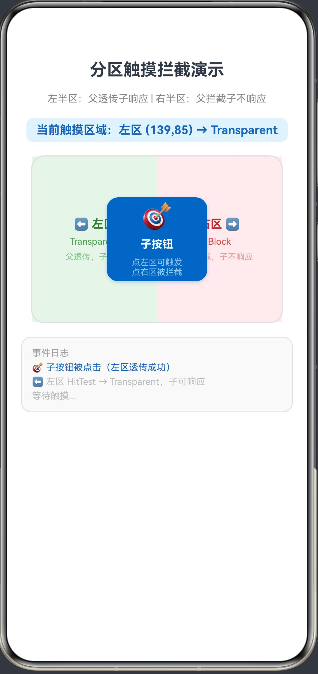
onTouchIntercept 最强大的能力是按触点坐标动态返回不同模式,实现不规则交互区域:
typescript
// entry/src/main/ets/pages/Index.ets
@Entry
@Component
struct ZonedInterceptDemo {
  @State log: string[] = ['等待触摸...']
  @State touchZone: string = '---'

  private appendLog(msg: string): void {
    this.log = [msg, ...this.log.slice(0, 9)]
  }

  build() {
    Column({ space: 16 }) {
      Text('分区触摸拦截演示').fontSize(20).fontWeight(FontWeight.Bold).margin({ top: 24 })
      Text('左半区:父透传子响应 | 右半区:父拦截子不响应').fontSize(12).fontColor('#888888')

      Text(`当前触摸区域:${this.touchZone}`).fontSize(14).fontColor('#1565C0').fontWeight(FontWeight.Bold)
        .padding({ left: 12, right: 12, top: 6, bottom: 6 })
        .backgroundColor('#E3F2FD').borderRadius(8)

      // 主演示容器(宽度 300vp,触点 x<150 为左区,x>=150 为右区)
      Stack() {
        // 左侧背景色
        Row() {
          Column()
            .width('50%').height('100%')
            .backgroundColor('#E8F5E9')
          Column()
            .width('50%').height('100%')
            .backgroundColor('#FFEBEE')
        }.width('100%').height('100%')

        // 区域标注
        Row() {
          Column({ space: 6 }) {
            Text('⬅ 左区').fontSize(14).fontWeight(FontWeight.Bold).fontColor('#2E7D32')
            Text('Transparent').fontSize(11).fontColor('#43A047')
            Text('父透传,子响应').fontSize(10).fontColor('#81C784')
          }.layoutWeight(1).justifyContent(FlexAlign.Center)

          Column({ space: 6 }) {
            Text('右区 ➡').fontSize(14).fontWeight(FontWeight.Bold).fontColor('#C62828')
            Text('Block').fontSize(11).fontColor('#E53935')
            Text('父拦截,子不响应').fontSize(10).fontColor('#EF9A9A')
          }.layoutWeight(1).justifyContent(FlexAlign.Center)
        }.width('100%').height('100%')

        // 子组件(位于中央,跨越左右两区)
        Column({ space: 8 }) {
          Text('🎯').fontSize(30)
          Text('子按钮').fontSize(13).fontWeight(FontWeight.Bold).fontColor(Color.White)
          Text('点左区可触发\n点右区被拦截').fontSize(10).fontColor('#90CAF9').textAlign(TextAlign.Center)
        }
        .width(120).height(100)
        .justifyContent(FlexAlign.Center).alignItems(HorizontalAlign.Center)
        .backgroundColor('#1565C0').borderRadius(14)
        .shadow({ radius: 10, color: '#401565C0', offsetX: 0, offsetY: 4 })
        .onClick(() => {
          this.appendLog('🎯 子按钮被点击(左区透传成功)')
        })
      }
      .width(300).height(200)
      .borderRadius(16)
      .border({ width: 1.5, color: '#E0E0E0', style: BorderStyle.Solid })
      .onTouchIntercept((event: TouchEvent) => {
        const x = event.touches[0]?.x ?? 0
        const y = event.touches[0]?.y ?? 0
        if (x < 150) {
          // 左半区:父容器透明,子组件可响应
          this.touchZone = `左区 (${x.toFixed(0)},${y.toFixed(0)}) → Transparent`
          this.appendLog(`⬅ 左区 HitTest → Transparent,子可响应`)
          return HitTestMode.Transparent
        } else {
          // 右半区:父容器拦截,子组件不响应
          this.touchZone = `右区 (${x.toFixed(0)},${y.toFixed(0)}) → Block`
          this.appendLog(`➡ 右区 HitTest → Block,父拦截`)
          return HitTestMode.Block
        }
      })
      .onClick(() => {
        this.appendLog('📦 父容器 onClick(右区 Block 拦截触发)')
      })

      // 事件日志
      Column({ space: 4 }) {
        Text('事件日志').fontSize(11).fontColor('#9E9E9E').width('100%')
        ForEach(this.log, (item: string, idx: number) => {
          Text(item).fontSize(11).fontColor(idx === 0 ? '#1565C0' : '#BDBDBD').width('100%')
        })
      }
      .width('90%').padding(12).backgroundColor('#F9F9F9').borderRadius(12)
      .border({ width: 1, color: '#E0E0E0', style: BorderStyle.Solid })
      .alignItems(HorizontalAlign.Start)
    }
    .width('100%').height('100%')
    .alignItems(HorizontalAlign.Center)
    .backgroundColor(Color.White)
  }
}
运行效果如图:
4.2 圆形有效区域(不规则形状)
通过判断触点到中心的距离,实现圆形有效触摸区域------圆内响应,圆外禁用:
typescript
// 圆形触摸区域:圆内 Default,圆外 None
Stack() {
  // 视觉上是圆形的组件
  Column()
    .width(200).height(200)
    .borderRadius(100)  // 视觉圆形
    .backgroundColor('#1565C0')
}
.width(200).height(200)
.onTouchIntercept((event: TouchEvent) => {
  const x = event.touches[0]?.x ?? 0
  const y = event.touches[0]?.y ?? 0
  // 计算触点到圆心(100,100)的距离
  const dx = x - 100
  const dy = y - 100
  const distance = Math.sqrt(dx * dx + dy * dy)
  if (distance <= 100) {
    // 圆内:正常响应
    return HitTestMode.Default
  } else {
    // 圆外(矩形边角区域):完全禁用
    return HitTestMode.None
  }
})
.onClick(() => {
  console.info('圆形区域内点击有效')
})
五、实战场景:多层叠加透明穿透
5.1 场景说明
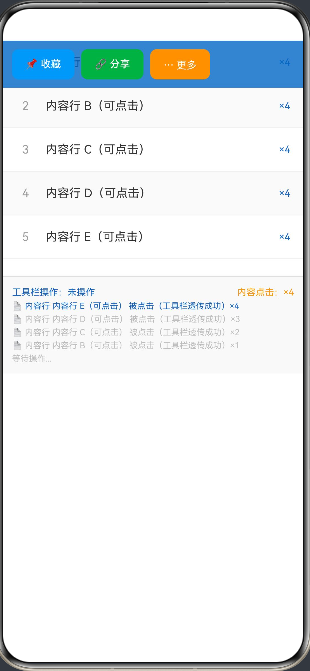
以下示例模拟一个常见的悬浮工具栏覆盖在内容区上方的场景。工具栏有按钮区和空白区:
- 按钮区 :
Block模式,点击由工具栏按钮消费 - 空白区 :
Transparent模式,触摸穿透到下方内容区
typescript
// entry/src/main/ets/pages/Index.ets
@Entry
@Component
struct FloatToolbarDemo {
  @State log: string[] = ['等待操作...']
  @State contentClickCount: number = 0
  @State toolbarClickLabel: string = '未操作'
  // 工具栏按钮区域(x: 0-260, y: 0-56),其余为空白区
  private readonly TOOLBAR_HEIGHT: number = 56
  private readonly TOOLBAR_BTN_WIDTH: number = 260

  private appendLog(msg: string): void {
    this.log = [msg, ...this.log.slice(0, 9)]
  }

  build() {
    Stack({ alignContent: Alignment.TopStart }) {
      // 底层:内容区(背景地图/文章列表模拟)
      Column({ space: 0 }) {
        ForEach(['内容行 A(可点击)', '内容行 B(可点击)', '内容行 C(可点击)',
          '内容行 D(可点击)', '内容行 E(可点击)'], (item: string, idx: number) => {
          Row({ space: 12 }) {
            Text(`${idx + 1}`).fontSize(14).fontColor('#9E9E9E').width(24).textAlign(TextAlign.Center)
            Text(item).fontSize(14).fontColor('#333333').layoutWeight(1)
            Text(`×${this.contentClickCount}`).fontSize(12).fontColor('#1565C0')
          }
          .width('100%').height(52).padding({ left: 16, right: 16 })
          .backgroundColor(idx % 2 === 0 ? Color.White : '#FAFAFA')
          .border({ width: { bottom: 1 }, color: '#F0F0F0', style: BorderStyle.Solid })
          .onClick(() => {
            this.contentClickCount++
            this.appendLog(`📄 内容行 ${item} 被点击(工具栏透传成功)×${this.contentClickCount}`)
          })
        })
      }
      .width('100%')

      // 顶层:悬浮工具栏
      Stack({ alignContent: Alignment.TopStart }) {
        // 工具栏背景(半透明)
        Column()
          .width('100%').height(56)
          .backgroundColor('#CC1565C0')  // 半透明蓝

        // 工具栏按钮行
        Row({ space: 8 }) {
          Button('📌 收藏').height(36).fontSize(12).borderRadius(8)
            .backgroundColor('#2196F3').fontColor(Color.White)
            .onClick(() => {
              this.toolbarClickLabel = '📌 收藏'
              this.appendLog('📌 工具栏:收藏按钮点击')
            })
          Button('🔗 分享').height(36).fontSize(12).borderRadius(8)
            .backgroundColor('#4CAF50').fontColor(Color.White)
            .onClick(() => {
              this.toolbarClickLabel = '🔗 分享'
              this.appendLog('🔗 工具栏:分享按钮点击')
            })
          Button('⋯ 更多').height(36).fontSize(12).borderRadius(8)
            .backgroundColor('#FF9800').fontColor(Color.White)
            .onClick(() => {
              this.toolbarClickLabel = '⋯ 更多'
              this.appendLog('⋯ 工具栏:更多按钮点击')
            })
        }
        .height(56).padding({ left: 12, right: 12 })
      }
      .width('100%').height(56)
      // 关键:动态分区拦截
      .onTouchIntercept((event: TouchEvent) => {
        const x = event.touches[0]?.x ?? 0
        const y = event.touches[0]?.y ?? 0
        // 仅按钮区(y 在工具栏范围内且 x < 按钮总宽度)拦截
        if (y < this.TOOLBAR_HEIGHT && x < this.TOOLBAR_BTN_WIDTH) {
          // 按钮区:Block,工具栏消费事件
          return HitTestMode.Block
        }
        // 其他区域:Transparent,穿透到下方内容区
        return HitTestMode.Transparent
      })

      // 事件日志(固定在底部)
      Column({ space: 4 }) {
        Row() {
          Text(`工具栏操作:${this.toolbarClickLabel}`).fontSize(11).fontColor('#1565C0').layoutWeight(1)
          Text(`内容点击:×${this.contentClickCount}`).fontSize(11).fontColor('#FF9800')
        }.width('100%')
        ForEach(this.log.slice(0, 5), (item: string, idx: number) => {
          Text(item).fontSize(10).fontColor(idx === 0 ? '#1565C0' : '#BDBDBD').width('100%')
        })
      }
      .width('100%').padding(12).backgroundColor('#F9F9F9')
      .border({ width: { top: 1 }, color: '#E0E0E0', style: BorderStyle.Solid })
      .position({ x: 0, y: 280 })
    }
    .width('100%').height('100%').backgroundColor(Color.White)
  }
}
运行效果如图:
六、综合实战:四场景触摸拦截演示页面
6.1 功能说明
以下综合示例整合本文所有核心知识点,单页面通过 Tab 切换展示四个场景:
- 模式对比 :四种
HitTestMode实时切换对比,显示触发日志 - 分区拦截:左右分区动态返回不同模式,演示坐标驱动拦截
- 圆形区域 :矩形容器只有圆内有效,圆外返回
None - 悬浮工具栏:工具栏覆盖内容区,按钮区拦截,空白区透传
6.2 完整可运行代码
typescript
// entry/src/main/ets/pages/Index.ets
@Entry
@Component
struct TouchInterceptAllDemo {
  // ── Tab 控制 ──────────────────────────────────────
  @State activeTab: number = 0
  private tabs: string[] = ['🔀 模式', '↔ 分区', '⭕ 圆形', '🛠 工具栏']

  // ── Tab0:模式对比 ────────────────────────────────
  @State t0Mode: number = 0
  @State t0Log: string[] = ['等待触摸...']
  @State t0Parent: number = 0
  @State t0Child: number = 0
  private modeNames: string[] = ['Default', 'Block', 'Transparent', 'None']
  private modeBg: string[] = ['#E3F2FD', '#FFEBEE', '#E8F5E9', '#FFF9C4']

  // ── Tab1:分区拦截 ────────────────────────────────
  @State t1Log: string[] = ['等待触摸...']
  @State t1Zone: string = '---'

  // ── Tab2:圆形区域 ────────────────────────────────
  @State t2Log: string[] = ['等待触摸...']
  @State t2InCircle: boolean = false

  // ── Tab3:悬浮工具栏 ──────────────────────────────
  @State t3Log: string[] = ['等待操作...']
  @State t3ContentCount: number = 0
  @State t3ToolLabel: string = '未操作'

  private appendLog(arr: string[], msg: string): string[] {
    return [msg, ...arr.slice(0, 7)]
  }

  private getHitMode(idx: number): HitTestMode {
    if (idx === 0) return HitTestMode.Default
    if (idx === 1) return HitTestMode.Block
    if (idx === 2) return HitTestMode.Transparent
    return HitTestMode.None
  }

  @Builder
  Tab0() {
    Column({ space: 12 }) {
      // 模式选择
      Row({ space: 6 }) {
        ForEach(this.modeNames, (name: string, idx: number) => {
          Text(name).fontSize(11).layoutWeight(1).textAlign(TextAlign.Center)
            .padding({ top: 7, bottom: 7 })
            .backgroundColor(this.t0Mode === idx ? '#1565C0' : '#F5F5F5')
            .fontColor(this.t0Mode === idx ? Color.White : '#555555')
            .borderRadius(8).animation({ duration: 120, curve: Curve.EaseOut })
            .onClick(() => {
              this.t0Mode = idx
              this.t0Parent = 0; this.t0Child = 0
              this.t0Log = [`切换:HitTestMode.${name}`]
            })
        })
      }.width('92%')

      // 演示区
      Stack({ alignContent: Alignment.Center }) {
        Column().width('100%').height('100%')
          .backgroundColor(this.modeBg[this.t0Mode]).borderRadius(14)
          .animation({ duration: 200, curve: Curve.EaseOut })
        Column({ space: 8 }) {
          Text(`父:HitTestMode.${this.modeNames[this.t0Mode]}`).fontSize(12).fontColor('#555555')
          Button('子组件按钮').height(40).fontSize(13).borderRadius(10)
            .backgroundColor('#1565C0').fontColor(Color.White)
            .onClick(() => { this.t0Child++; this.t0Log = this.appendLog(this.t0Log, `子组件点击 ×${this.t0Child}`) })
          Row({ space: 16 }) {
            Text(`父: ×${this.t0Parent}`).fontSize(12).fontColor('#FF9800').fontWeight(FontWeight.Bold)
            Text(`子: ×${this.t0Child}`).fontSize(12).fontColor('#1565C0').fontWeight(FontWeight.Bold)
          }
        }
      }
      .width('92%').height(160).borderRadius(14)
      .border({ width: 1.5, color: '#E0E0E0', style: BorderStyle.Solid })
      .onTouchIntercept((event: TouchEvent) => {
        const x = event.touches[0]?.x ?? 0
        this.t0Log = this.appendLog(this.t0Log, `HitTest(${x.toFixed(0)}) → ${this.modeNames[this.t0Mode]}`)
        return this.getHitMode(this.t0Mode)
      })
      .onClick(() => { this.t0Parent++; this.t0Log = this.appendLog(this.t0Log, `父容器点击 ×${this.t0Parent}`) })

      Column({ space: 3 }) {
        ForEach(this.t0Log, (item: string, idx: number) => {
          Text(item).fontSize(10).fontColor(idx === 0 ? '#1565C0' : '#BDBDBD').width('100%')
        })
      }
      .width('92%').padding(10).backgroundColor('#F9F9F9').borderRadius(10)
      .border({ width: 1, color: '#E0E0E0', style: BorderStyle.Solid })
      .alignItems(HorizontalAlign.Start)
    }
    .width('100%').alignItems(HorizontalAlign.Center).margin({ top: 14 })
  }

  @Builder
  Tab1() {
    Column({ space: 12 }) {
      Text('触点 x<150 → Transparent  |  x≥150 → Block').fontSize(11).fontColor('#888888').margin({ top: 14 })
      Text(`当前:${this.t1Zone}`).fontSize(12).fontColor('#1565C0').fontWeight(FontWeight.Bold)
        .padding({ left: 10, right: 10, top: 5, bottom: 5 }).backgroundColor('#E3F2FD').borderRadius(8)

      Stack() {
        Row() {
          Column().width('50%').height('100%').backgroundColor('#E8F5E9')
          Column().width('50%').height('100%').backgroundColor('#FFEBEE')
        }.width('100%').height('100%').borderRadius(14)
        Row() {
          Column({ space: 4 }) {
            Text('左区').fontSize(14).fontWeight(FontWeight.Bold).fontColor('#2E7D32')
            Text('Transparent').fontSize(10).fontColor('#43A047')
          }.layoutWeight(1).justifyContent(FlexAlign.Center)
          Column({ space: 4 }) {
            Text('右区').fontSize(14).fontWeight(FontWeight.Bold).fontColor('#C62828')
            Text('Block').fontSize(10).fontColor('#E53935')
          }.layoutWeight(1).justifyContent(FlexAlign.Center)
        }.width('100%').height('100%')
        Button('子按钮(左区可触发)').height(40).fontSize(12).borderRadius(10)
          .backgroundColor('#1565C0').fontColor(Color.White)
          .onClick(() => { this.t1Log = this.appendLog(this.t1Log, '子按钮点击(左区透传成功)') })
      }
      .width('92%').height(160).borderRadius(14)
      .border({ width: 1.5, color: '#E0E0E0', style: BorderStyle.Solid })
      .onTouchIntercept((event: TouchEvent) => {
        const x = event.touches[0]?.x ?? 0
        if (x < 150) {
          this.t1Zone = `左区(${x.toFixed(0)}) → Transparent`
          return HitTestMode.Transparent
        }
        this.t1Zone = `右区(${x.toFixed(0)}) → Block`
        this.t1Log = this.appendLog(this.t1Log, `右区 Block 拦截 x=${x.toFixed(0)}`)
        return HitTestMode.Block
      })
      .onClick(() => { this.t1Log = this.appendLog(this.t1Log, '父容器 Block 点击触发') })

      Column({ space: 3 }) {
        ForEach(this.t1Log, (item: string, idx: number) => {
          Text(item).fontSize(10).fontColor(idx === 0 ? '#1565C0' : '#BDBDBD').width('100%')
        })
      }
      .width('92%').padding(10).backgroundColor('#F9F9F9').borderRadius(10)
      .border({ width: 1, color: '#E0E0E0', style: BorderStyle.Solid })
      .alignItems(HorizontalAlign.Start)
    }
    .width('100%').alignItems(HorizontalAlign.Center)
  }

  @Builder
  Tab2() {
    Column({ space: 12 }) {
      Text('圆内 Default 响应,圆外矩形角 None 禁用').fontSize(11).fontColor('#888888').margin({ top: 14 })
      Text(this.t2InCircle ? '✅ 圆内:响应' : '❌ 圆外:禁用').fontSize(14).fontWeight(FontWeight.Bold)
        .fontColor(this.t2InCircle ? '#4CAF50' : '#F44336')
        .padding({ left: 12, right: 12, top: 6, bottom: 6 })
        .backgroundColor(this.t2InCircle ? '#E8F5E9' : '#FFEBEE').borderRadius(8)
        .animation({ duration: 150, curve: Curve.EaseOut })

      Stack({ alignContent: Alignment.Center }) {
        Column().width(200).height(200).backgroundColor('#EDE7F6').borderRadius(0)
        Column().width(200).height(200).borderRadius(100).backgroundColor('#7B1FA2').opacity(0.15)
        Text('点击圆内有效\n点击边角无效').fontSize(12).fontColor('#4A148C').textAlign(TextAlign.Center)
          .fontWeight(FontWeight.Bold)
      }
      .width(200).height(200)
      .border({ width: 1.5, color: '#CE93D8', style: BorderStyle.Solid })
      .onTouchIntercept((event: TouchEvent) => {
        const x = event.touches[0]?.x ?? 0
        const y = event.touches[0]?.y ?? 0
        const dx = x - 100; const dy = y - 100
        const inCircle = Math.sqrt(dx * dx + dy * dy) <= 100
        this.t2InCircle = inCircle
        this.t2Log = this.appendLog(this.t2Log,
          `(${x.toFixed(0)},${y.toFixed(0)}) 距圆心${Math.sqrt(dx*dx+dy*dy).toFixed(0)}px → ${inCircle ? 'Default' : 'None'}`)
        return inCircle ? HitTestMode.Default : HitTestMode.None
      })
      .onClick(() => { this.t2Log = this.appendLog(this.t2Log, '⭕ 圆内点击响应') })

      Column({ space: 3 }) {
        ForEach(this.t2Log, (item: string, idx: number) => {
          Text(item).fontSize(10).fontColor(idx === 0 ? '#7B1FA2' : '#BDBDBD').width('100%')
        })
      }
      .width('92%').padding(10).backgroundColor('#F9F9F9').borderRadius(10)
      .border({ width: 1, color: '#E0E0E0', style: BorderStyle.Solid })
      .alignItems(HorizontalAlign.Start)
    }
    .width('100%').alignItems(HorizontalAlign.Center)
  }

  @Builder
  Tab3() {
    Stack({ alignContent: Alignment.TopStart }) {
      // 底层内容
      Column({ space: 0 }) {
        ForEach(['内容行 A', '内容行 B', '内容行 C', '内容行 D', '内容行 E'], (item: string, idx: number) => {
          Row({ space: 10 }) {
            Text(`${idx+1}`).fontSize(13).fontColor('#9E9E9E').width(20)
            Text(item).fontSize(13).fontColor('#333333').layoutWeight(1)
            Text(`×${this.t3ContentCount}`).fontSize(11).fontColor('#1565C0')
          }
          .width('100%').height(50).padding({ left: 14, right: 14 })
          .backgroundColor(idx % 2 === 0 ? Color.White : '#FAFAFA')
          .border({ width: { bottom: 1 }, color: '#F0F0F0', style: BorderStyle.Solid })
          .onClick(() => { this.t3ContentCount++; this.t3Log = this.appendLog(this.t3Log, `内容"${item}"点击 ×${this.t3ContentCount}`) })
        })
      }.width('100%')

      // 顶层工具栏
      Stack({ alignContent: Alignment.TopStart }) {
        Column().width('100%').height(50).backgroundColor('#CC1565C0')
        Row({ space: 8 }) {
          Button('收藏').height(34).fontSize(12).borderRadius(8).backgroundColor('#2196F3').fontColor(Color.White)
            .onClick(() => { this.t3ToolLabel = '收藏'; this.t3Log = this.appendLog(this.t3Log, '工具栏:收藏') })
          Button('分享').height(34).fontSize(12).borderRadius(8).backgroundColor('#4CAF50').fontColor(Color.White)
            .onClick(() => { this.t3ToolLabel = '分享'; this.t3Log = this.appendLog(this.t3Log, '工具栏:分享') })
          Button('更多').height(34).fontSize(12).borderRadius(8).backgroundColor('#FF9800').fontColor(Color.White)
            .onClick(() => { this.t3ToolLabel = '更多'; this.t3Log = this.appendLog(this.t3Log, '工具栏:更多') })
          Text(this.t3ToolLabel).fontSize(11).fontColor(Color.White).layoutWeight(1).textAlign(TextAlign.End)
        }.height(50).padding({ left: 10, right: 10 })
      }
      .width('100%').height(50)
      .onTouchIntercept((event: TouchEvent) => {
        const x = event.touches[0]?.x ?? 0
        // 按钮区(前 220vp)拦截,右侧透传到内容
        return x < 220 ? HitTestMode.Block : HitTestMode.Transparent
      })

      // 日志
      Column({ space: 3 }) {
        ForEach(this.t3Log.slice(0, 4), (item: string, idx: number) => {
          Text(item).fontSize(10).fontColor(idx === 0 ? '#1565C0' : '#BDBDBD').width('100%')
        })
      }
      .width('100%').padding(10).backgroundColor('#F9F9F9')
      .border({ width: { top: 1 }, color: '#E0E0E0', style: BorderStyle.Solid })
      .position({ x: 0, y: 280 })
    }
    .width('100%').height(380)
  }

  build() {
    Column({ space: 0 }) {
      Text('ArkUI 触摸拦截综合演示')
        .fontSize(18).fontWeight(FontWeight.Bold).fontColor(Color.White)
        .width('100%').textAlign(TextAlign.Center)
        .padding({ top: 16, bottom: 12 })
        .backgroundColor('#1565C0')

      Row() {
        ForEach(this.tabs, (tab: string, index: number) => {
          Text(tab)
            .fontSize(12).layoutWeight(1).textAlign(TextAlign.Center)
            .fontColor(this.activeTab === index ? '#1565C0' : '#9E9E9E')
            .fontWeight(this.activeTab === index ? FontWeight.Bold : FontWeight.Normal)
            .padding({ top: 10, bottom: 10 })
            .border({ width: { bottom: this.activeTab === index ? 2 : 0 },
              color: '#1565C0', style: BorderStyle.Solid })
            .onClick(() => { this.activeTab = index })
        })
      }
      .width('100%').backgroundColor(Color.White)
      .border({ width: { bottom: 1 }, color: '#E0E0E0', style: BorderStyle.Solid })

      Scroll() {
        Column() {
          if (this.activeTab === 0) {
            this.Tab0()
          } else if (this.activeTab === 1) {
            this.Tab1()
          } else if (this.activeTab === 2) {
            this.Tab2()
          } else {
            this.Tab3()
          }
        }
        .width('100%').padding({ bottom: 24 })
      }
      .layoutWeight(1).width('100%')
    }
    .width('100%').height('100%').backgroundColor(Color.White)
  }
}
总结
- 动态 vs 静态 :
onTouchIntercept是hitTestBehavior的动态增强版,每次 HitTest 前触发回调,可根据触点坐标或业务状态动态返回 不同的HitTestMode - 四种模式 :
Default(自身+子均响应)、Block(自身响应+子被拦截)、Transparent(自身透明+子正常)、None(全部禁用) - 分区控制 :通过判断
event.touches[0].x/y坐标,实现左右/上下分区不同拦截策略,覆盖不规则形状场景 - 必须同步 :回调内禁止异步操作,状态需提前用
@State缓存;复杂计算建议在onTouch事件中预处理 - 性能意识 :
onTouchIntercept在触摸高频阶段执行,回调逻辑务必轻量,避免影响手势响应流畅度 - 实战选型 :简单固定场景用
hitTestBehavior;需要动态分区、不规则形状、条件拦截的场景用onTouchIntercept
如果这篇文章对你有帮助,欢迎点赞👍、收藏⭐、关注🔔,你的支持是我持续创作的动力!