拷贝构造函数与析构函数执行流程分析
cpp
#define _CRT_SECURE_NO_WARNINGS // strcpy运行会报错,支持

#include<iostream>
#include<string.h>
using namespace std;

class Student1
{
public:

	int age;
	char * name;

	Student1() { cout << "空参数构造函数" << endl; }

	Student1(char * name) :Student1(name, 99) { cout << "一个参数构造函数" << endl; }

    Student1(char * name, int age) {
		cout << "二个参数构造函数" << endl;

		this->name = (char *) malloc(sizeof(char * ) * 10);
		strcpy(this->name, name);

		this->age = age;
	}

	~Student1() {
		cout << "析构函数执行" << endl;

		free(this->name);
		this->name = NULL;
	}

	// 默认有一个拷贝构造函数 隐士的 我们看不见
	// Student(const Student & stu) {
		// stu 旧地址

		// this 新地址

		// s2 = 新地址
	// }
};

void mainT1() {
	Student s1;
	Student s2;
	cout << &s1 << endl;
	cout << &s2 << endl;
	getchar(); // 不要一闪而过,让程序停留
}
cpp
空参数构造函数
空参数构造函数
009FF898
009FFB88
cpp
#define _CRT_SECURE_NO_WARNINGS // strcpy运行会报错,支持

#include<iostream>
#include<string.h>
using namespace std;

class Student1
{
public:

	int age;
	char * name;

	Student1() { cout << "空参数构造函数" << endl; }

	Student1(char * name) :Student1(name, 99) { cout << "一个参数构造函数" << endl; }

    Student1(char * name, int age) {
		cout << "二个参数构造函数" << endl;

		this->name = (char *) malloc(sizeof(char * ) * 10);
		strcpy(this->name, name);

		this->age = age;
	}

	~Student1() {
		cout << "析构函数执行" << endl;

		free(this->name);
		this->name = NULL;
	}

	// 默认有一个拷贝构造函数 隐士的 我们看不见
	// Student(const Student & stu) {
		// stu 旧地址

		// this 新地址

		// s2 = 新地址
	// }
};

void mainT1() {
	// ① 情况分析 画图了
	// Student s1;
	// Student s2;
	// cout << &s1 << endl;
	// cout << &s2 << endl;
	// 两个地址 完全不同
	// 打印:
	// 空参数构造函数
	// 空参数构造函数
	// 1000H
	// 2000H


	// ② 情况分析
	Student1 s1;
	Student1 s2 = s1;

	// 两个地址 完全不同
	// 打印:
	// 空参数构造函数
	// 1000H
	// 2000H

	cout << &s1 << endl;
	cout << &s2 << endl;

	getchar(); // 不要一闪而过,让程序停留
}
Student1 s1; // ① 调用默认构造函数 → 打印"空参数构造函数"
Student1 s2 = s1; // ② 调用拷贝构造函数 → 但没打印任何信息
由旧地址转为新地址,新地址的内容由旧地址拷贝过来
由拷贝构造函数构造新地址
拷贝构造函数与析构函数原理细节图研究
cpp
#define _CRT_SECURE_NO_WARNINGS // strcpy运行会报错,支持

#include<iostream>
#include<string.h>
using namespace std;

class Student2
{
public:

	int age;
	char * name;

	Student2() { cout << "空参数构造函数" << endl; }

	Student2(char * name) :Student2(name, 99) {
		cout << "一个参数构造函数 this:" << this << endl;
	}

	Student2(char * name, int age) {
		cout << "二个参数构造函数 this:" << this << endl;

		this->name = (char *)malloc(sizeof(char *)* 10);
		strcpy(this->name, name);

		this->age = age;
	}

	~Student2() {
		cout << "析构函数执行 &this->name:" << &this->name << endl;

		free(this->name);
		this->name = NULL;
	}

	// 默认有一个拷贝构造函数 隐士的 我们看不见
	// 一旦复写了拷贝构造函数,默认的还在吗? Java的构造函数一个思路
	Student2(const Student2 & stu) {
		// stu 旧地址

		// this 新地址

		// s2 = 新地址

		cout << "拷贝构造函数 &stu:" << &stu << " this:" << this << endl;


		// 新地址name = 旧地址 (浅拷贝)
		this->name = stu.name;


		// 深拷贝 后面见  原理全部打通的时候讲
	} // 此拷贝构造函数执行完 旧会出现一个 this==新地址  给 main函数的 stu
};

Student2 getStudent(char * name) {
	Student2 stu(name); // 旧地址

	cout << "getStudent函数:" << &stu << endl; // 旧地址

	return stu; // stu 旧地址
} // 弹栈 释放 栈成员 stu

void mainT3() {
	// = 会执行拷贝构造函数
	// stu 新地址
	Student2 stu = getStudent("截拳道");

	cout << "main函数:" << &stu << endl;

	// 打印:
	// 两个参数构造函数
	// 一个参数构造函数
	// getStudent函数: 1000H地址
	// 拷贝构造函数 构建新地址 把新地址 给 main函数的 stu == 新地址
	// 析构函数
	// main函数:

	// getchar(); // 不要一闪而过,让程序停留
} // main函数弹栈 stu 新地址 析构函数执行

// 伏笔一: main函数弹栈 stu 新地址 析构函数执行 会造成 重复释放空间的问题   深拷贝
// 伏笔二 xx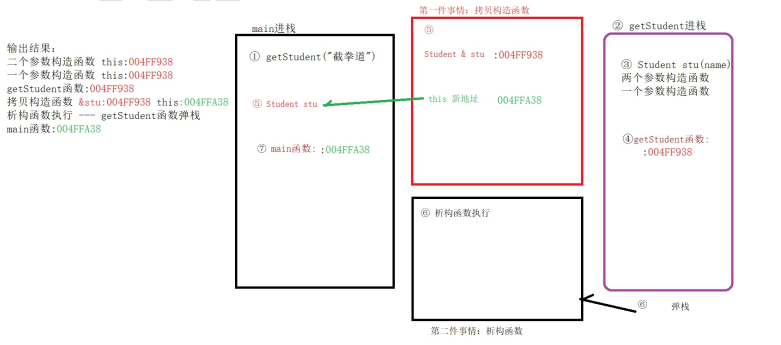
cpp
#define _CRT_SECURE_NO_WARNINGS // strcpy运行会报错,支持

#include<iostream>
#include<string.h>
using namespace std;

class Student
{
public:

	int age;
	char * name;

	Student() { cout << "空参数构造函数" << endl; }

	Student(char * name) :Student(name, 99) {
		cout << "一个参数构造函数 this:" << (int)this << endl;
	}

	Student(char * name, int age) {
		cout << "二个参数构造函数 this:" << (int)this << endl;

		this->name = (char *)malloc(sizeof(char *)* 10);
		strcpy(this->name, name);

		this->age = age;
	}

	~Student() {
		cout << "析构函数执行 &this->name:" << (int)this->name << endl;

		free(this->name);
		this->name = NULL;
	}

	// 默认有一个拷贝构造函数 隐士的 我们看不见
	// 一旦复写了拷贝构造函数,默认的还在吗? Java的构造函数一个思路
	// 自定义拷贝构造函数 如果有堆成员,必须采用深拷贝
	Student(const Student & stu) {
		// stu 旧地址

		// this 新地址

		// s2 = 新地址

		cout << "拷贝构造函数 &stu:" << (int)&stu << " this:" << (int)this << endl;

		// 【浅拷贝】:新地址name  旧地址name 指向同一个空间,会造成,重复free的问题,引发奔溃
		// 新地址name = 旧地址 (浅拷贝)
		// this->name = stu.name;

		// 【深拷贝】
		this->name = (char *)malloc(sizeof(char *)* 10);
		strcpy(this->name, name);

		this->age = stu.age;

		cout << "拷贝构造函数2 this->name:" << ((int) this->name) << "  stu.name:" << (int)stu.name << endl;

		// 深拷贝 后面见  原理全部打通的时候讲
	} // 此拷贝构造函数执行完 旧会出现一个 this==新地址  给 main函数的 stu


	// 默认的拷贝构造函数 是浅拷贝
};

void showStudent(Student stu) {
	cout << "showStudent函数:" << (int)&stu << "  " << stu.name << "," << stu.age<< endl;
}

void main() {
	Student stu("刘奋", 31);

	showStudent(stu); // 弹栈后 新地址name释放一遍
	// showStudent(stu); // 弹栈后 新地址name释放一遍
	// 两次释放新地址name 会奔溃

	// 释放一次新地址name  再释放一次旧name也报错

	showStudent(stu);


	showStudent(stu);


	showStudent(stu);


	showStudent(stu);

	getchar();
} // main函数弹栈 stu 旧地址


// 专业技能:1.研究过C++语言深拷贝原理| 拷贝类型 | 核心特征 | 判断标准 |
|---|---|---|
| 浅拷贝 | 只复制指针地址 | 两个对象的指针成员指向同一块内存 |
| 深拷贝 | 只复制实际数据 | 两个对象的指针成员指向不同的内存 |
判断方法
方法1:看内存地址
cpp
Student s1("张三", 20);
Student s2 = s1;

cout << (void*)s1.name << endl;  // 0x5555557772a0
cout << (void*)s2.name << endl;  // ???

// 如果地址相同 → 浅拷贝 ❌
// 如果地址不同 → 深拷贝 ✅
方法2:修改一个,看另一个是否受影响
cpp
s1.name[0] = '李';

cout << s1.name << endl;  // 李三
cout << s2.name << endl;  // ???

// 如果 s2 也变成"李三" → 浅拷贝 ❌
// 如果 s2 还是"张三" → 深拷贝 ✅
方法3:看析构是否崩溃
cpp
// 程序结束时
// 如果崩溃(double free)→ 浅拷贝 ❌
// 如果正常退出 → 深拷贝 ✅
代码对比
浅拷贝示例:
cpp
class Student {
public:
    char* name;
    int age;

    // 使用编译器默认的拷贝构造函数
    // Student(const Student& other) = default;
};

int main() {
    Student s1;
    s1.name = (char*)malloc(10);
    strcpy(s1.name, "张三");

    Student s2 = s1;  // ⚠️ 默认浅拷贝

    // 验证
    cout << (void*)s1.name << endl;  // 0x1000
    cout << (void*)s2.name << endl;  // 0x1000 ← 相同!

    s2.name[0] = '李';
    cout << s1.name << endl;  // 李三 ← s1也被修改了!
}
内存图:
s1 s2
┌─────────┐ ┌─────────┐
│ name ───┼─────┐ │ name ───┼───┐
│ age: 20 │ │ │ age: 20 │ │
└─────────┘ │ └─────────┘ │
│ │
▼ ▼
┌─────────┐
│ "张三" │ ← 同一块内存(浅拷贝)
└─────────┘
深拷贝示例
cpp
class Student {
public:
    char* name;
    int age;

    // ⭐ 显式定义拷贝构造函数
    Student(const Student& other) {
        age = other.age;
        if (other.name != NULL) {
            name = (char*)malloc(strlen(other.name) + 1);  // 新分配内存
            strcpy(name, other.name);                       // 复制数据
        } else {
            name = NULL;
        }
    }
};

int main() {
    Student s1;
    s1.name = (char*)malloc(10);
    strcpy(s1.name, "张三");

    Student s2 = s1;  // 深拷贝

    // 验证
    cout << (void*)s1.name << endl;  // 0x1000
    cout << (void*)s2.name << endl;  // 0x2000 ← 不同!

    s2.name[0] = '李';
    cout << s1.name << endl;  // 张三 ← s1不受影响!
    cout << s2.name << endl;  // 李三
}
内存图:
s1 s2
┌─────────┐ ┌─────────┐
│ name ───┼───┐ │ name ───┼───┐
│ age: 20 │ │ │ age: 20 │ │
└─────────┘ │ └─────────┘ │
│ │
▼ ▼
┌─────────┐ ┌─────────┐
│ "张三" │ │ "李三" │ ← 独立内存(深拷贝)
└─────────┘ └─────────┘
| 成员类型 | 拷贝方式 | 说明 |
|---|---|---|
age (int) |
值拷贝 | 直接复制数值,浅/深拷贝都一样 |
name (char*) |
指针处理 | 浅拷贝复制地址,深拷贝复制数据 |