欢迎加入开源鸿蒙跨平台社区:https://openharmonycrossplatform.csdn.net
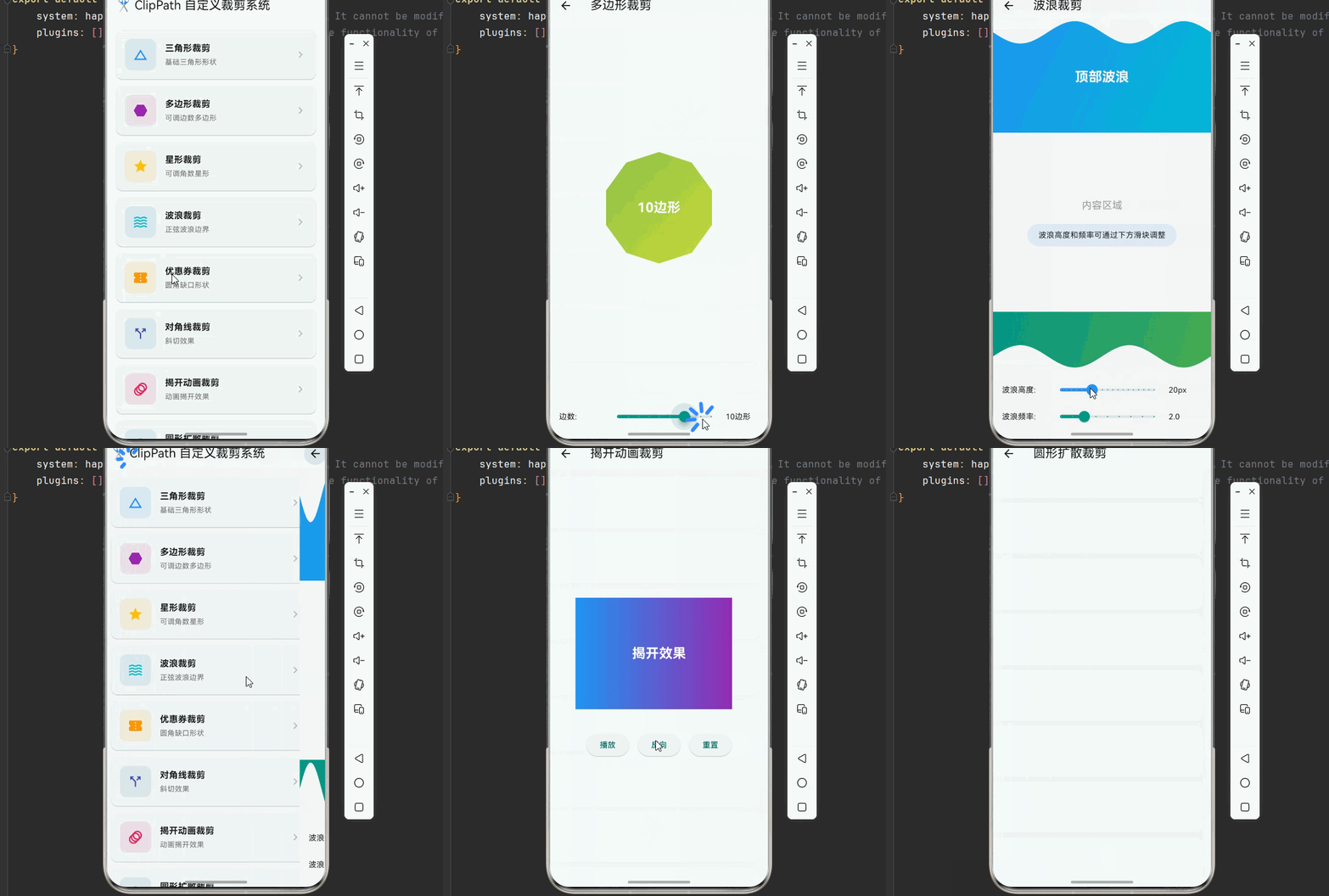
一、ClipPath 系统架构深度解析
在现代移动应用开发中,裁剪效果是创建独特视觉形状和提升用户界面美观度的重要手段。Flutter 提供了强大的 ClipPath 组件,通过自定义路径实现各种复杂的裁剪效果。理解路径裁剪的底层原理,是掌握高级视觉效果的关键。
📱 1.1 ClipPath 核心概念
ClipPath 是 Flutter 中用于对子组件进行路径裁剪的 Widget。它通过 CustomClipper 定义裁剪路径,将子组件裁剪成任意形状,而不影响子组件的实际布局。
ClipPath 与其他裁剪组件的关系:
┌─────────────────────────────────────────────────────────────────┐
│                    Flutter 裁剪组件体系                          │
├─────────────────────────────────────────────────────────────────┤
│                                                                 │
│  ┌─────────────────────────────────────────────────────────┐    │
│  │                    ClipPath (路径裁剪)                   │    │
│  │  最灵活的裁剪方式,支持任意形状                           │    │
│  └─────────────────────────────────────────────────────────┘    │
│                              │                                   │
│              ┌───────────────┼───────────────┐                  │
│              ▼               ▼               ▼                  │
│  ┌───────────────┐ ┌───────────────┐ ┌───────────────┐          │
│  │  ClipRect     │ │  ClipRRect    │ │  ClipOval     │          │
│  │  矩形裁剪     │ │  圆角矩形裁剪 │ │  椭圆裁剪     │          │
│  └───────────────┘ └───────────────┘ └───────────────┘          │
│                                                                 │
└─────────────────────────────────────────────────────────────────┘
ClipPath 核心属性:
| 属性 | 类型 | 说明 | 应用场景 |
|---|---|---|---|
| clipper | CustomClipper | 裁剪器 | 定义裁剪路径 |
| clipBehavior | Clip | 裁剪行为 | 控制裁剪方式 |
| child | Widget | 子组件 | 被裁剪的内容 |
🔬 1.2 Path 路径绘制原理
Path 是 Flutter 中定义几何路径的核心类,通过一系列绘图命令(移动、连线、曲线等)构建复杂的形状。
Path 常用方法:
dart
// 创建路径
final path = Path();

// 移动到指定点
path.moveTo(x, y);

// 绘制直线
path.lineTo(x, y);

// 绘制相对直线
path.relativeLineTo(dx, dy);

// 绘制二次贝塞尔曲线
path.quadraticBezierTo(x1, y1, x2, y2);

// 绘制三次贝塞尔曲线
path.cubicTo(x1, y1, x2, y2, x3, y3);

// 绘制圆弧
path.arcTo(rect, startAngle, sweepAngle, forceMoveTo);

// 绘制圆
path.addOval(rect);

// 绘制矩形
path.addRect(rect);

// 绘制圆角矩形
path.addRRect(rrect);

// 绘制多边形
path.addPolygon(points, close);

// 闭合路径
path.close();
路径组合操作:
dart
// 路径相加(并集)
Path.combine(PathOperation.union, path1, path2);

// 路径相减(差集)
Path.combine(PathOperation.difference, path1, path2);

// 路径交集
Path.combine(PathOperation.intersect, path1, path2);

// 路径异或
Path.combine(PathOperation.xor, path1, path2);

// 反转路径
Path.combine(PathOperation.reverseDifference, path1, path2);
🎯 1.3 CustomClipper 工作原理
CustomClipper 是定义裁剪逻辑的核心抽象类,通过重写 getClip 和 shouldReclip 方法实现自定义裁剪。
dart
abstract class CustomClipper<T> {
  T getClip(Size size);           // 返回裁剪区域
  bool shouldReclip(covariant CustomClipper<T> oldClipper);  // 是否重新裁剪
}
CustomClipper 工作流程:
┌─────────────────────────────────────────────────────────────────┐
│                  CustomClipper 工作流程                          │
├─────────────────────────────────────────────────────────────────┤
│                                                                 │
│  1. 组件构建                                                    │
│     │                                                          │
│     ▼                                                          │
│  2. 调用 getClip(size) 获取裁剪路径                             │
│     │                                                          │
│     ▼                                                          │
│  3. 应用裁剪路径到子组件                                        │
│     │                                                          │
│     ▼                                                          │
│  4. 状态更新时调用 shouldReclip() 判断是否重新裁剪              │
│     │                                                          │
│     ├── true  -> 重新调用 getClip()                            │
│     └── false -> 保持现有裁剪                                   │
│                                                                 │
└─────────────────────────────────────────────────────────────────┘
二、基础裁剪形状实现
掌握了 ClipPath 的基本原理后,让我们通过实际的代码示例来学习各种裁剪效果的实现方法。
👆 2.1 三角形裁剪
三角形是最基础的裁剪形状,通过三个点连线闭合形成。
dart
import 'dart:math';
import 'package:flutter/material.dart';

/// 三角形裁剪器
class TriangleClipper extends CustomClipper<Path> {
  final bool isUpward;

  TriangleClipper({this.isUpward = true});

  @override
  Path getClip(Size size) {
    final path = Path();

    if (isUpward) {
      path.moveTo(size.width / 2, 0);
      path.lineTo(size.width, size.height);
      path.lineTo(0, size.height);
    } else {
      path.moveTo(0, 0);
      path.lineTo(size.width, 0);
      path.lineTo(size.width / 2, size.height);
    }

    path.close();
    return path;
  }

  @override
  bool shouldReclip(TriangleClipper oldClipper) => isUpward != oldClipper.isUpward;
}

/// 三角形裁剪示例
class TriangleClipDemo extends StatelessWidget {
  const TriangleClipDemo({super.key});

  @override
  Widget build(BuildContext context) {
    return Scaffold(
      appBar: AppBar(title: const Text('三角形裁剪')),
      body: Center(
        child: Column(
          mainAxisAlignment: MainAxisAlignment.center,
          children: [
            ClipPath(
              clipper: TriangleClipper(isUpward: true),
              child: Container(
                width: 200,
                height: 200,
                decoration: const BoxDecoration(
                  gradient: LinearGradient(
                    colors: [Colors.blue, Colors.cyan],
                    begin: Alignment.topCenter,
                    end: Alignment.bottomCenter,
                  ),
                ),
                child: const Center(
                  child: Text(
                    '向上三角形',
                    style: TextStyle(color: Colors.white, fontSize: 18, fontWeight: FontWeight.bold),
                  ),
                ),
              ),
            ),
            const SizedBox(height: 40),
            ClipPath(
              clipper: TriangleClipper(isUpward: false),
              child: Container(
                width: 200,
                height: 200,
                decoration: const BoxDecoration(
                  gradient: LinearGradient(
                    colors: [Colors.purple, Colors.pink],
                    begin: Alignment.topCenter,
                    end: Alignment.bottomCenter,
                  ),
                ),
                child: const Center(
                  child: Padding(
                    padding: EdgeInsets.only(top: 80),
                    child: Text(
                      '向下三角形',
                      style: TextStyle(color: Colors.white, fontSize: 18, fontWeight: FontWeight.bold),
                    ),
                  ),
                ),
              ),
            ),
          ],
        ),
      ),
    );
  }
}
🔧 2.2 多边形裁剪
多边形裁剪通过连接多个顶点形成封闭区域,可以创建各种正多边形效果。
dart
/// 多边形裁剪器
class PolygonClipper extends CustomClipper<Path> {
  final int sides;

  PolygonClipper({required this.sides});

  @override
  Path getClip(Size size) {
    final path = Path();
    final center = Offset(size.width / 2, size.height / 2);
    final radius = min(size.width, size.height) / 2;

    for (int i = 0; i < sides; i++) {
      final angle = (2 * pi * i / sides) - pi / 2;
      final x = center.dx + radius * cos(angle);
      final y = center.dy + radius * sin(angle);

      if (i == 0) {
        path.moveTo(x, y);
      } else {
        path.lineTo(x, y);
      }
    }

    path.close();
    return path;
  }

  @override
  bool shouldReclip(PolygonClipper oldClipper) => sides != oldClipper.sides;
}

/// 多边形裁剪示例
class PolygonClipDemo extends StatefulWidget {
  const PolygonClipDemo({super.key});

  @override
  State<PolygonClipDemo> createState() => _PolygonClipDemoState();
}

class _PolygonClipDemoState extends State<PolygonClipDemo> {
  int _sides = 6;

  @override
  Widget build(BuildContext context) {
    return Scaffold(
      appBar: AppBar(title: const Text('多边形裁剪')),
      body: Column(
        children: [
          Expanded(
            child: Center(
              child: ClipPath(
                clipper: PolygonClipper(sides: _sides),
                child: Container(
                  width: 200,
                  height: 200,
                  decoration: BoxDecoration(
                    gradient: LinearGradient(
                      colors: [
                        Colors.primaries[_sides % Colors.primaries.length],
                        Colors.primaries[(_sides + 1) % Colors.primaries.length],
                      ],
                      begin: Alignment.topLeft,
                      end: Alignment.bottomRight,
                    ),
                  ),
                  child: Center(
                    child: Text(
                      '$_sides边形',
                      style: const TextStyle(
                        color: Colors.white,
                        fontSize: 24,
                        fontWeight: FontWeight.bold,
                      ),
                    ),
                  ),
                ),
              ),
            ),
          ),
          Container(
            padding: const EdgeInsets.all(16),
            decoration: BoxDecoration(
              color: Colors.grey[100],
              borderRadius: const BorderRadius.vertical(top: Radius.circular(20)),
            ),
            child: Column(
              children: [
                Row(
                  children: [
                    const SizedBox(width: 80, child: Text('边数:')),
                    Expanded(
                      child: Slider(
                        value: _sides.toDouble(),
                        min: 3,
                        max: 12,
                        divisions: 9,
                        activeColor: Colors.teal,
                        onChanged: (value) => setState(() => _sides = value.round()),
                      ),
                    ),
                    SizedBox(width: 60, child: Text('$_sides边形')),
                  ],
                ),
              ],
            ),
          ),
        ],
      ),
    );
  }
}
🎨 2.3 星形裁剪
星形裁剪通过交替内外半径的点连接形成,可以创建各种星形效果。
dart
/// 星形裁剪器
class StarClipper extends CustomClipper<Path> {
  final int points;
  final double innerRadiusRatio;

  StarClipper({required this.points, this.innerRadiusRatio = 0.5});

  @override
  Path getClip(Size size) {
    final path = Path();
    final center = Offset(size.width / 2, size.height / 2);
    final outerRadius = min(size.width, size.height) / 2;
    final innerRadius = outerRadius * innerRadiusRatio;

    for (int i = 0; i < points * 2; i++) {
      final radius = i.isEven ? outerRadius : innerRadius;
      final angle = (pi * i / points) - pi / 2;
      final x = center.dx + radius * cos(angle);
      final y = center.dy + radius * sin(angle);

      if (i == 0) {
        path.moveTo(x, y);
      } else {
        path.lineTo(x, y);
      }
    }

    path.close();
    return path;
  }

  @override
  bool shouldReclip(StarClipper oldClipper) =>
      points != oldClipper.points || innerRadiusRatio != oldClipper.innerRadiusRatio;
}

/// 星形裁剪示例
class StarClipDemo extends StatefulWidget {
  const StarClipDemo({super.key});

  @override
  State<StarClipDemo> createState() => _StarClipDemoState();
}

class _StarClipDemoState extends State<StarClipDemo> {
  int _points = 5;
  double _innerRadius = 0.5;

  @override
  Widget build(BuildContext context) {
    return Scaffold(
      appBar: AppBar(title: const Text('星形裁剪')),
      body: Column(
        children: [
          Expanded(
            child: Center(
              child: ClipPath(
                clipper: StarClipper(points: _points, innerRadiusRatio: _innerRadius),
                child: Container(
                  width: 200,
                  height: 200,
                  decoration: const BoxDecoration(
                    gradient: LinearGradient(
                      colors: [Colors.amber, Colors.orange],
                      begin: Alignment.topLeft,
                      end: Alignment.bottomRight,
                    ),
                  ),
                  child: Center(
                    child: Text(
                      '$_points角星',
                      style: const TextStyle(
                        color: Colors.white,
                        fontSize: 24,
                        fontWeight: FontWeight.bold,
                      ),
                    ),
                  ),
                ),
              ),
            ),
          ),
          Container(
            padding: const EdgeInsets.all(16),
            decoration: BoxDecoration(
              color: Colors.grey[100],
              borderRadius: const BorderRadius.vertical(top: Radius.circular(20)),
            ),
            child: Column(
              children: [
                Row(
                  children: [
                    const SizedBox(width: 80, child: Text('角数:')),
                    Expanded(
                      child: Slider(
                        value: _points.toDouble(),
                        min: 3,
                        max: 12,
                        divisions: 9,
                        activeColor: Colors.amber,
                        onChanged: (value) => setState(() => _points = value.round()),
                      ),
                    ),
                    SizedBox(width: 60, child: Text('$_points角')),
                  ],
                ),
                Row(
                  children: [
                    const SizedBox(width: 80, child: Text('内径比:')),
                    Expanded(
                      child: Slider(
                        value: _innerRadius,
                        min: 0.1,
                        max: 0.9,
                        divisions: 16,
                        activeColor: Colors.orange,
                        onChanged: (value) => setState(() => _innerRadius = value),
                      ),
                    ),
                    SizedBox(width: 60, child: Text(_innerRadius.toStringAsFixed(2))),
                  ],
                ),
              ],
            ),
          ),
        ],
      ),
    );
  }
}
三、波浪形裁剪效果
波浪形裁剪是常见的装饰效果,可以创建优美的曲线边界。
🌊 3.1 正弦波浪裁剪
使用正弦函数创建平滑的波浪边界。
dart
/// 波浪裁剪器
class WaveClipper extends CustomClipper<Path> {
  final double waveHeight;
  final double waveFrequency;
  final bool isTop;

  WaveClipper({
    this.waveHeight = 20,
    this.waveFrequency = 2,
    this.isTop = true,
  });

  @override
  Path getClip(Size size) {
    final path = Path();

    if (isTop) {
      path.moveTo(0, waveHeight);
      for (double i = 0; i <= size.width; i++) {
        final y = waveHeight + sin(i * waveFrequency * 2 * pi / size.width) * waveHeight;
        path.lineTo(i, y);
      }
      path.lineTo(size.width, size.height);
      path.lineTo(0, size.height);
    } else {
      path.moveTo(0, 0);
      path.lineTo(size.width, 0);
      for (double i = size.width; i >= 0; i--) {
        final y = size.height - waveHeight - sin(i * waveFrequency * 2 * pi / size.width) * waveHeight;
        path.lineTo(i, y);
      }
    }

    path.close();
    return path;
  }

  @override
  bool shouldReclip(WaveClipper oldClipper) =>
      waveHeight != oldClipper.waveHeight ||
      waveFrequency != oldClipper.waveFrequency ||
      isTop != oldClipper.isTop;
}

/// 波浪裁剪示例
class WaveClipDemo extends StatefulWidget {
  const WaveClipDemo({super.key});

  @override
  State<WaveClipDemo> createState() => _WaveClipDemoState();
}

class _WaveClipDemoState extends State<WaveClipDemo> {
  double _waveHeight = 20;
  double _waveFrequency = 2;

  @override
  Widget build(BuildContext context) {
    return Scaffold(
      appBar: AppBar(title: const Text('波浪裁剪')),
      body: Column(
        children: [
          ClipPath(
            clipper: WaveClipper(waveHeight: _waveHeight, waveFrequency: _waveFrequency, isTop: true),
            child: Container(
              height: 200,
              decoration: const BoxDecoration(
                gradient: LinearGradient(
                  colors: [Colors.blue, Colors.cyan],
                  begin: Alignment.topLeft,
                  end: Alignment.bottomRight,
                ),
              ),
              child: const Center(
                child: Text(
                  '顶部波浪',
                  style: TextStyle(color: Colors.white, fontSize: 24, fontWeight: FontWeight.bold),
                ),
              ),
            ),
          ),
          Expanded(
            child: Container(
              color: Colors.grey[100],
              child: Center(
                child: Column(
                  mainAxisAlignment: MainAxisAlignment.center,
                  children: [
                    const Text('内容区域', style: TextStyle(fontSize: 18, color: Colors.grey)),
                    const SizedBox(height: 20),
                    Container(
                      padding: const EdgeInsets.symmetric(horizontal: 20, vertical: 10),
                      decoration: BoxDecoration(
                        color: Colors.blue.withOpacity(0.1),
                        borderRadius: BorderRadius.circular(20),
                      ),
                      child: const Text('波浪高度和频率可通过下方滑块调整'),
                    ),
                  ],
                ),
              ),
            ),
          ),
          ClipPath(
            clipper: WaveClipper(waveHeight: _waveHeight, waveFrequency: _waveFrequency, isTop: false),
            child: Container(
              height: 100,
              decoration: const BoxDecoration(
                gradient: LinearGradient(
                  colors: [Colors.teal, Colors.green],
                  begin: Alignment.topLeft,
                  end: Alignment.bottomRight,
                ),
              ),
            ),
          ),
          Container(
            padding: const EdgeInsets.all(16),
            decoration: BoxDecoration(
              color: Colors.grey[100],
              borderRadius: const BorderRadius.vertical(top: Radius.circular(20)),
            ),
            child: Column(
              children: [
                Row(
                  children: [
                    const SizedBox(width: 80, child: Text('波浪高度:')),
                    Expanded(
                      child: Slider(
                        value: _waveHeight,
                        min: 5,
                        max: 50,
                        divisions: 18,
                        activeColor: Colors.blue,
                        onChanged: (value) => setState(() => _waveHeight = value),
                      ),
                    ),
                    SizedBox(width: 60, child: Text('${_waveHeight.toStringAsFixed(0)}px')),
                  ],
                ),
                Row(
                  children: [
                    const SizedBox(width: 80, child: Text('波浪频率:')),
                    Expanded(
                      child: Slider(
                        value: _waveFrequency,
                        min: 1,
                        max: 5,
                        divisions: 8,
                        activeColor: Colors.teal,
                        onChanged: (value) => setState(() => _waveFrequency = value),
                      ),
                    ),
                    SizedBox(width: 60, child: Text('${_waveFrequency.toStringAsFixed(1)}')),
                  ],
                ),
              ],
            ),
          ),
        ],
      ),
    );
  }
}
💬 3.2 贝塞尔曲线波浪
使用贝塞尔曲线创建更平滑的波浪效果。
dart
/// 贝塞尔波浪裁剪器
class BezierWaveClipper extends CustomClipper<Path> {
  final double waveHeight;
  final int waveCount;

  BezierWaveClipper({this.waveHeight = 30, this.waveCount = 2});

  @override
  Path getClip(Size size) {
    final path = Path();
    final waveWidth = size.width / waveCount;

    path.moveTo(0, size.height);
    path.lineTo(0, size.height - waveHeight);

    for (int i = 0; i < waveCount; i++) {
      final startX = i * waveWidth;
      final midX = startX + waveWidth / 2;
      final endX = startX + waveWidth;

      path.quadraticBezierTo(
        midX, size.height - waveHeight * 2,
        endX, size.height - waveHeight,
      );
    }

    path.lineTo(size.width, size.height);
    path.close();

    return path;
  }

  @override
  bool shouldReclip(BezierWaveClipper oldClipper) =>
      waveHeight != oldClipper.waveHeight || waveCount != oldClipper.waveCount;
}
四、复杂裁剪效果实现
🔐 4.1 圆角缺口裁剪
创建带有圆角缺口的形状,常用于优惠券、卡片等设计。
dart
/// 圆角缺口裁剪器
class NotchedClipper extends CustomClipper<Path> {
  final double notchRadius;
  final double notchPosition;
  final bool isLeft;

  NotchedClipper({
    this.notchRadius = 20,
    this.notchPosition = 0.5,
    this.isLeft = true,
  });

  @override
  Path getClip(Size size) {
    final path = Path();
    final notchY = size.height * notchPosition;

    if (isLeft) {
      path.moveTo(0, 0);
      path.lineTo(0, notchY - notchRadius);
      path.arcToPoint(
        Offset(0, notchY + notchRadius),
        radius: Radius.circular(notchRadius),
        clockwise: false,
      );
      path.lineTo(0, size.height);
      path.lineTo(size.width, size.height);
      path.lineTo(size.width, 0);
    } else {
      path.moveTo(0, 0);
      path.lineTo(size.width, 0);
      path.lineTo(size.width, notchY - notchRadius);
      path.arcToPoint(
        Offset(size.width, notchY + notchRadius),
        radius: Radius.circular(notchRadius),
        clockwise: true,
      );
      path.lineTo(size.width, size.height);
      path.lineTo(0, size.height);
    }

    path.close();
    return path;
  }

  @override
  bool shouldReclip(NotchedClipper oldClipper) =>
      notchRadius != oldClipper.notchRadius ||
      notchPosition != oldClipper.notchPosition ||
      isLeft != oldClipper.isLeft;
}

/// 优惠券样式裁剪示例
class CouponClipDemo extends StatelessWidget {
  const CouponClipDemo({super.key});

  @override
  Widget build(BuildContext context) {
    return Scaffold(
      appBar: AppBar(title: const Text('优惠券裁剪')),
      body: Center(
        child: Column(
          mainAxisAlignment: MainAxisAlignment.center,
          children: [
            ClipPath(
              clipper: NotchedClipper(isLeft: true, notchRadius: 25),
              child: Container(
                width: 320,
                height: 120,
                decoration: const BoxDecoration(
                  gradient: LinearGradient(
                    colors: [Colors.orange, Colors.deepOrange],
                    begin: Alignment.centerLeft,
                    end: Alignment.centerRight,
                  ),
                ),
                child: Row(
                  children: [
                    Container(
                      width: 100,
                      alignment: Alignment.center,
                      child: const Column(
                        mainAxisAlignment: MainAxisAlignment.center,
                        children: [
                          Text('¥50', style: TextStyle(color: Colors.white, fontSize: 28, fontWeight: FontWeight.bold)),
                          Text('优惠券', style: TextStyle(color: Colors.white70, fontSize: 12)),
                        ],
                      ),
                    ),
                    Container(
                      width: 1,
                      height: 60,
                      color: Colors.white.withOpacity(0.3),
                    ),
                    Expanded(
                      child: Padding(
                        padding: const EdgeInsets.all(16),
                        child: Column(
                          mainAxisAlignment: MainAxisAlignment.center,
                          crossAxisAlignment: CrossAxisAlignment.start,
                          children: [
                            const Text('满100元可用', style: TextStyle(color: Colors.white, fontSize: 16, fontWeight: FontWeight.bold)),
                            const SizedBox(height: 4),
                            Text('有效期至 2024-12-31', style: TextStyle(color: Colors.white.withOpacity(0.8), fontSize: 12)),
                          ],
                        ),
                      ),
                    ),
                  ],
                ),
              ),
            ),
            const SizedBox(height: 30),
            ClipPath(
              clipper: DoubleNotchedClipper(notchRadius: 20),
              child: Container(
                width: 320,
                height: 120,
                decoration: const BoxDecoration(
                  gradient: LinearGradient(
                    colors: [Colors.purple, Colors.pink],
                    begin: Alignment.centerLeft,
                    end: Alignment.centerRight,
                  ),
                ),
                child: Row(
                  children: [
                    Container(
                      width: 100,
                      alignment: Alignment.center,
                      child: const Column(
                        mainAxisAlignment: MainAxisAlignment.center,
                        children: [
                          Text('¥100', style: TextStyle(color: Colors.white, fontSize: 28, fontWeight: FontWeight.bold)),
                          Text('折扣券', style: TextStyle(color: Colors.white70, fontSize: 12)),
                        ],
                      ),
                    ),
                    Container(
                      width: 1,
                      height: 60,
                      color: Colors.white.withOpacity(0.3),
                    ),
                    Expanded(
                      child: Padding(
                        padding: const EdgeInsets.all(16),
                        child: Column(
                          mainAxisAlignment: MainAxisAlignment.center,
                          crossAxisAlignment: CrossAxisAlignment.start,
                          children: [
                            const Text('全场通用', style: TextStyle(color: Colors.white, fontSize: 16, fontWeight: FontWeight.bold)),
                            const SizedBox(height: 4),
                            Text('有效期至 2024-12-31', style: TextStyle(color: Colors.white.withOpacity(0.8), fontSize: 12)),
                          ],
                        ),
                      ),
                    ),
                  ],
                ),
              ),
            ),
          ],
        ),
      ),
    );
  }
}

/// 双缺口裁剪器
class DoubleNotchedClipper extends CustomClipper<Path> {
  final double notchRadius;

  DoubleNotchedClipper({this.notchRadius = 20});

  @override
  Path getClip(Size size) {
    final path = Path();
    final centerY = size.height / 2;

    path.moveTo(0, 0);
    path.lineTo(0, centerY - notchRadius);
    path.arcToPoint(
      Offset(0, centerY + notchRadius),
      radius: Radius.circular(notchRadius),
      clockwise: false,
    );
    path.lineTo(0, size.height);
    path.lineTo(size.width, size.height);
    path.lineTo(size.width, centerY + notchRadius);
    path.arcToPoint(
      Offset(size.width, centerY - notchRadius),
      radius: Radius.circular(notchRadius),
      clockwise: false,
    );
    path.lineTo(size.width, 0);

    path.close();
    return path;
  }

  @override
  bool shouldReclip(DoubleNotchedClipper oldClipper) =>
      notchRadius != oldClipper.notchRadius;
}
🎵 4.2 对角线裁剪
创建对角线切割效果,常用于卡片和背景装饰。
dart
/// 对角线裁剪器
class DiagonalClipper extends CustomClipper<Path> {
  final double clipHeight;
  final bool isTopLeft;

  DiagonalClipper({this.clipHeight = 50, this.isTopLeft = true});

  @override
  Path getClip(Size size) {
    final path = Path();

    if (isTopLeft) {
      path.moveTo(0, clipHeight);
      path.lineTo(size.width, 0);
      path.lineTo(size.width, size.height);
      path.lineTo(0, size.height);
    } else {
      path.moveTo(0, 0);
      path.lineTo(size.width, clipHeight);
      path.lineTo(size.width, size.height);
      path.lineTo(0, size.height);
    }

    path.close();
    return path;
  }

  @override
  bool shouldReclip(DiagonalClipper oldClipper) =>
      clipHeight != oldClipper.clipHeight || isTopLeft != oldClipper.isTopLeft;
}

/// 对角线裁剪示例
class DiagonalClipDemo extends StatelessWidget {
  const DiagonalClipDemo({super.key});

  @override
  Widget build(BuildContext context) {
    return Scaffold(
      appBar: AppBar(title: const Text('对角线裁剪')),
      body: Column(
        children: [
          ClipPath(
            clipper: DiagonalClipper(clipHeight: 80, isTopLeft: true),
            child: Container(
              height: 200,
              decoration: const BoxDecoration(
                gradient: LinearGradient(
                  colors: [Colors.indigo, Colors.purple],
                  begin: Alignment.topLeft,
                  end: Alignment.bottomRight,
                ),
              ),
              child: const Center(
                child: Padding(
                  padding: EdgeInsets.only(top: 50),
                  child: Text(
                    '对角线裁剪效果',
                    style: TextStyle(color: Colors.white, fontSize: 24, fontWeight: FontWeight.bold),
                  ),
                ),
              ),
            ),
          ),
          Expanded(
            child: Center(
              child: Row(
                mainAxisAlignment: MainAxisAlignment.spaceEvenly,
                children: [
                  ClipPath(
                    clipper: DiagonalClipper(clipHeight: 40, isTopLeft: true),
                    child: Container(
                      width: 150,
                      height: 100,
                      color: Colors.teal,
                      child: const Center(
                        child: Padding(
                          padding: EdgeInsets.only(top: 20),
                          child: Text('卡片1', style: TextStyle(color: Colors.white, fontWeight: FontWeight.bold)),
                        ),
                      ),
                    ),
                  ),
                  ClipPath(
                    clipper: DiagonalClipper(clipHeight: 40, isTopLeft: false),
                    child: Container(
                      width: 150,
                      height: 100,
                      color: Colors.orange,
                      child: const Center(
                        child: Text('卡片2', style: TextStyle(color: Colors.white, fontWeight: FontWeight.bold)),
                      ),
                    ),
                  ),
                ],
              ),
            ),
          ),
        ],
      ),
    );
  }
}
五、动画裁剪效果
🎬 5.1 揭开动画裁剪
通过动画控制裁剪区域,创建揭开效果。
dart
/// 揭开动画裁剪器
class RevealClipper extends CustomClipper<Path> {
  final double revealFactor;
  final Axis direction;

  RevealClipper({required this.revealFactor, this.direction = Axis.horizontal});

  @override
  Path getClip(Size size) {
    final path = Path();

    if (direction == Axis.horizontal) {
      final revealWidth = size.width * revealFactor;
      path.addRect(Rect.fromLTWH(0, 0, revealWidth, size.height));
    } else {
      final revealHeight = size.height * revealFactor;
      path.addRect(Rect.fromLTWH(0, 0, size.width, revealHeight));
    }

    return path;
  }

  @override
  bool shouldReclip(RevealClipper oldClipper) =>
      revealFactor != oldClipper.revealFactor || direction != oldClipper.direction;
}

/// 揭开动画示例
class RevealClipDemo extends StatefulWidget {
  const RevealClipDemo({super.key});

  @override
  State<RevealClipDemo> createState() => _RevealClipDemoState();
}

class _RevealClipDemoState extends State<RevealClipDemo>
    with SingleTickerProviderStateMixin {
  late AnimationController _controller;
  late Animation<double> _animation;

  @override
  void initState() {
    super.initState();
    _controller = AnimationController(
      duration: const Duration(seconds: 2),
      vsync: this,
    );
    _animation = Tween<double>(begin: 0, end: 1).animate(
      CurvedAnimation(parent: _controller, curve: Curves.easeInOut),
    );
  }

  @override
  void dispose() {
    _controller.dispose();
    super.dispose();
  }

  @override
  Widget build(BuildContext context) {
    return Scaffold(
      appBar: AppBar(title: const Text('揭开动画裁剪')),
      body: Center(
        child: Column(
          mainAxisAlignment: MainAxisAlignment.center,
          children: [
            AnimatedBuilder(
              animation: _animation,
              builder: (context, child) {
                return ClipPath(
                  clipper: RevealClipper(revealFactor: _animation.value),
                  child: Container(
                    width: 300,
                    height: 200,
                    decoration: const BoxDecoration(
                      gradient: LinearGradient(
                        colors: [Colors.blue, Colors.purple],
                        begin: Alignment.centerLeft,
                        end: Alignment.centerRight,
                      ),
                    ),
                    child: const Center(
                      child: Text(
                        '揭开效果',
                        style: TextStyle(color: Colors.white, fontSize: 24, fontWeight: FontWeight.bold),
                      ),
                    ),
                  ),
                );
              },
            ),
            const SizedBox(height: 40),
            Row(
              mainAxisAlignment: MainAxisAlignment.center,
              children: [
                ElevatedButton(
                  onPressed: () => _controller.forward(),
                  child: const Text('播放'),
                ),
                const SizedBox(width: 16),
                ElevatedButton(
                  onPressed: () => _controller.reverse(),
                  child: const Text('反向'),
                ),
                const SizedBox(width: 16),
                ElevatedButton(
                  onPressed: () => _controller.reset(),
                  child: const Text('重置'),
                ),
              ],
            ),
          ],
        ),
      ),
    );
  }
}
🎭 5.2 圆形扩散裁剪
从中心点向外扩散的圆形裁剪效果。
dart
/// 圆形扩散裁剪器
class CircleRevealClipper extends CustomClipper<Path> {
  final double radiusFactor;
  final Offset center;

  CircleRevealClipper({required this.radiusFactor, required this.center});

  @override
  Path getClip(Size size) {
    final maxRadius = sqrt(pow(size.width, 2) + pow(size.height, 2));
    final radius = maxRadius * radiusFactor;

    return Path()
      ..addOval(Rect.fromCircle(center: center, radius: radius));
  }

  @override
  bool shouldReclip(CircleRevealClipper oldClipper) =>
      radiusFactor != oldClipper.radiusFactor || center != oldClipper.center;
}

/// 圆形扩散示例
class CircleRevealDemo extends StatefulWidget {
  const CircleRevealDemo({super.key});

  @override
  State<CircleRevealDemo> createState() => _CircleRevealDemoState();
}

class _CircleRevealDemoState extends State<CircleRevealDemo>
    with SingleTickerProviderStateMixin {
  late AnimationController _controller;
  late Animation<double> _animation;
  Offset _center = Offset.zero;

  @override
  void initState() {
    super.initState();
    _controller = AnimationController(
      duration: const Duration(milliseconds: 800),
      vsync: this,
    );
    _animation = Tween<double>(begin: 0, end: 1).animate(
      CurvedAnimation(parent: _controller, curve: Curves.easeInOut),
    );
  }

  @override
  void dispose() {
    _controller.dispose();
    super.dispose();
  }

  void _startAnimation(Offset position) {
    setState(() => _center = position);
    _controller.forward(from: 0);
  }

  @override
  Widget build(BuildContext context) {
    return Scaffold(
      appBar: AppBar(title: const Text('圆形扩散裁剪')),
      body: GestureDetector(
        onTapDown: (details) => _startAnimation(details.localPosition),
        child: AnimatedBuilder(
          animation: _animation,
          builder: (context, child) {
            return ClipPath(
              clipper: CircleRevealClipper(
                radiusFactor: _animation.value,
                center: _center,
              ),
              child: Container(
                width: double.infinity,
                height: double.infinity,
                decoration: const BoxDecoration(
                  gradient: LinearGradient(
                    colors: [Colors.teal, Colors.cyan],
                    begin: Alignment.topLeft,
                    end: Alignment.bottomRight,
                  ),
                ),
                child: Center(
                  child: Column(
                    mainAxisAlignment: MainAxisAlignment.center,
                    children: [
                      const Icon(Icons.touch_app, color: Colors.white, size: 48),
                      const SizedBox(height: 16),
                      Text(
                        '点击任意位置',
                        style: TextStyle(
                          color: Colors.white.withOpacity(0.9),
                          fontSize: 20,
                          fontWeight: FontWeight.bold,
                        ),
                      ),
                    ],
                  ),
                ),
              ),
            );
          },
        ),
      ),
    );
  }
}
六、完整代码示例
以下是本文所有示例的完整代码,可以直接运行体验:
dart
import 'dart:math';
import 'package:flutter/material.dart';

void main() {
  runApp(const MyApp());
}

class MyApp extends StatelessWidget {
  const MyApp({super.key});

  @override
  Widget build(BuildContext context) {
    return MaterialApp(
      debugShowCheckedModeBanner: false,
      theme: ThemeData(
        colorScheme: ColorScheme.fromSeed(seedColor: Colors.teal),
        useMaterial3: true,
      ),
      home: const ClipPathHomePage(),
    );
  }
}

class ClipPathHomePage extends StatelessWidget {
  const ClipPathHomePage({super.key});

  @override
  Widget build(BuildContext context) {
    return Scaffold(
      appBar: AppBar(title: const Text('✂️ ClipPath 自定义裁剪系统')),
      body: ListView(
        padding: const EdgeInsets.all(16),
        children: [
          _buildSectionCard(context, title: '三角形裁剪', description: '基础三角形形状', icon: Icons.change_history, color: Colors.blue, onTap: () => Navigator.push(context, MaterialPageRoute(builder: (_) => const TriangleClipDemo()))),
          _buildSectionCard(context, title: '多边形裁剪', description: '可调边数多边形', icon: Icons.hexagon, color: Colors.purple, onTap: () => Navigator.push(context, MaterialPageRoute(builder: (_) => const PolygonClipDemo()))),
          _buildSectionCard(context, title: '星形裁剪', description: '可调角数星形', icon: Icons.star, color: Colors.amber, onTap: () => Navigator.push(context, MaterialPageRoute(builder: (_) => const StarClipDemo()))),
          _buildSectionCard(context, title: '波浪裁剪', description: '正弦波浪边界', icon: Icons.waves, color: Colors.cyan, onTap: () => Navigator.push(context, MaterialPageRoute(builder: (_) => const WaveClipDemo()))),
          _buildSectionCard(context, title: '优惠券裁剪', description: '圆角缺口形状', icon: Icons.confirmation_number, color: Colors.orange, onTap: () => Navigator.push(context, MaterialPageRoute(builder: (_) => const CouponClipDemo()))),
          _buildSectionCard(context, title: '对角线裁剪', description: '斜切效果', icon: Icons.call_split, color: Colors.indigo, onTap: () => Navigator.push(context, MaterialPageRoute(builder: (_) => const DiagonalClipDemo()))),
          _buildSectionCard(context, title: '揭开动画裁剪', description: '动画揭开效果', icon: Icons.animation, color: Colors.pink, onTap: () => Navigator.push(context, MaterialPageRoute(builder: (_) => const RevealClipDemo()))),
          _buildSectionCard(context, title: '圆形扩散裁剪', description: '点击扩散效果', icon: Icons.circle, color: Colors.teal, onTap: () => Navigator.push(context, MaterialPageRoute(builder: (_) => const CircleRevealDemo()))),
        ],
      ),
    );
  }

  Widget _buildSectionCard(BuildContext context, {required String title, required String description, required IconData icon, required Color color, required VoidCallback onTap}) {
    return Card(
      margin: const EdgeInsets.only(bottom: 12),
      child: InkWell(
        onTap: onTap,
        borderRadius: BorderRadius.circular(12),
        child: Padding(
          padding: const EdgeInsets.all(16),
          child: Row(
            children: [
              Container(width: 56, height: 56, decoration: BoxDecoration(color: color.withOpacity(0.1), borderRadius: BorderRadius.circular(12)), child: Icon(icon, color: color, size: 28)),
              const SizedBox(width: 16),
              Expanded(child: Column(crossAxisAlignment: CrossAxisAlignment.start, children: [Text(title, style: const TextStyle(fontSize: 16, fontWeight: FontWeight.bold)), const SizedBox(height: 4), Text(description, style: TextStyle(fontSize: 13, color: Colors.grey[600]))])),
              Icon(Icons.chevron_right, color: Colors.grey[400]),
            ],
          ),
        ),
      ),
    );
  }
}

class TriangleClipper extends CustomClipper<Path> {
  final bool isUpward;
  TriangleClipper({this.isUpward = true});

  @override
  Path getClip(Size size) {
    final path = Path();
    if (isUpward) {
      path.moveTo(size.width / 2, 0);
      path.lineTo(size.width, size.height);
      path.lineTo(0, size.height);
    } else {
      path.moveTo(0, 0);
      path.lineTo(size.width, 0);
      path.lineTo(size.width / 2, size.height);
    }
    path.close();
    return path;
  }

  @override
  bool shouldReclip(TriangleClipper oldClipper) => isUpward != oldClipper.isUpward;
}

class TriangleClipDemo extends StatelessWidget {
  const TriangleClipDemo({super.key});

  @override
  Widget build(BuildContext context) {
    return Scaffold(
      appBar: AppBar(title: const Text('三角形裁剪')),
      body: Center(
        child: Column(
          mainAxisAlignment: MainAxisAlignment.center,
          children: [
            ClipPath(
              clipper: TriangleClipper(isUpward: true),
              child: Container(
                width: 200, height: 200,
                decoration: const BoxDecoration(gradient: LinearGradient(colors: [Colors.blue, Colors.cyan], begin: Alignment.topCenter, end: Alignment.bottomCenter)),
                child: const Center(child: Text('向上三角形', style: TextStyle(color: Colors.white, fontSize: 18, fontWeight: FontWeight.bold))),
              ),
            ),
            const SizedBox(height: 40),
            ClipPath(
              clipper: TriangleClipper(isUpward: false),
              child: Container(
                width: 200, height: 200,
                decoration: const BoxDecoration(gradient: LinearGradient(colors: [Colors.purple, Colors.pink], begin: Alignment.topCenter, end: Alignment.bottomCenter)),
                child: const Center(child: Padding(padding: EdgeInsets.only(top: 80), child: Text('向下三角形', style: TextStyle(color: Colors.white, fontSize: 18, fontWeight: FontWeight.bold)))),
              ),
            ),
          ],
        ),
      ),
    );
  }
}

class PolygonClipper extends CustomClipper<Path> {
  final int sides;
  PolygonClipper({required this.sides});

  @override
  Path getClip(Size size) {
    final path = Path();
    final center = Offset(size.width / 2, size.height / 2);
    final radius = min(size.width, size.height) / 2;
    for (int i = 0; i < sides; i++) {
      final angle = (2 * pi * i / sides) - pi / 2;
      final x = center.dx + radius * cos(angle);
      final y = center.dy + radius * sin(angle);
      if (i == 0) { path.moveTo(x, y); } else { path.lineTo(x, y); }
    }
    path.close();
    return path;
  }

  @override
  bool shouldReclip(PolygonClipper oldClipper) => sides != oldClipper.sides;
}

class PolygonClipDemo extends StatefulWidget {
  const PolygonClipDemo({super.key});
  @override
  State<PolygonClipDemo> createState() => _PolygonClipDemoState();
}

class _PolygonClipDemoState extends State<PolygonClipDemo> {
  int _sides = 6;

  @override
  Widget build(BuildContext context) {
    return Scaffold(
      appBar: AppBar(title: const Text('多边形裁剪')),
      body: Column(
        children: [
          Expanded(
            child: Center(
              child: ClipPath(
                clipper: PolygonClipper(sides: _sides),
                child: Container(
                  width: 200, height: 200,
                  decoration: BoxDecoration(gradient: LinearGradient(colors: [Colors.primaries[_sides % Colors.primaries.length], Colors.primaries[(_sides + 1) % Colors.primaries.length]], begin: Alignment.topLeft, end: Alignment.bottomRight)),
                  child: Center(child: Text('$_sides边形', style: const TextStyle(color: Colors.white, fontSize: 24, fontWeight: FontWeight.bold))),
                ),
              ),
            ),
          ),
          Container(
            padding: const EdgeInsets.all(16),
            decoration: BoxDecoration(color: Colors.grey[100], borderRadius: const BorderRadius.vertical(top: Radius.circular(20))),
            child: Row(children: [const SizedBox(width: 80, child: Text('边数:')), Expanded(child: Slider(value: _sides.toDouble(), min: 3, max: 12, divisions: 9, activeColor: Colors.teal, onChanged: (value) => setState(() => _sides = value.round()))), SizedBox(width: 60, child: Text('$_sides边形'))]),
          ),
        ],
      ),
    );
  }
}

class StarClipper extends CustomClipper<Path> {
  final int points;
  final double innerRadiusRatio;
  StarClipper({required this.points, this.innerRadiusRatio = 0.5});

  @override
  Path getClip(Size size) {
    final path = Path();
    final center = Offset(size.width / 2, size.height / 2);
    final outerRadius = min(size.width, size.height) / 2;
    final innerRadius = outerRadius * innerRadiusRatio;
    for (int i = 0; i < points * 2; i++) {
      final radius = i.isEven ? outerRadius : innerRadius;
      final angle = (pi * i / points) - pi / 2;
      final x = center.dx + radius * cos(angle);
      final y = center.dy + radius * sin(angle);
      if (i == 0) { path.moveTo(x, y); } else { path.lineTo(x, y); }
    }
    path.close();
    return path;
  }

  @override
  bool shouldReclip(StarClipper oldClipper) => points != oldClipper.points || innerRadiusRatio != oldClipper.innerRadiusRatio;
}

class StarClipDemo extends StatefulWidget {
  const StarClipDemo({super.key});
  @override
  State<StarClipDemo> createState() => _StarClipDemoState();
}

class _StarClipDemoState extends State<StarClipDemo> {
  int _points = 5;
  double _innerRadius = 0.5;

  @override
  Widget build(BuildContext context) {
    return Scaffold(
      appBar: AppBar(title: const Text('星形裁剪')),
      body: Column(
        children: [
          Expanded(
            child: Center(
              child: ClipPath(
                clipper: StarClipper(points: _points, innerRadiusRatio: _innerRadius),
                child: Container(
                  width: 200, height: 200,
                  decoration: const BoxDecoration(gradient: LinearGradient(colors: [Colors.amber, Colors.orange], begin: Alignment.topLeft, end: Alignment.bottomRight)),
                  child: Center(child: Text('$_points角星', style: const TextStyle(color: Colors.white, fontSize: 24, fontWeight: FontWeight.bold))),
                ),
              ),
            ),
          ),
          Container(
            padding: const EdgeInsets.all(16),
            decoration: BoxDecoration(color: Colors.grey[100], borderRadius: const BorderRadius.vertical(top: Radius.circular(20))),
            child: Column(
              children: [
                Row(children: [const SizedBox(width: 80, child: Text('角数:')), Expanded(child: Slider(value: _points.toDouble(), min: 3, max: 12, divisions: 9, activeColor: Colors.amber, onChanged: (value) => setState(() => _points = value.round()))), SizedBox(width: 60, child: Text('$_points角'))]),
                Row(children: [const SizedBox(width: 80, child: Text('内径比:')), Expanded(child: Slider(value: _innerRadius, min: 0.1, max: 0.9, divisions: 16, activeColor: Colors.orange, onChanged: (value) => setState(() => _innerRadius = value))), SizedBox(width: 60, child: Text(_innerRadius.toStringAsFixed(2)))]),
              ],
            ),
          ),
        ],
      ),
    );
  }
}

class WaveClipper extends CustomClipper<Path> {
  final double waveHeight;
  final double waveFrequency;
  final bool isTop;
  WaveClipper({this.waveHeight = 20, this.waveFrequency = 2, this.isTop = true});

  @override
  Path getClip(Size size) {
    final path = Path();
    if (isTop) {
      path.moveTo(0, waveHeight);
      for (double i = 0; i <= size.width; i++) {
        final y = waveHeight + sin(i * waveFrequency * 2 * pi / size.width) * waveHeight;
        path.lineTo(i, y);
      }
      path.lineTo(size.width, size.height);
      path.lineTo(0, size.height);
    } else {
      path.moveTo(0, 0);
      path.lineTo(size.width, 0);
      for (double i = size.width; i >= 0; i--) {
        final y = size.height - waveHeight - sin(i * waveFrequency * 2 * pi / size.width) * waveHeight;
        path.lineTo(i, y);
      }
    }
    path.close();
    return path;
  }

  @override
  bool shouldReclip(WaveClipper oldClipper) => waveHeight != oldClipper.waveHeight || waveFrequency != oldClipper.waveFrequency || isTop != oldClipper.isTop;
}

class WaveClipDemo extends StatefulWidget {
  const WaveClipDemo({super.key});
  @override
  State<WaveClipDemo> createState() => _WaveClipDemoState();
}

class _WaveClipDemoState extends State<WaveClipDemo> {
  double _waveHeight = 20;
  double _waveFrequency = 2;

  @override
  Widget build(BuildContext context) {
    return Scaffold(
      appBar: AppBar(title: const Text('波浪裁剪')),
      body: Column(
        children: [
          ClipPath(
            clipper: WaveClipper(waveHeight: _waveHeight, waveFrequency: _waveFrequency, isTop: true),
            child: Container(
              height: 200,
              decoration: const BoxDecoration(gradient: LinearGradient(colors: [Colors.blue, Colors.cyan], begin: Alignment.topLeft, end: Alignment.bottomRight)),
              child: const Center(child: Text('顶部波浪', style: TextStyle(color: Colors.white, fontSize: 24, fontWeight: FontWeight.bold))),
            ),
          ),
          Expanded(
            child: Container(
              color: Colors.grey[100],
              child: Center(
                child: Column(
                  mainAxisAlignment: MainAxisAlignment.center,
                  children: [
                    const Text('内容区域', style: TextStyle(fontSize: 18, color: Colors.grey)),
                    const SizedBox(height: 20),
                    Container(padding: const EdgeInsets.symmetric(horizontal: 20, vertical: 10), decoration: BoxDecoration(color: Colors.blue.withOpacity(0.1), borderRadius: BorderRadius.circular(20)), child: const Text('波浪高度和频率可通过下方滑块调整')),
                  ],
                ),
              ),
            ),
          ),
          ClipPath(
            clipper: WaveClipper(waveHeight: _waveHeight, waveFrequency: _waveFrequency, isTop: false),
            child: Container(height: 100, decoration: const BoxDecoration(gradient: LinearGradient(colors: [Colors.teal, Colors.green], begin: Alignment.topLeft, end: Alignment.bottomRight))),
          ),
          Container(
            padding: const EdgeInsets.all(16),
            decoration: BoxDecoration(color: Colors.grey[100], borderRadius: const BorderRadius.vertical(top: Radius.circular(20))),
            child: Column(
              children: [
                Row(children: [const SizedBox(width: 80, child: Text('波浪高度:')), Expanded(child: Slider(value: _waveHeight, min: 5, max: 50, divisions: 18, activeColor: Colors.blue, onChanged: (value) => setState(() => _waveHeight = value))), SizedBox(width: 60, child: Text('${_waveHeight.toStringAsFixed(0)}px'))]),
                Row(children: [const SizedBox(width: 80, child: Text('波浪频率:')), Expanded(child: Slider(value: _waveFrequency, min: 1, max: 5, divisions: 8, activeColor: Colors.teal, onChanged: (value) => setState(() => _waveFrequency = value))), SizedBox(width: 60, child: Text('${_waveFrequency.toStringAsFixed(1)}'))]),
              ],
            ),
          ),
        ],
      ),
    );
  }
}

class NotchedClipper extends CustomClipper<Path> {
  final double notchRadius;
  final double notchPosition;
  final bool isLeft;
  NotchedClipper({this.notchRadius = 20, this.notchPosition = 0.5, this.isLeft = true});

  @override
  Path getClip(Size size) {
    final path = Path();
    final notchY = size.height * notchPosition;
    if (isLeft) {
      path.moveTo(0, 0);
      path.lineTo(0, notchY - notchRadius);
      path.arcToPoint(Offset(0, notchY + notchRadius), radius: Radius.circular(notchRadius), clockwise: false);
      path.lineTo(0, size.height);
      path.lineTo(size.width, size.height);
      path.lineTo(size.width, 0);
    } else {
      path.moveTo(0, 0);
      path.lineTo(size.width, 0);
      path.lineTo(size.width, notchY - notchRadius);
      path.arcToPoint(Offset(size.width, notchY + notchRadius), radius: Radius.circular(notchRadius), clockwise: true);
      path.lineTo(size.width, size.height);
      path.lineTo(0, size.height);
    }
    path.close();
    return path;
  }

  @override
  bool shouldReclip(NotchedClipper oldClipper) => notchRadius != oldClipper.notchRadius || notchPosition != oldClipper.notchPosition || isLeft != oldClipper.isLeft;
}

class DoubleNotchedClipper extends CustomClipper<Path> {
  final double notchRadius;
  DoubleNotchedClipper({this.notchRadius = 20});

  @override
  Path getClip(Size size) {
    final path = Path();
    final centerY = size.height / 2;
    path.moveTo(0, 0);
    path.lineTo(0, centerY - notchRadius);
    path.arcToPoint(Offset(0, centerY + notchRadius), radius: Radius.circular(notchRadius), clockwise: false);
    path.lineTo(0, size.height);
    path.lineTo(size.width, size.height);
    path.lineTo(size.width, centerY + notchRadius);
    path.arcToPoint(Offset(size.width, centerY - notchRadius), radius: Radius.circular(notchRadius), clockwise: false);
    path.lineTo(size.width, 0);
    path.close();
    return path;
  }

  @override
  bool shouldReclip(DoubleNotchedClipper oldClipper) => notchRadius != oldClipper.notchRadius;
}

class CouponClipDemo extends StatelessWidget {
  const CouponClipDemo({super.key});

  @override
  Widget build(BuildContext context) {
    return Scaffold(
      appBar: AppBar(title: const Text('优惠券裁剪')),
      body: Center(
        child: Column(
          mainAxisAlignment: MainAxisAlignment.center,
          children: [
            ClipPath(
              clipper: NotchedClipper(isLeft: true, notchRadius: 25),
              child: Container(
                width: 320, height: 120,
                decoration: const BoxDecoration(gradient: LinearGradient(colors: [Colors.orange, Colors.deepOrange], begin: Alignment.centerLeft, end: Alignment.centerRight)),
                child: Row(
                  children: [
                    Container(width: 100, alignment: Alignment.center, child: const Column(mainAxisAlignment: MainAxisAlignment.center, children: [Text('¥50', style: TextStyle(color: Colors.white, fontSize: 28, fontWeight: FontWeight.bold)), Text('优惠券', style: TextStyle(color: Colors.white70, fontSize: 12))])),
                    Container(width: 1, height: 60, color: Colors.white.withOpacity(0.3)),
                    Expanded(child: Padding(padding: const EdgeInsets.all(16), child: Column(mainAxisAlignment: MainAxisAlignment.center, crossAxisAlignment: CrossAxisAlignment.start, children: [const Text('满100元可用', style: TextStyle(color: Colors.white, fontSize: 16, fontWeight: FontWeight.bold)), const SizedBox(height: 4), Text('有效期至 2024-12-31', style: TextStyle(color: Colors.white.withOpacity(0.8), fontSize: 12))]))),
                  ],
                ),
              ),
            ),
            const SizedBox(height: 30),
            ClipPath(
              clipper: DoubleNotchedClipper(notchRadius: 20),
              child: Container(
                width: 320, height: 120,
                decoration: const BoxDecoration(gradient: LinearGradient(colors: [Colors.purple, Colors.pink], begin: Alignment.centerLeft, end: Alignment.centerRight)),
                child: Row(
                  children: [
                    Container(width: 100, alignment: Alignment.center, child: const Column(mainAxisAlignment: MainAxisAlignment.center, children: [Text('¥100', style: TextStyle(color: Colors.white, fontSize: 28, fontWeight: FontWeight.bold)), Text('折扣券', style: TextStyle(color: Colors.white70, fontSize: 12))])),
                    Container(width: 1, height: 60, color: Colors.white.withOpacity(0.3)),
                    Expanded(child: Padding(padding: const EdgeInsets.all(16), child: Column(mainAxisAlignment: MainAxisAlignment.center, crossAxisAlignment: CrossAxisAlignment.start, children: [const Text('全场通用', style: TextStyle(color: Colors.white, fontSize: 16, fontWeight: FontWeight.bold)), const SizedBox(height: 4), Text('有效期至 2024-12-31', style: TextStyle(color: Colors.white.withOpacity(0.8), fontSize: 12))]))),
                  ],
                ),
              ),
            ),
          ],
        ),
      ),
    );
  }
}

class DiagonalClipper extends CustomClipper<Path> {
  final double clipHeight;
  final bool isTopLeft;
  DiagonalClipper({this.clipHeight = 50, this.isTopLeft = true});

  @override
  Path getClip(Size size) {
    final path = Path();
    if (isTopLeft) {
      path.moveTo(0, clipHeight);
      path.lineTo(size.width, 0);
      path.lineTo(size.width, size.height);
      path.lineTo(0, size.height);
    } else {
      path.moveTo(0, 0);
      path.lineTo(size.width, clipHeight);
      path.lineTo(size.width, size.height);
      path.lineTo(0, size.height);
    }
    path.close();
    return path;
  }

  @override
  bool shouldReclip(DiagonalClipper oldClipper) => clipHeight != oldClipper.clipHeight || isTopLeft != oldClipper.isTopLeft;
}

class DiagonalClipDemo extends StatelessWidget {
  const DiagonalClipDemo({super.key});

  @override
  Widget build(BuildContext context) {
    return Scaffold(
      appBar: AppBar(title: const Text('对角线裁剪')),
      body: Column(
        children: [
          ClipPath(
            clipper: DiagonalClipper(clipHeight: 80, isTopLeft: true),
            child: Container(
              height: 200,
              decoration: const BoxDecoration(gradient: LinearGradient(colors: [Colors.indigo, Colors.purple], begin: Alignment.topLeft, end: Alignment.bottomRight)),
              child: const Center(child: Padding(padding: EdgeInsets.only(top: 50), child: Text('对角线裁剪效果', style: TextStyle(color: Colors.white, fontSize: 24, fontWeight: FontWeight.bold)))),
            ),
          ),
          Expanded(
            child: Center(
              child: Row(
                mainAxisAlignment: MainAxisAlignment.spaceEvenly,
                children: [
                  ClipPath(
                    clipper: DiagonalClipper(clipHeight: 40, isTopLeft: true),
                    child: Container(width: 150, height: 100, color: Colors.teal, child: const Center(child: Padding(padding: EdgeInsets.only(top: 20), child: Text('卡片1', style: TextStyle(color: Colors.white, fontWeight: FontWeight.bold))))),
                  ),
                  ClipPath(
                    clipper: DiagonalClipper(clipHeight: 40, isTopLeft: false),
                    child: Container(width: 150, height: 100, color: Colors.orange, child: const Center(child: Text('卡片2', style: TextStyle(color: Colors.white, fontWeight: FontWeight.bold)))),
                  ),
                ],
              ),
            ),
          ),
        ],
      ),
    );
  }
}

class RevealClipper extends CustomClipper<Path> {
  final double revealFactor;
  final Axis direction;
  RevealClipper({required this.revealFactor, this.direction = Axis.horizontal});

  @override
  Path getClip(Size size) {
    final path = Path();
    if (direction == Axis.horizontal) {
      final revealWidth = size.width * revealFactor;
      path.addRect(Rect.fromLTWH(0, 0, revealWidth, size.height));
    } else {
      final revealHeight = size.height * revealFactor;
      path.addRect(Rect.fromLTWH(0, 0, size.width, revealHeight));
    }
    return path;
  }

  @override
  bool shouldReclip(RevealClipper oldClipper) => revealFactor != oldClipper.revealFactor || direction != oldClipper.direction;
}

class RevealClipDemo extends StatefulWidget {
  const RevealClipDemo({super.key});
  @override
  State<RevealClipDemo> createState() => _RevealClipDemoState();
}

class _RevealClipDemoState extends State<RevealClipDemo> with SingleTickerProviderStateMixin {
  late AnimationController _controller;
  late Animation<double> _animation;

  @override
  void initState() {
    super.initState();
    _controller = AnimationController(duration: const Duration(seconds: 2), vsync: this);
    _animation = Tween<double>(begin: 0, end: 1).animate(CurvedAnimation(parent: _controller, curve: Curves.easeInOut));
  }

  @override
  void dispose() { _controller.dispose(); super.dispose(); }

  @override
  Widget build(BuildContext context) {
    return Scaffold(
      appBar: AppBar(title: const Text('揭开动画裁剪')),
      body: Center(
        child: Column(
          mainAxisAlignment: MainAxisAlignment.center,
          children: [
            AnimatedBuilder(
              animation: _animation,
              builder: (context, child) {
                return ClipPath(
                  clipper: RevealClipper(revealFactor: _animation.value),
                  child: Container(
                    width: 300, height: 200,
                    decoration: const BoxDecoration(gradient: LinearGradient(colors: [Colors.blue, Colors.purple], begin: Alignment.centerLeft, end: Alignment.centerRight)),
                    child: const Center(child: Text('揭开效果', style: TextStyle(color: Colors.white, fontSize: 24, fontWeight: FontWeight.bold))),
                  ),
                );
              },
            ),
            const SizedBox(height: 40),
            Row(
              mainAxisAlignment: MainAxisAlignment.center,
              children: [
                ElevatedButton(onPressed: () => _controller.forward(), child: const Text('播放')),
                const SizedBox(width: 16),
                ElevatedButton(onPressed: () => _controller.reverse(), child: const Text('反向')),
                const SizedBox(width: 16),
                ElevatedButton(onPressed: () => _controller.reset(), child: const Text('重置')),
              ],
            ),
          ],
        ),
      ),
    );
  }
}

class CircleRevealClipper extends CustomClipper<Path> {
  final double radiusFactor;
  final Offset center;
  CircleRevealClipper({required this.radiusFactor, required this.center});

  @override
  Path getClip(Size size) {
    final maxRadius = sqrt(pow(size.width, 2) + pow(size.height, 2));
    final radius = maxRadius * radiusFactor;
    return Path()..addOval(Rect.fromCircle(center: center, radius: radius));
  }

  @override
  bool shouldReclip(CircleRevealClipper oldClipper) => radiusFactor != oldClipper.radiusFactor || center != oldClipper.center;
}

class CircleRevealDemo extends StatefulWidget {
  const CircleRevealDemo({super.key});
  @override
  State<CircleRevealDemo> createState() => _CircleRevealDemoState();
}

class _CircleRevealDemoState extends State<CircleRevealDemo> with SingleTickerProviderStateMixin {
  late AnimationController _controller;
  late Animation<double> _animation;
  Offset _center = Offset.zero;

  @override
  void initState() {
    super.initState();
    _controller = AnimationController(duration: const Duration(milliseconds: 800), vsync: this);
    _animation = Tween<double>(begin: 0, end: 1).animate(CurvedAnimation(parent: _controller, curve: Curves.easeInOut));
  }

  @override
  void dispose() { _controller.dispose(); super.dispose(); }

  void _startAnimation(Offset position) {
    setState(() => _center = position);
    _controller.forward(from: 0);
  }

  @override
  Widget build(BuildContext context) {
    return Scaffold(
      appBar: AppBar(title: const Text('圆形扩散裁剪')),
      body: GestureDetector(
        onTapDown: (details) => _startAnimation(details.localPosition),
        child: AnimatedBuilder(
          animation: _animation,
          builder: (context, child) {
            return ClipPath(
              clipper: CircleRevealClipper(radiusFactor: _animation.value, center: _center),
              child: Container(
                width: double.infinity, height: double.infinity,
                decoration: const BoxDecoration(gradient: LinearGradient(colors: [Colors.teal, Colors.cyan], begin: Alignment.topLeft, end: Alignment.bottomRight)),
                child: Center(
                  child: Column(
                    mainAxisAlignment: MainAxisAlignment.center,
                    children: [
                      const Icon(Icons.touch_app, color: Colors.white, size: 48),
                      const SizedBox(height: 16),
                      Text('点击任意位置', style: TextStyle(color: Colors.white.withOpacity(0.9), fontSize: 20, fontWeight: FontWeight.bold)),
                    ],
                  ),
                ),
              ),
            );
          },
        ),
      ),
    );
  }
}
七、最佳实践与注意事项
⚡ 7.1 性能优化建议
ClipPath 是一个强大的裁剪工具,但在使用时需注意以下几点:
1. 避免频繁重建
当裁剪器参数变化时,会触发 shouldReclip 判断是否重新裁剪。确保正确实现此方法,避免不必要的重绘。
2. 简化路径计算
在 getClip 方法中避免复杂的计算,可以将计算结果缓存起来复用。
3. 合理使用 clipBehavior
根据实际需求选择合适的裁剪行为:
Clip.none:不裁剪(最快)Clip.hardEdge:硬边裁剪Clip.antiAlias:抗锯齿裁剪Clip.antiAliasWithSaveLayer:带保存层的抗锯齿裁剪(最慢但效果最好)
🔧 7.2 常见问题与解决方案
问题1:裁剪后内容显示不完整
解决方案:
- 检查路径是否正确闭合
- 确保路径坐标在组件尺寸范围内
- 使用
path.addRect添加背景区域
问题2:动画裁剪卡顿
解决方案:
- 使用
AnimatedBuilder而非setState - 简化路径计算逻辑
- 考虑使用
RepaintBoundary隔离重绘区域
问题3:裁剪边缘有锯齿
解决方案:
- 设置
clipBehavior: Clip.antiAlias - 使用更高分辨率的设备
- 考虑使用
Clip.antiAliasWithSaveLayer
八、总结
本文详细介绍了 Flutter 中 ClipPath 自定义裁剪系统的使用方法,从基础的三角形、多边形裁剪到高级的波浪、优惠券、动画裁剪效果,涵盖了以下核心内容:
- ClipPath 核心概念:理解路径裁剪的工作原理和 CustomClipper 的使用
- 基础裁剪形状:三角形、多边形、星形等基础形状的实现
- 波浪形裁剪:正弦波浪、贝塞尔波浪等曲线裁剪效果
- 复杂裁剪效果:优惠券缺口、对角线切割等实用形状
- 动画裁剪效果:揭开动画、圆形扩散等动态裁剪效果
- 性能优化:合理使用 ClipPath,避免性能问题
ClipPath 是 Flutter 中实现独特视觉形状的核心工具,掌握其使用技巧能够帮助开发者创建更加精美、个性化的用户界面。在实际开发中,需要根据具体场景选择合适的裁剪方式,并注意性能优化。