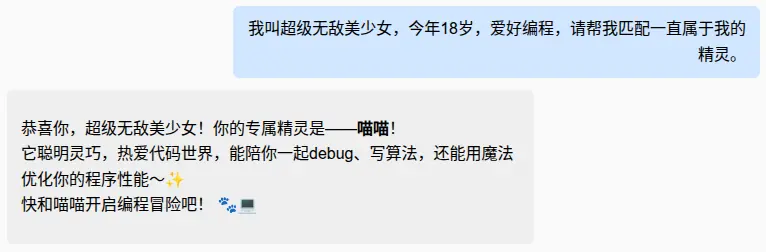
工具(函数调用)
有一种被称为"工具"或"函数调用"的概念。它允许 LLM 在必要的时候调用一个或多个工具,这些工具通常由开发者定义。
工具可以是任何功能,如:网络搜索、外部 API 调用、执行特定代码片段等。
LLM 本身不能直接调用工具,相反,它们会在响应中表达调用特定工具的意图(而不是用纯文本回复)。作为开发者,我们需要使用提供的参数执行这个工具,然后将工具执行的结果反馈给模型。
LangChain4j 为此提供了两种级别的使用方式:
- Low-level 使用
ChatModel和ToolSpecificationAPI - High-level 使用
AI Service和@Tool的方法
创建工具的规范
手动创建
java
// 工具声明
ToolSpecification toolSpecification = ToolSpecification.builder()
    .name("getWeather")
    .description("Returns the weather forecast for a given city")
    .parameters(JsonObjectSchema.builder()
        .addStringProperty("city", "The city for which the weather forecast should be returned")
        .addEnumProperty("temperatureUnit", List.of("CELSIUS", "FAHRENHEIT"))
        .required("city") // the required properties should be specified explicitly
        .build())
    .build();
// 工具业务逻辑
ToolExecutor toolExecutor = (req, memoryId) -> {
    String[] elf = { "皮卡丘", "妙蛙种子", "喷火龙", "喵喵" };
    int i = (int) (Math.random() * 100) % elf.length;
    return req.name() + " · " + elf[i];
};
JsonObjectSchema 的更多信息:docs.langchain4j.dev/tutorials/s...
使用类创建
java
class WeatherTools {
    @Tool("Returns the weather forecast for a given city")
    String getWeather(@P("The city for which the weather forecast should be returned") String city,
                      @P(value = "Unit of temperature", required = false) Unit unit,
            			TemperatureUnit temperatureUnit) {
        ...
    }
}
// List<ToolSpecification> toolSpecifications = ToolSpecifications.toolSpecificationsFrom(WeatherTools.class);
@Tool 注解的方法:
- 可以是静态的或非静态的
- 可见性可以是任意的,如 public、private 都可以
@Tool 注解的方法可以接受任意数量和类型的参数:
- 基本类型、对象类型、POJO、枚举、List 和 Set集合
- Map 集合(需要再参数描述中手动指定 K 和 V 的类型,使用
@P注解) - 无参
@P
- 参数描述
返回值类型:
- void 如果返回值是 void,方法执行成功时,会将 "Success" 字符串发送给 LLM。
- String 返回值将原样发送给 LLM,不进行任何转换。
- other 返回其他类型,返回值在发送给 LLM 之前会转换为 JSON 字符串。
Low-level
一旦你拥有 List<ToolSpecification> ,就可以调用模型:
java
ChatRequest request = ChatRequest.builder()
    .messages(UserMessage.from("What will the weather be like in London tomorrow?"))
    .toolSpecifications(toolSpecifications) // 传入工具
    .build();
ChatResponse response = model.chat(request);
AiMessage aiMessage = response.aiMessage();
如果 LLM 决定调用工具,返回的 AiMessage 将包含 toolExecutionRequests 字段中的数据。在这种情况下, AiMessage.hasToolExecutionRequests() 将返回 true 。根据 LLM 的不同,它可以包含一个或多个 ToolExecutionRequest 对象(一些 LLM 支持并行调用多个工具)。
toolExecutionRequests
id根据调用的 ID。注意:某些 LLM 提供商(如 Google、Ollama)可能会省略此IDname根据将要调用的工具名称。arguments工具参数
你需要使用 ToolExecutionRequest 中的信息手动执行工具。
如果你想将工具执行的结果发送回 LLM,你需要创建一个 ToolExecutionResultMessage (每个 ToolExecutionRequest 对应一个),并将其与所有之前的消息一起发送:
java
String result = "It is expected to rain in London tomorrow.";
ToolExecutionResultMessage toolExecutionResultMessage = ToolExecutionResultMessage.from(toolExecutionRequest, result);
ChatRequest request2 = ChatRequest.builder()
        .messages(List.of(userMessage, aiMessage, toolExecutionResultMessage))
        .toolSpecifications(toolSpecifications)
        .build();
ChatResponse response2 = model.chat(request2);
High-level API
java
@Bean("elfToolAssistantV1")
    public Assistant elfToolAssistantV1(StreamingChatModel streamingChatModel) {
    // 工具说明
    ToolSpecification toolSpecification = ToolSpecification.builder()
            .name("精灵匹配助手")
            .description("根据姓名和爱好匹配精灵")
            .parameters(
                    JsonObjectSchema.builder()
                            .addStringProperty("name", "姓名")
                            .addStringProperty("hobby", "爱好")
                            .build()
            )
            .build();

    // 工具业务逻辑
    ToolExecutor toolExecutor = (req, memoryId) -> {
        String[] elf = { "皮卡丘", "妙蛙种子", "喷火龙", "喵喵" };
        int i = (int) (Math.random() * 100) % elf.length;
        return req.name() + " · " + elf[i];
    };

    return AiServices.builder(Assistant.class)
            .streamingChatModel(streamingChatModel)
            .tools(Map.of(toolSpecification, toolExecutor))
            .build();
}
High-level API
定义类
java
@Component
public class ElfMatchingTool {
    private String[] elf = { "皮卡丘", "妙蛙种子", "喷火龙", "喵喵" };

    @Tool("根据姓名和爱好匹配精灵")
    public String getElf(@P("姓名") String name, @P("爱好") String hobby) {
        return matching(name, hobby);
    }

    @Tool("查看有一共多少只精灵")
    public String getAllElfDesc() {
        return Arrays.toString(elf);
    }

    public String matching(String name, String hobby) {
        int i = (int) (Math.random() * 100) % elf.length;
        return elf[i];
    }
}
配置
java
@Bean("elfToolAssistantV2")
public Assistant elfToolAssistantV2(StreamingChatModel streamingChatModel, ElfMatchingTool elfMatchingTool) {
    return AiServices.builder(Assistant.class)
            .streamingChatModel(streamingChatModel)
            .tools(elfMatchingTool)
            .build();
}