DML语句
DML数据操作语言:通过SQL来实现数据的插入、修改和删除操作,在Oracle中常用的数据操作语音有
-
INSERT
-
UPDATE
-
DELETE
-
SELECT ... FOR UPDATE
1.INSERT
数据插入语句
INSERT INTO 表名(fieldName1,fieldName1,...fieldNameN)values(value1,value2,...,valueN)
-- 案例
insert into t_class(id,name)values(1,'计算机1班');
简略的语法:如果我们插入的记录需要给表中的每一个字段都添加信息。那么我们可以省略 字段列表,但是后面的值列表必须和表结构中的字段顺序保持一致
INSERT INTO 表名 values(value1,value2,...,valueN)
INSERT INTO t_class values(2,'计算机2班');
-- 下面是错误示范
INSERT INTO t_class values('英语一班',3);2.序列号
主键:我们插入数据的时候就需要保证他的唯一性
-
Orlace中提供的序列号的方案来解决
-
MySQL中提供了主键自增的方案
-
在分布式环境下。我们可以通过分布式ID来解决
序列号的语法:
CREATE SEQUENCE 序列名称
[INCREMENT BY] -- 每次自增的数量
[START WITH 1] -- 从1开始计数
[NOMAXVALUE]   -- 不设置最大值
[NOCYCLE]     -- 一直累加,不循环
CACHE 10;     -- 缓存10
案例应用
create sequence s_class; -- 从1开始  每次增长1个
-- currval是在执行了nextval之后才会生效
select s_class.currval from dual;
select s_class.nextval from dual;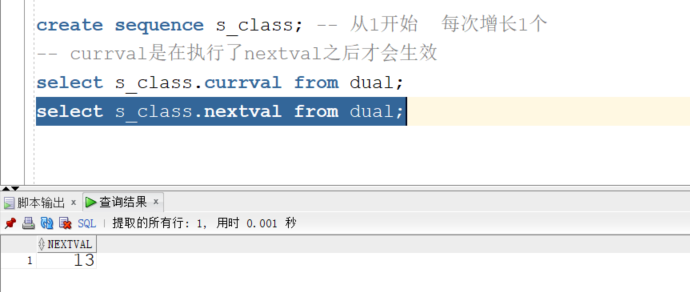
插入语句的应用
INSERT INTO t_class values(s_class.nextval,'计算机2班');3.UPDATE
需要对已经插入到表结构中的数据做出调整。对应的语法结构
UPDATE 表名 SET field1=value1,field2=value2 ... [where 条件]
update t_class set name = '软件班级' ;
update t_class set name = '计算机1班' where id = 15;
-- 更新id为18 19 21的记录为 '计算机2班'
update t_class set name = '计算机2班' where id = 18 or id=19 or id=21 ;
update t_class set name = '计算机3班' where id in (14,16,17) ;
update t_class set name = '英语1班' where id >= 100 and id <=200 ;
update t_class set name = '英语2班' where id between 100 and 130 ;
update t_class set name = 'test' where id != 24 ;
update t_class set name = 'test666' where id <> 22 ;4.删除语句
 DELETE FROM 表名 [where 条件]
 delete from t_class where id = 17;
 -- 对于null的查询我们是用 is null 来匹配的
 delete from t_class where name is null;

 -- delete 删除会做数据的缓存
delete from t_class ; -- 会删除表中的所有的数据。 删库跑路 要小心使用
-- 删除全表的数据,直接删除数据。不做缓存处理。 效率高。风险大
truncate table t_class ;
5.多行插入
-- 多行插入
insert into t_class_copy(id,name)
select id,name from t_class
select * from t_class_copy1
-- 复制表
create table t_class_copy as select * from t_class where 1 != 1;
-- 复制表 带有数据的情况
create table t_class_copy1 as select * from t_class ;DQL语句
DQL:数据查询语言。
查询语句的语法结构
--语法结构
SELECT <列名>
FROM <表名>
[WHERE <查询条件> ]
[ORDER BY <排序的列名>[ASC或者DESC] ]
[GROUP BY <分组字段> ]
1.简单查询语句
1.1 知识点讲解
全表查询中的内容:
create sequence s_student;
insert into t_student(id,name,age,address,gender)values(s_student.nextval,'王五',18,'湖南长沙','女') ;
-- 1.查询学生表的所有信息 * 表示查询表中的所有的列
select * from t_student;
-- 2.查询特定的列
select id,name,age from t_student;
-- 3.查询信息使用别名来标识,别名不能用' 我们得使用 "
select
id as "学生编号",
name as "学生姓名",
age as "学生年龄"
from t_student;
-- 我们可以省略 ""
select
id as 学生编号,
name as 学生姓名,
age as 学生年龄
from t_student;
-- 我们还可以省略 as 关键字
select
id 学生编号,
name 学生姓名,
age 学生年龄
from t_student;
-- 如果别名中有特殊符号的情况。那么不能省略""
select
id "【学生编号】",
name as 学生姓名,
age as 学生年龄
from t_student;
-- 4.常量的处理
select id,name,age ,29 体重 from t_student
-- 5.查询学生信息。 id 和 name 拼接起来 ||
select id,name,age , '【'||id||'-'||'name'||'】' 组合 from t_student带条件的查询:
drop table t_student ;
create table t_student(
id number(3) primary key,
name varchar2(30) ,
gender char(3) ,
age number(2),
class_id number(5)
)
Insert into DPB.T_STUDENT (ID,NAME,GENDER,AGE,CLASS_ID) values (1,'张三','男 ',18,1001);
Insert into DPB.T_STUDENT (ID,NAME,GENDER,AGE,CLASS_ID) values (2,'李四','女 ',22,1002);
Insert into DPB.T_STUDENT (ID,NAME,GENDER,AGE,CLASS_ID) values (3,'小明','男 ',35,1003);
Insert into DPB.T_STUDENT (ID,NAME,GENDER,AGE,CLASS_ID) values (4,'小花','女 ',16,1001);
Insert into DPB.T_STUDENT (ID,NAME,GENDER,AGE,CLASS_ID) values (5,'张三疯','男 ',18,1001);
Insert into DPB.T_STUDENT (ID,NAME,GENDER,AGE,CLASS_ID) values (6,'王张妮','女 ',25,1002);
-- 6.查询出年龄在18到25之间的学生
select *
from t_student
where age >= 18 and age <= 25
select * from t_student where age between 18 and 25;
-- 7.查询出班级编号为1001或者1002的学生信息
select * from t_student where t_student.class_id = 1001 or t_student.class_id = 1002
select * from t_student t where t.class_id = 1001 or t.class_id = 1002
select * from t_student t where t.class_id in (1001,1002)
-- 8.查询出不在班级编号为1001和1002的学生信息
select * from t_student where class_id not in (1001,1002) or class_id is null
-- 9.查询出所有姓张的学员的信息 模糊查询: like
select * from t_student where name like '张%'
select * from t_student where name like '%张%'
-- 10.查询所有姓张的学生信息。并且名字又两个字组成
select * from t_student where name like '张_'
-- 11.查询所有的学生信息。按照年龄升序排列 asc 升序 可以省略
select * from t_student;
select * from t_student order by age ;
select * from t_student order by age desc;
-- 11.查询所有的学生信息。按照班级升序。如果班级相同则按照年龄降序
select * from t_student order by class_id , age desc
-- 12.查询学生表中的所有的班级编号 distinct 关键字可以帮助我们去掉重复的记录。
-- 如果后面有多个列。去掉的是多个列组合中相同的记录
select distinct class_id,age from t_student1.2 案例讲解
SQL练习讲解:
表结构
Emp----员工信息表
Ename varchar2(30), --姓名
Empno number(5), --编号
Deptno number(5), --所在部门
Job varchar2(20), --工种(人员类别),如:manager 经理,clerk 办事员
Hiredate Date, --雇佣日期
Comm number(6,2), --佣金
Sal number(6,2) --薪金
Mgr number(5) --员工上司编号
Dept-----部门表
Dname varchar2(30), --部门名
Deptno number(5), --部门号
Loc varchar2(50) --位置准备数据:
create table emp --–创建员工信息表
(
Ename varchar2(30), --姓名
Empno number(5), --编号
Deptno number(5), --所在部门
Job varchar2(20), --工种(人员类别),如:manager 经理,clerk 办事员
Hiredate Date, --雇佣日期
Comm number(7,2), --佣金
Sal number(7,2) , --薪金
Mgr number(5) --编号
);
insert into EMP (ENAME, EMPNO, DEPTNO, JOB, HIREDATE, COMM, SAL, MGR)
values ('张三', 1, 10, '办事员', null, 500, 2000, null);
insert into EMP (ENAME, EMPNO, DEPTNO, JOB, HIREDATE, COMM, SAL, MGR)
values ('李四', 2, 10, '办事员', null, 650, 2333, null);
insert into EMP (ENAME, EMPNO, DEPTNO, JOB, HIREDATE, COMM, SAL, MGR)
values ('王五', 3, 20, '办事员', null, 1650, 1221, null);
insert into EMP (ENAME, EMPNO, DEPTNO, JOB, HIREDATE, COMM, SAL, MGR)
values ('小张', 4, 20, '经理', null, 980, 3200, null);
insert into EMP (ENAME, EMPNO, DEPTNO, JOB, HIREDATE, COMM, SAL, MGR)
values ('小刘', 5, 10, '办事员', null, 500, 2000, null);
commit;
create table dept --部门表
(
Dname varchar2(30), --部门名
Deptno number(5), --部门号
Loc varchar2(50) -- 部门位置
);
insert into DEPT (DNAME, DEPTNO, LOC)
values ('市场部', 10, '大连');
insert into DEPT (DNAME, DEPTNO, LOC)
values ('研发部', 20, '沈阳');
insert into DEPT (DNAME, DEPTNO, LOC)
values ('人事部', 30, '深圳');
insert into DEPT (DNAME, DEPTNO, LOC)
values ('人事部', 40, '广州');
commit;
题目:
单表查询
1.选择部门30中的雇员
select * from emp where emp.deptno = 30
2.列出所有办事员的姓名、编号和部门
select ename as 姓名,empno "编号",deptno 部门
from emp
where emp.job = '办事员'
select ename as 姓名,empno "编号",deptno 部门 ,(select dname from dept where dept.deptno = emp.deptno) 部门名称
from emp
where emp.job = '办事员'
3.找出佣金高于薪金的雇员
select * from emp where comm > sal
4.找出佣金高于薪金60%的雇员
select emp.*,sal*0.6 from emp where comm > sal*0.6
5.找出部门10中所有经理和部门20中的所有办事员的详细资料
select *
from emp
where (deptno = 10 and job = '经理')
or (deptno = 20 and job = '办事员')
6.找出收取佣金的雇员的不同工作
select distinct job from emp where comm > 0
7.找出不收取佣金或收取的佣金低于100的雇员
select * from emp where (comm <= 0 or comm is null ) or comm < 100
select * from emp where comm <= 100 or comm is null
8.找出各月最后一天受雇的所有雇员
select emp.*,last_day(emp.hiredate)
from emp
where emp.hiredate = last_day(emp.hiredate)
9.找出早于25年之前受雇的雇员
select emp.*,sysdate
from emp
where add_months(emp.hiredate,25*12) < sysdate
10.显示只有首字母大写的所有雇员的姓名
select emp.*,ename,substr(ename,1,1)
from emp
where substr(ename,1,1) >= 'A' and substr(ename,1,1) <= 'Z'
select emp.*,ename,substr(ename,1,1)
from emp
where substr(ename,1,1) between 'A' and 'Z'
11.显示正好为6个字符的雇员姓名
select emp.*,emp.ename,length(emp.ename)
from emp
where length(emp.ename) = 6
12.显示不带有'R'的雇员姓名
select *
from emp
where emp.ename not like '%R%'
13.显示所有雇员的姓名的前三个字符
select emp.*,substr(emp.ename,1,2) from emp
14.显示所有雇员的姓名,用a替换所有'A'
select ename,replace(ename,'A','a')
from emp
15.显示所有雇员的姓名以及满10年服务年限的日期
select ename,hiredate,add_months(hiredate,10*12)
from emp
16.显示雇员的详细资料,按姓名排序
select *
from emp
order by ename desc
17.显示雇员姓名,根据其服务年限,将最老的雇员排在最前面
select ename 姓名
from emp
order by hiredate asc
18.显示所有雇员的姓名、工作和薪金,按工作的降序顺序排序,而工作相同时按薪金升序
select ename 姓名, job 工作 ,sal 薪金
from emp
order by job desc ,sal asc
19.显示所有雇员的姓名和加入公司的年份和月份,按雇员受雇日所在月排序,将最早年份的项目排在最前面
select emp.ename,
emp.hiredate,
extract(YEAR from emp.hiredate) year,
extract(MONTH from emp.hiredate) month
from emp
order by extract(MONTH from emp.hiredate) ,extract(YEAR from emp.hiredate) ;
20.显示在一个月为30天的情况下所有雇员的日薪金
select emp.*,nvl(sal,0),round(nvl(sal,0)/30,2) 日薪
from emp
21.找出在(任何年份的)2月受聘的所有雇员
select *
from emp
where extract(MONTH from hiredate) = 2
22.对于每个雇员,显示其加入公司的天数
select emp.*,round(sysdate-hiredate ) 天数
from emp
23.显示姓名字段的任何位置,包含 "A" 的所有雇员的姓名
select ename 姓名
from emp
where ename like '%A%'
24.以年、月和日显示所有雇员的服务年限
select
trunc((sysdate-hiredate)/365) year,
trunc((sysdate-hiredate)/12) month,
trunc((sysdate-hiredate)) days
from emp2.聚合函数
聚合函数的作用:解决我们对于数据的统计的需求
-- 聚合函数和分组函数
-- 1.统计学生的人数 count(字段名称) 统计该列中数据不为空的记录条数
select count(*),count(name),count(gender),count(age),count(1)
from t_student ;
-- count(*) 和 count(1) 的区别
select t_student.*,1
from t_student ;
-- 2.其他常用的统计函数
select count(1),max(age),min(age),sum(age),round(avg(age))
from t_student ;3.分组查询
分组函数  group by
--  1> 不和聚合函数一块使用,作用和distinct是一样。可以去掉重复的记录
    select * from emp ;
    select deptno from emp group by deptno ;

    select distinct deptno from emp;

    select deptno,job
    from emp
    group by deptno , job
    order by deptno;

-- 2>和聚合函数一块使用的场景,聚合函数统计的数据就不是查询的所有的数据了。而是分组后的数据
   -- 分组后的数据中我们不能直接出现非分组的字段
   -- a.统计出学生表中男生和女生的人数
   select gender,count(1) from t_student group by gender;

   -- b.统计出学生表中每个班级的人数
   select class_id,count(1)  from t_student t group by t.class_id;

   -- c.统计出学生表中每个班级中的男生和女生人数 聚合函数统计的是分组后的最小单位的数据
   select class_id,gender,count(1) from t_student group by class_id ,gender ;

   -- d.统计出学生表中年龄大于18的男生和女生的人数
   select gender,count(1)
   from t_student
   where age > 18 -- where 的位置,必须是要在group by 之前。作用呢是筛选要分组的数据
   group by gender

   -- e.统计出学习表中年龄大于18的班级人数大于1的记录
   select class_id,count(1)
   from t_student
   where age > 18
   group by class_id
   having count(1) > 1 -- 在group by 之后。和group by 配合使用。作用是过滤分组后的数据
4.多表查询
Oracle和MySQL都是关系型数据库。【关系】指的就是表和表之间的数据是有关联关系的。
多表查询
-- 1.交叉连接:获取两张表的笛卡尔乘积
select * from t_class ;
select * from t_student;
-- 查询出学生信息和对应的班级信息
select t1.*,t2.*
from t_student t1,t_class t2
-- 等值连接:在交叉连接的基础上添加过滤条件
select t1.*,t2.*
from t_student t1,t_class t2 -- 1000 * 1000 = 100W
where t1.class_id = t2.id -- where 关键是在结果集之后做的条件筛选
-- 内连接:左边表结构中的记录和右边表结构中的记录连接的时候会根据on中的条件判断。如果满足就获取。否则都丢失
select t1.*,t2.*
from t_student t1
inner join t_class t2
on t1.class_id = t2.id
-- 查询出学生表中的所有的记录。同时显示学生对应的班级名称
select t1.*,t2.*
from t_student t1
inner join t_class t2
on t1.class_id = t2.id
-- 左连接:在内连接的基础上。保留左侧不满足条件的数据
select t1.*,t2.*
from t_student t1 left outer join t_class t2
on t1.class_id = t2.id
-- 右连接:在内连接的基础上。保留右侧不满足条件的数据
-- 查询所有的班级信息。同时查询相关的学生信息
select t2.*,t1.*
from t_student t1 right outer join t_class t2
on t1.class_id = t2.id
-- 全连接:在内连接的基础上保留左右两侧不满足条件的数据
select t1.*,t2.*
from t_student t1 full join t_class t2
on t1.class_id = t2.id
-- union union all 合并结果集
select t1.*,t2.*
from t_student t1 left outer join t_class t2
on t1.class_id = t2.id
union -- 合并结果集。会去掉重复的记录 和 全连接差不多
select t1.*,t2.*
from t_student t1 right outer join t_class t2
on t1.class_id = t2.id
select t1.*,t2.*
from t_student t1 left outer join t_class t2
on t1.class_id = t2.id
union all -- 合并结果集。不会去掉重复的记录
select t1.*,t2.*
from t_student t1 right outer join t_class t2
on t1.class_id = t2.id5.案例讲解
sql
drop table student;
create table student (
id number(3) PRIMARY key,
name VARCHAR2(20) not null,
sex varchar2(4),
birth number(4),
department varchar2(20),
address VARCHAR2(50));


创建score表。SQL代码如下:
create table score(
   id number(3)   PRIMARY key,
   stu_id number(3)  not null,
   c_name VARCHAR(20) ,
   grade number(3)
);

-- 向student表插入记录的INSERT语句如下:
insert into student values(901,'张老大','男',1985,'计算机系','北京市海淀区');
insert into student values(902,'张老二','男',1986,'中文系','北京市昌平区');
insert into student values(903,'张三','女',1990,'中文系','湖南省永州市');
insert into student values(904,'李四','男',1990,'英语系','辽宁省阜新市');
insert into student values(905,'王五','女',1991,'英语系','福建省厦门市');
insert into student values(906,'王六','男',1988,'计算机系','湖南省衡阳市');
-- 向score表插入记录的INSERT语句如下:
insert into score values(1,901,'计算机',98);
insert into score values(2,901,'英语',80);
insert into score values(3,902,'计算机',65);
insert into score values(4,902,'中文',88);
insert into score values(5,903,'中文',95);
insert into score values(6,904,'计算机',70);
insert into score values(7,904,'英语',92);
insert into score values(8,905,'英语',94);
insert into score values(9,906,'计算机',90);
insert into score values(10,906,'英语',85);

SELECT * from student;
select * from score;

1、查询student表的第2条到4条记录
   分页查询的步骤:
-- rownum:系统自动维护的 从1开始
select t.* ,rownum
from (
select s.*,rownum num
from student s
where rownum <=4 ) t
where t.num >=2

2、从student表查询所有学生的学号(id)、
           姓名(name)和院系(department)的信息

select id 学号, name 姓名, department 院系
from student

3、从student表中查询计算机系和英语系的学生的信息
   select *
   from student
   -- where department = '计算机系' or department = '英语系'
      where department in ('英语系','计算机系' )
4、从student表中查询年龄25~30岁的学生信息
   select s.*,(extract(year from sysdate) - birth) age
   from student s
   where (extract(year from sysdate) - birth)  between 30 and 35

5、从student表中查询每个院系有多少人?
select department,count(1)
from student
group by department

6、从score表中查询每个科目的最高分
select c_name,max(grade)
from score
group by c_name

7、查询李四的考试科目(c_name)和考试成绩(grade)
     注意: '=' 只有在确定结果是一个的情况下使用,不确定的使用用 'in'

     select * from student for update;

     select c_name,grade
     from score
     where stu_id in (
        select id from student where name = '李四'
     )

     select c_name,grade
     from score
     where exists ( -- 是否满足下面的子查询的条件
        select id from student where name = '李四' and score.stu_id = student.id
     )

     select s1.c_name,s1.grade,s2.name
     from score s1 , student s2
     where s2.name = '李四' and s1.stu_id = s2.id

     select s1.name,s2.c_name,s2.grade
     from student s1 left join score s2  on s1.id = s2.stu_id -- and s1.name = '李四' 连接匹配的条件
     where s1.name = '李四'

     select s1.name,s2.c_name,s2.grade
     from (
        select * from student where name = '李四'
     ) s1 left join score s2  on s1.id = s2.stu_id -- and s1.name = '李四' 连接匹配的条件
     -- where s1.name = '李四'

8、用内连接的方式查询所有学生的信息和考试信息
    select s1.*,s2.*
    from student s1 inner join score s2 on s1.id = s2.stu_id

9、计算每个学生的总成绩
  select stu_id,(select name from student where id = stu_id) 名称,sum(grade)
  from score
  group by stu_id

10、计算每个考试科目的平均成绩
    select c_name,round(avg(grade),2) 平均成绩
    from score
    group by c_name

11、查询计算机成绩低于95的学生信息
  select s1.*,s2.grade
  from student s1 left join score s2 on s1.id = s2.stu_id
  where s2.grade < 95 and s1.department = '计算机系'

12、查询同时参加计算机和英语考试的学生的信息
    select *
    from student
    where id in (
        select stu_id from score where c_name = '计算机' and c_name = '英语'
    )

    select t1.stu_id
    from (
    select * from score where c_name = '计算机' ) t1,
    (select * from score where c_name = '英语' ) t2
    where t1.stu_id = t2.stu_id

13、将计算机考试成绩按从高到低进行排序
    select *
    from score
    where c_name = '计算机'
    order by grade desc

14、从student表和score表中查询出学生的学号,
     然后合并查询结果 UNION与union all
select  id
from student
union all
select stu_id
from score

15、查询姓张或者姓王的同学的姓名、院系和考试科目及成绩
  select s1.name ,s1.department,s2.c_name,s2.grade
  from (select * from student where name like '张%' or name like '王%') s1
  left join score s2  on s1.id = s2.stu_id

16、查询都是湖南的学生的姓名、年龄、院系和考试科目及成绩

  select s1.name ,s1.department,s2.c_name,s2.grade
  from (select * from student where address like '湖南%' ) s1
  left join score s2  on s1.id = s2.stu_id