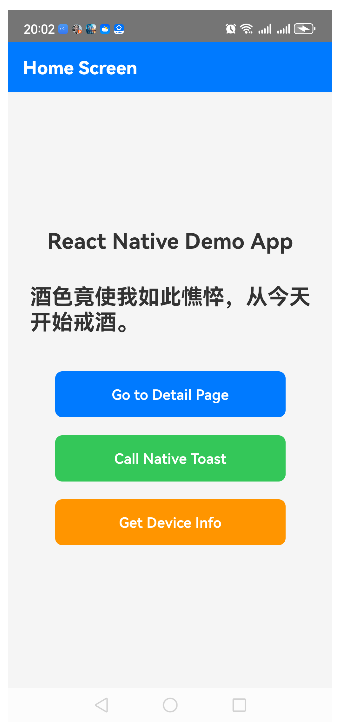
写了一个React Native demo,包含页面间跳转逻辑,包括安卓原生和JS接口的互相调用。页面如下。
首页:
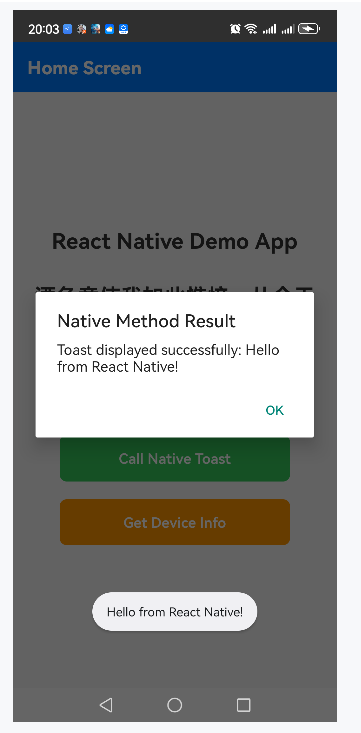
点击call Native Toast:
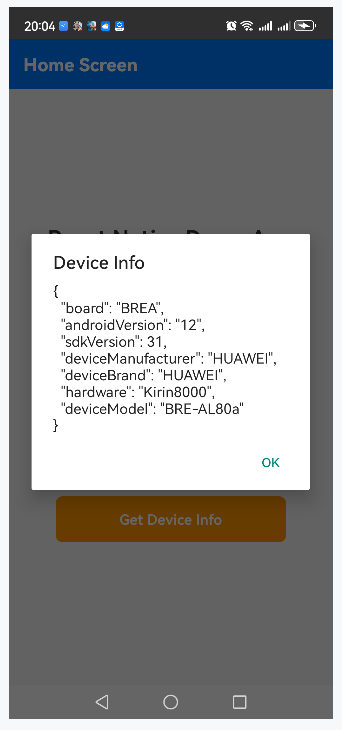
点击Get Device Info:
点击Go to Detail Page:
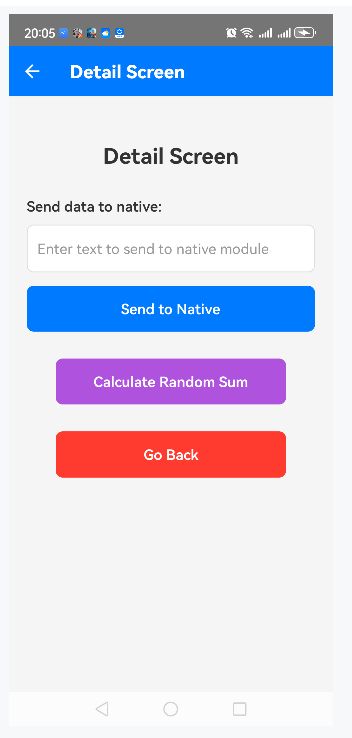
输入文字,点击Send to Native:
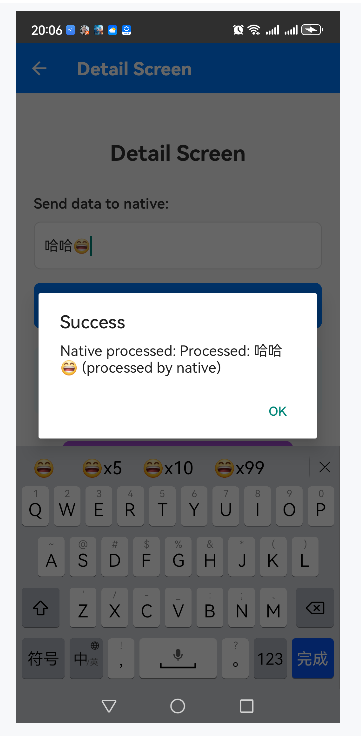
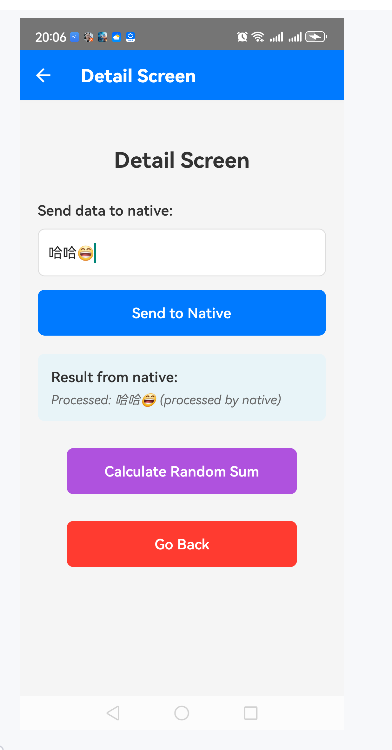
点击 Calculate Random Sum:
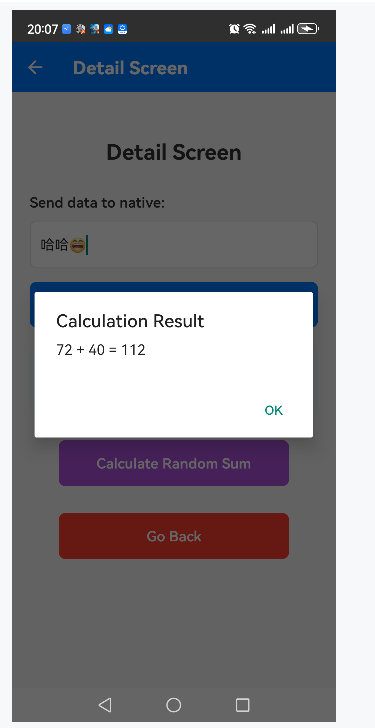
点击Go Back,回到首页。
ok. 功能就这些。工程结构如下:
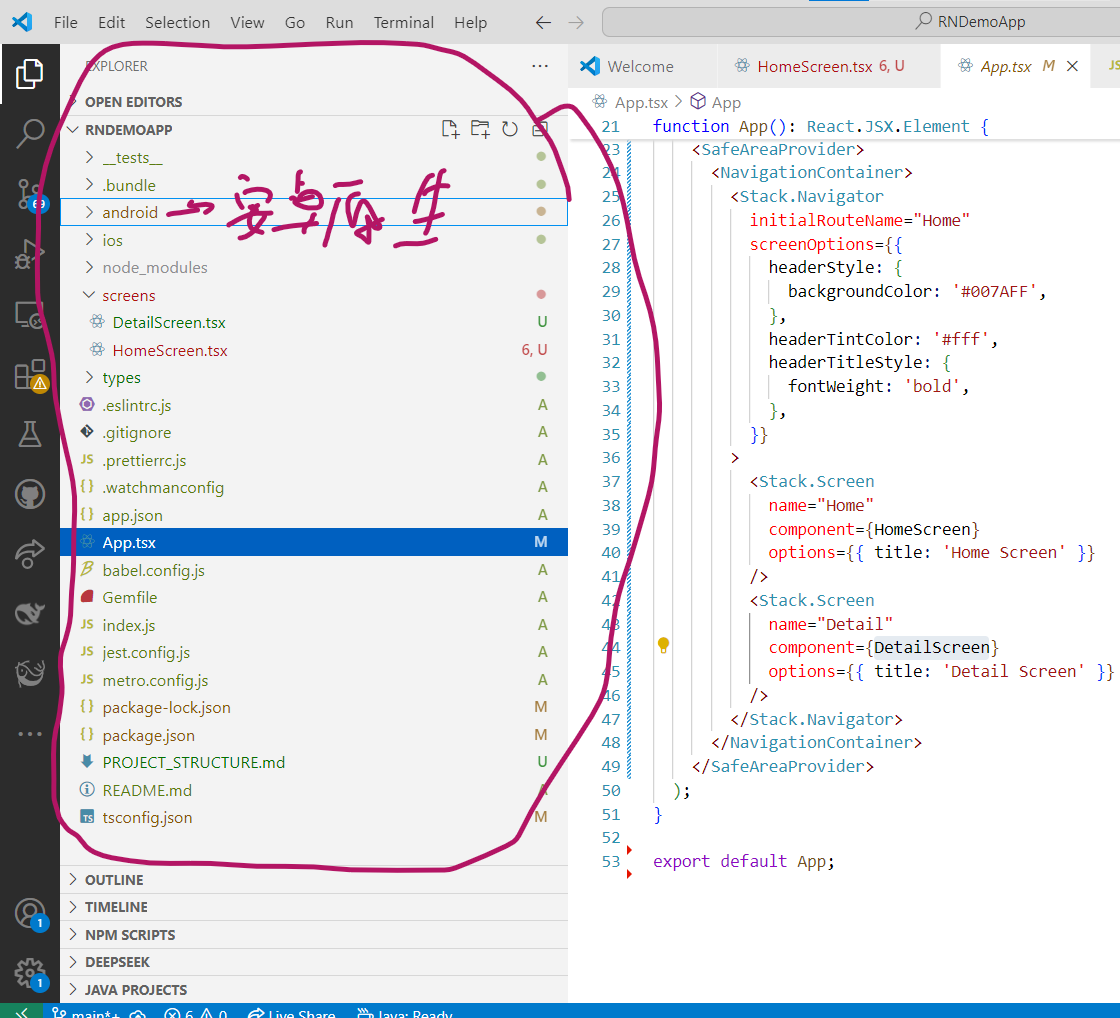
代码如下:
安卓原生代码.
1、NativeDemoModule:
java
package com.rndemoapp.modules;

import android.widget.Toast;
import android.os.Build;
import android.content.pm.PackageManager;
import android.Manifest;

import androidx.annotation.NonNull;

import com.facebook.react.bridge.ReactApplicationContext;
import com.facebook.react.bridge.ReactContextBaseJavaModule;
import com.facebook.react.bridge.ReactMethod;
import com.facebook.react.bridge.Promise;
import com.facebook.react.bridge.WritableMap;
import com.facebook.react.bridge.Arguments;

import java.util.HashMap;
import java.util.Map;

public class NativeDemoModule extends ReactContextBaseJavaModule {

    public NativeDemoModule(@NonNull ReactApplicationContext reactContext) {
        super(reactContext);
    }

    @Override
    @NonNull
    public String getName() {
        return "NativeDemoModule";
    }

    @ReactMethod
    public void showToast(String message, Promise promise) {
        try {
            Toast.makeText(getReactApplicationContext(), message, Toast.LENGTH_SHORT).show();
            promise.resolve("Toast displayed successfully: " + message);
        } catch (Exception e) {
            promise.reject("TOAST_ERROR", "Failed to show toast", e);
        }
    }

    @ReactMethod
    public void getDeviceInfo(Promise promise) {
        try {
            WritableMap deviceInfo = Arguments.createMap();

            deviceInfo.putString("deviceModel", Build.MODEL);
            deviceInfo.putString("deviceBrand", Build.BRAND);
            deviceInfo.putString("deviceManufacturer", Build.MANUFACTURER);
            deviceInfo.putString("androidVersion", Build.VERSION.RELEASE);
            deviceInfo.putInt("sdkVersion", Build.VERSION.SDK_INT);
            deviceInfo.putString("board", Build.BOARD);
            deviceInfo.putString("hardware", Build.HARDWARE);

            promise.resolve(deviceInfo);
        } catch (Exception e) {
            promise.reject("DEVICE_INFO_ERROR", "Failed to get device info", e);
        }
    }

    @ReactMethod
    public void processData(String inputData, Promise promise) {
        try {
            // 模拟处理数据
            String processedData = "Processed: " + inputData.toUpperCase() + " (processed by native)";
            promise.resolve(processedData);
        } catch (Exception e) {
            promise.reject("PROCESS_DATA_ERROR", "Failed to process data", e);
        }
    }

    @ReactMethod
    public void calculateSum(int num1, int num2, Promise promise) {
        try {
            int sum = num1 + num2;
            promise.resolve(sum);
        } catch (Exception e) {
            promise.reject("CALCULATION_ERROR", "Failed to calculate sum", e);
        }
    }
}
2、NativeDemoPackage:
java
package com.rndemoapp.modules;

import com.facebook.react.ReactPackage;
import com.facebook.react.bridge.NativeModule;
import com.facebook.react.bridge.ReactApplicationContext;
import com.facebook.react.uimanager.ViewManager;

import java.util.ArrayList;
import java.util.Collections;
import java.util.List;

public class NativeDemoPackage implements ReactPackage {

    @Override
    public List<NativeModule> createNativeModules(ReactApplicationContext reactContext) {
        List<NativeModule> modules = new ArrayList<>();
        modules.add(new NativeDemoModule(reactContext));
        return modules;
    }

    @Override
    public List<ViewManager> createViewManagers(ReactApplicationContext reactContext) {
        return Collections.emptyList();
    }
}
3、MainApplication:
Kotlin
package com.rndemoapp

import android.app.Application
import com.facebook.react.PackageList
import com.facebook.react.ReactApplication
import com.facebook.react.ReactHost
import com.facebook.react.ReactNativeHost
import com.facebook.react.ReactPackage
import com.facebook.react.defaults.DefaultNewArchitectureEntryPoint.load
import com.facebook.react.defaults.DefaultReactHost.getDefaultReactHost
import com.facebook.react.defaults.DefaultReactNativeHost
import com.facebook.soloader.SoLoader
import com.rndemoapp.modules.NativeDemoPackage

class MainApplication : Application(), ReactApplication {

    override val reactNativeHost: ReactNativeHost =
        object : DefaultReactNativeHost(this) {
            override fun getPackages(): List<ReactPackage> =
                PackageList(this).packages.apply {
                    // 如果需要手动添加尚未自动链接的包,可以在这里 add,例如:
                     add(NativeDemoPackage())
                }

            override fun getJSMainModuleName(): String = "index"

            override fun getUseDeveloperSupport(): Boolean = BuildConfig.DEBUG

//            override val isNewArchitectureEnabled: Boolean = BuildConfig.IS_NEW_ARCHITECTURE_ENABLED
            override val isHermesEnabled: Boolean = BuildConfig.IS_HERMES_ENABLED
        }

    override val reactHost: ReactHost
        get() = getDefaultReactHost(applicationContext, reactNativeHost)

    override fun onCreate() {
        super.onCreate()
        SoLoader.init(this, false)
        if (BuildConfig.IS_NEW_ARCHITECTURE_ENABLED) {
            // 如果启用了新架构,加载原生入口点
            load()
        }
    }
}
4、MainActivity:
Kotlin
package com.rndemoapp

import com.facebook.react.ReactActivity
import com.facebook.react.ReactActivityDelegate
import com.facebook.react.defaults.DefaultNewArchitectureEntryPoint.fabricEnabled
import com.facebook.react.defaults.DefaultReactActivityDelegate

class MainActivity : ReactActivity() {

  /**
   * Returns the name of the main component registered from JavaScript. This is used to schedule
   * rendering of the component.
   */
  override fun getMainComponentName(): String = "RNDemoApp"

  /**
   * Returns the instance of the [ReactActivityDelegate]. We use [DefaultReactActivityDelegate]
   * which allows you to enable New Architecture with a single boolean flags [fabricEnabled]
   */
  override fun createReactActivityDelegate(): ReactActivityDelegate =
      DefaultReactActivityDelegate(this, mainComponentName, fabricEnabled)
}
5、AndroidManifest:
XML
<manifest xmlns:android="http://schemas.android.com/apk/res/android">

    <uses-permission android:name="android.permission.INTERNET" />

    <application
      android:name=".MainApplication"
      android:label="@string/app_name"
      android:icon="@mipmap/ic_launcher"
      android:roundIcon="@mipmap/ic_launcher_round"
      android:allowBackup="false"
      android:theme="@style/AppTheme"
      android:usesCleartextTraffic="${usesCleartextTraffic}"
      android:supportsRtl="true">
      <activity
        android:name=".MainActivity"
        android:label="@string/app_name"
        android:configChanges="keyboard|keyboardHidden|orientation|screenLayout|screenSize|smallestScreenSize|uiMode"
        android:launchMode="singleTask"
        android:windowSoftInputMode="adjustResize"
        android:exported="true">
        <intent-filter>
            <action android:name="android.intent.action.MAIN" />
            <category android:name="android.intent.category.LAUNCHER" />
        </intent-filter>
      </activity>
    </application>
</manifest>
6、drawable目录里的输入框背景rn_edit_text_material.xml:
XML
<?xml version="1.0" encoding="utf-8"?>
<!-- Copyright (C) 2014 The Android Open Source Project

     Licensed under the Apache License, Version 2.0 (the "License");
     you may not use this file except in compliance with the License.
     You may obtain a copy of the License at

          http://www.apache.org/licenses/LICENSE-2.0

     Unless required by applicable law or agreed to in writing, software
     distributed under the License is distributed on an "AS IS" BASIS,
     WITHOUT WARRANTIES OR CONDITIONS OF ANY KIND, either express or implied.
     See the License for the specific language governing permissions and
     limitations under the License.
-->
<inset xmlns:android="http://schemas.android.com/apk/res/android"
       android:insetLeft="@dimen/abc_edit_text_inset_horizontal_material"
       android:insetRight="@dimen/abc_edit_text_inset_horizontal_material"
       android:insetTop="@dimen/abc_edit_text_inset_top_material"
       android:insetBottom="@dimen/abc_edit_text_inset_bottom_material"
       >

    <selector>
        <!--
          This file is a copy of abc_edit_text_material (https://bit.ly/3k8fX7I).
          The item below with state_pressed="false" and state_focused="false" causes a NullPointerException.
          NullPointerException:tempt to invoke virtual method 'android.graphics.drawable.Drawable android.graphics.drawable.Drawable$ConstantState.newDrawable(android.content.res.Resources)'

          <item android:state_pressed="false" android:state_focused="false" android:drawable="@drawable/abc_textfield_default_mtrl_alpha"/>

          For more info, see https://bit.ly/3CdLStv (react-native/pull/29452) and https://bit.ly/3nxOMoR.
        -->
        <item android:state_enabled="false" android:drawable="@drawable/abc_textfield_default_mtrl_alpha"/>
        <item android:drawable="@drawable/abc_textfield_activated_mtrl_alpha"/>
    </selector>

</inset>
7、styles.xml:
XML
<resources>

    <!-- Base application theme. -->
    <style name="AppTheme" parent="Theme.AppCompat.DayNight.NoActionBar">
        <!-- Customize your theme here. -->
        <item name="android:editTextBackground">@drawable/rn_edit_text_material</item>
    </style>

</resources>
8、app/build.gradle :
bash
apply plugin: "com.android.application"
apply plugin: "org.jetbrains.kotlin.android"
apply plugin: "com.facebook.react"


/**
 * Set this to true to Run Proguard on Release builds to minify the Java bytecode.
 */
def enableProguardInReleaseBuilds = false

/**
 * The preferred build flavor of JavaScriptCore (JSC)
 *
 * For example, to use the international variant, you can use:
 * `def jscFlavor = io.github.react-native-community:jsc-android-intl:2026004.+`
 *
 * The international variant includes ICU i18n library and necessary data
 * allowing to use e.g. `Date.toLocaleString` and `String.localeCompare` that
 * give correct results when using with locales other than en-US. Note that
 * this variant is about 6MiB larger per architecture than default.
 */
def jscFlavor = 'io.github.react-native-community:jsc-android:2026004.+'

android {
    ndkVersion rootProject.ext.ndkVersion
    buildToolsVersion rootProject.ext.buildToolsVersion
    compileSdk rootProject.ext.compileSdkVersion

    namespace "com.rndemoapp"

    buildFeatures {
        buildConfig = true
    }

    defaultConfig {
        applicationId "com.rndemoapp"
        minSdkVersion rootProject.ext.minSdkVersion
        targetSdkVersion rootProject.ext.targetSdkVersion
        versionCode 1
        versionName "1.0"
        manifestPlaceholders = [usesCleartextTraffic: "true"]
    }
    signingConfigs {
        debug {
            storeFile file('debug.keystore')
            storePassword 'android'
            keyAlias 'androiddebugkey'
            keyPassword 'android'
        }
    }
    buildTypes {
        debug {
            signingConfig signingConfigs.debug
        }
        release {
            // Caution! In production, you need to generate your own keystore file.
            // see https://reactnative.dev/docs/signed-apk-android.
            signingConfig signingConfigs.debug
            minifyEnabled enableProguardInReleaseBuilds
            proguardFiles getDefaultProguardFile("proguard-android.txt"), "proguard-rules.pro"
        }
    }
}

println "React plugin applied: ${project.plugins.hasPlugin('com.facebook.react')}"

dependencies {
    // The version of react-native is set by the React Native Gradle Plugin
    implementation("com.facebook.react:react-android")
    implementation project(':react-native-gesture-handler')

    if (hermesEnabled.toBoolean()) {
        implementation("com.facebook.react:hermes-android")
    } else {
        implementation jscFlavor
    }
}

// 添加旧的自动链接(放在文件末尾)
//apply from: file("../../node_modules/react-native/node_modules/@react-native-community/cli-platform-android/native_modules.gradle")
apply from: file("../../node_modules/react-native/node_modules/@react-native-community/cli-platform-android/native_modules.gradle"); applyNativeModulesAppBuildGradle(project)

configurations.all {
    resolutionStrategy {
        force "org.jetbrains.kotlin:kotlin-stdlib:$rootProject.ext.kotlinVersion"
        force "org.jetbrains.kotlin:kotlin-stdlib-jdk7:$rootProject.ext.kotlinVersion"
        force "org.jetbrains.kotlin:kotlin-stdlib-jdk8:$rootProject.ext.kotlinVersion"
    }
}
9、android/build.gradle :
bash
buildscript {
    ext {
        buildToolsVersion = "34.0.0"
        minSdkVersion = 21
        compileSdkVersion = 34
        targetSdkVersion = 34
        ndkVersion = "27.1.12297006"
        kotlinVersion = "1.9.0"
    }
    repositories {
        google()
        mavenCentral()

    }
    dependencies {
        classpath("com.android.tools.build:gradle:7.4.2")
        classpath("com.facebook.react:react-native-gradle-plugin")
//        classpath("org.jetbrains.kotlin:kotlin-gradle-plugin:1.9.0")
        // 使用变量,确保与 ext.kotlinVersion 一致
        classpath("org.jetbrains.kotlin:kotlin-gradle-plugin:$kotlinVersion")
    }
}

apply plugin: "com.facebook.react.rootproject"
10、gradle.properties :
bash
# Project-wide Gradle settings.

org.gradle.jvmargs=-Xmx2048m -XX:MaxMetaspaceSize=512m


# https://developer.android.com/topic/libraries/support-library/androidx-rn
android.useAndroidX=true


reactNativeArchitectures=armeabi-v7a,arm64-v8a,x86,x86_64

#newArchEnabled=true
newArchEnabled=false

hermesEnabled=true

edgeToEdgeEnabled=false
11、settings.gradle:
bash
// 这两个块必须放在文件最顶部,对全局生效
pluginManagement {
    repositories {
        google()
        mavenCentral()
        gradlePluginPortal()
    }
}
dependencyResolutionManagement {
    repositoriesMode.set(RepositoriesMode.PREFER_SETTINGS)
    repositories {
        google()
        mavenCentral()
    }
}

rootProject.name = 'RNDemoApp'

apply from: file("../node_modules/react-native/node_modules/@react-native-community/cli-platform-android/native_modules.gradle"); applyNativeModulesSettingsGradle(settings)

include ':app'
includeBuild('../node_modules/@react-native/gradle-plugin')

include ':react-native-gesture-handler'
project(':react-native-gesture-handler').projectDir = new File(rootProject.projectDir, '../node_modules/react-native-gesture-handler/android')
12、gradle-wrapper.properties:
bash
#Sat Feb 21 17:50:51 CST 2026
distributionBase=GRADLE_USER_HOME
distributionPath=wrapper/dists
distributionUrl=https\://services.gradle.org/distributions/gradle-8.5-bin.zip
zipStoreBase=GRADLE_USER_HOME
zipStorePath=wrapper/dists
RN代码:
1、index.js:
javascript
/**
 * @format
 */

import { AppRegistry } from 'react-native';
import App from './App';
import { name as appName } from './app.json';

AppRegistry.registerComponent(appName, () => App);
2、app.json:
bash
{
  "name": "RNDemoApp",
  "displayName": "RNDemoApp"
}
3、App.tsx:
TypeScript
/**
 * React Native Demo App with Navigation and Native Modules
 */

import React from 'react';
import { NavigationContainer } from '@react-navigation/native';
import { createStackNavigator } from '@react-navigation/stack';
import { SafeAreaProvider } from 'react-native-safe-area-context';

import HomeScreen from './screens/HomeScreen';
import DetailScreen from './screens/DetailScreen';

// 定义路由参数类型
export type RootStackParamList = {
  Home: undefined;
  Detail: undefined;
};

const Stack = createStackNavigator<RootStackParamList>();

function App(): React.JSX.Element {
  return (
    <SafeAreaProvider>
      <NavigationContainer>
        <Stack.Navigator
          initialRouteName="Home"
          screenOptions={{
            headerStyle: {
              backgroundColor: '#007AFF',
            },
            headerTintColor: '#fff',
            headerTitleStyle: {
              fontWeight: 'bold',
            },
          }}
        >
          <Stack.Screen
            name="Home"
            component={HomeScreen}
            options={{ title: 'Home Screen' }}
          />
          <Stack.Screen
            name="Detail"
            component={DetailScreen}
            options={{ title: 'Detail Screen' }}
          />
        </Stack.Navigator>
      </NavigationContainer>
    </SafeAreaProvider>
  );
}

export default App;
4、DetailScreen.tsx:
TypeScript
import React, { useState } from 'react';
import { View, Text, StyleSheet, TouchableOpacity, TextInput, Alert, NativeModules } from 'react-native';

const { NativeDemoModule } = NativeModules;

interface DetailScreenProps {
  navigation: any;
}

const DetailScreen: React.FC<DetailScreenProps> = ({ navigation }) => {
  const [inputText, setInputText] = useState('');
  const [result, setResult] = useState('');

  const handleGoBack = () => {
    navigation.goBack();
  };

  const handleSendDataToNative = async () => {
    try {
      if (NativeDemoModule && inputText.trim()) {
        const response = await NativeDemoModule.processData(inputText);
        setResult(response);
        Alert.alert('Success', `Native processed: ${response}`);
      } else {
        Alert.alert('Error', 'Please enter some text first');
      }
    } catch (error) {
      Alert.alert('Error', 'Failed to send data to native');
    }
  };

  const handleCalculateSum = async () => {
    try {
      if (NativeDemoModule) {
        // 生成两个随机数
        const num1 = Math.floor(Math.random() * 100);
        const num2 = Math.floor(Math.random() * 100);

        const sum = await NativeDemoModule.calculateSum(num1, num2);
        Alert.alert('Calculation Result', `${num1} + ${num2} = ${sum}`);
      } else {
        Alert.alert('Error', 'Native module not available');
      }
    } catch (error) {
      Alert.alert('Error', 'Failed to calculate sum');
    }
  };

  return (
    <View style={styles.container}>
      <Text style={styles.title}>Detail Screen</Text>

      <View style={styles.inputContainer}>
        <Text style={styles.label}>Send data to native:</Text>
        <TextInput
          style={styles.textInput}
          value={inputText}
          onChangeText={setInputText}
          placeholder="Enter text to send to native module"
          placeholderTextColor="#999"
        />
        <TouchableOpacity
          style={styles.sendButton}
          onPress={handleSendDataToNative}
          disabled={!inputText.trim()}
        >
          <Text style={styles.buttonText}>Send to Native</Text>
        </TouchableOpacity>
      </View>

      {result ? (
        <View style={styles.resultContainer}>
          <Text style={styles.resultLabel}>Result from native:</Text>
          <Text style={styles.resultText}>{result}</Text>
        </View>
      ) : null}

      <TouchableOpacity style={styles.calcButton} onPress={handleCalculateSum}>
        <Text style={styles.buttonText}>Calculate Random Sum</Text>
      </TouchableOpacity>

      <TouchableOpacity style={styles.backButton} onPress={handleGoBack}>
        <Text style={styles.buttonText}>Go Back</Text>
      </TouchableOpacity>
    </View>
  );
};

const styles = StyleSheet.create({
  container: {
    flex: 1,
    justifyContent: 'flex-start',
    alignItems: 'center',
    backgroundColor: '#f5f5f5',
    padding: 20,
    paddingTop: 50,
  },
  title: {
    fontSize: 24,
    fontWeight: 'bold',
    marginBottom: 30,
    color: '#333',
  },
  inputContainer: {
    width: '100%',
    marginBottom: 20,
  },
  label: {
    fontSize: 16,
    marginBottom: 10,
    color: '#333',
    fontWeight: '600',
  },
  textInput: {
    borderWidth: 1,
    borderColor: '#ddd',
    borderRadius: 8,
    padding: 12,
    fontSize: 16,
    backgroundColor: 'white',
    marginBottom: 15,
  },
  sendButton: {
    backgroundColor: '#007AFF',
    padding: 15,
    borderRadius: 8,
    alignItems: 'center',
  },
  calcButton: {
    backgroundColor: '#AF52DE',
    padding: 15,
    borderRadius: 8,
    alignItems: 'center',
    width: '80%',
    marginVertical: 10,
  },
  backButton: {
    backgroundColor: '#FF3B30',
    padding: 15,
    borderRadius: 8,
    alignItems: 'center',
    width: '80%',
    marginTop: 20,
  },
  buttonText: {
    color: 'white',
    fontSize: 16,
    fontWeight: '600',
  },
  resultContainer: {
    backgroundColor: '#e8f4f8',
    padding: 15,
    borderRadius: 8,
    width: '100%',
    marginBottom: 20,
  },
  resultLabel: {
    fontSize: 16,
    fontWeight: '600',
    color: '#333',
    marginBottom: 5,
  },
  resultText: {
    fontSize: 14,
    color: '#666',
    fontStyle: 'italic',
  },
});

export default DetailScreen;
5、HomeScreen.tsx:
TypeScript
import React from 'react';
import { View, Text, StyleSheet, TouchableOpacity, Alert, NativeModules } from 'react-native';

const { NativeDemoModule } = NativeModules;

interface HomeScreenProps {
  navigation: any;
}

const HomeScreen: React.FC<HomeScreenProps> = ({ navigation }) => {
  const handleNavigateToDetail = () => {
    navigation.navigate('Detail');
  };

  const handleCallNativeMethod = async () => {
    try {
      if (NativeDemoModule) {
        const result = await NativeDemoModule.showToast('Hello from React Native!');
        Alert.alert('Native Method Result', result);
      } else {
        Alert.alert('Error', 'Native module not available');
      }
    } catch (error) {
      Alert.alert('Error', 'Failed to call native method');
    }
  };

  const handleGetDeviceInfo = async () => {
    try {
      if (NativeDemoModule) {
        const deviceInfo = await NativeDemoModule.getDeviceInfo();
        Alert.alert('Device Info', JSON.stringify(deviceInfo, null, 2));
      } else {
        Alert.alert('Error', 'Native module not available');
      }
    } catch (error) {
      Alert.alert('Error', 'Failed to get device info');
    }
  };

  return (
    <View style={styles.container}>
      <Text style={styles.title}>React Native Demo App</Text>
      <Text style={styles.title}>酒色竟使我如此憔悴,从今天开始戒酒。</Text>

      <TouchableOpacity style={styles.button} onPress={handleNavigateToDetail}>
        <Text style={styles.buttonText}>Go to Detail Page</Text>
      </TouchableOpacity>

      <TouchableOpacity style={[styles.button, styles.nativeButton]} onPress={handleCallNativeMethod}>
        <Text style={styles.buttonText}>Call Native Toast</Text>
      </TouchableOpacity>

      <TouchableOpacity style={[styles.button, styles.infoButton]} onPress={handleGetDeviceInfo}>
        <Text style={styles.buttonText}>Get Device Info</Text>
      </TouchableOpacity>
    </View>
  );
};

const styles = StyleSheet.create({
  container: {
    flex: 1,
    justifyContent: 'center',
    alignItems: 'center',
    backgroundColor: '#f5f5f5',
    padding: 20,
  },
  title: {
    fontSize: 24,
    fontWeight: 'bold',
    marginBottom: 30,
    color: '#333',
  },
  button: {
    backgroundColor: '#007AFF',
    padding: 15,
    borderRadius: 8,
    marginVertical: 10,
    width: '80%',
    alignItems: 'center',
  },
  nativeButton: {
    backgroundColor: '#34C759',
  },
  infoButton: {
    backgroundColor: '#FF9500',
  },
  buttonText: {
    color: 'white',
    fontSize: 16,
    fontWeight: '600',
  },
});

export default HomeScreen;
ok. 当有修改时,同步原生功能,再在工程根目录(E:\android\projects\RNDemo7\RNDemoApp)中执行:npx react-native run-android。 如果是修改RN代码, 只要下面Metro服务还在运行,保持会自动热更新,很方便。
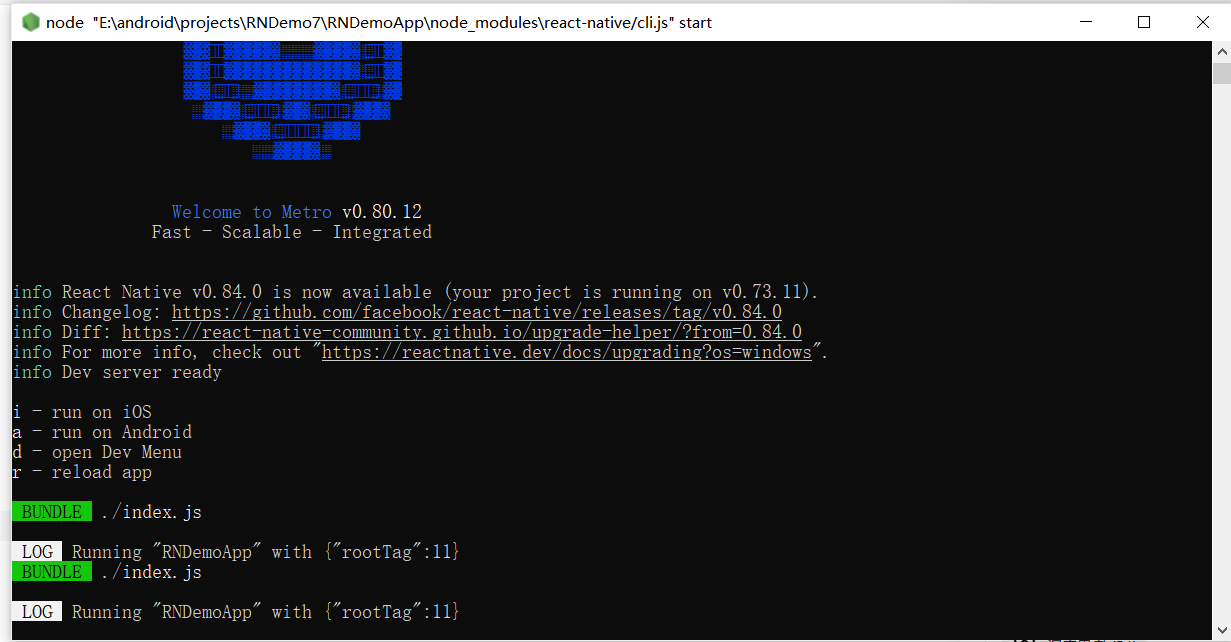
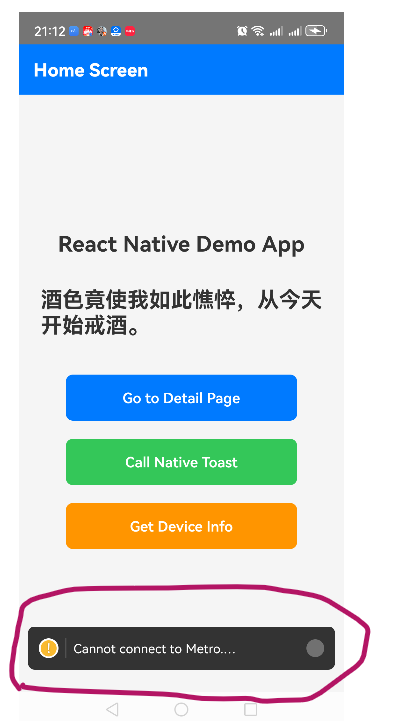
ok. 调试时当Metro服务被关闭,页面会显示Cannot connect to Metro:
ok .