Nginx中建立下载服务器
root@Nginx \~# mkdir -p /usr/local/nginx/download
root@Nginx \~# cp /etc/passwd /usr/local/nginx/download/
root@Nginx \~# dd if=/dev/zero of=/usr/local/nginx/download/bigfile bs=1M count=100
记录了100+0 的读入
记录了100+0 的写出
104857600字节(105 MB,100 MiB)已复制,0.152409 s,688 MB/s
root@Nginx \~# vim /usr/local/nginx/conf/conf.d/vhosts.conf
server {
listen 80;
server_name lee.timinglee.org;
error_page 404 405 503 502 /error;
error_log logs/timinglee.org/lee.error error;
location /lee {
root /usr/local/nginx/html;
}
location /error {
alias /usr/local/nginx/errorpage/errormessage;
}
location /download {
root /usr/local/nginx;
}
}
root@Nginx \~# nginx -s reload
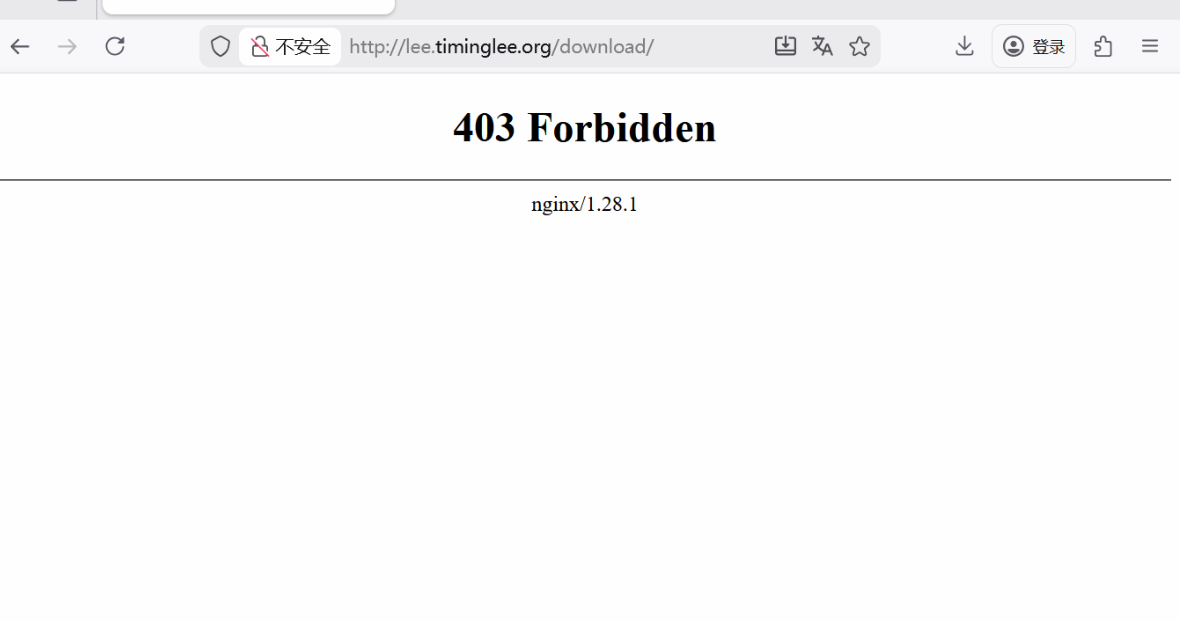
1.启用列表功能
root@Nginx \~# vim /usr/local/nginx/conf/conf.d/vhosts.conf
server {
listen 80;
server_name lee.timinglee.org;
error_page 404 405 503 502 /error;
error_log logs/timinglee.org/lee.error error;
location /lee {
root /usr/local/nginx/html;
}
location /error {
alias /usr/local/nginx/errorpage/errormessage;
}
location /download {
root /usr/local/nginx;
autoindex on;
}
}
root@Nginx \~# nginx -s reload
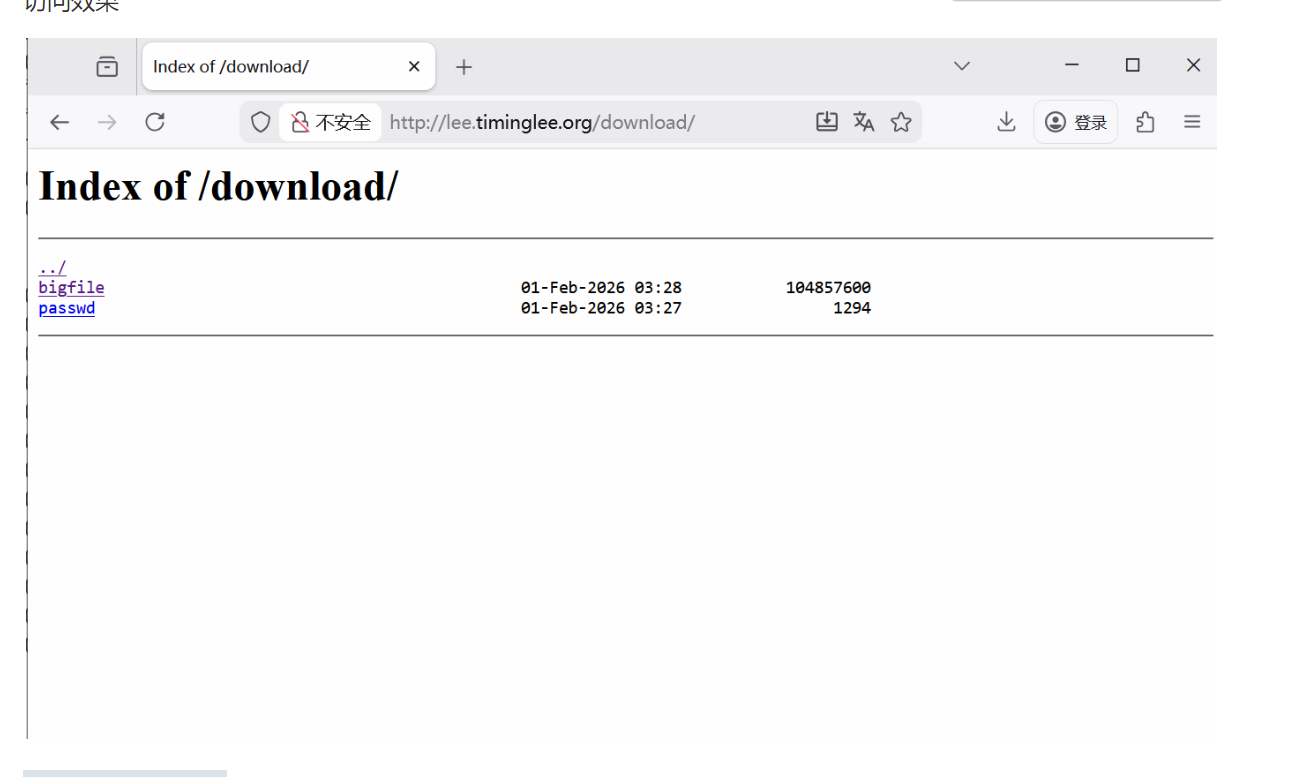
2.下载控速
root@Nginx \~# wget http://lee.timinglee.org/download/bigfile
--2026-02-01 11:37:52-- http://lee.timinglee.org/download/bigfile
正在解析主机 lee.timinglee.org (lee.timinglee.org)... 172.25.254.100
正在连接 lee.timinglee.org (lee.timinglee.org)|172.25.254.100|:80... 已连接。
已发出 HTTP 请求,正在等待回应... 200 OK
长度:104857600 (100M) application/octet-stream
正在保存至: "bigfile"
bigfile 100%=================================\> 100.00M 232MB/s 用时 0.4s
2026-02-01 11:37:52 (232 MB/s) - 已保存 "bigfile" 104857600/104857600)
root@Nginx \~# rm -fr bigfile
root@Nginx \~# vim /usr/local/nginx/conf/conf.d/vhosts.conf
server {
listen 80;
server_name lee.timinglee.org;
error_page 404 405 503 502 /error;
error_log logs/timinglee.org/lee.error error;
location /lee {
root /usr/local/nginx/html;
}
location /error {
alias /usr/local/nginx/errorpage/errormessage;
}
location /download {
root /usr/local/nginx;
autoindex on;
limit_rate 1024k;
}
}
root@Nginx \~# nginx -s reload
root@Nginx \~# wget http://lee.timinglee.org/download/bigfile
--2026-02-01 11:39:09-- http://lee.timinglee.org/download/bigfile
正在解析主机 lee.timinglee.org (lee.timinglee.org)... 172.25.254.100
正在连接 lee.timinglee.org (lee.timinglee.org)|172.25.254.100|:80... 已连接。
已发出 HTTP 请求,正在等待回应... 200 OK
长度:104857600 (100M) application/octet-stream
正在保存至: "bigfile"
bigfile 12%===\> 12.00M 1.00MB/s 剩余 88s
3.显示文件大小优化
root@Nginx \~# vim /usr/local/nginx/conf/conf.d/vhosts.conf
server {
listen 80;
server_name lee.timinglee.org;
error_page 404 405 503 502 /error;
error_log logs/timinglee.org/lee.error error;
location /lee {
root /usr/local/nginx/html;
}
location /error {
alias /usr/local/nginx/errorpage/errormessage;
}
location /download {
root /usr/local/nginx;
autoindex on;
limit_rate 1024k;
autoindex_exact_size off;
}
}
root@Nginx \~# nginx -s reload、
root@Nginx ~]# curl lee.timinglee.org/download
<html>
<head><title>301 Moved Permanently</title></head>
<body>
<center><h1>301 Moved Permanently</h1></center>
<hr><center>nginx/1.28.1</center>
</body>
</html>
4.时间显示调整
root@Nginx \~# vim /usr/local/nginx/conf/conf.d/vhosts.conf
server {
listen 80;
server_name lee.timinglee.org;
error_page 404 405 503 502 /error;
error_log logs/timinglee.org/lee.error error;
location /lee {
root /usr/local/nginx/html;
}
location /error {
alias /usr/local/nginx/errorpage/errormessage;
}
location /download {
root /usr/local/nginx;
autoindex on;
limit_rate 1024k;
autoindex_exact_size off;
autoindex_localtime on;
}
}
root@Nginx \~# nginx -s reload
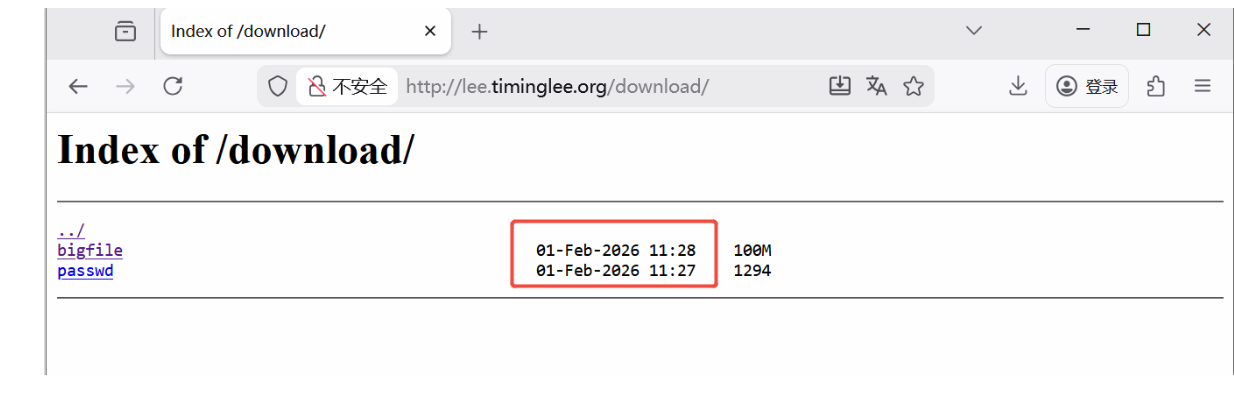
5.设定页面风格
root@Nginx \~# vim /usr/local/nginx/conf/conf.d/vhosts.conf
server {
listen 80;
server_name lee.timinglee.org;
error_page 404 405 503 502 /error;
error_log logs/timinglee.org/lee.error error;
location /lee {
root /usr/local/nginx/html;
}
location /error {
alias /usr/local/nginx/errorpage/errormessage;
}
location /download {
root /usr/local/nginx;
autoindex on;
limit_rate 1024k;
autoindex_exact_size off;
autoindex_localtime on;
autoindex_format html | xml | json | jsonp;
}
}
root@Nginx \~# nginx -s reload
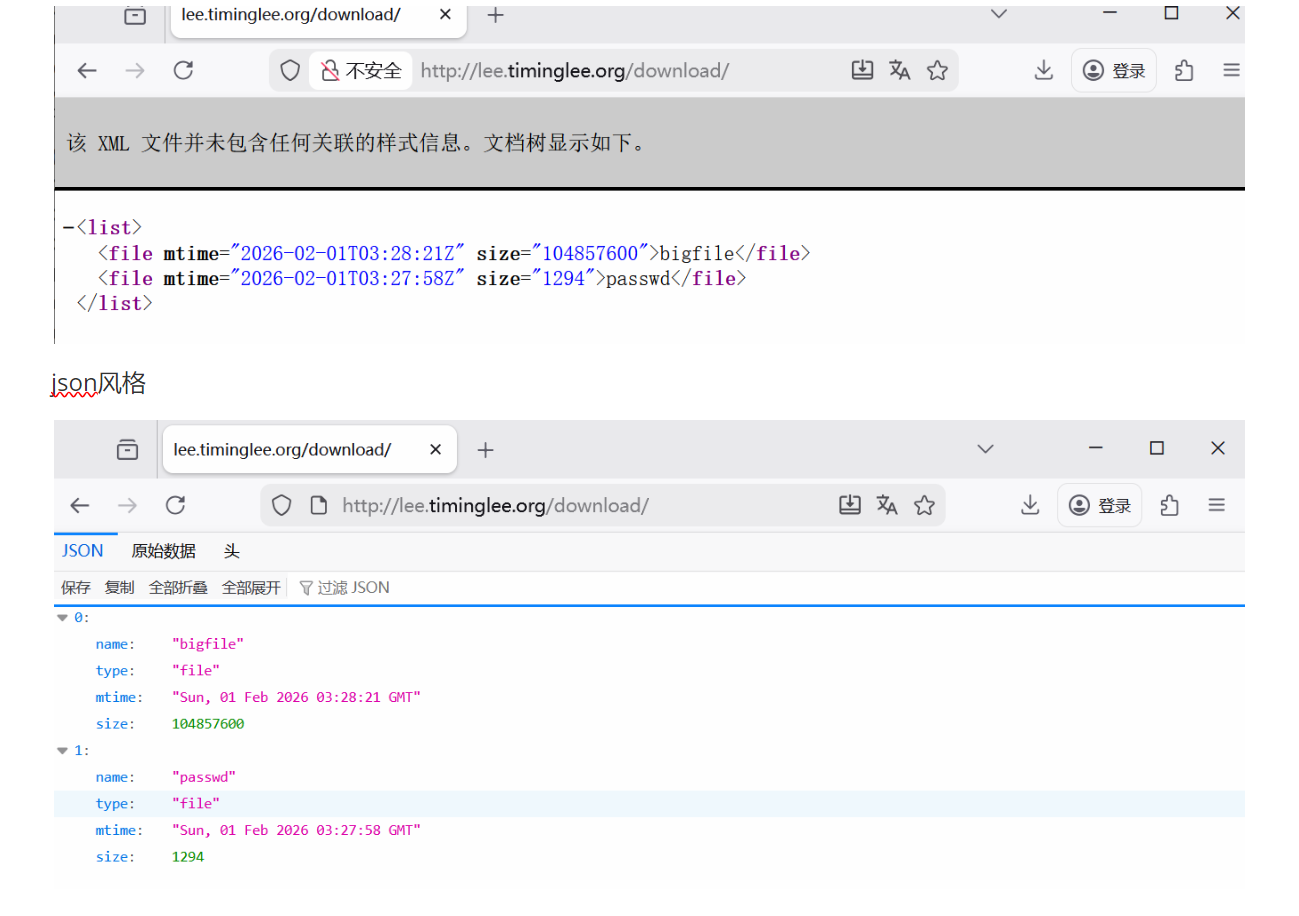
Nginx的四层负载均衡代理
1.实验环境(Mysql)
root@RS1 \~# dnf install mariadb-server -y
root@RS2 \~# dnf install mariadb-server -y
root@RS1 \~# vim /etc/my.cnf.d/mariadb-server.cnf
server-id=10
root@RS2 \~# vim /etc/my.cnf.d/mariadb-server.cnf
server-id=20
root@RS1 \~# systemctl enable --now mariadb
root@RS2 \~# systemctl enable --now mariadb
root@RS1 \~# mysql
Welcome to the MariaDB monitor. Commands end with ; or \g.
Your MariaDB connection id is 3
Server version: 10.5.27-MariaDB MariaDB Server
Copyright (c) 2000, 2018, Oracle, MariaDB Corporation Ab and others.
Type 'help;' or '\h' for help. Type '\c' to clear the current input statement.
MariaDB (none)> CREATE USER lee@'%' IDENTIFIED BY 'lee';
Query OK, 0 rows affected (0.001 sec)
MariaDB (none)> GRANT ALL ON *.* TO lee@'%';
Query OK, 0 rows affected (0.001 sec)
MariaDB (none)>
root@RS2 \~# mysql
Welcome to the MariaDB monitor. Commands end with ; or \g.
Your MariaDB connection id is 3
Server version: 10.5.27-MariaDB MariaDB Server
Copyright (c) 2000, 2018, Oracle, MariaDB Corporation Ab and others.
Type 'help;' or '\h' for help. Type '\c' to clear the current input statement.
MariaDB (none)> CREATE USER lee@'%' IDENTIFIED BY 'lee';
Query OK, 0 rows affected (0.001 sec)
MariaDB (none)> GRANT ALL ON *.* TO lee@'%';
Query OK, 0 rows affected (0.001 sec)
2.实验环境(dns)
root@RS1 \~# dnf install bind -y
root@RS2 \~# dnf install bind -y
root@RS1 \~# vim /etc/named.conf
root@RS2 \~# vim /etc/named.conf
options {
// listen-on port 53 { 127.0.0.1; };
// listen-on-v6 port 53 { ::1; };
directory "/var/named";
dump-file "/var/named/data/cache_dump.db";
statistics-file "/var/named/data/named_stats.txt";
memstatistics-file "/var/named/data/named_mem_stats.txt";
secroots-file "/var/named/data/named.secroots";
recursing-file "/var/named/data/named.recursing";
// allow-query { localhost; };
dnssec-validation no;
root@RS1 \~# vim /etc/named.rfc1912.zones
root@RS2 \~# vim /etc/named.rfc1912.zones
zone "timinglee.org" IN {
type master;
file "timinglee.org.zone";
allow-update { none; };
};
root@RS1 \~# cd /var/named/
root@RS2 \~# cd /var/named/
root@RS1 named# cp -p named.localhost timinglee.org.zone
root@RS2 named# cp -p named.localhost timinglee.org.zone
root@RS1 named# vim timinglee.org.zone
$TTL 1D
@ IN SOA dns.timingle.org. rname.invalid. (
0 ; serial
1D ; refresh
1H ; retry
1W ; expire
3H ) ; minimum
dns A 172.25.254.10
root@RS2 named# vim timinglee.org.zone
$TTL 1D
@ IN SOA dns.timingle.org. rname.invalid. (
0 ; serial
1D ; refresh
1H ; retry
1W ; expire
3H ) ; minimum
dns A 172.25.254.20
root@RS2 named# systemctl enable --now named
#测试
root@RS1 named# dig dns.timinglee.org @172.25.254.10
; <<>> DiG 9.16.23-RH <<>> dns.timinglee.org @172.25.254.10
;; global options: +cmd
;; Got answer:
;; ->>HEADER<<- opcode: QUERY, status: NOERROR, id: 24486
;; flags: qr aa rd ra; QUERY: 1, ANSWER: 1, AUTHORITY: 0, ADDITIONAL: 1
;; OPT PSEUDOSECTION:
; EDNS: version: 0, flags:; udp: 1232
; COOKIE: 4bb88849cac36aa4010000006982fef4676bf81574ab80b7 (good)
;; QUESTION SECTION:
;dns.timinglee.org. IN A
;; ANSWER SECTION:
dns.timinglee.org. 86400 IN A 172.25.254.10
;; Query time: 3 msec
;; SERVER: 172.25.254.10#53(172.25.254.10)
;; WHEN: Wed Feb 04 16:10:28 CST 2026
;; MSG SIZE rcvd: 90
root@RS1 named# dig dns.timinglee.org @172.25.254.20
; <<>> DiG 9.16.23-RH <<>> dns.timinglee.org @172.25.254.20
;; global options: +cmd
;; Got answer:
;; ->>HEADER<<- opcode: QUERY, status: NOERROR, id: 42456
;; flags: qr aa rd ra; QUERY: 1, ANSWER: 1, AUTHORITY: 0, ADDITIONAL: 1
;; OPT PSEUDOSECTION:
; EDNS: version: 0, flags:; udp: 1232
; COOKIE: 7c088d4822b8f1c1010000006982fef9047f3812bdaf7c0e (good)
;; QUESTION SECTION:
;dns.timinglee.org. IN A
;; ANSWER SECTION:
dns.timinglee.org. 86400 IN A 172.25.254.20
;; Query time: 1 msec
;; SERVER: 172.25.254.20#53(172.25.254.20)
;; WHEN: Wed Feb 04 16:10:33 CST 2026
;; MSG SIZE rcvd: 90
3.tcp四层负载
root@Nginx conf# mkdir /usr/local/nginx/conf/tcp -p
root@Nginx conf# mkdir /usr/local/nginx/conf/udp -p
root@Nginx conf# vim /usr/local/nginx/conf/nginx.conf
include "/usr/local/nginx/conf/tcp/*.conf";
root@Nginx conf# vim /usr/local/nginx/conf/tcp/mariadb.conf
stream {
upstream mysql_server {
server 172.25.254.10:3306 max_fails=3 fail_timeout=30s;
server 172.25.254.20:3306 max_fails=3 fail_timeout=30s;
}
server {
listen 172.25.254.100:3306;
proxy_pass mysql_server;
proxy_connect_timeout 30s;
proxy_timeout 300s;
}
}
root@Nginx conf# nginx -s reload
#检测
root@Nginx \~# mysql -ulee -plee -h172.25.254.100
Welcome to the MariaDB monitor. Commands end with ; or \g.
Your MariaDB connection id is 4
Server version: 10.5.27-MariaDB MariaDB Server
Copyright (c) 2000, 2018, Oracle, MariaDB Corporation Ab and others.
Type 'help;' or '\h' for help. Type '\c' to clear the current input statement.
MariaDB (none)> SELECT @@server_id;
+-------------+
| @@server_id |
+-------------+
| 10 |
+-------------+
1 row in set (0.001 sec)
MariaDB (none)> quit
Bye
root@Nginx \~# mysql -ulee -plee -h172.25.254.100
Welcome to the MariaDB monitor. Commands end with ; or \g.
Your MariaDB connection id is 4
Server version: 10.5.27-MariaDB MariaDB Server
Copyright (c) 2000, 2018, Oracle, MariaDB Corporation Ab and others.
Type 'help;' or '\h' for help. Type '\c' to clear the current input statement.
MariaDB (none)> SELECT @@server_id;
+-------------+
| @@server_id |
+-------------+
| 20 |
+-------------+
1 row in set (0.001 sec)
4.udp四层负载
root@Nginx \~# vim /usr/local/nginx/conf/tcp/mariadb.conf
stream {
upstream mysql_server {
server 172.25.254.10:3306 max_fails=3 fail_timeout=30s;
server 172.25.254.20:3306 max_fails=3 fail_timeout=30s;
}
upstream dns_server{
server 172.25.254.10:53 max_fails=3 fail_timeout=30s;
server 172.25.254.20:53 max_fails=3 fail_timeout=30s;
}
server {
listen 172.25.254.100:3306;
proxy_pass mysql_server;
proxy_connect_timeout 30s;
proxy_timeout 300s;
}
server {
listen 172.25.254.100:53 udp;
proxy_pass dns_server;
proxy_timeout 1s;
proxy_responses 1;
error_log logs/dns.log;
}
}
root@Nginx \~# nginx -s reload
#测试
root@Nginx \~# dig dns.timinglee.org @172.25.254.100
; <<>> DiG 9.16.23-RH <<>> dns.timinglee.org @172.25.254.100
;; global options: +cmd
;; Got answer:
;; ->>HEADER<<- opcode: QUERY, status: NOERROR, id: 32224
;; flags: qr aa rd ra; QUERY: 1, ANSWER: 1, AUTHORITY: 0, ADDITIONAL: 1
;; OPT PSEUDOSECTION:
; EDNS: version: 0, flags:; udp: 1232
; COOKIE: 9ac742ccc566d4450100000069830452db8dce1f1b224c9f (good)
;; QUESTION SECTION:
;dns.timinglee.org. IN A
;; ANSWER SECTION:
dns.timinglee.org. 86400 IN A 172.25.254.10
;; Query time: 2 msec
;; SERVER: 172.25.254.100#53(172.25.254.100)
;; WHEN: Wed Feb 04 16:33:22 CST 2026
;; MSG SIZE rcvd: 90
root@Nginx \~# dig dns.timinglee.org @172.25.254.100
; <<>> DiG 9.16.23-RH <<>> dns.timinglee.org @172.25.254.100
;; global options: +cmd
;; Got answer:
;; ->>HEADER<<- opcode: QUERY, status: NOERROR, id: 2259
;; flags: qr aa rd ra; QUERY: 1, ANSWER: 1, AUTHORITY: 0, ADDITIONAL: 1
;; OPT PSEUDOSECTION:
; EDNS: version: 0, flags:; udp: 1232
; COOKIE: 7f9ffa4884c0b685010000006983045565fd892fc72c5514 (good)
;; QUESTION SECTION:
;dns.timinglee.org. IN A
;; ANSWER SECTION:
dns.timinglee.org. 86400 IN A 172.25.254.20
;; Query time: 2 msec
;; SERVER: 172.25.254.100#53(172.25.254.100)
;; WHEN: Wed Feb 04 16:33:25 CST 2026
;; MSG SIZE rcvd: 90