一、背景介绍
在企业级CRM系统中,批量数据导入是一个常见但具有挑战性的需求。传统的逐条插入方式在处理大量数据时效率低下,而Salesforce提供的Bulk API 2.0则是专门为大批量数据操作设计的解决方案。
本文将分享一个完整的Python实现方案,涵盖从Excel读取数据、字段映射、关联关系处理到最终通过Bulk API 2.0上传的全流程。
二、技术选型
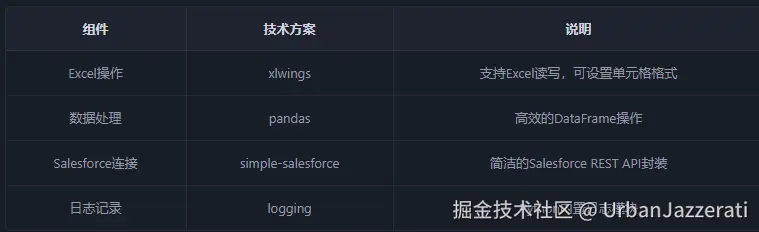
三、整体架构
rust
┌─────────────┐    ┌──────────────┐    ┌─────────────┐    ┌──────────────┐
│   Excel     │ -> │   字段映射   │ -> │  CSV生成    │ -> │  Bulk API    │
│   数据源    │    │  数据转换    │    │  UTF-8编码  │    │   上传       │
└─────────────┘    └──────────────┘    └─────────────┘    └──────────────┘
       │                  │
       v                  v
┌─────────────┐    ┌──────────────┐
│  关联查询   │    │  写回Excel   │
│ (ParentId)  │    │  备份记录    │
└─────────────┘    └──────────────┘
四、核心功能实现
4.1 配置管理
将配置集中管理,便于维护:
python
class Config:
    """配置类,集中管理常量和配置"""
    # Excel文件配置
    EXCEL_FILE_PATH = r'<your_path>/data_import.xlsx'
    SHEET_NAME = 'Account'

    # CSV文件配置
    CSV_FILE_NAME = 'account_import.csv'

    # Salesforce配置
    BATCH_SIZE = 2000
    OBJECT_NAME = 'Account'

    @classmethod
    def get_csv_file_path(cls):
        """获取CSV文件路径"""
        csv_dir = r'<your_path>/output'
        return os.path.join(csv_dir, cls.CSV_FILE_NAME)
4.2 Excel数据读取
使用xlwings读取Excel数据并转换为pandas DataFrame:
python
def read_excel_data(file_path, sheet_name):
    """读取Excel数据并返回相关信息"""
    app = xw.App(visible=True)
    wb = app.books.open(file_path)
    sheet = wb.sheets[sheet_name]

    # 将整个使用区域的数据读取为列表,再转为DataFrame
    data_range = sheet.used_range
    raw_data = data_range.value
    df = pd.DataFrame(raw_data[1:], columns=raw_data[0])
    df = df.fillna('')  # 将空值替换为空字符串

    # 记录Excel中的列索引,用于后续写回
    parent_id_col_index = None
    parent_name_col_index = None
    header_row = raw_data[0]
    for i, col_name in enumerate(header_row):
        if col_name == 'ParentId':
            parent_id_col_index = i
        elif col_name == 'Parent.Name':
            parent_name_col_index = i

    return df, parent_id_col_index, parent_name_col_index, wb, sheet
4.3 SOQL批量查询优化
关键优化点 :使用IN语句批量查询,避免逐条查询:
python
def get_parent_ids(parent_names, sf_instance):
    """
    根据Parent.Name列表批量查询对应的ParentId
    使用SOQL的IN语句批量查询,大幅提升效率
    """
    parent_id_map = {}

    # 获取非空的唯一Parent.Name值
    unique_parent_names = [name for name in set(parent_names) if name]

    if not unique_parent_names:
        return parent_id_map

    # 构建IN语句的查询字符串
    escaped_names = [f"'{name}'" for name in unique_parent_names]
    in_clause = ', '.join(escaped_names)

    # 使用SOQL的IN语句批量查询
    query = f"SELECT Id, Name FROM Account WHERE Name IN ({in_clause})"
    result = sf_instance.query_all(query)

    # 构建映射字典
    for record in result['records']:
        parent_id_map[record['Name']] = record['Id']

    # 未找到的记录设为空
    for name in unique_parent_names:
        if name not in parent_id_map:
            parent_id_map[name] = ''

    return parent_id_map
性能对比 :
- 逐条查询:N次API调用
- IN语句批量查询:1次API调用
4.4 字段映射
将Excel列名映射到Salesforce字段名:
python
FIELD_MAPPING = {
    'Name': 'Name',
    'Phone': 'Phone',
    'Website': 'Website',
    'ParentId': 'ParentId',
    'BillingCountry': 'BillingCountry',
    'BillingState': 'BillingState',
    'BillingCity': 'BillingCity',
    'BillingStreet': 'BillingStreet',
    # ... 更多字段映射
}

# 使用映射
selected_columns = [col for col in FIELD_MAPPING.keys() if col in df.columns]
mapped_df = df[selected_columns].rename(columns=FIELD_MAPPING)
4.5 Excel批量写入优化
优化前 :逐行写入,效率极低
python
# 错误示例 - 逐行写入
for row in range(data_rows):
    sheet.range((row, col)).value = value  # 每次都是一次Excel交互
优化后 :批量写入,只更新目标列
python
def write_parent_ids_to_excel(sheet, parent_id_col_index, parent_name_col_index,
                               parent_id_map, start_row=2):
    """将ParentId写回到Excel文件 - 批量写入优化"""

    data_range = sheet.used_range
    total_rows = data_range.rows.count
    data_rows = total_rows - 1

    # 读取整列数据
    parent_name_col_data = sheet.range(
        (start_row, parent_name_col_index + 1),
        (total_rows, parent_name_col_index + 1)
    ).value

    # 在内存中构建ParentId列的数据列表
    parent_id_col_data = []
    for parent_name in parent_name_col_data:
        if parent_name:
            parent_id = parent_id_map.get(parent_name, '')
            parent_id_col_data.append([parent_id])
        else:
            parent_id_col_data.append([''])

    # 一次性写入整列 - 只需一次Excel交互
    sheet.range((start_row, parent_id_col_index + 1)).resize(data_rows, 1).value =
    parent_id_col_data
4.6 CSV生成与编码处理
关键点 :使用UTF-8编码(不带BOM),避免Salesforce字段识别错误:
python
def create_account_import_temp(wb, mapped_df):
    """创建临时工作表并生成CSV文件"""
    csv_file_path = Config.get_csv_file_path()

    # 检查并删除已存在的工作表
    existing_sheets = [sheet.name for sheet in wb.sheets]
    if 'AccountImportTemp' in existing_sheets:
        wb.sheets['AccountImportTemp'].delete()

    # 创建临时工作表
    temp_sheet = wb.sheets.add('AccountImportTemp')

    # 直接从DataFrame获取数据
    headers = mapped_df.columns.tolist()
    data_rows = mapped_df.values.tolist()

    if len(data_rows) > 0:
        full_data = [headers] + data_rows

        # 设置特定列格式为文本(避免电话号码等被格式化)
        temp_sheet.range('H:H').number_format = '@'

        # 批量写入数据
        temp_sheet.range((1, 1)).resize(len(full_data), len(headers)).value =
        full_data

    # 生成CSV文件 - UTF-8编码(不带BOM)
    mapped_df.to_csv(csv_file_path, index=False, encoding='utf-8')

    return csv_file_path
4.7 Bulk API 2.0上传
python
def execute_bulk_upload(csv_file_path, object_name='Account', batch_size=2000):
    """执行Bulk API上传操作"""

    # 使用Bulk API 2.0插入
    results = sf.bulk2.Account.insert(csv_file_path, batch_size=batch_size)

    for result in results:
        job_id = result['job_id']
        num_failed = result['numberRecordsFailed']

        if num_failed > 0:
            # 获取失败记录并保存
            sf.bulk2.Account.get_failed_records(job_id, file=f'{job_id}_failed.
            csv')

    return results
五、性能优化总结
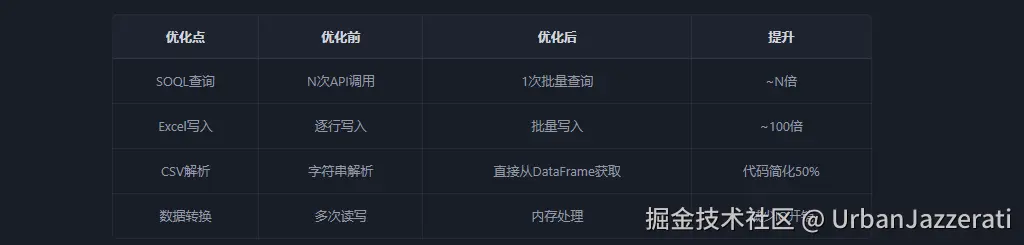
六、完整代码
python
from simple_salesforce import Salesforce
import xlwings as xw
import pandas as pd
import logging
import os

# 配置日志
logging.basicConfig(level=logging.DEBUG)
logger = logging.getLogger(__name__)


class Config:
    """配置类"""
    EXCEL_FILE_PATH = r'<your_path>/data_import.xlsx'
    SHEET_NAME = 'Account'
    CSV_FILE_NAME = 'account_import.csv'
    BATCH_SIZE = 2000
    OBJECT_NAME = 'Account'

    @classmethod
    def get_csv_file_path(cls):
        csv_dir = r'<your_path>/output'
        return os.path.join(csv_dir, cls.CSV_FILE_NAME)


def get_parent_ids(parent_names, sf_instance):
    """批量查询ParentId"""
    parent_id_map = {}
    unique_parent_names = [name for name in set(parent_names) if name]

    if not unique_parent_names:
        return parent_id_map

    escaped_names = [f"'{name}'" for name in unique_parent_names]
    in_clause = ', '.join(escaped_names)

    query = f"SELECT Id, Name FROM Account WHERE Name IN ({in_clause})"
    result = sf_instance.query_all(query)

    for record in result['records']:
        parent_id_map[record['Name']] = record['Id']

    for name in unique_parent_names:
        if name not in parent_id_map:
            parent_id_map[name] = ''

    return parent_id_map


def read_excel_data(file_path, sheet_name):
    """读取Excel数据"""
    app = xw.App(visible=True)
    wb = app.books.open(file_path)
    sheet = wb.sheets[sheet_name]

    data_range = sheet.used_range
    raw_data = data_range.value
    df = pd.DataFrame(raw_data[1:], columns=raw_data[0])
    df = df.fillna('')

    return df, wb, sheet


def write_parent_ids_to_excel(sheet, parent_id_col_index, parent_name_col_index,
                               parent_id_map, start_row=2):
    """批量写回ParentId"""
    data_range = sheet.used_range
    total_rows = data_range.rows.count
    data_rows = total_rows - 1

    parent_name_col_data = sheet.range(
        (start_row, parent_name_col_index + 1),
        (total_rows, parent_name_col_index + 1)
    ).value

    parent_id_col_data = []
    for parent_name in parent_name_col_data:
        parent_id = parent_id_map.get(parent_name, '') if parent_name else ''
        parent_id_col_data.append([parent_id])

    sheet.range((start_row, parent_id_col_index + 1)).resize(data_rows, 1).value =
    parent_id_col_data


def create_account_import_temp(wb, mapped_df):
    """创建临时工作表并生成CSV"""
    csv_file_path = Config.get_csv_file_path()

    existing_sheets = [s.name for s in wb.sheets]
    if 'AccountImportTemp' in existing_sheets:
        wb.sheets['AccountImportTemp'].delete()

    temp_sheet = wb.sheets.add('AccountImportTemp')

    headers = mapped_df.columns.tolist()
    data_rows = mapped_df.values.tolist()

    if len(data_rows) > 0:
        full_data = [headers] + data_rows
        temp_sheet.range('H:H').number_format = '@'
        temp_sheet.range((1, 1)).resize(len(full_data), len(headers)).value =
        full_data

    mapped_df.to_csv(csv_file_path, index=False, encoding='utf-8')

    return csv_file_path


def execute_bulk_upload(csv_file_path, object_name='Account', batch_size=2000):
    """执行Bulk API上传"""
    results = sf.bulk2.Account.insert(csv_file_path, batch_size=batch_size)

    for result in results:
        job_id = result['job_id']
        if result['numberRecordsFailed'] > 0:
            sf.bulk2.Account.get_failed_records(job_id, file=f'{job_id}_failed.
            csv')

    return results


def main():
    """主函数"""
    # 读取Excel数据
    df, wb, sheet = read_excel_data(Config.EXCEL_FILE_PATH, Config.SHEET_NAME)

    # 字段映射
    mapped_df = df[['Name', 'Phone', 'Website', 'ParentId']].copy()
    mapped_df = mapped_df.fillna('')

    # 处理关联关系
    if 'Parent.Name' in df.columns:
        parent_id_map = get_parent_ids(df['Parent.Name'].tolist(), sf)
        mapped_df['ParentId'] = df['Parent.Name'].apply(lambda x: parent_id_map.get
        (x, ''))

    # 生成CSV
    csv_file_path = create_account_import_temp(wb, mapped_df)

    # 保存并关闭Excel
    wb.save()
    wb.app.quit()

    # 等待用户确认
    input("确认CSV文件无误后,按Enter继续...")

    # 执行上传
    execute_bulk_upload(csv_file_path, Config.OBJECT_NAME, Config.BATCH_SIZE)


if __name__ == "__main__":
    # 初始化Salesforce连接
    sf = Salesforce(
        username='<your_username>',
        password='<your_password>',
        security_token='<your_token>'
    )
    main()
七、注意事项
- CSV编码 :务必使用UTF-8编码(不带BOM),否则Salesforce可能无法识别字段名
- 批量大小 :Bulk API 2.0建议batch_size设置为2000-10000
- 错误处理 :上传后务必检查失败记录,及时修正数据
- Excel格式 :对于电话号码等字段,需提前设置为文本格式,避免科学计数法
八、总结
本文介绍了一个完整的Salesforce批量数据导入方案,核心优化点包括:
- SOQL批量查询 :使用IN语句替代逐条查询
- Excel批量操作 :内存处理+批量写入
- 编码规范 :UTF-8编码确保兼容性
- 代码架构 :模块化设计,便于维护和扩展