限流过滤器
RequestRateLimiterGatewayFilterFactory这个内置的过滤器主要用于限流,默认实现的限流算法为令牌桶限流算法。其中比较关键的属性有:
java
	/**
	 * Key-Resolver key.
	 */
	public static final String KEY_RESOLVER_KEY = "keyResolver";

	private static final String EMPTY_KEY = "____EMPTY_KEY__";

	private final RateLimiter defaultRateLimiter;

	private final KeyResolver defaultKeyResolver;

	/**
	 * Switch to deny requests if the Key Resolver returns an empty key, defaults to true.
	 */
	private boolean denyEmptyKey = true;

	/** HttpStatus to return when denyEmptyKey is true, defaults to FORBIDDEN. */
	private String emptyKeyStatusCode = HttpStatus.FORBIDDEN.name();
keyResolver 用于限流的表示key,比如请求中的用户信息、请求token、请求IP、请求URL的等,这个自定义key的解析器可以自己实现,默认是提供的key的解析器为基于用户的认证,可以根据这个解析器的实现,进行相关的仿写:
java
public class PrincipalNameKeyResolver implements KeyResolver {

	/**
	 * {@link PrincipalNameKeyResolver} bean name.
	 */
	public static final String BEAN_NAME = "principalNameKeyResolver";

	@Override
	public Mono<String> resolve(ServerWebExchange exchange) {
		return exchange.getPrincipal().flatMap(p -> Mono.justOrEmpty(p.getName()));
	}

}
denyEmptyKey = true; 表明对于空的key值,过滤器执行拒绝逻辑,限流无效,放行相关的请求。
defaultRateLimiter 的限流策略的实现默认提供了两个维度分别为:Bucket4jRateLimiter与RedisRateLimiter
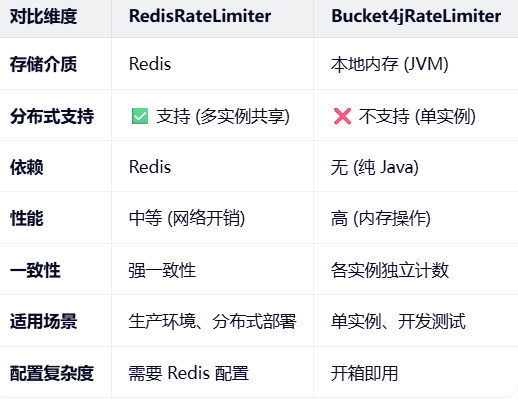
在多个节点的分布式环境中,需要采用的测率为:RedisRateLimiter
其中关键的属性配置为:
java
@Validated
	public static class Config {

		@Min(1)
		private int replenishRate;

		@Min(0)
		private int burstCapacity = 1;

		@Min(1)
		private int requestedTokens = 1;
replenishRate:每秒补充的令牌数
burstCapacity:令牌桶最大容量
requestedTokens: 每次请求消耗的令牌数
源码
java
/*
 * Copyright 2013-present the original author or authors.
 *
 * Licensed under the Apache License, Version 2.0 (the "License");
 * you may not use this file except in compliance with the License.
 * You may obtain a copy of the License at
 *
 *      https://www.apache.org/licenses/LICENSE-2.0
 *
 * Unless required by applicable law or agreed to in writing, software
 * distributed under the License is distributed on an "AS IS" BASIS,
 * WITHOUT WARRANTIES OR CONDITIONS OF ANY KIND, either express or implied.
 * See the License for the specific language governing permissions and
 * limitations under the License.
 */

package org.springframework.cloud.gateway.filter.ratelimit;

import java.util.ArrayList;
import java.util.Arrays;
import java.util.HashMap;
import java.util.List;
import java.util.Map;
import java.util.concurrent.atomic.AtomicBoolean;

import jakarta.validation.constraints.Min;
import org.apache.commons.logging.Log;
import org.apache.commons.logging.LogFactory;
import reactor.core.publisher.Flux;
import reactor.core.publisher.Mono;

import org.springframework.beans.BeansException;
import org.springframework.boot.context.properties.ConfigurationProperties;
import org.springframework.cloud.gateway.config.GatewayProperties;
import org.springframework.cloud.gateway.route.RouteDefinitionRouteLocator;
import org.springframework.cloud.gateway.support.ConfigurationService;
import org.springframework.context.ApplicationContext;
import org.springframework.context.ApplicationContextAware;
import org.springframework.core.style.ToStringCreator;
import org.springframework.data.redis.core.ReactiveStringRedisTemplate;
import org.springframework.data.redis.core.script.RedisScript;
import org.springframework.util.Assert;
import org.springframework.validation.annotation.Validated;

/**
 * See https://stripe.com/blog/rate-limiters and
 * https://gist.github.com/ptarjan/e38f45f2dfe601419ca3af937fff574d#file-1-check_request_rate_limiter-rb-L11-L34.
 *
 * @author Spencer Gibb
 * @author Ronny Bräunlich
 * @author Denis Cutic
 * @author Andrey Muchnik
 */
@ConfigurationProperties(GatewayProperties.PREFIX + ".redis-rate-limiter")
public class RedisRateLimiter extends AbstractRateLimiter<RedisRateLimiter.Config> implements ApplicationContextAware {

	/**
	 * Redis Rate Limiter property name.
	 */
	public static final String CONFIGURATION_PROPERTY_NAME = "redis-rate-limiter";

	/**
	 * Redis Script name.
	 */
	public static final String REDIS_SCRIPT_NAME = "redisRequestRateLimiterScript";

	/**
	 * Remaining Rate Limit header name.
	 */
	public static final String REMAINING_HEADER = "X-RateLimit-Remaining";

	/**
	 * Replenish Rate Limit header name.
	 */
	public static final String REPLENISH_RATE_HEADER = "X-RateLimit-Replenish-Rate";

	/**
	 * Burst Capacity header name.
	 */
	public static final String BURST_CAPACITY_HEADER = "X-RateLimit-Burst-Capacity";

	/**
	 * Requested Tokens header name.
	 */
	public static final String REQUESTED_TOKENS_HEADER = "X-RateLimit-Requested-Tokens";

	private Log log = LogFactory.getLog(getClass());

	private ReactiveStringRedisTemplate redisTemplate;

	private RedisScript<List<Long>> script;

	private AtomicBoolean initialized = new AtomicBoolean(false);

	private Config defaultConfig;

	// configuration properties
	/**
	 * Whether or not to include headers containing rate limiter information, defaults to
	 * true.
	 */
	private boolean includeHeaders = true;

	/**
	 * The name of the header that returns number of remaining requests during the current
	 * second.
	 */
	private String remainingHeader = REMAINING_HEADER;

	/** The name of the header that returns the replenish rate configuration. */
	private String replenishRateHeader = REPLENISH_RATE_HEADER;

	/** The name of the header that returns the burst capacity configuration. */
	private String burstCapacityHeader = BURST_CAPACITY_HEADER;

	/** The name of the header that returns the requested tokens configuration. */
	private String requestedTokensHeader = REQUESTED_TOKENS_HEADER;

	public RedisRateLimiter(ReactiveStringRedisTemplate redisTemplate, RedisScript<List<Long>> script,
			ConfigurationService configurationService) {
		super(Config.class, CONFIGURATION_PROPERTY_NAME, configurationService);
		this.redisTemplate = redisTemplate;
		this.script = script;
		this.initialized.compareAndSet(false, true);
	}

	/**
	 * This creates an instance with default static configuration, useful in Java DSL.
	 * @param defaultReplenishRate how many tokens per second in token-bucket algorithm.
	 * @param defaultBurstCapacity how many tokens the bucket can hold in token-bucket
	 * algorithm.
	 */
	public RedisRateLimiter(int defaultReplenishRate, int defaultBurstCapacity) {
		super(Config.class, CONFIGURATION_PROPERTY_NAME, (ConfigurationService) null);
		this.defaultConfig = new Config().setReplenishRate(defaultReplenishRate).setBurstCapacity(defaultBurstCapacity);
	}

	/**
	 * This creates an instance with default static configuration, useful in Java DSL.
	 * @param defaultReplenishRate how many tokens per second in token-bucket algorithm.
	 * @param defaultBurstCapacity how many tokens the bucket can hold in token-bucket
	 * algorithm.
	 * @param defaultRequestedTokens how many tokens are requested per request.
	 */
	public RedisRateLimiter(int defaultReplenishRate, int defaultBurstCapacity, int defaultRequestedTokens) {
		this(defaultReplenishRate, defaultBurstCapacity);
		this.defaultConfig.setRequestedTokens(defaultRequestedTokens);
	}

	static List<String> getKeys(String id, String routeId) {
		// use `{}` around keys to use Redis Key hash tags
		// this allows for using redis cluster

		// Make a unique key per user and route.
		String prefix = "request_rate_limiter.{" + routeId + "." + id + "}.";

		// You need two Redis keys for Token Bucket.
		String tokenKey = prefix + "tokens";
		String timestampKey = prefix + "timestamp";
		return Arrays.asList(tokenKey, timestampKey);
	}

	public boolean isIncludeHeaders() {
		return includeHeaders;
	}

	public void setIncludeHeaders(boolean includeHeaders) {
		this.includeHeaders = includeHeaders;
	}

	public String getRemainingHeader() {
		return remainingHeader;
	}

	public void setRemainingHeader(String remainingHeader) {
		this.remainingHeader = remainingHeader;
	}

	public String getReplenishRateHeader() {
		return replenishRateHeader;
	}

	public void setReplenishRateHeader(String replenishRateHeader) {
		this.replenishRateHeader = replenishRateHeader;
	}

	public String getBurstCapacityHeader() {
		return burstCapacityHeader;
	}

	public void setBurstCapacityHeader(String burstCapacityHeader) {
		this.burstCapacityHeader = burstCapacityHeader;
	}

	public String getRequestedTokensHeader() {
		return requestedTokensHeader;
	}

	public void setRequestedTokensHeader(String requestedTokensHeader) {
		this.requestedTokensHeader = requestedTokensHeader;
	}

	/**
	 * Used when setting default configuration in constructor.
	 * @param context the ApplicationContext object to be used by this object
	 * @throws BeansException if thrown by application context methods
	 */
	@Override
	@SuppressWarnings("unchecked")
	public void setApplicationContext(ApplicationContext context) throws BeansException {
		if (initialized.compareAndSet(false, true)) {
			if (this.redisTemplate == null) {
				this.redisTemplate = context.getBean(ReactiveStringRedisTemplate.class);
			}
			this.script = context.getBean(REDIS_SCRIPT_NAME, RedisScript.class);
			if (context.getBeanNamesForType(ConfigurationService.class).length > 0) {
				setConfigurationService(context.getBean(ConfigurationService.class));
			}
		}
	}

	/* for testing */ Config getDefaultConfig() {
		return defaultConfig;
	}

	/**
	 * This uses a basic token bucket algorithm and relies on the fact that Redis scripts
	 * execute atomically. No other operations can run between fetching the count and
	 * writing the new count.
	 */
	@Override
	@SuppressWarnings("unchecked")
	public Mono<Response> isAllowed(String routeId, String id) {
		if (!this.initialized.get()) {
			throw new IllegalStateException("RedisRateLimiter is not initialized");
		}

		Config routeConfig = loadConfiguration(routeId);

		// How many requests per second do you want a user to be allowed to do?
		int replenishRate = routeConfig.getReplenishRate();

		// How much bursting do you want to allow?
		int burstCapacity = routeConfig.getBurstCapacity();

		// How many tokens are requested per request?
		int requestedTokens = routeConfig.getRequestedTokens();

		try {
			List<String> keys = getKeys(id, routeId);

			// The arguments to the LUA script. time() returns unixtime in seconds.
			List<String> scriptArgs = Arrays.asList(replenishRate + "", burstCapacity + "", "", requestedTokens + "");
			// allowed, tokens_left = redis.eval(SCRIPT, keys, args)
			Flux<List<Long>> flux = this.redisTemplate.execute(this.script, keys, scriptArgs);
			// .log("redisratelimiter", Level.FINER);
			return flux.onErrorResume(throwable -> {
				log.error("Error calling rate limiter lua", throwable);
				return Flux.just(Arrays.asList(1L, -1L));
			}).reduce(new ArrayList<Long>(), (longs, l) -> {
				longs.addAll(l);
				return longs;
			}).map(results -> {
				boolean allowed = results.get(0) == 1L;
				Long tokensLeft = results.get(1);

				Response response = new Response(allowed, getHeaders(routeConfig, tokensLeft));

				if (log.isDebugEnabled()) {
					log.debug("response: " + response);
				}
				return response;
			});
		}
		catch (Exception e) {
			/*
			 * We don't want a hard dependency on Redis to allow traffic. Make sure to set
			 * an alert so you know if this is happening too much. Stripe's observed
			 * failure rate is 0.01%.
			 */
			log.error("Error determining if user allowed from redis", e);
		}
		return Mono.just(new Response(true, getHeaders(routeConfig, -1L)));
	}

	/* for testing */ Config loadConfiguration(String routeId) {
		Config routeConfig = getConfig().getOrDefault(routeId, defaultConfig);

		if (routeConfig == null) {
			routeConfig = getConfig().get(RouteDefinitionRouteLocator.DEFAULT_FILTERS);
		}

		if (routeConfig == null) {
			throw new IllegalArgumentException("No Configuration found for route " + routeId + " or defaultFilters");
		}
		return routeConfig;
	}

	public Map<String, String> getHeaders(Config config, Long tokensLeft) {
		Map<String, String> headers = new HashMap<>();
		if (isIncludeHeaders()) {
			headers.put(this.remainingHeader, tokensLeft.toString());
			headers.put(this.replenishRateHeader, String.valueOf(config.getReplenishRate()));
			headers.put(this.burstCapacityHeader, String.valueOf(config.getBurstCapacity()));
			headers.put(this.requestedTokensHeader, String.valueOf(config.getRequestedTokens()));
		}
		return headers;
	}

	@Validated
	public static class Config {

		@Min(1)
		private int replenishRate;

		@Min(0)
		private int burstCapacity = 1;

		@Min(1)
		private int requestedTokens = 1;

		public int getReplenishRate() {
			return replenishRate;
		}

		public Config setReplenishRate(int replenishRate) {
			this.replenishRate = replenishRate;
			return this;
		}

		public int getBurstCapacity() {
			return burstCapacity;
		}

		public Config setBurstCapacity(int burstCapacity) {
			Assert.isTrue(burstCapacity >= this.replenishRate, "BurstCapacity(" + burstCapacity
					+ ") must be greater than or equal than replenishRate(" + this.replenishRate + ")");
			this.burstCapacity = burstCapacity;
			return this;
		}

		public int getRequestedTokens() {
			return requestedTokens;
		}

		public Config setRequestedTokens(int requestedTokens) {
			this.requestedTokens = requestedTokens;
			return this;
		}

		@Override
		public String toString() {
			return new ToStringCreator(this).append("replenishRate", replenishRate)
				.append("burstCapacity", burstCapacity)
				.append("requestedTokens", requestedTokens)
				.toString();

		}

	}

}
其中的核心方法为:isAllowed
java
public Mono<Response> isAllowed(String routeId, String id) {
		if (!this.initialized.get()) {
			throw new IllegalStateException("RedisRateLimiter is not initialized");
		}

		Config routeConfig = loadConfiguration(routeId);

		// How many requests per second do you want a user to be allowed to do?
		int replenishRate = routeConfig.getReplenishRate();

		// How much bursting do you want to allow?
		int burstCapacity = routeConfig.getBurstCapacity();

		// How many tokens are requested per request?
		int requestedTokens = routeConfig.getRequestedTokens();

		try {
			List<String> keys = getKeys(id, routeId);

			// The arguments to the LUA script. time() returns unixtime in seconds.
			List<String> scriptArgs = Arrays.asList(replenishRate + "", burstCapacity + "", "", requestedTokens + "");
			// allowed, tokens_left = redis.eval(SCRIPT, keys, args)
			Flux<List<Long>> flux = this.redisTemplate.execute(this.script, keys, scriptArgs);
			// .log("redisratelimiter", Level.FINER);
			return flux.onErrorResume(throwable -> {
				log.error("Error calling rate limiter lua", throwable);
				return Flux.just(Arrays.asList(1L, -1L));
			}).reduce(new ArrayList<Long>(), (longs, l) -> {
				longs.addAll(l);
				return longs;
			}).map(results -> {
				boolean allowed = results.get(0) == 1L;
				Long tokensLeft = results.get(1);

				Response response = new Response(allowed, getHeaders(routeConfig, tokensLeft));

				if (log.isDebugEnabled()) {
					log.debug("response: " + response);
				}
				return response;
			});
		}
		catch (Exception e) {
			/*
			 * We don't want a hard dependency on Redis to allow traffic. Make sure to set
			 * an alert so you know if this is happening too much. Stripe's observed
			 * failure rate is 0.01%.
			 */
			log.error("Error determining if user allowed from redis", e);
		}
		return Mono.just(new Response(true, getHeaders(routeConfig, -1L)));
	}
redis通过执行Lua脚本实现令牌桶算法的限流机制
java
Flux<List<Long>> flux = this.redisTemplate.execute(this.script, keys, scriptArgs);相关的参数
keys:Lua脚本维护的两个key:tokenKey 与 timestampKey
java
	   String prefix = "request_rate_limiter.{" + routeId + "." + id + "}.";

		// You need two Redis keys for Token Bucket.
		String tokenKey = prefix + "tokens";
		String timestampKey = prefix + "timestamp";
scriptArgs: Lua脚本的入参,也即前面提到的三个可配置的核心参数也即:
java
         // The arguments to the LUA script. time() returns unixtime in seconds.
			List<String> scriptArgs = Arrays.asList(replenishRate + "", burstCapacity + "", "", requestedTokens + "");
Redis相关的Lua脚本的名称redisRequestRateLimiterScript
java
public static final String REDIS_SCRIPT_NAME = "redisRequestRateLimiterScript";该信息从配置类GatewayRedisAutoConfiguration中获取,实例化接口RedisScript 通过方法getScriptAsString读取脚本信息:
java
@Configuration(proxyBeanMethods = false)
@AutoConfigureAfter(RedisReactiveAutoConfiguration.class)
@AutoConfigureBefore(GatewayAutoConfiguration.class)
@ConditionalOnBean(ReactiveRedisTemplate.class)
@ConditionalOnClass({ RedisTemplate.class, DispatcherHandler.class })
@ConditionalOnProperty(name = GatewayProperties.PREFIX + ".redis.enabled", matchIfMissing = true)
class GatewayRedisAutoConfiguration {

	@Bean
	@SuppressWarnings("unchecked")
	public RedisScript redisRequestRateLimiterScript() {
		DefaultRedisScript redisScript = new DefaultRedisScript<>();
		redisScript.setScriptSource(
				new ResourceScriptSource(new ClassPathResource("META-INF/scripts/request_rate_limiter.lua")));
		redisScript.setResultType(List.class);
		return redisScript;
	}

	@Bean
	@ConditionalOnMissingBean
	public RedisRateLimiter redisRateLimiter(ReactiveStringRedisTemplate redisTemplate,
			@Qualifier(RedisRateLimiter.REDIS_SCRIPT_NAME) RedisScript<List<Long>> redisScript,
			ConfigurationService configurationService) {
		return new RedisRateLimiter(redisTemplate, redisScript, configurationService);
	}
Lua脚本的信息位于:
bash
META-INF/scripts/request_rate_limiter.lua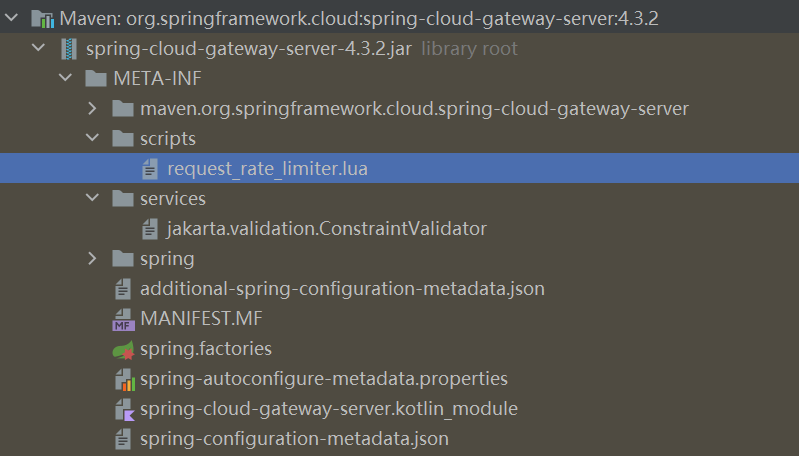
具体内容为:
lua
redis.replicate_commands()

local tokens_key = KEYS[1]
local timestamp_key = KEYS[2]

local rate = tonumber(ARGV[1])
local capacity = tonumber(ARGV[2])
local now = tonumber(ARGV[3]) or redis.call('TIME')[1]
local requested = tonumber(ARGV[4])

local fill_time = capacity / rate
local ttl = math.floor(fill_time * 2)

local last_tokens = tonumber(redis.call("get", tokens_key)) or capacity
local last_refreshed = tonumber(redis.call("get", timestamp_key)) or 0

local delta = math.max(0, now-last_refreshed)
local filled_tokens = math.min(capacity, last_tokens+(delta*rate))
local allowed = filled_tokens >= requested
local new_tokens = allowed and filled_tokens - requested or filled_tokens

if ttl > 0 then
  redis.call("setex", tokens_key, ttl, new_tokens)
  redis.call("setex", timestamp_key, ttl, now)
end

return { allowed and 1 or 0, new_tokens }
第1行:启用命令复制
第3-7行:参数定义
lua
local tokens_key = KEYS[1]          -- 令牌数 Key
local timestamp_key = KEYS[2]       -- 时间戳 Key
local rate = tonumber(ARGV[1])      -- 补充速率 (令牌/秒)
local capacity = tonumber(ARGV[2])  -- 桶容量 (最大令牌数)
local now = tonumber(ARGV[3]) or redis.call('TIME')[1]  -- 当前时间戳
local requested = tonumber(ARGV[4]) -- 本次请求消耗令牌数
参数来源示例:
bash
// Spring Cloud Gateway 调用时传入
keys = ["request_rate_limiter:user123:tokens",
        "request_rate_limiter:user123:timestamp"]

args = [10,      // rate: 每秒10个令牌
        20,      // capacity: 桶容量20
        1708756800,  // now: 当前时间戳
        1]       // requested: 每次消耗1个
第9-10行:计算 TTL
bash
local fill_time = capacity / rate
local ttl = math.floor(fill_time * 2)
其中fill_time表示令牌桶从空到满需要的时间,容量/速率
,ttl为key的过期时间为fill_time的两倍。
举个例子:
bash
rate = 10 (每秒10个令牌)
capacity = 20 (桶容量20)

fill_time = 20 / 10 = 2 秒  (从空到满需要2秒)
ttl = 2 * 2 = 4 秒  (Key 4秒后过期)
为什么 TTL = fill_time × 2?
bash
┌─────────────────────────────────────────────────────────────┐
│                      TTL 设计原理                            │
├─────────────────────────────────────────────────────────────┤
│                                                             │
│  目的:自动清理不活跃用户的限流数据,防止 Redis 内存泄漏     │
│                                                             │
│  逻辑:                                                      │
│  - 如果用户超过 fill_time×2 时间没有请求                     │
│  - 说明该用户已不活跃                                       │
│  - Key 自动过期,释放内存                                   │
│                                                             │
│  示例:                                                     │
│  - rate=10, capacity=20 → fill_time=2秒 → ttl=4秒           │
│  - 用户4秒无请求 → Key 过期 → 下次请求重新初始化             │
│                                                             │
└─────────────────────────────────────────────────────────────┘
第11-12行:获取当前状态
bash
local last_tokens = tonumber(redis.call("get", tokens_key)) or capacity
local last_refreshed = tonumber(redis.call("get", timestamp_key)) or 0
last_tokens:当前令牌数,默认值为令牌桶的容量,last_refreshed:上次更新的时间戳,默认值为0
首次请求时的值:
Redis 中无数据 → last_tokens = capacity = 20
→ last_refreshed = 0
第13-14行:计算补充后的令牌数
bash
local delta = math.max(0, now - last_refreshed)
local filled_tokens = math.min(capacity, last_tokens + (delta * rate))
有一定的算法逻辑:
定义了非负时间差因子delta, 同时计算补充令牌=时间差因子delta* 速率rate。新的令牌数=原有令牌(redis中存储)+补充令牌,但同时不能超过桶的容量capacity。
示例:
last_tokens = 5, delta = 3秒, rate = 10
补充 = 3 × 10 = 30 个
filled_tokens = min(20, 5 + 30) = 20 (不能超过容量)
bash
┌─────────────────────────────────────────────────────────────┐
│                    令牌补充计算                              │
├─────────────────────────────────────────────────────────────┤
│                                                             │
│  1. delta = 时间差 (秒)                                      │
│     delta = max(0, now - last_refreshed)                    │
│     (确保不为负数)                                          │
│                                                             │
│  2. 补充令牌 = 时间差 × 速率                                 │
│     added_tokens = delta * rate                             │
│                                                             │
│  3. 新令牌数 = 原有令牌 + 补充令牌                           │
│     但不能超过桶容量                                        │
│     filled_tokens = min(capacity, last_tokens + added)      │
│                                                             │
│  示例:                                                     │
│  - last_tokens = 5, delta = 3秒, rate = 10                  │
│  - 补充 = 3 × 10 = 30 个                                    │
│  - filled_tokens = min(20, 5 + 30) = 20 (不能超过容量)       │
│                                                             │
└─────────────────────────────────────────────────────────────┘
第15-16行:判断是否允许 + 扣减令牌
bash
local allowed = filled_tokens >= requested
local new_tokens = allowed and filled_tokens - requested or filled_tokens
逻辑等价于:
bash
if filled_tokens >= requested then
    allowed = true
    new_tokens = filled_tokens - requested  -- 扣减
else
    allowed = false
    new_tokens = filled_tokens  -- 不扣减
end
举例说明:
bash
情况1:令牌充足
  filled_tokens = 15, requested = 1
  allowed = true (15 >= 1)
  new_tokens = 15 - 1 = 14

情况2:令牌不足
  filled_tokens = 0, requested = 1
  allowed = false (0 >= 1 为假)
  new_tokens = 0 (不扣减)
第17-20行:令牌更新后,信息写入 Redis
bash
if ttl > 0 then
  redis.call("setex", tokens_key, ttl, new_tokens)
  redis.call("setex", timestamp_key, ttl, now)
end
setex:保证设置值+过期时间的原子操作
tokens_key: 存储剩余令牌数
timestamp_key: 存储当前时间戳,用于后续时间因子的计算
ttl: 过期时间
第22行:返回结果
bash
return { allowed and 1 or 0, new_tokens }两个参数,参数1:是否允许 (1=允许, 0=拒绝)
参数2:剩余的令牌数
Java中获取相关的参数:
java
List<Long> result = redisTemplate.execute(script, keys, args);
boolean allowed = result.get(0) == 1;
long remainingTokens = result.get(1);
完整的执行流程:
bash
┌─────────────────────────────────────────────────────────────────┐
│                      Lua 脚本执行流程                            │
├─────────────────────────────────────────────────────────────────┤
│                                                                 │
│  1. 接收参数                                                    │
│     KEYS: [tokens_key, timestamp_key]                           │
│     ARGV: [rate, capacity, now, requested]                      │
│         ↓                                                       │
│  2. 计算 TTL                                                    │
│     fill_time = capacity / rate                                 │
│     ttl = fill_time * 2                                         │
│         ↓                                                       │
│  3. 读取 Redis 当前状态                                          │
│     last_tokens = GET tokens_key (或 capacity)                  │
│     last_refreshed = GET timestamp_key (或 0)                   │
│         ↓                                                       │
│  4. 计算补充后的令牌数                                           │
│     delta = now - last_refreshed                                │
│     filled_tokens = min(capacity, last_tokens + delta*rate)     │
│         ↓                                                       │
│  5. 判断是否允许                                                 │
│     allowed = filled_tokens >= requested                        │
│         ↓                                                       │
│  6. 扣减令牌 (如果允许)                                          │
│     new_tokens = allowed ? filled_tokens - requested : filled   │
│         ↓                                                       │
│  7. 写入 Redis                                                   │
│     SETEX tokens_key ttl new_tokens                             │
│     SETEX timestamp_key ttl now                                 │
│         ↓                                                       │
│  8. 返回结果                                                    │
│     {allowed(0/1), new_tokens}                                  │
│                                                                 │
└─────────────────────────────────────────────────────────────────┘
📊 实际执行示例
场景:用户首次请求
bash
参数:
  rate = 10 (每秒10个令牌)
  capacity = 20 (桶容量20)
  now = 1000 (当前时间戳)
  requested = 1 (消耗1个)

Redis 状态:无数据

执行过程:
  fill_time = 20 / 10 = 2
  ttl = 2 * 2 = 4
  last_tokens = 20 (默认桶满)
  last_refreshed = 0 (默认)
  delta = max(0, 1000 - 0) = 1000
  filled_tokens = min(20, 20 + 1000*10) = 20
  allowed = 20 >= 1 → true
  new_tokens = 20 - 1 = 19

写入 Redis:
  SETEX tokens_key 4 19
  SETEX timestamp_key 4 1000

返回:{1, 19}  → 允许通过 ✅
场景:令牌耗尽
bash
参数同上,但 Redis 中 tokens = 0

执行过程:
  last_tokens = 0
  last_refreshed = 1000
  now = 1000 (同一秒)
  delta = 0
  filled_tokens = min(20, 0 + 0*10) = 0
  allowed = 0 >= 1 → false
  new_tokens = 0 (不扣减)

返回:{0, 0}  → 拒绝请求 ❌
场景:令牌恢复
bash
参数同上,但 now = 1001 (过了1秒)

执行过程:
  last_tokens = 0
  last_refreshed = 1000
  now = 1001
  delta = 1
  filled_tokens = min(20, 0 + 1*10) = 10
  allowed = 10 >= 1 → true
  new_tokens = 10 - 1 = 9

返回:{1, 9}  → 允许通过 ✅