前言
欢迎加入开源鸿蒙跨平台社区:https://openharmonycrossplatform.csdn.net
一个 extractTextFromDoc 方法要同时处理 .doc 和 .docx 两种完全不同的格式。怎么分流?doc_text 用了最简单直接的方式------看文件扩展名。听起来不够"高级",但在这个场景下确实是最合理的选择。
一、格式判断逻辑
1.1 源码
typescript
private async extractTextFromDoc(filePath: string): Promise<string | null> {
  try {
    if (filePath.toLowerCase().endsWith(".doc")) {
      return await this.extractTextFromOldDoc(filePath);
    } else if (filePath.toLowerCase().endsWith(".docx")) {
      return await this.extractTextFromDocx(filePath);
    }
    return null;
  } catch (e) {
    console.error("DocTextPlugin: Error extracting text", e);
    return null;
  }
}
1.2 执行流程
filePath = "/data/storage/test.docx"
    ↓
filePath.toLowerCase() → "/data/storage/test.docx"
    ↓
endsWith(".doc") → false(注意 .docx 不匹配 .doc)
    ↓
endsWith(".docx") → true
    ↓
extractTextFromDocx(filePath)
1.3 判断顺序的重要性
typescript
// 当前顺序:先 .doc 后 .docx
if (filePath.toLowerCase().endsWith(".doc")) {     // 1. 先检查 .doc
  // ...
} else if (filePath.toLowerCase().endsWith(".docx")) {  // 2. 再检查 .docx
  // ...
}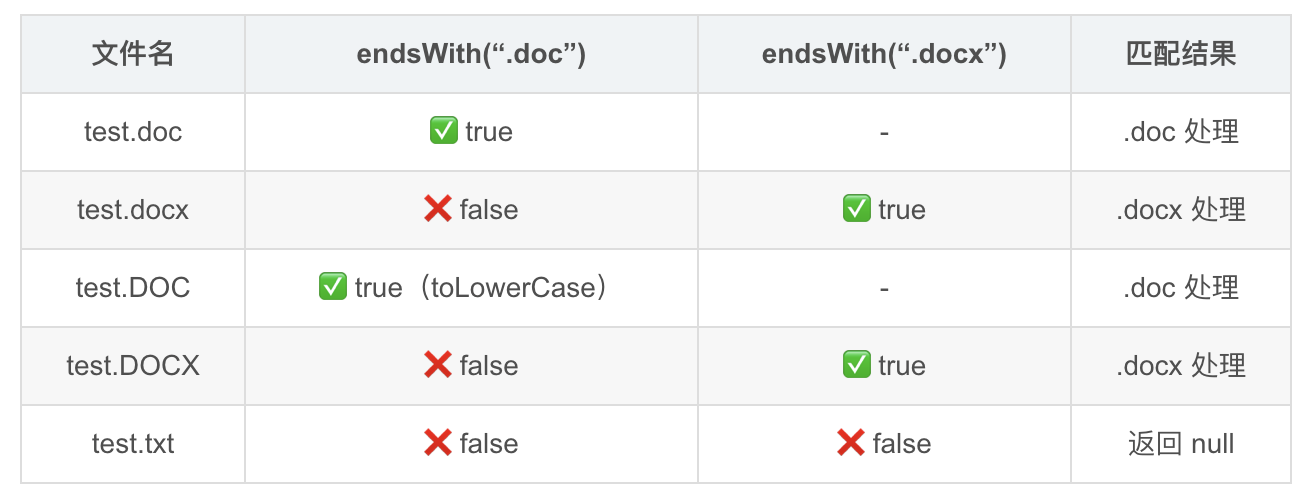
💡 这里有个细节 :
"test.docx".endsWith(".doc")返回 false ,因为.docx的最后四个字符是docx,不是doc\0。所以先检查.doc不会误匹配.docx文件。如果用contains(".doc")就会出问题了。
二、toLowerCase() 的防御作用
2.1 为什么需要
用户可能传入的文件名:
- test.doc      ← 标准
- test.DOC      ← Windows 大写
- test.Doc      ← 混合大小写
- test.DOCX     ← 大写
- TEST.docx     ← 文件名大写
2.2 不加 toLowerCase 的风险
typescript
// ❌ 不加 toLowerCase
if (filePath.endsWith(".doc")) {
  // "test.DOC" 不会匹配!
}

// ✅ 加了 toLowerCase
if (filePath.toLowerCase().endsWith(".doc")) {
  // "test.DOC" → "test.doc" → 匹配 ✅
}
2.3 性能考虑
typescript
// 当前实现:调用了两次 toLowerCase
filePath.toLowerCase().endsWith(".doc")
filePath.toLowerCase().endsWith(".docx")

// 优化写法:只调用一次
const lowerPath = filePath.toLowerCase();
if (lowerPath.endsWith(".doc")) {
  // ...
} else if (lowerPath.endsWith(".docx")) {
  // ...
}
实际上这个优化意义不大------toLowerCase 对于一个文件路径字符串来说几乎不耗时。但如果追求代码整洁,可以提取一个局部变量。
三、不支持的格式处理
3.1 静默返回 null
typescript
if (filePath.toLowerCase().endsWith(".doc")) {
  return await this.extractTextFromOldDoc(filePath);
} else if (filePath.toLowerCase().endsWith(".docx")) {
  return await this.extractTextFromDocx(filePath);
}
return null;  // 不支持的格式,静默返回 null
3.2 null 的传播链
extractTextFromDoc("test.txt") → return null
    ↓
onMethodCall 中的 then 回调:
if (text) {  // null 是 falsy
  result.success(text);
} else {
  result.error("UNAVAILABLE", "Could not extract text.", null);
}
    ↓
Dart 层收到 PlatformException(code: "UNAVAILABLE")
3.3 是否应该返回更明确的错误
| 方案 | 行为 | 优点 | 缺点 |
|---|---|---|---|
| 当前:返回 null | UNAVAILABLE 错误 | 简单 | 不知道是格式不支持还是解析失败 |
| 改进:返回特定错误 | UNSUPPORTED_FORMAT | 明确 | 多一种错误码 |
typescript
// 可能的改进
if (!lowerPath.endsWith(".doc") && !lowerPath.endsWith(".docx")) {
  throw new Error("Unsupported format: " + filePath.split('.').pop());
}
📌 当前的静默返回 null 策略是合理的------调用者通过 UNAVAILABLE 错误就知道"无法提取",具体原因可以自己判断(检查文件扩展名)。
四、try-catch 顶层异常兜底
4.1 代码
typescript
private async extractTextFromDoc(filePath: string): Promise<string | null> {
  try {
    // 所有解析逻辑
  } catch (e) {
    console.error("DocTextPlugin: Error extracting text", e);
    return null;
  }
}
4.2 这个 try-catch 能捕获什么
| 异常来源 | 示例 | 能否捕获 |
|---|---|---|
| 文件不存在 | fs.openSync 失败 | ✅ |
| 权限不足 | 无读取权限 | ✅ |
| 格式损坏 | OLE2 魔数不匹配 | ✅ |
| 内存不足 | 超大文件 | ✅ |
| ZIP 解压失败 | docx 文件损坏 | ✅ |
| 正则匹配异常 | 极端输入 | ✅ |
4.3 异常处理策略
extractTextFromDoc
├── try
│   ├── extractTextFromOldDoc
│   │   ├── 内部有自己的 try-catch → 返回 null
│   │   └── 未捕获的异常 → 冒泡到顶层 catch
│   └── extractTextFromDocx
│       ├── 内部有自己的 try-catch → 返回 null
│       └── 未捕获的异常 → 冒泡到顶层 catch
└── catch
    └── 记录日志 + 返回 null
4.4 双重 try-catch 的设计
typescript
// 顶层
private async extractTextFromDoc(filePath: string): Promise<string | null> {
  try {
    if (filePath.toLowerCase().endsWith(".docx")) {
      return await this.extractTextFromDocx(filePath);  // 内部也有 try-catch
    }
  } catch (e) {
    console.error("DocTextPlugin: Error extracting text", e);
    return null;
  }
}

// 内层
private async extractTextFromDocx(filePath: string): Promise<string | null> {
  try {
    // 解析逻辑
  } catch (e) {
    console.error("DocTextPlugin: Error parsing docx", e);
    return null;  // 内层捕获,返回 null
  }
}
内层 catch 处理已知的解析错误,顶层 catch 兜底处理所有未预期的异常。这是防御性编程的典型模式。
五、与 Android 端格式判断的对比
5.1 Android 端
java
// Android 端也是通过扩展名判断
if (filePath.endsWith(".doc")) {
    HWPFDocument doc = new HWPFDocument(new FileInputStream(filePath));
    // ...
} else if (filePath.endsWith(".docx")) {
    XWPFDocument docx = new XWPFDocument(new FileInputStream(filePath));
    // ...
}
5.2 POI 的自动检测
java
// POI 其实可以自动检测格式
// 但 doc_text 没有用这个功能
OPCPackage pkg = OPCPackage.open(filePath);  // 自动判断 ZIP 还是 OLE2
5.3 对比
| 维度 | doc_text (OpenHarmony) | doc_text (Android) |
|---|---|---|
| 判断方式 | 扩展名 | 扩展名 |
| 大小写处理 | toLowerCase() | 取决于实现 |
| 不支持格式 | 返回 null | 返回 null |
| 异常兜底 | try-catch | try-catch |
两端的格式判断逻辑基本一致,这保证了行为的一致性。
六、魔数检测 vs 扩展名检测
6.1 两种方案对比
typescript
// 方案1:扩展名检测(当前实现)
if (filePath.toLowerCase().endsWith(".doc")) { ... }

// 方案2:魔数检测(更准确)
const bytes = readFileBytes(filePath);
if (bytes[0] === 0xD0 && bytes[1] === 0xCF) {
  // OLE2 格式 (.doc)
} else if (bytes[0] === 0x50 && bytes[1] === 0x4B) {
  // ZIP 格式 (.docx)
}| 方案 | 准确性 | 性能 | 复杂度 |
|---|---|---|---|
| 扩展名 | 中(可能被改名) | 高(不读文件) | 低 |
| 魔数 | 高(看实际内容) | 低(需要读文件) | 中 |
6.2 为什么扩展名检测够用
实际场景中:
1. 用户从文件选择器选文件 → 扩展名正确
2. 从网络下载的文件 → 扩展名通常正确
3. 程序生成的文件 → 扩展名正确

扩展名不正确的场景:
1. 用户手动改了扩展名 → 极少见
2. 文件传输过程中扩展名丢失 → 极少见
📌 doc_text 的 OLE2Parser 内部其实做了魔数验证------如果一个 .doc 文件的魔数不对,OLE2Parser 会返回 null。所以即使扩展名判断错了,也不会产生错误结果,只是返回 null。
七、extractTextFromDocx 和 extractTextFromOldDoc 的入口
7.1 两个方法的签名
typescript
// .docx 解析入口
private async extractTextFromDocx(filePath: string): Promise<string | null>

// .doc 解析入口
private async extractTextFromOldDoc(filePath: string): Promise<string | null>
7.2 统一的返回值
| 返回值 | 含义 |
|---|---|
string |
成功提取的文本 |
null |
无法提取(格式错误、文件损坏、加密等) |
两个方法都返回 Promise<string | null>,调用者不需要关心具体是哪种格式------统一的接口屏蔽了格式差异。
7.3 方法命名
typescript
extractTextFromDocx    // docx → 新格式
extractTextFromOldDoc  // OldDoc → 旧格式(.doc)
OldDoc 这个命名很直观------.doc 确实是"旧的" Word 格式。
八、完整的格式路由流程图
8.1 流程图
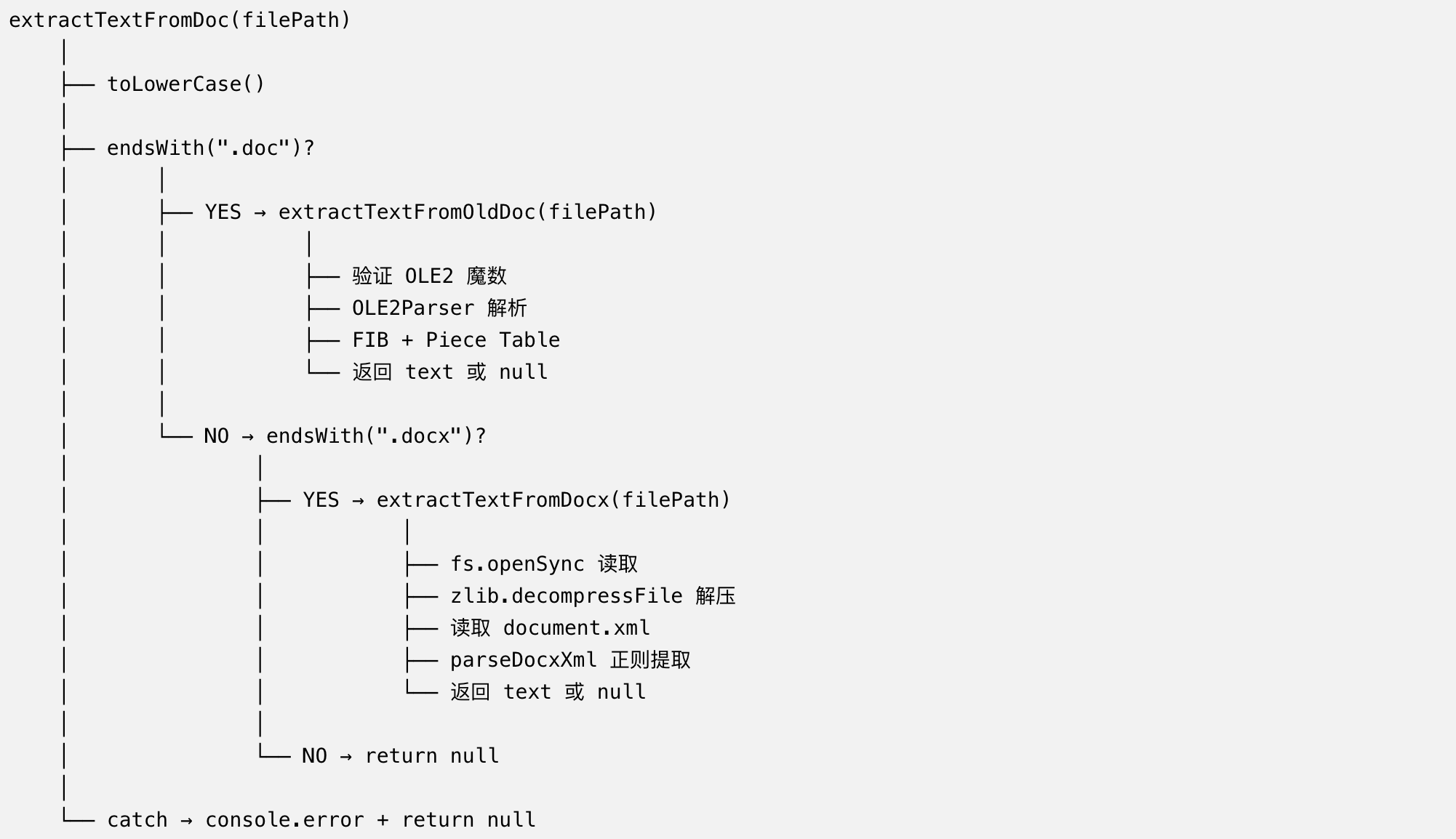
总结
doc_text 的文件格式路由设计简单实用:
- 扩展名判断:toLowerCase().endsWith() 覆盖大小写
- 两条路径:.doc → OLE2 解析,.docx → ZIP+XML 解析
- 静默处理:不支持的格式返回 null
- 双重 try-catch:内层处理已知错误,外层兜底未预期异常
- 统一返回值:Promise<string | null> 屏蔽格式差异
下一篇我们深入 .docx 解析------从 ZIP 解压到 XML 文本提取的完整流程。
如果这篇文章对你有帮助,欢迎点赞👍、收藏⭐、关注🔔,你的支持是我持续创作的动力!
相关资源: