一、NAT模式环境设定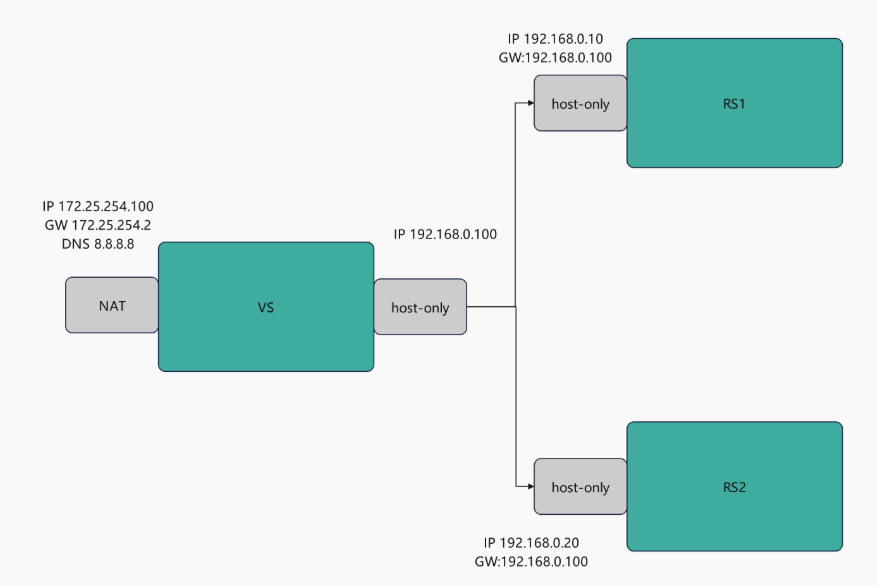
1.VS主机中
root@vsnode \~# vmset.sh eth0 172.25.254.100 vsnode
root@vsnode \~# vmset.sh eth1 192.168.0.100 vsnode noroute
2.RS1
设定网络
root@RS1 \~# vmset.sh eth0 192.168.0.20 RS1 noroute
root@RS1 \~# nmcli connection modify eth0 ipv4.gateway 192.168.0.100
root@RS1 \~# nmcli connection reload
root@RS1 \~# nmcli connection up eth0
root@RS1 \~# route -n
Kernel IP routing table
Destination Gateway Genmask Flags Metric Ref Use Iface
0.0.0.0 192.168.0.100 0.0.0.0 UG 100 0 0 eth0
192.168.0.0 0.0.0.0 255.255.255.0 U 100 0 0 eth0
设定访问业务真实数据
root@RS1 \~# dnf install httpd -y
root@RS1 \~# systemctl enable --now httpd
root@RS1 \~# echo RS1 - 192.168.0.20 > /var/www/html/index.html
3.RS2
#设定网络
root@RS1 \~# vmset.sh eth0 192.168.0.30 RS1 noroute
root@RS1 \~# nmcli connection modify eth0 ipv4.gateway 192.168.0.100
root@RS1 \~# nmcli connection reload
root@RS1 \~# nmcli connection up eth0
root@RS1 \~# route -n
Kernel IP routing table
Destination Gateway Genmask Flags Metric Ref Use Iface
0.0.0.0 192.168.0.100 0.0.0.0 UG 100 0 0 eth0
192.168.0.0 0.0.0.0 255.255.255.0 U 100 0 0 eth0
设定访问业务真实数据
root@RS1 \~# dnf install httpd -y
root@RS1 \~# systemctl enable --now httpd
root@RS1 \~# echo RS2 - 192.168.0.30 > /var/www/html/index.html
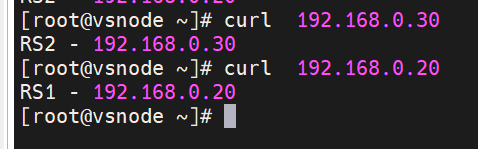
4.在vs主机中测试环境
root@vsnode \~# curl 192.168.0.20
RS1 - 192.168.0.20
root@vsnode \~# curl 192.168.0.30
RS2 - 192.168.0.30
二、DR模式实验过程
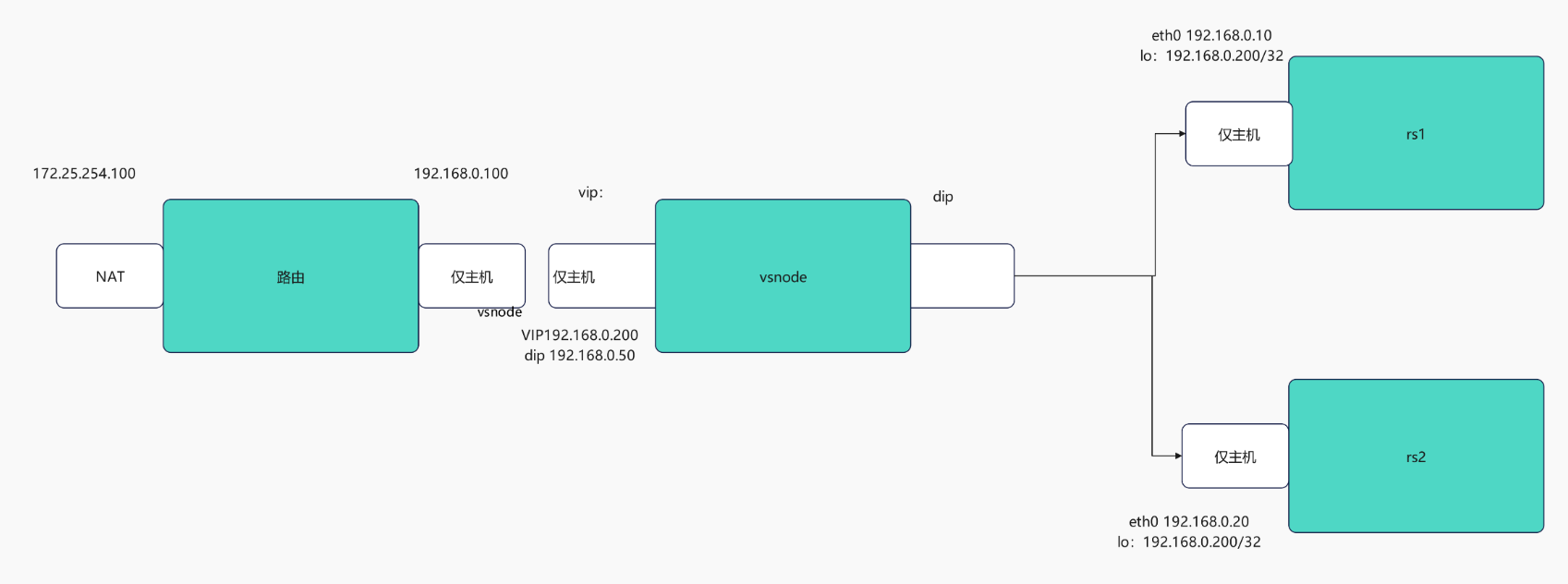
环境设定方式
1.在路由器中
root@router \~# systemctl disable --now ipvsadm.service
Removed "/etc/systemd/system/multi-user.target.wants/ipvsadm.service".
root@router \~# ipvsadm -C
root@router \~# vmset.sh eth0 172.25.254.100 vsnode
root@router \~# vmset.sh eth1 192.168.0.100 vsnode noroute、
设定内核路由功能
root@router \~# echo net.ipv4.ip_forward=1 >> /etc/sysctl.conf
root@router \~# sysctl -p
net.ipv4.ip_forward = 1
数据转发策略
root@router \~# iptables -t nat -A POSTROUTING -o eth1 -j SNAT --to-source 192.168.0.100
root@vsnode \~# iptables -t nat -A POSTROUTING -o eth0 -j SNAT --to-source 172.25.254.100
2.vsnode 调度器
root@vsnode \~# vmset.sh eth0 192.168.0.50 vsnode norouter
root@vsnode \~# vim /etc/NetworkManager/system-connections/eth0.nmconnection
connection
id=eth0
type=ethernet
interface-name=eth0
ipv4
method=manual
address1==192.168.0.50/24,192.168.0.100
root@vsnode \~# cd /etc/NetworkManager/system-connections/
root@vsnode system-connections# cp -p eth0.nmconnection lo.nmconnection
root@vsnode system-connections# vim lo.nmconnection
connection
id=lo
type=loopback
interface-name=lo
ipv4
method=manual
address1==127.0.0.1/8
address2=192.168.0.200/32
root@RS1 system-connections# nmcli connection reload
root@RS1 system-connections# nmcli connection up eth0
连接已成功激活(D-Bus 活动路径:/org/freedesktop/NetworkManager/ActiveConnection/7)
root@RS1 system-connections# nmcli connection up lo
连接已成功激活(D-Bus 活动路径:/org/freedesktop/NetworkManager/ActiveConnection/8)
3.检测
root@vsnode system-connections# route -n
Kernel IP routing table
Destination Gateway Genmask Flags Metric Ref Use Iface
0.0.0.0 192.168.0.100 0.0.0.0 UG 100 0 0 eth0
192.168.0.0 0.0.0.0 255.255.255.0 U 100 0 0 eth0
192.168.0.0 0.0.0.0 255.255.255.0 U 100 0 0 eth0
4.客户端
root@client \~# vmset.sh eth0 172.25.254.99 client norouter
连接已成功激活(D-Bus 活动路径:/org/freedesktop/NetworkManager/ActiveConnection/4)
2: eth0: <BROADCAST,MULTICAST,UP,LOWER_UP> mtu 1500 qdisc mq state UP group default qlen 1000
link/ether 00:0c:29:e5:75:af brd ff:ff:ff:ff:ff:ff
altname enp3s0
altname ens160
inet 172.25.254.99/24 brd 172.25.254.255 scope global noprefixroute eth0
valid_lft forever preferred_lft forever
inet6 fe80::20c:29ff:fee5:75af/64 scope link tentative noprefixroute
valid_lft forever preferred_lft forever
client
root@client \~# vim /etc/NetworkManager/system-connections/eth0.nmconnection
connection
id=eth0
type=ethernet
interface-name=eth0
ipv4
method=manual
address1=172.25.254.99/24,172.25.254.100
dns=8.8.8.8;
root@client \~# nmcli connection reload
root@client \~# nmcli connection up eth0
连接已成功激活(D-Bus 活动路径:/org/freedesktop/NetworkManager/ActiveConnection/5)
root@client \~# route -n
Kernel IP routing table
Destination Gateway Genmask Flags Metric Ref Use Iface
0.0.0.0 172.25.254.100 0.0.0.0 UG 100 0 0 eth0
172.25.254.0 0.0.0.0 255.255.255.0 U 100 0 0 eth0
检测
root@client \~# ping 192.168.0.200
PING 192.168.0.200 (192.168.0.200) 56(84) 比特的数据。
64 比特,来自 192.168.0.200: icmp_seq=1 ttl=128 时间=1.08 毫秒
5.RS1
root@RS1 \~# vmset.sh eth0 192.168.0.10 RS1 noroute
root@RS1 \~# nmcli connection modify eth0 ipv4.gateway 192.168.0.100
root@RS1 \~# nmcli connection reload
root@RS1 \~# nmcli connection up eth0
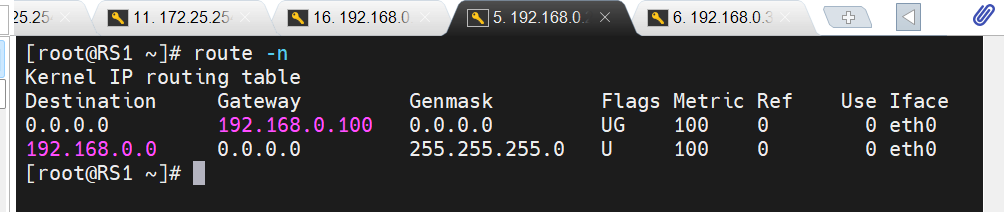
root@RS1 \~# route -n
Kernel IP routing table
Destination Gateway Genmask Flags Metric Ref Use Iface
0.0.0.0 192.168.0.100 0.0.0.0 UG 100 0 0 eth0
192.168.0.0 0.0.0.0 255.255.255.0 U 100 0 0 eth0
在lo上设定vip
root@RS1 \~# cd /etc/NetworkManager/system-connections/
root@RS1 system-connections# cp -p eth0.nmconnection lo.nmconnection
root@RS1 system-connections# vim lo.nmconnection
connection
id=lo
type=loopback
interface-name=lo
ethernet
ipv4
address1=127.0.0.1/8
address2=192.168.0.200/32
method=manual
root@RS1 system-connections# nmcli connection reload
root@RS1 system-connections# nmcli connection up lo
连接已成功激活(D-Bus 活动路径:/org/freedesktop/NetworkManager/ActiveConnection/6)
root@RS1 system-connections# ip a
1: lo: <LOOPBACK,UP,LOWER_UP> mtu 65536 qdisc noqueue state UNKNOWN group default qlen 1000
link/loopback 00:00:00:00:00:00 brd 00:00:00:00:00:00
inet 127.0.0.1/8 scope host lo
valid_lft forever preferred_lft forever
inet 192.168.0.200/32 scope global lo
valid_lft forever preferred_lft forever
inet6 ::1/128 scope host
valid_lft forever preferred_lft forever
arp禁止响应
root@rs1 \~# echo 1 > /proc/sys/net/ipv4/conf/all/arp_ignore
root@rs1 \~# echo 1 > /proc/sys/net/ipv4/conf/lo/arp_ignore
root@rs1 \~# echo 2 > /proc/sys/net/ipv4/conf/lo/arp_announce
root@rs1 \~# echo 2 > /proc/sys/net/ipv4/conf/all/arp_announce
6.RS2
root@RS2 \~# vmset.sh eth0 192.168.0.20 RS2 noroute
root@RS2 \~# nmcli connection modify eth0 ipv4.gateway 192.168.0.100
root@RS2 \~# nmcli connection reload
root@RS2 \~# nmcli connection up eth0
root@RS2 \~# route -n
Kernel IP routing table
Destination Gateway Genmask Flags Metric Ref Use Iface
0.0.0.0 192.168.0.100 0.0.0.0 UG 100 0 0 eth0
192.168.0.0 0.0.0.0 255.255.255.0 U 100 0 0 eth0
在lo上设定vip
root@RS2 \~# cd /etc/NetworkManager/system-connections/
root@RS2 system-connections# cp -p eth0.nmconnection lo.nmconnection
root@RS2 system-connections# vim lo.nmconnection
connection
id=lo
type=loopback
interface-name=lo
ethernet
ipv4
address1=127.0.0.1/8
address2=192.168.0.200/32
method=manual
root@RS2 system-connections# nmcli connection reload
root@RS2 system-connections# nmcli connection up lo
连接已成功激活(D-Bus 活动路径:/org/freedesktop/NetworkManager/ActiveConnection/6)
root@RS2 system-connections# ip a
1: lo: <LOOPBACK,UP,LOWER_UP> mtu 65536 qdisc noqueue state UNKNOWN group default qlen 1000
link/loopback 00:00:00:00:00:00 brd 00:00:00:00:00:00
inet 127.0.0.1/8 scope host lo
valid_lft forever preferred_lft forever
inet 192.168.0.200/32 scope global lo
valid_lft forever preferred_lft forever
inet6 ::1/128 scope host
valid_lft forever preferred_lft forever
arp禁止响应
root@rs2 \~# echo 1 > /proc/sys/net/ipv4/conf/all/arp_ignore
root@rs2 \~# echo 1 > /proc/sys/net/ipv4/conf/lo/arp_ignore
root@rs2 \~# echo 2 > /proc/sys/net/ipv4/conf/lo/arp_announce
root@rs2 \~# echo 2 > /proc/sys/net/ipv4/conf/all/arp_announce
三、利用火墙标记解决轮询错误
1.在rs主机中同时开始http和https两种协议
在RS1和RS2中开启https
root@RS1+RS2 \~# dnf install mod_ssl -y
root@RS1+RS2 \~# systemctl restart httpd
root@RS1+RS2 \~# systemctl restart httpd
2.在vsnode中添加https的轮询策略
root@vsnode boot]# ip^Cadm -A -t 192.168.0.200:80 -s rr
root@vsnode boot# ipvsadm -a -t 192.168.0.200:80 -r 192.168.0.20 -g
root@vsnode boot# ipvsadm -a -t 192.168.0.200:80 -r 192.168.0.30 -g
root@vsnode boot# ipvsadm -A -t 192.168.0.200:443 -s rr
root@vsnode boot# ipvsadm -a -t 192.168.0.200:443 -r 192.168.0.30:443 -g
root@vsnode boot# ipvsadm -a -t 192.168.0.200:443 -r 192.168.0.20:443 -g
root@vsnode boot# ipvsadm -Ln
IP Virtual Server version 1.2.1 (size=4096)
Prot LocalAddress:Port Scheduler Flags
-> RemoteAddress:Port Forward Weight ActiveConn InActConn
TCP 192.168.0.200:80 rr
-> 192.168.0.30:80 Route 1 0 0
-> 192.168.0.20:80 Route 1 0 0
TCP 192.168.0.200:443 rr
-> 192.168.0.30:443 Route 1 0 0
-> 192.168.0.20:443
3.轮询错误展示
root@client \~# curl 192.168.0.200;curl -k https://192.168.0.200
RS2 - 192.168.0.20
RS2 - 192.168.0.20
当上述设定完成后http和https是独立的service,轮询会出现重复问题
解决方案:使用火墙标记访问vip的80和443的所有数据包,设定标记为6666,然后对此标记进行负载
root@vsnode boot# iptables -t mangle -A PREROUTING -d 192.168.0.200 -p tcp -m multiport --dports 80,443 -j MARK --set-mark 6666
root@vsnode boot# ipvsadm -A -f 6666 -s rr
root@vsnode boot# ipvsadm -a -f 6666 -r 192.168.0.30 -g
root@vsnode boot# ipvsadm -a -f 6666 -r 192.168.0.20 -g
#测试:在客户端
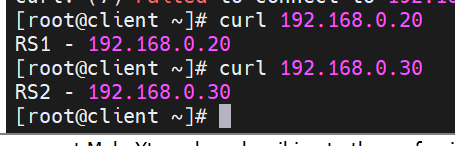
root@client \~# curl 192.168.0.200;curl -k https://192.168.0.200
RS2 - 192.168.0.20
RS1 - 192.168.0.30
四、利用持久连接实现会话粘滞
1.设定ipvs调度策略
root@vsnode \~# ipvsadm -A -f 6666 -s rr -p 1
root@vsnode \~# ipvsadm -Ln
IP Virtual Server version 1.2.1 (size=4096)
Prot LocalAddress:Port Scheduler Flags
-> RemoteAddress:Port Forward Weight ActiveConn InActConn
FWM 6666 rr persistent 1
-> 192.168.0.20:0 Route 1 0 0
-> 192.168.0.30:0
2.测试:
root@client \~# curl 192.168.0.200
RS1 - 192.168.0.20
root@client \~# curl 192.168.0.200
RS1 - 192.168.0.20
3.观察
root@vsnode \~# watch -n 1 ipvsadm -Lnc
IPVS connection entries
pro expire state source virtual destination
TCP 01:56 FIN_WAIT 172.25.254.99:42420 192.168.0.200:80 192.168.0.20:80
IP 00:57 ASSURED 172.25.254.99:0 0.0.26.10:0 192.168.0.20:0
TCP 01:54 FIN_WAIT 172.25.254.99:46216 192.168.0.200:80 192.168.0.20:80
TCP 01:55 FIN_WAIT 172.25.254.99:46222 192.168.0.200:80 192.168.0.30:80