一、网页从写
1.网页重写中的指令
#if
[root@Nginx ~]# vim /usr/local/nginx/conf/conf.d/vhosts.conf
server {
    listen 80;
    server_name lee.timinglee.org;
    root /webdir/timinglee.org/lee/html;
    location /vars {
        echo $remote_user;
        echo $request_method;
        echo $request_filename;
        echo $request_uri;
        echo $scheme;
    }

    location / {
        if ( $http_user_agent ~* firefox ) {
            return 200 "test if messages";
        }
    }
}

[root@Nginx ~]# nginx -s reload
测试:

#set
[root@Nginx ~]# vim /usr/local/nginx/conf/conf.d/vhosts.conf
server {
    listen 80;
    server_name lee.timinglee.org;
    root /webdir/timinglee.org/lee/html;
    location /vars {
        echo $remote_user;
        echo $request_method;
        echo $request_filename;
        echo $request_uri;
        echo $scheme;
    }

    location / {
        set $testname timinglee;
        echo $testname;
    }
}

[root@Nginx ~]# nginx -s reload
#return
[root@Nginx ~]# vim /usr/local/nginx/conf/conf.d/vhosts.conf
server {
    listen 80;
    server_name lee.timinglee.org;
    root /webdir/timinglee.org/lee/html;
    location /vars {
        echo $remote_user;
        echo $request_method;
        echo $request_filename;
        echo $request_uri;
        echo $scheme;
    }

    location / {
        return 200 "hello world";
    }
}
[root@Nginx ~]# nginx -s reload
#break
[root@Nginx ~]# vim /usr/local/nginx/conf/conf.d/vhosts.conf
server {
    listen 80;
    server_name lee.timinglee.org;
    root /webdir/timinglee.org/lee/html;
    location /vars {
        echo $remote_user;
        echo $request_method;
        echo $request_filename;
        echo $request_uri;
        echo $scheme;
    }

    location / {
        set $test1 lee1;
        set $test2 lee2;
        if ($http_user_agent = firefox){
            break;
        }
        set $test3 lee3;
        echo $test1 $test2 $test3;
    }
}
[root@Nginx ~]# nginx -s reload

#break
[root@Nginx ~]# vim /usr/local/nginx/conf/conf.d/vhosts.conf
server {
    listen 80;
    server_name lee.timinglee.org;
    root /webdir/timinglee.org/lee/html;
    location /vars {
        echo $remote_user;
        echo $request_method;
        echo $request_filename;
        echo $request_uri;
        echo $scheme;
    }

    location / {
        set $test1 lee1;
        set $test2 lee2;
        if ($http_user_agent = firefox){
            break;
        }
        set $test3 lee3;
        echo $test1 $test2 $test3;
    }
}
[root@Nginx ~]# nginx -s reload
二、Nginx利用网页重写实现全站加密
1.制作key
[root@Nginx ~]# mkdir -p /usr/local/nginx/certs/
[root@Nginx ~]# openssl req -newkey rsa:2048 -nodes  -sha256  -keyout  /usr/local/nginx/certs/timinglee.org.key -x509 -days 365 -out /usr/local/nginx/certs/timinglee.org.crt
2.编辑加密配置文件
[root@Nginx ~]# vim /usr/local/nginx/conf/conf.d/vhosts.conf
server {
    listen 80;
    listen 443 ssl;
    ssl_certificate /usr/local/nginx/certs/timinglee.org.crt;
    ssl_certificate_key /usr/local/nginx/certs/timinglee.org.key;
    ssl_session_cache shared:sslcache:20m;
    ssl_session_timeout 10m;
    server_name lee.timinglee.org;
    root /webdir/timinglee.org/lee/html;
    location / {
        if ($scheme = http ){
            rewrite /(.*) https://$host/$1 redirect;
        }
    }

}

[root@Nginx ~]# systemctl restart nginx.service
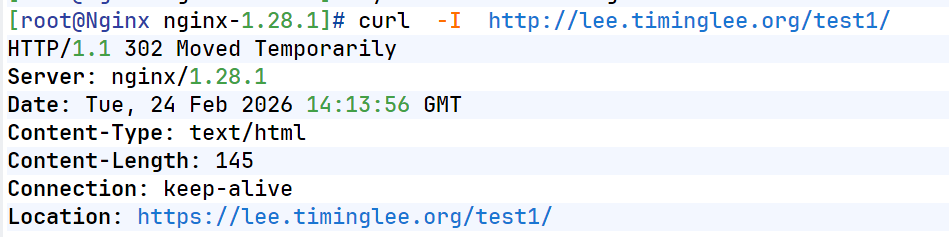
测试:
三、防盗链
防盗链基于客户端携带的referer实现,referer是记录打开一个页面之前记录是从哪个页面跳转过来的标 记信息,如果别人只链接了自己网站图片或某个单独的资源,而不是打开了网站的整个页面,这就是盗 链,referer就是之前的那个网站域名,正常的referer信息有以下几种:
|---------------------|------------------------------------------------------------|
| none: | #请求报文首部没有referer首部, #比如用户直接在浏览器输入域名访问web网站,就没有referer信息。 |
| blocked: | #请求报文有referer首部,但无有效值,比如为空。 |
| server_names: | #referer首部中包含本主机名及即nginx 监听的server_name。 |
| arbitrary_string: | #自定义指定字符串,但可使用*作通配符。示例: *.timinglee.org www.timinglee.* |
| regular expression: | #被指定的正则表达式模式匹配到的字符串,要使用~开头,例如: ~.*\.timinglee\.com |
[root@Nginx ~]# vim /usr/local/nginx/conf/conf.d/vhosts.conf

server {
    listen 80;
    server_name lee.timinglee.org;
    root /webdir/timinglee.org/lee/html;
    location / {
        valid_referers none blocked server_names *.timinglee.org ~/.baidu/.;
        if ($invalid_referer){
            return 404;
        }
    }
    location /img {
        valid_referers none blocked server_names *.timinglee.org ~/.baidu/.;
        if ($invalid_referer){
            rewrite ^/ http://lee.timinglee.org/daolian/daolian.png;
        }
    }

}

[root@Nginx ~]# nginx -s reload

#另外的web服务器
[root@RS1 ~]# vim /var/www/html/index.html
<html>

  <head>
    <meta http-equiv=Content-Type content="text/html;charset=utf-8">
    <title>盗链</title>
</head>

  <body>
    <h1 style="color:red">欢迎大家</h1>
    <p><a href=http://192.168.170.100>狂点老李</a>出门见喜</p>
  </body>

</html>
测试:

四、Nginx反向代理
1.实验环境
#192.168.170.10 RS1	192.168.170.20 RS2


[root@RSX ~]# dnf install httpd -y
[root@RSX ~]# systemctl enable --now httpd
[root@RSX ~]# echo 192.168.170.20  > /var/www/html/index.html


#测试 在Nginx主机中
[root@Nginx ~]# curl  192.168.170.10
192.168.170.10
[root@Nginx ~]# curl  192.168.170.20
192.168.170.20
2.简单的代理方法
[root@RS2 ~]# mkdir  /var/www/html/web
[root@RS2 ~]# echo 192.168.170.20 web > /var/www/html/web/index.html


[root@Nginx ~]# vim /usr/local/nginx/conf/conf.d/vhosts.conf
server {
    listen 80;
    server_name lee.timinglee.org;
    location / {
        proxy_pass http://192.168.170.10:80;
    }

    location /web {
        proxy_pass http://192.168.170.20:80;
    }

}

[root@Nginx ~]# nginx -s reload
测试:

3.proxy_hide_header filed
[root@Nginx nginx-1.28.1]# curl -v lee.timinglee.org
*   Trying 192.168.170.100:80...
* Connected to lee.timinglee.org (192.168.170.100) port 80 (#0)
> GET / HTTP/1.1
> Host: lee.timinglee.org
> User-Agent: curl/7.76.1
> Accept: */*
>
* Mark bundle as not supporting multiuse
< HTTP/1.1 200 OK
< Server: nginx/1.28.1
< Date: Tue, 24 Feb 2026 14:54:53 GMT
< Content-Type: text/html; charset=UTF-8
< Content-Length: 15
< Connection: keep-alive
< Last-Modified: Tue, 24 Feb 2026 14:49:27 GMT
< ETag: "f-64b92fe7a7c38"
< Accept-Ranges: bytes
<
192.168.170.10
* Connection #0 to host lee.timinglee.org left intact
[root@Nginx nginx-1.28.1]# vim /usr/local/nginx/conf/conf.d/vhosts.conf
server {
    listen 80;
    server_name lee.timinglee.org;
    location / {
        proxy_pass http://192.168.170.10:80;
        proxy_hide_header ETag;
    }

    location /web {
        proxy_pass http://192.168.170.20:80;
    }

}

[root@Nginx nginx-1.28.1]# nginx -s reload
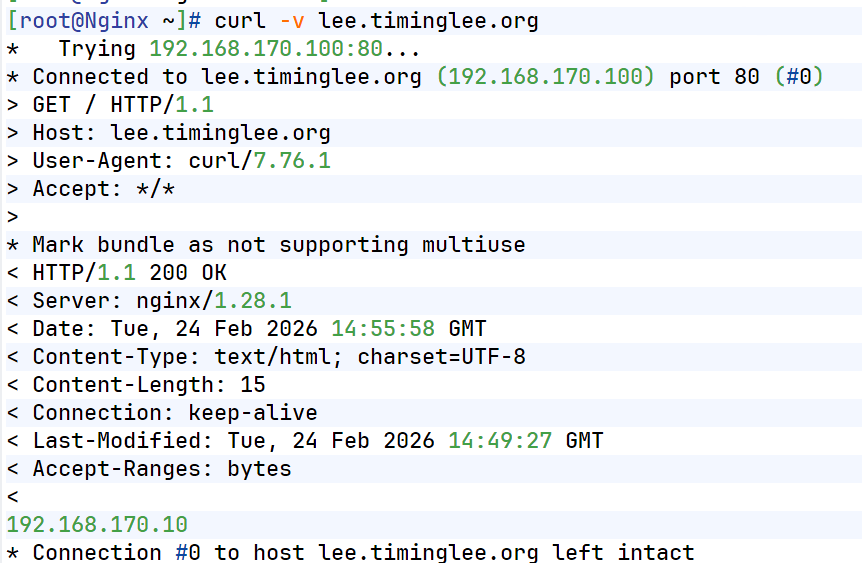
测试:
4.proxy_pass_header(默认访问不透传server信息)
[root@Nginx ~]# vim /usr/local/nginx/conf/conf.d/vhosts.conf
server {
    listen 80;
    server_name lee.timinglee.org;
    location / {
        proxy_pass http://192.168.170.10:80;
        proxy_pass_header Server;
    }

    location /web {
        proxy_pass http://192.168.170.20:80;
    }

}

[root@Nginx ~]# nginx -s reload
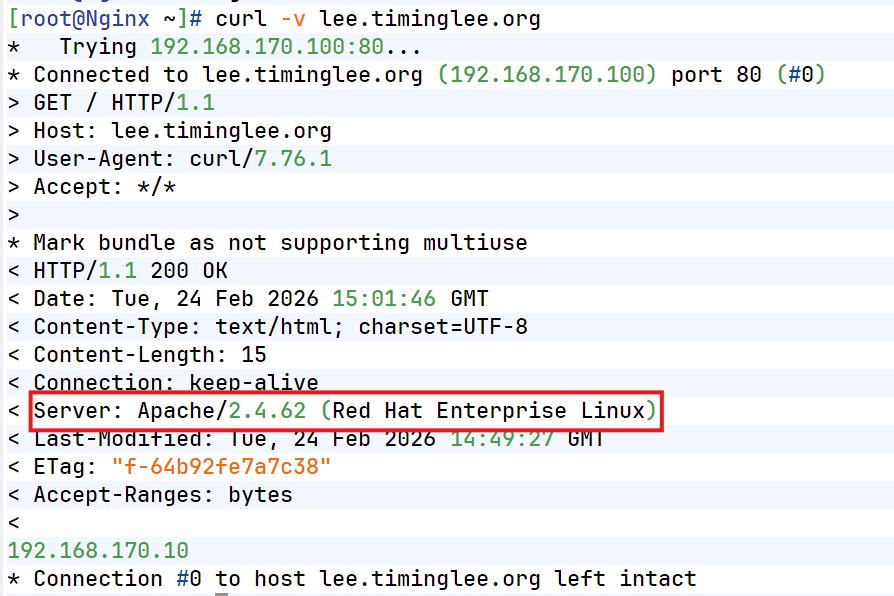
透传结果:
5.透传信息
[root@RS1 ~]# vim /etc/httpd/conf/httpd.conf
    LogFormat "%h %l %u %t \"%r\" %>s %b \"%{Referer}i\" \"%{User-Agent}i\" \"%{X-Forwarded-For}i\"" combined


[root@RS1 ~]# systemctl restart httpd

[root@Nginx ~]# vim /usr/local/nginx/conf/conf.d/vhosts.conf
server {
    listen 80;
    server_name lee.timinglee.org;
    location / {
        proxy_pass http://192.168.170.10:80;
        proxy_set_header X-Forwarded-For $remote_addr;

    }

    location /web {
        proxy_pass http://192.168.170.20:80;
    }
}

[root@Nginx ~]# nginx -s reload
[root@Nginx ~]# curl -v lee.timinglee.org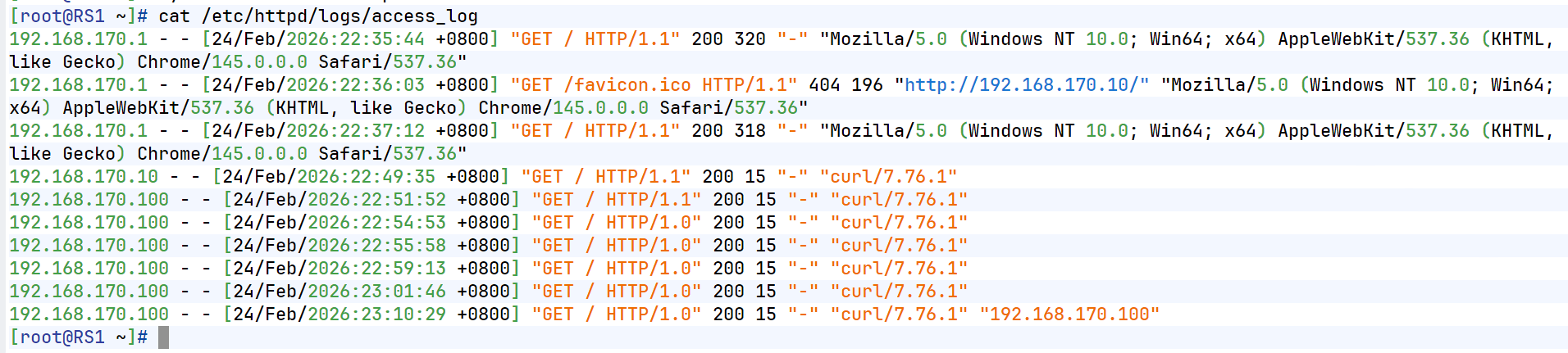
五、利用反向代理实现动静分离
1.试验机环境
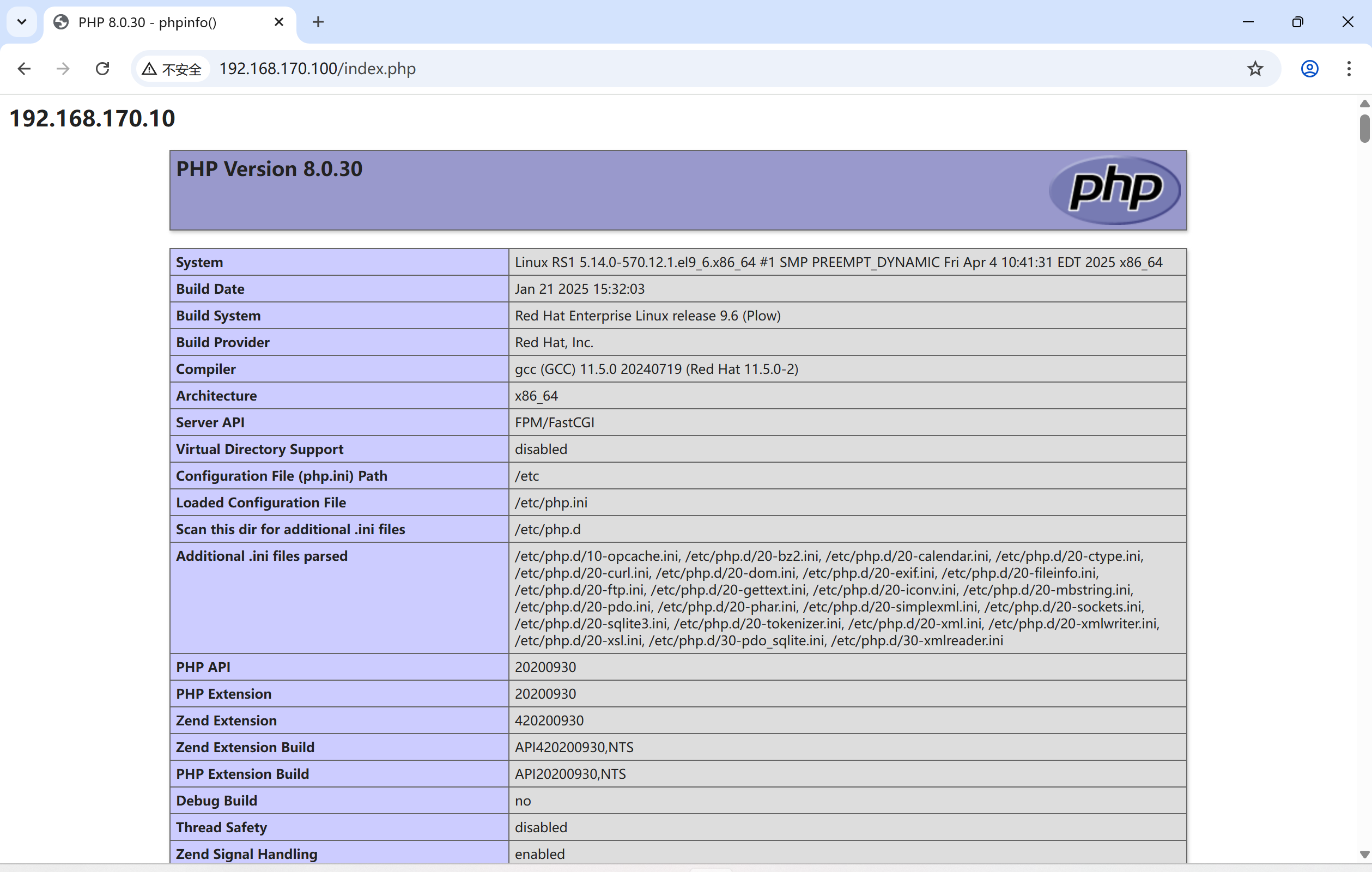
#在RS1中
[root@RS1 ~]# dnf install php -y
[root@RS1 ~]# systemctl restart httpd

[root@RS1 ~]# vim /var/www/html/index.php

<?php
    echo "<h2>192.168.170.10</h2>";
    phpinfo();
?>
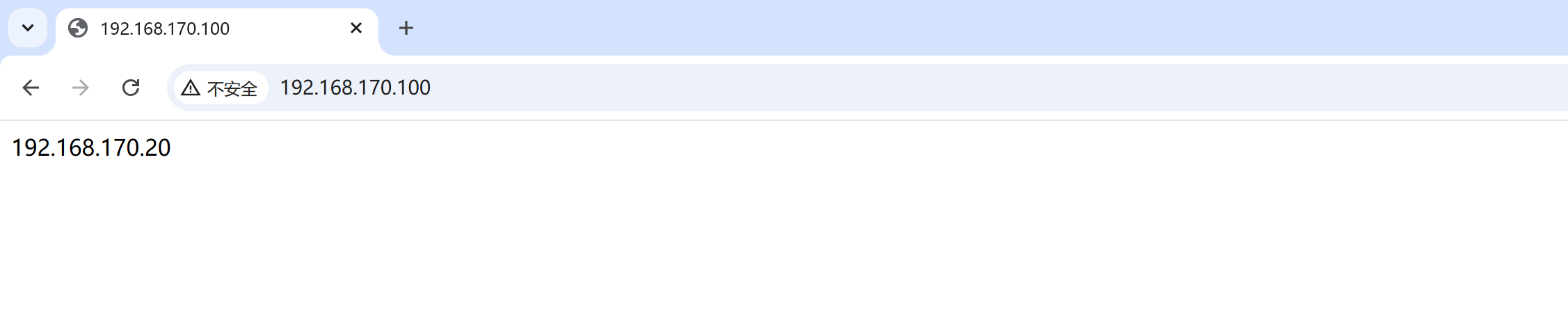
2.动静分离的实现
[root@Nginx ~]# vim /usr/local/nginx/conf/conf.d/vhosts.conf
server {
    listen 80;
    server_name lee.timinglee.org;
    location / {
        proxy_pass http://192.168.170.20:80;

    }

    location ~* \.(php|js)$ {
        proxy_pass http://192.168.170.10:80;
    }
}

[root@Nginx ~]# nginx -s reload
测试效果:
六、缓存加速
1.当未启用缓存时进行压测
[root@Nginx ~]# ab -n 10000 -c 50 lee.timinglee.org/index.php
This is ApacheBench, Version 2.3 <$Revision: 1913912 $>
Copyright 1996 Adam Twiss, Zeus Technology Ltd, http://www.zeustech.net/
Licensed to The Apache Software Foundation, http://www.apache.org/

Benchmarking lee.timinglee.org (be patient)
Completed 1000 requests
Completed 2000 requests
Completed 3000 requests
Completed 4000 requests
Completed 5000 requests
Completed 6000 requests
Completed 7000 requests
Completed 8000 requests
Completed 9000 requests
Completed 10000 requests
Finished 10000 requests


Server Software:        nginx/1.28.1
Server Hostname:        lee.timinglee.org
Server Port:            80

Document Path:          /index.php
Document Length:        72925 bytes

Concurrency Level:      50
Time taken for tests:   16.188 seconds
Complete requests:      10000
Failed requests:        9998
   (Connect: 0, Receive: 0, Length: 9998, Exceptions: 0)
Total transferred:      731147642 bytes
HTML transferred:       729287642 bytes
Requests per second:    617.73 [#/sec] (mean)
Time per request:       80.941 [ms] (mean)
Time per request:       1.619 [ms] (mean, across all concurrent requests)
Transfer rate:          44106.86 [Kbytes/sec] received

Connection Times (ms)
              min  mean[+/-sd] median   max
Connect:        0    0   0.8      0      28
Processing:     4   80  37.3     74     474
Waiting:        4   69  32.5     64     462
Total:          5   81  37.3     74     474

Percentage of the requests served within a certain time (ms)
  50%     74
  66%     87
  75%     95
  80%    100
  90%    122
  95%    144
  98%    181
  99%    219
 100%    474 (longest request)
2.设定缓存加速
[root@Nginx ~]# vim /usr/local/nginx/conf/nginx.conf
proxy_cache_path /usr/local/nginx/proxy_cache levels=1:2:2 keys_zone=proxycache:20m inactive=120s max_size=1g;

server {
    listen 80;
    server_name lee.timinglee.org;
    location / {
        proxy_pass http://192.168.170.20:80;

    }

    location ~* \.(php|js)$ {
        proxy_pass http://192.168.170.10:80;
        proxy_cache proxycache;
        proxy_cache_key $request_uri;
        proxy_cache_valid 200 302 301 10m;
        proxy_cache_valid any 1m;
    }

}
[root@Nginx ~]# systemctl restart nginx.service
[root@Nginx ~]# tree  /usr/local/nginx/proxy_cache/
/usr/local/nginx/proxy_cache/

0 directories, 0 files
测试: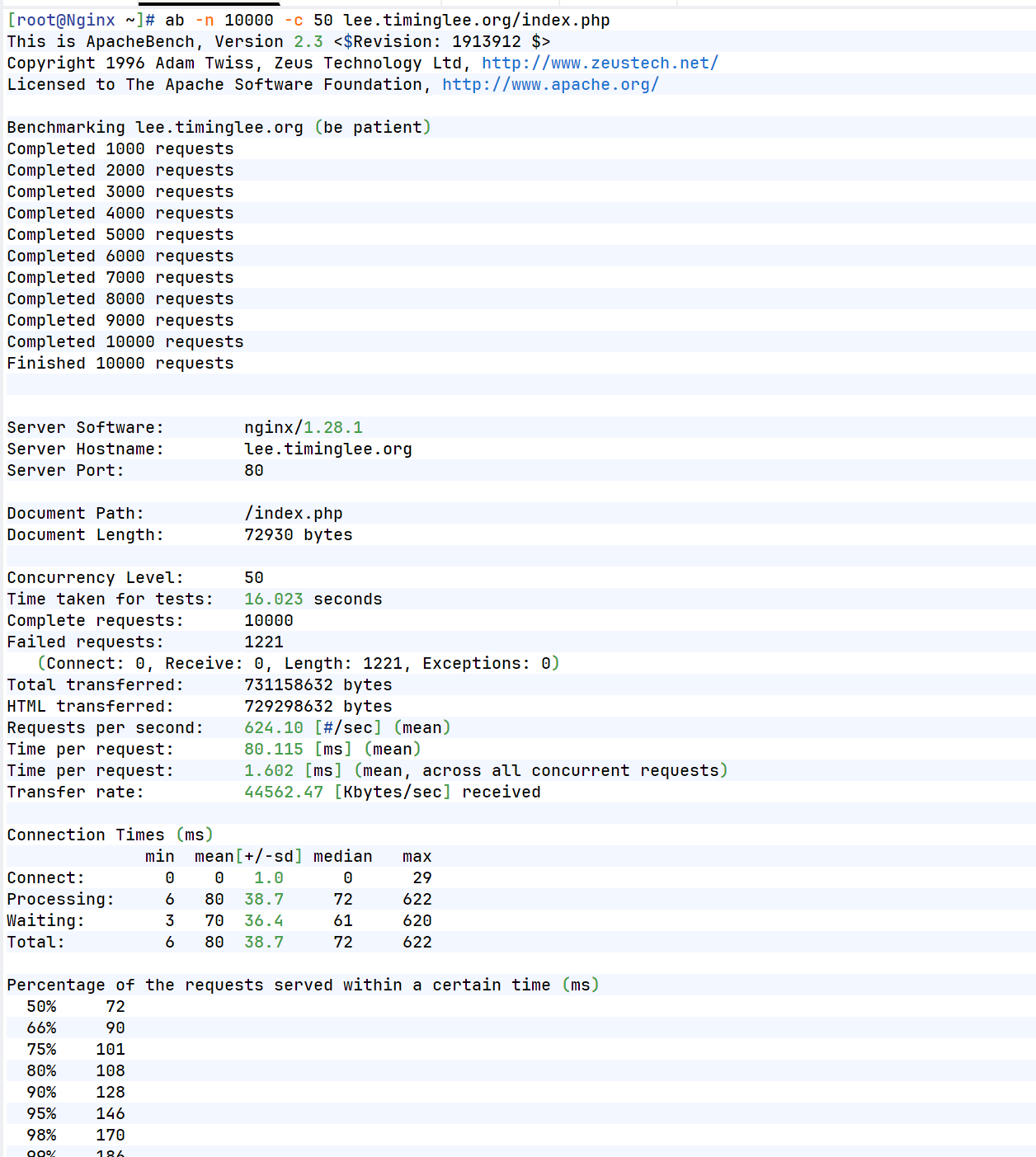
七、反向代理负载均衡
[root@Nginx ~]# mkdir  /usr/local/nginx/conf/upstream/
[root@Nginx ~]# vim /usr/local/nginx/conf/nginx.conf
events {
    worker_connections  10000;
    use epoll;
    accept_mutex on;
    multi_accept on;
}

http {
    include       mime.types;
    default_type  application/octet-stream;
	include "/usr/local/nginx/conf/upstream/*.conf";		#子配置目录


[root@Nginx ~]# vim /usr/local/nginx/conf/upstream/loadbalance.conf
upstream webserver {
    server 192.168.170.10:80 weight=1 fail_timeout=15s max_fails=3;
    server 192.168.170.20:80 weight=1 fail_timeout=15s max_fails=3;
    server 192.168.170.100:8888 backup;

}
server {
    listen 80;
    server_name www.timinglee.org;

    location ~ / {
        proxy_pass http://webserver;
    }
}

[root@Nginx ~]# mkdir  /webdir/timinglee.org/error/html -p
[root@Nginx ~]# echo error > /webdir/timinglee.org/error/html/index.html

[root@Nginx ~]# vim /usr/local/nginx/conf/conf.d/vhosts.conf
server {
    listen 8888;
    root /webdir/timinglee.org/error/html;
}

[root@Nginx ~]# systemctl restart nginx.service
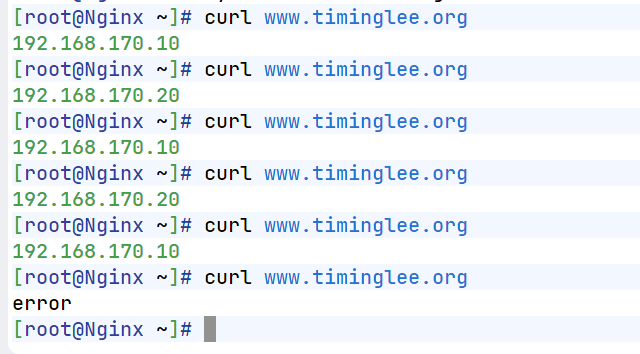
测试效果:
八、Nginx负载均衡算法
[root@RS1+RS2 ~]# systemctl start httpd
[root@RS1+RS2 ~]# mkdir /var/www/html/web{1..3}
[root@RS1+RS2 ~]# echo web1 > /var/www/html/web1/index.html
[root@RS1+RS2 ~]# echo web2 > /var/www/html/web2/index.html
[root@RS1+RS2 ~]# echo web3 > /var/www/html/web3/index.html

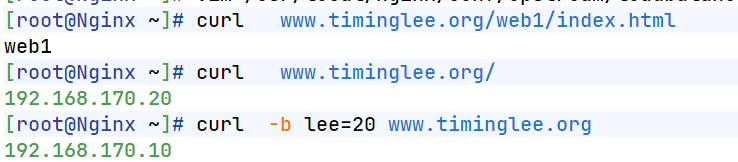
[root@Nginx ~]# vim /usr/local/nginx/conf/upstream/loadbalance.conf
upstream webserver {
    #ip_hash;
    #hash $request_uri consistent;
    #least_conn;
    hash $cookie_lee;
    server 192.168.170.10:80 weight=1 fail_timeout=15s max_fails=3;
    server 192.168.170.20:80 weight=1 fail_timeout=15s max_fails=3;
    #server 192.168.170.100:8888 backup;

}
server {
    listen 80;
    server_name www.timinglee.org;

    location ~ / {
        proxy_pass http://webserver;
    }
}
九、PHP的源码编译
1.下载源码包
[root@Nginx ~]# wget https://www.php.net/distributions/php-8.3.30.tar.gz
[root@Nginx ~]# wget https://mirrors.aliyun.com/rockylinux/9.7/devel/x86_64/os/Packages/o/oniguruma-devel-6.9.6-1.el9.6.x86_64.rpm     #依赖
2.解压
[root@Nginx ~]# tar zxf php-8.3.30.tar.gz
[root@Nginx ~]# ls
anaconda-ks.cfg                lee.png              nginx-1.29.4.tar.gz  test.c
daolian.png                    nginx-1.28.1         php-8.3.30
echo-nginx-module-0.64         nginx-1.28.1.tar.gz  php-8.3.30.tar.gz
echo-nginx-module-0.64.tar.gz  nginx-1.29.4         test
[root@Nginx ~]# cd php-8.3.30
3.源码编译
[root@Nginx ~]# dnf install gcc systemd-devel-252-51.el9.x86_64 libxml2-devel.x86_64 sqlite-devel.x86_64  libcurl-devel.x86_64  libpng-devel.x86_64 oniguruma-devel-6.9.6-1.el9.6.x86_64.rpm -y

[root@Nginx ~]# cd php-8.3.30/
[root@Nginx php-8.3.30]# ./configure \
--prefix=/usr/local/php \		#安装路径
--with-config-file-path=/usr/local/php/etc \	#指定配置路径
--enable-fpm  \			#用cgi方式启动程序
--with-fpm-user=nginx \	#指定运行用户身份
--with-fpm-group=nginx \
--with-curl \			#打开curl浏览器支持
--with-iconv \			#启用iconv函数,转换字符编码
--with-mhash \			#mhash加密方式扩展库
--with-zlib \			#支持zlib库,用于压缩http压缩传输
--with-openssl \		#支持ssl加密
--enable-mysqlnd \		#mysql数据库
--with-mysqli \
--with-pdo-mysql \
--disable-debug \		#关闭debug功能
--enable-sockets \		#支持套接字访问
--enable-soap \			#支持soap扩展协议
--enable-xml \			#支持xml
--enable-ftp \			#支持ftp
--enable-gd \			#支持gd库
--enable-exif \			#支持图片元数据
--enable-mbstring \		#支持多字节字符串
--enable-bcmath \		#打开图片大小调整,用到zabbix监控的时候用到了这个模块
--with-fpm-systemd		#支持systemctl 管理cgi

[root@Nginx php-8.3.30]# make && make instsall
4.配置PHP
[root@Nginx php-8.3.30]# cd /usr/local/php/etc
[root@Nginx etc]# cp -p php-fpm.conf.default  php-fpm.conf

[root@Nginx etc]# vim php-fpm.conf
[global]
; Pid file
; Note: the default prefix is /usr/local/php/var
; Default Value: none
pid = run/php-fpm.pid


[root@Nginx etc]# cd php-fpm.d/
[root@Nginx php-fpm.d]# cp www.conf.default www.conf
[root@Nginx php-fpm.d]# vim www.conf
41 listen = 0.0.0.0:9000

[root@Nginx php-fpm.d]# cp /root/php-8.3.30/php.ini-production  /usr/local/php/etc/php.ini

[root@Nginx php-fpm.d]# vim /usr/local/php/etc/php.ini
989 date.timezone = Asia/Shangha

[root@Nginx ~]# cp /root/php-8.3.30/sapi/fpm/php-fpm.service /lib/systemd/system/
[root@Nginx ~]# vim /lib/systemd/system/php-fpm.service

# Mounts the /usr, /boot, and /etc directories read-only for processes invoked by this unit.
#ProtectSystem=full		#注释此参数
[root@Nginx ~]# systemctl daemon-reload
[root@Nginx ~]# systemctl enable --now php-fpm

[root@Nginx ~]# netstat -antlupe | grep php
tcp        0      0 0.0.0.0:9000            0.0.0.0:*               LISTEN      0          329917     165562/php-fpm: mas
十、Nginx整合PHP
[root@Nginx conf.d]# mkdir  /webdir/timinglee.org/php/html -p
[root@Nginx conf.d]# vim /webdir/timinglee.org/php/html/index.html
php.timinglee.org

[root@Nginx conf.d]# vim /webdir/timinglee.org/php/html/index.php
<?php
  phpinfo();
?>


[root@Nginx ~]# cd /usr/local/nginx/conf/conf.d/
[root@Nginx conf.d]# vim php.conf
server {
  listen 80;
  server_name php.timinglee.org;
  root /webdir/timinglee.org/php/html;
  location ~ \.php$ {
    fastcgi_pass 127.0.0.1:9000;
    fastcgi_index index.php;
    include fastcgi.conf;
  }
}

[root@Nginx conf.d]# nginx -s reload
测试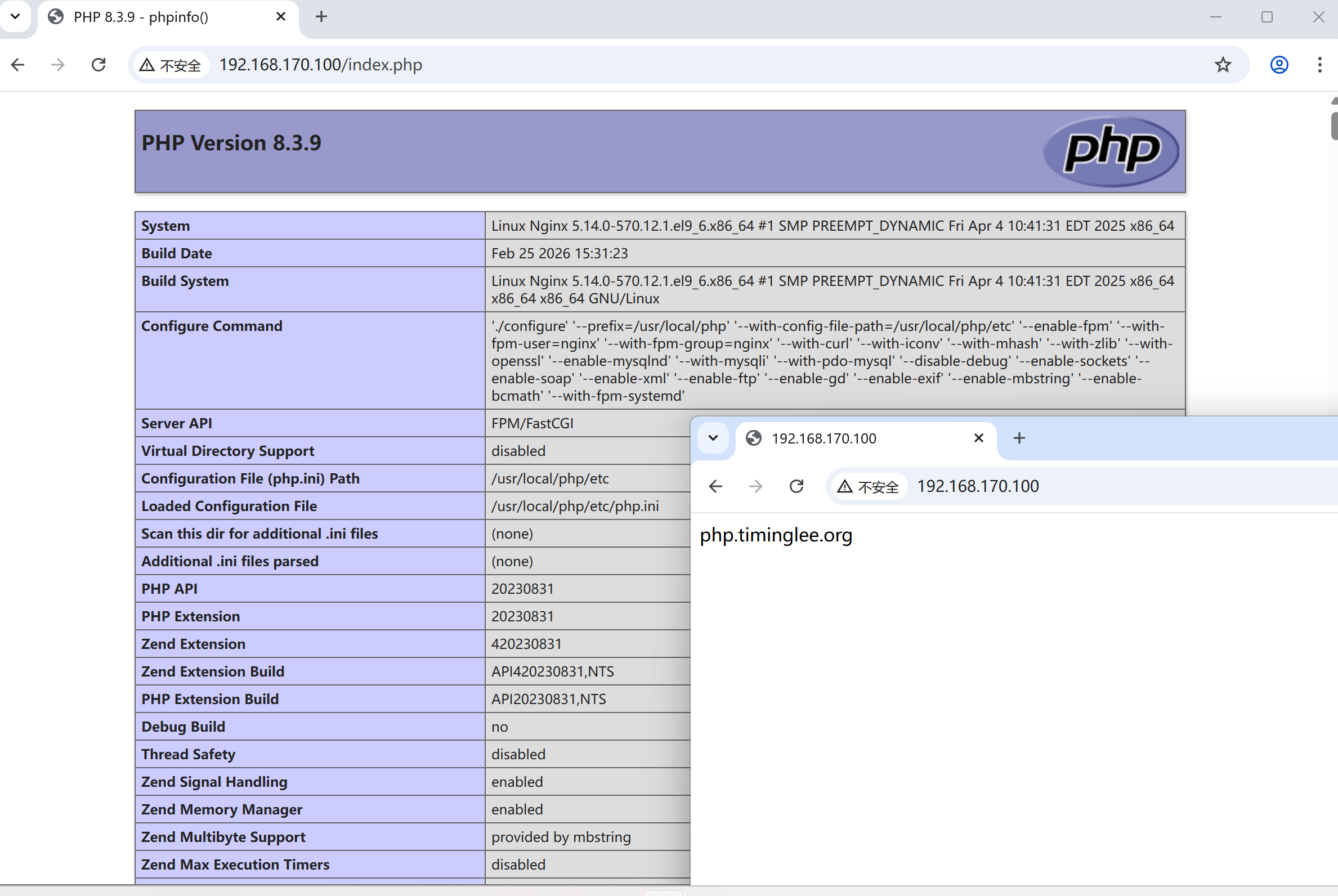
十一、利用memcache实现php的缓存加速
1.安装memcache
[root@Nginx ~]# dnf install memcached.x86_64 -y2.配置memcache
[root@Nginx ~]# vim /etc/sysconfig/memcached
PORT="11211"
USER="memcached"
MAXCONN="1024"
CACHESIZE="64"
OPTIONS="-l 0.0.0.0,::1"

[root@Nginx ~]# systemctl enable --now memcached.service

[root@Nginx ~]# netstat -antlupe | grep memcache
tcp        0      0 0.0.0.0:11211           0.0.0.0:*               LISTEN      991        437305     166169/memcached
tcp6       0      0 ::1:11211               :::*                    LISTEN      991        437306     166169/memcached
3.升级php对于memcache的支持
[root@Nginx ~]# php -m	#查看php支持的插件

[root@Nginx ~]# tar zxf memcache-8.2.tgz
[root@Nginx ~]# cd memcache-8.2/
[root@Nginx memcache-8.2]# dnf install autoconf -y
[root@Nginx memcache-8.2]# phpize
[root@Nginx memcache-8.2]# ./configure  && make && make install

[root@Nginx memcache-8.2]# ls /usr/local/php/lib/php/extensions/no-debug-non-zts-20230831/
memcache.so  opcache.so

[root@Nginx memcache-8.2]# vim /usr/local/php/etc/php.ini
939  extension=memcache

[root@Nginx memcache-8.2]# systemctl restart php-fpm.service
[root@Nginx memcache-8.2]# php -m  | grep memcache
memcache
4.测试性能
[root@Nginx memcache-8.2]# vim memcache.php
define('ADMIN_USERNAME','admin');   // Admin Username
define('ADMIN_PASSWORD','lee');     // Admin Password
$MEMCACHE_SERVERS[] = '172.25.254.100:11211'; // add more as an array
#$MEMCACHE_SERVERS[] = 'mymemcache-server2:11211'; // add more as an array

[root@Nginx memcache-8.2]# cp -p memcache.php  /webdir/timinglee.org/php/html/
[root@Nginx memcache-8.2]# cp -p example.php /webdir/timinglee.org/php/html/

#测试
http://php.timinglee.org/memcache.php			#数据页面,在浏览器中可以直接访问
[root@Nginx memcache-8.2]# ab -n 1000 -c 300  php.timinglee.org/example.php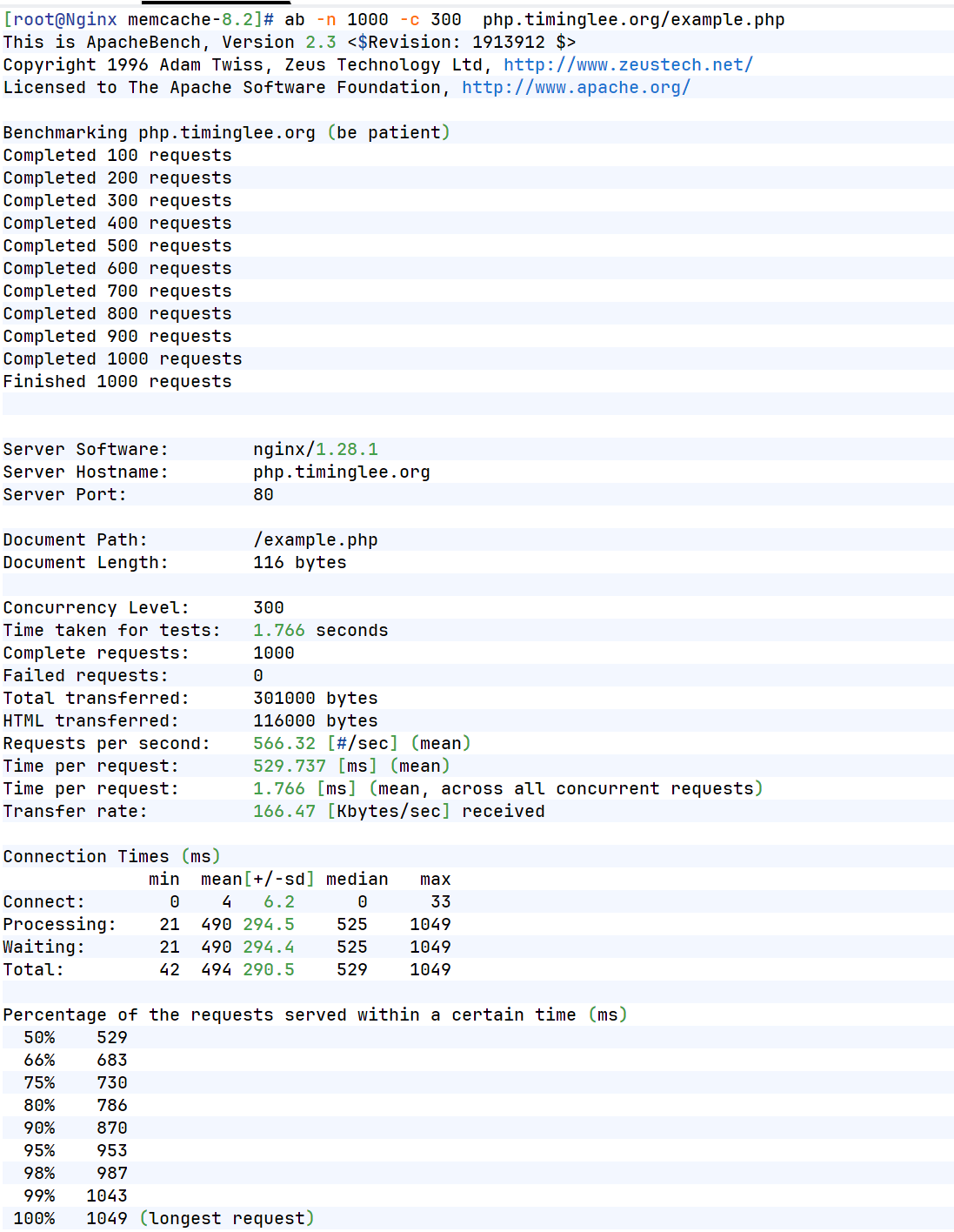
十二、Nginx的四层负载均衡代理
1.实验环境(Mysql)
[root@RS1 ~]# dnf install mariadb-server -y
[root@RS2 ~]# dnf install mariadb-server -y

[root@RS1 ~]# vim /etc/my.cnf.d/mariadb-server.cnf
server-id=10

[root@RS2 ~]# vim /etc/my.cnf.d/mariadb-server.cnf
server-id=20
[root@RS1 ~]# systemctl enable --now mariadb
[root@RS2 ~]# systemctl enable --now mariadb

[root@RS1 ~]# mysql
Welcome to the MariaDB monitor.  Commands end with ; or \g.
Your MariaDB connection id is 3
Server version: 10.5.27-MariaDB MariaDB Server

Copyright (c) 2000, 2018, Oracle, MariaDB Corporation Ab and others.

Type 'help;' or '\h' for help. Type '\c' to clear the current input statement.

MariaDB [(none)]> CREATE USER lee@'%' IDENTIFIED BY 'lee';
Query OK, 0 rows affected (0.001 sec)

MariaDB [(none)]> GRANT ALL ON *.* TO lee@'%';
Query OK, 0 rows affected (0.001 sec)

MariaDB [(none)]>

[root@RS2 ~]# mysql
Welcome to the MariaDB monitor.  Commands end with ; or \g.
Your MariaDB connection id is 3
Server version: 10.5.27-MariaDB MariaDB Server

Copyright (c) 2000, 2018, Oracle, MariaDB Corporation Ab and others.

Type 'help;' or '\h' for help. Type '\c' to clear the current input statement.

MariaDB [(none)]>  CREATE USER lee@'%' IDENTIFIED BY 'lee';
Query OK, 0 rows affected (0.001 sec)

MariaDB [(none)]> GRANT ALL ON *.* TO lee@'%';
Query OK, 0 rows affected (0.001 sec)
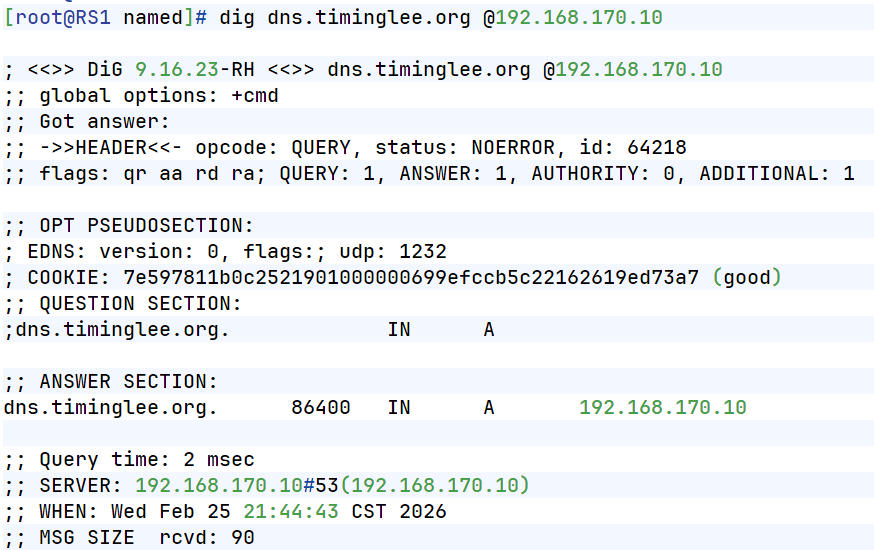
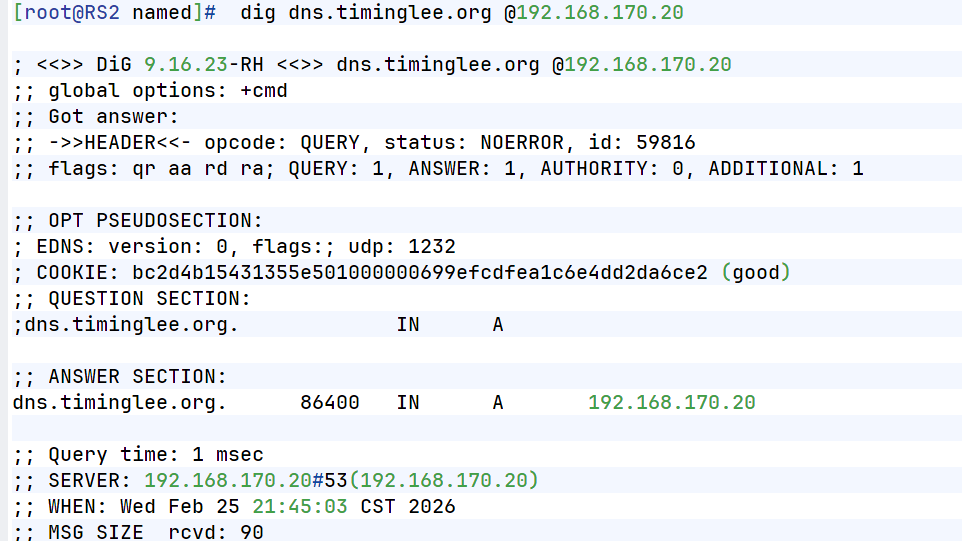
2.实验环境(dns)
[root@RS1 ~]# dnf install bind -y
[root@RS2 ~]# dnf install bind -y

[root@RS1 ~]# vim /etc/named.conf
[root@RS2 ~]# vim /etc/named.conf

options {
//      listen-on port 53 { 127.0.0.1; };
//      listen-on-v6 port 53 { ::1; };
        directory       "/var/named";
        dump-file       "/var/named/data/cache_dump.db";
        statistics-file "/var/named/data/named_stats.txt";
        memstatistics-file "/var/named/data/named_mem_stats.txt";
        secroots-file   "/var/named/data/named.secroots";
        recursing-file  "/var/named/data/named.recursing";
//      allow-query     { localhost; };
        dnssec-validation no;

[root@RS1 ~]# vim /etc/named.rfc1912.zones
[root@RS2 ~]# vim /etc/named.rfc1912.zones

zone "timinglee.org" IN {
        type master;
        file "timinglee.org.zone";
        allow-update { none; };
};

[root@RS1 ~]# cd /var/named/
[root@RS2 ~]# cd /var/named/
[root@RS1 named]# cp -p named.localhost  timinglee.org.zone
[root@RS2 named]# cp -p named.localhost  timinglee.org.zone


[root@RS1 named]# vim timinglee.org.zone
$TTL 1D
@       IN SOA  dns.timingle.org. rname.invalid. (
                                        0       ; serial
                                        1D      ; refresh
                                        1H      ; retry
                                        1W      ; expire
                                        3H )    ; minimum
        NS      dns.timinglee.org.
dns     A       192.168.170.10

[root@RS2 named]# vim timinglee.org.zone
$TTL 1D
@       IN SOA  dns.timingle.org. rname.invalid. (
                                        0       ; serial
                                        1D      ; refresh
                                        1H      ; retry
                                        1W      ; expire
                                        3H )    ; minimum
        NS      dns.timinglee.org.
dns     A       192.168.170.20


[root@RS2 named]# systemctl enable --now named
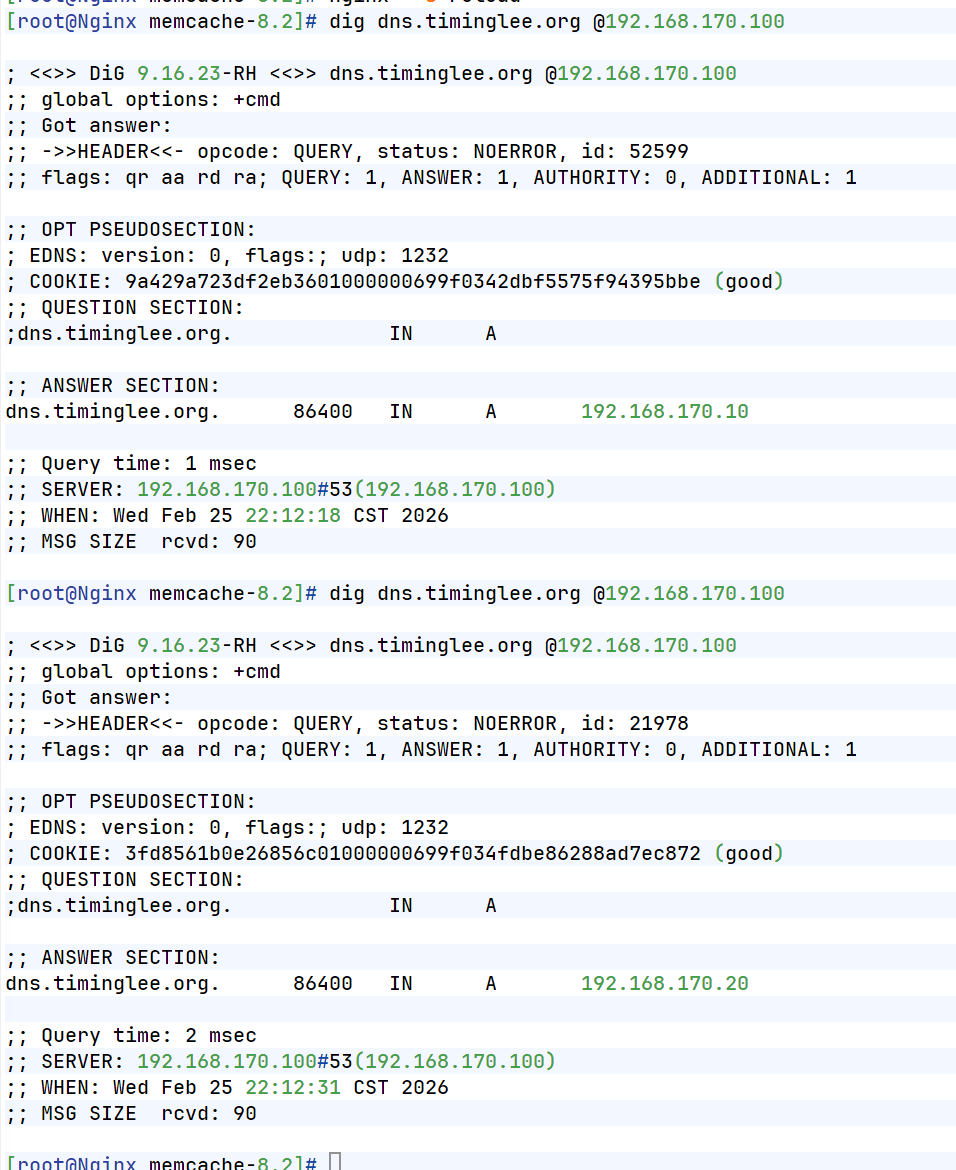
测试:
3.tcp四层负载
[root@Nginx conf]# mkdir  /usr/local/nginx/conf/tcp -p
[root@Nginx conf]# mkdir  /usr/local/nginx/conf/udp -p
[root@Nginx conf]# vim /usr/local/nginx/conf/nginx.conf
include "/usr/local/nginx/conf/tcp/*.conf";

[root@Nginx conf]# vim /usr/local/nginx/conf/tcp/mariadb.conf
stream {
  upstream mysql_server {
    server 192.168.170.10:3306  max_fails=3 fail_timeout=30s;
    server 192.168.170.20:3306  max_fails=3 fail_timeout=30s;
  }

  server {
    listen 192.168.170.100:3306;
    proxy_pass mysql_server;
    proxy_connect_timeout 30s;
    proxy_timeout 300s;
  }

}
[root@Nginx conf]# nginx  -s reload

#检测
[root@Nginx ~]# mysql -ulee -plee -h172.25.254.100
Welcome to the MariaDB monitor.  Commands end with ; or \g.
Your MariaDB connection id is 4
Server version: 10.5.27-MariaDB MariaDB Server

Copyright (c) 2000, 2018, Oracle, MariaDB Corporation Ab and others.

Type 'help;' or '\h' for help. Type '\c' to clear the current input statement.

MariaDB [(none)]> SELECT @@server_id;
+-------------+
| @@server_id |
+-------------+
|          10 |
+-------------+
1 row in set (0.001 sec)

MariaDB [(none)]> quit
Bye
[root@Nginx ~]# mysql -ulee -plee -h172.25.254.100
Welcome to the MariaDB monitor.  Commands end with ; or \g.
Your MariaDB connection id is 4
Server version: 10.5.27-MariaDB MariaDB Server

Copyright (c) 2000, 2018, Oracle, MariaDB Corporation Ab and others.

Type 'help;' or '\h' for help. Type '\c' to clear the current input statement.

MariaDB [(none)]> SELECT @@server_id;
+-------------+
| @@server_id |
+-------------+
|          20 |
+-------------+
1 row in set (0.001 sec)
4.udp四层负载
[root@Nginx ~]# vim /usr/local/nginx/conf/tcp/mariadb.conf
stream {
  upstream mysql_server {
    server 192.168.170.10:3306  max_fails=3 fail_timeout=30s;
    server 192.168.170.20:3306  max_fails=3 fail_timeout=30s;
  }

  upstream dns_server{
    server 192.168.170.10:53 max_fails=3 fail_timeout=30s;
    server 192.168.170.20:53 max_fails=3 fail_timeout=30s;
  }

  server {
    listen 192.168.170.100:3306;
    proxy_pass mysql_server;
    proxy_connect_timeout 30s;
    proxy_timeout 300s;
  }

  server {
        listen 192.168.170.100:53 udp;
        proxy_pass dns_server;
        proxy_timeout 1s;
        proxy_responses 1;
        error_log logs/dns.log;
    }
}
[root@Nginx ~]# nginx  -s reload
测试: