标准工作流程
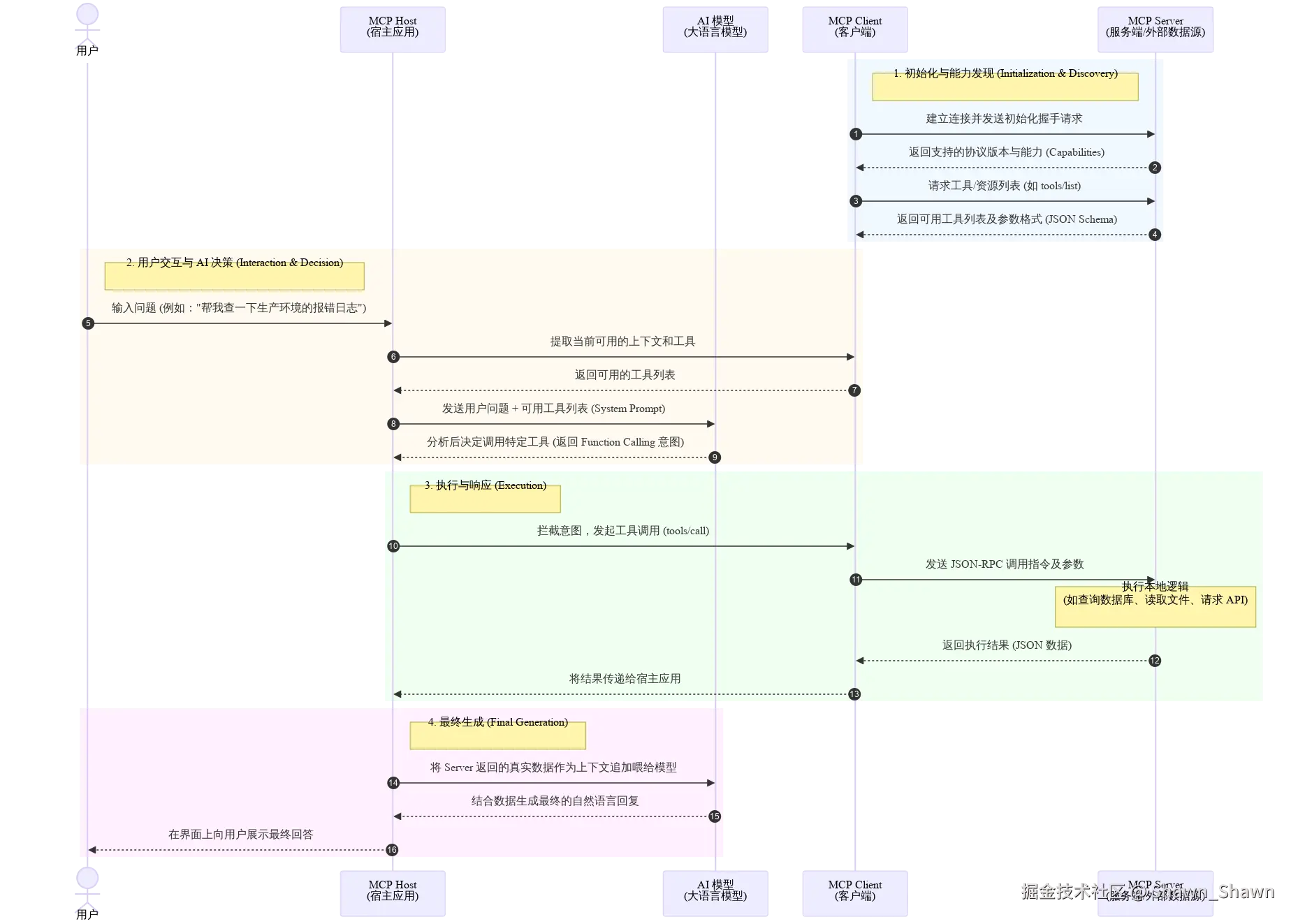
一个典型的 MCP 交互流程如下:
- 初始化握手 (Initialization):
Client 启动并连接到 Server,发送初始化请求。双方交换各自支持的协议版本和能力(Capabilities)。 - 能力发现 (Discovery):
Client 向 Server 发送请求(如tools/list或resources/list),获取该 Server 支持的所有可用工具和资源的列表及参数格式(通常基于 JSON Schema)。 - 用户交互与 AI 决策:
用户向宿主应用(Host)提出问题。Host 将问题连同 Server 提供的"工具列表"发给 AI 模型。AI 决定需要调用某个特定工具来解答问题。 - 执行与响应 (Execution):
-
- Host 拦截到 AI 的工具调用意图,通过 MCP Client 向 Server 发出
tools/call请求。 - Server 执行本地代码(例如查询数据库)。
- Server 将结果通过 JSON-RPC 响应返回给 Client。
- Host 拦截到 AI 的工具调用意图,通过 MCP Client 向 Server 发出
- 最终生成:
Host 将 Server 返回的数据喂给 AI 模型,AI 根据这些实时上下文生成最终回复给用户。
Server层源语
| 功能 | 说明 | 调用方 |
|---|---|---|
| 工具 | LLM 可以主动调用的函数,并根据用户请求决定何时使用。工具可以写入数据库、调用外部 API、修改文件或触发其他逻辑。 | llm |
| 资源 | 被动数据源,为上下文提供信息的只读访问,如文件内容、数据库模式或 API 文档。 | App |
| 提示 | 预构建的指令模板,指导模型如何使用特定的工具和资源。 | user |
Tool
工具使 AI 模型能够执行操作。每个工具定义了一个具有类型化输入和输出的特定操作。模型根据上下文请求执行工具。
协议操作:
| 方法 | 目的 | 返回 |
|---|---|---|
tools/list |
发现可用工具 | 带有架构的工具定义数组 |
tools/call |
执行特定工具 | 工具执行结果 |
工具定义示例:
json
{
  name: "searchFlights",
  description: "Search for available flights",
  inputSchema: {
    type: "object",
    properties: {
      origin: { type: "string", description: "Departure city" },
      destination: { type: "string", description: "Arrival city" },
      date: { type: "string", format: "date", description: "Travel date" }
    },
    required: ["origin", "destination", "date"]
  }
}
代码示例:
python
# 创建MCP实例
mcp = FastMCP(name="demo-mcp")

# 添加一个简单的资源
@mcp.tool()
def greeting(name: str = "World") -> str:
    """返回问候语"""
    return f"Hello, {name}!"


# 添加计算功能
@mcp.tool()
def add(a: int, b: int) -> int:
    """加法计算器"""
    return a + b

async def main():
    """Main client function that demonstrates MCP client features"""
    logger.info("Starting clean MCP client")

    try:
        logger.info("Connecting to server...")
        params = StdioServerParameters(
            command="python",  # Executable
            args=["mcp-server.py"],  # Server script
            env=None,  # Optional environment variables
        )
        async with stdio_client(params) as (reader, writer):
            async with ClientSession(reader, writer) as session:
                logger.info("Initializing session")
                await session.initialize()

                # 1. Call the add tool
                logger.info("Testing calculator tool")
                add_result = await session.call_tool("add", arguments={"a": 5, "b": 7})
                if add_result and add_result.content:
                    text_content = next((content for content in add_result.content
                                         if isinstance(content, TextContent)), None)
                    if text_content:
                        print(f"\n1. Calculator result (5 + 7) = {text_content.text}")
Resource
资源提供对信息的结构化访问,AI 应用程序可以检索这些信息并将其作为上下文提供给模型。
每个资源都有一个唯一的 URI(例如 file:///path/to/document.md)并声明其 MIME 类型以便进行适当的内容处理,且url支持动态参数,例如file:///path/to/{dest}
协议操作:
| 方法 | 目的 | 返回 |
|---|---|---|
resources/list |
列出可用的直接资源 | 资源描述符数组 |
resources/templates/list |
发现资源模板 | 资源模板定义数组 |
resources/read |
检索资源内容 | 带有元数据的资源数据 |
resources/subscribe |
监控资源变化 | 订阅确认 |
资源模版示例:
json
{
  "uriTemplate": "weather://forecast/{city}/{date}",
  "name": "weather-forecast",
  "title": "Weather Forecast",
  "description": "Get weather forecast for any city and date",
  "mimeType": "application/json"
}
代码示例:
python
@mcp.resource("models://")
def get_models() -> str:
    """Get information about available AI models"""
    logger.info("Retrieving available models")
    models_data = [
        {
            "id": "gpt-4",
            "name": "GPT-4",
            "description": "OpenAI's GPT-4 large language model"
        },
        {
            "id": "llama-3-70b",
            "name": "LLaMA 3 (70B)",
            "description": "Meta's LLaMA 3 with 70 billion parameters"
        },
        {
            "id": "claude-3-sonnet",
            "name": "Claude 3 Sonnet",
            "description": "Anthropic's Claude 3 Sonnet model"
        }
    ]

    return json.dumps({"models": models_data})

@mcp.resource("file://documents/{name}")
def read_document(name: str) -> str:
    """Read a document by name."""
    # This would normally read from disk
    return f"Content of {name}"

async def main():
    """Main client function that demonstrates MCP client features"""
    logger.info("Starting clean MCP client")

    try:
        logger.info("Connecting to server...")
        params = StdioServerParameters(
            command="python",  # Executable
            args=["mcp-server.py"],  # Server script
            env=None,  # Optional environment variables
        )
        async with stdio_client(params) as (reader, writer):
            async with ClientSession(reader, writer) as session:
                logger.info("Initializing session")
                await session.initialize()

                # 2. Get models resource
                logger.info("Testing models resource")
                models_response = await session.read_resource("models://")
                if models_response and models_response.contents:
                    text_resource = next((content for content in models_response.contents
                                          if isinstance(content, TextResourceContents)), None)
                    if text_resource:
                        models = json.loads(text_resource.text)
                        print("\n3. Available models:")
                        for model in models.get("models", []):
                            print(f"   - {model['name']} ({model['id']}): {model['description']}")

                # 5. Get document resource
                logger.info("Testing document resource")
                document_response = await session.read_resource("file://documents/example.txt")
                if document_response and document_response.contents:
                    text_resource = next((content for content in document_response.contents
                                          if isinstance(content, TextResourceContents)), None)
                    if text_resource:
                        print(f"\n5. Document content:")
                        print(f"   {text_resource.text}")

    except Exception:
        logger.exception("An error occurred")
        sys.exit(1)


if __name__ == "__main__":
    asyncio.run(main())
mcp resource与rag的比对
MCP 是一种"连接标准/协议",而 RAG 是一种"数据处理/应用架构"。MCP 提供了一种标准化的方式来获取数据,而 RAG 解决的是如何利用外部数据准确回答问题。
| 维度 | MCP Resource (模型上下文协议资源) | RAG (检索增强生成) |
|---|---|---|
| 本质 | 协议/接口标准。定义了 AI 客户端(如 Claude Desktop)如何与数据源服务器进行通信的规范。 | 技术架构/模式。一种结合了信息检索和大语言模型生成的技术流程。 |
| 角色 | 它负责让 AI 能够"看到"或"读取"外部的文件、数据库内容或系统状态。 | 它负责从海量数据中找到最相关的片段,并喂给 AI,让 AI 据此回答。 |
| 核心功能 | 数据的标准化暴露与访问。解决"AI 怎么读取这个数据"的问题。 | 数据的检索与增强。解决"AI 如何利用这个数据回答问题"的问题。 |
| 数据形态 | 通常是完整的文件、目录列表、API 响应或数据库记录的原始形态。 | 通常是被切割的文本块,经过向量化并存储在向量数据库中。 |
| 主要目的 | 互操作性。让一个 AI 助手能通过统一协议连接各种不同的数据源(如 Google Drive, PostgreSQL, Git)。 | 准确性与时效性。减少模型幻觉,利用私有数据回答,并允许模型获取训练集之外的知识。 |
| 适用场景 | - 结构化数据 :数据库查询、API 调用结果。- 特定文件操作 :读取代码库、查看配置文件、浏览特定文档. 系统级操作 :读取服务器状态、日志文件。- 小规模/静态数据 :当你确定 AI 需要阅读整个文件(如读取一个 requirements.txt)时。 |
- 海量非结构化数据 :企业知识库、数千份 PDF 文档、Wiki 页面。- 开放式问答 :用户不知道具体在哪份文档里,只是问一个问题。- 长文档避坑:当文档太长无法全部塞入 Context Window,需要精准查找时。 |
在 MCP 出现之前,很多 AI IDE(如 Cursor, Windsurf)已经有了非常完善的"文件上下文读取"功能,它们虽然可能没叫 MCP Resource,但已经解决了"读代码"的问题。因此,MCP Resource 在"读文件"这个领域显得有些"重复造轮子"。
Prompt
提示词是定义了预期输入和交互模式的结构化模板。它们由用户控制,需要显式调用而非自动触发。
协议操作:
| 方法 | 目的 | 返回 |
|---|---|---|
prompts/list |
发现可用提示词 | 提示词描述符数组 |
prompts/get |
检索提示词详情 | 带有参数的完整提示词定义 |
提示词定义模版:
json
{
  "name": "plan-vacation",
  "title": "Plan a vacation",
  "description": "Guide through vacation planning process",
  "arguments": [
    { "name": "destination", "type": "string", "required": true },
    { "name": "duration", "type": "number", "description": "days" },
    { "name": "budget", "type": "number", "required": false },
    { "name": "interests", "type": "array", "items": { "type": "string" } }
  ]
}
代码示例:
python
@mcp.prompt(title="Code Review")
def review_code(code: str) -> str:
    return f"Please review this code:\n\n{code}"


@mcp.prompt(title="Debug Assistant")
def debug_error(error: str) -> list[base.Message]:
    return [
        base.UserMessage("I'm seeing this error:"),
        base.UserMessage(error),
        base.AssistantMessage("I'll help debug that. What have you tried so far?"),
    ]


# client.py
async def main():
    """Main client function that demonstrates MCP client features"""
    logger.info("Starting clean MCP client")

    try:
        logger.info("Connecting to server...")
        params = StdioServerParameters(
            command="python",  # Executable
            args=["mcp-server.py"],  # Server script
            env=None,  # Optional environment variables
        )
        async with stdio_client(params) as (reader, writer):
            async with ClientSession(reader, writer) as session:
                logger.info("Initializing session")
                await session.initialize()


                # 6. Use code review prompt
                logger.info("Testing code review prompt")
                sample_code = "def hello_world():\n    print('Hello, world!')"
                prompt_response = await session.get_prompt("review_code", {"code": sample_code})
                if prompt_response and prompt_response.messages:
                    message = next((msg for msg in prompt_response.messages if msg.content), None)
                    if message and message.content:
                        text_content = next((content for content in [message.content]
                                             if isinstance(content, TextContent)), None)
                        if text_content:
                            print("\n6. Code review prompt:")
                            print(f"   {text_content.text}")

    except Exception:
        logger.exception("An error occurred")
        sys.exit(1)


if __name__ == "__main__":
    asyncio.run(main())
mcp prompt vs dynamic prompt vs claude code command/agent
| 维度 | MCP Prompt | 动态 Prompt (概念) | Command / Agent (如 Claude Code) |
|---|---|---|---|
| 所属层级 | 协议层 (标准化接口) | 代码逻辑层 (组装技术) | 应用层 (用户直接交互的产品) |
| 产出物 | 仅仅是一段或多段文本/消息对象。 | 仅仅是一段文本。 | 一个完整的动作流或任务结果。 |
| 自主性 | 无。它只负责提供文本,大模型拿到文本后怎么做,它不管。 | 无。它只是字符串拼接的结果。 | 高。Agent 可以根据中间结果,反复调用工具(Tools)直到完成任务。 |
| 触发方式 | 客户端主动通过协议发送 prompts/get拉取。 |
开发者在代码中写好的拼接逻辑。 | 用户在 UI/终端 输入特定指令 (如 /fix) 触发。 |
- MCP Prompt 是标准化组件,用于在不同客户端间复用"优秀的提问方式"。
- Dynamic Prompt 是技术实现手段,用于根据实时数据生成个性化的指令。
- Claude Code Agent 是智能调度器,它负责决定何时使用工具、何时遵循 Prompt。
现在大家都在卷Agent,所以mcp prompt应用的也比较少。比如要写一个 SQL 生成器:
- MCP Prompt 思路:写一个模板告诉 AI "你现在是 SQL 专家,请写 SQL"。
- Tool + Agent 思路 :让 AI 先调用
get_schema工具读取表结构,然后自己思考怎么写 SQL。
显然后者更强大,也让 Prompt 这种"纯文本指导"显得没那么重要。