本章涵盖以下内容:
- 理解研究摘要引擎
- 使用提示工程生成 Web 搜索并汇总结果
- 将整个流程组织为独立的 LangChain 链
- 将子链集成到主链中
- 使用高级 LCEL 进行并行处理
在第 3 章内容摘要技术的基础之上,本章将指导你创建一个研究摘要引擎(research summarization engine) 。这个 LLM 应用会处理用户查询、执行 Web 搜索,并将搜索结果整理为一份全面的摘要报告。我们会以循序渐进的方式开发这个项目:先从基础开始,再逐步提高复杂度。在这一过程中,随着我引入如何使用 LangChain Expression Language(LCEL) 来创建 LLM 链,你对 LangChain 的理解也会进一步加深。
4.1 研究摘要引擎概览
设想一下,你正在研究各种主题,例如某位 NBA 球员、一个旅游目的地,或者是否值得投资某只股票。若用手工方式来做,你通常会先进行 Web 搜索,浏览搜索结果,阅读相关网页,记笔记,然后整理出一份总结。更现代的做法,是让 LLM 来完成这项工作。你可以把每个网页中的文本复制出来,粘贴到 ChatGPT 的提示中做摘要,对多个页面重复这一过程,然后再把这些摘要整合进一个最终提示,以生成一份综合性总结(见图 4.1)。
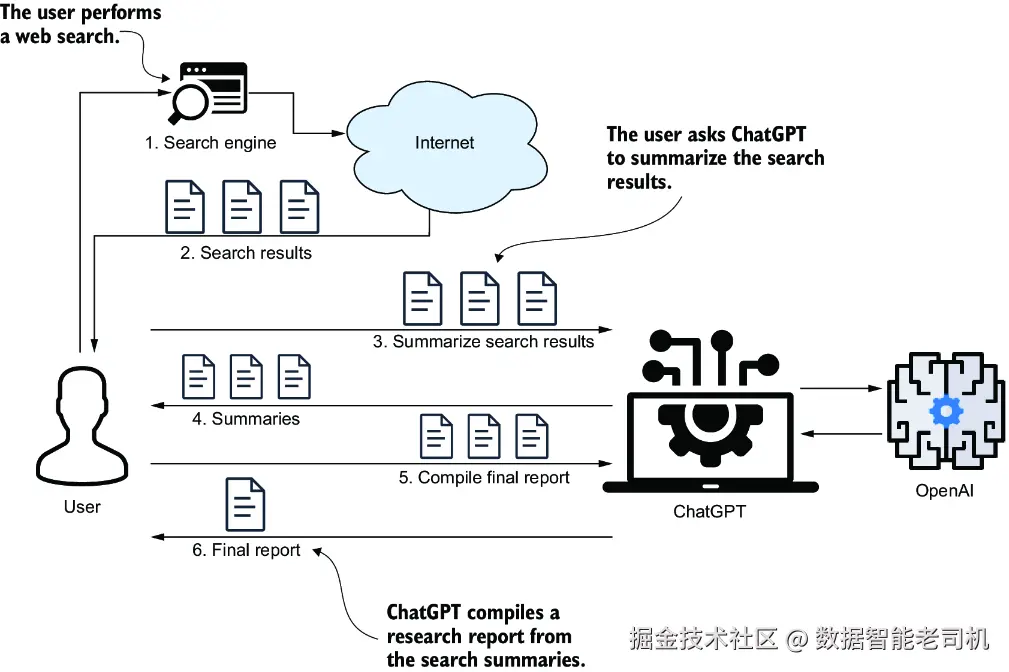
图 4.1 使用 LLM 的半自动摘要流程。你让 ChatGPT 对每个 Web 搜索结果逐一做摘要,再把这些摘要整合成一份综合总结。
一种更高效的方法,是开发一个全自动研究摘要引擎。这个引擎能够自动执行 Web 搜索、汇总搜索结果,并自动生成最终报告(见图 4.2)。对于处理任何研究型问题来说,它都是一个非常有价值的工具。
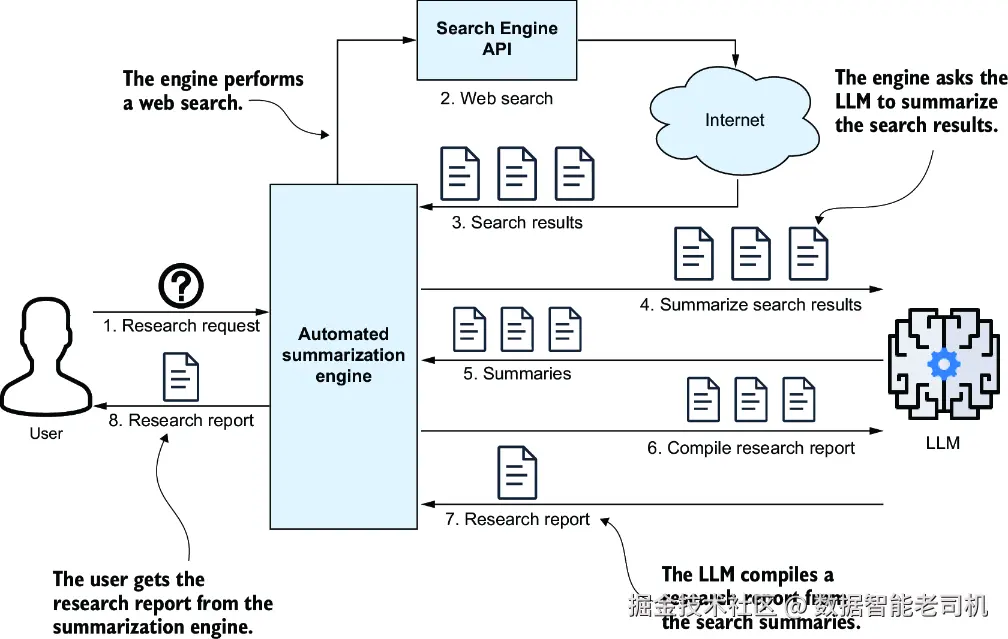
图 4.2 自动化研究摘要引擎。你提出一个问题,引擎就会执行 Web 搜索、返回 URL、抓取并摘要网页内容,最后为你生成一份研究报告。
我们将使用 LangChain 来构建这个引擎。首先,我们会实现 Web 搜索与网页抓取;然后,配置用于摘要的 OpenAI LLM 模型;最后,将所有组件集成到一个 Python 应用中。最初,它将以可执行程序的形式运行;之后,如果你愿意,也可以把它封装为一个 REST API。
4.2 搭建项目
这里我默认你使用的是 Visual Studio Code(VS Code) ,安装了免费的 Python 扩展,并且运行环境是 Windows。当然,如果你更习惯其他 Python IDE,比如 PyCharm,也完全可以使用。
安装 VS Code 与 Python 扩展
请先从 VS Code 官方网站下载并安装适合你操作系统的版本(https://code.visualstudio.com/download)。安装完成后,打开 VS Code,点击左侧菜单中的 Extensions 图标,然后搜索 Python ,选择 Microsoft 提供的 Python 扩展并点击 Install,如下图所示。
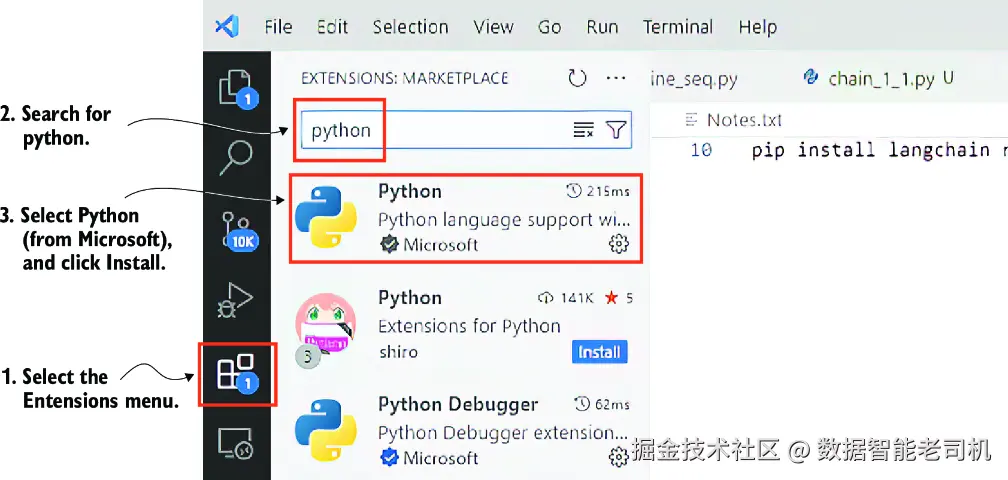
Extensions Marketplace 面板
下面我会简要带你完成以下步骤:在 VS Code 中创建一个 Python 项目、创建并激活虚拟环境,以及安装所需依赖。请在你的源码目录中,通过文件资源管理器或 shell 创建一个名为 ch04 的空文件夹,例如:
makefile
C:\Github\building-llm-applications\ch04打开 VS Code,选择 File > Open Folder ,定位到 ch04 文件夹并点击 Select Folder 。接着,通过 Terminal > New Terminal 在 VS Code 中打开终端。终端中应显示你刚刚创建的文件夹路径。在 Windows 上,你会看到类似下面的内容:
PS C:\Github\building-llm-applications\ch04>如果你刚安装 VS Code,或者对它还不熟悉,请先运行下面这条命令来启用终端(只需执行一次):
sql
PS C:\Github\building-llm-applications\ch04> Set-ExecutionPolicy
↪-ExecutionPolicy AllSigned -Scope CurrentUser
像往常一样,在这个终端中创建一个虚拟环境并激活它(为方便起见,我省略了 ch04 的完整路径):
python
... ch04> python -m venv env_ch04
... ch04> .\env_ch04\Scripts\activate
如果你是在 PowerShell 中通过 activate.ps1 激活虚拟环境,可能会看到提示: "Do you want to run software from this untrusted publisher?" 。此时输入 A(Always run) 继续即可。
如果你已经从 GitHub 克隆了这个仓库,那么可以使用下面的命令安装所需依赖包(langchain、langchain_openai、langchain_community、requests、bs4、duckduckgo-search、ddgs):
scss
(env_ch04) ... ch04> pip install -r requirements.txt安装完这些依赖之后,我建议你创建一个自定义运行配置,以确保你在刚刚创建的 env_ch04 虚拟环境中运行和调试代码。创建这个配置的步骤如下:
进入顶部菜单,选择 Run > Open Configurations 。这会在编辑器中打开 launch.json 文件。
将其内容替换为或新增以下配置:
bash
{
    "version": "0.2.0",
    "configurations": [
        {
            "name": "Python Debugger: Current File",
            "type": "debugpy",
            "request": "launch",
            "program": "${file}",
            "console": "integratedTerminal",
            "python": "${workspaceFolder}/env_ch04/Scripts/python.exe"
        }
    ]
}
注意 如果你使用的是 macOS 或 Linux,请把 "python" 字段中的路径改为 "${workspaceFolder}/env_ch04/bin/python"。
这个自定义 Run 配置能够确保你的代码使用正确的解释器和环境运行。后面你会用它来调试代码。至此,所有准备工作就都完成了,你已经可以开始编码了!
4.3 实现核心功能
再次回看图 4.2,不难发现,我们的研究摘要引擎依赖于两项关键能力:一项用于执行 Web 搜索,另一项用于从相关网页中提取文本。此外,你还需要一个工具函数,用来初始化你所选 LLM 客户端的实例。
4.3.1 实现 Web 搜索
我们将使用 LangChain 针对 DuckDuckGo 搜索引擎的封装来执行 Web 搜索。它的 results 方法会返回一个对象列表,其中每个对象都在名为 "link" 的属性里保存了结果 URL。请在项目中新增一个空文件 web_searching.py,并填入以下代码:
python
from langchain_community.utilities import DuckDuckGoSearchAPIWrapper
from typing import List

def web_search(
    web_query: str,
    num_results: int) -> List[str]:
    return [r["link"]
        for r in DuckDuckGoSearchAPIWrapper().results(
            web_query, num_results)]
再创建一个单独的 Python 文件,例如 web_searching_try.py,用于测试这个搜索函数:
ini
from web_searching import web_search

result = web_search(
    web_query = "How many titles did Michael Jordan win?",
    num_results=5)
print(result)
注意 如果你对 VS Code 还不熟悉,可以按 F5 执行代码,然后选择 Python Debugger > Python File 。你也可以设置断点,并通过在每一行按 F10 来逐步执行代码。
在终端中,你会得到一个类似下面这样的 URL 列表,它们就是你的搜索结果:
css
['https://en.wikipedia.org/wiki/List_of_career_achievements_by_Michael_Jordan', 'https://sportsbrief.com/nba/40447-michael-jordans-achievements-awards-a-list-mjs-accomplishments/', 'https://www.rookieroad.com/basketball/how-many-championships-does-michael-jordan-have-5263621/', 'https://www.hoopsaddict.com/michael-jordan-awards/', 'https://www.wsn.com/nba/michael-jordan-championship-rings/']注意 LangChain 还提供了其他搜索引擎封装,例如 TavilySearchResults 和 GoogleSearchAPIWrapper。这两者都需要 API key,因此我这里选择了 DuckDuckGoSearchAPIWrapper,因为它不需要。
4.3.2 实现网页抓取
我们会使用 Beautiful Soup 这个网页抓取库,从搜索结果列表中的网页中抓取内容。请把下面代码放进一个名为 web_scraping.py 的文件中。
代码清单 4.1 web_scraping.py 文件代码
python
import requests
from bs4 import BeautifulSoup

def web_scrape(url: str) -> str:
    try:
    headers = {  #1
    "User-Agent": (
        "Mozilla/5.0 (Windows NT 10.0; Win64; x64) "
        "AppleWebKit/537.36 (KHTML, like Gecko) "
        "Chrome/124.0.0.0 Safari/537.36"
    ),
    "Accept-Language": "en-US,en;q=0.9",
    }
    response = requests.get(url, headers=headers, timeout=15)

        if response.status_code == 200:
            soup = BeautifulSoup(response.text, "html.parser")
            page_text = soup.get_text(separator=" ", strip=True)

            return page_text
        else:
            return f"Could not retrieve the webpage: Status code
            ↪{response.status_code}"
    except Exception as e:
        print(e)
        return f"Could not retrieve the webpage: {e}"
#1 Add request headers; otherwise, Wikipedia will block the call.
我们来试一下这个函数。请将下面代码保存到一个名为 web_scraping_try.py 的文件中:
python
from web_scraping import web_scrape
result = web_scrape('https://en.wikipedia.org/wiki
↪/List_of_career_achievements_by_Michael_Jordan')
print(result)
运行这个脚本后,输出结果会类似如下节选:
css
List of career achievements by Michael Jordan - Wikipedia Jump to content Main menu Main menu move to sidebar hide Navigation Main page Contents Current events Random article About Wikipedia Contact us Donate Contribute Help Learn to edit Community portal Recent changes Upload file Languages Language links are at the top of the page across from the title. Search web scraping Create account Log in Personal tools [SHORTENED...]如你所见,抓取出来的内容中有相当一部分并不相关,不过现在这还不是问题。LLM 会从中提取出我们真正关心的相关信息。
4.3.3 实例化 LLM 客户端
在这个用例中,我们会使用 OpenAI GPT-5 nano 模型。首先,在 ch04 文件夹根目录下创建一个 .env 文件,并填入如下内容,把 <YOUR_OPENAI_KEY> 替换为你真实的 OpenAI API key:
ini
OPENAI_API_KEY=<YOUR_OPENAI_KEY>或者,如果你已经克隆了 GitHub 仓库,或者从 Manning 网站下载了代码 zip 包,那么只需将 .env_example 文件重命名为 .env,然后把其中的 <YOUR_OPENAI_KEY> 替换成你自己的实际 API key 即可。
接下来,创建一个函数来实例化 OpenAI 客户端,如下所示,并将其放入名为 llm_models.py 的文件中(把 YOUR_OPENAI_API_KEY 替换成你的 OpenAI key):
ini
from langchain_openai import ChatOpenAI
from dotenv import load_dotenv
import os

load_dotenv()  #1
openai_api_key = os.getenv("OPENAI_API_KEY")  #2

def get_llm():  #3
    return ChatOpenAI(openai_api_key=openai_api_key,
         model_name="gpt-5-nano")
#1 Loads the environment variables from the .env file
#2 Gets the OpenAI API key from the environment variables
#3 Instantiates and returns the ChatOpenAI model
4.3.4 JSON 到 Python 对象的转换器
我们再做一个工具函数,用来把 LLM 输出的 JSON 文本转换成 Python 对象,通常是字典,有时也可能是列表。如果 JSON 格式有误,它会返回一个空字典。请把下面代码加入到一个名为 utilities.py 的文件中:
python
import json

def to_obj(s):
    try:
        return json.loads(s)
    except Exception:
        return {}
回顾一下,到这里我们已经搭建好了 VS Code 项目,并实现了所需的核心能力。在真正开始构建那个负责协调 Web 搜索、网页抓取以及调用 LLM 执行摘要请求的引擎之前,我们不妨先退一步,再整体审视一下整个系统架构。
4.4 通过查询改写增强架构
让我们再次看看图 4.2 中的架构图。为了方便起见,我在这里又把它作为图 4.3 放了一次。如果你仔细观察这个架构图,可能会发现一个可以改进的点:与其将原始研究请求直接发送给搜索引擎,不如先让 LLM 生成多个搜索查询。这个技术被称作查询改写(query rewriting) ,或者多查询生成(multiple query generation) 。它和一种用于增强 Retrieval-Augmented Generation(RAG) 搜索的方法非常相似,我会在后面的章节里讲到。把一个原始问题改写成多个查询有几个好处:它可以澄清模糊或表达不清的问题,修正可能让搜索引擎困惑的语法或句法错误,还能为简短问题补充上下文,从而提升搜索结果质量。
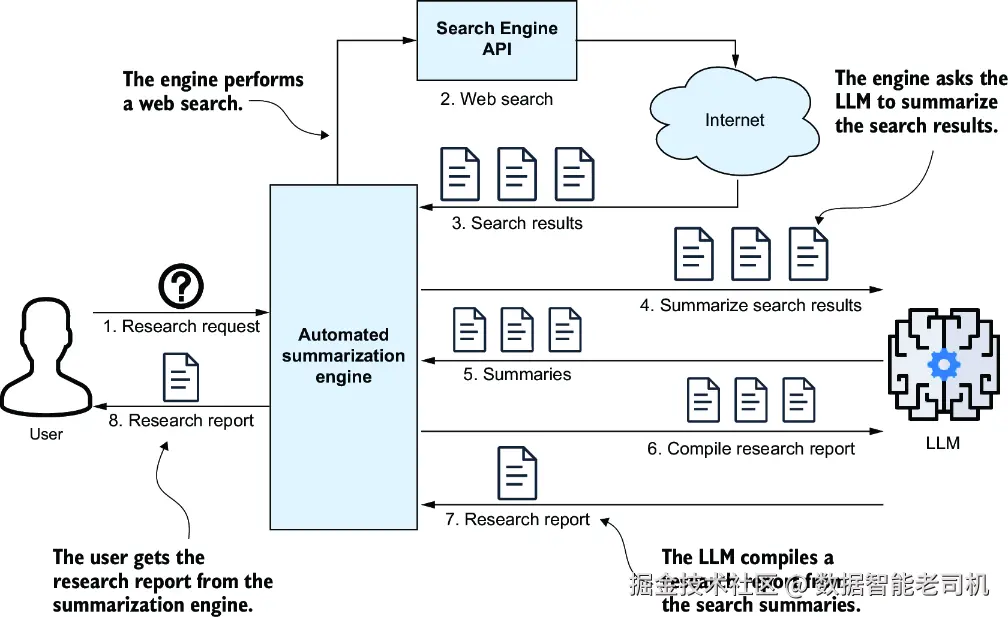
图 4.3 自动化研究摘要引擎。你提出一个问题,引擎就会执行 Web 搜索、返回 URL、抓取并摘要网页内容,最后为你生成研究报告。
对于复杂问题,把它拆解成更简单的多个查询,可以为获得更好的答案提供有用上下文。这正是将单个问题改写为多个有针对性搜索请求的核心原因。比如,与其直接向搜索引擎发出 "How many titles did Michael Jordan win?" 这样的查询,不如先这样提示 ChatGPT:
Generate three web search queries to research the following topic, aiming for a comprehensive report: "How many titles did Michael Jordan win?"
你会得到像下面这样的查询:
"
"Michael Jordan NBA championships total"
"List of NBA titles won by Michael Jordan"
"Michael Jordan basketball career championships count"
于是,这个引擎就会通过执行这三个 Web 搜索,并汇总每次搜索的结果来完成研究任务。这个更新后的工作流如图 4.4 所示。
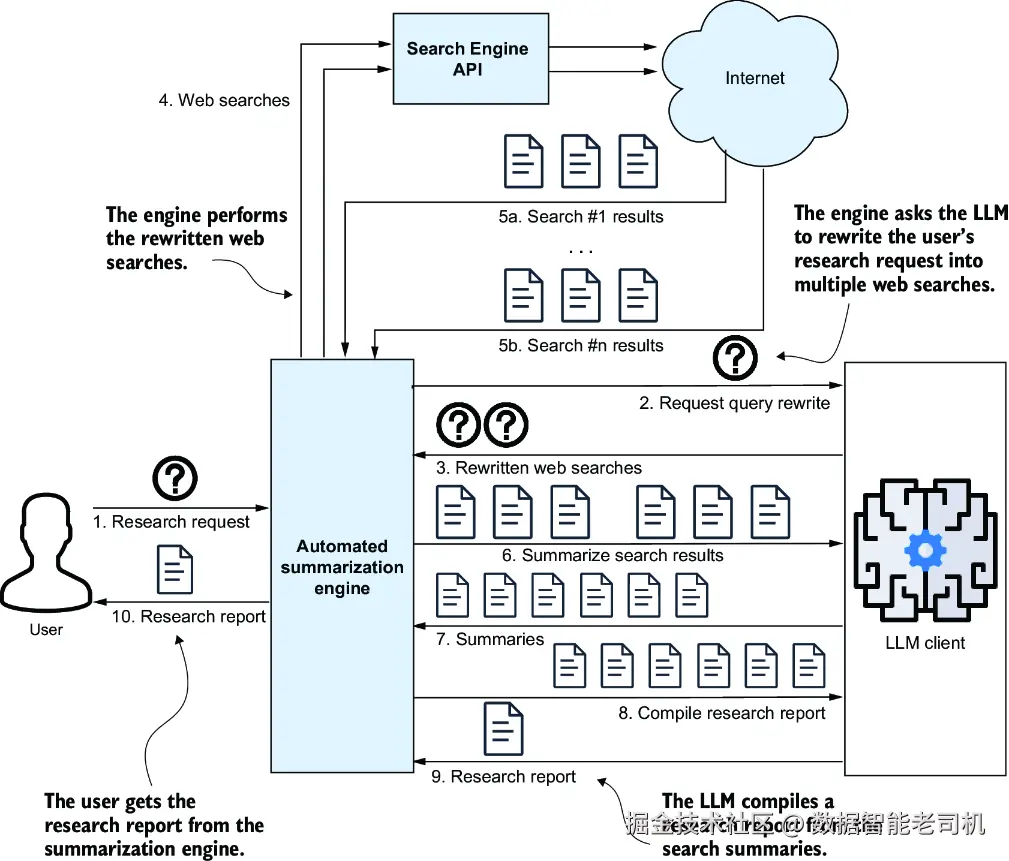
图 4.4 引入查询改写后的修订系统架构图。整个过程首先由 LLM 根据用户的研究问题生成指定数量的查询,然后这些查询被提交给搜索引擎。后续处理流程则与图 4.2 所示保持一致。
从技术上说,更新后的架构确实更复杂了,因此你可能会担心性能问题:毕竟额外增加了多次 Web 搜索。如果按顺序执行,响应时间会线性增加;例如,如果执行四次 Web 搜索,总耗时大约就是原来的四倍。不过,你可以通过并行化来加速处理,这一点我会在后面的章节里讲到。现在我们先从顺序执行开始,稍后再来讨论并行化。
4.5 提示工程
在把 4.3 节中的各个功能模块组装起来之前,我们需要先处理一部分提示工程工作。我们要分别为以下任务创建提示:生成 Web 搜索查询、摘要单个网页,以及生成最终研究报告。下面我们逐步来看。
4.5.1 设计 Web 搜索提示
设想用户提出一个金融类问题,例如:"Should I invest in Apple stocks?"。当你引导 LLM 基于这个问题生成 Web 搜索查询时,先明确指定这些查询应由什么样的"人设"来构造,通常会很有帮助。例如,你可以这样开头:"You are an experienced finance analyst AI assistant. Your objective is to create detailed, insightful, unbiased, and well-structured financial reports based on the provided data and trends."
为了根据研究问题动态生成这些指令,我们将使用一个专门的提示。首先,我们需要设计一个提示:它能够为用户的问题选出合适的研究助手,并生成与之匹配的指令。请创建一个名为 prompts.py 的文件,并先加入以下代码。
代码清单 4.2 prompts.py:生成助手指令
vbnet
from langchain_core.prompts import PromptTemplate

ASSISTANT_SELECTION_INSTRUCTIONS = """
You are skilled at assigning a research question to the correct
research assistant.
There are various research assistants available, each specialized
in an area of expertise.
Each assistant is identified by a specific type. Each assistant
has specific instructions to undertake
the research.   #1

How to select the correct assistant: you must select the
relevant assistant depending on the topic of the question,
which should match the area of expertise of the assistant.

------
Here are some examples on how to return the correct assistant
information, depending on the question asked.

Examples:
Question: "Should I invest in Apple stocks?"
Response:
{{
    "assistant_type": "Financial analyst assistant",
    "assistant_instructions": "You are a seasoned finance
analyst AI assistant. Your primary goal is to compose
comprehensive, astute, impartial, and methodically arranged
financial reports based on provided data and trends.",
    "user_question": {user_question}
}}
Question: "what are the most interesting sites in Tel Aviv?"
Response:
{{
    "assistant_type": "Tour guide assistant",
    "assistant_instructions": "You are a world-travelled
AI tour guide assistant. Your main purpose is to draft
engaging, insightful, unbiased, and well-structured
travel reports on given locations, including history,
attractions,
and cultural insights.",
    "user_question": "{user_question}"
}}

Question: "Is Messi a good soccer player?"
Response:
{{
    "assistant_type": "Sport expert assistant",
    "assistant_instructions": "You are an experienced AI
sport assistant. Your main purpose is to draft engaging,
insightful, unbiased, and well-structured sport reports on
given sport personalities, or sport events, including
factual details, statistics and insights.",
    "user_question": "{user_question}"
}}

------
Now that you have understood all the above, select the
correct research assistant for the following question.
Question: {user_question}
Response:

"""

ASSISTANT_SELECTION_PROMPT_TEMPLATE = PromptTemplate.from_template(
    template=ASSISTANT_SELECTION_INSTRUCTIONS
)
#1 Assistant selection instructions prompt
这个提示模板有几个关键特点。首先,它是一个 few-shot prompt(少样本提示) ,因为其中给出了三个示例,帮助 LLM 理解我们的具体要求。其次,它明确要求 LLM 以 JSON 格式 返回结果,这样就可以很方便地把输出转换成 Python 字典,以供后续处理。
有了这个用于选择合适助手类型并生成相应指令的提示之后,接下来你就可以继续创建一个提示,用于根据用户问题生成 Web 搜索请求,如下一个代码清单所示。
代码清单 4.3 prompts.py:用于改写用户查询的提示
css
WEB_SEARCH_INSTRUCTIONS = """
{assistant_instructions}

Write {num_search_queries} web search queries to gather
as much information as possible
on the following question: {user_question}. Your objective is
to write a report based on the information you find.
You must respond with a list of queries such as
query1, query2, query3 in the following format:
[
    {{"search_query": "query1", "user_question": "{user_question}" }},
    {{"search_query": "query2", "user_question": "{user_question}" }},
    {{"search_query": "query3", "user_question": "{user_question}" }}
]
"""

WEB_SEARCH_PROMPT_TEMPLATE = PromptTemplate.from_template(
    template=WEB_SEARCH_INSTRUCTIONS
)
这里的 {assistant_instructions} 占位符,会由前一个"助手选择提示"输出中的 "assistant_instructions" 填充进去。这个提示同样会以 JSON 格式返回结果,因此也很容易被转换成一个由 Python 字典组成的列表,方便后续处理。把用户问题一并包含在输出中,可以确保整个流程前后衔接不断,尤其是在后续基于链的代码中,我们会反复用到它。既然 Web 搜索提示已经完成,我们接下来就来创建摘要提示。
4.5.2 设计摘要提示
用于摘要搜索结果页面的提示,与上一章中用过的摘要提示非常相似。代码如下所示。
代码清单 4.4 prompts.py:用于摘要结果页面的提示
ini
SUMMARY_INSTRUCTIONS = """
Read the following text:
Text: {search_result_text}

-----------

Using the above text, answer in short the following question.
Question: {search_query}

If you cannot answer the question above using the text provided
above, then just summarize the text.
Include all factual information, numbers, stats etc if available.
"""

SUMMARY_PROMPT_TEMPLATE = PromptTemplate.from_template(
    template=SUMMARY_INSTRUCTIONS
)
4.5.3 研究报告提示
同样地,用于生成研究报告的提示也并不复杂。请注意下面代码清单中的指令写得非常清晰、而且语气明确,这样做是为了尽可能确保 LLM 输出我们想要的结果。
代码清单 4.5 prompts.py:用于生成研究报告的提示
ini
# Research Report prompts adapted from
# https://github.com/assafelovic/gpt-researcher/
# blob/master/gpt_researcher/master/prompts.py
RESEARCH_REPORT_INSTRUCTIONS = """
You are an AI critical thinker research assistant. Your sole
purpose is to write well written, critically acclaimed,
objective and structured reports on given text.

Information:
--------
{research_summary}
--------

Using the above information, answer the following question
or topic: "{user_question}" in a detailed report -- \
The report should focus on the answer to the question,
should be well structured, informative, \
in depth, with facts and numbers if available and a minimum of 1,200 words.

You should strive to write the report as long as you can using
all relevant and necessary information provided.
You must write the report with markdown syntax.
You MUST determine your own concrete and valid opinion based
on the given information. Do NOT infer general and meaningless
conclusions.
Write all used source urls at the end of the report, and make sure
to not add duplicated sources, but only one reference for each.
You must write the report in apa format.
Please do your best, this is very important to my career."""

RESEARCH_REPORT_PROMPT_TEMPLATE = PromptTemplate.from_template(
    template=RESEARCH_REPORT_INSTRUCTIONS
)
4.6 初始实现
在这一节中,我会带你完成我们这个研究摘要引擎的初始实现,整体流程会遵循图 4.4 中的架构图。这个第一个版本是刻意设计得比较直观的 ,这样你就可以先看清每个步骤本身是如何独立工作的,然后我再引入更高级的优化方案。当你跟着代码一步步走下去时,你会看到不同组件------从提示模板到网页抓取工具函数------是如何协同工作的,并最终构成一个完整的研究工作流。这里的目标不仅是实现这个引擎,更是让你对整个系统是怎样拼装起来的,形成一种直观理解。到这一节结束时,你将得到一个可以真正运行的完整流水线,它能够自动完成 Web 研究并生成结构化报告。而这也会为下一节做铺垫,到那时我们将从顺序执行设计切换到更高效的 LCEL 方案。
4.6.1 导入函数和提示模板
我们先从创建一个名为 research_engine_seq.py 的 Python 文件开始。然后,导入你在前面几个小节中编写好的函数和提示模板:
javascript
from web_searching import web_search
from web_scraping import web_scrape
from llm_models import get_llm
from utilities import to_obj
from prompts import (
    ASSISTANT_SELECTION_PROMPT_TEMPLATE,
    WEB_SEARCH_PROMPT_TEMPLATE,
    SUMMARY_PROMPT_TEMPLATE,
    RESEARCH_REPORT_PROMPT_TEMPLATE
)
4.6.2 设置常量与输入变量
现在我们先定义一些常量,用来配置整个应用。最终报告的准确性和覆盖面,会受到你设置的 Web 搜索次数以及每次搜索返回结果数的影响。不过,设置这些值时也要考虑你的预算。举例来说,如果你配置为执行 4 次 Web 搜索 ,每次返回 5 个结果 ,那就意味着你需要对 20 个网页 做摘要。假设每个网页大约有 2,000 个 token,那么总量就是 20 × 2,000 = 40,000 个 token 。如果使用 OpenAI GPT-5 mini,按每 1,000 个输出 token 约 0.00005 美元 计算,那么每次研究请求的大致成本约为 0.002 美元。我这里会设置得更低一些,不过你完全可以根据需要自行调整:
ini
NUM_SEARCH_QUERIES = 2
NUM_SEARCH_RESULTS_PER_QUERY = 3
RESULT_TEXT_MAX_CHARACTERS = 10000
这个应用中唯一的输入变量,就是用户提出的研究问题:
ini
question = 'What can I see and do in the Spanish town of Astorga?'4.6.3 实例化 LLM 客户端
实例化 LLM 客户端非常直接,写法如下:
ini
llm = get_llm()4.6.4 生成 Web 搜索并收集结果
在生成 Web 搜索并收集结果的过程中,第一步是执行 LLM 提示,根据用户提出的研究问题来判断合适的研究助手及其对应指令:
ini
assistant_selection_prompt = ASSISTANT_SELECTION_PROMPT_TEMPLATE
↪.format(user_question=question)
assistant_instructions = llm.invoke(assistant_selection_prompt)
若要执行这段代码,请先在 llm = get_llm() 这一行设置断点。如果你是 VS Code 新手,可以通过点击行号左侧来设置断点,让调试器在那一行暂停。
接着,点击左侧边栏的 Run & Debug 图标(Windows 下快捷键是 Ctrl-Shift-D )来启动调试器。在顶部下拉框中,选择你在 4.2 节末尾创建的那个运行配置 Python Debugger: Current File。然后点击旁边的播放按钮,开始调试。
当代码运行并命中断点之后,你可以在屏幕左上角的 Variables 面板中查看 assistant_instructions 变量的值。你也可以在 VS Code 底部的 Debug Console 面板中手动打印这个值:
scss
print(assistant_instructions)你会看到如下输出:
css
content='{\n "assistant_type": "Tour guide assistant",\n "assistant_instructions": "You are a world-travelled AI tour guide assistant. Your main purpose is to draft engaging, insightful, unbiased, and well-structured travel reports on given locations, including history, attractions, and cultural insights.",\n "user_question": "What can I see and do in the Spanish town of Astorga"\n}' response_metadata={'token_usage': {'completion_tokens': 82, 'prompt_tokens': 432, 'total_tokens': 514}, 'model_name': 'gpt-4o-mini-2024-07-18', 'system_fingerprint': 'fp_3bc1b5746c', 'finish_reason': 'stop', 'logprobs': None}真正有用的信息在 content 属性中。要把它转换成 Python 对象,可以这样写:
ini
assistant_instructions_dict = to_obj(assistant_instructions.content)如果你打印 assistant_instructions_dict 变量,就会得到如下结果:
rust
{'assistant_type': 'Tour guide assistant', 'assistant_instructions': 'You are a world-travelled AI tour guide assistant. Your main purpose is to draft engaging, insightful, unbiased, and well-structured travel reports on given locations, including history, attractions, and cultural insights.', 'user_question': 'What can I see and do in the Spanish town of Astorga?'}现在,你就可以根据原始用户研究问题执行提示,生成 Web 搜索查询了:
ini
web_search_prompt = WEB_SEARCH_PROMPT_TEMPLATE.format(
    assistant_instructions=assistant_instructions_dict[
    'assistant_instructions'],
    num_search_queries=NUM_SEARCH_QUERIES,
    user_question=assistant_instructions_dict[
    'user_question'])
web_search_queries = llm.invoke(web_search_prompt)
web_search_queries_list = to_obj(
    web_search_queries.content.replace('\n', ''))
这个提示的主要输入,就是上一步输出中的 assistant_instructions。如果你运行这段代码,并打印 web_search_queries_list,你会得到类似下面这样的搜索查询列表:
rust
[{'search_query': 'Astorga attractions', 'user_question': 'What can I see and do in the Spanish town of Astorga?'}, {'search_query': 'Astorga history', 'user_question': 'What can I
see and do in the Spanish town of Astorga?'}]
接着,你可以用 web_search() 函数发起 Web 搜索:
perl
searches_and_result_urls = [{
    'result_urls': web_search(
   web_query=wq['search_query'],
   num_results=NUM_SEARCH_RESULTS_PER_QUERY),
    'search_query': wq['search_query']}
   for wq in web_search_queries_list]
如果你执行到这里,那么 searches_and_result_urls 变量中会保存一个类似下面这样的 Python 字典列表:
css
[{'result_urls': ['https://igotospain.com/one-day-in-astorga-on-the-camino-de-santiago/', 'https://worldfreetours.com/blog/astorga/explore-astorga-for-free/', 'https://budtravelagency.com/things-to-do-in-astorga-spain/'], 'search_query': 'things to do in Astorga'}, {'result_urls': ['https://igotospain.com/one-day-in-astorga-on-the-camino-de-santiago/', 'https://worldfreetours.com/blog/astorga/explore-astorga-for-free/', 'https://www.thingstodoguru.com/things-to-do-in-astorga-es'], 'search_query': 'top attractions in Astorga'}, {'result_urls': ['https://www.worldatlas.com/cities/astorga-spain.html', 'https://citiesandattractions.com/spain/astorga-spain-uncovering-the-jewels-of-a-hidden-spanish-gem/', 'https://ewtn.co.uk/article-spanish-civil-war-martyrs-of-astorga-didnt-let-themselves-be-overcome-by-fear/'], 'search_query': 'history of Astorga Spain'}]每个字典都表示一个搜索查询,以及它对应返回的若干结果 URL(这里每个查询返回了三个结果)。接下来,需要把这些结果"摊平",也就是让每个字典只保留一个搜索查询和一个结果 URL:
css
search_query_and_result_url_list = []
for qr in searches_and_result_urls:
    search_query_and_result_url_list.extend([{
        'search_query': qr['search_query'],
        'result_url': r}
for r in qr['result_urls']])这样一来,search_query_and_result_url_list 就会如预期那样包含六个字典:
css
[{'search_query': 'Astorga attractions', 'result_url': 'https://www.worldatlas.com/cities/astorga-spain.html'}, {'search_query': 'Astorga attractions', 'result_url': 'https://citiesandattractions.com/spain/astorga-spain-uncovering-the-jewels-of-a-hidden-spanish-gem/'}, {'search_query': 'Astorga attractions', 'result_url': 'https://www.caminoadventures.com/blog/two-weeks-on-the-camino-de-santiago/'}, {'search_query': 'Astorga cultural sites', 'result_url': 'https://www.worldatlas.com/cities/astorga-spain.html'}, {'search_query': 'Astorga cultural sites', 'result_url': 'https://interrailero .com/que-ver-en-astorga/'}, {'search_query': 'Astorga cultural sites', 'result_url': 'https://www.atlasobscura.com/places/palacio-episcopal'}]现在,Web 搜索查询及其所有相关结果 URL 都准备好了,下一步就是开始抓取这些 URL 所对应网页的内容。
4.6.5 抓取 Web 搜索结果
接下来,你将使用 web_scrape() 函数,从搜索结果中的网页里提取文本。代码如下:
css
result_text_list = [{    'result_text': web_scrape(    url=re['result_url'])[:RESULT_TEXT_MAX_CHARACTERS],
    'result_url': re['result_url'],
    'search_query': re['search_query']}
    for re in search_query_and_result_url_list]
这段代码会填充 result_text_list,其中会包含六个字典,每个字典保存了一个网页中的文本内容:
vbnet
[{'result_text': 'Astorga, Spain - WorldAtlas Astorga, Spain Astorga is a municipality of just over 11,000 residents (as of the most recent 2018 estimates) in Northwestern Spain . This former Roman settlement (still partially encircled by the ancient, albeit reconstructed walls) is the capital of the traditional county, Maragatería, ... Science Social Science Society Economics Politics About Us Contact Us Privacy Copyright Search WorldAtlas', 'result_url': 'https://www.worldatlas.com/cities/astorga-spain.html', 'search_query': 'Astorga attractions'},
{'result_text': "Astorga, Spain: Uncovering the Jewels of a Hidden Spanish Gem Skip to content Cities and Attractions Roaming Around: Your Guide to Exploring the World Search for: Cities and Attractions Close menu Cities and Attractions ... Uncovering the Jewels of a Hidden Spanish Gem March 13, 2023 May 28, 2023 Spain Discover the charms of Astorga, Spain - from stunning cathedrals and museums to hidden gems like the Chocolate Factory
Museum and Gaudi's Palace... ', 'result_url': 'https://citiesandattractions.com/spain/astorga-spain-uncovering-the-jewels-of-a-hidden-spanish-gem/'}, ... ]
下一步,就是对从每个网页收集到的信息进行摘要。
4.6.6 摘要 Web 搜索结果
你将使用之前设置好的 SUMMARY_PROMPT_TEMPLATE,让语言模型对每个网页文本做摘要。与此同时,也要保留原始的搜索查询和 URL,因为稍后还会用到它们:
ini
result_text_summary_list = []
for rt in result_text_list:
    summary_prompt = SUMMARY_PROMPT_TEMPLATE.format(
    search_result_text=rt['result_text'],
    search_query=rt['search_query'])

    text_summary = llm.invoke(summary_prompt)

    result_text_summary_list.append({
    'text_summary': text_summary,
    'result_url': rt['result_url'],
    'search_query': rt['search_query']})
执行完这一步后,会得到一个 result_text_summary_list 列表,其中包含九个字典。每个字典都保存了一份抓取文本的摘要、该文本对应的来源 URL,以及用来找到它的搜索查询:
css
[{'text_summary': '\nAstorga is a municipality in Northwestern Spain with a population of over 11,000 people. It is the capital of the Maragatería county in the province of León, within the autonomous community of Castilla y León.... pilgrims on the Camino de Santiago. ', 'result_url': 'https://www.worldatlas.com/cities/astorga-spain.html', 'search_query': 'Astorga attractions'}, {'text_summary': '\nSome of the main attractions in Astorga, Spain include ... culture, and natural beauty. ', 'result_url': 'https://citiesandattractions.com/spain/astorga-spain-uncovering-the-jewels-of-a-hidden-spanish-gem/', 'search_query': 'Astorga attractions'}, ...]有了这些摘要之后,你就已经收集好了生成最终研究报告所需的全部信息。
4.6.7 生成研究报告
我们先回顾一下用于生成最终报告的提示。在这个阶段,前面流水线中的所有组件都会汇合起来,模型也终于会拿到它生成一份连贯、结构化回答所需的全部摘要信息:
ini
RESEARCH_REPORT_INSTRUCTIONS = """
You are an AI critical thinker research assistant.
Your sole purpose is to write well written,
critically acclaimed, objective and structured
reports on given text.

Information:
--------
{research_summary}
--------

Using the above information, answer the ...
...
"""
现在,我们来准备最终报告。方法是把摘要和对应的 URL 组织成提示模板所期望的格式。首先,把每个字典转换成一个字符串,其中同时包含摘要和来源 URL:
python
stringified_summary_list = [
    f'Source URL: {sr["result_url"]}\nSummary: {sr["text_summary"]}'
        for sr in result_text_summary_list]
检查 stringified_summary_list,你会看到类似下面这样的条目:
rust
['Source URL: https://www.worldatlas.com/cities/astorga-spain.html\nSummary: \nAstorga is a municipality in Northwestern Spain with a population of over 11,000 people. It is the capital of the Maragatería ... pilgrims on the Camino de Santiago. ', 'Source URL: https://citiesandattractions.com/spain/astorga-spain-uncovering-the-jewels-of-a-hidden-spanish-gem/\nSummary: \nSome of the main attractions in Astorga, Spain include the Episcopal Palace, the Cathedral... and natural beauty. ', ...]接着,把这些摘要字符串合并成一个整体:
ini
appended_result_summaries = '\n'.join(stringified_summary_list)这样你就得到了一整段文本块,其中包含所有摘要和对应 URL:
less
Source URL: https://www.worldatlas.com/cities/astorga-spain.html
Summary:
Astorga is a municipality in Northwestern Spain with a population of over 11,000 people. It is the capital of the Maragatería ... Astorga has a rich history, including being a former Roman settlement, and has undergone periods of decline and resurgence due to various conflicts. It is a popular stop for tourists and pilgrims on the Camino de Santiago.
Source URL: https://citiesandattractions.com/spain/astorga-spain-uncovering-the-jewels-of-a-hidden-spanish-gem/
Summary:
Some of the main attractions in Astorga, Spain include the Episcopal Palace, the Cathedral of Santa Maria de Astorga, the Roman Walls and Museum, the Chocolate Factory Museum, Gaudi's Palace, ...
现在,把这段内容填入 RESEARCH_REPORT_INSTRUCTIONS 提示模板,即可生成最终研究报告:
ini
research_report_prompt = RESEARCH_REPORT_PROMPT_TEMPLATE.format(
    research_summary=appended_result_summaries,
    user_question=question
)
research_report = llm.invoke(research_report_prompt)

print(f'strigified_summary_list={stringified_summary_list}')
print(f'merged_result_summaries={appended_result_summaries}')
print(f'research_report={research_report}')
如果你运行整个 research_engine_seq.py 脚本,大约一分钟后,你就会收到一份基于网页摘要生成的完整研究报告,类似下面这样:
csharp
# Introduction
Astorga is a charming town located in the northwestern region of Spain, with a population of over 11,000 residents. It is the capital of the Maragatería county in the province of León, within the autonomous community of Castilla y León. Astorga is a town known for its rich history, cultural significance, and natural beauty. It is a popular destination for tourists and pilgrims on the Camino de Santiago, with two Camino routes converging in the city. In this report, we will explore the main attractions and activities that can be seen and done in the Spanish town of Astorga.
# Historical and Cultural Significance
Astorga is a town with a long and rich history, dating back to the Roman Empire. It was a former Roman settlement and has undergone periods of decline and resurgence due to various conflicts. Today, visitors can still see the remnants of the Roman walls and ruins, which are one of the main attractions in Astorga. The city is also home to the 15th-century Cathedral of Astorga, a mix of Gothic, Renaissance, and Baroque styles, and the neo-Gothic Episcopal Palace designed by the famous Catalan architect Antoni Gaudí.
[... SHORTENED]
恭喜你,完成了第一次自动化 Web 研究!我建议你再回头通读一遍这个初始实现的代码。如果你刚才没来得及亲手敲一遍并运行,也请务必去 GitHub 仓库里看看。你大概率会一眼就看懂,但再复习一遍会帮助你把整个流程理解得更牢。
这个初始版本已经能够正常工作,并生成预期的研究报告。不过,它有一点慢,因为所有任务都是顺序执行的。如果我们把配置改成执行 10 次 Web 搜索、每次 10 个结果,那么所需时间就会明显上升。
那能不能让它更快?当然可以。在下一节里,我们就会通过 LCEL 来实现这一点。LCEL 在第 3 章中已经做过介绍。
4.7 使用 LCEL 重新实现研究摘要引擎
LangChain Expression Language(LCEL) 提供了一种结构化的方式,用来把 LLM 应用中的核心组件------例如 Web 搜索、网页抓取和摘要------组织成一条高效的链或流水线。这个框架不仅让你能够更轻松地用简单组件构建复杂工作流,还提供了诸如流式处理、并行执行和日志记录等高级特性。
LangChain Expression Language(LCEL)
对于开发 LLM 应用的人来说,强烈建议使用 LCEL。它使你能够通过创建和执行链,高效地与 LLM 和聊天模型交互,并带来以下几个好处:
- Fallback ------ 可以为错误处理添加回退动作
- Parallel execution ------ 可同时执行彼此独立的链组件,从而提升性能
- Execution modes ------ 支持先用同步模式开发,再按需切换到流式、批处理或异步执行模式
- LangSmith tracing ------ 当升级为 LangSmith 时,可以自动记录执行步骤,从而便于调试和监控
一条链遵循 Runnable 协议 ,这意味着它必须实现一组特定方法,例如 invoke()、stream() 和 batch(),以及它们的异步版本。LangChain 框架确保其组件------例如 PromptTemplate 和 JsonOutputFunctionsParser------都遵循这一标准。
LCEL 通过提供统一接口(即 Runnable 协议)、组合工具,以及方便的并行化能力,大大简化了复杂链的创建过程。虽然掌握 LCEL 可能需要一点练习,但这份投入是非常值得的,因为它能显著提升应用的性能和可扩展性。
我的链实现策略如图 4.5 所示:为前面流程中的每一个处理步骤分别构建一个迷你链(mini-chain),然后把它们集成进一条主控的 Web Research 链中。
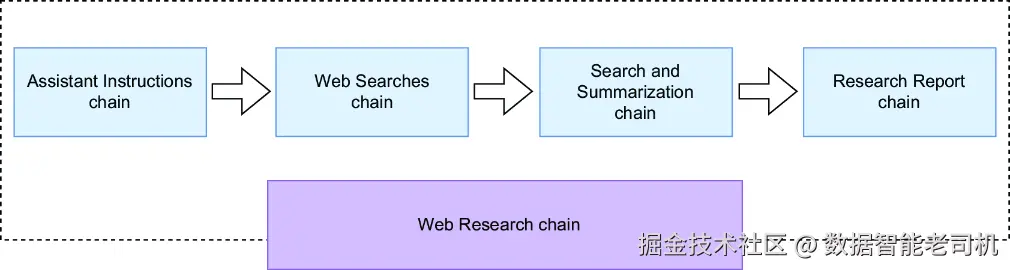
图 4.5 基于链的研究摘要引擎架构图。流程中的每一步都被重新实现为一个迷你链;所有迷你链再组装成一条主控的 Web Research 链。
这条主控的 Web Research 链会处理整个研究流程,如图 4.5 所示。图中展示了基于链的研究摘要引擎架构:每个处理步骤都被实现成一个迷你链,并最终整合到这条主链中:
Assistant Instructions chain ------ 这条链负责从若干可选助手中挑选出最合适的研究助手,以回答用户的问题。它还会生成系统提示,用以定义该助手的技能与职责。
Web Searches chain ------ 这条链根据用户问题生成多个 Web 搜索查询。它能够从不同角度提供上下文,或者把复杂问题拆分成更简单的子查询。
Search and Summarization chain ------ 这条链负责执行 Web 搜索、从搜索结果中提取 URL、抓取相关网页,并对每个网页内容进行摘要。
Research Report chain ------ 最后一条链会结合原始问题与从搜索结果中生成的摘要,综合出最终答案。
Search and Summarization chain 会在一个连贯的工作流中协调三条底层子链的执行。这一点如图 4.6 所示。
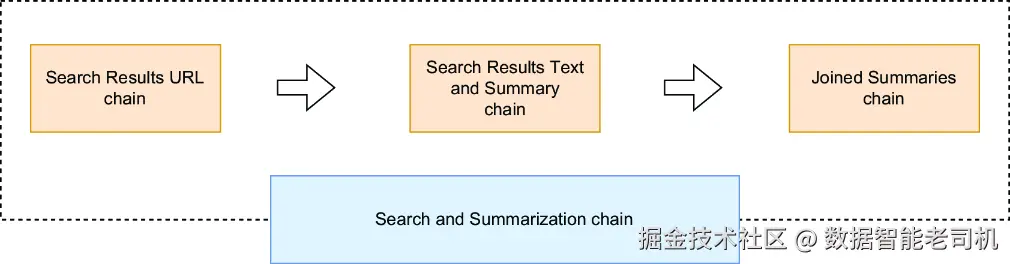
图 4.6 Search and Summarization chain
图 4.6 展示了这三条链是如何协同工作的:先是一条生成搜索查询的链,然后是一条处理搜索结果网页的抓取与摘要链,最后是一条把所有摘要合并成单一文本块的整合链。将这一流程重构成链,如图 4.7 所示,可以实现并行执行,从而相较于图 4.5 中的顺序方式显著提升效率。
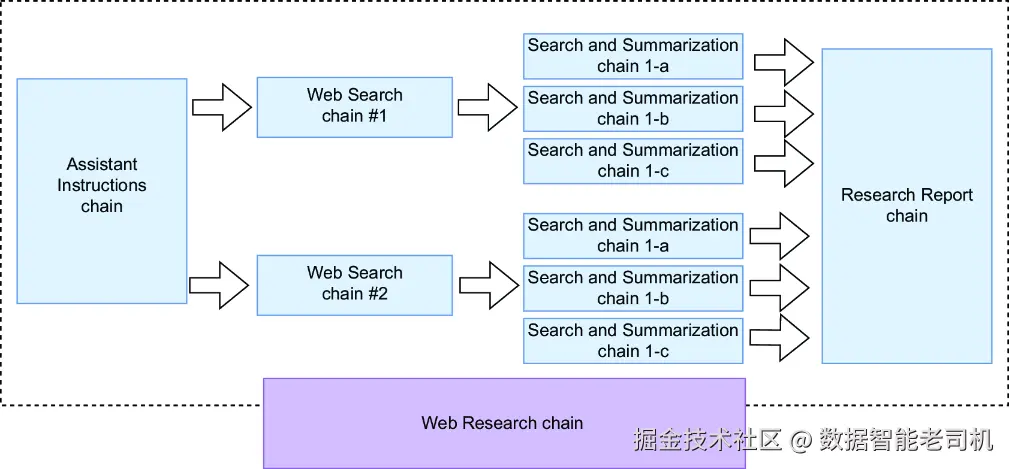
图 4.7 展示研究摘要引擎中并行化应用方式的链架构图,突出显示了多个独立链实例的并行执行过程,以提高效率
图 4.7 强调了两个关键阶段的并行化:
- 对于 Web Searches chain 发起的每一次 Web 搜索,都会创建并同时执行一个独立的 Search and Summarization chain 实例。
- 对于 Search Result URLs chain 生成的每个搜索结果,都会启动一个独立的 Search Result Text and Summary chain 实例,并行运行。
有了这份基于链的整体思路之后,我们现在就来逐一看看各个迷你链。先从 Assistant Instructions chain 开始。
4.7.1 Assistant Instructions chain
要开始处理一个研究问题,第一件事就是确定最合适的研究助手及其提示指令。这一工作由 assistant_instructions_chain 完成,如下所示。请将下面的代码放入一个名为 chain_1_1.py 的文件中:
javascript
from llm_models import get_llm
from prompts import (
    ASSISTANT_SELECTION_PROMPT_TEMPLATE,
)
from langchain_core.output_parsers import StrOutputParser

assistant_instructions_chain = (
    ASSISTANT_SELECTION_PROMPT_TEMPLATE | get_llm()
)
对于刚接触 LCEL 语法的人来说,这里的执行流程其实很直接:选择提示会被送入 LLM,然后模型会根据用户问题选择一个合适的研究助手。若要测试这一配置,可以使用如下脚本,并将其保存为 chain_try_1_1.py:
ini
from chain_1_1 import assistant_instructions_chain

question = 'What can I see and do in the Spanish town of Astorga?'

assistant_instructions = assistant_instructions_chain.invoke(question)
print(assistant_instructions)
运行这段代码后,你会得到与 4.6.4 节中类似的输出,其中会包含助手类型、助手指令以及用户问题(输出会在几秒后出现,而元数据可能和我这里给出的示例略有不同):
css
content='{\n "assistant_type": "Tour guide assistant",\n "assistant_instructions": "You are a world-travelled AI tour guide assistant. Your main purpose is to draft engaging, insightful, unbiased, and well-structured travel reports on given locations, including history, attractions, and cultural insights.",\n "user_question": "What can I see and do in the Spanish town of Astorga?"\n}' response_metadata={'token_usage': {'completion_tokens': 82, 'prompt_tokens': 432, 'total_tokens': 514}, 'model_name': 'gpt-4o-mini-2024-07-18', 'system_fingerprint': 'fp_3bc1b5746c', 'finish_reason': 'stop', 'logprobs': None}虽然你也可以手动从 content 属性中提取所需信息,但使用 LCEL 其实有一种更高效的方法。通过在链中加入一个 StrOutputParser() 模块,你就可以自动从 content 属性中抽取 LLM 的响应文本。请据此更新这条链,并将其保存为 chain_1_2.py:
javascript
from llm_models import get_llm
from utilities import to_obj
from prompts import (
    ASSISTANT_SELECTION_PROMPT_TEMPLATE,
)
from langchain_core.runnables import RunnablePassthrough
from langchain_core.output_parsers import StrOutputParser

assistant_instructions_chain = (
    {'user_question': RunnablePassthrough()}
    | ASSISTANT_SELECTION_PROMPT_TEMPLATE
    | get_llm() | StrOutputParser() | to_obj
)
这个更新版本有几个增强点:
- 虽然
ASSISTANT_SELECTION_PROMPT_TEMPLATE会自动把输入问题映射到{user_question}字段(你可以回看 4.5.1 节中关于{user_question}的内容),但显式地通过RunnablePassthrough()把输入问题映射到 Python 字典里的user_question属性会更安全。它是通过一个未命名参数把外部输入绑定到user_question变量上的。这样做也有好处,因为这个信息对后续步骤非常重要。 StrOutputParser()模块会从 LLM 的content属性中提取纯文本,使输出处理更简单。- 最后再通过
to_obj()把响应转换成 Python 字典,从而便于在链中继续使用。
现在用下面这个脚本测试修改后的链,并保存为 chain_try_1_2.py:
python
from chain_1_2 import assistant_instructions_chain
question = 'What can I see and do in the Spanish town of Astorga?'

assistant_instructions_dict
↪= assistant_instructions_chain.invoke(question)   #1
print(assistant_instructions_dict)
#1 Test chain invocation
运行后,应当会得到如下预期输出:
rust
{'assistant_type': 'Tour guide assistant', 'assistant_instructions': 'You are a world-travelled AI tour guide assistant. Your main purpose is to draft engaging, insightful, unbiased, and well-structured travel reports on given locations, including history, attractions, and cultural insights.', 'user_question': 'What can I see and do in the Spanish town of Astorga?'}4.7.2 Web Searches chain
在 LLM 选定合适的研究助手并描述好其角色之后,你就可以进一步提示 LLM 生成与用户问题相关的 Web 搜索查询了。请使用下面的代码完成这一步,并将其保存为 chain_2_1.py。
代码清单 4.6 将用户查询改写为 Web 搜索的链
python
from llm_models import get_llm
from utilities import to_obj
from prompts import (
    WEB_SEARCH_PROMPT_TEMPLATE
)
from langchain_core.output_parsers import StrOutputParser
from langchain_core.runnables import RunnableLambda

NUM_SEARCH_QUERIES = 2

web_searches_chain = (
    RunnableLambda(lambda x:
        {
            'assistant_instructions': x['assistant_instructions'],
            'num_search_queries': NUM_SEARCH_QUERIES,
            'user_question': x['user_question']
        }
    )
    | WEB_SEARCH_PROMPT_TEMPLATE
    | get_llm() | StrOutputParser() | to_obj
)
这个实现中使用了一个 RunnableLambda 模块,用来处理上一条链的输出,并把它转换成 WEB_SEARCH_PROMPT_TEMPLATE 所需要的输入格式。其余部分则与前面的链类似。你可以用下面这个脚本来测试这条链,并将其保存为 chain_try_2_1.py。
代码清单 4.7 测试 Web Searches chain 的脚本
scss
from utilities import to_obj
from chain_2_1 import web_searches_chain

# test chain invocation
assistant_instruction_str = '{"assistant_type":
↪"Tour guide assistant",
↪"assistant_instructions": "You are a world-travelled
↪AI tour guide assistant. Your main purpose is to draft
↪engaging, insightful, unbiased, and well-structured travel
↪reports on given locations, including history, attractions,
↪and cultural insights.",
↪"user_question": "What can I see and do in the Spanish
↪town of Astorga?"}'
assistant_instruction_dict = to_obj(assistant_instruction_str)
web_searches_list = web_searches_chain.invoke(assistant_instruction_dict)
print(web_searches_list)
这个脚本使用 assistant_instruction_str 作为模拟输入,用来模仿 Assistant Instructions chain 的输出,以测试该链对此类输入的响应。预期输出如下:
rust
[{'search_query': 'Things to do in Astorga Spain', 'user_question': 'What can I see and do in the Spanish town Astorga'}, {'search_query': 'Attractions in Astorga Spain', 'user_question': 'What can I see and do in the Spanish town Astorga'}, {'search_query': 'Historical sites in Astorga Spain', 'user_question': 'What can I see and do in the Spanish town Astorga'}]现在,Web 搜索查询已经生成好了。接下来我们进入 Search and Summarization chain。
4.7.3 Search and Summarization chain
Search and Summarization chain 的目标,是根据上一条链给出的某个查询执行一次 Web 搜索,从搜索结果中提取 URL,抓取相应网页,并对每个网页进行摘要。正如前面图 4.6 所示,这一过程会进一步拆分为几条较小的子链:
- Search Result URLs chain
- Search Result Text and Summary chain
- Joined Summary chain
我们先从这些子链开始构建,第一步是 Search Result URLs chain。
SEARCH RESULT URLS CHAIN
这个子链负责执行一次 Web 搜索,并从结果中提取指定数量的 URL。请将下面代码保存为 chain_3_1.py。
代码清单 4.8 Search and Summarization chain
ini
from web_searching import web_search
from langchain_core.runnables import RunnableLambda

NUM_SEARCH_RESULTS_PER_QUERY = 3

search_result_urls_chain = (
    RunnableLambda(lambda x:
        [
            {
                'result_url': url,
                'search_query': x['search_query'],
                'user_question': x['user_question']
            }
            for url in web_search(
                web_query=x['search_query'],
                num_results=NUM_SEARCH_RESULTS_PER_QUERY)
        ]
    )
)
这里有两个关键点值得注意:
- 使用了一个 lambda 函数,把
web_query参数传给web_search()函数。这个函数还会把输出整理成一个字典列表,其中每个字典除了结果 URL 之外,还包含来自前一条链的数据,例如搜索查询和原始用户问题。这些信息会在后续步骤中继续发挥作用。 - 这个 lambda 函数的输入来自前一条链的输出,也就是 Web Searches chain。
为了测试这个子链,我们会使用一段模拟输入,来模仿 Web Searches chain 的输出。请将下面的测试代码保存为 chain_try_3_1.py。
代码清单 4.9 测试 Search and Summarization chain 的脚本
ini
from utilities import to_obj
from chain_3_1 import search_result_urls_chain

# test chain invocation
web_search_str = '{"search_query":
↪"Astorga Spain attractions",
↪"user_question": "What can I see and do in the
↪Spanish town of Astorga?"}'
web_search_dict = to_obj(web_search_str)
result_urls_list = search_result_urls_chain.invoke(web_search_dict)
print(result_urls_list)
执行之后,你应该会看到类似下面的输出:
css
[{'result_url': 'https://loveatfirstadventure.com/astorga-spain/', 'search_query': 'Astorga Spain attractions', 'user_question': 'What can I see and do in the Spanish town Astorga?'}, {'result_url': 'https://igotospain.com/one-day-in-astorga-on-the-camino-de-santiago/', 'search_query': 'Astorga Spain attractions', 'user_question': 'What can I see and do in the Spanish town Astorga'}, {'result_url': 'https://citiesandattractions.com/spain/astorga-spain-uncovering-the-jewels-of-a-hidden-spanish-gem/', 'search_query': 'Astorga Spain attractions', 'user_question': 'What can I see and do in the Spanish town Astorga'}]SEARCH RESULT TEXT AND SUMMARY CHAIN
Search Result Text and Summary 这个子链会接收上一子链给出的 URL,并完成以下工作:
- 使用该 URL 抓取网页文本
- 对抓取到的文本生成摘要
- 在摘要中附带来源 URL
这些步骤都在下面的代码中实现得很清楚,请将其保存为 chain_4_1.py。
代码清单 4.10 Search Result Text and Summary chain
python
from llm_models import get_llm
from web_scraping import web_scrape
from langchain_core.output_parsers import StrOutputParser
from langchain_core.runnables import RunnableLambda, RunnableParallel
from prompts import (
    SUMMARY_PROMPT_TEMPLATE
)

RESULT_TEXT_MAX_CHARACTERS = 10000

search_result_text_and_summary_chain = (
    RunnableLambda(lambda x:
        {
            'search_result_text':
                web_scrape(url=x['result_url'])[
                    :RESULT_TEXT_MAX_CHARACTERS],
            'result_url': x['result_url'],
            'search_query': x['search_query'],
            'user_question': x['user_question']
        }
    )
    | RunnableParallel (
        {
            'text_summary': SUMMARY_PROMPT_TEMPLATE
               | get_llm() | StrOutputParser(),
            'result_url': lambda x: x['result_url'],
            'user_question': lambda x: x['user_question']
        }
    )
    | RunnableLambda(lambda x:
        {
            'summary':
               f"Source Url: {x['result_url']}\nSummary:
               ↪{x['text_summary']}",
            'user_question': x['user_question']
        }
    )
)
这段代码延续了前面几条链的写法风格,而你可能还记得第 3 章里 RunnableParallel 的作用。RunnableParallel 这个模块允许在同一个输入上,同时执行一个内部链(这里是 text_summary 后面的那部分)以及其他依赖于相同输入的操作(这里是两个 lambda 函数)。如果你想运行这条链,请把下面这个脚本保存为 chain_try_4_1.py。
代码清单 4.11 测试 Search Result Text and Summary chain
scss
from utilities import to_obj
from chain_4_1 import search_result_text_and_summary_chain

# test chain invocation
result_url_str = '{"result_url":
↪"https://citiesandattractions.com/spain/astorga-spain
↪-uncovering-the-jewels-of-a-hidden-spanish-gem/",
↪"search_query":"Astorga Spain attractions",
↪"user_question": "What can I see and do in the Spanish
↪town of Astorga?"}'
result_url_dict = to_obj(result_url_str)

search_text_summary =
↪search_result_text_and_summary_chain.invoke(result_url_dict)
print(search_text_summary)
你会看到类似如下输出:
rust
{'summary': 'Source Url: https://citiesandattractions.com/spain/astorga-spain-uncovering-the-jewels-of-a-hidden-spanish-gem/\nSummary: \nAstorga, Spain has several attractions including the Episcopal Palace, Cathedral of Santa Maria de Astorga, Roman Walls and Museum, Chocolate Factory Museum, Palace of Gaudi, Sierra de los Ancares, and wineries. The town is known for its history, architecture, cuisine, and natural beauty. It offers unique culinary experiences, such as the traditional dish "Cocido Maragato," and is home to various hidden gems waiting to be discovered. ', 'user_question': 'What can I see and do in the Spanish town Astorga?'}组装 Search and Summarization chain
到这里,我们已经具备了构建 Search and Summarization chain 所需的所有关键组件。在进入 LCEL 具体实现之前,不妨先回顾一下图 4.8。相较于前面的图 4.6,这张图能更清晰地说明整个流程。
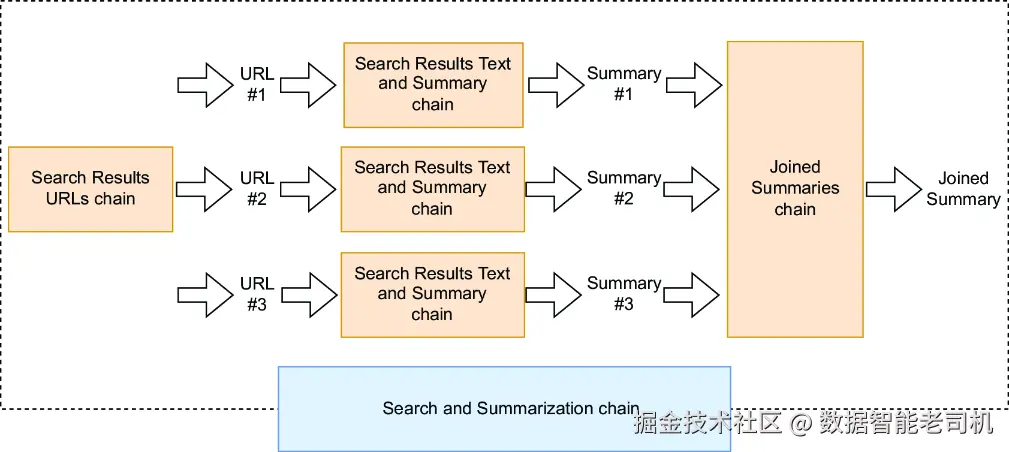
图 4.8 强化版 Search and Summarization chain 图示
如图 4.8 所示,Search Result URLs chain 会生成多个 URL,而每个 URL 都会触发一个 Result Text and Summary chain 实例。这些实例并行运行,并各自为对应网页生成摘要。随后,Joined Summary chain 会将这些摘要整合为一个单一文本块。为了实现这一流程,请把下面的代码保存到 chain_5_1.py 文件中。
代码清单 4.12 Search and Summarization chain
python
from llm_models import get_llm
from prompts import (
    RESEARCH_REPORT_PROMPT_TEMPLATE
)
from chain_1_2 import assistant_instructions_chain
from chain_2_1 import web_searches_chain
from chain_3_1 import search_result_urls_chain
from chain_4_1 import search_result_text_and_summary_chain

from langchain_core.output_parsers import StrOutputParser
from langchain_core.runnables import RunnableLambda

search_and_summarization_chain = (
    search_result_urls_chain
    | search_result_text_and_summary_chain.map() # parallelize for each url
    | RunnableLambda(lambda x:
        {
            'summary': '\n'.join([i['summary'] for i in x]),
            'user_question': x[0]['user_question'] if len(x) > 0 else ''
        })
)
这里的 map() 操作符会针对 Search Result URLs chain 输出中的每一个 URL 字典,触发一个 Result Text and Summary chain 实例,从而使它们能够同时运行。
此外,Joined Summaries 子链并没有作为一个独立实体单独存在,而是直接被内联集成进了更大的 Search and Summarization chain 中。它的作用是把各个 Result Text and Summary 实例生成的摘要合并起来,作为整个流程的一个核心部分。现在,所有这些组件都已经到位,你也可以继续完成 Web Research chain 了。
4.7.4 Web Research chain
在进入实现之前,我们先看一下图 4.9,以便从更高层次上把握 Web Research chain 的全貌。这个图是对图 4.7 的进一步展开,方式和我们前面处理 Search and Summarization chain 时类似。
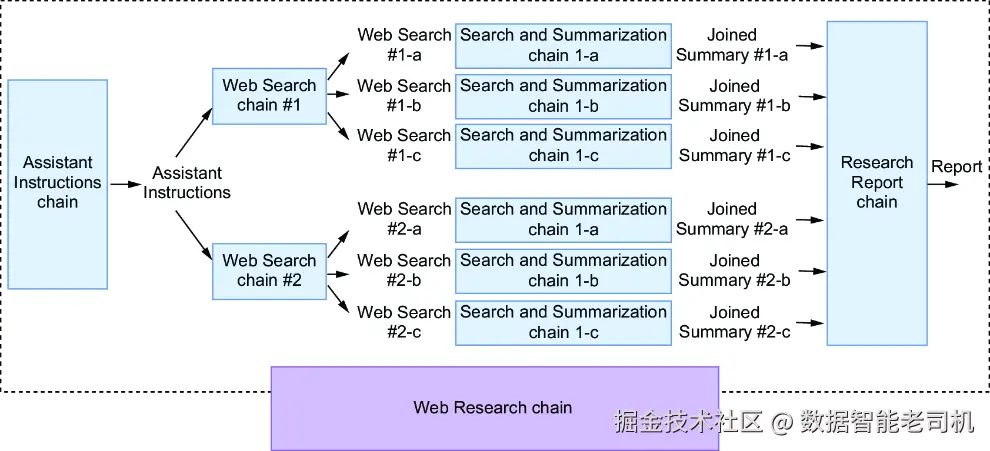
图 4.9 Web Research chain 概览
如图 4.9 所示,Web Searches chain 输出的多个 Web 搜索会分别触发多个 Search and Summarization chain 实例并行执行。每条链都会针对某次搜索生成一个摘要,然后这些摘要会被送入 Research Report chain,由后者生成最终研究报告。下面的代码清单给出了这一流程的 LCEL 实现。请把这些代码追加到 chain_5_1.py 文件中。
代码清单 4.13 Web Research chain
less
web_research_chain = (
    assistant_instructions_chain
    | web_searches_chain
    | search_and_summarization_chain.map() # parallelize for each web search
    | RunnableLambda(lambda x:
       {
           'research_summary': '\n\n'.join([i['summary'] for i in x]),
           'user_question': x[0]['user_question'] if len(x) > 0 else ''
        })
    | RESEARCH_REPORT_PROMPT_TEMPLATE | get_llm() | StrOutputParser()
)
这个实现与 Search and Summarization chain 的逻辑是一致的。这里同样使用了 map() 操作符,用来触发多个 Search and Summarization 子链实例并发运行。然后,Research Report chain 被作为整个 Web Research chain 的最后一部分集成进去。若要测试 Web Research chain,请使用下面这个脚本,并将其保存为 chain_try_5_1.py。
代码清单 4.14 测试 Web Research chain 的脚本
ini
from chain_5_1 import web_research_chain

question = 'What can I see and do in the Spanish town of Astorga?'

web_research_report = web_research_chain.invoke(question)
print(web_research_report)
运行之后,你会得到一份以 Markdown 格式输出的研究报告,格式正如提示中所要求的那样。这里为了简洁起见,示例报告只保留了部分内容:
vbnet
# Introduction
Astorga, a small town in northwestern Spain, may not be on everyone's travel radar, but it is a hidden gem waiting to be discovered. With a rich history dating back to ancient Roman times, stunning architecture, delicious local cuisine, and natural beauty, there is plenty to see and do in Astorga. In this report, we will explore the top attractions and activities in Astorga,
along with practical information for planning a trip to this charming Spanish town.


# History of Astorga
Astorga's history dates back to the ancient Roman settlement of Asturica Augusta, founded in 14 BC. The town was an important mining center, and its strategic location on the Pilgrim's Road, part of the Camino de Santiago, made it a significant stop for pilgrims. Over the centuries, Astorga was conquered and ruled by various civilizations, including the Visigoths, Moors, and Christians. It has also been the site of many violent campaigns, including the Spanish Civil War. Despite its tumultuous past, Astorga has persevered and is now a peaceful and charming town with a rich cultural heritage.
# Top Attractions in Astorga
## Episcopal Palace
One of the most iconic ...
恭喜你!你已经构建出了一条基于 LCEL 的链,它整合了子链、内联链、lambda 函数以及并行化处理。这样的动手实践经验,会让你之后更容易编写属于自己的 LCEL 链。我建议你花一点时间,亲自尝试修改这个应用中的不同链。你可以调整提示、修改生成查询的数量,或者把整个应用改造成更适合某一类特定 Web 研究任务的版本。
注意 你刚刚构建的这个研究摘要引擎,其灵感来自一个名为 GPT Researcher 的开源项目。你可以去看看它的 GitHub 仓库(https://github.com/assafelovic/gpt-researcher),在那里你会发现一个更加健壮的平台:它支持多种搜索引擎与 LLM,还具备 memory、compression 等特性。虽然它并没有使用 LCEL,但我之所以把它的核心功能改写成一个基于 LCEL 的框架,是为了让你更清楚地理解其中若干技术细节。我很推荐你去探索 GPT Researcher 的代码库,并在条件允许的情况下把这个项目跑起来。它是一个非常好的学习材料,可以帮助你理解如何构建一个完整的 LLM 应用,而不只是理解其底层引擎本身,比如连 Web UI 集成这类方面也能一起看到。
小结
-
研究摘要引擎通过查询多个 Web 信息源并整合发现结果,生成一份全面的报告。它自动化了原本需要人工浏览网页和记笔记的多源研究任务。
-
一个典型的研究摘要工作流包括以下步骤:
- 接收用户提出的研究问题
- 利用 LLM 推理,把问题转换为多个有针对性的 Web 搜索查询
- 从每个检索到的网页中提取并摘要内容
- 把各个单独摘要整合成统一的最终报告
-
这个引擎集成了三类核心操作:Web 搜索 API(负责提交查询)、HTML 解析库(负责抽取内容)以及 LLM 调用(负责摘要与综合)。每种操作都需要各自独立地处理错误。
-
提示工程会塑造三个关键阶段:
- 搜索查询生成 ------ 将宽泛问题转换为更具体、更有针对性的搜索词
- 内容摘要 ------ 从原始网页中提取关键事实与论点
- 报告生成 ------ 把局部摘要整合成带有引用的连贯结论
-
LangChain Expression Language(LCEL)通过管道操作符
|将各个操作串联起来,形成顺序变换。每个组件的输出会自动成为下一个组件的输入。 -
RunnableParallel允许在同一个输入上同时执行多个操作。你可以通过RunnableParallel({"key1": operation1, "key2": operation2})的形式,把多个操作包装起来并发执行。 -
.map()操作符会针对一个列表中的每个元素触发一个链实例。使用chain.map(),你就能对 URL 或搜索结果并行处理,让每个实例同时运行。 -
RunnableLambda允许你把 Python 函数包装进 LCEL 链中使用。导入方式是from langchain_core.runnables import RunnableLambda,用法则是RunnableLambda(lambda x: your_function(x))。 -
链实现了 Runnable 协议,主要方法包括:
.invoke()(单次执行)、.stream()(流式输出)以及.batch()(批量处理),它们也都各自提供异步版本,以支持并发操作。 -
构建链时,最好采用模块化方式:分别为搜索查询生成、URL 抓取、内容提取与摘要建立独立链,然后再通过 LCEL 将它们组合成干净、可维护的整体架构。
-
RunnablePassthrough会在允许附加其他操作的同时保留原始输入。你可以用它在链中保留最初问题的同时,基于这个问题继续生成搜索查询。