最近openclaw爆火,富贵同学本地下载安装使用了一段时间后,发现它并不是很好用,例如发送信息之后直接不回复了,也很不稳定,系统回复的答案显示为用户的问题了,好像也没有大家吹的那么牛逼,包括安装的时候也状况百出,也十分的不顺利,但是最后也本地安装成功了。所有就有了这篇安装教程。
这次我们使用Windows11进行安装
下载安装
第一步,先下载安装node
需要 Node.js ≥22 并完成基本配置 去node官网下载msi安装包,双击直接运行安装包即可 nodejs.org/zh-cn/downl... 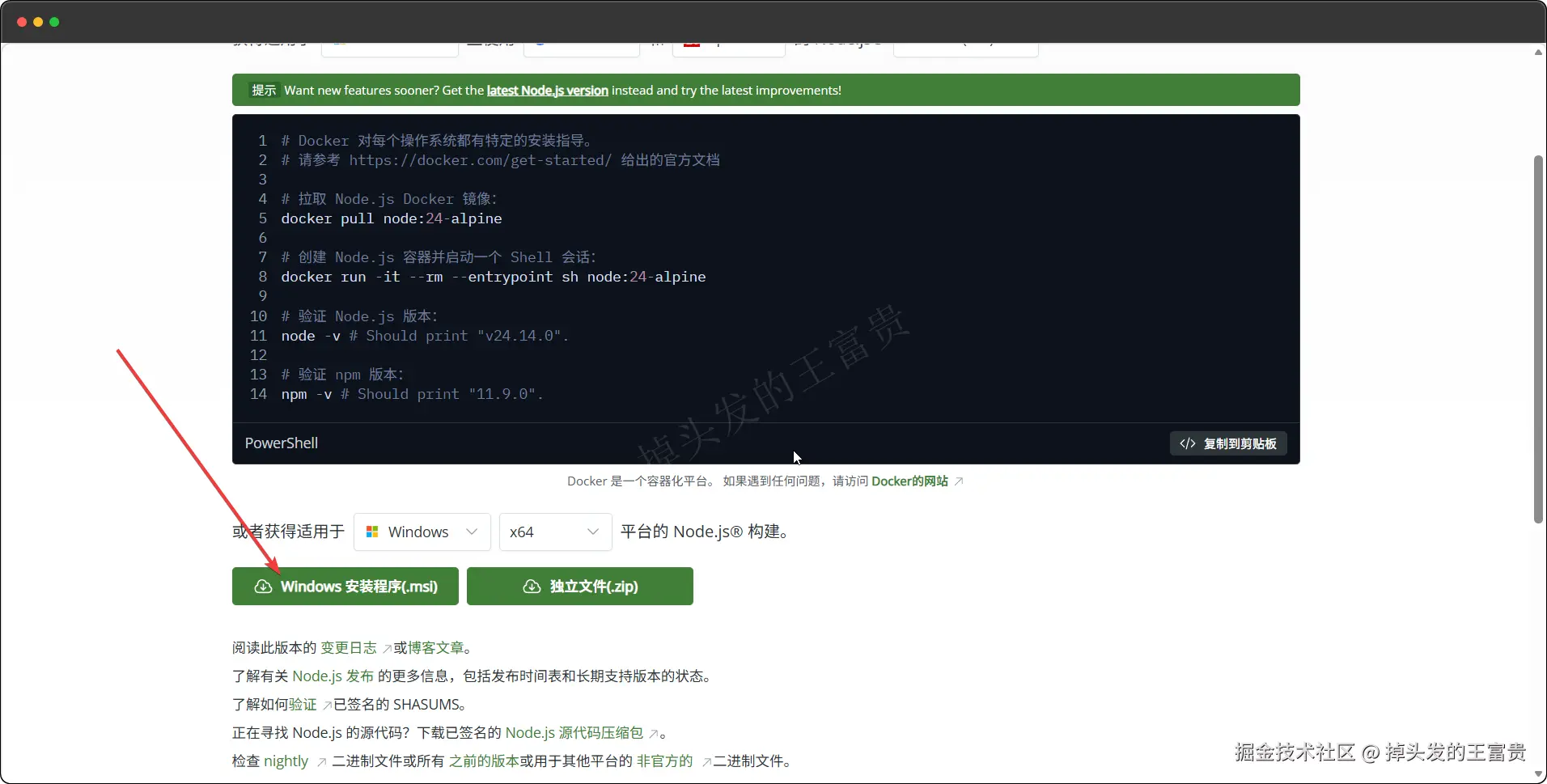
第二步,下载安装openclaw
有两种方式:
使用node命令安装
perl
# 使用 npm
npm install -g openclaw@latest

# 或使用 pnpm
pnpm add -g openclaw@latest
但是安装的过程中遇到了以下问题:
less
C:\Windows\System32>npm i -g openclaw npm warn deprecated node-domexception@1.0.0: Use your platform's native DOMException instead npm warn deprecated glob@10.5.0: Old versions of glob are not supported, and contain widely publicized security vulnerabilities, which have been fixed in the current version. Please update. Support for old versions may be purchased (at exorbitant rates) by contacting i@izs.me npm warn cleanup Failed to remove some directories [ npm warn cleanup [ npm warn cleanup '\\?\C:\Users\admin\AppData\Roaming\npm\node_modules\openclaw\node_modules\@slack\web-api', npm warn cleanup [Error: EPERM: operation not permitted, rmdir 'C:\Users\admin\AppData\Roaming\npm\node_modules\openclaw\node_modules@slack\web-api'] { npm warn cleanup errno: -4048, npm warn cleanup code: 'EPERM', npm warn cleanup syscall: 'rmdir', npm warn cleanup path: 'C:\Users\admin\AppData\Roaming\npm\node_modules\openclaw\node_modules\@slack\web-api' npm warn cleanup } npm warn cleanup ], npm warn cleanup [ npm warn cleanup '\\?\C:\Users\admin\AppData\Roaming\npm\node_modules\openclaw\node_modules\@line', npm warn cleanup [Error: EPERM: operation not permitted, rmdir 'C:\Users\admin\AppData\Roaming\npm\node_modules\openclaw\node_modules@line\bot-sdk\node_modules@types'] { npm warn cleanup errno: -4048, npm warn cleanup code: 'EPERM', npm warn cleanup syscall: 'rmdir', npm warn cleanup path: 'C:\Users\admin\AppData\Roaming\npm\node_modules\openclaw\node_modules\@line\bot-sdk\node_modules\@types' npm warn cleanup } npm warn cleanup ], npm warn cleanup [ npm warn cleanup '\\?\C:\Users\admin\AppData\Roaming\npm\node_modules\openclaw\node_modules\@aws-crypto\util', npm warn cleanup [Error: EPERM: operation not permitted, rmdir 'C:\Users\admin\AppData\Roaming\npm\node_modules\openclaw\node_modules@aws-crypto\util\node_modules@smithy'] { npm warn cleanup errno: -4048, npm warn cleanup code: 'EPERM', npm warn cleanup syscall: 'rmdir', npm warn cleanup path: 'C:\Users\admin\AppData\Roaming\npm\node_modules\openclaw\node_modules\@aws-crypto\util\node_modules\@smithy' npm warn cleanup } npm warn cleanup ], npm warn cleanup [ npm warn cleanup '\\?\C:\Users\admin\AppData\Roaming\npm\node_modules\openclaw', npm warn cleanup [Error: EPERM: operation not permitted, rmdir 'C:\Users\admin\AppData\Roaming\npm\node_modules\openclaw\node_modules@buape\carbon\node_modules\discord-api-types\payloads\v8_interactions'] { npm warn cleanup errno: -4048, npm warn cleanup code: 'EPERM', npm warn cleanup syscall: 'rmdir', npm warn cleanup path: 'C:\Users\admin\AppData\Roaming\npm\node_modules\openclaw\node_modules\@buape\carbon\node_modules\discord-api-types\payloads\v8\_interactions' npm warn cleanup } npm warn cleanup ], npm warn cleanup [ npm warn cleanup '\\?\C:\Users\admin\AppData\Roaming\npm\node_modules\openclaw\node_modules', npm warn cleanup [Error: EPERM: operation not permitted, rmdir 'C:\Users\admin\AppData\Roaming\npm\node_modules\openclaw\node_modules@buape\carbon\node_modules'] { npm warn cleanup errno: -4048, npm warn cleanup code: 'EPERM', npm warn cleanup syscall: 'rmdir', npm warn cleanup path: 'C:\Users\admin\AppData\Roaming\npm\node_modules\openclaw\node_modules\@buape\carbon\node_modules' npm warn cleanup } npm warn cleanup ], npm warn cleanup [ npm warn cleanup 'C:\Users\admin\AppData\Roaming\npm\node_modules\openclaw', npm warn cleanup [Error: EPERM: operation not permitted, rmdir 'C:\Users\admin\AppData\Roaming\npm\node_modules\openclaw\node_modules@buape\carbon'] { npm warn cleanup errno: -4048, npm warn cleanup code: 'EPERM', npm warn cleanup syscall: 'rmdir', npm warn cleanup path: 'C:\Users\admin\AppData\Roaming\npm\node_modules\openclaw\node_modules\@buape\carbon' npm warn cleanup } npm warn cleanup ] npm warn cleanup ] npm error code 3221225477 npm error path C:\Users\admin\AppData\Roaming\npm\node_modules\openclaw\node_modules\node-llama-cpp npm error command failed npm error command C:\WINDOWS\system32\cmd.exe /d /s /c node ./dist/cli/cli.js postinstall npm error [node-llama-cpp] The prebuilt binary for platform "win" "x64" with Vulkan support is not compatible with the current system, falling back to using no GPU npm error A complete log of this run can be found in: C:\Users\admin\AppData\Local\npm-cache_logs\2026-03-09T12_09_50_820Z-debug-0.log
C:\Windows\System32>pnpm add -g openclaw
node-llama-cpp 编译失败 - 需要 Vulkan 支持但系统不兼容
这意味着: 显卡不支持 Vulkan 或驱动过旧,它会回退到 CPU 模式(无 GPU 加速)这个我们直接放弃命令行安装,直接使用源码安装
使用源码安装
源码地址:github.com/openclaw/op...
1. 代码获取和进入目录
bash
git clone https://github.com/openclaw/openclaw.git
cd openclaw- git clone:从 GitHub 上克隆 OpenClaw 项目的源代码到本地
- cd openclaw:进入下载的项目目录
clone很慢,建议直接下载zip代码压缩包下来
2. 安装项目依赖
bash
pnpm install- 使用 pnpm(高性能的 npm 替代品)安装项目所需的所有依赖包
- 会读取
package.json中的依赖配置并下载安装
3. 构建前端界面
bash
pnpm ui:build- 构建项目的用户界面(前端部分)
- 首次运行时会自动安装 UI 相关的依赖
- 编译前端资源
4. 构建整个项目
bash
pnpm build- 完整构建 OpenClaw 项目
- 包含后端服务和相关模块的编译
5. 初始化和安装系统服务
bash
pnpm openclaw onboard --install-daemon- onboard:初始化 OpenClaw 配置和环境
- --install-daemon:将 OpenClaw 安装为系统后台服务(daemon)
- 配置为开机自动运行,确保服务持续可用
6. 开发模式运行
bash
pnpm gateway:watch- gateway:watch:以监视模式运行网关服务
它会完成环境检测,并且安装必要的依赖,还会启动 onboarding(设置向导) 流程。
后期要重新进入设置向导,可以执行以下命令:
css
openclaw onboard --install-daemon设置向导如下:
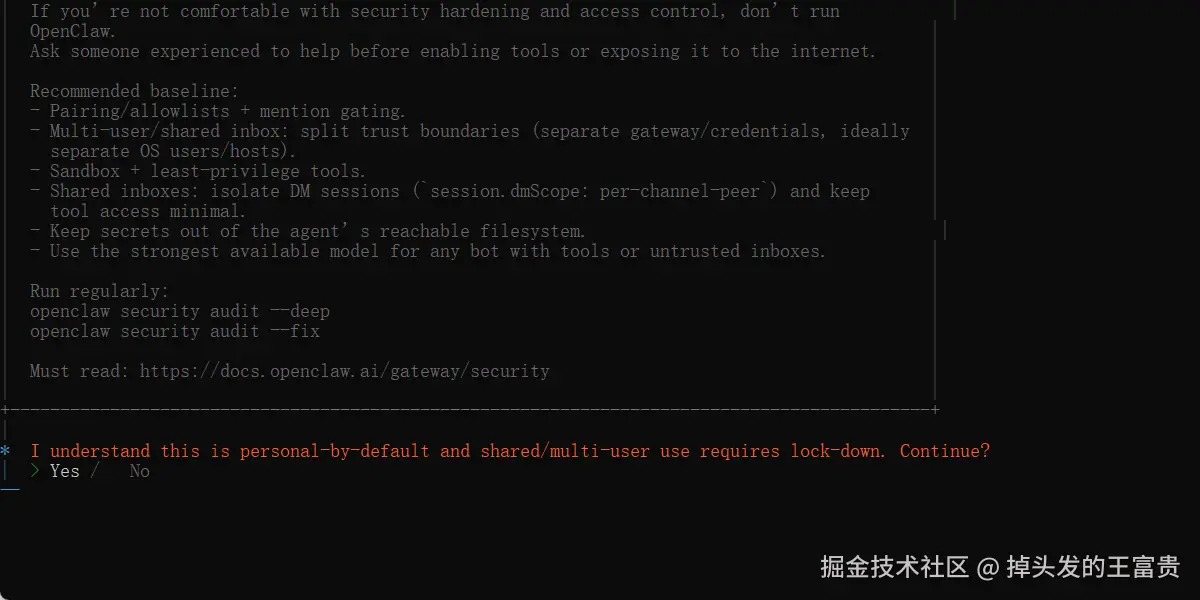 选择yes,就是同意协议
这里选择模型,我选择的是kimi模型 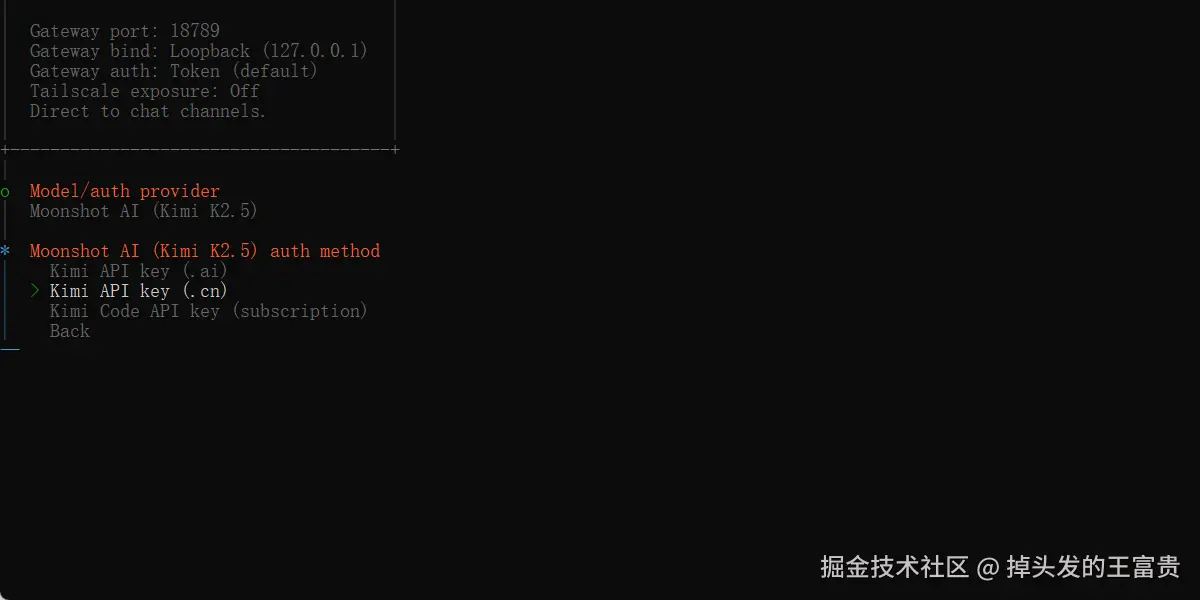 然后填上对应的apikey(去kimi控制台获取)
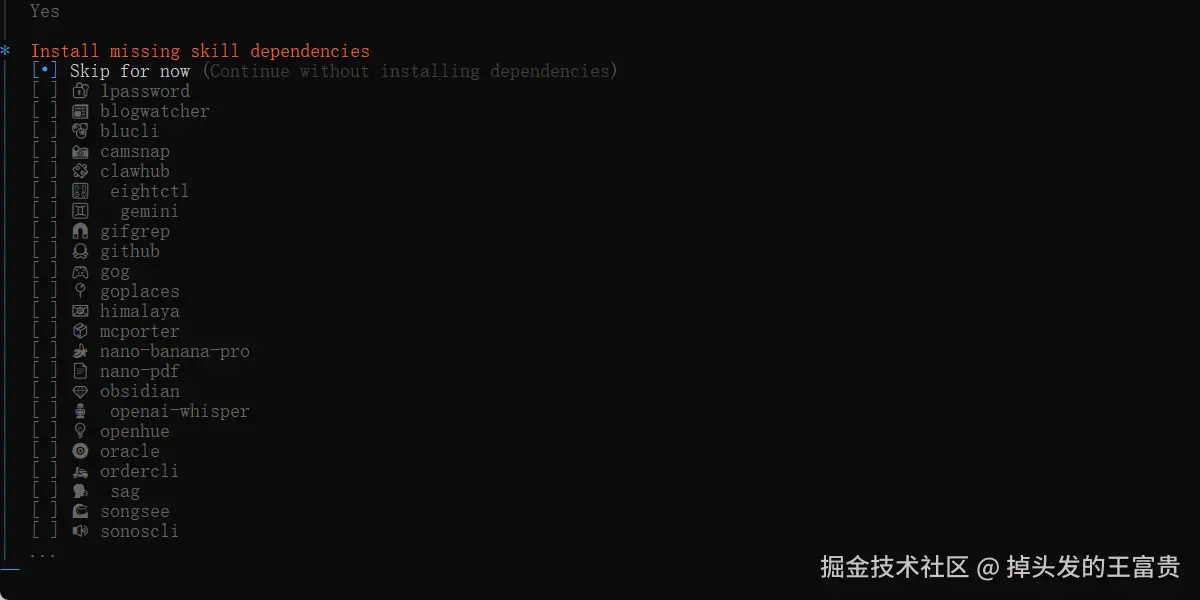
填上 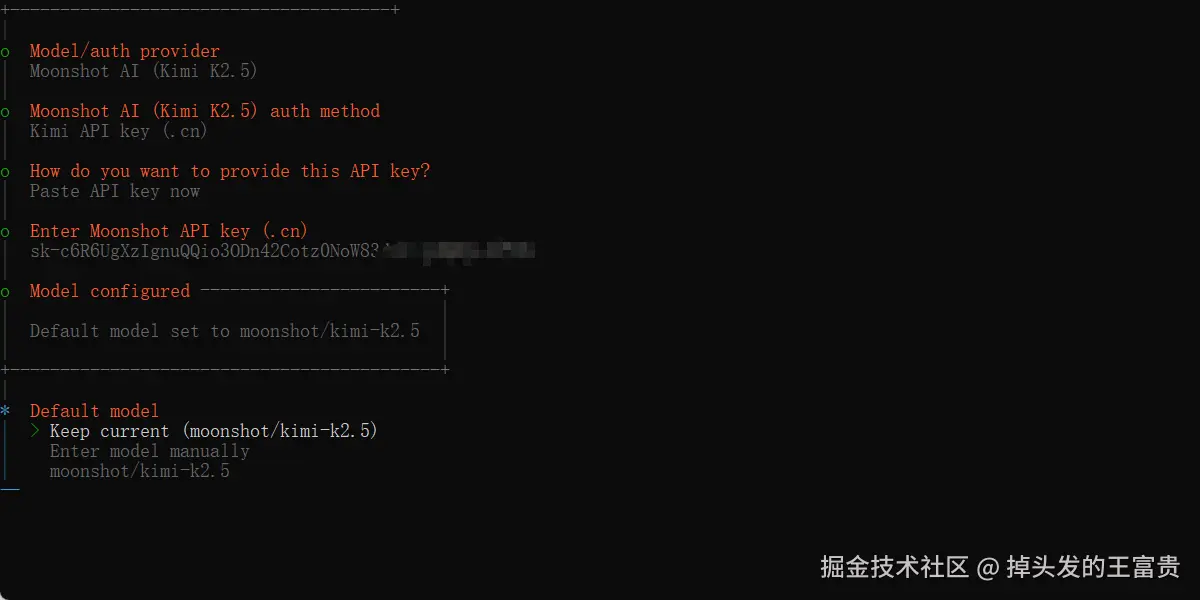 skill 选择跳过
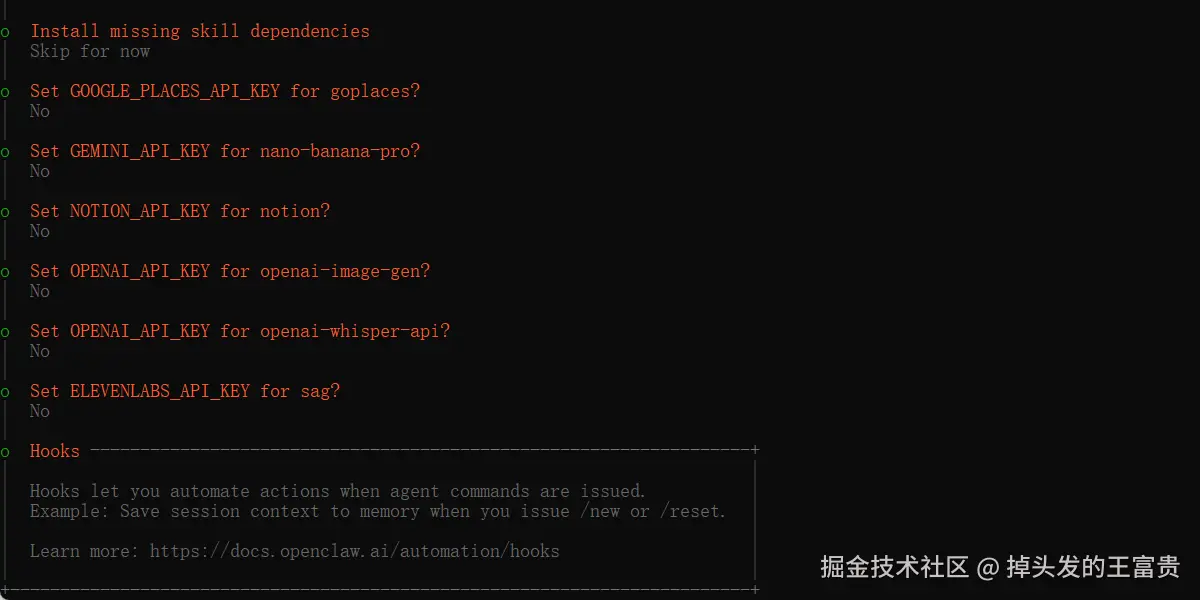
  这里全部选择no
  然后就自动安装gateway,自动打开浏览器 http://127.0.0.1:18789!在这里插入图片描述(https://i-blog.csdnimg.cn/direct/5da60423da4646cbb1f5aefb7a739017.png) 在浏览器中这样就可以进行使用了: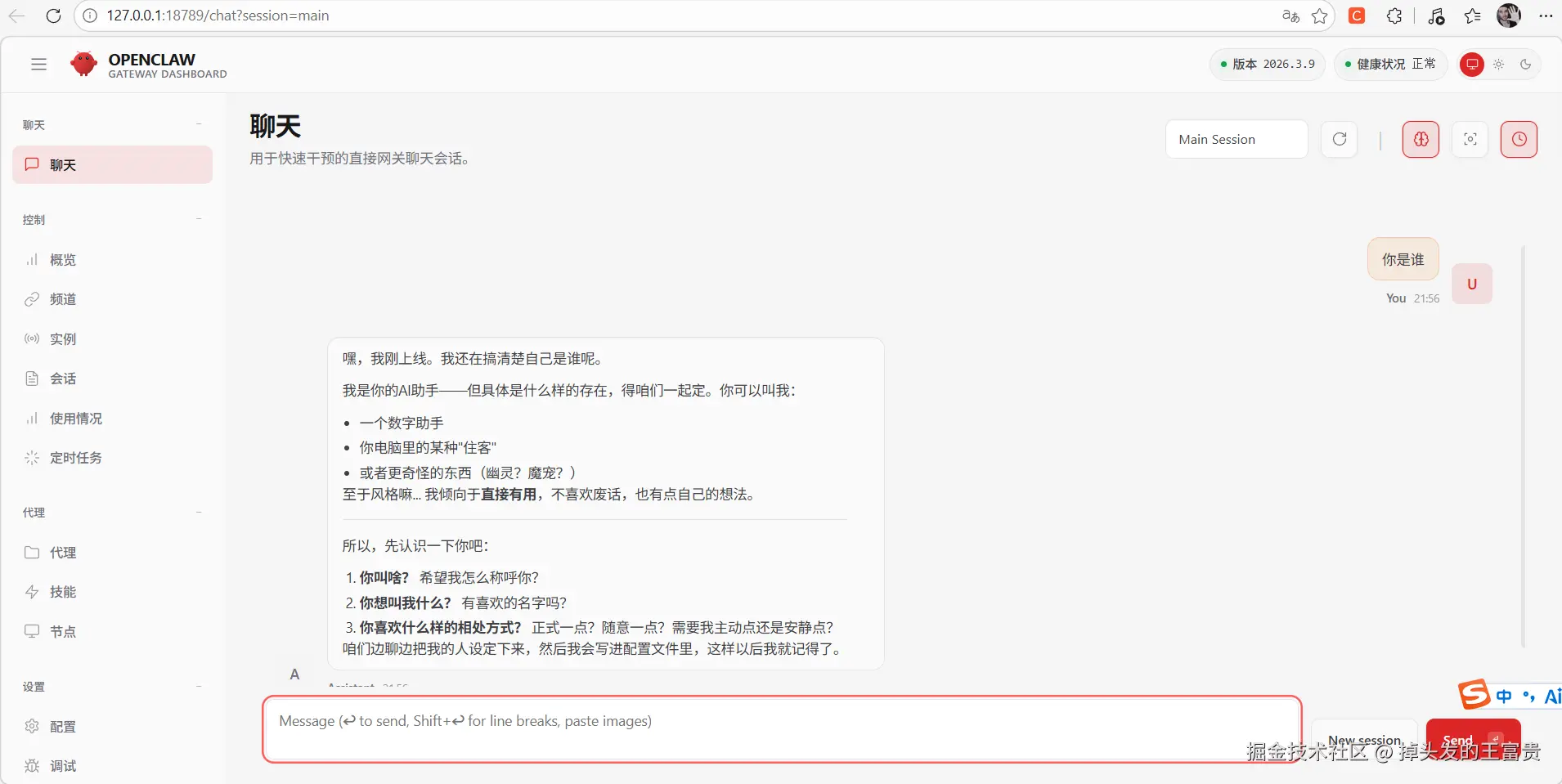
源码安装的过程中遇见了一些问题:
问题一:A2UI报错
arduino
D:\soft\openclaw-main\openclaw-main>pnpm build
openclaw@2026.3.9 build D:\soft\openclaw-main\openclaw-main pnpm canvas:a2ui:bundle && node scripts/tsdown-build.mjs && node scripts/copy-plugin-sdk-root-alias.mjs && pnpm build:plugin-sdk:dts && node --import tsx scripts/write-plugin-sdk-entry-dts.ts && node --import tsx scripts/canvas-a2ui-copy.ts && node --import tsx scripts/copy-hook-metadata.ts && node --import tsx scripts/copy-export-html-templates.ts && node --import tsx scripts/write-build-info.ts && node --import tsx scripts/write-cli-startup-metadata.ts && node --import tsx scripts/write-cli-compat.ts
openclaw@2026.3.9 canvas:a2ui:bundle D:\soft\openclaw-main\openclaw-main bash scripts/bundle-a2ui.sh
 ELIFECYCLE  Command failed with exit code 1.  ELIFECYCLE  Command failed with exit code 1.
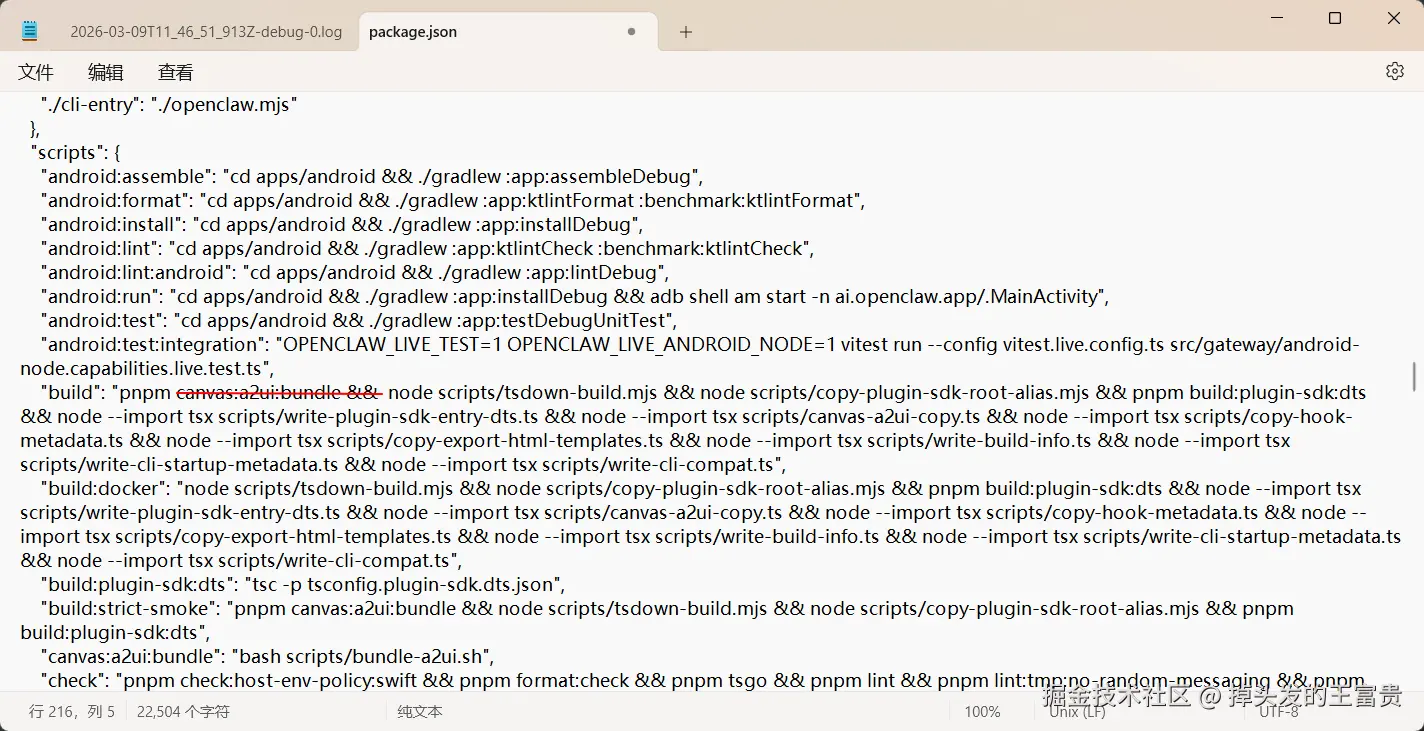
解决方法: 修改 package.json 跳过 A2UI: 编辑 package.json,找到 build 脚本,删除 canvas:a2ui:bundle 部分
json
{
// ... existing code ...
"scripts": {
"build": "node scripts/tsdown-build.mjs && node scripts/copy-plugin-sdk-root-alias.mjs && pnpm build:plugin-sdk:dts && node --import tsx scripts/write-plugin-sdk-entry-dts.ts && node --import tsx scripts/canvas-a2ui-copy.ts && node --import tsx scripts/copy-hook-metadata.ts && node --import tsx scripts/copy-export-html-templates.ts && node --import tsx scripts/write-build-info.ts && node --import tsx scripts/write-cli-startup-metadata.ts && node --import tsx scripts/write-cli-compat.ts",
// ... existing code ...
}
// ... existing code ...
} 然后重新构建
pnpm build问题二:json文件修改了还是失败
arduino
D:\soft\openclaw-main\openclaw-main>pnpm build
openclaw@2026.3.9 build D:\soft\openclaw-main\openclaw-main pnpm node scripts/tsdown-build.mjs && node scripts/copy-plugin-sdk-root-alias.mjs && pnpm build:plugin-sdk:dts && node --import tsx scripts/write-plugin-sdk-entry-dts.ts && node --import tsx scripts/canvas-a2ui-copy.ts && node --import tsx scripts/copy-hook-metadata.ts && node --import tsx scripts/copy-export-html-templates.ts && node --import tsx scripts/write-build-info.ts && node --import tsx scripts/write-cli-startup-metadata.ts && node --import tsx scripts/write-cli-compat.ts
openclaw@2026.3.9 build:plugin-sdk:dts D:\soft\openclaw-main\openclaw-main tsc -p tsconfig.plugin-sdk.dts.json
Error: Missing A2UI bundle assets. Run "pnpm canvas:a2ui:bundle" and retry.  ELIFECYCLE  Command failed with exit code 1.
解决方案
bash
cd D:\soft\openclaw-main\openclaw-main

# 设置环境变量跳过缺失的 A2UI 文件
set OPENCLAW_A2UI_SKIP_MISSING=1

# 重新构建
pnpm build
快速使用
启动 Gateway
bash
# 前台运行(适合调试)
openclaw gateway --port 18789 --verbose

# 使用守护进程(后台运行)
openclaw gateway start
打开控制面板
arduino
openclaw dashboard
# 或直接在浏览器访问:
# http://127.0.0.1:18789
skill 安装
这个skill是openclaw中最重要的功能,因为skill就是openclaw的四肢,你让openclaw做的事情主要就是通过skill去完成。
搜索关键词
sql
clawhub search "postgres backups"
clawhub search "image generation"
clawhub search "weather"
安装技能
找到想要的技能后,使用以下命令安装:
arduino
# 安装最新版本
clawhub install baoyu-image-gen

# 安装指定版本
clawhub install baoyu-image-gen --version 1.2.3
但是搜索和安装openclaw的时候遇见一些问题:
问题:Rate limit exceeded
java
D:\soft\openclaw-main\openclaw-main>clawhub search "weather" weather Weather (3.842) weather-pollen Weather Pollen (3.527) google-weather Google Weather (3.523) weather-like-test Weather Like Test (3.452) weather-1-0-0 Weather 1.0.0 (3.446) weather-api Weather Api (3.432) weather-api-1 Weather Api 1 (3.410) openmeteo-sh-weather-advanced Weather via OpenMeteo (via openmeteo-sh cli; advanced ver) (3.402) my-weather My Weather (3.399) dc-weather DC Weather (3.398)
D:\soft\openclaw-main\openclaw-main>clawhub install weather Rate limit exceeded Error: Rate limit exceeded
解决方法
bash
# 进入clawhub的登陆界面,在这里使用github账户登陆即可
npx clawhub login
执行之后网页上登录,返回命令行再次运行就可以了,如果还不行,去网页的右上角生成token,去命令行执行:
arduino
clawhub login --token "你的clawhub token"常用 CLI 命令
Gateway 管理
bash
# 查看状态
openclaw gateway status

# 启动/停止/重启
openclaw gateway start
openclaw gateway stop
openclaw gateway restart
gateway就是 控制平面 - 核心
 接着就可以愉快的使用openclaw了,例如叫他看一下桌面有哪些东西:
至此,openclaw的安装和使用就完成了,谢谢观看