Android 15 核心子系统系列 - 第24篇
本篇深入分析Android通知系统的核心服务NotificationManagerService,理解通知渠道、优先级控制和免打扰模式的工作机制。
引言
想象一下:你的手机一天收到几十上百条通知------即时消息、邮件、新闻推送、应用更新...如果每条通知都同样"吵闹",你会疯掉。
这就是为什么Android从8.0开始引入了通知渠道(Notification Channels)机制------让用户精细控制每个应用的不同类型通知。而管理这一切的核心服务,就是NotificationManagerService(NMS)。
在上一篇电源管理中,我们看到Android如何限制后台应用;今天我们将看到,Android如何让前台通知既有效又不烦人。
一、NotificationManagerService整体架构
1.1 架构设计哲学
NMS的设计遵循几个核心原则:
用户至上 :用户的通知偏好优先于应用的发送请求 精细控制 :通过渠道机制实现类型级别的控制 智能排序 :根据重要性、时间、用户习惯排序 隐私保护:锁屏通知可隐藏敏感内容
1.2 四层架构
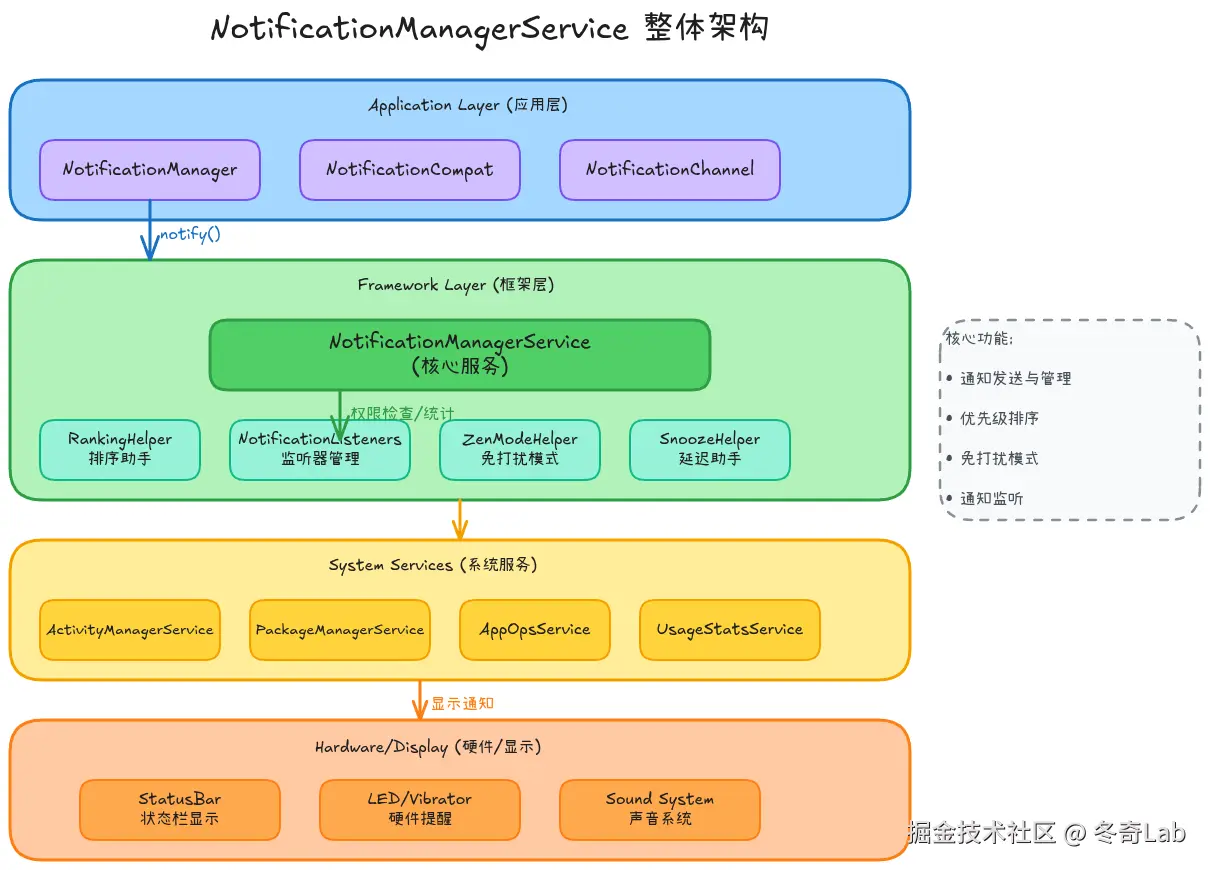
1.3 核心组件
java
// frameworks/base/services/core/java/com/android/server/notification/NotificationManagerService.java

public class NotificationManagerService extends SystemService {
    // 核心组件
    private RankingHelper mRankingHelper;              // 排序助手
    private NotificationListeners mListenerManager;    // 监听器管理
    private ZenModeHelper mZenModeHelper;             // 免打扰模式
    private SnoozeHelper mSnoozeHelper;               // 延迟助手
    private GroupHelper mGroupHelper;                 // 分组助手

    // 通知记录
    private final NotificationRecordList mNotificationList;  // 所有通知
    private final ArrayMap<String, NotificationRecord> mNotificationsByKey;  // 按key索引

    // 配置
    private AtomicFile mPolicyFile;                   // 策略配置文件
    private RankingConfig mRankingConfig;             // 排序配置
}
二、通知渠道(Notification Channels)机制
2.1 为什么需要通知渠道?
在Android 8.0之前,应用的所有通知共享一个设置,用户只能选择"全开"或"全关"。这导致:
- 想收重要消息,就得忍受垃圾推送
- 不想被打扰,就收不到关键通知
通知渠道 解决了这个问题------同一应用的不同类型通知,可以分别控制。
生活类比:就像邮件的"收件箱分类"------工作邮件设置提醒,营销邮件静音,垃圾邮件直接屏蔽。
2.2 渠道的三级层次结构
scss
应用 (App)
  ├─ 渠道组 (Channel Group) - 可选
  │   ├─ 渠道1 (Channel)
  │   └─ 渠道2 (Channel)
  └─ 渠道3 (Channel) - 未分组
示例:即时通讯应用
kotlin
// 创建渠道组
val groupId = "message_group"
notificationManager.createNotificationChannelGroup(
    NotificationChannelGroup(groupId, "消息通知")
)

// 创建渠道
val channels = listOf(
    NotificationChannel("private_msg", "私聊消息", IMPORTANCE_HIGH).apply {
        group = groupId
        description = "一对一聊天消息"
        enableVibration(true)
        setSound(privateMsgSound, audioAttributes)
    },
    NotificationChannel("group_msg", "群聊消息", IMPORTANCE_DEFAULT).apply {
        group = groupId
        description = "群组聊天消息"
        enableVibration(false)  // 群消息不震动
    },
    NotificationChannel("system_notice", "系统通知", IMPORTANCE_LOW).apply {
        description = "账号、安全相关通知"
        setSound(null, null)  // 无声音
    }
)

notificationManager.createNotificationChannels(channels)
2.3 渠道重要性级别
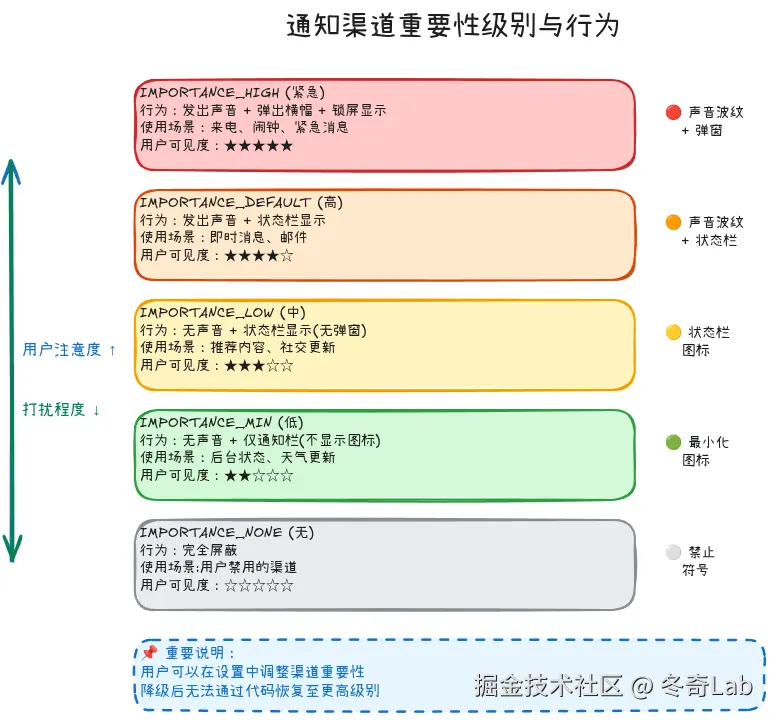
Android定义了5个重要性级别:
| 级别 | 值 | 行为 | 使用场景 |
|---|---|---|---|
IMPORTANCE_HIGH |
4 | 🔴 声音+横幅+锁屏 | 来电、闹钟、紧急消息 |
IMPORTANCE_DEFAULT |
3 | 🟠 声音+状态栏 | 即时消息、邮件 |
IMPORTANCE_LOW |
2 | 🟡 无声音+状态栏 | 推荐内容、社交更新 |
IMPORTANCE_MIN |
1 | 🟢 仅通知栏(无图标) | 后台状态、天气 |
IMPORTANCE_NONE |
0 | ⚪ 完全屏蔽 | 用户禁用的渠道 |
源码实现:
java
// NotificationChannel.java

// 根据重要性决定通知行为
boolean shouldShowBadge() {
    return mImportance >= IMPORTANCE_LOW;  // 低及以上显示角标
}

boolean canShowBanner() {
    return mImportance >= IMPORTANCE_HIGH;  // 仅高级别显示横幅
}

boolean canBypassDnd() {
    return mImportance >= IMPORTANCE_HIGH
        && mBypassDnd;  // 高级别可绕过免打扰
}
2.4 渠道的不可逆降级
关键设计 :用户降低渠道重要性后,应用无法通过代码恢复。
java
// NotificationManagerService.java

void updateNotificationChannelInt(String pkg, int uid,
        NotificationChannel channel, boolean fromTargetApp) {

    NotificationChannel existing = getChannel(pkg, uid, channel.getId());

    if (fromTargetApp) {
        // 应用尝试更新渠道
        // 检查是否试图提升重要性
        if (channel.getImportance() > existing.getImportance()) {
            // 禁止!保持用户设置的较低值
            channel.setImportance(existing.getImportance());
            Log.w(TAG, "App cannot increase channel importance");
        }
    }

    // 更新渠道
    updateChannel(pkg, uid, channel);
}
设计理念 :用户说了算------应用不能推翻用户的选择,这是Android通知系统的核心原则。
三、通知发送与处理流程
3.1 完整的发送流程
scss
App调用NotificationManager.notify()
            ↓
    Binder IPC到NMS
            ↓
    权限检查(AppOps)
            ↓
    渠道验证(必须有效渠道)
            ↓
    重要性评估(RankingHelper)
            ↓
    免打扰模式过滤(ZenModeHelper)
            ↓
    创建NotificationRecord
            ↓
    通知排序(mRankingHelper.sort())
            ↓
    通知监听器回调
            ↓
    显示到StatusBar
3.2 源码分析:enqueueNotificationInternal
java
// NotificationManagerService.java

void enqueueNotificationInternal(final String pkg, final String opPkg,
        final int callingUid, final int callingPid, final String tag,
        final int id, final Notification notification, int userId) {

    // 1. 权限检查
    checkCallerIsSystemOrSameApp(pkg);
    final boolean isSystemNotification = isUidSystem(callingUid);

    // 2. 速率限制检查(防刷屏)
    if (!isSystemNotification) {
        synchronized (mNotificationLock) {
            final float rate = mUsageStats.getAppEnqueueRate(pkg);
            if (rate > mMaxPackageEnqueueRate) {
                // 超过速率限制,延迟发送
                mSnoozeHelper.snooze(r, SNOOZE_UNTIL_UNTHROTTLED);
                return;
            }
        }
    }

    // 3. 获取或创建通知渠道
    final NotificationChannel channel = getChannel(pkg, callingUid,
            notification.getChannelId());
    if (channel == null) {
        // Android 8.0+必须指定有效渠道
        throw new IllegalArgumentException(
            "No Channel found for pkg=" + pkg
            + ", channelId=" + notification.getChannelId());
    }

    // 4. 创建通知记录
    final NotificationRecord r = new NotificationRecord(
        getContext(), notification, channel);

    // 5. 检查免打扰模式
    if (mZenModeHelper.shouldIntercept(r)) {
        r.setSuppressed(true);  // 被免打扰模式拦截
    }

    // 6. 添加到通知列表
    synchronized (mNotificationLock) {
        // 移除旧通知(相同id)
        NotificationRecord old = mNotificationsByKey.get(r.getKey());
        if (old != null) {
            cancelNotificationLocked(old, false, REASON_APP_CANCEL);
        }

        // 添加新通知
        mNotificationList.add(r);
        mNotificationsByKey.put(r.getKey(), r);

        // 7. 排序
        mRankingHelper.sort(mNotificationList);

        // 8. 通知监听器
        mListenerManager.notifyPostedLocked(r, old);

        // 9. 更新状态栏
        mHandler.post(() -> mStatusBar.addNotification(r));
    }
}关键步骤:
- 权限检查------确保调用者身份合法
- 速率限制------防止应用短时间发送大量通知
- 渠道验证------Android 8.0+强制要求
- 免打扰过滤------根据ZenMode规则拦截
- 排序------按重要性、时间排序
- 回调监听器------通知其他应用(如launcher)
- 显示------最终展示给用户
3.3 通知更新与取消
java
// 更新通知(相同id)
notificationManager.notify(NOTIFICATION_ID, newNotification)

// 取消单个通知
notificationManager.cancel(NOTIFICATION_ID)

// 取消所有通知
notificationManager.cancelAll()源码实现:
java
// NotificationManagerService.java

void cancelNotificationLocked(NotificationRecord r, boolean sendDelete,
        int reason, boolean wasPosted) {

    // 1. 从列表移除
    mNotificationList.remove(r);
    mNotificationsByKey.remove(r.getKey());

    // 2. 取消系统资源
    cancelSoundVibrationLights(r);  // 停止声音/震动/灯光

    // 3. 通知监听器
    if (wasPosted) {
        mListenerManager.notifyRemovedLocked(r, reason);
    }

    // 4. 发送删除Intent(如果应用设置了)
    if (sendDelete && r.getNotification().deleteIntent != null) {
        r.getNotification().deleteIntent.send();
    }

    // 5. 更新状态栏
    mHandler.post(() -> mStatusBar.removeNotification(r.getKey()));
}
四、通知排序与分组
4.1 RankingHelper排序逻辑
NMS通过RankingHelper对通知进行智能排序:
java
// RankingHelper.java

void sort(ArrayList<NotificationRecord> notificationList) {
    Collections.sort(notificationList, mRankingComparator);
}

// 排序比较器
private final Comparator<NotificationRecord> mRankingComparator = (a, b) -> {
    // 1. 前台服务通知优先
    int aFg = a.isForegroundService() ? 1 : 0;
    int bFg = b.isForegroundService() ? 1 : 0;
    if (aFg != bFg) return bFg - aFg;

    // 2. 用户锁定的通知优先
    int aLocked = a.isUserLocked() ? 1 : 0;
    int bLocked = b.isUserLocked() ? 1 : 0;
    if (aLocked != bLocked) return bLocked - aLocked;

    // 3. 重要性高的优先
    int aImp = a.getImportance();
    int bImp = b.getImportance();
    if (aImp != bImp) return bImp - aImp;

    // 4. 相同重要性,最近的优先
    return Long.compare(b.getRankingTimeMs(), a.getRankingTimeMs());
};排序优先级:
- 前台服务通知(最高)
- 用户锁定的通知
- 重要性级别
- 时间(最近的优先)
4.2 通知分组
Android支持将相同应用的通知分组显示:
kotlin
// 设置分组key
val notification = NotificationCompat.Builder(context, CHANNEL_ID)
    .setSmallIcon(R.drawable.ic_message)
    .setContentTitle("新消息")
    .setGroup("message_group")  // 分组key
    .build()

// 创建分组摘要通知
val summaryNotification = NotificationCompat.Builder(context, CHANNEL_ID)
    .setSmallIcon(R.drawable.ic_message)
    .setContentTitle("5条新消息")
    .setGroup("message_group")
    .setGroupSummary(true)  // 标记为分组摘要
    .build()

notificationManager.notify(SUMMARY_ID, summaryNotification)分组效果:
- 收起状态显示摘要(如"5条新消息")
- 展开后显示所有通知
- 省空间,提升可读性
4.3 通知类别(Category)
java
// 通知类别,用于系统优化显示
notification.category = Notification.CATEGORY_MESSAGE;  // 消息类
// 其他类别:
// - CATEGORY_CALL: 来电
// - CATEGORY_ALARM: 闹钟
// - CATEGORY_EMAIL: 邮件
// - CATEGORY_EVENT: 日历事件
// - CATEGORY_PROMO: 促销信息
// - CATEGORY_PROGRESS: 进度通知
系统根据类别做特殊处理:
CATEGORY_CALL在锁屏显示全屏界面CATEGORY_ALARM绕过免打扰模式CATEGORY_PROGRESS不计入通知数量
五、免打扰(DND)模式
5.1 免打扰模式的三种类型
java
// ZenModeHelper.java

public static final int ZEN_MODE_OFF = 0;              // 关闭
public static final int ZEN_MODE_IMPORTANT_INTERRUPTIONS = 1;  // 仅重要通知
public static final int ZEN_MODE_NO_INTERRUPTIONS = 2;  // 完全静音
public static final int ZEN_MODE_ALARMS = 3;           // 仅闹钟
5.2 免打扰规则
用户可以配置哪些通知被允许:
java
// ZenModeConfig.java

public static class ZenRule {
    boolean allowCalls;            // 允许来电
    boolean allowMessages;         // 允许消息
    boolean allowEvents;           // 允许日历事件
    boolean allowReminders;        // 允许提醒
    boolean allowRepeatCallers;    // 允许重复来电
    boolean allowAlarms;           // 允许闹钟
    boolean allowMedia;            // 允许媒体声音
    boolean allowSystem;           // 允许系统声音

    // 来电/消息的来源过滤
    int allowCallsFrom = ZenModeConfig.SOURCE_ANYONE;
    int allowMessagesFrom = ZenModeConfig.SOURCE_ANYONE;
    // 可选值:
    // - SOURCE_ANYONE: 任何人
    // - SOURCE_CONTACT: 联系人
    // - SOURCE_STAR: 星标联系人
}
5.3 通知是否被拦截的判定
java
// ZenModeHelper.java

boolean shouldIntercept(NotificationRecord record) {
    if (mZenMode == ZEN_MODE_OFF) {
        return false;  // 免打扰关闭,不拦截
    }

    // 1. 前台服务通知不拦截
    if (record.isForegroundService()) {
        return false;
    }

    // 2. 检查通知类别
    String category = record.getNotification().category;
    if (Notification.CATEGORY_ALARM.equals(category)) {
        // 闹钟类通知,检查规则
        return !mConfig.allowAlarms;
    }

    if (Notification.CATEGORY_CALL.equals(category)) {
        // 来电类通知,检查来源
        return !mConfig.allowCalls
            || !isFromAllowedSource(record, mConfig.allowCallsFrom);
    }

    // 3. 检查渠道是否可绕过DND
    NotificationChannel channel = record.getChannel();
    if (channel.canBypassDnd()) {
        return false;
    }

    // 4. 完全静音模式拦截所有
    if (mZenMode == ZEN_MODE_NO_INTERRUPTIONS) {
        return true;
    }

    // 5. 检查重要性
    if (record.getImportance() < IMPORTANCE_DEFAULT) {
        return true;  // 低重要性被拦截
    }

    return false;
}
5.4 自动规则
Android支持基于时间/地点的自动免打扰:
kotlin
// 创建自动规则:工作日晚上10点到早上8点
val rule = AutomaticZenRule(
    name = "睡眠时段",
    interruptionFilter = INTERRUPTION_FILTER_PRIORITY,  // 仅重要通知
    conditionId = ZenModeConfig.toScheduleConditionId(
        ScheduleInfo().apply {
            days = intArrayOf(
                Calendar.MONDAY, Calendar.TUESDAY, Calendar.WEDNESDAY,
                Calendar.THURSDAY, Calendar.FRIDAY
            )
            startHour = 22
            startMinute = 0
            endHour = 8
            endMinute = 0
        }
    ),
    enabled = true
)

notificationManager.addAutomaticZenRule(rule)
六、通知监听器服务(NotificationListenerService)
6.1 什么是NotificationListenerService?
NLS允许应用监听系统中所有应用的通知,常用于:
- 智能手表同步通知
- 通知管理应用
- 自动化工具(如Tasker)
- 辅助功能服务
6.2 实现NotificationListenerService
kotlin
class MyNotificationListener : NotificationListenerService() {

    // 通知发布时回调
    override fun onNotificationPosted(sbn: StatusBarNotification) {
        val packageName = sbn.packageName
        val notification = sbn.notification
        val extras = notification.extras

        val title = extras.getString(Notification.EXTRA_TITLE)
        val text = extras.getString(Notification.EXTRA_TEXT)

        Log.d(TAG, "New notification: $packageName - $title: $text")

        // 可以进行处理,如:
        // - 同步到穿戴设备
        // - 智能分类
        // - 自动回复
    }

    // 通知移除时回调
    override fun onNotificationRemoved(sbn: StatusBarNotification) {
        Log.d(TAG, "Notification removed: ${sbn.packageName}")
    }

    // 通知排序变化时回调
    override fun onNotificationRankingUpdate(rankingMap: RankingMap) {
        // 通知的排序/重要性发生变化
    }

    // 监听器连接成功
    override fun onListenerConnected() {
        // 可以获取当前所有活跃通知
        val activeNotifications = getActiveNotifications()
    }

    // 可以主动取消通知
    fun dismissNotification(key: String) {
        cancelNotification(key)
    }
}注册服务:
xml
<!-- AndroidManifest.xml -->
<service
    android:name=".MyNotificationListener"
    android:permission="android.permission.BIND_NOTIFICATION_LISTENER_SERVICE"
    android:exported="true">
    <intent-filter>
        <action android:name="android.service.notification.NotificationListenerService" />
    </intent-filter>
</service>用户授权:
kotlin
// 检查是否有权限
fun isNotificationListenerEnabled(context: Context): Boolean {
    val listeners = Settings.Secure.getString(
        context.contentResolver,
        "enabled_notification_listeners"
    )
    return listeners?.contains(context.packageName) == true
}

// 引导用户授权
fun requestNotificationListenerPermission(context: Context) {
    val intent = Intent(Settings.ACTION_NOTIFICATION_LISTENER_SETTINGS)
    context.startActivity(intent)
}
6.3 源码分析:监听器回调
java
// NotificationManagerService.java

void notifyPostedLocked(NotificationRecord r, NotificationRecord old) {
    // 遍历所有注册的监听器
    for (ManagedServiceInfo info : mServices) {
        boolean sbnVisible = isVisibleToListener(r.sbn, info);
        boolean oldSbnVisible = old != null
            ? isVisibleToListener(old.sbn, info)
            : false;

        if (oldSbnVisible && !sbnVisible) {
            // 对此监听器不可见了,回调removed
            mHandler.post(() -> notifyRemoved(info, old.sbn));
        } else if (!oldSbnVisible && sbnVisible) {
            // 对此监听器变为可见,回调posted
            mHandler.post(() -> notifyPosted(info, r.sbn));
        } else if (sbnVisible) {
            // 可见且更新,回调posted
            mHandler.post(() -> notifyPosted(info, r.sbn));
        }
    }
}
七、通知限制策略
7.1 速率限制
防止应用刷屏:
java
// NotificationManagerService.java

private static final float DEFAULT_MAX_NOTIFICATION_ENQUEUE_RATE = 5f;  // 每秒5条

// 检查速率
float getAppEnqueueRate(String pkg) {
    return mUsageStats.getAppEnqueueRate(pkg);
}

// 超过速率后延迟
if (rate > mMaxPackageEnqueueRate) {
    long snoozeDuration = (long) (rate / mMaxPackageEnqueueRate * 1000);
    mSnoozeHelper.snooze(r, snoozeDuration);
}
7.2 通知数量限制
java
// 每个应用最多50条活跃通知
private static final int MAX_PACKAGE_NOTIFICATIONS = 50;

// 超过限制,移除最老的通知
if (count >= MAX_PACKAGE_NOTIFICATIONS) {
    NotificationRecord oldest = findOldestNotification(pkg);
    cancelNotificationLocked(oldest, false, REASON_PACKAGE_LIMIT);
}
7.3 后台通知限制
java
// Android 8.0+ 后台应用发送通知需要前台服务或特殊权限

boolean canShowNotificationWhileBackground(String pkg, int uid) {
    // 1. 有前台服务 → 允许
    if (mAm.hasRunningForegroundService(pkg, uid)) {
        return true;
    }

    // 2. 白名单应用 → 允许
    if (isWhitelisted(pkg)) {
        return true;
    }

    // 3. 最近有用户交互 → 短暂允许
    if (mUsageStats.isRecentlyUsed(pkg, uid)) {
        return true;
    }

    return false;
}
八、调试与问题诊断
8.1 常用调试命令
bash
# 查看NMS状态
adb shell dumpsys notification

# 输出包含:
# - 所有活跃通知
# - 通知渠道配置
# - 免打扰规则
# - 排序信息
# - 速率限制状态

# 查看特定应用的通知
adb shell dumpsys notification | grep -A 20 "com.example.app"

# 查看通知渠道
adb shell dumpsys notification | grep -A 5 "NotificationChannel"

# 查看免打扰配置
adb shell dumpsys notification | grep -A 20 "zen mode"

# 模拟通知(需root或调试应用)
adb shell cmd notification post -t "Test Title" "Test Body"
8.2 通知不显示问题排查
问题1:通知完全不显示
bash
# 1. 检查应用是否被禁用通知
adb shell cmd notification allowed_listeners
adb shell cmd notification disallowed_assistants

# 2. 检查渠道是否存在且启用
adb shell dumpsys notification | grep -A 10 "com.example.app"
# 查看 channel importance 是否为 NONE

# 3. 检查是否在免打扰模式
adb shell dumpsys notification | grep "mZenMode"

# 4. 检查权限
adb shell dumpsys notification | grep "NotificationAccess"
问题2:通知无声音/震动
bash
# 检查渠道配置
adb shell dumpsys notification | grep -A 5 "sound\|vibration"

# 检查系统音量
adb shell dumpsys audio | grep "volume"
问题3:通知被延迟
bash
# 检查速率限制
adb shell dumpsys notification | grep "enqueue rate"

# 检查Doze模式
adb shell dumpsys deviceidle
8.3 通知日志分析
kotlin
// 开启通知日志
adb shell cmd notification set_log_level 2  // 0=OFF, 1=ERROR, 2=WARN, 3=INFO, 4=DEBUG

// 查看日志
adb logcat -s NotificationManager:* NotificationService:*

// 常见日志:
// - "Posting notification" - 通知发送
// - "Canceling notification" - 通知取消
// - "Ranking updated" - 排序更新
// - "Intercepted by zen mode" - 被免打扰拦截
九、最佳实践
9.1 正确创建通知渠道
kotlin
// ✅ 正确:在Application.onCreate中创建渠道
class MyApplication : Application() {
    override fun onCreate() {
        super.onCreate()
        createNotificationChannels()
    }

    private fun createNotificationChannels() {
        if (Build.VERSION.SDK_INT >= Build.VERSION_CODES.O) {
            val channels = listOf(
                NotificationChannel(
                    "important_msg",
                    "重要消息",
                    NotificationManager.IMPORTANCE_HIGH
                ).apply {
                    description = "需要立即查看的重要消息"
                    enableVibration(true)
                    enableLights(true)
                    lightColor = Color.RED
                },
                NotificationChannel(
                    "general",
                    "一般通知",
                    NotificationManager.IMPORTANCE_DEFAULT
                ).apply {
                    description = "常规消息和更新"
                }
            )

            notificationManager.createNotificationChannels(channels)
        }
    }
}

// ❌ 错误:发送通知时才创建渠道
fun showNotification() {
    // 太晚了!应该在应用启动时就创建
    notificationManager.createNotificationChannel(channel)
    notificationManager.notify(ID, notification)
}
9.2 合理设置重要性级别
kotlin
// ✅ 正确:根据通知类型选择合适的重要性
val channels = mapOf(
    "chat" to IMPORTANCE_HIGH,        // 即时消息 - 高
    "news" to IMPORTANCE_LOW,         // 新闻推送 - 低
    "download" to IMPORTANCE_MIN,     // 下载进度 - 最小
    "promotion" to IMPORTANCE_LOW     // 促销信息 - 低
)

// ❌ 错误:所有通知都设置为HIGH
// 用户会觉得烦,直接禁用你的应用通知
9.3 响应用户的渠道设置
kotlin
// 检查渠道是否被用户禁用
fun isChannelBlocked(channelId: String): Boolean {
    if (Build.VERSION.SDK_INT >= Build.VERSION_CODES.O) {
        val channel = notificationManager.getNotificationChannel(channelId)
        return channel?.importance == NotificationManager.IMPORTANCE_NONE
    }
    return false
}

// 引导用户开启渠道
fun promptToEnableChannel(channelId: String) {
    if (isChannelBlocked(channelId)) {
        AlertDialog.Builder(context)
            .setTitle("通知已关闭")
            .setMessage("您已关闭此类通知,可能会错过重要消息")
            .setPositiveButton("去设置") { _, _ ->
                // 跳转到渠道设置
                val intent = Intent(Settings.ACTION_CHANNEL_NOTIFICATION_SETTINGS).apply {
                    putExtra(Settings.EXTRA_APP_PACKAGE, packageName)
                    putExtra(Settings.EXTRA_CHANNEL_ID, channelId)
                }
                startActivity(intent)
            }
            .setNegativeButton("取消", null)
            .show()
    }
}
9.4 正确使用通知分组
kotlin
// ✅ 正确:消息类应用使用分组
val GROUP_KEY = "message_group"

// 发送多条通知
messages.forEach { msg ->
    val notification = NotificationCompat.Builder(context, CHANNEL_ID)
        .setSmallIcon(R.drawable.ic_message)
        .setContentTitle(msg.sender)
        .setContentText(msg.content)
        .setGroup(GROUP_KEY)  // 设置分组
        .build()

    notificationManager.notify(msg.id, notification)
}

// 发送分组摘要(消息数>1时)
if (messages.size > 1) {
    val summaryNotification = NotificationCompat.Builder(context, CHANNEL_ID)
        .setSmallIcon(R.drawable.ic_message)
        .setContentTitle("${messages.size}条新消息")
        .setGroup(GROUP_KEY)
        .setGroupSummary(true)  // 标记为摘要
        .build()

    notificationManager.notify(SUMMARY_ID, summaryNotification)
}
9.5 避免通知滥用
| 行为 | 影响 | 正确做法 |
|---|---|---|
| 短时间发送大量通知 | 触发速率限制 | 合并为一条或使用分组 |
| 所有通知都设HIGH | 用户禁用应用通知 | 仅紧急消息用HIGH |
| 深夜发送非紧急通知 | 打扰用户休息 | 尊重免打扰模式 |
| 过度使用声音/震动 | 引起反感 | 只在必要时使用 |
| 通知内容过长 | 显示被截断 | 使用BigTextStyle展开 |
十、Android 15新特性
10.1 增强的通知权限
kotlin
// Android 13+ 需要运行时权限
if (Build.VERSION.SDK_INT >= Build.VERSION_CODES.TIRAMISU) {
    if (checkSelfPermission(Manifest.permission.POST_NOTIFICATIONS)
        != PackageManager.PERMISSION_GRANTED) {

        // 请求通知权限
        requestPermissions(
            arrayOf(Manifest.permission.POST_NOTIFICATIONS),
            REQUEST_CODE
        )
    }
}
10.2 通知预测与智能排序
java
// Android 15使用机器学习预测通知重要性
class SmartRankingHelper extends RankingHelper {
    // 基于用户行为学习
    void updateImportanceByUserInteraction(NotificationRecord r, int action) {
        // action: DISMISSED, CLICKED, SNOOZED, etc.

        // 记录用户行为
        mUserInteractionLog.log(r.getPackageName(), r.getChannel(), action);

        // 更新预测模型
        if (mMLModel != null) {
            mMLModel.train(getUserInteractionData());
        }

        // 动态调整排序权重
        float predictedImportance = mMLModel.predict(r);
        r.setRankingScore(predictedImportance);
    }
}
10.3 隐私保护增强
kotlin
// Android 15对锁屏通知的隐私保护更严格
val notification = NotificationCompat.Builder(context, CHANNEL_ID)
    .setSmallIcon(R.drawable.icon)
    .setContentTitle("新消息")
    .setContentText("您有一条新消息")
    // 设置锁屏可见性
    .setVisibility(NotificationCompat.VISIBILITY_PRIVATE)  // 锁屏不显示内容
    // 设置公开版本(锁屏显示的简化版)
    .setPublicVersion(
        NotificationCompat.Builder(context, CHANNEL_ID)
            .setSmallIcon(R.drawable.icon)
            .setContentTitle("新消息")
            .build()
    )
    .build()
10.4 对话通知(Conversation Notifications)
kotlin
// Android 11+引入,Android 15进一步优化
val person = Person.Builder()
    .setName("张三")
    .setIcon(IconCompat.createWithResource(context, R.drawable.avatar))
    .build()

val notification = NotificationCompat.Builder(context, CHANNEL_ID)
    .setSmallIcon(R.drawable.ic_message)
    .setContentTitle("张三")
    .setContentText("你好!")
    // 标记为对话通知
    .setStyle(
        NotificationCompat.MessagingStyle(person)
            .addMessage("你好!", System.currentTimeMillis(), person)
    )
    .setShortcutId("chat_zhangsan")  // 关联聊天快捷方式
    .setCategory(NotificationCompat.CATEGORY_MESSAGE)
.build()对话通知优势:
- 在通知抽屉中优先显示
- 支持气泡(Bubbles)浮窗
- 快捷回复更便捷
总结
本篇我们深入分析了Android通知系统的核心机制:
- NotificationManagerService架构:四层架构,核心组件协作
- 通知渠道机制:精细化控制,用户至上的设计理念
- 通知发送流程:从应用到显示的完整链路
- 排序与分组:智能排序,分组显示提升体验
- 免打扰模式:灵活的规则配置,平衡打扰与提醒
- 监听器服务:强大的通知监听能力
- 限制策略:速率限制、数量限制、后台限制
- 调试与最佳实践:完善的调试工具和开发建议
关键设计思想:
- 用户至上:用户的设置优先级高于应用
- 精细控制:渠道机制实现类型级别的管理
- 隐私保护:锁屏通知可隐藏敏感内容
- 智能排序:根据重要性、时间、用户习惯排序
下一篇预告:《JobScheduler与WorkManager:任务调度机制》将分析Android的后台任务调度系统,理解JobScheduler和WorkManager的工作原理与最佳实践。
参考资料
系列导航:
本文基于Android 15 (API Level 35)源码分析,不同厂商的定制ROM可能存在差异。 欢迎来我中的个人主页找到更多有用的知识和有趣的产品