👨⚕️ 主页: gis分享者
👨⚕️ 感谢各位大佬 点赞👍 收藏⭐ 留言📝 加关注✅!
文章目录
- 一、🍀前言
-
- [1.1 ☘️GLSL着色器](#1.1 ☘️GLSL着色器)
-
- [1.1.1 ☘️着色器类型](#1.1.1 ☘️着色器类型)
- [1.1.2 ☘️工作原理](#1.1.2 ☘️工作原理)
- [1.1.3 ☘️核心特点](#1.1.3 ☘️核心特点)
- [1.1.4 ☘️应用场景](#1.1.4 ☘️应用场景)
- [1.1.5 ☘️实战示例](#1.1.5 ☘️实战示例)
- [1.2 ☘️THREE.EffectComposer 后期处理](#1.2 ☘️THREE.EffectComposer 后期处理)
-
- [1.2.1 ☘️代码示例](#1.2.1 ☘️代码示例)
- [1.2.2 ☘️构造函数](#1.2.2 ☘️构造函数)
- [1.2.3 ☘️属性](#1.2.3 ☘️属性)
- [1.2.4 ☘️方法](#1.2.4 ☘️方法)
- [1.3 ☘️THREE.RenderPass](#1.3 ☘️THREE.RenderPass)
-
- [1.3.1 ☘️构造函数](#1.3.1 ☘️构造函数)
- [1.3.2 ☘️属性](#1.3.2 ☘️属性)
- [1.3.3 ☘️方法](#1.3.3 ☘️方法)
- [1.4 ☘️THREE.UnrealBloomPass](#1.4 ☘️THREE.UnrealBloomPass)
-
- [1.4.1 ☘️构造函数](#1.4.1 ☘️构造函数)
- [1.4.2 ☘️方法](#1.4.2 ☘️方法)
- [1.5 ☘️THREE.OutputPass](#1.5 ☘️THREE.OutputPass)
-
- [1.5.1 ☘️构造函数](#1.5.1 ☘️构造函数)
- [1.5.2 ☘️属性](#1.5.2 ☘️属性)
- [1.5.3 ☘️方法](#1.5.3 ☘️方法)
- 二、🍀实现带有GLSL着色器的动画
-
- [1. ☘️实现思路](#1. ☘️实现思路)
- [2. ☘️代码样例](#2. ☘️代码样例)
一、🍀前言
本文详细介绍如何基于threejs在三维场景中实现带有GLSL着色器的动画,亲测可用。希望能帮助到您。一起学习,加油!加油!
1.1 ☘️GLSL着色器
GLSL(OpenGL Shading Language)是OpenGL的核心编程语言,用于编写图形渲染管线中可定制的计算逻辑。其核心设计目标是通过GPU并行计算实现高效的图形处理,支持从基础几何变换到复杂物理模拟的多样化需求。
1.1.1 ☘️着色器类型
顶点着色器(Vertex Shader)
- 功能:处理每个顶点的坐标变换(如模型视图投影矩阵变换)、法线计算及顶点颜色传递。
- 输出:裁剪空间坐标gl_Position,供后续光栅化阶段使用。
片段着色器(Fragment Shader)
- 功能:计算每个像素的最终颜色,支持纹理采样、光照模型(如Phong、PBR)及后处理效果(如模糊、景深)。
- 输出:像素颜色gl_FragColor或gl_FragColor(RGBA格式)。
计算着色器(Compute Shader,高级)
- 功能:执行通用并行计算任务(如物理模拟、图像处理),不直接绑定渲染管线。
- 特点:通过工作组(Work Group)实现高效数据并行处理。
1.1.2 ☘️工作原理
渲染管线流程
- 顶点处理:CPU提交顶点数据(位置、颜色、纹理坐标),GPU并行执行顶点着色器处理每个顶点。
- 光栅化:将顶点数据转换为像素片段,生成片段着色器输入。
- 片段处理:GPU并行执行片段着色器计算每个像素颜色。
- 输出合并:将片段颜色与帧缓冲区混合,生成最终图像。
数据流动
- 顶点属性:通过glVertexAttribPointer传递位置、颜色等数据,索引由layout(location=N)指定。
- Uniform变量:CPU通过glGetUniformLocation传递常量数据(如变换矩阵、时间),在渲染循环中更新。
- 内置变量: gl_Position(顶点着色器输出):裁剪空间坐标。 gl_FragCoord(片段着色器输入):当前像素的窗口坐标。
gl_FrontFacing(片段着色器输入):判断像素是否属于正面三角形。
1.1.3 ☘️核心特点
语法特性
- C语言变体:支持条件语句、循环、函数等结构,天然适配图形算法。
- 向量/矩阵运算:内置vec2/vec3/vec4及mat2/mat3/mat4类型,支持点乘、叉乘等操作。
- 精度限定符:如precision mediump float,控制计算精度与性能平衡。
硬件加速
- 并行计算:GPU数千个核心并行执行着色器代码,适合处理大规模数据(如粒子系统、体素渲染)。
- 内存模型:支持常量内存(Uniform)、纹理内存(Sampler)及共享内存(计算着色器),优化数据访问效率。
灵活性
- 可编程管线:完全替代固定渲染管线,支持自定义光照、阴影、后处理效果。
- 跨平台兼容性:OpenGL ES(移动端)与WebGL(Web)均支持GLSL,代码可移植性强。
1.1.4 ☘️应用场景
游戏开发
- 实时渲染:实现PBR材质、动态阴影、屏幕空间反射。
- 特效系统:粒子火焰、流体模拟、布料物理。
- 性能优化:通过计算着色器加速AI计算、碰撞检测。
数据可视化
- 科学计算:将多维数据映射为颜色/高度图(如气象数据、流场可视化)。
- 信息图表:动态生成3D柱状图、热力图,增强数据表现力。
艺术创作
- 程序化生成:使用噪声函数(如Perlin、Simplex)生成地形、纹理。
- 交互式装置:结合传感器数据实时修改着色器参数,创造动态艺术作品。
教育与研究
- 算法实验:实时调试光线追踪、路径追踪算法。
- 教学工具:可视化线性代数运算(如矩阵变换、向量投影)。
1.1.5 ☘️实战示例
顶点着色器(传递法线与世界坐标):
javascript
#version 330 core
layout(location=0) in vec3 aPos;
layout(location=1) in vec3 aNormal;
out vec3 FragPos;
out vec3 Normal;
uniform mat4 model;
uniform mat4 view;
uniform mat4 projection;
void main() {
    FragPos = vec3(model * vec4(aPos, 1.0));
    Normal = mat3(transpose(inverse(model))) * aNormal; // 模型空间到世界空间的法线变换
    gl_Position = projection * view * vec4(FragPos, 1.0);
}
片段着色器(实现Blinn-Phong光照):
javascript
#version 330 core
in vec3 FragPos;
in vec3 Normal;
out vec4 FragColor;
uniform vec3 lightPos;
uniform vec3 viewPos;
uniform vec3 lightColor;
uniform vec3 objectColor;
void main() {
    // 环境光
    vec3 ambient = 0.1 * lightColor;
    // 漫反射
    vec3 norm = normalize(Normal);
    vec3 lightDir = normalize(lightPos - FragPos);
    float diff = max(dot(norm, lightDir), 0.0);
    vec3 diffuse = diff * lightColor;
    // 镜面反射
    vec3 viewDir = normalize(viewPos - FragPos);
    vec3 reflectDir = reflect(-lightDir, norm);
    float spec = pow(max(dot(viewDir, reflectDir), 0.0), 32);
    vec3 specular = 0.5 * spec * lightColor;
    // 最终颜色
    vec3 result = (ambient + diffuse + specular) * objectColor;
    FragColor = vec4(result, 1.0);
}1.2 ☘️THREE.EffectComposer 后期处理
THREE.EffectComposer 用于在three.js中实现后期处理效果。该类管理了产生最终视觉效果的后期处理过程链。 后期处理过程根据它们添加/插入的顺序来执行,最后一个过程会被自动渲染到屏幕上。
1.2.1 ☘️代码示例
javascript
import { EffectComposer } from 'three/examples/jsm/postprocessing/EffectComposer.js';
import { RenderPass } from 'three/examples/jsm/postprocessing/RenderPass.js';
// 初始化 composer
const composer = new EffectComposer(renderer);
// 创建 RenderPass 并添加到 composer
const renderPass = new RenderPass(scene, camera);
composer.addPass(renderPass);
// 添加其他后期处理通道(如模糊)
// composer.addPass(blurPass);
// 在动画循环中渲染
function animate() {
  composer.render();
  requestAnimationFrame(animate);
}
1.2.2 ☘️构造函数
EffectComposer( renderer : WebGLRenderer, renderTarget : WebGLRenderTarget )
renderer -- 用于渲染场景的渲染器。
renderTarget -- (可选)一个预先配置的渲染目标,内部由 EffectComposer 使用。
1.2.3 ☘️属性
.passes : Array
一个用于表示后期处理过程链(包含顺序)的数组。
javascript
渲染通道:
BloomPass   该通道会使得明亮区域参入较暗的区域。模拟相机照到过多亮光的情形
DotScreenPass   将一层黑点贴到代表原始图片的屏幕上
FilmPass    通过扫描线和失真模拟电视屏幕
MaskPass    在当前图片上贴一层掩膜,后续通道只会影响被贴的区域
RenderPass  该通道在指定的场景和相机的基础上渲染出一个新的场景
SavePass    执行该通道时,它会将当前渲染步骤的结果复制一份,方便后面使用。这个通道实际应用中作用不大;
ShaderPass  使用该通道你可以传入一个自定义的着色器,用来生成高级的、自定义的后期处理通道
TexturePass 该通道可以将效果组合器的当前状态保存为一个纹理,然后可以在其他EffectCoposer对象中将该纹理作为输入参数
.readBuffer : WebGLRenderTarget
内部读缓冲区的引用。过程一般从该缓冲区读取先前的渲染结果。
.renderer : WebGLRenderer
内部渲染器的引用。
.renderToScreen : Boolean
最终过程是否被渲染到屏幕(默认帧缓冲区)。
.writeBuffer : WebGLRenderTarget
内部写缓冲区的引用。过程常将它们的渲染结果写入该缓冲区。
1.2.4 ☘️方法
.addPass ( pass : Pass ) : undefined
pass -- 将被添加到过程链的过程
将传入的过程添加到过程链。
.dispose () : undefined
释放此实例分配的 GPU 相关资源。每当您的应用程序不再使用此实例时调用此方法。
.insertPass ( pass : Pass, index : Integer ) : undefined
pass -- 将被插入到过程链的过程。
index -- 定义过程链中过程应插入的位置。
将传入的过程插入到过程链中所给定的索引处。
.isLastEnabledPass ( passIndex : Integer ) : Boolean
passIndex -- 被用于检查的过程
如果给定索引的过程在过程链中是最后一个启用的过程,则返回true。 由EffectComposer所使用,来决定哪一个过程应当被渲染到屏幕上。
.removePass ( pass : Pass ) : undefined
pass -- 要从传递链中删除的传递。
从传递链中删除给定的传递。
.render ( deltaTime : Float ) : undefined
deltaTime -- 增量时间值。
执行所有启用的后期处理过程,来产生最终的帧,
.reset ( renderTarget : WebGLRenderTarget ) : undefined
renderTarget -- (可选)一个预先配置的渲染目标,内部由 EffectComposer 使用。
重置所有EffectComposer的内部状态。
.setPixelRatio ( pixelRatio : Float ) : undefined
pixelRatio -- 设备像素比
设置设备的像素比。该值通常被用于HiDPI设备,以阻止模糊的输出。 因此,该方法语义类似于WebGLRenderer.setPixelRatio()。
.setSize ( width : Integer, height : Integer ) : undefined
width -- EffectComposer的宽度。
height -- EffectComposer的高度。
考虑设备像素比,重新设置内部渲染缓冲和过程的大小为(width, height)。 因此,该方法语义类似于WebGLRenderer.setSize()。
.swapBuffers () : undefined
交换内部的读/写缓冲。
1.3 ☘️THREE.RenderPass
THREE.RenderPass用于将场景渲染到中间缓冲区,为后续的后期处理效果(如模糊、色调调整等)提供基础。
1.3.1 ☘️构造函数
RenderPass(scene, camera, overrideMaterial, clearColor, clearAlpha)
- scene THREE.Scene 要渲染的 Three.js 场景对象。
- camera THREE.Camera 场景对应的相机(如 PerspectiveCamera)。
- overrideMaterial THREE.Material (可选) 覆盖场景中所有物体的材质(默认 null)。
- clearColor THREE.Color (可选) 渲染前清除画布的颜色(默认不主动清除)。
- clearAlpha number (可选) 清除画布的透明度(默认 0)。
1.3.2 ☘️属性
.enabled:boolean
是否启用此通道(默认 true)。设为 false 可跳过渲染。
.clear:boolean
渲染前是否清除画布(默认 true)。若需叠加多个 RenderPass,可设为 false。
.needsSwap:boolean
是否需要在渲染后交换缓冲区(通常保持默认 false)。
1.3.3 ☘️方法
.setSize(width, height)
调整通道的渲染尺寸(通常由 EffectComposer 自动调用)。
width: 画布宽度(像素)。
height: 画布高度(像素)。
1.4 ☘️THREE.UnrealBloomPass
UnrealBloomPass 是 Three.js 中实现高质量泛光效果的后期处理通道,通过模拟类似 Unreal Engine 的泛光效果,为场景中的明亮区域添加柔和的光晕,提升视觉表现力。
1.4.1 ☘️构造函数
new UnrealBloomPass(resolution, strength, radius, threshold)
- resolution (Vector2): 泛光效果应用的场景分辨率,需与画布尺寸一致。
示例:new THREE.Vector2(window.innerWidth, window.innerHeight) - strength (Number): 泛光强度,默认值 1.0。值越大,光晕越明显。
- radius (Number): 模糊半径,默认值 0.4。值越大,光晕扩散范围越广。
- threshold (Number): 泛光阈值,默认值 0.85。仅对亮度高于此值的区域生效。
1.4.2 ☘️方法
- renderToScreen: 是否直接渲染到屏幕,默认为 false(需通过 EffectComposer 管理)。
- clearColor: 设置背景清除颜色,默认为透明。
1.5 ☘️THREE.OutputPass
OutputPass 是 Three.js 后期处理(Post-Processing)中的一个通道(Pass),用于控制最终渲染输出的颜色空间、色调映射(Tone Mapping)和抗锯齿等效果。它通常作为 EffectComposer 的最后一个通道,负责将处理后的图像输出到屏幕。
1.5.1 ☘️构造函数
new OutputPass(resolution)
resolution (Vector2): 可选参数,指定输出分辨率。默认值为 null,自动匹配画布尺寸。
1.5.2 ☘️属性
.output:WebGLRenderTarget
类型: WebGLRenderTarget
描述: 存储最终渲染结果的渲染目标对象。
.uniforms:Object
类型: Object
描述: 包含着色器统一变量(Uniforms)的对象,用于控制输出效果。常用属性:
toneMappingExposure (Number): 色调映射曝光值,默认 1.0。
toneMappingType (Number): 色调映射算法类型,默认 NoToneMapping。
.needsSwap:boolean
类型: Boolean
描述: 是否需要交换帧缓冲区,通常设为 true 以确保输出到屏幕。
1.5.3 ☘️方法
.setSize(width, height)
调整通道的渲染尺寸(通常由 EffectComposer 自动调用)。
width: 画布宽度(像素)。
height: 画布高度(像素)。
.render(renderer, writeBuffer, readBuffer)
功能: 执行渲染操作(通常由 EffectComposer 自动调用)。
二、🍀实现带有GLSL着色器的动画
1. ☘️实现思路
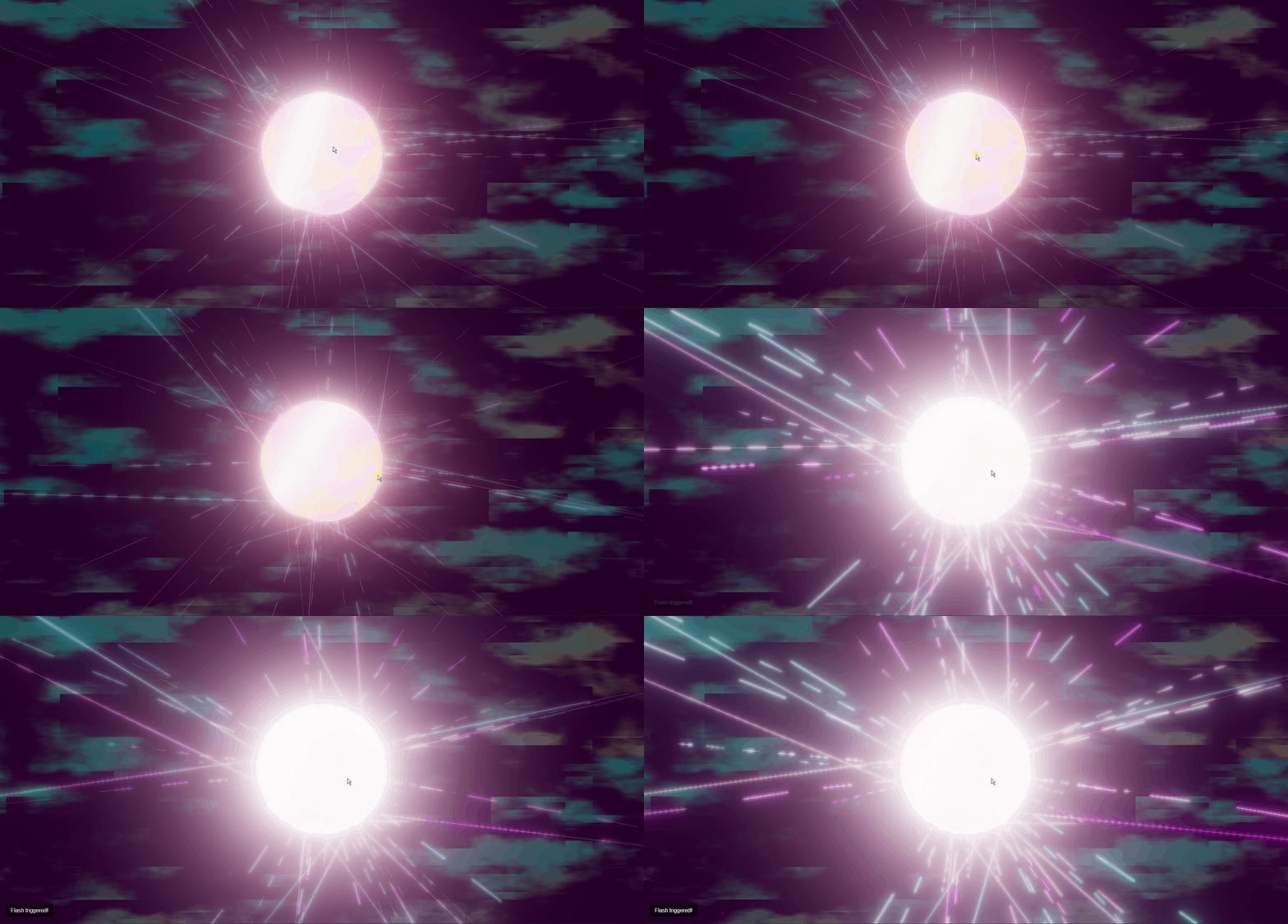
结合 GLSL 着色器实现动画效果。包含变形的核心、细丝和粒子。点击可触发闪光效果,增强绽放(bloom)效果。具体代码参考下面代码样例。
2. ☘️代码样例
html
<!DOCTYPE html>
<html lang="en">
<head>
<meta charset="UTF-8">
<title>带有 GLSL 着色器动画</title>
<style>
body {
margin: 0;
overflow: hidden;
background-color: #100510;
color: #fff;
}
#container {
width: 100%;
height: 100vh;
display: block;
}
#instructions {
position: absolute;
bottom: 20px;
left: 20px;
background-color: rgba(0, 0, 0, 0.6);
padding: 10px 15px;
border-radius: 5px;
font-family: Arial, sans-serif;
pointer-events: none;
transition: opacity 0.5s;
}
</style>
</head>
<body>
<div id="container"></div>
<div id="instructions">Click/Tap anywhere to make filaments flash</div>
<script type="module">
import * as THREE from "https://esm.sh/three";
import { OrbitControls } from "https://esm.sh/three/examples/jsm/controls/OrbitControls.js";
import { EffectComposer } from "https://esm.sh/three/examples/jsm/postprocessing/EffectComposer.js";
import { RenderPass } from "https://esm.sh/three/examples/jsm/postprocessing/RenderPass.js";
import { ShaderPass } from "https://esm.sh/three/examples/jsm/postprocessing/ShaderPass.js";
import { UnrealBloomPass } from "https://esm.sh/three/examples/jsm/postprocessing/UnrealBloomPass.js";
import { OutputPass } from "https://esm.sh/three/examples/jsm/postprocessing/OutputPass.js";
let scene, camera, renderer, controls, clock, composer;
let morphingCore, emittedFragments, dynamicFilaments;
let fragmentData = [];
let filamentData = [];
const dummy = new THREE.Object3D();
let flashTime = 0;
let flashActive = false;
let instructions = null;
const params = {
autoRotateSpeed: 0.15,
bloomStrength: 0.65,
bloomRadius: 0.5,
bloomThreshold: 0.1,
coreRadius: 3.0,
fragmentCount: 2000,
fragmentMaxDistance: 25.0,
filamentCount: 50,
filamentSegments: 15,
filamentMaxLength: 12.0
};
const noiseFunctionsGLSL = `
float rand(vec2 co){ return fract(sin(dot(co.xy ,vec2(12.9898,78.233))) * 43758.5453); }
float rand(vec3 co){ return fract(sin(dot(co.xy ,vec2(12.9898,78.233))+co.z)*43758.5453); }
float noise (vec3 p) { vec3 i = floor(p); vec3 f = fract(p); f = f*f*(3.0-2.0*f); return mix(mix(mix(rand(i+vec3(0,0,0)), rand(i+vec3(1,0,0)),f.x), mix(rand(i+vec3(0,1,0)), rand(i+vec3(1,1,0)),f.x),f.y), mix(mix(rand(i+vec3(0,0,1)), rand(i+vec3(1,0,1)),f.x), mix(rand(i+vec3(0,1,1)), rand(i+vec3(1,1,1)),f.x),f.y),f.z); }
float fbm (vec3 p) { float v = 0.0; float a = 0.5; for (int i = 0; i < 4; i++) { v += a * noise(p); p *= 2.1; a *= 0.5; } return v; }
float noise2D (vec2 p) { vec2 i = floor(p); vec2 f = fract(p); f = f*f*(3.0-2.0*f); return mix(mix(rand(i+vec2(0,0)), rand(i+vec2(1,0)),f.x), mix(rand(i+vec2(0,1)), rand(i+vec2(1,1)),f.x),f.y); }
float fbm2D (vec2 p) { float v = 0.0; float a = 0.5; for (int i = 0; i < 5; i++) { v += a * noise2D(p); p *= 2.0; a *= 0.5; } return v; }
float reactionDiffusionPattern(vec2 uv, float time) { float zoom = 4.0; uv *= zoom; float baseNoise = fbm2D(uv + time * 0.15); float offset = 0.1; float neighbor1 = fbm2D(uv + vec2(offset, 0.0) + time * 0.12); float neighbor2 = fbm2D(uv + vec2(0.0, offset) - time * 0.11); float pattern = baseNoise * abs(neighbor1 - neighbor2) * 2.5; pattern = smoothstep(0.1, 0.5, pattern); return pattern; }
`;
function fractJS(n) { return n - Math.floor(n); }
function mixJS(x, y, a) { return x * (1 - a) + y * a; }
function dotJS2(v1, v2) { return v1.x * v2.x + v1.y * v2.y; }
function dotJS3(v1, v2) { return v1.x * v2.x + v1.y * v2.y + v1.z * v2.z; }
function randJS(coVec3) {
const dt = dotJS2({x: coVec3.x, y: coVec3.y}, {x: 12.9898, y: 78.233}) + coVec3.z;
const sn = Math.sin(dt) * 43758.5453;
return fractJS(sn);
}
function noise3DJS(pVec3) {
const i = {x: Math.floor(pVec3.x), y: Math.floor(pVec3.y), z: Math.floor(pVec3.z)};
let f = {x: fractJS(pVec3.x), y: fractJS(pVec3.y), z: fractJS(pVec3.z)};
f.x = f.x * f.x * (3.0 - 2.0 * f.x);
f.y = f.y * f.y * (3.0 - 2.0 * f.y);
f.z = f.z * f.z * (3.0 - 2.0 * f.z);
const r000 = randJS({x: i.x + 0, y: i.y + 0, z: i.z + 0});
const r100 = randJS({x: i.x + 1, y: i.y + 0, z: i.z + 0});
const r010 = randJS({x: i.x + 0, y: i.y + 1, z: i.z + 0});
const r110 = randJS({x: i.x + 1, y: i.y + 1, z: i.z + 0});
const r001 = randJS({x: i.x + 0, y: i.y + 0, z: i.z + 1});
const r101 = randJS({x: i.x + 1, y: i.y + 0, z: i.z + 1});
const r011 = randJS({x: i.x + 0, y: i.y + 1, z: i.z + 1});
const r111 = randJS({x: i.x + 1, y: i.y + 1, z: i.z + 1});
const x00 = mixJS(r000, r100, f.x);
const x10 = mixJS(r010, r110, f.x);
const x01 = mixJS(r001, r101, f.x);
const x11 = mixJS(r011, r111, f.x);
const y0 = mixJS(x00, x10, f.y);
const y1 = mixJS(x01, x11, f.y);
return mixJS(y0, y1, f.z);
}
function fbmJS(pVec3) {
let v = 0.0;
let a = 0.5;
let p = pVec3.clone();
for (let i = 0; i < 4; i++) {
v += a * noise3DJS(p);
p.multiplyScalar(2.1);
a *= 0.5;
}
return v;
}
init();
animate();
function init() {
scene = new THREE.Scene();
camera = new THREE.PerspectiveCamera(70, window.innerWidth / window.innerHeight, 0.1, 1000);
camera.position.set(0, 0, 12);
camera.lookAt(new THREE.Vector3(0, 0, 0));
renderer = new THREE.WebGLRenderer({ antialias: true, alpha: true });
renderer.setSize(window.innerWidth, window.innerHeight);
renderer.setPixelRatio(Math.min(window.devicePixelRatio, 2));
renderer.toneMapping = THREE.ACESFilmicToneMapping;
renderer.toneMappingExposure = 1.0;
document.getElementById('container').appendChild(renderer.domElement);
controls = new OrbitControls(camera, renderer.domElement);
controls.enableDamping = true;
controls.dampingFactor = 0.05;
controls.autoRotate = true;
controls.autoRotateSpeed = params.autoRotateSpeed;
controls.minDistance = 4;
controls.maxDistance = 30;
controls.enablePan = false;
controls.target.set(0, 0, 0);
clock = new THREE.Clock();
scene.add(new THREE.AmbientLight(0x302030, 0.15));
createReactionDiffusionBackground();
createMorphingCore();
createEmittedFragments();
createDynamicFilaments();
setupPostProcessing();
instructions = document.getElementById('instructions');
window.addEventListener('resize', onWindowResize);
window.addEventListener('click', handleInteraction);
window.addEventListener('touchstart', handleInteraction);
setTimeout(() => {
if (instructions) {
instructions.style.opacity = "0";
}
}, 5000);
}
function handleInteraction(event) {
event.preventDefault();
flashActive = true;
flashTime = clock.getElapsedTime();
if (instructions) {
instructions.style.opacity = "1";
instructions.textContent = "Flash triggered!";
setTimeout(() => {
instructions.style.opacity = "0";
}, 2000);
}
const bloomPass = composer.passes.find(pass => pass instanceof UnrealBloomPass);
if (bloomPass) {
bloomPass.strength = 1.5;
setTimeout(() => {
bloomPass.strength = params.bloomStrength;
}, 1000);
}
}
function createReactionDiffusionBackground() {
const backgroundGeometry = new THREE.PlaneGeometry(2, 2);
const backgroundVertexShader = `varying vec2 vUv; void main() { vUv = uv; gl_Position = vec4(position.xy, 0.999, 1.0); }`;
const backgroundFragmentShader = `
varying vec2 vUv; uniform float time;
${noiseFunctionsGLSL}
void main() {
vec2 uv = vUv * 1.5; vec3 color = vec3(0.05, 0.0, 0.05);
float pattern = reactionDiffusionPattern(uv, time);
vec3 color1 = vec3(0.0, 0.1, 0.1); vec3 color2 = vec3(0.2, 0.05, 0.0);
vec3 colorMix = mix(color1, color2, smoothstep(0.3, 0.7, fbm2D(uv * 0.5 + time * 0.08)));
color = mix(color, colorMix, pattern * 0.8);
color *= (0.8 + pattern * 0.4);
gl_FragColor = vec4(color, 1.0);
}
`;
const backgroundMaterial = new THREE.ShaderMaterial({
vertexShader: backgroundVertexShader,
fragmentShader: backgroundFragmentShader,
uniforms: { time: { value: 0 } },
depthWrite: false,
depthTest: false
});
const backgroundMesh = new THREE.Mesh(backgroundGeometry, backgroundMaterial);
backgroundMesh.renderOrder = -1;
scene.add(backgroundMesh);
}
function createMorphingCore() {
const coreGeometry = new THREE.IcosahedronGeometry(params.coreRadius, 10);
const coreVertexShader = `
varying vec3 vNormal;
varying vec3 vWorldPosition;
varying float vDisplacement;
uniform float time;
attribute vec3 basePosition;
${noiseFunctionsGLSL}
void main() {
float noiseFreq = 0.5;
float noiseAmp = 0.4;
float timeFreq = 0.15;
vec3 noisePos = position * noiseFreq + time * timeFreq;
vDisplacement = fbm(noisePos);
vec3 displacedPosition = position + normal * vDisplacement * noiseAmp;
vec4 worldPos = modelMatrix * vec4(displacedPosition, 1.0);
vWorldPosition = worldPos.xyz;
vNormal = normalize(normalMatrix * normal);
gl_Position = projectionMatrix * viewMatrix * worldPos;
}
`;
const coreFragmentShader = `
varying vec3 vNormal;
varying vec3 vWorldPosition;
varying float vDisplacement;
uniform float time;
${noiseFunctionsGLSL}
void main() {
vec3 normal = normalize(vNormal);
vec3 viewDir = normalize(cameraPosition - vWorldPosition);
float fresnel = 1.0 - abs(dot(normal, viewDir));
fresnel = pow(fresnel, 4.0);
vec3 color1 = vec3(0.0, 0.8, 0.8);
vec3 color2 = vec3(1.0, 0.4, 0.1);
vec3 color3 = vec3(0.8, 0.2, 0.8);
float noiseColorMix = noise(vWorldPosition * 1.5 + time * 0.3);
vec3 mix1 = mix(color1, color2, smoothstep(-0.2, 0.2, vDisplacement));
vec3 mix2 = mix(mix1, color3, smoothstep(0.3, 0.7, noiseColorMix));
vec3 color = mix2 * (0.5 + abs(vDisplacement) * 0.8);
color = mix(color, vec3(1.0), fresnel * 0.9);
color *= (0.9 + sin(time * 2.0 + vDisplacement * 5.0) * 0.1);
float alpha = 0.7 + fresnel * 0.3;
gl_FragColor = vec4(color, alpha);
}
`;
const coreMaterial = new THREE.ShaderMaterial({
vertexShader: coreVertexShader,
fragmentShader: coreFragmentShader,
uniforms: { time: { value: 0 } },
transparent: true,
side: THREE.DoubleSide
});
morphingCore = new THREE.Mesh(coreGeometry, coreMaterial);
scene.add(morphingCore);
}
function createEmittedFragments() {
const fragmentGeometry = new THREE.BufferGeometry();
const positions = new Float32Array(params.fragmentCount * 3);
const colors = new Float32Array(params.fragmentCount * 3);
fragmentData = [];
const spawnRadius = params.coreRadius * 1.1;
const color1 = new THREE.Color(0x00ffff);
const color2 = new THREE.Color(0xff8800);
const color3 = new THREE.Color(0xff44ff);
for (let i = 0; i < params.fragmentCount; i++) {
const i3 = i * 3;
const theta = Math.random() * Math.PI * 2;
const phi = Math.acos(2.0 * Math.random() - 1.0);
const r = spawnRadius;
const x = r * Math.sin(phi) * Math.cos(theta);
const y = r * Math.sin(phi) * Math.sin(theta);
const z = r * Math.cos(phi);
positions[i3] = x;
positions[i3 + 1] = y;
positions[i3 + 2] = z;
const initialDir = new THREE.Vector3(x, y, z).normalize();
const tempColor = color1.clone().lerp(color2, Math.abs(initialDir.x));
tempColor.lerp(color3, Math.abs(initialDir.y));
colors[i3] = tempColor.r;
colors[i3 + 1] = tempColor.g;
colors[i3 + 2] = tempColor.b;
fragmentData.push({
position: new THREE.Vector3(x, y, z),
velocity: initialDir.clone().multiplyScalar(0.5 + Math.random() * 1.0),
initialDir: initialDir,
age: 0,
lifetime: 3.0 + Math.random() * 4.0,
seed: Math.random()
});
}
fragmentGeometry.setAttribute('position', new THREE.BufferAttribute(positions, 3).setUsage(THREE.DynamicDrawUsage));
fragmentGeometry.setAttribute('color', new THREE.BufferAttribute(colors, 3).setUsage(THREE.DynamicDrawUsage));
const fragmentMaterial = new THREE.PointsMaterial({
vertexColors: true,
size: 0.1,
sizeAttenuation: true,
transparent: true,
opacity: 0.8,
blending: THREE.AdditiveBlending,
depthWrite: false
});
emittedFragments = new THREE.Points(fragmentGeometry, fragmentMaterial);
scene.add(emittedFragments);
}
function createDynamicFilaments() {
const lineGeometry = new THREE.BufferGeometry();
const positions = new Float32Array(params.filamentCount * params.filamentSegments * 3);
const colors = new Float32Array(params.filamentCount * params.filamentSegments * 3);
filamentData = [];
const color1 = new THREE.Color(0x00eeee);
const color2 = new THREE.Color(0xee00ee);
for (let i = 0; i < params.filamentCount; i++) {
const startPos = new THREE.Vector3()
.randomDirection()
.multiplyScalar(params.coreRadius * (0.9 + Math.random() * 0.1));
filamentData.push({
origin: startPos.clone(),
direction: startPos.clone().normalize(),
seed: Math.random() * 100,
color: color1.clone().lerp(color2, Math.random()),
pulseOffset: Math.random() * Math.PI * 2,
thickness: 1.0 + Math.random() * 0.5,
speedFactor: 0.8 + Math.random() * 0.4
});
for (let j = 0; j < params.filamentSegments; j++) {
const idx = (i * params.filamentSegments + j) * 3;
positions[idx] = startPos.x;
positions[idx + 1] = startPos.y;
positions[idx + 2] = startPos.z;
colors[idx] = filamentData[i].color.r;
colors[idx+1] = filamentData[i].color.g;
colors[idx+2] = filamentData[i].color.b;
}
}
lineGeometry.setAttribute('position', new THREE.BufferAttribute(positions, 3).setUsage(THREE.DynamicDrawUsage));
lineGeometry.setAttribute('color', new THREE.BufferAttribute(colors, 3).setUsage(THREE.DynamicDrawUsage));
const lineMaterial = new THREE.LineBasicMaterial({
vertexColors: true,
linewidth: 1,
transparent: true,
opacity: 0.6,
blending: THREE.AdditiveBlending,
depthWrite: false
});
dynamicFilaments = new THREE.LineSegments(lineGeometry, lineMaterial);
scene.add(dynamicFilaments);
}
function setupPostProcessing() {
composer = new EffectComposer(renderer);
composer.addPass(new RenderPass(scene, camera));
const bloomPass = new UnrealBloomPass(
new THREE.Vector2(window.innerWidth, window.innerHeight),
params.bloomStrength,
params.bloomRadius,
params.bloomThreshold
);
composer.addPass(bloomPass);
composer.addPass(new OutputPass());
}
function animate() {
requestAnimationFrame(animate);
const time = clock.getElapsedTime();
const deltaTime = Math.min(clock.getDelta(), 0.05);
const timeSinceFlash = time - flashTime;
const flashDuration = 2.0;
const flashIntensity = flashActive && timeSinceFlash < flashDuration
? Math.exp(-timeSinceFlash * 1.5) * (Math.sin(timeSinceFlash * 10.0) * 0.5 + 0.5)
: 0;
if (timeSinceFlash > flashDuration) {
flashActive = false;
}
if (morphingCore) {
morphingCore.rotation.y += deltaTime * 0.1;
morphingCore.rotation.x += deltaTime * 0.08;
morphingCore.rotation.z -= deltaTime * 0.05;
if (morphingCore.material.uniforms.time) {
morphingCore.material.uniforms.time.value = time;
}
}
if (emittedFragments && fragmentData.length > 0 &&
emittedFragments.geometry &&
emittedFragments.geometry.attributes.position &&
emittedFragments.geometry.attributes.color)
{
const positions = emittedFragments.geometry.attributes.position.array;
const colors = emittedFragments.geometry.attributes.color.array;
const force = new THREE.Vector3();
const acceleration = new THREE.Vector3();
const maxSpeed = 3.0;
const outwardForce = 0.03;
const swirlForce = 0.15;
const color1 = new THREE.Color(0x00ffff);
const color2 = new THREE.Color(0xff8800);
const color3 = new THREE.Color(0xff44ff);
for (let i = 0; i < fragmentData.length; i++) {
const data = fragmentData[i];
const idx = i * 3;
data.age += deltaTime;
let needsReset = data.age > data.lifetime;
let baseColor = new THREE.Color();
if (needsReset) {
const theta = Math.random() * Math.PI * 2;
const phi = Math.acos(2.0 * Math.random() - 1.0);
const r = params.coreRadius * 1.1;
data.position.set(
r * Math.sin(phi) * Math.cos(theta),
r * Math.sin(phi) * Math.sin(theta),
r * Math.cos(phi)
);
data.initialDir.copy(data.position).normalize();
data.velocity.copy(data.initialDir).multiplyScalar(0.5 + Math.random() * 1.0);
data.age = 0;
data.lifetime = 3.0 + Math.random() * 4.0;
const tempColor = color1.clone().lerp(color2, Math.abs(data.initialDir.x));
tempColor.lerp(color3, Math.abs(data.initialDir.y));
baseColor.copy(tempColor);
} else {
baseColor.fromArray(colors, idx);
}
force.copy(data.initialDir).multiplyScalar(outwardForce * (1.0 + data.seed));
const swirlDir = new THREE.Vector3().crossVectors(data.position, new THREE.Vector3(0, 1, 0)).normalize();
const distFactor = Math.max(0, 1.0 - data.position.length() / params.fragmentMaxDistance);
force.add(swirlDir.multiplyScalar(swirlForce * (0.5 + Math.sin(data.seed * 5 + time * 2.0)) * distFactor));
acceleration.copy(force);
data.velocity.add(acceleration.multiplyScalar(deltaTime));
if (data.velocity.length() > maxSpeed) {
data.velocity.normalize().multiplyScalar(maxSpeed);
}
data.position.add(data.velocity.clone().multiplyScalar(deltaTime));
positions[idx] = data.position.x;
positions[idx + 1] = data.position.y;
positions[idx + 2] = data.position.z;
const ageFactor = data.age / data.lifetime;
let fade = Math.pow(1.0 - ageFactor, 1.5);
if (flashIntensity > 0) {
const flashBoost = flashIntensity * 1.5;
colors[idx] = Math.min(1.0, baseColor.r * fade * (1.0 + flashBoost));
colors[idx + 1] = Math.min(1.0, baseColor.g * fade * (1.0 + flashBoost));
colors[idx + 2] = Math.min(1.0, baseColor.b * fade * (1.0 + flashBoost));
} else {
colors[idx] = baseColor.r * fade;
colors[idx + 1] = baseColor.g * fade;
colors[idx + 2] = baseColor.b * fade;
}
}
emittedFragments.geometry.attributes.position.needsUpdate = true;
emittedFragments.geometry.attributes.color.needsUpdate = true;
}
if (dynamicFilaments &&
filamentData.length > 0 &&
dynamicFilaments.geometry &&
dynamicFilaments.geometry.attributes.position &&
dynamicFilaments.geometry.attributes.color)
{
const positions = dynamicFilaments.geometry.attributes.position.array;
const colors = dynamicFilaments.geometry.attributes.color.array;
const tempPos = new THREE.Vector3();
const noisePos = new THREE.Vector3();
const noiseVec = new THREE.Vector3();
const perpNoise = new THREE.Vector3();
const noiseScale = 0.3;
const noiseSpeed = 0.2;
const noiseAmount = 0.5;
for (let i = 0; i < params.filamentCount; i++) {
const data = filamentData[i];
const pulseEffect = Math.sin(time * 2.0 + data.pulseOffset) * 0.25;
const flashFactor = 1.0 + flashIntensity * 0.8;
const currentLength = params.filamentMaxLength *
(0.6 + Math.sin(time * 0.5 * data.speedFactor + data.seed * 2.0) * 0.4) *
flashFactor;
for (let j = 0; j < params.filamentSegments; j++) {
const idx = (i * params.filamentSegments + j) * 3;
const segmentRatio = j / (params.filamentSegments - 1);
tempPos.copy(data.origin).addScaledVector(
data.direction,
segmentRatio * currentLength
);
noisePos.copy(tempPos)
.multiplyScalar(noiseScale)
.addScalar(time * noiseSpeed * data.speedFactor + data.seed);
noiseVec.set(
fbmJS(noisePos) - 0.5,
fbmJS(new THREE.Vector3(noisePos.x + 10.0, noisePos.y, noisePos.z)) - 0.5,
fbmJS(new THREE.Vector3(noisePos.x, noisePos.y + 10.0, noisePos.z)) - 0.5
).multiplyScalar(noiseAmount * segmentRatio * (1.0 + flashIntensity * 0.5));
perpNoise.copy(noiseVec).sub(
data.direction.clone().multiplyScalar(noiseVec.dot(data.direction))
);
if (flashIntensity > 0.05) {
const flashWave = Math.sin(segmentRatio * 20.0 - timeSinceFlash * 15.0) * flashIntensity * 0.5;
perpNoise.multiplyScalar(1.0 + flashWave);
}
tempPos.add(perpNoise);
positions[idx] = tempPos.x;
positions[idx + 1] = tempPos.y;
positions[idx + 2] = tempPos.z;
const baseFade = Math.pow(1.0 - segmentRatio, 1.5);
let fade = baseFade;
if (flashIntensity > 0.05) {
const flashWave = Math.sin((segmentRatio * 10.0 - timeSinceFlash * 6.0) * Math.PI) * 0.5 + 0.5;
fade = Math.max(fade, flashWave * flashIntensity);
}
const energyBoost = 1.0 + pulseEffect + (flashIntensity * 2.0);
colors[idx] = Math.min(1.0, data.color.r * fade * energyBoost);
colors[idx+1] = Math.min(1.0, data.color.g * fade * energyBoost);
colors[idx+2] = Math.min(1.0, data.color.b * fade * energyBoost);
}
}
dynamicFilaments.material.opacity = 0.6 + (flashIntensity * 0.4);
dynamicFilaments.geometry.attributes.position.needsUpdate = true;
dynamicFilaments.geometry.attributes.color.needsUpdate = true;
}
const bgMesh = scene.children.find(child => child.renderOrder === -1);
if (bgMesh && bgMesh.material.uniforms && bgMesh.material.uniforms.time) {
bgMesh.material.uniforms.time.value = time * 0.3;
}
controls.update();
composer.render();
}
function onWindowResize() {
camera.aspect = window.innerWidth / window.innerHeight;
camera.updateProjectionMatrix();
renderer.setSize(window.innerWidth, window.innerHeight);
composer.setSize(window.innerWidth, window.innerHeight);
}
</script>
</body>
</html>效果如下:
源码