从上一篇文章中我们可以看到这个中文脚本解释器计划要实现的功能,现在我们就来先实现对系统命令进行解析和执行功能对应的模块。
如不包括自动化处理excel文档的几个模块,只能处理系统命令的模块文件结构如下图示:
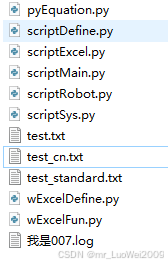
文章(一)中已对其中四个文件进行了说明和共享,需要时请在文章(一)中下载备用
为演示一个机器人可以不断的从外部得到要执行的命令(可以以脚本文本或脚本文件"投喂"),这里先定义一个scriptRobot类,用此类来管理具体执行中文命令脚本模块,此类采用多线程机制,可以随时接收外部传入的脚本文本列表或脚本文件,并将这些待执行的脚本文本列表或脚本文件加入队列中进行管理,按先进先出的方式去执行脚本,直到全部队列中的脚本都被执行完毕,再进入等待状态。此类可以继承定义各种针对不同专业完成不同功能的子类,如本例用于实现对excel文档自动化处理的功能,则可以定义scriptRobot的子类来实现功能,🍌好子类名scriptRobot_excel,用此类的实例化对象专门用于自动化处理excel文档.此模块scriptRobot.py代码如下:
python
# -*- coding: utf-8 -*-
"""scriptRobot.py:执行中文命令脚本来完成命令功能的模块"""
import threading
import time
import os
import tempfile
from queue import Queue
from typing import List, Union

from scriptExcel import *    #自定义用于解析和执行脚本命令(本例对应自动化处理excel专业命令类)的模块

class scriptRobot():
    """多线程处理要执行中文脚本文件或命令脚本文件,以队列形式后进先出方式对文件或命令腬本进行和执行,他是所的专业处理命令的父类"""
    def __init__(self,robotName='未知姓名'):
        self.robotName=robotName
        self.lstScripts = Queue()  # 使用队列来保存任务

        self.scriptObj = scriptExcel(self.robotName)   #定义具体解析和执行命令的对象
        self.running = True
        self.sleepTime = 0.1
        self.last_activity_time = time.time()
        self.lock = threading.Lock()
        self.temp_file_created = False  # 标记是否创建了临时文件

        # 任务完成事件
        self.all_tasks_completed = threading.Event()
        self.all_tasks_completed.set()  # 初始状态为已完成

        # 启动工作线程
        self.worker_thread = threading.Thread(target=self._worker_loop)
        self.worker_thread.daemon = True
        self.worker_thread.start()

    def appendScriptFile(self, fileName: str):
        """向队列中添加文件任务"""
        with self.lock:
            self.lstScripts.put(('file', fileName))
            self.last_activity_time = time.time()
            self.all_tasks_completed.clear()  # 有新任务,清除完成标志
            print(f"添加命令脚本文件任务: {fileName}")

    def appendScriptStrings(self, lstStrings: List[str]):
        """向队列中添加字符串列表任务"""
        with self.lock:
            self.lstScripts.put(('text', lstStrings))
            self.last_activity_time = time.time()
            self.all_tasks_completed.clear()  # 有新任务,清除完成标志
            print(f"添加命令脚本文本任务: {lstStrings}")

    def delTempFile(self,tmpFile="scrpitTemp.txt"):
        """删除临时文件"""
        temp_file_path = os.path.join(tempfile.gettempdir(), tmpFile)
        try:
            if os.path.exists(temp_file_path):
                os.remove(temp_file_path)
                self.temp_file_created = False
        except Exception as e:
            pass  # 静默处理错误

    def wait_for_completion(self, timeout=None):
        """等待所有任务完成"""
        return self.all_tasks_completed.wait(timeout)

    def _worker_loop(self):
        """工作线程主循环"""
        while self.running:
            time.sleep(self.sleepTime)
            try:
                # 检查working状态和队列
                if not self.scriptObj.working:
                    # 在开始新任务前,检查并删除临时文件
                    if self.temp_file_created:
                        self.delTempFile()

                    if not self.lstScripts.empty():
                        # 获取下一个任务
                        task_type, task_data = self.lstScripts.get()

                        # 根据任务类型执行相应方法
                        if task_type == 'file':
                            self.scriptObj.openScriptFile(task_data)
                            self.temp_file_created = False
                        else:  # 'text'
                            self.scriptObj.setScriptTexts(task_data)
                            self.temp_file_created = True

                        # 执行分析和运行
                        self.scriptObj.analyseAllCmds()
                        self.scriptObj.run()

                        # 等待run完成(直到working变为False)
                        while self.scriptObj.working and self.running:
                            time.sleep(0.05)

                        # 更新最后活动时间
                        with self.lock:
                            self.last_activity_time = time.time()
                    else:
                        # 队列为空且working为False,设置完成事件
                        if not self.all_tasks_completed.is_set():
                            self.all_tasks_completed.set()

                        time.sleep(0.5)
                else:
                    time.sleep(0.1)

            except Exception as e:
                time.sleep(1)

    def stop(self):
        """停止工作线程"""
        self.running = False
        self.worker_thread.join(timeout=5)

        if self.temp_file_created:
            self.delTempFile()


class scriptRobot_excel(scriptRobot):
    """多线程处理excel文档的机器人角色,继承自scriptRobot类"""
    def __init__(self,robotName='未知姓名'):
        super().__init__(robotName)
主模块scripyMain.py中只需实例化scriptRobot_excel类对象,robot_007 = scriptRobot_excel('我是007'),就可以用实例化对象robot_007来进行解析和执行中文脚本的工作了
对应主模块代码如下:
python
"""
scripyMain.py:用于测试中文脚本各模块的主模块文件
"""
import threading
import time
import os
import tempfile
from queue import Queue
from typing import List, Union

from scriptRobot import *   #自定义用于管理用于执行中文脚本命令的机器人角色模块(接收和投送脚本到相关类模块)
from scriptExcel import *   #自定义用于解析和执行脚本命令(本例对应自动化处理excel专业命令类)的模块


# 使用示例
def main():
    # 创建scriptRobot实例
    robot_007 = scriptRobot_excel('我是007')

    try:
        # 添加任务
        print("开始添加任务...")
        #加入要执行的脚本命令文件到队列
        robot_007.appendScriptFile("test.txt")
        #加入要执行的脚本命令文本列表
        robot_007.appendScriptStrings(["printf 加入脚本命令列表1", "pause 1"])
        robot_007.appendScriptStrings(["printf 加入脚本命令列表2", "pause 2"])
        #再次加入要执行的脚本命令文件到队列
        robot_007.appendScriptFile("test_cn.txt")
        robot_007.appendScriptStrings(["printf 加入脚本命令列表3", "pause 3",'显示对话框 信息,测式用脚本全部被执行完成,如完成进行主窗体的循环选择' ])

        print("\n所有任务已添加,等待处理完成...")
        print("(程序将在所有任务完成后循环等待30秒,询问是否退出)")
        print("输入 Y 退出程序,输入 N 重新开始30秒等待")
        print("-" * 50)

        # 等待所有任务完成
        robot_007.wait_for_completion()
        print("\n✓ 所有任务已完成!")

        # 主循环,除非用户输入Y,否则永不退出
        while True:
            # 开始30秒空闲计时
            idle_start_time = time.time()
            last_display_time = 0

            # 30秒等待循环
            while True:
                current_time = time.time()
                idle_duration = current_time - idle_start_time
                remaining_time = 30 - int(idle_duration)

                # 每5秒显示一次倒计时(但不要过于频繁)
                if remaining_time > 0 and int(idle_duration) > last_display_time and int(idle_duration) % 5 == 0:
                    print(f"等待用户操作... {remaining_time}秒后询问是否退出")
                    last_display_time = int(idle_duration)

                if idle_duration >= 30:
                    break

                time.sleep(0.5)

            # 30秒到了,清除屏幕上的其他内容
            print("\n" * 2)  # 打印空行,让提示更清晰

            # 询问用户
            try:
                response = input("你已30秒未向队列中加入文本或文件,是否退出程序?(Y/N): ").strip().upper()

                if response == 'Y':
                    print("正在退出程序...")
                    break  # 退出主循环
                elif response == 'N':
                    print("继续等待,重新开始30秒倒计时...")
                    print("-" * 50)
                    continue  # 重新开始30秒等待
                else:
                    print("输入无效,请输入 Y 或 N")
                    continue  # 重新开始30秒等待

            except EOFError:
                # 处理非交互环境
                print("\n非交互环境,程序将继续运行")
                time.sleep(5)
                continue

    except KeyboardInterrupt:
        print("\n用户中断程序")
    except Exception as e:
        print(f"程序异常: {e}")
    finally:
        robot_007.stop()
        print("程序已退出")

if __name__ == "__main__":
    main()
上面代码中连续对脚本执行对象加入了两个脚本文件和三组脚本文本串,robot_007 将会对这些脚本依次进行解析和按命令名称和参数进行处理,全部处理完毕后,主进入循环等待状态,每30秒会提醒一次无脚本命令可执行了,是否退出,对应robot_007执行的全部脚本内容会保存到一日志文件robot_007.log中。
下一篇文章(三)将对主算法模块进行说明和开源,敬请关注