学习一下websocket通信
效果图
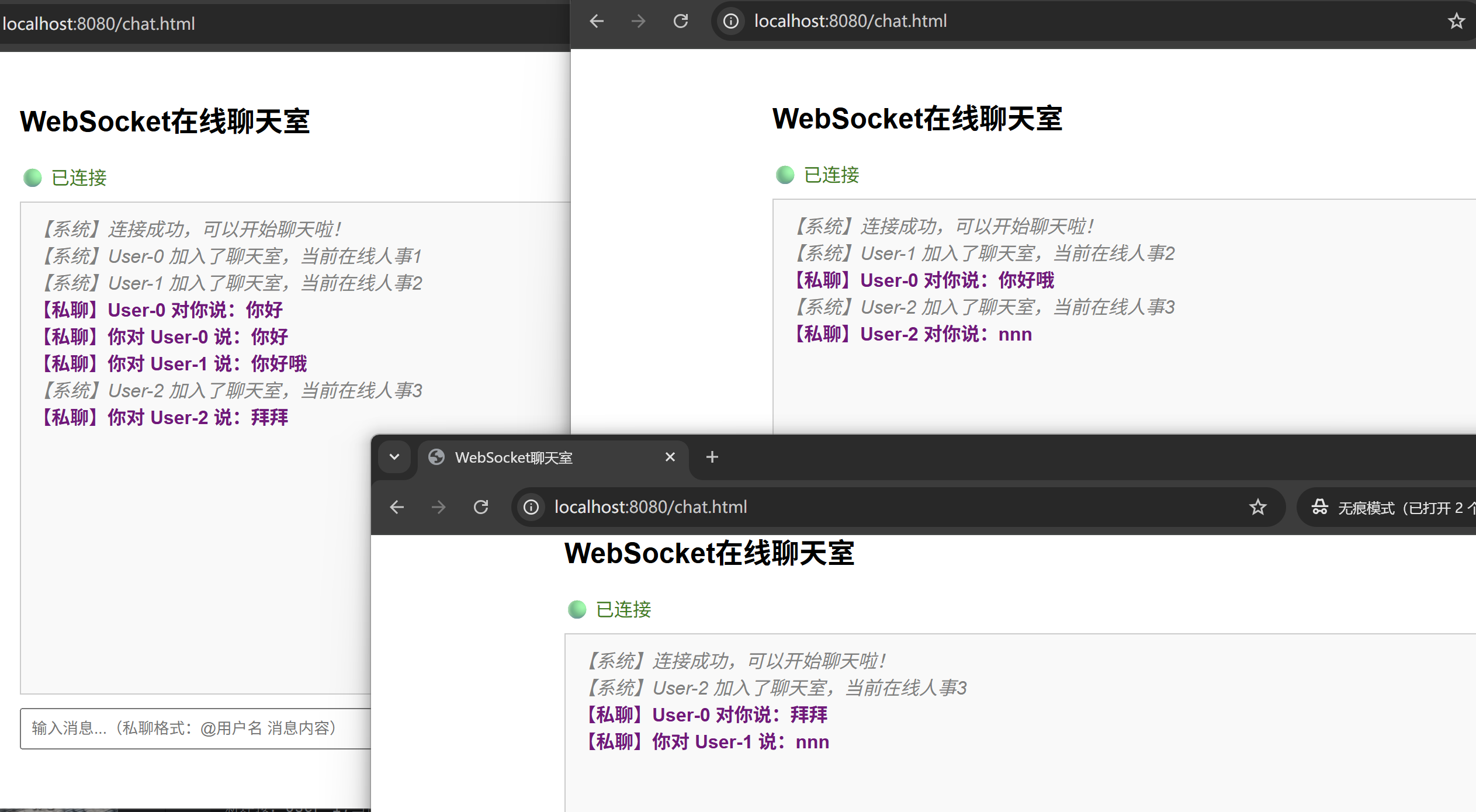
前端代码,在当前目录src\main\resources\static 创建chat.html
<!DOCTYPE` `html>`
`<html>`
`<head>`
    `<meta` `charset="UTF-8">`
    `<title>WebSocket聊天室</title>`
    `<style>`
        `body` `{` `font-family:` `Arial,` `sans-serif;` `max-width:` `800px;` `margin:` `0` `auto;` `padding:` `20px;` `}`
`        #messages` `{` `border:` `1px` `solid #ccc;` `height:` `400px;` `overflow-y:` `scroll;` `padding:` `10px;` `margin-bottom:` `10px;` `background: #f9f9f9;` `}`
        `.system` `{` `color:` `gray;` `font-style:` `italic;` `}`
        `.private` `{` `color:` `purple;` `font-weight:` `bold;` `}`
        `input` `{` `padding:` `8px;` `width:` `70%;` `margin-right:` `5px;` `}`
        `button` `{` `padding:` `8px` `15px;` `background: #007bff;` `color:` `white;` `border:` `none;` `cursor:` `pointer;` `}`
        `button:hover` `{` `background: #0056b3;` `}`
`        #status` `{` `color:` `green;` `margin-bottom:` `10px;` `}`
    `</style>`
`</head>`
`<body>`
`<h2>WebSocket在线聊天室</h2>`
`<div` `id="status">🟢 正在连接...</div>`
`<div` `id="messages"></div>`

`<div>`
    `<input` `type="text"` `id="messageInput"` `placeholder="输入消息...(私聊格式:@用户名 消息内容)"` `/>`
    `<button` `onclick="sendMessage()">发送</button>`
    `<button` `onclick="closeConnection()">断开连接</button>`
`</div>`

`<script>`
    `// 创建WebSocket连接`
    `const` `socket` `=` `new` `WebSocket('ws://localhost:8080/chat');`

    `// 获取DOM元素`
    `const` `messagesDiv` `=` `document.getElementById('messages');`
    `const` `statusDiv` `=` `document.getElementById('status');`
    `const` `messageInput` `=` `document.getElementById('messageInput');`

    `// 连接打开`
    `socket.onopen` `=` `function()` `{`
        `statusDiv.innerHTML` `=` `'🟢 已连接';`
        `appendMessage('【系统】连接成功,可以开始聊天啦!',` `'system');`
    `};`

    `// 收到消息`
    `socket.onmessage` `=` `function(event)` `{`
        `const` `message` `=` `event.data;`

        `// 根据消息内容判断类型(简单判断)`
        `if` `(message.includes('【系统】'))` `{`
            `appendMessage(message,` `'system');`
        `}` `else` `if` `(message.includes('【私聊】'))` `{`
            `appendMessage(message,` `'private');`
        `}` `else` `{`
            `appendMessage(message);`
        `}`
    `};`

    `// 连接关闭`
    `socket.onclose` `=` `function()` `{`
        `statusDiv.innerHTML` `=` `'🔴 已断开连接';`
        `appendMessage('【系统】连接已断开',` `'system');`
    `};`

    `// 连接错误`
    `socket.onerror` `=` `function(error)` `{`
        `console.error('WebSocket错误:',` `error);`
        `appendMessage('【系统】连接发生错误',` `'system');`
    `};`

    `// 发送消息`
    `function` `sendMessage()` `{`
        `const` `message` `=` `messageInput.value.trim();`
        `if` `(message` `===` `'')` `{`
            `alert('请输入消息');`
            `return;`
        `}`

        `if` `(socket.readyState` `===` `WebSocket.OPEN)` `{`
            `socket.send(message);`
            `messageInput.value` `=` `'';`
        `}` `else` `{`
            `alert('连接未建立或已断开');`
        `}`
    `}`

    `// 关闭连接`
    `function` `closeConnection()` `{`
        `socket.close();`
    `}`

    `// 添加消息到显示区域`
    `function` `appendMessage(message,` `type` `=` `'normal')` `{`
        `const` `msgElement` `=` `document.createElement('div');`
        `msgElement.textContent` `=` `message;`

        `if` `(type` `===` `'system')` `{`
            `msgElement.style.color` `=` `'gray';`
            `msgElement.style.fontStyle` `=` `'italic';`
        `}` `else` `if` `(type` `===` `'private')` `{`
            `msgElement.style.color` `=` `'purple';`
            `msgElement.style.fontWeight` `=` `'bold';`
        `}`

        `messagesDiv.appendChild(msgElement);`
        `// 自动滚动到底部`
        `messagesDiv.scrollTop` `=` `messagesDiv.scrollHeight;`
    `}`

    `// 回车发送`
    `messageInput.addEventListener('keypress',` `function(e)` `{`
        `if` `(e.key` `===` `'Enter')` `{`
            `sendMessage();`
        `}`
    `});`
`</script>`
`</body>`
`</html>`
`
后端使用springboot框架
首先添加maven依赖
 <parent>
        <groupId>org.springframework.boot</groupId>
        <artifactId>spring-boot-starter-parent</artifactId>
        <version>3.2.4</version> <!-- 或者用 2.7.18,看你需要哪个版本 -->
        <relativePath/> <!-- 从仓库查找 -->
    </parent>
    <dependencies>
        <dependency>
            <groupId>org.springframework.boot</groupId>
            <artifactId>spring-boot-starter-websocket</artifactId>
        </dependency>
        <dependency>
            <groupId>org.springframework.boot</groupId>
            <artifactId>spring-boot-starter-web</artifactId>
        </dependency>

    </dependencies>
添加完后,核心配置类
java
import org.springframework.context.annotation.Bean;
import org.springframework.context.annotation.Configuration;
import org.springframework.web.socket.server.standard.ServerEndpointExporter;

@Configuration
public class WebSocketConfig {

    @Bean
    public ServerEndpointExporter serverEndpointExporter(){
        return new ServerEndpointExporter();
    }
}
为什么需要这个配置,springboot默认不会扫描@ServerEndpoint注解,需要ServerEndpointExporter来注册他们
核心:websocket处理器
java
import jakarta.websocket.*;
import jakarta.websocket.server.ServerEndpoint;
import org.springframework.stereotype.Component;

import java.io.IOException;
import java.util.concurrent.ConcurrentHashMap;
import java.util.concurrent.CopyOnWriteArrayList;

@Component
@ServerEndpoint("/chat")
public class ChatWebSocketServer {

    private static final CopyOnWriteArrayList<ChatWebSocketServer> connections =
            new CopyOnWriteArrayList<>();

    private static final ConcurrentHashMap<String,ChatWebSocketServer> userMap  =
            new ConcurrentHashMap<>();

    private Session session;

    private String username;

    /**
     * 连接建立成功调用
     *
     */
    @OnOpen
    public void onOpen(Session session){
        this.session = session;
        this.username = "User-"+session.getId();
        connections.add(this);
        userMap.put(username,this);

        // 广播 某某加入了聊天室
        broadcaseMessage("【系统】"+username+" 加入了聊天室,当前在线人事"+connections.size());
        System.out.println("新连接:"+username+",当前在线:"+connections.size());
    }

    /**
     * 收到客户端的消息
     * @param message
     * @param session
     */
    @OnMessage
    public void onMessage(String message,Session session){

        System.out.println("来自 "+username+" 的消息:"+message);

        // 处理私聊格式 :@用名 消息内容
        if(message.startsWith("@")){
            int firstSpace = message.indexOf(" ");
            if(firstSpace > 1){
                String targetUser = message.substring(1,firstSpace);
                String privateMsg = message.substring(firstSpace+1);

                sendPrivateMsg(targetUser,"【私聊】"+username+" 对你说:"+privateMsg);
                sendMessage("【私聊】你对 "+targetUser+" 说:"+privateMsg);
                return ;

            }
        }

        // 默认群发
        broadcaseMessage(username+ " : "+message);
    }

    /**
     * 连接关闭
     */
    @OnClose
    public void onClose(){
        connections.remove(this);
        if(username!=null){
            userMap.remove(username);
            broadcaseMessage("【系统】"+username+" 离开了聊天室,剩余人数"+connections.size());

        }else{
            // 用户名为空的情况下只广播有人离开了
            broadcaseMessage("【系统】有用户离开了聊天室,剩余人数"+connections.size());
        }
        System.out.println(username!=null?username:"未知用户" + " 断开了连接,当前在线:"+connections.size());


    }

    /**
     * 发生错误时候
     */
    @OnError
    public void onError(Throwable error){
        System.out.println("websocket 发生错误"+error.getMessage());
    }

    /**
     * 发送消息给自己
     */
    private void sendMessage(String message){
        try{
            if(session != null && session.isOpen()){
                session.getBasicRemote().sendText(message);
            }
        }catch (IOException e){
            e.printStackTrace();
        }
    }

    /**
     * 发送私聊消息给指定用户
     */
    private void sendPrivateMsg(String targetUsername,String msg){
        ChatWebSocketServer target = userMap.get(targetUsername);
        if(target != null){
            target.sendMessage(msg);
        }else{
            sendMessage("【系统】用户"+targetUsername+" 不在线");
        }
    }

    /**
     * 广播
     */
    private static void broadcaseMessage(String message){
        for(ChatWebSocketServer client:connections){
            try{
                if(client.session!=null && client.session.isOpen()){
                    client.session.getBasicRemote().sendText(message);
                }
            }catch (IOException e){
                e.printStackTrace();
                // 发送失败就移除连接
                connections.remove(client);
                userMap.remove(client.username);
            }
        }
    }
}
CopyOnWriteArrayList 是读写安全的list,广播常用
ConcurrentHashMap 按照用户名查找会话,适合私聊场景
@ServerEndPoint 定义webSocket服务端点
@OnOpen,@OnClose,@OnMessage,@OnError生命周期事件
启动springboot项目,输入http://localhost:8080/chat.html
可以打开多个浏览器窗口模拟多个用户
普通消息是广播的形式,@用户名是使用私聊的方式