一、ChatClient VS ChatModel
ChatModel 和 ChatClient 是 Spring AI Alibaba 中两个核心的接口,它们服务于不同的开发需求。你可以把 ChatModel 看作是直接与AI模型对话的"基础电话",而 ChatClient 则是一个功能强大的"智能总机",能帮你处理更多复杂的沟通任务
二、两者对比
deepseek给出的对比:
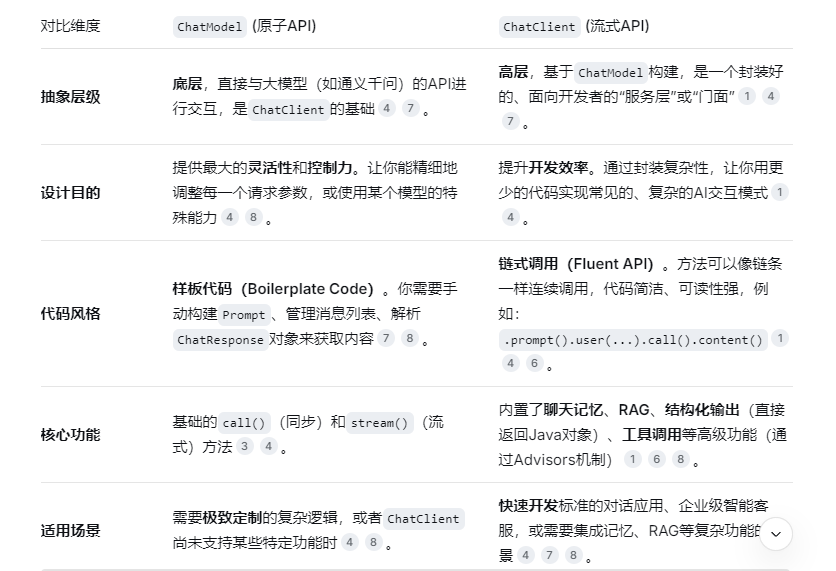
-
想快速实现一个功能完善、包含复杂逻辑的AI应用 (比如一个带记忆功能的客服机器人)。直接使用
ChatClient。它内置的Advisors机制可以让你像"搭积木"一样轻松添加对话历史管理(MessageChatMemoryAdvisor)或RAG检索(QuestionAnswerAdvisor)等功能。 -
需要精细控制模型参数或调用模型的某个特定功能 ?那就在需要的部分直接注入
ChatModel来获得最大的灵活性。
三、测试实例
3.1 拷贝demo2新建配置类
package com.wx.config;

import com.alibaba.cloud.ai.dashscope.api.DashScopeApi;
import org.springframework.ai.chat.client.ChatClient;
import org.springframework.ai.chat.model.ChatModel;
import org.springframework.context.annotation.Bean;
import org.springframework.context.annotation.Configuration;

/**
 * @Description
 * @author: wangxin
 * @date: 2026/3/11 22:11
 */
@Configuration
public class LLMConfig {


    @Bean
    public DashScopeApi dashScopeApi() {
        return DashScopeApi.builder().apiKey(System.getenv("aliQwen-api")).build();
    }

    @Bean
    public ChatClient chatClient(ChatModel dashscopeChatModel)
    {
        return ChatClient.builder(dashscopeChatModel).build();
    }

}
3.2 yml配置
server:
  port: 8003
  servlet:
    encoding:
      enabled: true
      force: true
      charset: utf-8

spring:
  application:
    name: demo3
  # ====ollama Config=============
  ai:
    dashscope:
      api-key: ${aliQwen-api}
3.3 controller
package com.wx.controller;

import com.alibaba.cloud.ai.dashscope.api.DashScopeApi;
import jakarta.annotation.Resource;
import org.springframework.ai.chat.client.ChatClient;
import org.springframework.ai.chat.model.ChatModel;
import org.springframework.beans.factory.annotation.Qualifier;
import org.springframework.web.bind.annotation.GetMapping;
import org.springframework.web.bind.annotation.RequestParam;
import org.springframework.web.bind.annotation.RestController;
import reactor.core.publisher.Flux;

/**
 * @Description
 * @author: wangxin
 * @date: 2026/3/7 20:42
 */
@RestController
public class ChatClientController {

    @Resource(name = "dashscopeChatModel")
    private ChatModel chatModel;

    @Resource
    private ChatClient chatClient;


    @GetMapping("/chatclient/dochat")
    public String doChat(@RequestParam(name = "msg",defaultValue = "你是谁") String msg)
    {
        String result = chatClient.prompt().user(msg).call().content();
        System.out.println("ChatClient响应:" + result);
        return result;
    }

    /**
     * http://localhost:8003/chatmodelv2/dochat
     * @param msg
     * @return
     */
    @GetMapping("/chatmodel/dochat")
    public String doChat2(@RequestParam(name = "msg",defaultValue = "你是谁") String msg)
    {
        String result = chatModel.call(msg);
        System.out.println("ChatModel响应:" + result);
        return result;
    }


}
3.4 测试
