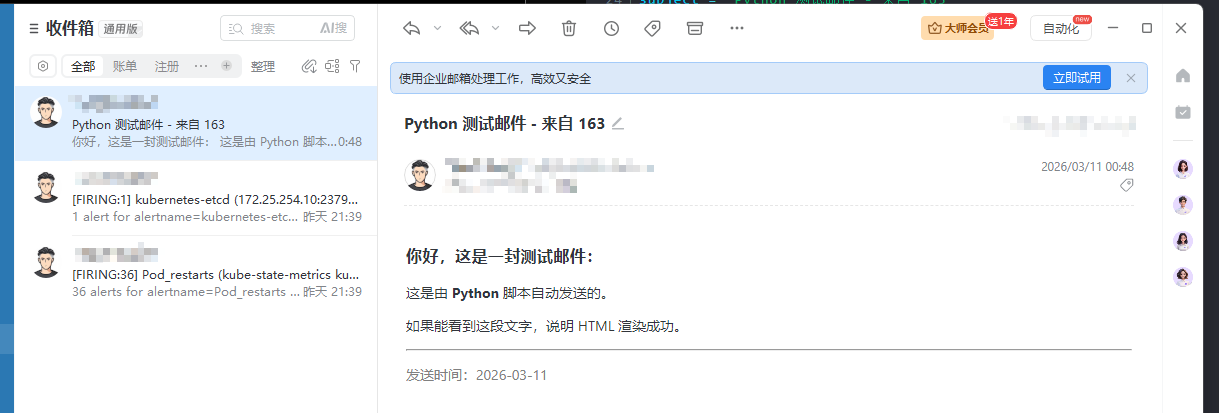
在Linux中测试自己邮箱是否可接收邮件?
bash
# 测试的是163邮箱
]# yum install -y python3	# 我是redhat系统

[root@k8s-master1 ~]# vim smtp-test.sh
#!/usr/bin/env python3
import smtplib
from email.mime.text import MIMEText
from email.mime.multipart import MIMEMultipart
from email.mime.base import MIMEBase
from email import encoders
from email.header import Header
import os

# ================= 配置区域 =================
# 发件人邮箱
sender_email = "xxxxx@163.com"
# 发件人授权码 (注意:不是登录密码!)
sender_auth_code = "xxxxx"

# 收件人邮箱 (可以是列表)
receiver_emails = ["xxxx@example.com"]
# 抄送人 (可选,不需要可留空)
cc_emails = []

# 邮件主题
subject = "Python 测试邮件 - 来自 163"

# 邮件正文 (支持 HTML)
html_content = """
<html>
<body>
    <h3>你好,这是一封测试邮件:</h3>
    <p>这是由 <b>Python</b> 脚本自动发送的。</p>
    <p>如果能看到这段文字,说明 HTML 渲染成功。</p>
    <hr>
    <p style="color: gray;">发送时间:2026-03-11</p>
</body>
</html>
"""

# 附件路径 (可选,如果没有附件可留空或设为 None)
# 示例:attachment_path = "/path/to/your/file.pdf"
attachment_path = None
# ===========================================

def send_email():
    # 1. 创建邮件对象
    msg = MIMEMultipart()
    msg['From'] = sender_email
    msg['To'] = ", ".join(receiver_emails)
    if cc_emails:
        msg['Cc'] = ", ".join(cc_emails)
    msg['Subject'] = Header(subject, 'utf-8')

    # 2. 添加正文 (HTML)
    # 如果只需要纯文本,使用 MIMEText(text, 'plain', 'utf-8')
    msg.attach(MIMEText(html_content, 'html', 'utf-8'))

    # 3. 添加附件 (如果有)
    if attachment_path and os.path.exists(attachment_path):
        try:
            with open(attachment_path, "rb") as f:
                part = MIMEBase('application', 'octet-stream')
                part.set_payload(f.read())

            encoders.encode_base64(part)
            filename = os.path.basename(attachment_path)
            part.add_header('Content-Disposition', f"attachment; filename= {filename}")
            msg.attach(part)
            print(f"✓ 附件已添加: {filename}")
        except Exception as e:
            print(f"✗ 添加附件失败: {e}")
            return

    # 4. 合并所有收件人列表 (发送给 To + Cc)
    all_receivers = receiver_emails + cc_emails

    # 5. 连接 SMTP 服务器并发送
    # 163 的 SMTP 服务器地址
    smtp_server = "smtp.163.com"
    smtp_port = 465  # SSL 端口通常是 465, 明文/STARTTLS 是 25 或 587

    try:
        print(f"正在连接 {smtp_server}:{smtp_port} ...")
        # 使用 SSL 连接 (推荐)
        server = smtplib.SMTP_SSL(smtp_server, smtp_port)
        server.login(sender_email, sender_auth_code)

        print("登录成功,正在发送...")
        server.sendmail(sender_email, all_receivers, msg.as_string())

        print("✓ 邮件发送成功!")

    except smtplib.SMTPAuthenticationError:
        print("✗ 认证失败:请检查邮箱账号和【授权码】是否正确。")
    except smtplib.SMTPConnectError:
        print("✗ 连接失败:请检查网络连接或防火墙是否拦截了 465 端口。")
    except Exception as e:
        print(f"✗ 发送过程中发生错误: {e}")
    finally:
        try:
            server.quit()
        except:
            pass

if __name__ == "__main__":
    # 替换配置区域的变量后运行
    send_email()

[root@k8s-master1 ~]# chmod +x smtp-test.sh
[root@k8s-master1 ~]# ./smtp-test.sh
正在连接 smtp.163.com:465 ...
登录成功,正在发送...
✓ 邮件发送成功!