本文属于【Azure 架构师学习笔记】系列。
本文属于【Azure AI】系列。
接上文 【Azure 架构师学习笔记 】- Azure AI(13)-Azure OpenAI(4)-Azure OpenAI 提示工程进阶技巧
前言
本文聚焦职场高频的文本处理痛点(会议纪要总结、需求文档信息提取、批量数据整理等),基于 Azure OpenAI 打造一款纯单文件 Python 智能文本处理工具。工具延续前序实操掌握的 OpenAI 基础调用、提示工程、费用监控核心能力,从最简单的 TXT 格式入手,逐步扩展支持 Word、Excel、PDF 四大职场主流格式,全程单文件运行、无复杂依赖,既能快速上手,又能直接落地日常工作场景,实现文本处理效率翻倍。
一、环境准备(前置条件)
基础环境:已安装 Python 3.8+,确认环境可用;
依赖安装:执行以下命令安装所需库(一行完成):pip install openai python-docx openpyxl PyPDF2 --upgrade
- openai:Azure OpenAI 核心调用库;
- python-docx:处理 Word(.docx)文件;
- openpyxl:处理 Excel(.xlsx)文件;
- PyPDF2:处理 PDF 文件;
配置准备:已获取 Azure OpenAI 的 azure_endpoint、api_key、DEPLOYMENT_NAME。
实操
替换你的实际配置,然后可以直接运行下面代码:
python
from openai import AzureOpenAI
import os
from docx import Document
import openpyxl
import csv
import PyPDF2

# ===================== 基础配置(替换为你的信息) =====================
client = AzureOpenAI(
    azure_endpoint="",  # 你的 Endpoint
    api_key="",# 你的 Key
    api_version=""
)
DEPLOYMENT_NAME = ""  # 从Azure AI Foundry复制的部署名


# ===================== 核心文本处理函数(复用提示工程+费用监控) =====================
def process_text(text, task_type="总结"):
    """
    核心处理逻辑:支持3种职场高频任务
    :param text: 待处理文本
    :param task_type: 处理类型(总结/提取关键信息/格式标准化)
    :return: 处理结果 + 单次调用费用
    """
    # 角色绑定+场景化提示词(贴合职场需求)
    system_prompt = {
        "总结": "你是专业的职场文档总结助手,需简洁总结文本核心内容,控制在200字内,突出关键结论、行动项和责任人,语言正式且简洁。",
        "提取关键信息": "你是职场信息提取专家,从文本中提取「核心需求、责任人、截止时间、风险点、决策结果」5类关键信息,无则标注「无」,分点清晰输出。",
        "格式标准化": "你是文档格式整理助手,将杂乱的工作文本整理为「标题+核心内容+行动项+备注」的结构化格式,逻辑清晰、符合职场文档规范。"
    }

    try:
        response = client.chat.completions.create(
            model=DEPLOYMENT_NAME,
            messages=[
                {"role": "system", "content": system_prompt[task_type]},
                {"role": "user", "content": f"请按职场标准处理以下文本({task_type}):\n{text}"}
            ],
            temperature=0.2  # 降低随机性,保证输出稳定
        )

        # 费用计算(精准监控,避免超支)
        prompt_tokens = response.usage.prompt_tokens
        completion_tokens = response.usage.completion_tokens
        cost = (prompt_tokens / 1000 * 0.00015) + (completion_tokens / 1000 * 0.0006)

        return response.choices[0].message.content.strip(), round(cost, 6)
    except Exception as e:
        return f"处理失败:{str(e)}", 0

# ===================== 各格式文件处理函数 =====================
def process_txt(file_path, task_type="总结"):
    """处理TXT文件:批量处理每行文本,适配零散文本整理"""
    if not os.path.exists(file_path):
        return "文件不存在,请检查路径", 0

    total_cost = 0
    results = []
    with open(file_path, "r", encoding="utf-8") as f:
        lines = [line.strip() for line in f.readlines() if line.strip()]

    for idx, line in enumerate(lines):
        print(f"\n正在处理TXT第{idx+1}条文本...")
        result, cost = process_text(line, task_type)
        total_cost += cost
        results.append(f"【TXT第{idx+1}条】\n处理结果:{result}\n单次费用:${cost}\n")

    summary = f"\n===== TXT处理完成 =====\n共处理{len(results)}条有效文本,总费用:${total_cost:.6f}\n"
    return "\n".join(results + [summary]), total_cost

def process_word(file_path, task_type="总结"):
    """处理Word(.docx)文件:读取全文档文本,适配完整职场文档"""
    if not os.path.exists(file_path) or not file_path.endswith(".docx"):
        return "文件不存在或非.docx格式", 0

    try:
        doc = Document(file_path)
        # 读取所有段落,过滤空行
        full_text = "\n".join([para.text.strip() for para in doc.paragraphs if para.text.strip()])
        if not full_text:
            return "Word文档无有效文本内容", 0

        print("\n正在处理Word文档(合并全文)...")
        result, cost = process_text(full_text, task_type)
        summary = f"\n===== Word处理完成 =====\n文档路径:{file_path}\n处理结果:\n{result}\n总费用:${cost:.6f}\n"
        return summary, cost
    except Exception as e:
        return f"Word处理失败:{str(e)}", 0

def process_excel(file_path, sheet_name="Sheet1", col_index=0, task_type="总结"):
    """处理Excel(.xlsx)文件:按列批量处理,适配表格型数据"""
    if not os.path.exists(file_path) or not file_path.endswith(".xlsx"):
        return "文件不存在或非.xlsx格式", 0

    try:
        wb = openpyxl.load_workbook(file_path)
        ws = wb[sheet_name] if sheet_name in wb.sheetnames else wb.active
        total_cost = 0
        results = []

        # 遍历指定列(跳过表头,从第2行开始)
        for row_idx, row in enumerate(ws.iter_rows(min_row=2, min_col=col_index+1, max_col=col_index+1, values_only=True)):
            cell_text = row[0]
            if not cell_text or not isinstance(cell_text, str):
                continue

            print(f"\n正在处理Excel第{row_idx+2}行文本...")
            result, cost = process_text(str(cell_text), task_type)
            total_cost += cost
            results.append(f"【Excel第{row_idx+2}行】\n处理结果:{result}\n单次费用:${cost}\n")

        wb.close()
        summary = f"\n===== Excel处理完成 =====\n共处理{len(results)}行有效文本,总费用:${total_cost:.6f}\n"
        return "\n".join(results + [summary]), total_cost
    except Exception as e:
        return f"Excel处理失败:{str(e)}", 0

def process_pdf(file_path, task_type="总结"):
    """处理PDF文件:读取所有页面文本,适配正式报告/合同类文档"""
    if not os.path.exists(file_path) or not file_path.endswith(".pdf"):
        return "文件不存在或非.pdf格式", 0

    try:
        with open(file_path, "rb") as f:
            pdf_reader = PyPDF2.PdfReader(f)
            # 读取所有页面文本
            full_text = ""
            for page_num in range(len(pdf_reader.pages)):
                page = pdf_reader.pages[page_num]
                page_text = page.extract_text()
                if page_text:
                    full_text += page_text.strip() + "\n"

        if not full_text:
            return "PDF文档无可提取的文本(可能是图片型PDF)", 0

        print("\n正在处理PDF文档(合并全页文本)...")
        result, cost = process_text(full_text, task_type)
        summary = f"\n===== PDF处理完成 =====\n文档路径:{file_path}\n处理结果:\n{result}\n总费用:${cost:.6f}\n"
        return summary, cost
    except Exception as e:
        return f"PDF处理失败:{str(e)}", 0

# ===================== 主程序(交互式操作,新手友好) =====================
if __name__ == "__main__":
    print("===== OpenAI 职场文本处理小工具(多格式版)=====\n")
    print("支持格式:1.TXT  2.Word(.docx)  3.Excel(.xlsx)  4.PDF")
    format_choice = input("请选择待处理文件格式(输入1/2/3/4):")

    # 选择处理类型
    task_type = input("\n请选择处理类型(总结/提取关键信息/格式标准化):")
    task_type = task_type if task_type in ["总结", "提取关键信息", "格式标准化"] else "总结"
    print(f"已选定处理类型:{task_type}\n")

    # 按格式执行处理逻辑
    if format_choice == "1":
        file_path = input("请输入TXT文件完整路径(如:C:\\Users\\huang\\Desktop\\文本.txt):")
        result, _ = process_txt(file_path, task_type)
    elif format_choice == "2":
        file_path = input("请输入Word文件完整路径(如:C:\\Users\\huang\\Desktop\\会议纪要.docx):")
        result, _ = process_word(file_path, task_type)
    elif format_choice == "3":
        file_path = input("请输入Excel文件完整路径(如:C:\\Users\\huang\\Desktop\\需求清单.xlsx):")
        sheet_name = input("请输入工作表名称(默认Sheet1):") or "Sheet1"
        col_index = input("请输入待处理列索引(从0开始,默认0):")
        col_index = int(col_index) if col_index.isdigit() else 0
        result, _ = process_excel(file_path, sheet_name, col_index, task_type)
    elif format_choice == "4":
        file_path = input("请输入PDF文件完整路径(如:C:\\Users\\huang\\Desktop\\项目报告.pdf):")
        result, _ = process_pdf(file_path, task_type)
    else:
        result = "输入错误,程序退出"

    # 输出最终结果
    print("\n===================== 处理结果 =====================")
    print(result)
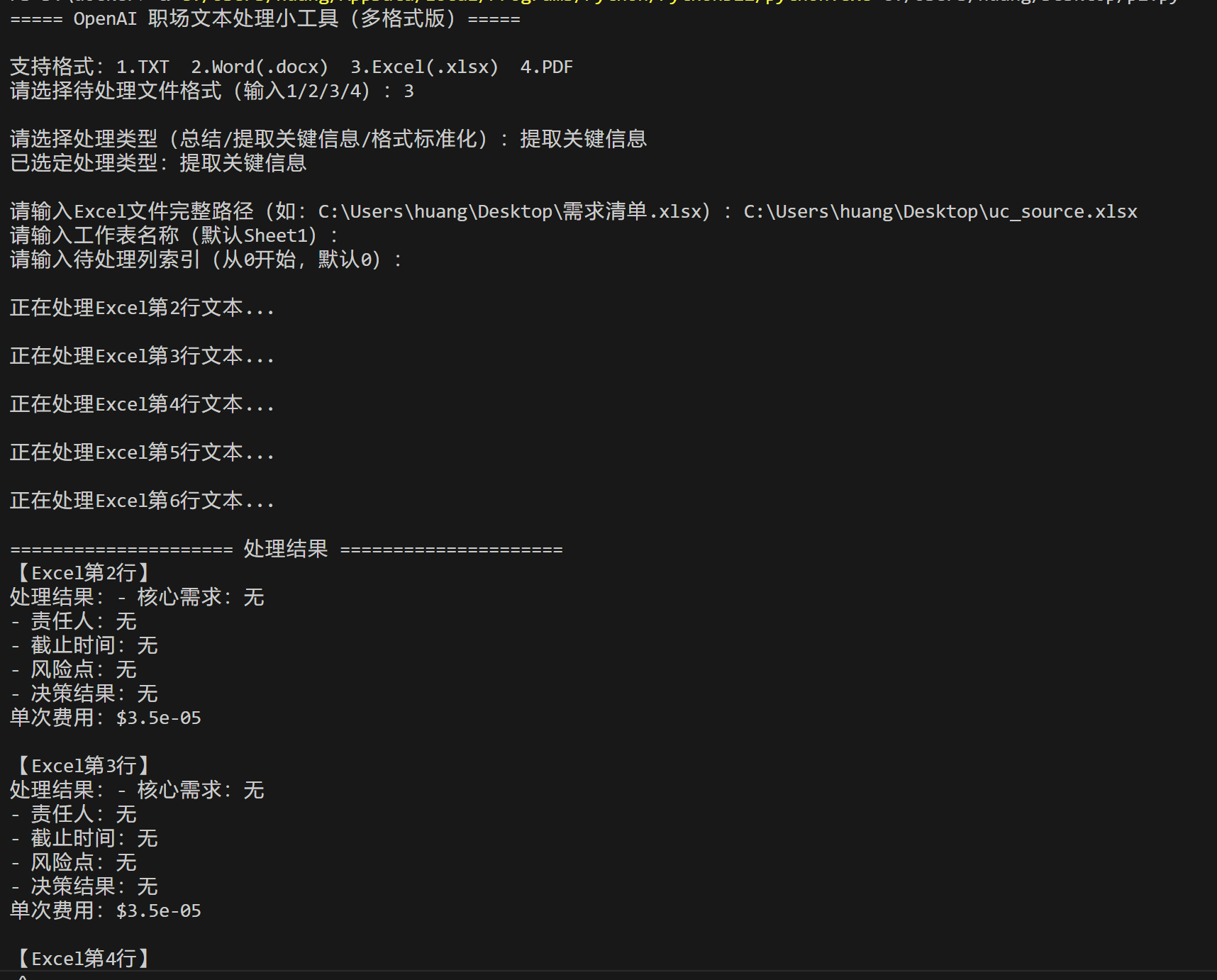
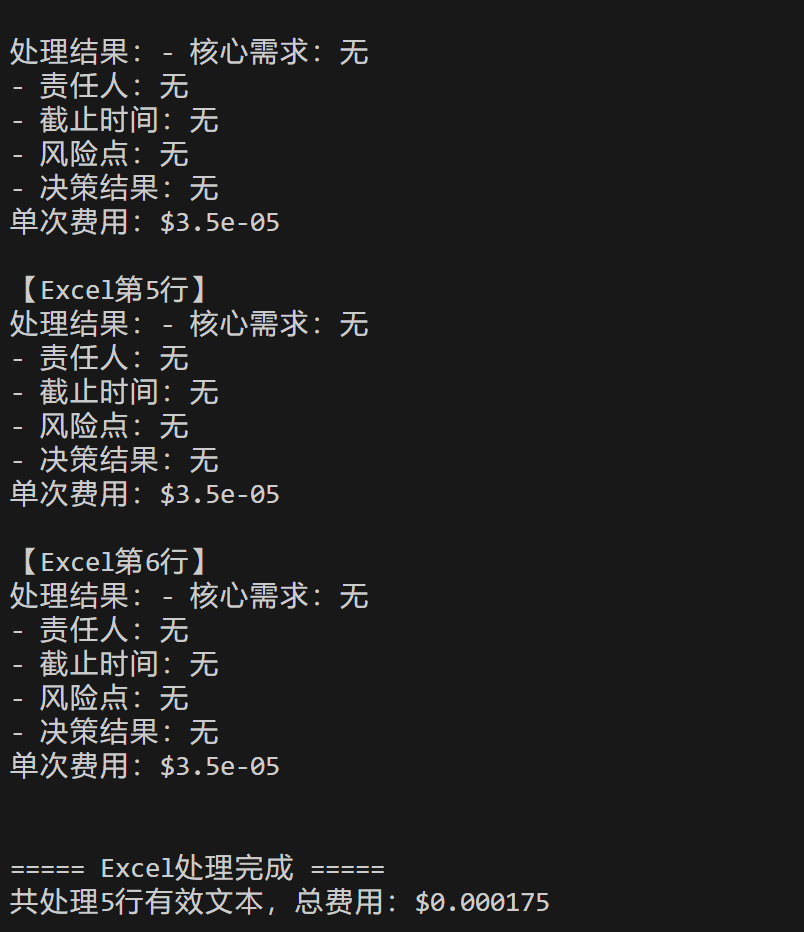
然后下面是PDF, excel的演示:
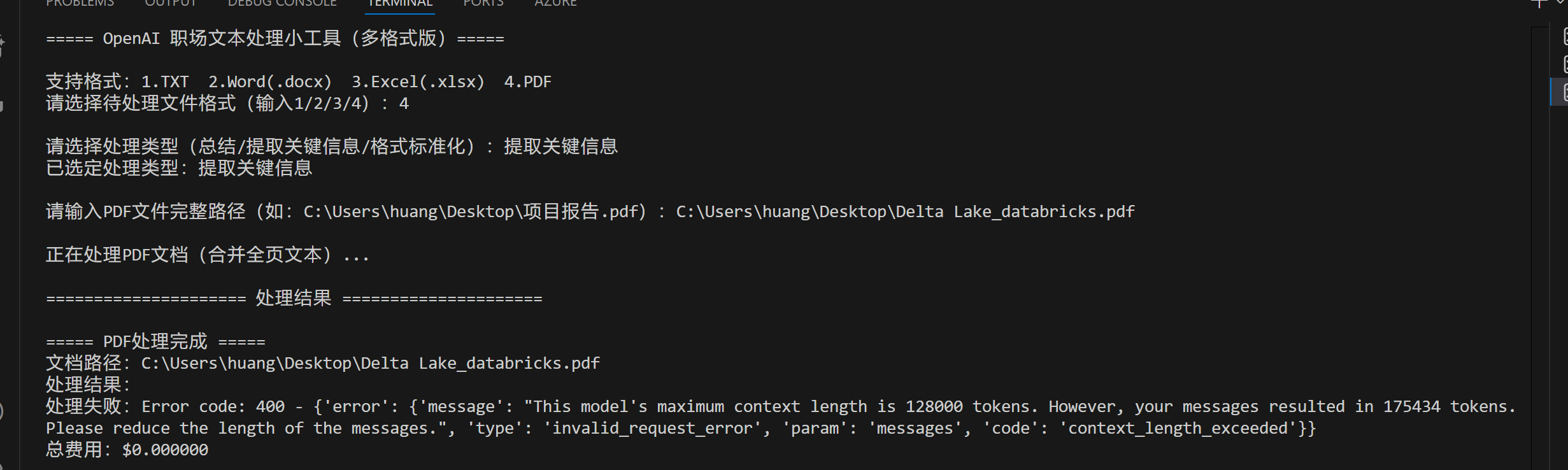
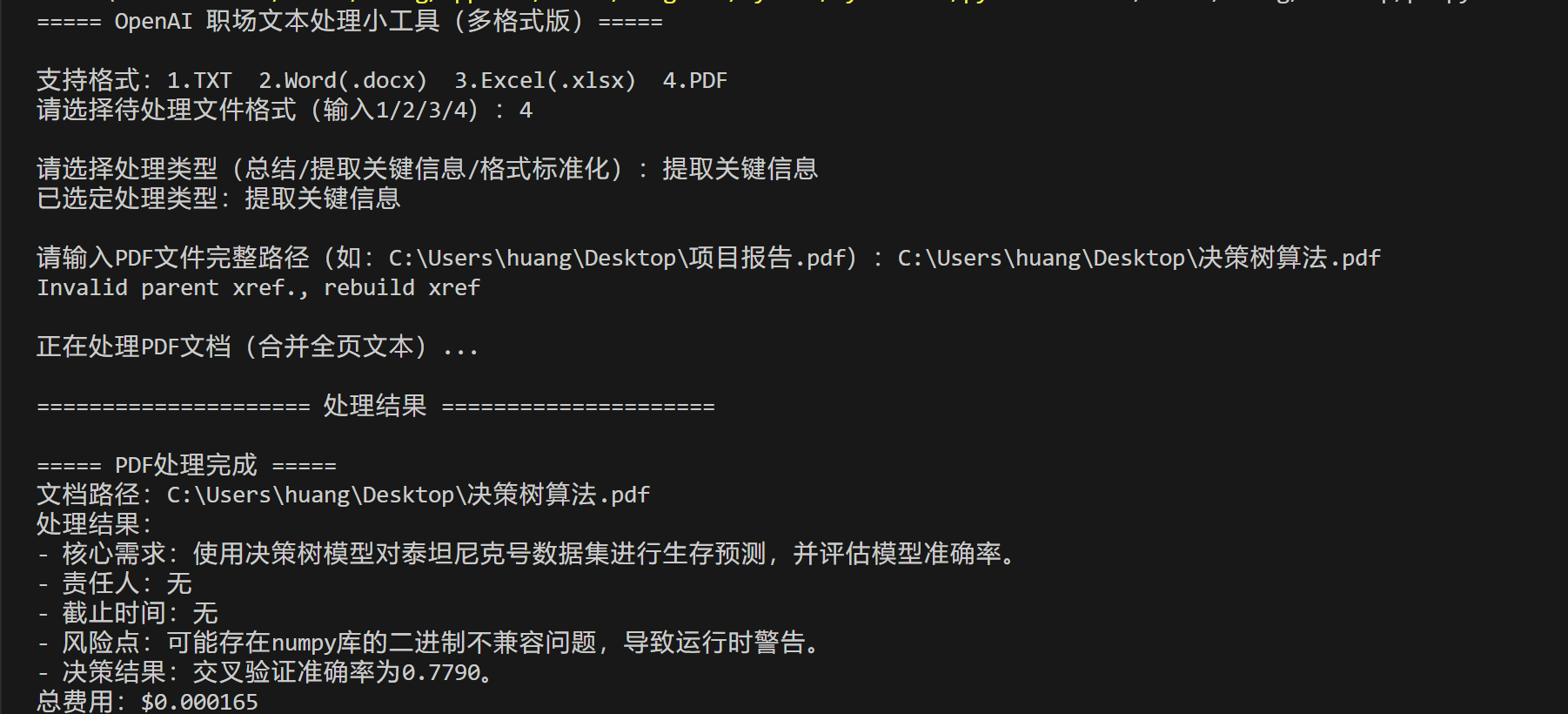
Excel示例

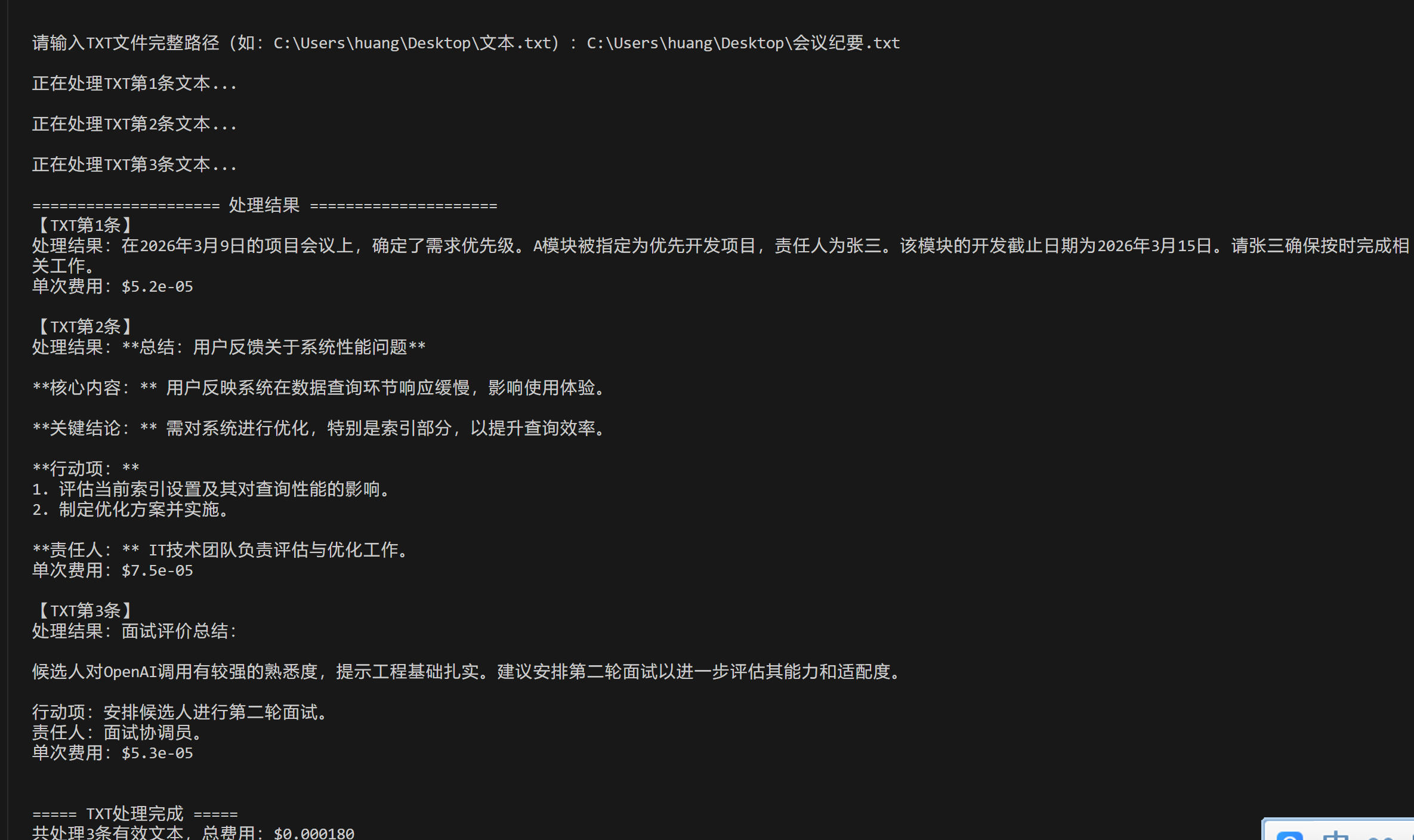
txt
测试文本:
2026.03.09项目会议:确定需求优先级,A模块优先开发,责任人张三,截止3月15日。
用户反馈:系统响应慢,主要出现在数据查询环节,建议优化索引。
面试评价:候选人熟悉OpenAI调用,提示工程基础较好,可安排二面。
结果
代码核心结构简介
核心结构(4 大模块)
- 基础配置模块:仅需替换 Azure OpenAI 的endpoint、api_key、部署名,无额外复杂配置;
- 核心处理模块:process_text函数封装提示工程(角色绑定 + 场景化提示词)和费用计算,支持 3 种职场高频处理类型,输出结果 + 单次费用;
- 多格式适配模块:4 个专属函数(process_txt/word/excel/pdf)分别处理对应格式文件,适配不同职场文档场景
- 交互模块:命令行交互式操作,新手只需按提示选择格式、输入路径,无需懂代码逻辑。
落地价值延伸
- 效率提升:替代 "手动阅读 - 整理 - 总结" 的重复工作,100 条文本处理仅需 1 分钟,远超人工效率;
- 成本可控:全程监控费用,避免 API 调用超支,适合企业 / 团队批量使用;
- 标准化输出:统一文本处理格式,避免不同人整理的文档风格不一致;
- 可复用性:工具可封装为团队内部小工具,配置好通用提示词后,新人也能快速上手。
总结
本工具以单文件 Python 为核心,从基础 TXT 格式到复杂的 PDF 格式,覆盖职场文本处理全场景,既复用了前面掌握的 OpenAI 核心能力,又直接落地日常工作痛点。无需复杂开发,仅需简单配置和操作,就能实现文本处理的智能化、批量化,是职场提效的轻量化实用工具。后续可根据自身工作场景进一步优化功能,或扩展支持更多格式(如 CSV、Markdown),最大化发挥 OpenAI 在文本处理中的价值。