从 gltf 文件中提取顶点和面索引,这样我就能把它们作为碰撞网格输入物理引擎。大多数 gltf 文件都能正常工作,但有些文件就不行了。调试时我重建了一个新的网格,这样问题就显现出来了。
以下是要重现的代码:
<!DOCTYPE html>
<html lang="en">

<head>
    <meta charset="UTF-8">
    <title>Debug Mesh Reconstruction</title>
    <script type="importmap">
{
  "imports": {
    "three": "https://cdn.jsdelivr.net/npm/three@v0.183.0/build/three.module.js",
    "three/addons/": "https://cdn.jsdelivr.net/npm/three@v0.183.0/examples/jsm/"
  }
}
</script>
</head>

<body style="margin:0; overflow:hidden;">
    <script type="module">
        import * as THREE from 'three';
        import { OrbitControls } from 'three/addons/controls/OrbitControls.js';
        import { GLTFLoader } from 'three/addons/loaders/GLTFLoader.js';

        const scene = new THREE.Scene();

        const camera = new THREE.PerspectiveCamera(60, innerWidth / innerHeight, 0.1, 1000);
        camera.position.set(2, 2, 2);

        const renderer = new THREE.WebGLRenderer();
        renderer.setSize(innerWidth, innerHeight);
        document.body.appendChild(renderer.domElement);

        const controls = new OrbitControls(camera, renderer.domElement);

        const loader = new GLTFLoader();
        loader.load('Menger Sponge.glb', gltf => {
            const original = gltf.scene;
            scene.add(original);

            const originalData = [];

            original.updateWorldMatrix(true, true);
            original.traverse(child => {
                if (!child.isMesh) return;

                child.material = new THREE.MeshNormalMaterial()

                const geom = child.geometry;
                const posAttr = geom.attributes.position;
                const indexAttr = geom.index;

                const worldMatrix = child.matrixWorld;
                const v = new THREE.Vector3();

                const vertices = new Float32Array(posAttr.count * 3);
                for (let i = 0; i < posAttr.count; i++) {
                    v.fromBufferAttribute(posAttr, i).applyMatrix4(worldMatrix);
                    vertices[i * 3 + 0] = v.x;
                    vertices[i * 3 + 1] = v.y;
                    vertices[i * 3 + 2] = v.z;
                }
                const faces = new Uint16Array(indexAttr.array);

                originalData.push({ vertices, faces });
            });

            const reconstructed = new THREE.Group();
            for (const data of originalData) {
                const geometry = new THREE.BufferGeometry();
                geometry.setAttribute('position', new THREE.BufferAttribute(data.vertices, 3));
                geometry.setIndex(new THREE.BufferAttribute(data.faces, 1));
                geometry.computeVertexNormals();

                const mesh = new THREE.Mesh(geometry, new THREE.MeshNormalMaterial());
                reconstructed.add(mesh);
            }
            scene.add(reconstructed);
            reconstructed.position.x = 3
        });

        function animate() {
            requestAnimationFrame(animate);
            controls.update();
            renderer.render(scene, camera);
        }
        animate();
    </script>
</body>

</html>
具体情况如下:
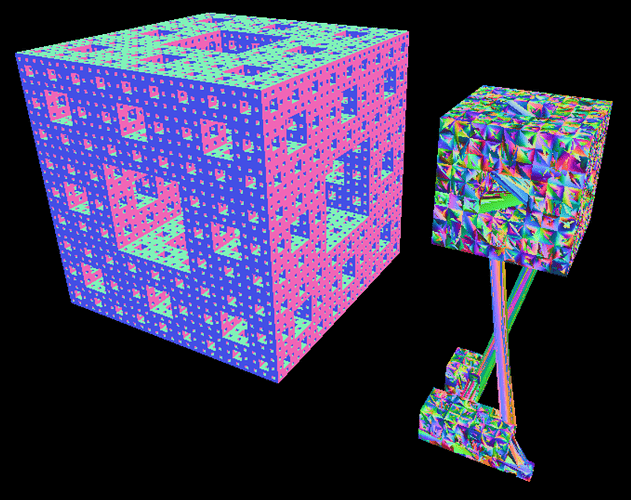
左边是原件,右边是重建版。