爬虫阶段三实战练习题二:使用 Selenium 模拟爬取拉勾网职位表
-
-
- 目标
- [分析 Ajax 接口(首选)](#分析 Ajax 接口(首选))
- 结果展示
- 调试好的代码
- 浏览器和抓取的页面数据对比
- 总结和复盘
-
- [🔍 为什么找不到 `item__10RTO`?](#🔍 为什么找不到
item__10RTO?) - [✅ 解决方案:使用更稳定的定位方式](#✅ 解决方案:使用更稳定的定位方式)
- [🧪 调试步骤:先确认页面到底有没有 `item__10RTO`](#🧪 调试步骤:先确认页面到底有没有
item__10RTO) - [💡 长期建议:放弃哈希类名,拥抱稳定结构](#💡 长期建议:放弃哈希类名,拥抱稳定结构)
- [🚀 终极方案:直接调用 Ajax 接口](#🚀 终极方案:直接调用 Ajax 接口)
- [🔍 为什么找不到 `item__10RTO`?](#🔍 为什么找不到
-
目标
- 爬取拉勾网 Python 职位信息(职位名称、公司、薪资、地点、经验要求)
- 要求:先尝试分析 Ajax 接口,若失败则用 Selenium 模拟滚动加载
分析 Ajax 接口(首选)
- 打开拉勾网 Python 职位页面:
https://www.lagou.com/zhaopin/Python/ - 打开开发者工具 Network → XHR,刷新页面,并向下滚动加载更多。
- 观察请求,可能会发现
https://www.lagou.com/jobs/positionAjax.json或类似的接口。 - 查看请求参数,可能有
city、needAddtionalResult、isSchoolJob、pageNo、pageSize等。 - 拉勾网的反爬较强,需要设置请求头,尤其是
Referer和Cookie,且参数可能包含加密的sign或token。 - 如果参数简单且没有加密,可以直接模拟。
结果展示
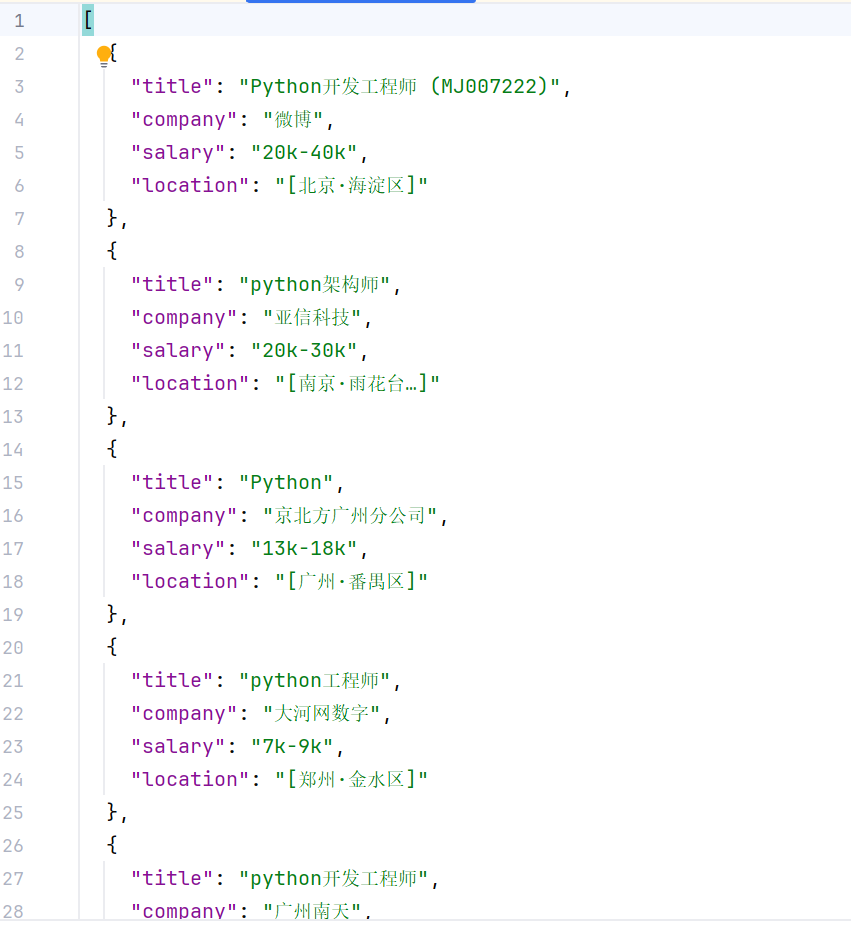
调试好的代码
python
from selenium import webdriver
from selenium.webdriver.common.by import By
from selenium.webdriver.support.ui import WebDriverWait
from selenium.webdriver.support import expected_conditions as EC
from selenium.webdriver.chrome.service import Service
from selenium.webdriver import ActionChains
import time
import json
import re

# 指定刚才解压的 chromedriver.exe 的完整路径
path = r'D:\Program Files (x86)\chromedriver\chromedriver-win64\chromedriver.exe'  # 请根据你的实际存放位置修改
service = Service(executable_path=path)


# 配置浏览器选项,尝试绕过检测
options = webdriver.ChromeOptions()
options.add_argument('--disable-blink-features=AutomationControlled')
options.add_experimental_option('excludeSwitches', ['enable-automation'])
options.add_experimental_option('useAutomationExtension', False)

# 启动浏览器
driver = webdriver.Chrome(options=options)
driver.execute_script("Object.defineProperty(navigator, 'webdriver', {get: () => undefined})")

# 打开拉勾网 Python 职位页
driver.get('https://www.lagou.com/zhaopin/Python/')


# --- 第一步:定位滑块元素 ---
# 注意:滑块的元素可能会变化,常见的有以下几种
# 等待滑块按钮出现(通常滑块是动态加载的)
slider = WebDriverWait(driver, 10).until(
    EC.presence_of_element_located((By.CLASS_NAME, "btn_slide"))
)

action = ActionChains(driver)
action.click_and_hold(slider).perform()
time.sleep(0.5)

# 尝试向右拖动 300 像素(可以适当加大,比如 400)
action.move_by_offset(300, 0).perform()
time.sleep(0.5)

action.release().perform()

# 等待职位列表加载
wait = WebDriverWait(driver, 2000)


print("等到之前")
wait.until(EC.presence_of_element_located((By.CLASS_NAME, 'item_con_list')))
print("等到之后")


# 模拟滚动加载,获取更多数据
# for i in range(5):  # 滚动5次
#     driver.execute_script('window.scrollTo(0, document.body.scrollHeight);')
#     time.sleep(2)  # 等待新数据加载

# 提取所有职位项
job_items = driver.find_elements(By.CLASS_NAME, 'con_list_item')
print(job_items)

results = []

for item in job_items:
    try:
        # 职位
        title = item.get_attribute("data-positionname")
        print(title)
        # 公司
        company = item.get_attribute("data-company")
        print(company)
        # 薪资
        salary = item.get_attribute("data-salary")
        print(salary)
        # 地点
        location = item.find_element(By.CLASS_NAME, 'add').text

        # 可能还有其他字段
        results.append({
            'title': title,
            'company': company,
            'salary': salary,
            'location': location
        })
    except:
        continue


driver.quit()

# 保存
with open('lagou_jobs.json', 'w', encoding='utf-8') as f:
    json.dump(results, f, ensure_ascii=False, indent=2)

print(f'共爬取 {len(results)} 条职位信息')
浏览器和抓取的页面数据对比
html
//浏览器看到的页面代码
<div class="item__10RTO">
    <div class="item-top__1Z3Zo">
        <div class="position__21iOS"><span style=""><div class="position__21iOS"><div class="p-top__1F7CL"><a
                id="openWinPostion">Python开发工程师 (MJ007222)[北京·海淀区]</a></div><div class="p-bom__JlNur"><span
                class="money__3Lkgq">20k-40k</span>经验1-3年 / 本科</div></div></span></div>
        <div class="company__2EsC8">
            <div class="company-name__2-SjF"><a>微博</a></div>
            <div class="industry__1HBkr">社交媒体 / 上市公司 / 2000人以上</div>
        </div>
        <div class="com-logo__1QOwC"><img
                src="https://www.lgstatic.com/thumbnail_120x120/image1/M00/00/0D/CgYXBlTUWCCAdkhOAABNgyvZQag818.jpg"
                alt="微博"></div>
    </div>
    <div class="item-bom__cTJhu">
        <div class="ir___QwEG">
            <span>数学/统计学相关专业</span><span>社交平台</span><span>社交媒体</span><span>PHP</span><span>计算机相关专业</span>
        </div>
        <div class="il__3lk85">"核心岗位"</div>
    </div>
</div>

//抓取到的页面代码
<li class="con_list_item default_list" data-index="0" data-positionid="12196627"
    data-salary="20k-40k" data-company="微博" data-positionname="Python开发工程师 (MJ007222)"
    data-companyid="5832" data-hrid="5054402" data-adword="0">
    <span class="top_icon direct_recruitment"></span>
    <span class="top_icon school_recruitment"></span>
    <div class="list_item_top">
        <div class="position">
            <div class="p_top">
                <a class="position_link"
                   href="https://www.lagou.com/wn/jobs/12196627.html?show=c4225b1eca74480eb3a28219f055f3ff"
                   target="_blank" data-index="0" data-lg-tj-id="8E00" data-lg-tj-no="
0101
" data-lg-tj-cid="12196627" data-lg-tj-abt="dm-csearch-personalPositionLayeredStrategyNew|0"
                   data-lg-webtj-_show_id="c4225b1eca74480eb3a28219f055f3ff"
                   data-lg-webtj-_search_type="csearch" data-lg-webtj-_content_type="jd">
                    <h3>Python开发工程师 (MJ007222)</h3>
                    <span class="add">[<em>北京·海淀区</em>]</span>
                </a>
                <span class="format-time">15:13发布</span>
            </div>
            <div class="p_bot">
                <div class="li_b_l">
                    <span class="money">20k-40k</span>
                    <!--<i></i>-->经验1-3年 / 本科
                </div>
            </div>
        </div>
        <div class="company">
            <div class="company_name">
                <a href="https://www.lagou.com/gongsi/v1/334456dc004201ab6285efc5a8fcf801f68d1c0605533972.html"
                   target="_blank" data-lg-tj-id="8F00" data-lg-tj-no="
0101
" data-lg-tj-cid="5832" data-lg-tj-abt="dm-csearch-personalPositionLayeredStrategyNew|0">微博</a><i
                    class="company_mark"><span>该企业已上传营业执照并通过资质验证审核</span></i>
            </div>
            <div class="industry">
                社交媒体 / 上市公司 / 2000人以上
            </div>
        </div>
        <div class="com_logo">
            <a href="https://www.lagou.com/gongsi/v1/334456dc004201ab6285efc5a8fcf801f68d1c0605533972.html"
            "="" target="_blank" data-lg-tj-id="8G00" data-lg-tj-no="
            0101
            " data-lg-tj-cid="5832"
            data-lg-tj-abt="dm-csearch-personalPositionLayeredStrategyNew|0">
            <img src="//www.lgstatic.com/thumbnail_120x120/image1/M00/00/0D/CgYXBlTUWCCAdkhOAABNgyvZQag818.jpg"
                 alt="微博" width="60" height="60">
            </a>
        </div>
    </div>
    <div class="list_item_bot">
        <div class="li_b_l">
            <span>数学/统计学相关专业</span>
            <span>社交平台</span>
            <span>社交媒体</span>
            <span>PHP</span>
            <span>计算机相关专业</span>
        </div>
        <div class="li_b_r">"核心岗位"</div>
    </div>
</li>
总结和复盘
你遇到的问题非常典型:item__10RTO 是拉勾网使用 CSS Modules 技术生成的动态哈希类名 ,每次部署或刷新页面都可能变化。硬编码这种类名,很可能在下次访问时就失效,导致 presence_of_element_located 一直等待超时。
🔍 为什么找不到 item__10RTO?
- 类名是动态生成的
现代前端框架(如 React、Vue)常配合 CSS Modules 使用,为每个类名添加唯一哈希值(如item__10RTO中的10RTO)。这保证了样式局部作用,但使得类名不可预测 ,每次打包都可能改变。 - 你看到的可能不是当前页面的真实类名
如果你是从浏览器复制了昨天的类名,今天页面更新后哈希值变了,自然就找不到了。 - 即使类名没变,也可能因为元素渲染时机或滑块遮挡导致等待超时。
✅ 解决方案:使用更稳定的定位方式
方案一:等待固定的骨架类名(推荐)
从你之前提供的 HTML 可以看出,职位列表在初始加载时有一个稳定的结构:
html
<li class="con_list_item default_list" data-positionname="Python开发工程师 (MJ007222)" ...>这个 con_list_item 类名是固定的,而且元素在页面早期就会出现。用它来等待,既稳定又快速。
python
from selenium.webdriver.common.by import By
from selenium.webdriver.support.ui import WebDriverWait
from selenium.webdriver.support import expected_conditions as EC

wait = WebDriverWait(driver, 10)
# 等待至少一个职位项出现
item = wait.until(EC.presence_of_element_located((By.CLASS_NAME, "con_list_item")))
如果这个也超时,说明页面可能被滑块拦截或根本没加载列表,需要先处理滑块。
方案二:基于文本内容定位
如果担心类名变化,可以用职位标题中的关键字(如"Python开发工程师")来定位:
python
item = wait.until(EC.presence_of_element_located(
    (By.XPATH, "//*[contains(text(), 'Python开发工程师')]")
))
这种方法不依赖类名,只要页面上有该文本就能找到。但可能匹配到多个元素(比如职位名称、公司名称),你可以结合上下文进一步筛选。
方案三:使用稳定的属性
初始骨架中的 data-* 属性非常稳定,你可以直接用 XPath 通过属性值定位:
python
item = wait.until(EC.presence_of_element_located(
    (By.XPATH, "//li[@data-positionname='Python开发工程师 (MJ007222)']")
))
不过这种方式需要知道精确的职位名称,适合单个职位的精确查找。
🧪 调试步骤:先确认页面到底有没有 item__10RTO
-
在浏览器中手动检查当前类名
打开拉勾网职位列表页,按 F12 打开开发者工具,用元素选择器点一个职位项,看它的实际类名是什么。如果仍然是
item__10RTO,说明哈希没变;如果变成了item__1aBcD,那你就需要更新代码。 -
在 Selenium 中打印页面源码
在等待超时后,打印当前页面的部分源码,看看里面是否包含
item__10RTO:pythontry: item = wait.until(EC.presence_of_element_located((By.CLASS_NAME, 'item__10RTO'))) except Exception as e: print(driver.page_source[:2000]) driver.save_screenshot('debug.png') raise e如果源码中没有
item__10RTO,说明类名确实变了;如果源码中有,但依然超时,可能是元素不可见或被遮挡(但presence_of_element_located只检查 DOM 存在,不关心可见性)。 -
检查滑块是否已完全消失
如果滑块还在,职位列表可能被遮住但 DOM 中其实存在。确保滑块消失后再等待:
pythonWebDriverWait(driver, 10).until(EC.invisibility_of_element_located((By.ID, "nc_1_n1z"))) -
检查是否有 iframe
职位列表可能在 iframe 内,需要先切换:
pythoniframes = driver.find_elements(By.TAG_NAME, 'iframe') if iframes: driver.switch_to.frame(iframes[0])
💡 长期建议:放弃哈希类名,拥抱稳定结构
拉勾网的职位列表在初始骨架阶段提供了非常干净的 data-* 属性,你可以直接从这些属性中提取信息,完全不需要等待最终渲染的复杂结构。这样不仅定位简单,而且数据完整。
python
# 等待至少一个职位项(用固定类名)
WebDriverWait(driver, 10).until(EC.presence_of_element_located((By.CLASS_NAME, "con_list_item")))

# 获取所有职位项
items = driver.find_elements(By.CLASS_NAME, "con_list_item")
for item in items:
    position_name = item.get_attribute("data-positionname")
    salary = item.get_attribute("data-salary")
    company = item.get_attribute("data-company")
    print(position_name, salary, company)
这种方法避开了动态渲染的复杂性,稳定高效。
🚀 终极方案:直接调用 Ajax 接口
如果 Selenium 的稳定性始终困扰你,可以考虑放弃渲染,直接模拟拉勾网的 Ajax 请求。职位数据接口通常是:
POST https://www.lagou.com/jobs/positionAjax.json需要携带正确的 Cookie(可手动登录后复制)和请求头。这样既快又不会遇到滑块和动态类名的问题。
总结
item__10RTO是动态哈希类名,不可靠。- 改用固定类名
con_list_item或基于文本/XPath 定位。 - 先确保滑块消失,再等待列表元素。
- 如果仍然超时,打印源码和截图,检查实际页面结构。
- 考虑直接调用 Ajax 接口,彻底规避 Selenium 的渲染问题。
希望这些方法能帮你解决问题!如果调试后仍有困难,欢迎提供打印的源码片段,我们一起分析。