Redis
-
定位 :Redis 是一个高性能的分布式内存数据库,支持多种数据结构(如 String、Hash、List、Set、Sorted Set 等),并提供持久化、主从复制、哨兵模式、集群模式等功能。
-
适用场景 :
-
缓存:作为缓存层,加速数据访问。
-
分布式锁:利用 Redis 的原子操作实现分布式锁。
-
消息队列:利用 List 或 Stream 实现简单的消息队列。
-
排行榜:利用 Sorted Set 实现实时排行榜。
-
地理位置:利用 Geo 模块存储和查询地理位置信息。
-
-
特点 :
-
支持分布式部署,适合高并发、高可用的场景。
-
支持数据持久化,避免数据丢失。
-
支持多种数据结构,功能丰富。
-
HashMap
-
定位 :HashMap 是 Java 中的一种数据结构,基于哈希表实现,用于存储键值对。
-
适用场景 :
-
单机内存缓存:适合小规模数据的快速查询和存储。
-
临时数据存储:适合在程序运行期间存储临时数据。
-
数据索引:适合通过键快速查找值。
-
-
特点 :
-
单机内存存储,不支持分布式。
-
数据结构简单,功能单一。
-
性能高,但受限于单机内存大小。
设计一个社交媒体应用,如何使用Redis来实时统计用户的点赞、评论和分享数量
一般推荐使用Redis的Hash数据类型来做:
增加点赞数:
Redis命令
-
HINCRBY question:123 likes 1Springboot的Redis的API
HashOperations<String, String, Integer> hashOperations;
hashOperations = redisTemplate.opsForHash();
hashOperations.increment("question:123", "likes", 1);
具体的代码:

应用中的排行榜功能,如何利用Redis来实现
-
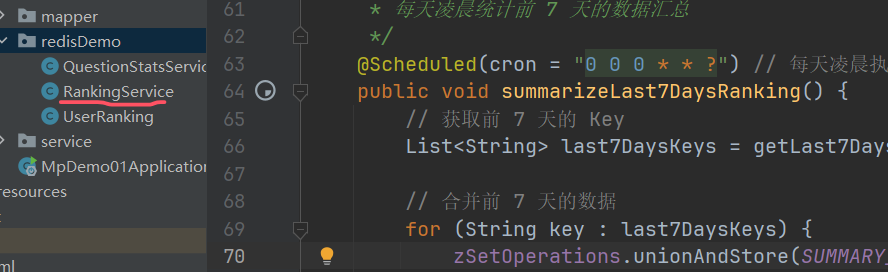
Redis 按日期存储数据 :每天的数据存储在一个独立的 Key 中,方便按天统计和清理。
-
定时任务汇总数据 :每天凌晨将前 7 天的数据汇总到
ranking:7days_summary中。 -
清理旧数据 :定时任务会清理超过 7 天的旧数据,避免 Redis 内存占用过多。
-
查询排行榜 :直接从汇总 Key 中获取前 7 天的排行榜数据。
这种方式既能保证排行榜的实时性,又能高效地统计和查询前 7 天的数据,适合需要长期保存排行榜数据的场景
如何使用Redis的发布/订阅功能实现消息通知系统
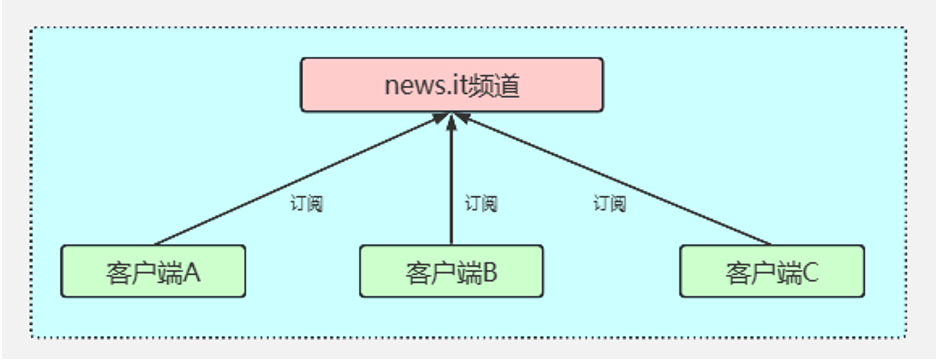
Redis 的发布/订阅(Pub/Sub)功能可以实现一个轻量级的消息通知系统,支持不同模块之间的实时通信。
核心概念
-
频道(Channel) :消息的发布和订阅基于频道。每个模块可以订阅一个或多个频道。
-
发布者(Publisher) :向频道发送消息的模块。
-
订阅者(Subscriber) :从频道接收消息的模块。
多级缓存架构
在高性能的服务项目中,我们一般会将一些热点数据存储到 Redis这类缓存中间件中,只有当缓存的访问没有命中时再查询数据库。在提升访问速度的同时,也能降低数据库的压力。
但是在一些场景下单纯使用 Redis 的分布式缓存不能满足高性能的要求,所以还需要加入使用本地缓存Caffeine,从而再次提升程序的响应速度与服务性能。于是,就产生了使用本地缓存(Caffeine)作为一级缓存,再加上分布式缓存(Redis)作为二级缓存的两级缓存架构。
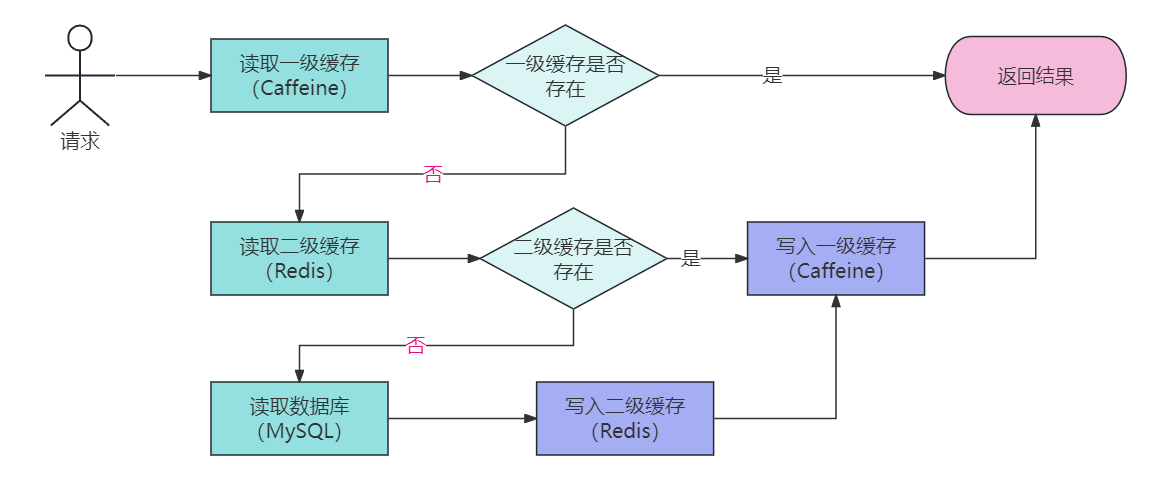
就是如果一个应用修改了缓存,另外一个应用的caffeine缓存是没有办法感知的,所以这里就会有缓存的一致性问题
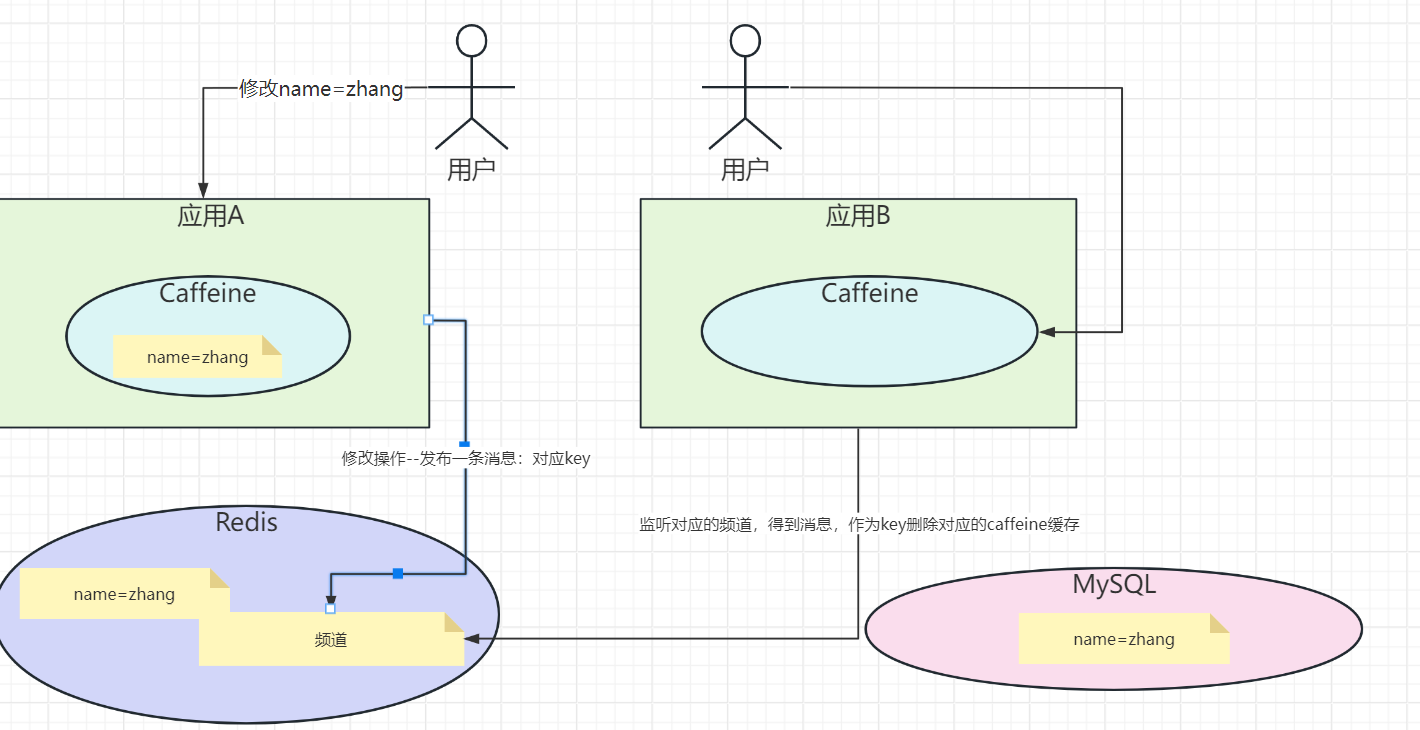
解决方案也很简单,就是在Redis中做一个发布和订阅。
遇到修改缓存的处理,需要向对应的频道发布一条消息,然后应用同步监听这条消息,有消息则需要删除本地的Caffeine缓存。
核心代码如下:
java
CacheAspect类
//强制更新
if (annotation.type()== CacheType.PUT){
Object object = point.proceed();
redisTemplate.opsForValue().set(realKey, object,annotation.l2TimeOut(), TimeUnit.SECONDS);
cache.put(realKey, object);
// 发送消息到Redis频道(让其他应用把Caffeine缓存失效掉)
redisTemplate.convertAndSend("cacheUpdateChannel", realKey);
log.info("cacheUpdateChannel:"+realKey);
return object;
}
//删除
else if (annotation.type()== CacheType.DELETE){
redisTemplate.delete(realKey);
cache.invalidate(realKey);
// 发送消息到Redis频道(让其他应用把Caffeine缓存失效掉)
redisTemplate.convertAndSend("cacheUpdateChannel", realKey);
log.info("cacheUpdateChannel:"+realKey);
return point.proceed();
}
log.info("get data from database");
Object object = point.proceed();
if (Objects.nonNull(object)){
//写入Redis
redisTemplate.opsForValue().set(realKey, object,annotation.l2TimeOut(), TimeUnit.SECONDS);
//写入Caffeine
cache.put(realKey, object);
// 发送消息到Redis频道(让其他应用把Caffeine缓存失效掉)
redisTemplate.convertAndSend("cacheUpdateChannel", realKey);
log.info("cacheUpdateChannel:"+realKey);
}
package com.msb.caffeine.config;
import com.msb.caffeine.service.RedisMessageListener;
import org.springframework.beans.factory.annotation.Autowired;
import org.springframework.context.annotation.Bean;
import org.springframework.context.annotation.Configuration;
import org.springframework.data.redis.connection.RedisConnectionFactory;
import org.springframework.data.redis.connection.lettuce.LettuceConnectionFactory;
import org.springframework.data.redis.core.RedisTemplate;
import org.springframework.data.redis.listener.ChannelTopic;
import org.springframework.data.redis.listener.RedisMessageListenerContainer;
import org.springframework.data.redis.serializer.GenericJackson2JsonRedisSerializer;
import org.springframework.data.redis.serializer.StringRedisSerializer;
@Configuration
public class RedisConfig {
@Bean
public LettuceConnectionFactory redisConnectionFactory() {
return new LettuceConnectionFactory(); // 需要设置主机名,端口,密码等参数
}
@Bean
public RedisTemplate<String, Object> redisTemplate(RedisConnectionFactory redisConnectionFactory) {
RedisTemplate<String, Object> template = new RedisTemplate<>();
template.setConnectionFactory(redisConnectionFactory);
// 使用Jackson2JsonRedisSerializer来序列化和反序列化对象
GenericJackson2JsonRedisSerializer jackson2JsonRedisSerializer = new GenericJackson2JsonRedisSerializer();
// 设置键序列化器
template.setKeySerializer(new StringRedisSerializer());
template.setHashKeySerializer(new StringRedisSerializer());
// 设置值序列化器
template.setValueSerializer(jackson2JsonRedisSerializer);
template.setHashValueSerializer(jackson2JsonRedisSerializer);
template.afterPropertiesSet();
return template;
}
@Bean
RedisMessageListenerContainer container(RedisConnectionFactory factory, RedisMessageListener listener) {
RedisMessageListenerContainer container = new RedisMessageListenerContainer();
container.setConnectionFactory(factory);
container.addMessageListener(listener, new ChannelTopic("cacheUpdateChannel"));
return container;
}
}
package com.msb.caffeine.service;
import com.github.benmanes.caffeine.cache.Cache;
import com.msb.caffeine.service.impl.UserService;
import lombok.extern.slf4j.Slf4j;
import org.springframework.beans.factory.annotation.Autowired;
import org.springframework.data.redis.connection.Message;
import org.springframework.data.redis.connection.MessageListener;
import org.springframework.stereotype.Component;
@Slf4j
@Component
public class RedisMessageListener implements MessageListener {
@Autowired
private Cache cache;
//这里就是应用接收到了(要删除缓存的策略): 这里就强制删除Caffeine中的缓存数据
@Override
public void onMessage(Message message, byte[] pattern) {
String cacheKey = new String(message.getBody());
if(!cacheKey.equals("")){
log.info("invalidate:"+cacheKey);
cache.invalidate(cacheKey);
}
}
}Redis其他的场景设计
如何使用Redis的地理位置功能(Geo)来实现XXX
使用 Redis 的 Geo 功能来实现 "附近的人" 或 "附近的商家"
Redis 的 Geo 功能基于 Sorted Set(ZSET) 实现,提供了以下核心命令:
-
GEOADD:添加地理位置(经纬度)到指定的 Key 中。 -
GEODIST:计算两个位置之间的距离。 -
GEORADIUS:查询指定半径范围内的位置。 -
GEORADIUSBYMEMBER:以某个成员为中心,查询指定半径范围内的位置。 -
GEOHASH:获取某个位置的 Geohash 值。

基于 Redis 的秒杀系统,如何解决超卖问题?
具体见代码
基于 Redis 的短链接生成系统
-
使用 Redis 的自增 ID :通过 Redis 的
INCR命令生成唯一的短链接 ID。 -
Base62 编码 :将自增 ID 转换为短链接字符串。
javapackage com.msb.caffeine.redisDemo; import org.springframework.beans.factory.annotation.Autowired; import org.springframework.data.redis.core.RedisTemplate; import org.springframework.stereotype.Service; import java.util.Base64; @Service public class ShortUrlService { private static final String SHORT_URL_KEY = "short_url:id"; // 自增 ID Key @Autowired private RedisTemplate<String, String> redisTemplate; /** * 生成短链接 * * @param longUrl 原始链接 * @return 短链接 */ public String generateShortUrl(String longUrl) { // 生成自增 ID long id = redisTemplate.opsForValue().increment(SHORT_URL_KEY, 1); // Base62 编码 String shortUrl = Base64.getEncoder().encodeToString(String.valueOf(id).getBytes()); // 存储映射关系 redisTemplate.opsForValue().set("short_url:" + shortUrl, longUrl); return shortUrl; } /** * 获取原始链接 * * @param shortUrl 短链接 * @return 原始链接 */ public String getLongUrl(String shortUrl) { return redisTemplate.opsForValue().get("short_url:" + shortUrl); } }
基于 Redis 的分布式 Session 管理系统
-
使用 Redis 存储 Session :将 Session 数据存储在 Redis 中,Key 为 Session ID,Value 为 Session 数据。
-
设置过期时间 :通过 Redis 的
EXPIRE命令设置 Session 的过期时间。