1 环境配置
sudo apt install -y ros-jazzy-sensor-msgs ros-jazzy-cv-bridge如果没有安装opencv,需要先安装 :
sudo apt update
sudo apt install libopencv-dev python3-opencv
2 创建空间
mkdir ~/image_ws
cd image_ws
mkdir src
3 创建源文件
源文件需要放置在src文件夹中
image_publisher.cpp
图片换成自己的图片
#include <rclcpp/rclcpp.hpp>
#include <sensor_msgs/msg/image.hpp>
#include <cv_bridge/cv_bridge.hpp>
#include <opencv2/opencv.hpp>

class ImagePublisher : public rclcpp::Node {
public:
    ImagePublisher() : Node("image_publisher") {
        publisher_ = this->create_publisher<sensor_msgs::msg::Image>("image_topic", 10);
        timer_ = this->create_wall_timer(
            std::chrono::milliseconds(1000),
            [this]() { publish_image(); }
        );
    }

private:
    void publish_image() {
        cv::Mat image = cv::imread("/home/hl/图片/1.jpeg");
        if (image.empty()) {
            RCLCPP_ERROR(this->get_logger(), "Could not read image file.");
            return;
        }

        sensor_msgs::msg::Image::SharedPtr msg =
            cv_bridge::CvImage(std_msgs::msg::Header(), "bgr8", image).toImageMsg();
        publisher_->publish(*msg);
    }

    rclcpp::Publisher<sensor_msgs::msg::Image>::SharedPtr publisher_;
    rclcpp::TimerBase::SharedPtr timer_;
};

int main(int argc, char * argv[])
{
    // 初始化ROS2客户端库
    rclcpp::init(argc, argv);

    // 创建ImagePublisher节点并开始处理回调
    auto node = std::make_shared<ImagePublisher>();

    // 运行节点直到收到关闭信号
    rclcpp::spin(node);

    // 清理资源并关闭ROS2客户端库
    rclcpp::shutdown();
    return 0;
}
image_subscriber.cpp
#include <rclcpp/rclcpp.hpp>
#include <sensor_msgs/msg/image.hpp>
#include <cv_bridge/cv_bridge.hpp>
#include <opencv2/opencv.hpp>

class ImageSubscriber : public rclcpp::Node {
public:
    ImageSubscriber() : Node("image_subscriber") {
        subscription_ = this->create_subscription<sensor_msgs::msg::Image>(
            "image_topic", 10,
            [this](const sensor_msgs::msg::Image::SharedPtr msg) { display_image(msg); });
    }

private:
    void display_image(const sensor_msgs::msg::Image::SharedPtr msg) {
        try {
            cv::Mat image = cv_bridge::toCvShare(msg, "bgr8")->image;
            cv::imshow("Received Image", image);
            cv::waitKey(1);
        } catch (const cv_bridge::Exception& e) {
            RCLCPP_ERROR(this->get_logger(), "Could not convert image: %s", e.what());
        }
    }

    rclcpp::Subscription<sensor_msgs::msg::Image>::SharedPtr subscription_;
};

int main(int argc, char * argv[])
{
    // 初始化ROS2客户端库
    rclcpp::init(argc, argv);

    // 创建ImagePublisher节点并开始处理回调
    auto node = std::make_shared<ImageSubscriber >();

    // 运行节点直到收到关闭信号
    rclcpp::spin(node);

    // 清理资源并关闭ROS2客户端库
    rclcpp::shutdown();
    return 0;
}
4 修改cmakelists.txt
cmake_minimum_required(VERSION 3.8)
project(image_pkg)

if(CMAKE_COMPILER_IS_GNUCXX OR CMAKE_CXX_COMPILER_ID MATCHES "Clang")
  add_compile_options(-Wall -Wextra -Wpedantic)
endif()

# find dependencies
find_package(ament_cmake REQUIRED)
# uncomment the following section in order to fill in
# further dependencies manually.
# find_package(<dependency> REQUIRED)
find_package(rclcpp REQUIRED)
find_package(sensor_msgs REQUIRED)
find_package(cv_bridge REQUIRED)
find_package(OpenCV REQUIRED)

if(BUILD_TESTING)
  find_package(ament_lint_auto REQUIRED)
  # the following line skips the linter which checks for copyrights
  # comment the line when a copyright and license is added to all source files
  set(ament_cmake_copyright_FOUND TRUE)
  # the following line skips cpplint (only works in a git repo)
  # comment the line when this package is in a git repo and when
  # a copyright and license is added to all source files
  set(ament_cmake_cpplint_FOUND TRUE)
  ament_lint_auto_find_test_dependencies()
endif()


add_executable(image_publisher src/image_publisher.cpp)
ament_target_dependencies(image_publisher rclcpp sensor_msgs cv_bridge)

add_executable(image_subscriber src/image_subscriber.cpp)
ament_target_dependencies(image_subscriber rclcpp sensor_msgs cv_bridge)

# 显式链接 OpenCV 库
target_link_libraries(image_publisher ${OpenCV_LIBS})
target_link_libraries(image_subscriber ${OpenCV_LIBS})


install(TARGETS
  image_publisher
  image_subscriber
  DESTINATION lib/${PROJECT_NAME}
)

ament_package()
5 修改package.xml
添加依赖库
<?xml version="1.0"?>
<?xml-model href="http://download.ros.org/schema/package_format3.xsd" schematypens="http://www.w3.org/2001/XMLSchema"?>
<package format="3">
  <name>image_pkg</name>
  <version>0.0.0</version>
  <description>simple publish/subscrible image</description>
  <maintainer email="hl@todo.todo">hl</maintainer>
  <license>Apache license 2.0</license>

  <buildtool_depend>ament_cmake</buildtool_depend>

  <depend>rclcpp</depend>
  <depend>sensor_msgs</depend>
  <depend>cv_bridge</depend>

  <test_depend>ament_lint_auto</test_depend>
  <test_depend>ament_lint_common</test_depend>

  <export>
    <build_type>ament_cmake</build_type>
  </export>
</package>
6 编译
进入image_ws目录
colcon build --packages-select image_pkg7 运行节点
打开两个终端,分别输入:
source install/setup.bash
ros2 run image_pkg image_publiser

source install/setup.bash
ros2 run image_pkg image_subscriber
8 运行结果
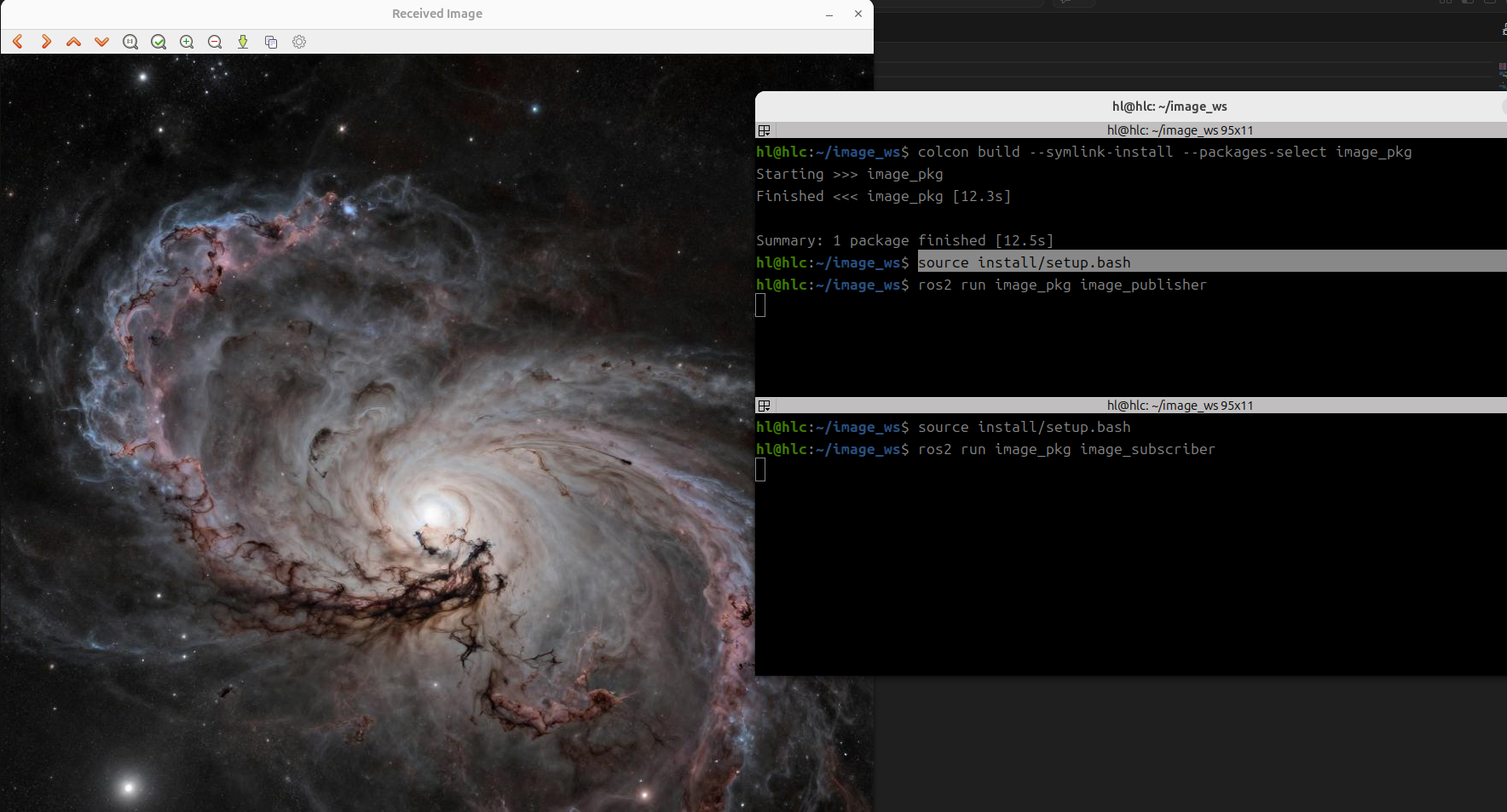
9 避坑指南
a.#include <cv_bridge/cv_bridge.hpp> // 而不是 cv_bridge.h
b.不要把opencv库放入ament_target_dependencies,因为它是系统库,而不是ros的,应该显式链接 OpenCV 库target_link_libraries(image_publisher ${OpenCV_LIBS})