Chain链式调用
1、字符串解析器
StrOutputParser是LangChain内置的简单字符串解析器。
- 可以将AIMessage类型转换为基础字符串
- 可以加入chain作为组件存在(Runnable接口子类)
示例将模型输出通过链式继续传入下个模型
python
from langchain_community.chat_models import ChatTongyi
from langchain_core.output_parsers import StrOutputParser
from langchain_core.prompts import ChatPromptTemplate, MessagesPlaceholder
from langchain_core.runnables import RunnableSerializable

chat_prompt_template = ChatPromptTemplate.from_messages([
    ("system", "你是一个边塞诗人,可以作诗。"),
    MessagesPlaceholder("history"),
    ("human", "请再来一首唐诗"),
])

history_data = [
    ("human", "你来写一个唐诗"),
    ("ai", "床前明月光,疑是地上霜。举头望明月,低头思故乡"),
    ("human", "好诗再来一个"),
    ("ai", "锄禾日当午,汗滴禾下土。谁知盘中餐,粒粒皆辛苦")
]

model = ChatTongyi(model="qwen3-max-2026-01-23")

# 组成链,要求每一个组件都是Runnable接口的子类
chain: RunnableSerializable = chat_prompt_template | model
# 可以通过链式调用将模型的输出继续输入到模型
# parser = StrOutputParser()
# chain: RunnableSerializable = chat_prompt_template | model | parser | model


# 通过链去调用invoke或stream
# res = chain.invoke({"history": history_data})
# print(res.content)

for chunk in chain.stream({"history": history_data}):
    print(chunk.content,end="",flush= True)
2、json解析器
上文通过字符串解析器将上一个模型的输出输入到下一个模型,正常情况需要对内容进行处理
才能使模型之间更好的协作。我们可以借助json解析器和提示词模板完成。
python
from langchain_community.chat_models import ChatTongyi
from langchain_core.output_parsers import StrOutputParser
from langchain_core.output_parsers import JsonOutputParser
from langchain_core.prompts import ChatPromptTemplate, MessagesPlaceholder
from langchain_core.runnables import RunnableSerializable


chat_prompt = ChatPromptTemplate.from_messages([
    ("system", "你是一个边塞诗人,可以作诗。"),
    MessagesPlaceholder("history"),
    ("human", "请再来一首唐诗,并封装为JSON格式返回给我,要求key是result,value就是你给的诗,请严格遵守格式要求"),
])
chat_checker_prompt = ChatPromptTemplate.from_messages([
    ("system", "你是一个边塞诗人赏析家,可以赏析诗词。"),
    ("human", "请赏析下这首诗词: {result}"),
])


model = ChatTongyi(
    model="qwen3-max-2026-01-23"
)
chain: RunnableSerializable = chat_prompt | model | JsonOutputParser() | chat_checker_prompt | model | StrOutputParser()


history_data = [
    ("human", "你来写一个唐诗"),
    ("ai", "床前明月光,疑是地上霜。举头望明月,低头思故乡"),
    ("human", "好诗再来一个"),
    ("ai", "锄禾日当午,汗滴禾下土。谁知盘中餐,粒粒皆辛苦")
]

# res = chain.invoke({"history": history_data})
# print(res)
for chunk in chain.stream({"history": history_data}):
    print(chunk,end="",flush= True)
3、自定义解析器
自定义解析器通过Langchain中的RunnableLambda类实现,其中封装了Runnable
接口实例,可以直接入链。也可以在链中直接写函数,函数会自动转换为RunnabeLambda
对象,因为Runnable接口类在实现__or__的时候,支持Callable接口的实例,函数就是Callable接口的实例。
链 | 符号底层是调用__or__组成的链。
python
from langchain_community.chat_models import ChatTongyi
from langchain_core.output_parsers import StrOutputParser
from langchain_core.output_parsers import JsonOutputParser
from langchain_core.prompts import ChatPromptTemplate, MessagesPlaceholder
from langchain_core.runnables import RunnableSerializable, RunnableLambda

chat_prompt = ChatPromptTemplate.from_messages([
    ("system", "你是一个边塞诗人,可以作诗。"),
    MessagesPlaceholder("history"),
    ("human", "请再来一首唐诗,直接给我诗词内容,不要有其他信息"),
])

chat_checker_prompt = ChatPromptTemplate.from_messages([
    ("system", "你是一个边塞诗人赏析家,可以赏析诗词。"),
    ("human", "请赏析下这首诗词: {result}"),
])


model = ChatTongyi(
    model="qwen3-max-2026-01-23"
)

get_result = RunnableLambda(lambda chat_prompt_result : {"result":chat_prompt_result.content})
chain: RunnableSerializable = chat_prompt | model | get_result | chat_checker_prompt | model | StrOutputParser()
# 在链中直接写函数,函数会自动转换为RunnabeLambda
# chain: RunnableSerializable = chat_prompt | model | (lambda chat_prompt_result : {"result":chat_prompt_result.content}) | chat_checker_prompt | model | StrOutputParser()


history_data = [
    ("human", "你来写一个唐诗"),
    ("ai", "床前明月光,疑是地上霜。举头望明月,低头思故乡"),
    ("human", "好诗再来一个"),
    ("ai", "锄禾日当午,汗滴禾下土。谁知盘中餐,粒粒皆辛苦")
]

# res = chain.invoke({"history": history_data})
# print(res)
for chunk in chain.stream({"history": history_data}):
    print(chunk,end="",flush= True)
会话记忆
1、临时内存记忆
将每次调用的历史记录实时添加到历史会话中,可以使用临时内存记忆方式,弊端
程序结束记忆即丢失。
通过RunnableWithMessageHistory中使用InMemoryChatMessageHistory可以实现内存中存储历史
python
from langchain_community.chat_models import ChatTongyi
from langchain_core.chat_history import InMemoryChatMessageHistory
from langchain_core.output_parsers import StrOutputParser
from langchain_core.output_parsers import JsonOutputParser
from langchain_core.prompts import ChatPromptTemplate, MessagesPlaceholder
from langchain_core.runnables import RunnableSerializable, RunnableLambda, RunnableWithMessageHistory

chat_prompt = ChatPromptTemplate.from_messages([
    ("system", "你是一个数学家。"),
    MessagesPlaceholder("history_chat_content"),
    ("human", "请回答我的问题: {user_input}"),
])


model = ChatTongyi(
    model="qwen3-max-2026-01-23"
)
# 每次提问将promt打印出来,这样就知道是不是带了历史记忆提问
def print_prompt(prompt):
    print("="*20,prompt.to_string(),"="*20)
    return prompt
chain: RunnableSerializable = chat_prompt | print_prompt | model | StrOutputParser()

# 将链封装成带有记忆类型的链
store = {} # 保存记忆的字典,key:session_id, val: 内存记忆对象
def get_history(session_id):
    if(session_id not in store):
        store[session_id] = InMemoryChatMessageHistory()
    return store[session_id]


chat_with_history = RunnableWithMessageHistory(chain, get_history, input_messages_key="user_input",
                                     history_messages_key="history_chat_content")

if __name__ == '__main__':
    # 固定格式,添加langchain的配置,为当前程序配置所属的session_id
    session_config = {
        "session_id": "user1"
    }

    res = chat_with_history.invoke({"user_input": "请记住小明有2只猫"},session_config)
    print("第一次执行",res)
    res = chat_with_history.invoke({"user_input": "请记住小刚有1只狗"}, session_config)
    print("第二次执行", res)
    res = chat_with_history.invoke({"user_input": "总共有多少动物"}, session_config)
    print("第三次执行", res)
2、长期记忆
InMemoryChatMessageHistory仅可以在内存中临时存储,InMemoryChatMessageHistory类继承BaseChatMessageHistory,BaseChatMessageHistory类注释中给出了文件存储相关实现实例 FileChatMessageHistory,可以实现基于文件存储的会话记录,
只要继承BaseChatMessageHistory实现了如下3个方法
- add_messages: 同步模式,添加消息
- messages: 同步模式,获取消息
- clear: 同步模式,清除消息
3、文档加载器
1、介绍
文档加载器提供了一套标准接口,用于将不同来源(如CSV、PDF、JSON等)的数据读取为LangChain的文档格式。无论数据来源如何,都进行统一处理。
文档加载器(内置或自行实现)需实现BaseLoader接口,返回Document类型的对象
2、CSVLoader示例:
python
from langchain_community.document_loaders import CSVLoader

# name,age,gender,hobby
# 小明,12,男,"打游戏,睡觉"
# 小红,11,女,"看书,睡觉"
loader = CSVLoader(
    file_path="./csv_data/data.csv",
    encoding="utf-8",
    csv_args={
        "delimiter": ",", # 分隔符
        "quotechar": '"', # 指定带有分隔符文本的引号
        # 如果数据原本有表头,就不要下面的代码,如果没有可以使用
        # "fieldnames": ['name','age','gender','hobby']
    }
)

for document in loader.lazy_load():
    print(document)
3、JSONLoader示例
JSONLoader依赖jq库,jq的解析语法可以提取数据
pip install jq -i https://pypi.tuna.tsinghua.edu.cn/simplejq的解析语法,常见如:
- .表示根、\[\]表示数组
- .name表示从根取name的值
- .hobby1表示取hobby对应数组的第二个元素
- .\[\]表示将数组内的每个字典(JSON对象)都取到
- .\[\].name表示取数组内每个字典(JSON)对象的name对应的值
python
from langchain_community.document_loaders import JSONLoader
#---------json对象实例
# {
#   "name": "周杰伦",
#   "age": 11,
#   "hobby": ["听歌", "看电影"],
#   "other": {
#     "addr": "深圳",
#     "tel": "1111111"
#   }
# }
json_loader = JSONLoader(
    file_path="./json_data/stu.json",
    jq_schema=".name"
)

document = json_loader.load()
print(document)


json_loader = JSONLoader(
    file_path="./json_data/stu.json",
    jq_schema=".",
    text_content= False, # 告知抽取的不是字符串,否则会报错
)

document = json_loader.load()
print(document)

#----------json数组示例
# [
#   {"name": "周杰伦","age": 11,"gender": "男"},
#   {"name": "蔡依林","age": 12,"gender": "女"}
# ]
json_loader = JSONLoader(
    file_path="./json_data/stus.json",
    jq_schema=".[].name",
    text_content= False, # 告知抽取的不是字符串,否则会报错
)
document = json_loader.load()
print(document)

#----------json对象行
# {"name": "周杰伦","age": 11,"gender": "男"}
# {"name": "蔡依林","age": 12,"gender": "女"}
json_loader = JSONLoader(
    file_path="./json_data/stus_lines.json",
    jq_schema=".name",
    text_content= False, # 告知抽取的不是字符串,否则会报错
    json_lines=True, # 告知JSONLoader,这是JSONLines文件(每一行都是一个独立的标准JSON)
)
document = json_loader.load()
print(document)
4、TextLoader示例
TextLoader可以加载文本文件内容
python
from langchain_community.document_loaders import TextLoader
from langchain_text_splitters import RecursiveCharacterTextSplitter

loader = TextLoader(file_path="./txt_data/data.txt", encoding="utf-8")

docs = loader.load()

splitter = RecursiveCharacterTextSplitter(
    chunk_size=500, #分段的最大字符数
    chunk_overlap=50, # 分段之间允许重叠字符数
    separators=["\n\n", "\n", "。",",","!","?"," ",""],
    length_function=len, # 计算字符长度的依据函数
)

split_documents = splitter.split_documents(docs)
print(len(split_documents))
for document in split_documents:
    print("="*20)
    print(document)
    print("="*20)
5、PyPDFLoader示例
LangChain支持许多PDF加载器,当前示例使用PyPDFLoader
需要安装库
pip install pypdf -i https://pypi.tuna.tsinghua.edu.cn/simple
python
from langchain_community.document_loaders import PyPDFLoader

pdf_loader = PyPDFLoader(
    file_path="./pdf_data/python语法篇.pdf",
    mode="page",  # 默认是page模式,每个页面形成一个Document文档对象, single模式则将所有页面内容合并成一个Document对象
    # password="123456", # 密码,如果pdf需要密码可以加
)

i= 0
for document in pdf_loader.lazy_load():
    print(i, document)
    i += 1
向量存储
LangChain提供向量存储功能
- InMemoryVectorStore 内存方式
- Chroma 外部数据库方式
需安装如下包:
pip install chromadb -i https://pypi.tuna.tsinghua.edu.cn/simple
pip install langchain-chroma -i https://pypi.tuna.tsinghua.edu.cn/simple
python
from langchain_chroma import Chroma
from langchain_community.document_loaders import CSVLoader
from langchain_community.embeddings import DashScopeEmbeddings
from langchain_core.vectorstores import InMemoryVectorStore

# 内存存储
# vector_store = InMemoryVectorStore(embedding=DashScopeEmbeddings())
# 数据库存储
vector_store = Chroma(
    collection_name="test",# 当前向量存储名字,类似数据库表名称
    embedding_function=DashScopeEmbeddings(), # 嵌入模型
    persist_directory="./chroma_db", # 数据库目录,
)

# name,age,gender,hobby
# 小明,12,男,"打游戏,睡觉"
# 小红,11,女,"看书,睡觉"
loader = CSVLoader(
    file_path="./csv_data/data.csv",
    encoding="utf-8",
    csv_args={
        "delimiter": ",", # 分隔符
        "quotechar": '"', # 指定带有分隔符文本的引号
        # 如果数据原本有表头,就不要下面的代码,如果没有可以使用
        # "fieldnames": ['name','age','gender','hobby']
    },
    source_column="hobby", # 指定读取出来的document#metadadta的source数据来源列内容
)

# source对应内容为hobby
# [Document(metadata={'source': '打游戏,睡觉', 'row': 0}, page_content='name: 小明\nage: 12\ngender: 男\nhobby: 打游戏,睡觉'),
doc = loader.load()
# print(doc)
# 添加文档
# vector_store.add_documents(
#     documents=doc,
#     ids=["id"+str(i) for i in range(1,len(doc)+1)], # 给文档doc 添加id
# )
# 删除
# vector_store.delete(ids=["id1"])
# 检索
result = vector_store.similarity_search(
    query="睡觉", # 检索的文本
    k=4, # 检索需要返回的文档数量
    filter={"source": "看书,睡觉"}, # 检索metadata的source列内容Document(metadata={'source'
)
print(result)
智能客服项目实战
1、项目介绍
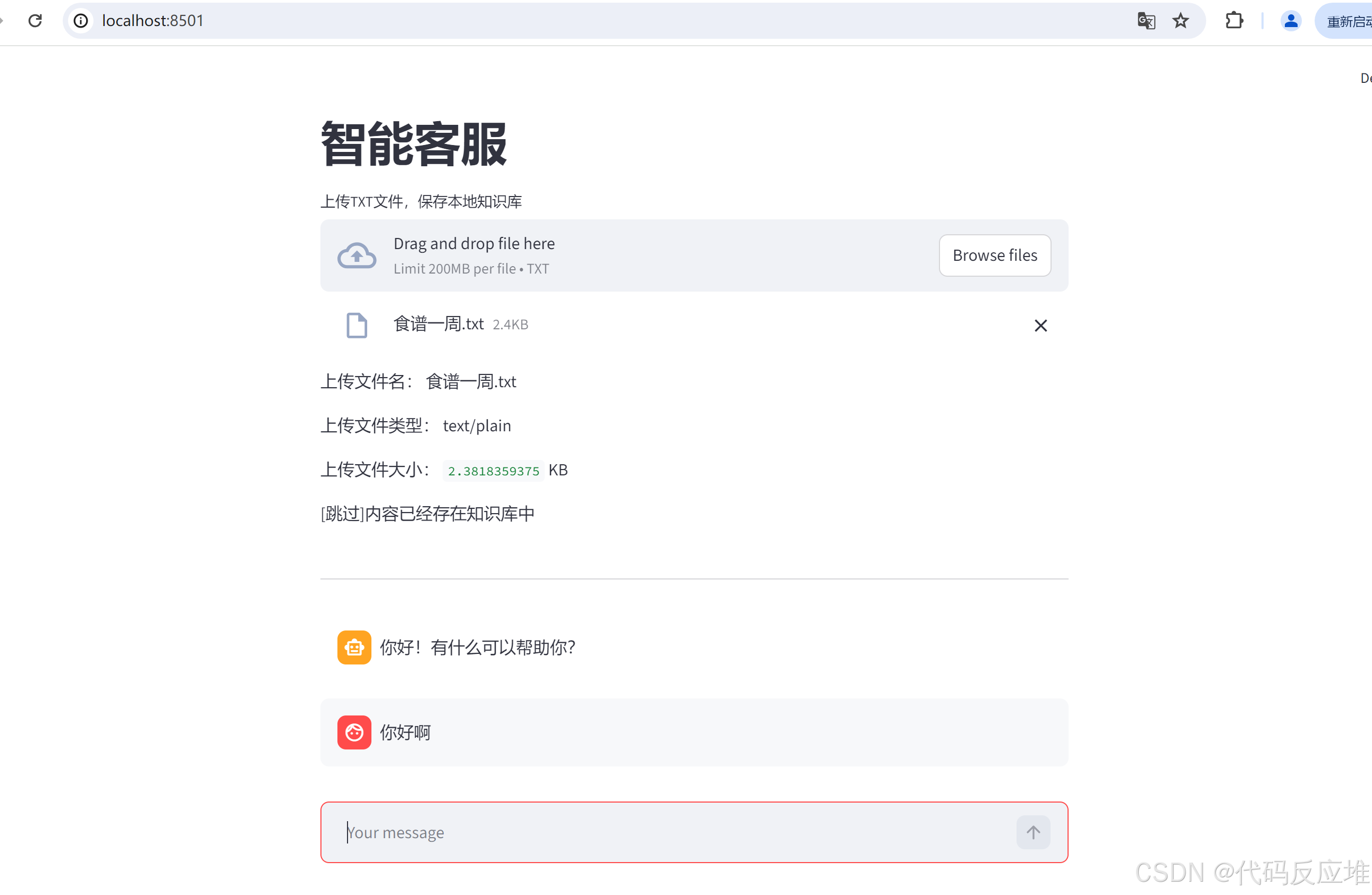
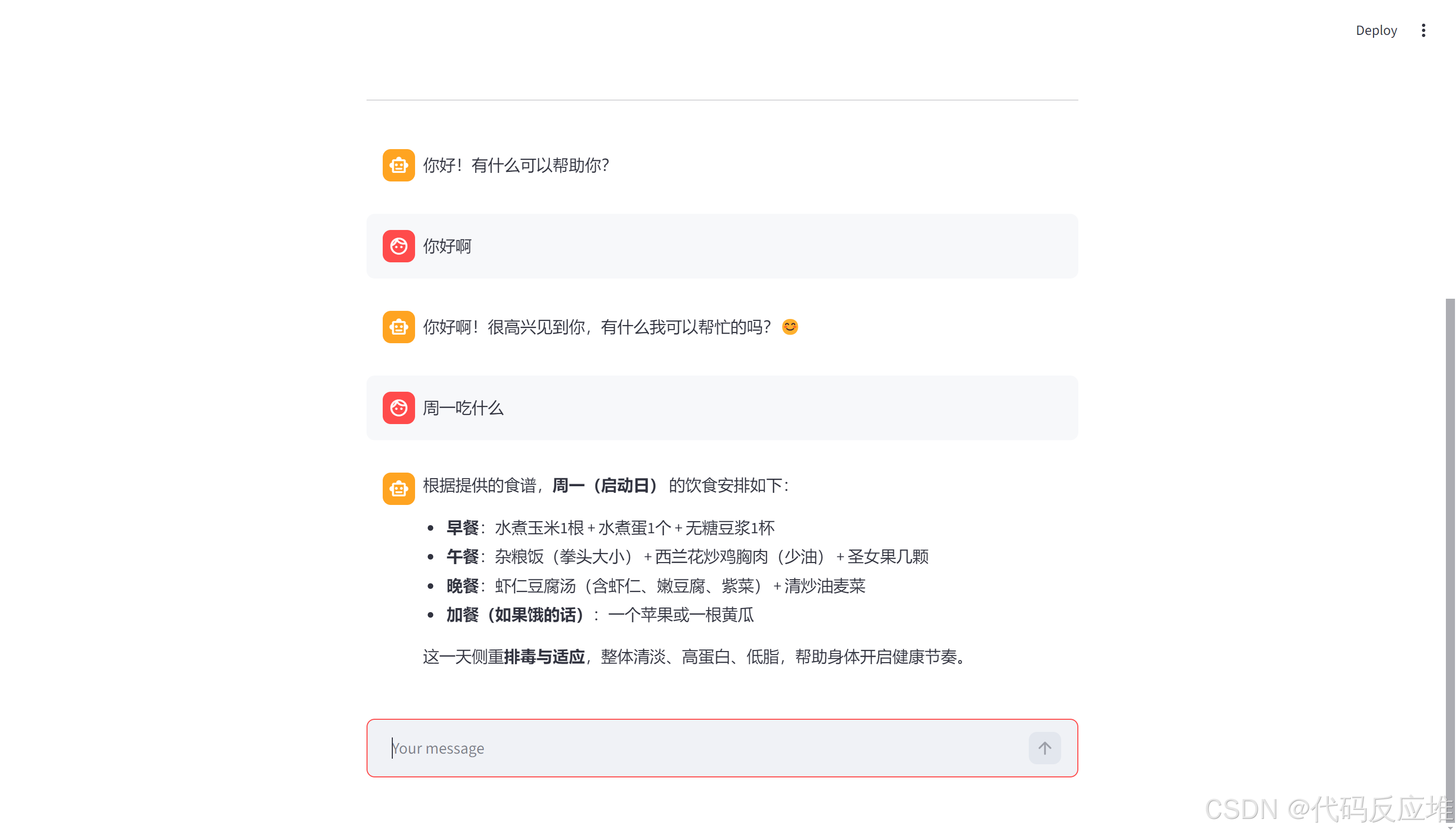
本项目以一周食谱为例构建本地知识。使用者可以自由的更新本地知识,智能客服的答案也是基于本地知识生成的。
项目框架采用streamlit、langchain、qwen3-max大模型、text-embedding-v4文本嵌入模型。

2、页面展示
3、项目源码
https://gitee.com/imyzp/CodeReactor-Ai.git 分支:rag-agent-v1.0 详细可咨询本人
shell
# 安装streamlit
pip install streamlit -i https://pypi.tuna.tsinghua.edu.cn/simple
# 命令启动应用
streamlit run app_qa.py