css
//'./assets/styles/variables.module.scss'

$headerHeight: 140px;
$footerHeight: 200px;

:export {
  headerHeight: $headerHeight;
  footerHeight: $footerHeight;
}

:root {
  --headerHeight: #{$headerHeight};
  --footerHeight: #{$footerHeight};
  --customProperty: 我是自定义属性在 root 中定义;
}
javascript
import { createApp } from 'vue'

import './assets/styles/variables.module.scss'

import App from './App.vue'

createApp(App).mount('#app')
javascript
<script setup>
import {computed, ref} from "vue";
import variables from '@/assets/styles/variables.module.scss'

//场景1 通过xxx.module.scss定义样式变量 js中通过variables.xxx获取
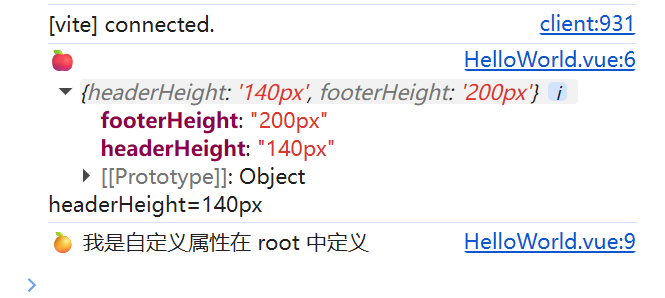
console.log('🍎', variables, 'headerHeight=' + variables?.headerHeight);

//场景2 通过getComputedStyle(DOMElement).getPropertyValue方法获取:root下定义的样式变量
console.log('🍊', getComputedStyle(document.documentElement)
.getPropertyValue('--customProperty')
);

const isWhite = ref(true);

const getFontColor = computed(() => {
  return isWhite.value ? 'white' : 'black'
})

const changeFontColor = () => {
  isWhite.value = !isWhite.value
}
</script>

<template>
  <div class="test-style">
    Hello world!
  </div>
  <button @click="changeFontColor">change Font Color</button>
</template>

<style scoped lang="sass">
.test-style
  //场景3 在style标签中获取root中定义的变量
  height: calc(50svh - var(--headerHeight))
  //场景4 通过v-bind结合vue的computed函数动态获取(常用于dark/light切换场景)
  color: v-bind(getFontColor)
  display: flex
  justify-content: center
  align-items: center
  font-size: 200px
  font-weight: bold
  background-color: #a2dc04
  text-shadow: #fff7f4 -8px 0px 5px
</style>