一、案例背景
在健康管理类应用中,用户希望在"个人中心"快速查看周期性的健康汇总。相比单一数据,健康报告弹窗能在一个页面中集中展示平均分、每日评分、分项进度与健康建议,阅读效率更高。
本案例面向 HarmonyOS 6 初学者,聚焦一个移动端功能点:个人中心菜单入口 + 健康报告弹窗 + 分项进度展示。
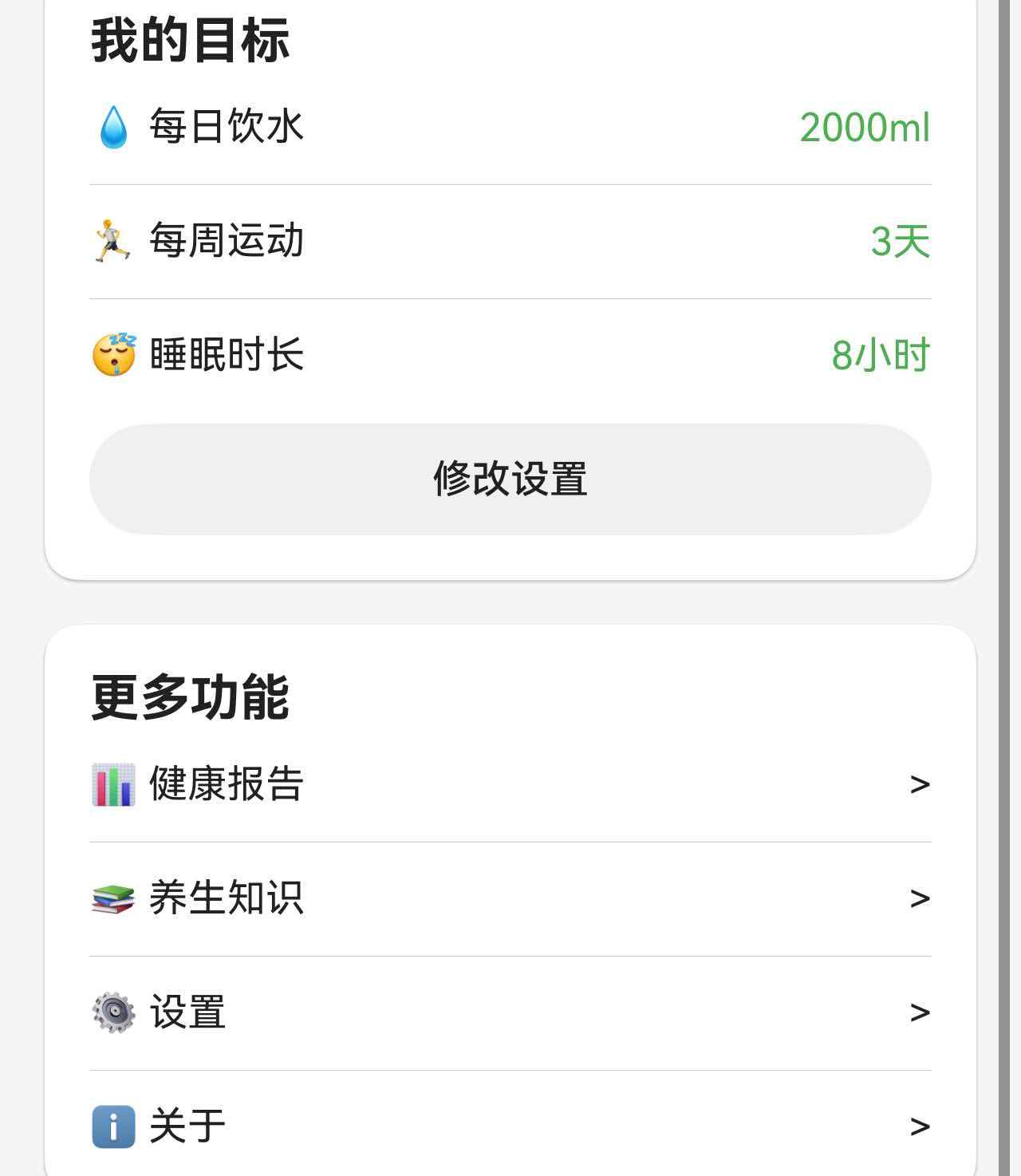
你将学到:
- 如何在"更多功能"中设置报告入口
- 如何控制弹窗显示/隐藏
- 如何用环形进度展示综合评分
- 如何用线性进度展示分项平均分
二、完整代码实现
本功能主要由两部分组成:
- 个人中心的"健康报告"入口
- 健康报告弹窗的内容结构与进度展示
2.1 菜单入口(点击打开报告弹窗)
typescript
          Column() {
            CommonCard({ title: '更多功能' }) {
              Column() {
                this.MenuRow('📊 健康报告', () => {
                  this.showReportDialog = true;
                  this.loadReportData(this.reportPeriod);
                })
                Divider().margin({ top: this.getDividerMargin(), bottom: this.getDividerMargin() } as Padding)
                this.MenuRow('📚 养生知识', () => {
                  this.selectedArticleIndex = -1;
                  this.showKnowledgeDialog = true;
                })
                Divider().margin({ top: this.getDividerMargin(), bottom: this.getDividerMargin() } as Padding)
                this.MenuRow('⚙️ 设置', () => {
                  this.tempWaterTarget = this.dailyWaterTarget;
                  this.tempExerciseTarget = this.weeklyExerciseTarget;
                  this.tempSleepHours = this.sleepTargetHours;
                  this.loadReminderSettings();
                  this.showSettingsDialog = true;
                })
                Divider().margin({ top: this.getDividerMargin(), bottom: this.getDividerMargin() } as Padding)
                this.MenuRow('ℹ️ 关于', () => {
                  this.showAboutDialog = true;
                })
              }
            }
          }
          .margin({ left: this.getCardMargin(), right: this.getCardMargin(), bottom: this.getCardMargin() } as Padding)
入口逻辑很清晰:
- 点击"📊 健康报告"
- 打开弹窗
showReportDialog = true - 同步加载本周/本月数据
2.2 健康报告弹窗结构
弹窗包含三个核心区域:综合评分、每日评分、各项平均分。
typescript
      // 健康报告弹窗
      if (this.showReportDialog) {
        Column() {
          Column() {
            // 头部
            Row() {
              Text('健康报告')
                .fontSize(this.getDialogTitleSize())
                .fontWeight(FontWeight.Bold)
                .fontColor($r('app.color.text_primary'))

              Blank()

              // 周/月切换
              Row() {
                Text('周')
                  .fontSize(this.getSmallTextSize())
                  .fontColor(this.reportPeriod === 'week' ? Color.White : $r('app.color.text_primary'))
                  .padding({
                    left: this.getDividerMargin(),
                    right: this.getDividerMargin(),
                    top: this.getChipPaddingVertical(),
                    bottom: this.getChipPaddingVertical()
                  } as Padding)
                  .backgroundColor(this.reportPeriod === 'week' ? $r('app.color.primary_color') : $r('app.color.input_background'))
                  .borderRadius(this.getDividerMargin())
                  .onClick(() => {
                    if (this.reportPeriod !== 'week') {
                      this.reportPeriod = 'week';
                      this.loadReportData('week');
                    }
                  })

                Text('月')
                  .fontSize(this.getSmallTextSize())
                  .fontColor(this.reportPeriod === 'month' ? Color.White : $r('app.color.text_primary'))
                  .padding({
                    left: this.getDividerMargin(),
                    right: this.getDividerMargin(),
                    top: this.getChipPaddingVertical(),
                    bottom: this.getChipPaddingVertical()
                  } as Padding)
                  .backgroundColor(this.reportPeriod === 'month' ? $r('app.color.primary_color') : $r('app.color.input_background'))
                  .borderRadius(this.getDividerMargin())
                  .margin({ left: this.getItemGap() } as Padding)
                  .onClick(() => {
                    if (this.reportPeriod !== 'month') {
                      this.reportPeriod = 'month';
                      this.loadReportData('month');
                    }
                  })
              }

              Text('×')
                .fontSize(this.getCloseLargeSize())
                .fontColor($r('app.color.text_secondary'))
                .margin({ left: this.getSectionGap() } as Padding)
                .onClick(() => {
                  this.showReportDialog = false;
                })
            }
            .width('100%')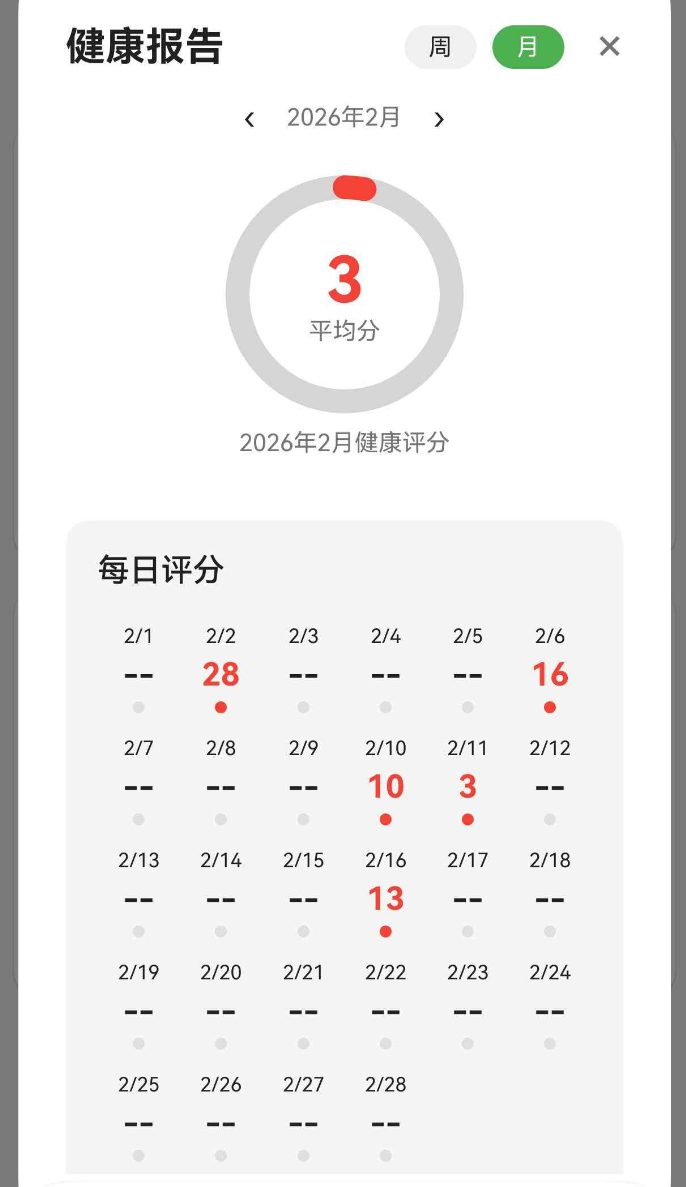
头部结构包含:
- 左侧标题
- 中部周/月切换
- 右侧关闭按钮
2.3 综合评分(环形进度)
typescript
                // 综合评分区
                Column() {
                  Stack() {
                    Progress({
                      value: 100,
                      total: 100,
                      type: ProgressType.Ring
                    })
                      .width(this.getReportRingSize())
                      .height(this.getReportRingSize())
                      .color($r('app.color.divider_color'))
                      .style({ strokeWidth: this.getReportRingStrokeWidth() })

                    Progress({
                      value: this.avgTotalScore,
                      total: 100,
                      type: ProgressType.Ring
                    })
                      .width(this.getReportRingSize())
                      .height(this.getReportRingSize())
                      .color(this.getScoreColor(this.avgTotalScore))
                      .style({ strokeWidth: this.getReportRingStrokeWidth() })

                    Column() {
                      Text(this.avgTotalScore.toString())
                        .fontSize(this.getReportScoreSize())
                        .fontWeight(FontWeight.Bold)
                        .fontColor(this.getScoreColor(this.avgTotalScore))
                      Text('平均分')
                        .fontSize(this.getReportLabelSize())
                        .fontColor($r('app.color.text_secondary'))
                    }
                  }

                  Text(`${this.getCurrentReportOffset() === 0 ? (this.reportPeriod === 'week' ? '本周' : '本月') : this.getReportRangeLabel()}健康评分`)
                    .fontSize(this.getSmallTextSize())
                    .fontColor($r('app.color.text_secondary'))
                    .margin({ top: this.getItemGap() } as Padding)

                }
                .width('100%')
                .padding({ top: this.getSectionGap(), bottom: this.getSectionGap() } as Padding)
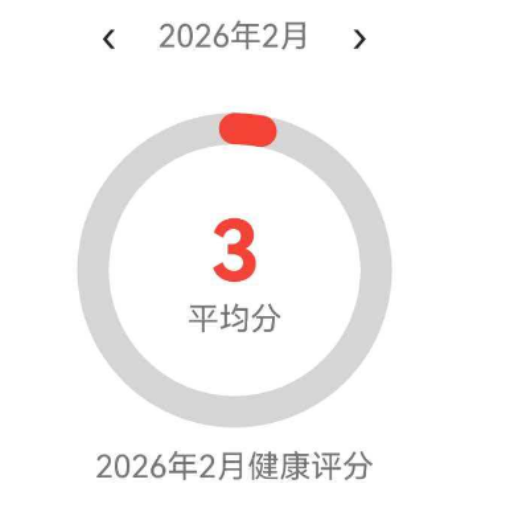
这里使用两个环形进度叠加:
- 底层灰色圆环是背景
- 顶层彩色圆环表示平均分
2.4 各项平均分(线性进度)
typescript
                // 模块统计
                Column() {
                  Text('各项平均')
                    .fontSize(this.getSectionTitleSize())
                    .fontWeight(FontWeight.Medium)
                    .fontColor($r('app.color.text_primary'))
                    .width('100%')

                  // 打卡
                  Row() {
                    Text('✅ 打卡')
                      .fontSize(this.getBodyTextSize())
                      .fontColor($r('app.color.text_primary'))
                    Blank()
                    Text(`${this.avgCheckInScore}分`)
                      .fontSize(this.getBodyTextSize())
                      .fontWeight(FontWeight.Medium)
                      .fontColor(this.getScoreColor(this.avgCheckInScore))
                  }
                  .width('100%')
                  .margin({ top: this.getDividerMargin() } as Padding)

                  Progress({
                    value: this.avgCheckInScore,
                    total: 100,
                    type: ProgressType.Linear
                  })
                    .height(this.getProgressHeight())
                    .color($r('app.color.primary_color'))
                    .backgroundColor($r('app.color.divider_color'))
                    .borderRadius(this.getProgressHeight() / 2)
                    .margin({ top: this.getSmallGap() } as Padding)

                  // 饮水
                  Row() {
                    Text('💧 饮水')
                      .fontSize(this.getBodyTextSize())
                      .fontColor($r('app.color.text_primary'))
                    Blank()
                    Text(`${this.avgWaterScore}分`)
                      .fontSize(this.getBodyTextSize())
                      .fontWeight(FontWeight.Medium)
                      .fontColor(this.getScoreColor(this.avgWaterScore))
                  }
                  .width('100%')
                  .margin({ top: this.getDividerMargin() } as Padding)

                  Progress({
                    value: this.avgWaterScore,
                    total: 100,
                    type: ProgressType.Linear
                  })
                    .height(this.getProgressHeight())
                    .color($r('app.color.water_blue'))
                    .backgroundColor($r('app.color.divider_color'))
                    .borderRadius(this.getProgressHeight() / 2)
                    .margin({ top: this.getSmallGap() } as Padding)

                  // 运动
                  Row() {
                    Text('🏃 运动')
                      .fontSize(this.getBodyTextSize())
                      .fontColor($r('app.color.text_primary'))
                    Blank()
                    Text(`${this.avgExerciseScore}分`)
                      .fontSize(this.getBodyTextSize())
                      .fontWeight(FontWeight.Medium)
                      .fontColor(this.getScoreColor(this.avgExerciseScore))
                  }
                  .width('100%')
                  .margin({ top: this.getDividerMargin() } as Padding)

                  Progress({
                    value: this.avgExerciseScore,
                    total: 100,
                    type: ProgressType.Linear
                  })
                    .height(this.getProgressHeight())
                    .color($r('app.color.exercise_orange'))
                    .backgroundColor($r('app.color.divider_color'))
                    .borderRadius(this.getProgressHeight() / 2)
                    .margin({ top: this.getSmallGap() } as Padding)

                  // 睡眠
                  Row() {
                    Text('😴 睡眠')
                      .fontSize(this.getBodyTextSize())
                      .fontColor($r('app.color.text_primary'))
                    Blank()
                    Text(`${this.avgSleepScore}分`)
                      .fontSize(this.getBodyTextSize())
                      .fontWeight(FontWeight.Medium)
                      .fontColor(this.getScoreColor(this.avgSleepScore))
                  }
                  .width('100%')
                  .margin({ top: this.getDividerMargin() } as Padding)

                  Progress({
                    value: this.avgSleepScore,
                    total: 100,
                    type: ProgressType.Linear
                  })
                    .height(this.getProgressHeight())
                    .color($r('app.color.sleep_purple'))
                    .backgroundColor($r('app.color.divider_color'))
                    .borderRadius(this.getProgressHeight() / 2)
                    .margin({ top: this.getSmallGap() } as Padding)
                }
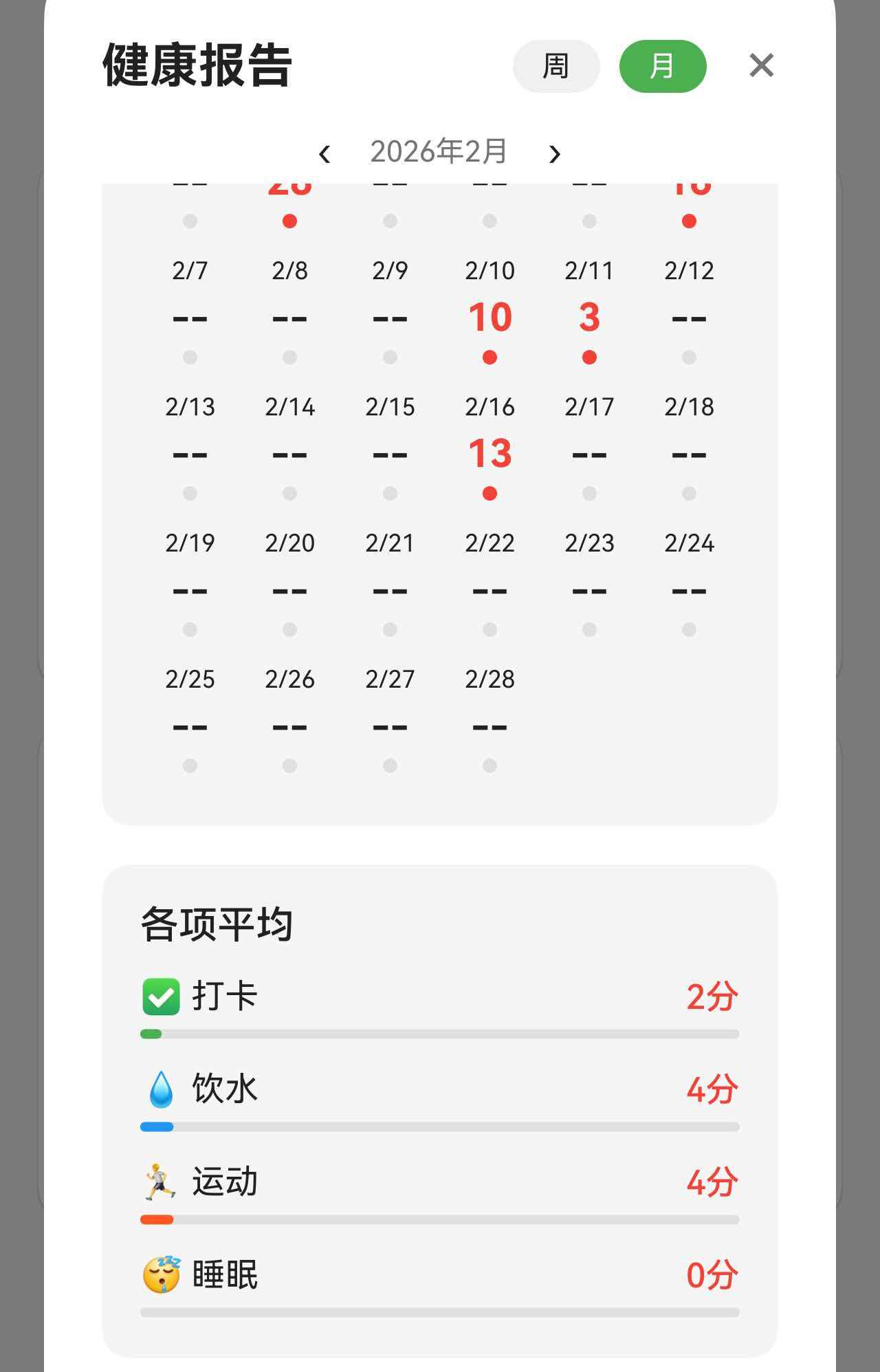
四条进度条分别代表四个维度的平均分,颜色区分非常直观:
- 打卡:主色
- 饮水:蓝色
- 运动:橙色
- 睡眠:紫色
三、总结
本案例完整展示了一个移动端健康报告弹窗的实现方式,核心要点包括:
- 菜单入口触发弹窗显示
- 周/月切换控制数据周期
- 环形进度展示综合评分
- 线性进度展示分项平均分
掌握这个案例后,你可以继续扩展更多报告内容,例如:
- 数据趋势折线图
- 日历高亮
- 评分等级标签