| 方案 | 安装成本 | 中文识别效果 |
|---|---|---|
| 安装 Tesseract + chi_sim语言包 | ~100MB,需手动装 | 中等 |
pip install easyocr |
~2GB(含torch) | 很好 |
pip install paddleocr |
~1GB | 最好 |
bash
pip install wxauto -i https://pypi.tuna.tsinghua.edu.cn/simple
pip install pytesseract
pip install pywinauto -q
pip install openai
pip install dashscope    # 通义千问
pip install pyautogui pillow -q
安装 Tesseract 引擎本体(带中文包): 👉 下载地址:https://github.com/UB-Mannheim/tesseract/wiki
下载 tesseract-ocr-w64-setup-5.x.x.exe,安装时勾选 Chinese Simplified 语言包。
python
# -*- coding: utf-8 -*-
"""
微信智能自动回复 v23
========================================
核心改进(相对v22):
  1. 截图改用 PrintWindow(PW_RENDERFULLCONTENT)
     → 解决微信4.x GPU渲染导致 BitBlt 截图为空白的问题
  2. 通过白色气泡背景定位对方消息(左侧x=0.20~0.52)
     → 不再依赖头像检测(之前找到的是错误位置)
  3. 只截最新一条气泡(找白色气泡块的底部,往上找到顶部)
  4. 发消息前先还原窗口,发完保持前台

关键参数(已调试确认):
  聊天区:y=[5%, 78%]*h
  对方气泡:x=[0.20, 0.52]*w(白色背景,R>245)
  最新气泡:从底部往上找连续白色行,断4行停止
========================================
"""
import sys, re, time, hashlib, ctypes, ctypes.wintypes
sys.stdout.reconfigure(encoding="utf-8")

import pyperclip
import win32gui, win32con, win32ui, win32api
import numpy as np
from PIL import Image, ImageEnhance
import pytesseract
from http import HTTPStatus
import dashscope
from dashscope import Generation

pytesseract.pytesseract.tesseract_cmd = r'C:\Program Files\Tesseract-OCR\tesseract.exe'
ctypes.windll.shcore.SetProcessDpiAwareness(2)

# ===== ⚙️ 配置 =====
TARGET_NAME    = "涂斯博"
QWEN_API_KEY   = "88888888"
CHECK_INTERVAL = 4
SYSTEM_PROMPT  = (
    "你是一个聊天助手,正在代替主人回复微信消息。"
    "请根据对方发来的消息,用自然友好简短的中文回复,1~3句即可,不要说自己是AI。"
)
# ====================

dashscope.api_key = QWEN_API_KEY


# ───────────────────────────────
# AI 回复
# ───────────────────────────────
def ask_qwen(user_message: str) -> str:
    try:
        response = Generation.call(
            model='qwen-turbo',
            messages=[
                {"role": "system", "content": SYSTEM_PROMPT},
                {"role": "user",   "content": user_message},
            ],
            result_format='message',
            max_tokens=200,
        )
        if response.status_code == HTTPStatus.OK:
            reply = response.output.choices[0].message.content.strip()
            print(f"  [AI回复] {reply}")
            return reply
        print(f"  [AI错误] {response.code}: {response.message}")
        return "收到,稍后回复你。"
    except Exception as e:
        print(f"  [AI异常] {e}")
        return "收到,稍后回复你。"


# ───────────────────────────────
# 窗口工具
# ───────────────────────────────
def get_hwnd():
    return (win32gui.FindWindow('Qt51514QWindowIcon', None) or
            win32gui.FindWindow(None, '微信') or
            win32gui.FindWindow(None, 'WeChat'))

def get_rect(hwnd):
    rect = ctypes.wintypes.RECT()
    ctypes.windll.dwmapi.DwmGetWindowAttribute(
        hwnd, 9, ctypes.byref(rect), ctypes.sizeof(rect))
    return rect.left, rect.top, rect.right, rect.bottom

def ensure_visible(hwnd):
    """确保窗口可见(不最小化),但不强制置顶"""
    if win32gui.IsIconic(hwnd):
        win32gui.ShowWindow(hwnd, win32con.SW_RESTORE)
        time.sleep(0.4)

def bring_to_front(hwnd):
    ensure_visible(hwnd)
    try:
        ctypes.windll.user32.SetForegroundWindow(hwnd)
        time.sleep(0.3)
    except Exception:
        pass


# ───────────────────────────────
# PrintWindow 截图(支持GPU渲染)
# ───────────────────────────────
def pw_shot(hwnd) -> Image.Image:
    """
    用 PrintWindow(PW_RENDERFULLCONTENT=2) 截整个窗口。
    返回以窗口左上角为原点的 PIL Image。
    """
    ensure_visible(hwnd)
    l, t, r, b = get_rect(hwnd)
    w, h = r - l, b - t
    hwnd_dc = win32gui.GetWindowDC(hwnd)
    mfc_dc  = win32ui.CreateDCFromHandle(hwnd_dc)
    save_dc = mfc_dc.CreateCompatibleDC()
    bmp = win32ui.CreateBitmap()
    bmp.CreateCompatibleBitmap(mfc_dc, w, h)
    save_dc.SelectObject(bmp)
    ctypes.windll.user32.PrintWindow(hwnd, save_dc.GetSafeHdc(), 2)
    info = bmp.GetInfo()
    bits = bmp.GetBitmapBits(True)
    img  = Image.frombuffer('RGB', (info['bmWidth'], info['bmHeight']),
                            bits, 'raw', 'BGRX', 0, 1)
    save_dc.DeleteDC(); mfc_dc.DeleteDC()
    win32gui.ReleaseDC(hwnd, hwnd_dc)
    win32gui.DeleteObject(bmp.GetHandle())
    return img  # 坐标原点 = 窗口左上角


# ───────────────────────────────
# 截图 hash(检测消息变化)
# 只截聊天记录区中部,避免输入框变化误触发
# ───────────────────────────────
def snap_hash(hwnd) -> str:
    img = pw_shot(hwnd)
    w, h = img.size
    # 对方气泡区(x=43%~79%,y扩到85%以覆盖5行长消息)
    crop = img.crop((int(w*0.43), int(h*0.06), int(w*0.79), int(h*0.85)))
    return hashlib.md5(crop.tobytes()).hexdigest()


# ───────────────────────────────
# 读对方最新消息(白色气泡定位 + OCR)
# ───────────────────────────────
def read_msg_by_ocr(hwnd) -> str:
    """
    读取对方最新消息。
    ──────────────────────────────────────────────────
    已调试确认参数(1321x1416窗口):
      - 对方气泡背景色(222,222,224)浅灰,文字色(25,25,26)深色
      - 对方气泡文字列:x=43%~77%(左侧头像x<43%,右侧不超x=77%)
      - 截图X:x=44%~79%(跳过昵称,右边留余量)
      - chat_y2 需到 85%(长消息最多5行,底部约y=83%)
      - 消息行间距约10px,消息间距约60px;gap=15可正确跨行合并
    ──────────────────────────────────────────────────
    """
    img = pw_shot(hwnd)
    w, h = img.size
    arr = np.array(img)

    # 聊天记录区
    # chat_y2 扩展到 85%:长消息(5行)底部约在83.4%,留2%余量
    chat_y1 = int(h * 0.06)
    chat_y2 = int(h * 0.85)

    # 对方气泡文字扫描列
    text_x1 = int(w * 0.43)
    text_x2 = int(w * 0.77)

    region = arr[chat_y1:chat_y2, text_x1:text_x2]
    rh = region.shape[0]

    # 深色文字检测(文字色约25,25,26;阈值<80覆盖子像素渲染)
    dark = (region[:,:,0] < 80) & (region[:,:,1] < 80) & (region[:,:,2] < 80)
    row_dark = dark.sum(axis=1)

    # 从底部往上找最新文字行
    bottom_y = -1
    for yi in range(rh - 1, -1, -1):
        if row_dark[yi] > 2:
            bottom_y = yi
            break

    if bottom_y < 0:
        print("  [OCR] 未找到对方文字行")
        return ""

    # 往上找文字块顶部
    # gap=15:行内间距约10px,消息间距约60px,gap=15可正确连接同条消息各行
    top_y = bottom_y
    gap = 0
    for yi in range(bottom_y, max(bottom_y - 800, -1), -1):
        if row_dark[yi] > 2:
            top_y = yi
            gap = 0
        else:
            gap += 1
            if gap >= 15:
                break

    # 截图区域(上下加15px内边距,X跳过头像/昵称,覆盖完整气泡)
    crop_y1 = chat_y1 + max(top_y - 15, 0)
    crop_y2 = chat_y1 + bottom_y + 20
    crop_x1 = int(w * 0.44)   # 跳过昵称(昵称在x=38%~40%,正文从44%开始)
    crop_x2 = int(w * 0.79)   # 文字最右端约x=76.6%,留3%余量

    crop_h = crop_y2 - crop_y1
    print(f"  [OCR] 文字块: y={crop_y1}~{crop_y2}({crop_h}px), x={crop_x1}~{crop_x2}")

    if crop_h < 8:
        print("  [OCR] 高度过小,跳过")
        return ""
    if crop_h > 700:
        # 超过700px说明扫到了多条消息混合,只取最近400px
        crop_y1 = crop_y2 - 400
        crop_h = 400
        print("  [OCR] 高度过大(>700px),截最近400px")

    crop = img.crop((crop_x1, crop_y1, crop_x2, crop_y2))

    # OCR预处理:3倍放大 + 对比度2.5 + psm6(已测试为最优组合)
    scale = 3
    big = crop.resize((crop.width * scale, crop.height * scale), Image.LANCZOS)
    gray = big.convert('L')
    enhanced = ImageEnhance.Contrast(gray).enhance(2.5)

    try:
        raw = pytesseract.image_to_string(
            enhanced, config='--oem 3 --psm 6 -l chi_sim+eng'
        ).strip()
    except Exception as e:
        print(f"  [OCR] 识别失败: {e}")
        return ""

    # ── 后处理 ──
    lines = [ln.strip() for ln in raw.splitlines() if ln.strip()]
    clean = []
    for ln in lines:
        zh    = sum(1 for c in ln if '\u4e00' <= c <= '\u9fff')
        alpha = sum(1 for c in ln if c.isalpha())
        digit = sum(1 for c in ln if c.isdigit())
        # 保留:有中文 OR 有>=3个字母(英文内容)OR 数字+字母混合
        if zh >= 1 or alpha >= 3 or (alpha >= 1 and digit >= 1):
            # 只在行首同时有英文前缀又有中文时,才去掉行首英文(昵称合并到正文)
            if zh >= 1:
                ln = re.sub(r'^[a-zA-Z0-9 _\-\.]+(?=[\u4e00-\u9fff])', '', ln).strip()
            if ln:
                clean.append(ln)

    # 只过滤掉明显是短昵称的行(≤4个字符且全是字母/空格,无数字无标点)
    # 保留正常英文内容行(alpha>=3 且内容不像昵称)
    def is_nickname_line(s):
        stripped = s.strip()
        return (len(stripped) <= 6
                and all(c.isalpha() or c.isspace() for c in stripped)
                and sum(1 for c in stripped if '\u4e00' <= c <= '\u9fff') == 0)
    clean = [ln for ln in clean if not is_nickname_line(ln)]

    # 去掉行首孤立单字(微信气泡换行时行尾汉字被拆到下行行首,OCR前面加了空白变"上"/"丨"等)
    # 例:"不太清\n上晰" → 合并前一行末尾
    merged = []
    for ln in clean:
        # 如果行首是1~2个孤立的非标点汉字(没有其他汉字跟随),并且上一行存在,把它拼到上一行末尾
        m = re.match(r'^([^\u4e00-\u9fff]{0,3})([\u4e00-\u9fff]{1,2})(\s+[\u4e00-\u9fff])', ln)
        if m and merged:
            # 行首有1~2个汉字+空格+更多汉字:可能第一个字是拆行造成的,但保留整行
            merged.append(ln)
        elif re.match(r'^[上丨|][\u4e00-\u9fff]', ln) and merged:
            # "上晰"这类行:去掉前面的"上"/"丨",把剩余拼到上一行
            fixed = re.sub(r'^[上丨|]', '', ln)
            merged[-1] = merged[-1] + fixed
        else:
            merged.append(ln)

    result = " ".join(merged).strip()
    # 去掉多余的空格和噪声符号
    result = re.sub(r'\s+', ' ', result)
    result = re.sub(r'[》《|丨]{1,3}', '', result).strip()
    print(f"  [OCR结果] 「{result}」")
    return result


# ───────────────────────────────
# 发消息
# ───────────────────────────────
def send_msg(hwnd, message: str):
    import pyautogui
    orig_pos = win32api.GetCursorPos()

    l, t, r, b = get_rect(hwnd)
    w, h = r - l, b - t
    input_x = l + int(w * 0.60)
    input_y = t + int(h * 0.88)

    bring_to_front(hwnd)
    pyautogui.click(input_x, input_y)
    time.sleep(0.3)

    pyperclip.copy(message)
    pyautogui.hotkey('ctrl', 'v')
    time.sleep(0.25)
    pyautogui.press('enter')
    time.sleep(0.35)

    ctypes.windll.user32.SetForegroundWindow(hwnd)
    time.sleep(0.2)
    win32api.SetCursorPos(orig_pos)


# ───────────────────────────────
# 去重
# ───────────────────────────────
def msg_hash(text: str) -> str:
    return hashlib.md5(text.encode('utf-8')).hexdigest()[:8]


# ───────────────────────────────
# 主循环
# ───────────────────────────────
def main():
    print("=" * 55)
    print("  微信智能自动回复 v23")
    print(f"  目标:{TARGET_NAME}")
    print("  截图:PrintWindow(支持微信4.x GPU渲染)")
    print("  读消息:白色气泡定位 + OCR")
    print("=" * 55)

    hwnd = get_hwnd()
    if not hwnd:
        print("❌ 未找到微信窗口!")
        return

    print(f"\n请打开【{TARGET_NAME}】的聊天窗口,然后按回车开始...")
    input()

    # 初始 hash
    last_hash     = snap_hash(hwnd)
    last_msg_hash = ""
    same_count    = 0
    replied_count = 0

    print("✅ 监听中(Ctrl+C 退出)\n")

    while True:
        try:
            time.sleep(CHECK_INTERVAL)
            current_hash = snap_hash(hwnd)

            if current_hash == last_hash:
                continue

            ts = time.strftime('%H:%M:%S')
            print(f"[{ts}] 检测到变化,等待渲染...")
            time.sleep(1.5)  # 等消息完整渲染

            msg_text = read_msg_by_ocr(hwnd)

            if not msg_text:
                print("  ⚠️  未识别到有效对方消息,可能是自己发的消息变化,跳过")
                last_hash = current_hash
                continue

            # 去重:防止对同一条消息反复回复
            mh = msg_hash(msg_text)
            if mh == last_msg_hash:
                same_count += 1
                if same_count <= 2:
                    print(f"  ⚠️  与上一条相同({same_count}/2),跳过(可能是自己回复刷新了屏幕)")
                    last_hash = current_hash
                    continue
                else:
                    print(f"  ⚠️  连续{same_count}次相同,强制处理")
            else:
                same_count = 0

            last_msg_hash = mh

            print(f"  [消息] 「{msg_text}」")
            ai_reply = ask_qwen(msg_text)
            send_msg(hwnd, ai_reply)
            replied_count += 1
            print(f"[{ts}] 第 {replied_count} 条已发送 ✓")
            print(f"  (等待【{TARGET_NAME}】下一条...)\n")

            # 回复发出后等屏幕稳定,更新 hash
            # 不用 already_replied 旗标,改为:等AI回复显示完毕后,
            # 持续等待直到hash稳定(最多等5秒),然后把稳定后的hash作为基准
            stable_wait = 0
            prev = snap_hash(hwnd)
            while stable_wait < 5:
                time.sleep(1)
                nxt = snap_hash(hwnd)
                if nxt == prev:
                    break
                prev = nxt
                stable_wait += 1
            last_hash = prev

        except KeyboardInterrupt:
            print(f"\n已退出,共回复 {replied_count} 次。")
            break
        except Exception as e:
            import traceback
            traceback.print_exc()
            time.sleep(CHECK_INTERVAL)


if __name__ == "__main__":
    main()
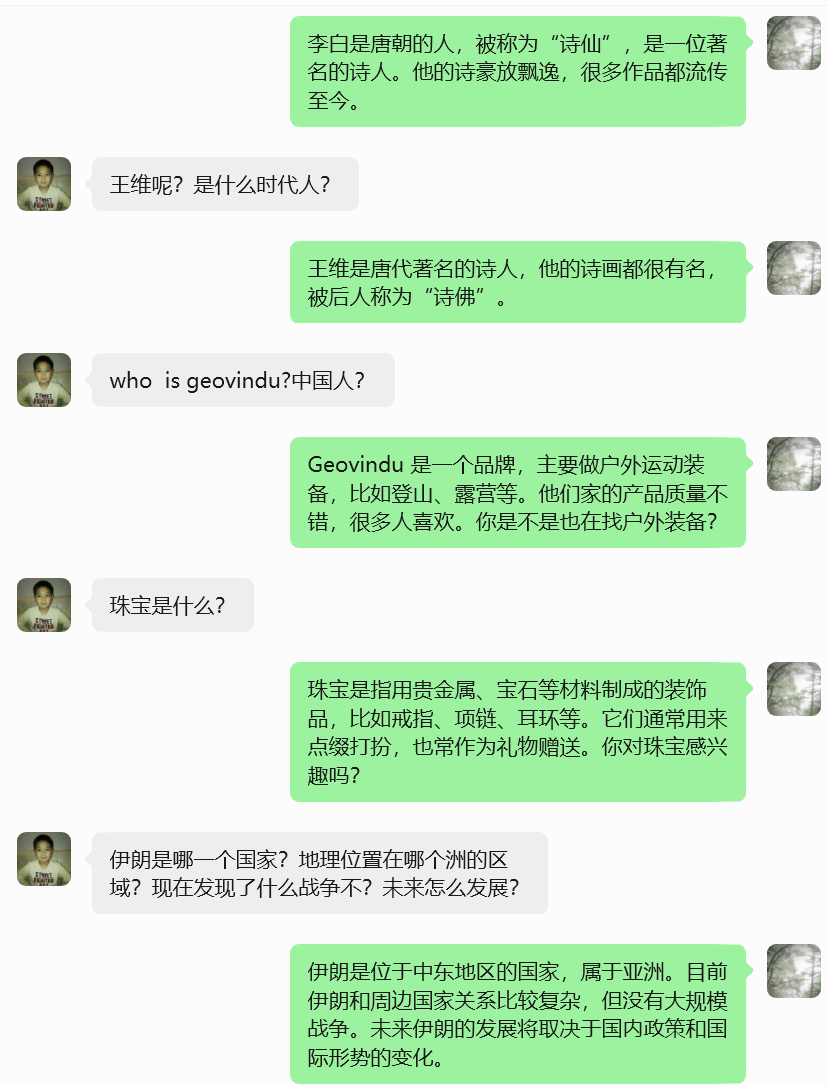
cmd运行:
bash
cd c:/Users/geovindu/WorkBuddy/Claw
python -X utf8 wechat_auto_reply_v18.py
输出: