目录
文章目录
- 目录
- 一、快速入门
- 二、初始化与配置管理
- 三、运维指令
- [四、Gateway 管理](#四、Gateway 管理)
- [五、Channel 管理](#五、Channel 管理)
- [六、Model 管理](#六、Model 管理)
- [七、Multi-Agent 管理](#七、Multi-Agent 管理)
- [八、Session 管理](#八、Session 管理)
- [九、Node 管理](#九、Node 管理)
- [十、Cron 管理](#十、Cron 管理)
- [十一、Heartbeat 管理](#十一、Heartbeat 管理)
- [十二、Memory 管理](#十二、Memory 管理)
- [十三、Message 管理](#十三、Message 管理)
- 十四、浏览器管理
- 十五、安全管理
- [十六、Skills 管理](#十六、Skills 管理)
- [十七、Plugins 管理](#十七、Plugins 管理)
- [十八、Hooks 管理](#十八、Hooks 管理)
- [十九、Sandbox 管理](#十九、Sandbox 管理)
- 二十、其他命令
- 二十一、斜杠命令
一、快速入门
bash
# 查看系统状态
openclaw status

# 诊断问题
openclaw doctor

# 查看日志
openclaw logs --follow

# 打开 Web 控制面板
openclaw dashboard

# 启动/重启 Gateway
openclaw gateway restart

# 更新版本
openclaw update
二、初始化与配置管理
首次使用时的配置向导。
bash
# 基础初始化
openclaw setup
# 运行向导
openclaw setup --wizard

# 引导式配置
openclaw onboard

# 配置向导
openclaw configure
# 配置特定部分
openclaw configure --section models
openclaw configure --section channels
openclaw configure --section web


# 查看配置文件路径
openclaw config file

# 获取配置值
openclaw config get gateway.port
openclaw config get agents.defaults.model.primary

# 设置配置值
openclaw config set gateway.port 19001
openclaw config set agents.defaults.model.primary "anthropic/claude-opus-4-6"

# 删除配置值
openclaw config unset tools.web.search.apiKey

# 验证配置
openclaw config validate
openclaw config validate --json
路径语法:
bash
# 点号语法
openclaw config get agents.defaults.workspace

# 数组索引
openclaw config get agents.list[0].id
openclaw config set agents.list[1].tools.exec.node "node-1"
三、运维指令
bash
# 快速状态概览
openclaw status

# 完整诊断(包括深度检查)
openclaw status --all --verbose

# 深度检测(探测所有渠道)
openclaw status --deep

# 显示用量信息
openclaw status --usage

# JSON 输出
openclaw status --json

# 基础健康检查
openclaw health

# JSON 格式
openclaw health --json

# 指定超时
openclaw health --timeout 5000

# 基础检查
openclaw doctor

# 自动修复
openclaw doctor --fix
openclaw doctor --repair

# 深度检查
openclaw doctor --deep

# 非交互模式
openclaw doctor --non-interactive

# 实时查看日志
openclaw logs --follow

# 查看最近 200 行
openclaw logs --limit 200

# JSON 格式输出
openclaw logs --json

# 禁用颜色
openclaw logs --plain


# 创建备份
openclaw backup create

# 验证备份
openclaw backup verify

# 重置配置
openclaw reset --scope config

# 重置配置和凭证
openclaw reset --scope config+creds+sessions

# 完全重置
openclaw reset --scope full

# 非交互模式
openclaw reset --scope config --yes --non-interactive


# 卸载服务
openclaw uninstall --service

# 卸载状态数据
openclaw uninstall --state

# 卸载工作空间
openclaw uninstall --workspace

# 完全卸载
openclaw uninstall --all

# 非交互模式
openclaw uninstall --all --yes --non-interactive
四、Gateway 管理
bash
# 启动 Gateway(前台)
openclaw gateway

# 查看状态
openclaw gateway status

# 网关状态(含 RPC 探测)
openclaw gateway status --probe

# 网关健康检查
openclaw gateway health

# 安装为系统服务
openclaw gateway install

# 启动服务
openclaw gateway start

# 停止服务
openclaw gateway stop

# 重启服务
openclaw gateway restart

# 卸载服务
openclaw gateway uninstall
启动参数:
| 参数 | 说明 |
|---|---|
--port <port> |
WebSocket 端口 |
| `--bind <loopback | lan |
--token <token> |
访问令牌 |
--password <password> |
访问密码 |
| `--tailscale <off | serve |
--dev |
开发模式 |
--verbose |
详细日志 |
--force |
强制启动(关闭占用端口的进程) |
示例:
bash
# 指定端口和令牌启动
openclaw gateway --port 19001 --token my-secret-token

# 绑定到局域网
openclaw gateway --bind lan

# 通过 Tailscale 暴露
openclaw gateway --tailscale serve
五、Channel 管理
bash
# 查看已配置的渠道
openclaw channels list

# 查看渠道状态
openclaw channels status

# 健康检查(探测渠道)
openclaw channels status --probe

# 探测渠道能力
openclaw channels capabilities

# 添加渠道账号
openclaw channels add --channel telegram --token <bot-token>
openclaw channels add --channel discord --token <bot-token>
openclaw channels add --channel feishu --app-id <id> --app-secret <secret>

# 删除渠道账号
openclaw channels remove --channel telegram --delete

# 查看渠道日志
openclaw channels logs --channel all
openclaw channels logs --channel telegram --lines 50

# 登录/登出(WhatsApp)
openclaw channels login --channel whatsapp
openclaw channels logout --channel whatsapp
支持的渠道:
| 渠道 | 说明 |
|---|---|
feishu |
飞书 / Lark |
telegram |
Telegram |
discord |
Discord |
whatsapp |
|
slack |
Slack |
signal |
Signal |
imessage |
iMessage |
msteams |
Microsoft Teams |
googlechat |
Google Chat |
管理 DM(私聊)配对请求:
bash
# 查看待配对请求
openclaw pairing list feishu

# 批准配对
openclaw pairing approve feishu <CODE>

# 批准并通知
openclaw pairing approve feishu <CODE> --notify
六、Model 管理
bash
# 查看模型状态
openclaw models status

# 测试模型认证
openclaw models status --probe

# 列出可用模型
openclaw models list
openclaw models list --all

# 设置默认模型
openclaw models set anthropic/claude-opus-4-6

# 设置图像模型
openclaw models set-image openai/gpt-4.1

# 扫描可用模型
openclaw models scan

# 列出别名
openclaw models aliases list

# 添加别名
openclaw models aliases add opus anthropic/claude-opus-4-6

# 删除别名
openclaw models aliases remove opus

# 列出 fallback
openclaw models fallbacks list

# 添加 fallback
openclaw models fallbacks add openai/gpt-4.1

# 删除 fallback
openclaw models fallbacks remove openai/gpt-4.1

# 清空 fallback
openclaw models fallbacks clear

# 添加认证
openclaw models auth add

# Setup-token
openclaw models auth setup-token --provider anthropic

# 粘贴 token
openclaw models auth paste-token --provider anthropic
七、Multi-Agent 管理
bash
# 列出所有 Agent
openclaw agents list
openclaw agents list --bindings  # 同时显示路由绑定

# 创建 Agent(进入向导流程)
openclaw agents add work

# 创建 Agent(指定参数)
openclaw agents add personal --workspace ~/.openclaw/workspace-personal

# 添加一个专门处理前端开发的代理
openclaw agents add \
  --workspace ~/.openclaw/workspace/fe-dev \
  --model claude-sonnet-4-2 \
  --bind telegram:work

# 添加一个专门处理后端开发的代理
openclaw agents add \
  --workspace ~/.openclaw/workspace/be-dev \
  --model claude-sonnet-4-2 \
  --bind slack:backend

# 删除 Agent(操作不可恢复)
openclaw agents delete work --force

# 查看绑定
openclaw agents bindings

# 添加绑定
openclaw agents bind --agent work --bind feishu:work-bot

# 移除绑定
openclaw agents unbind --agent work --bind feishu:work-bot
openclaw agents unbind --agent work --all

# 基础对话
openclaw agent --message "你好"

# 指定目标
openclaw agent --message "提醒我开会" --to "+15555550123"

# 指定渠道
openclaw agent --message "你好" --channel telegram

# 本地运行
openclaw agent --message "你好" --local

# 设置思考级别
openclaw agent --message "分析这个问题" --thinking high
八、Session 管理
bash
# 列出会话
openclaw sessions

# 列出特定 Agent 的会话
openclaw sessions --agent work

# 列出所有 Agent 的会话
openclaw sessions --all-agents

# 查看最近活跃的会话(最近 120 分钟)
openclaw sessions --active 120

# 清理会话(预览)
openclaw sessions cleanup --dry-run

# 执行清理
openclaw sessions cleanup --enforce
九、Node 管理
bash
# 添加节点
openclaw node add ${name}
openclaw node add macos-app

# 运行 Node Host(前台)
openclaw node run --host <gateway-ip> --port 18789

# 安装为系统服务
openclaw node install --host <gateway-ip> --port 18789 --display-name "Build Node"

# 查看状态
openclaw node status

# 启动服务
openclaw node start

# 停止服务
openclaw node stop

# 重启服务
openclaw node restart

# 卸载服务
openclaw node uninstall

# 查看所有节点状态
openclaw nodes status

# 列出节点
openclaw nodes list

# 查看待批准请求
openclaw nodes pending

# 批准节点
openclaw nodes approve <requestId>

# 拒绝节点
openclaw nodes reject <requestId>

# 重命名节点
openclaw nodes rename --node <id> --name "New Name"

# 查看节点详情
openclaw nodes describe --node <id>

# 在节点上执行命令
openclaw nodes run --node <id> -- echo "hello"

# 发送通知(macOS)
openclaw nodes notify --node <id> --title "提醒" --body "会议开始了"

# 列出设备
openclaw devices list

# 批准设备
openclaw devices approve <requestId>
openclaw devices approve --latest

# 拒绝设备
openclaw devices reject <requestId>

# 移除设备
openclaw devices remove <deviceId>

# 清除所有设备
openclaw devices clear --yes
十、Cron 管理
OpenClaw 内置了强大的定时任务系统,支持 3 种任务类型:
| 类型 | 说明 |
|---|---|
system-event |
在主会话中触发系统事件 |
agent-turn |
在隔离会话中运行 AI 代理任务 |
message |
直接发送消息到指定频道 |
bash
# 查看状态
openclaw cron status

# 列出任务
openclaw cron list

# 添加任务(每天早上 9 点)
openclaw cron add \
  --name "daily-report" \
  --cron "0 9 * * *" \
  --system-event "生成日报"

# 添加每周一早上的周报提醒
openclaw cron add \
  --name "周报提醒" \
  --cron "0 9 * * 1" \
  --system-event "提交周报的日子到了!"

# 添加每天早上 9 点的提醒
openclaw cron add \
  --name "晨间提醒" \
  --cron "0 9 * * *" \
  --system-event "记得喝咖啡 ☕️"

# 编辑任务
openclaw cron edit <id>

# 删除任务
openclaw cron rm <id>

# 启用/禁用任务
openclaw cron enable <id>
openclaw cron disable <id>

# 查看运行记录
openclaw cron runs --id <id>

# 立即运行
openclaw cron run <id>
十一、Heartbeat 管理
创建 ~/.openclaw/workspace/HEARTBEAT.md 文件:
bash
# 心跳检查清单

每次心跳时执行:

- [ ] 检查邮件
- [ ] 检查日历
- [ ] 检查待办事项
- [ ] 更新记忆文件
控制心跳:
bash
# 查看最后一次心跳
openclaw system heartbeat last

# 启用心跳系统
openclaw system heartbeat enable

# 禁用心跳系统
openclaw system heartbeat disable
十二、Memory 管理
OpenClaw 支持通过 CLI 来索引和搜索你的 MEMORY.md 文件,让它记住重要信息。
bash
# 查看记忆状态
openclaw memory status

# 重新索引记忆文件
openclaw memory index

# 搜索记忆内容
openclaw memory search "项目进度"

# 搜索需要密码的内容
openclaw memory search "SSH 凭证"
十三、Message 管理
bash
# 发送文本消息
openclaw message send --target "+15555550123" --message "你好"

# 发送到 Telegram
openclaw message send \
  --channel telegram \
  --target "@your_bot" \
  --message "Hello from OpenClaw!"

# 发送到 WhatsApp
openclaw message send \
  --channel whatsapp \
  --target "+8613800138000" \
  --message "测试消息"

# 发送到 Discord 频道
openclaw message send \
  --channel discord \
  --target "channel:1234567890" \
  --message "@here 重要通知"

# 发送图片
openclaw message send --target "+15555550123" --media /path/to/image.jpg

# 创建投票
openclaw message poll \
  --channel discord \
  --target "channel:123" \
  --poll-question "这周五聚餐吃什么?" \
  --poll-option "火锅" \
  --poll-option "烧烤" \
  --poll-option "西餐"

# 发送表情回应
openclaw message react \
  --channel discord \
  --target "channel:123" \
  --message-id "456" \
  --emoji "👍"
消息子命令:
| 子命令 | 说明 |
|---|---|
send |
发送消息 |
poll |
发送投票 |
react |
表情回应 |
edit |
编辑消息 |
delete |
删除消息 |
pin / unpin |
置顶/取消置顶 |
search |
搜索消息 |
十四、浏览器管理
bash
# 查看状态
openclaw browser status

# 启动浏览器
openclaw browser start

# 停止浏览器
openclaw browser stop

# 打开网页
openclaw browser open https://example.com

# 截图
openclaw browser screenshot

# 页面快照
openclaw browser snapshot

# 点击元素
openclaw browser click <ref>

# 输入文本
openclaw browser type <ref> "hello"

# 列出标签页
openclaw browser tabs

# 关闭标签页
openclaw browser close <targetId>

# 列出配置文件
openclaw browser profiles

# 创建配置文件
openclaw browser create-profile --name work --color "#FF0000"

# 删除配置文件
openclaw browser delete-profile --name work
十五、安全管理
bash
# 基础审计
openclaw security audit

# 深度审计(探测网关)
openclaw security audit --deep

# 自动修复常见问题
openclaw security audit --fix

# 重新加载密钥
openclaw secrets reload

# 审计密钥
openclaw secrets audit

# 配置密钥
openclaw secrets configure
十六、Skills 管理
bash
# 列出所有技能
openclaw skills list

# 列出可用的技能(依赖已满足)
openclaw skills list --eligible

# 查看技能详情
openclaw skills info browser

# 检查技能依赖
openclaw skills check

# 安装技能
openclaw skill install ${name}

# 关闭技能
openclaw skill disable ${name}
十七、Plugins 管理
bash
# 列出插件
openclaw plugins list

# 查看插件详情
openclaw plugins info <id>

# 安装插件
openclaw plugins install <path>

# 启用插件
openclaw plugins enable <id>

# 禁用插件
openclaw plugins disable <id>
十八、Hooks 管理
bash
# 列出钩子
openclaw hooks list

# 查看钩子详情
openclaw hooks info <name>

# 检查钩子
openclaw hooks check

# 启用钩子
openclaw hooks enable <name>

# 禁用钩子
openclaw hooks disable <name>
十九、Sandbox 管理
bash
# 列出沙箱
openclaw sandbox list

# 重建沙箱
openclaw sandbox recreate --agent <id>

# 清理全部沙箱容器
openclaw sandbox recreate --all

# 查看沙箱说明
openclaw sandbox explain
二十、其他命令
Approvals 管理
bash
# 查看审批设置
openclaw approvals get

# 设置审批模式
openclaw approvals set --mode allowlist

# 添加白名单
openclaw approvals allowlist add --node <id> "/usr/bin/git"

# 移除白名单
openclaw approvals allowlist remove --node <id> "/usr/bin/git"
docs 搜索
bash
openclaw docs
openclaw docs "gateway configuration"
TUI 界面
bash
openclaw tui
openclaw tui --session main
二维码
bash
openclaw qrClawHub
ClawdHub 技能市场:https://clawdhub.com
bash
# 搜索技能(模糊匹配)
clawhub search "模糊匹配"

# 安装技能
clawdhub install ${skill_name}

# 更新所有技能
clawhub update --all

# 同步已安装技能到最新版本
npx clawhub sync

# 发布技能
npx clawhub publish
二十一、斜杠命令
OpenClaw 有一套斜杠命令系统,在聊天里直接输入 / 开头的指令就能使用。
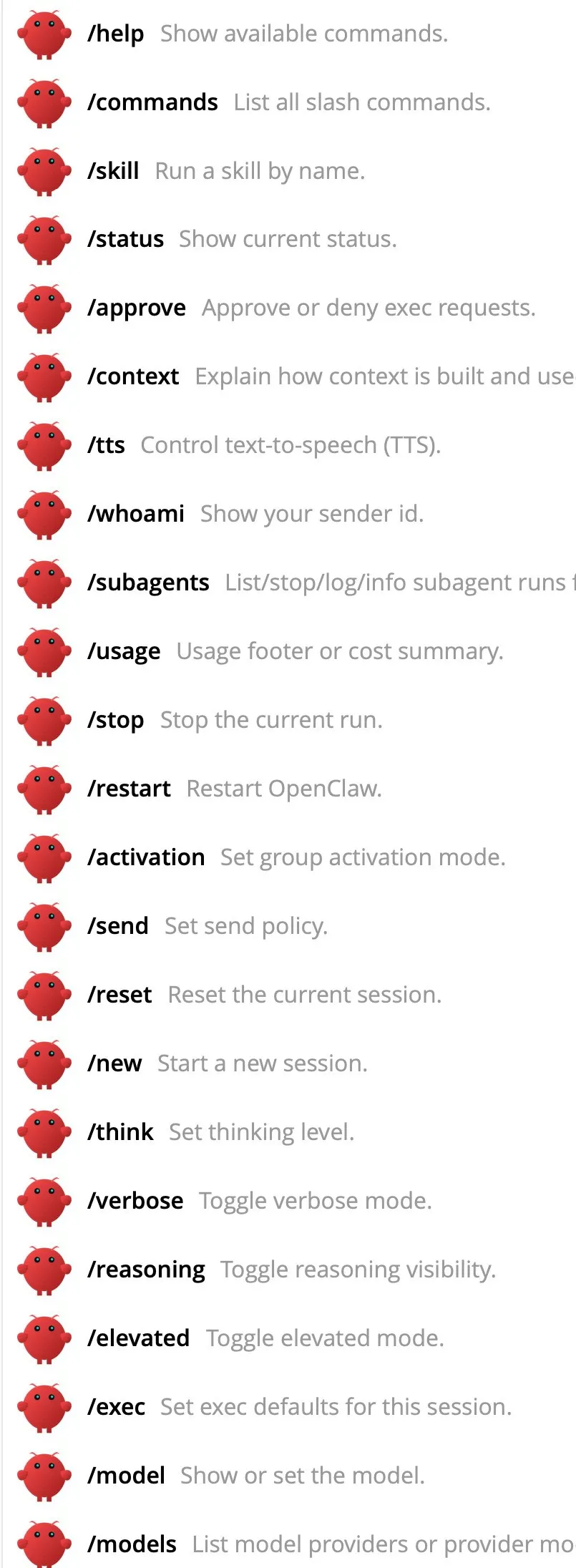
- /status 查看当前状态。
- /stop 停止某个任务。
- /compact 压缩上下文。
- /new 开启新会话,聊完一个话题想换下一个时用,避免上下文污染。
- /model <名字> 切换模型。
- /think <级别> 调整思考深度。日常闲聊用 off 就行,复杂问题开 high。