一、Redis安装部署
1.安装依赖,Redis 基于 C 语言开发,gcc是编译必备工具;make用于执行编译脚本;initscripts提供系统服务脚本支持。
bash
[root@redis-node1 ~]# dnf install make gcc initscripts -y2.源码编译redis
bash
[root@redis-node1 ~]# wget https://download.redis.io/releases/redis-7.4.8.tar.gz
[root@redis-node1 ~]# tar zxf redis-7.4.8.tar.gz
[root@redis-node1 ~]# cd redis-7.4.8/
[root@redis-node1 redis-7.4.8]#
[root@redis-node1 redis-7.4.8]# make && make install

[root@redis-node1 redis-7.4.8]# cd utils/
[root@redis-node1 utils]# vim install_server.sh
#bail if this system is managed by systemd
#_pid_1_exe="$(readlink -f /proc/1/exe)"
#if [ "${_pid_1_exe##*/}" = systemd ]
#then
#       echo "This systems seems to use systemd."
#       echo "Please take a look at the provided example service unit files in this directory, and adapt and install them. Sorry!"
#       exit 1
#fi

[root@redis-node1 utils]# ./install_server.sh
[root@redis-node1 utils]# ./install_server.sh
Welcome to the redis service installer
This script will help you easily set up a running redis server

Please select the redis port for this instance: [6379]
Selecting default: 6379
Please select the redis config file name [/etc/redis/6379.conf] /etc/redis/redis.conf
Please select the redis log file name [/var/log/redis_6379.log]
Selected default - /var/log/redis_6379.log
Please select the data directory for this instance [/var/lib/redis/6379]
Selected default - /var/lib/redis/6379
Please select the redis executable path [/usr/local/bin/redis-server]
Selected config:
Port           : 6379
Config file    : /etc/redis/redis.conf
Log file       : /var/log/redis_6379.log
Data dir       : /var/lib/redis/6379
Executable     : /usr/local/bin/redis-server
Cli Executable : /usr/local/bin/redis-cli
Is this ok? Then press ENTER to go on or Ctrl-C to abort.
Copied /tmp/6379.conf => /etc/init.d/redis_6379
Installing service...
Successfully added to chkconfig!
Successfully added to runlevels 345!
Starting Redis server...
Installation successful!

[root@redis-node1 utils]# systemctl status redis_6379.service

[root@redis-node2 utils]# systemctl daemon-reload
[root@redis-node2 utils]# systemctl status redis_6379.service
○ redis_6379.service - LSB: start and stop redis_6379
     Loaded: loaded (/etc/rc.d/init.d/redis_6379; generated)
     Active: inactive (dead)
       Docs: man:systemd-sysv-generator(8)

[root@redis-node2 utils]# systemctl start redis_6379.service
[root@redis-node2 utils]# systemctl status redis_6379.service
● redis_6379.service - LSB: start and stop redis_6379
     Loaded: loaded (/etc/rc.d/init.d/redis_6379; generated)
     Active: active (exited) since Sun 2026-03-08 15:24:18 CST; 8s ago
       Docs: man:systemd-sysv-generator(8)
    Process: 35637 ExecStart=/etc/rc.d/init.d/redis_6379 start (code=exited, status=0/SUCCESS)
        CPU: 1ms

[root@redis-node2 utils]# netstat -antlpe | grep redis
tcp        0      0 127.0.0.1:6379          0.0.0.0:*               LISTEN      0          76854      35530/redis-server
tcp6       0      0 ::1:6379                :::*                    LISTEN      0          76855      35530/redis-server
二、Redis主从复制
搭建一主多从 架构,实现主节点数据自动同步到从节点,达到数据备份、读写分离、提高读取性能的效果,同时保证从节点只读,确保数据一致性。
1.Redis主节点配置
bash
[root@redis-node1 ~]# vim /etc/redis/redis.conf
#bind 127.0.0.1 -::1
bind * -::*

protected-mode no

[root@redis-node1 ~]# systemctl restart redis_6379.service
2.配置Redis从节点
bash
#在redis-node2节点
[root@redis-node2 ~]# vim /etc/redis/redis.conf
#bind 127.0.0.1 -::1
bind * -::*

protected-mode no

replicaof 192.168.170.10  6379
[root@redis-node2 ~]# systemctl restart redis_6379.service

#在redis-node3节点
[root@redis-node3 ~]# vim /etc/redis/redis.conf
#bind 127.0.0.1 -::1
bind * -::*

protected-mode no

replicaof 192.168.170.10  6379
[root@redis-node3 ~]# systemctl restart redis_6379.service
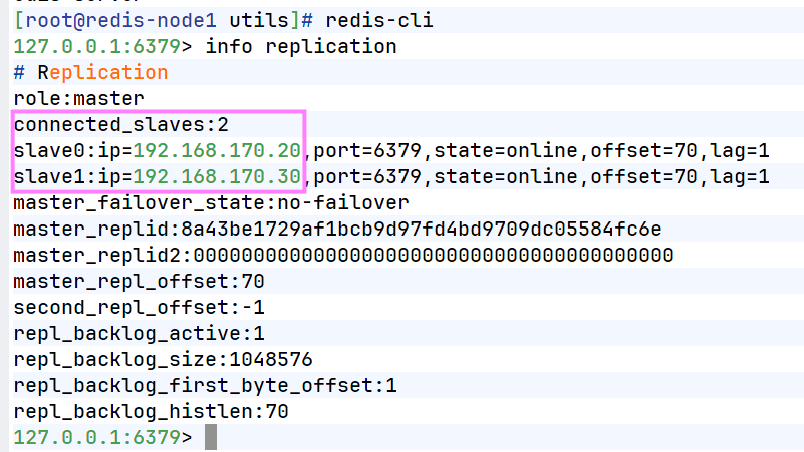
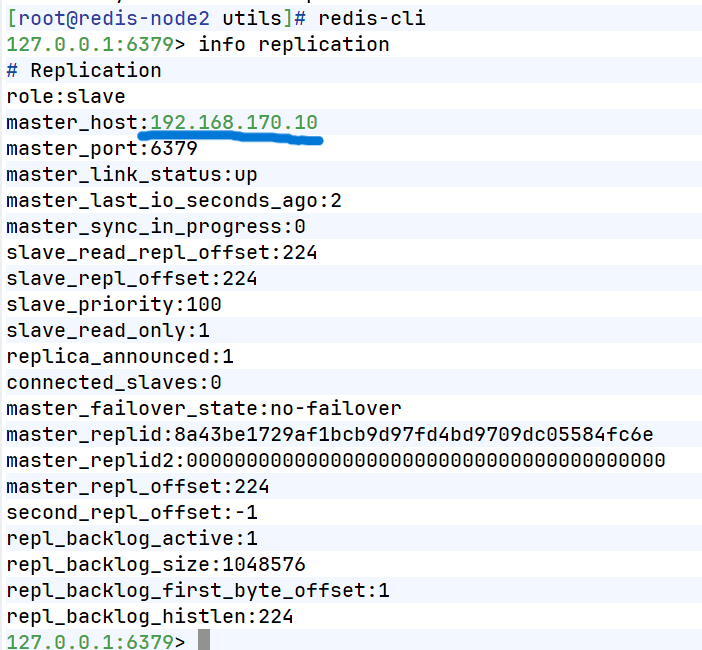
3.查看状态
4.测试数据同步性
bash
[root@redis-node1 ~]# redis-cli
127.0.0.1:6379> set name lee
OK
127.0.0.1:6379> get name
"lee"


[root@redis-node2 ~]# redis-cli
127.0.0.1:6379> get name
"lee"
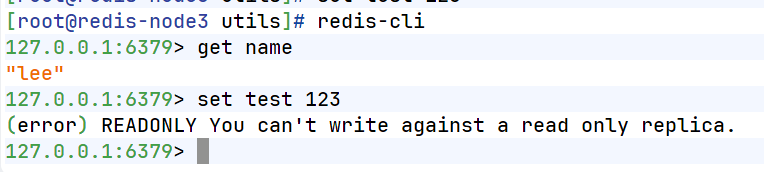
在从节点中不能写入数据
三、Redis哨兵模式
在主从复制基础上搭建哨兵集群 ,实现主节点故障时自动监控、自动投票、自动切换 ,让 Redis 服务具备高可用、自动故障转移能力,无需人工干预。
1.配置Redis哨兵模式
bash
#redis 主节点
[root@redis-node1 ~]# cd redis-7.4.8/
[root@redis-node1 redis-7.4.8]# cp -p sentinel.conf /etc/redis/
[root@redis-node1 ~]# vim /etc/redis/sentinel.conf
[root@redis-node1 redis-7.4.0]# vim /etc/redis/sentinel.conf
protected-mode no									#关闭保护模式
port 26379											#监听端口
daemonize no										#进入不打如后台
pidfile /var/run/redis-sentinel.pid					#sentinel进程pid文件
loglevel notice										#日志级别
sentinel monitor mymaster 192.168.170.100 6379 2		#创建sentinel监控监控master主机,2表示必须得到2票
sentinel down-after-milliseconds mymaster 10000		#master中断时长,10秒连不上视为master下线
sentinel parallel-syncs mymaster 1					#发生故障转移后,同时开始同步新master数据的slave数量
sentinel failover-timeout mymaster 180000			#整个故障切换的超时时间为3分钟

#在从节点关闭protected-mode模式
[root@redis-node2 ~]# vim /etc/redis/redis.conf
protected-mode no
[root@redis-node2 ~]# systemctl restart redis_6379.service
[root@redis-node3 ~]# vim /etc/redis/redis.conf
protected-mode no
[root@redis-node3 ~]# systemctl restart redis_6379.service

#在主节点复制sentinel.conf到从节点
[root@redis-node1 ~]# scp /etc/redis/sentinel.conf root@192.168.170.20:/etc/redis/
sentinel.conf                                                           100%   14KB  16.5MB/s   00:00
[root@redis-node1 ~]# scp /etc/redis/sentinel.conf root@192.168.170.30:/etc/redis/
sentinel.conf

#所有节点开启哨兵(保证所有主机已启动redis)
[root@redis-node1~3 ~]# redis-sentinel /etc/redis/sentinel.conf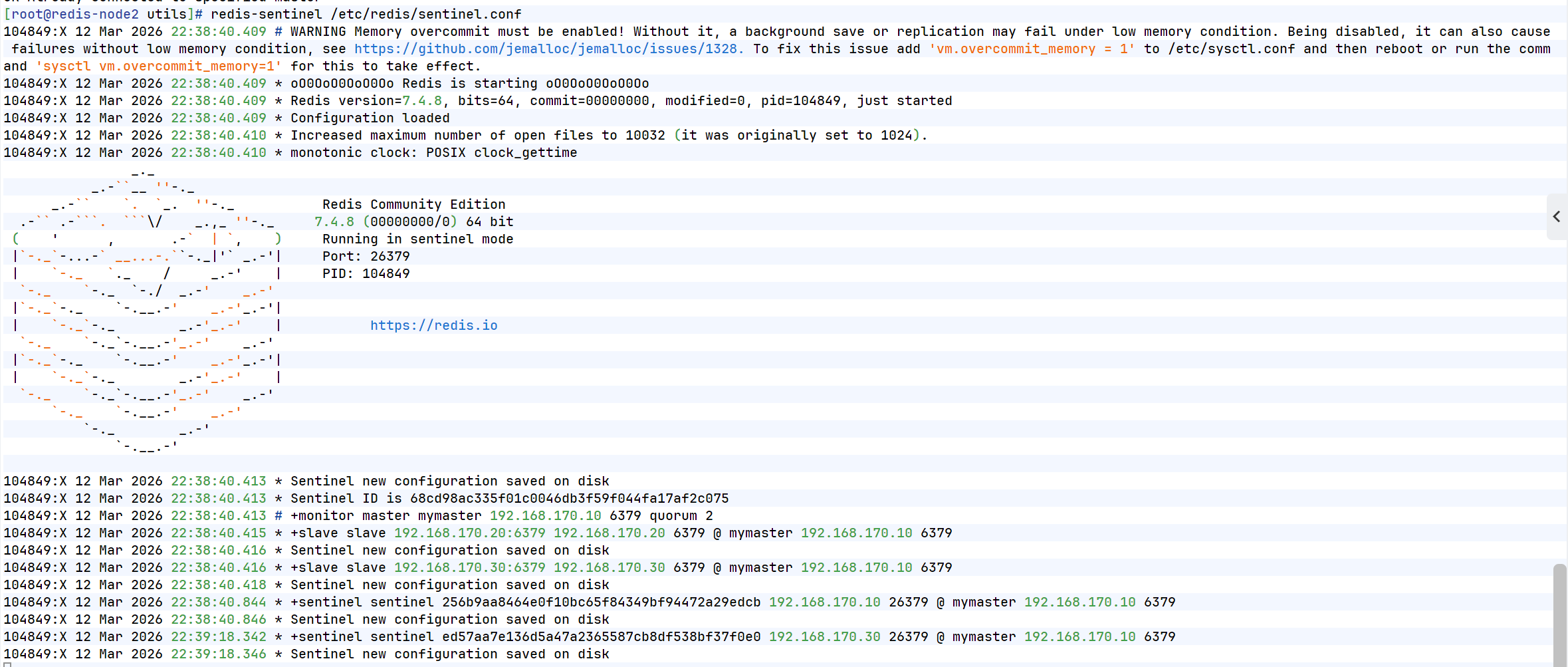
2.测试故障切换
bash
[root@redis-node1 6379]# redis-cli
127.0.0.1:6379> SHUTDOWN
not connected> quit

#切换信息
37502:X 08 Mar 2026 17:56:40.872 * Sentinel new configuration saved on disk
37502:X 08 Mar 2026 17:56:40.872 * Sentinel ID is d0780e7fd242a8f3244bc4dbead0fe63f793af03
37502:X 08 Mar 2026 17:56:40.872 # +monitor master mymaster 192.168.170.10 6379 quorum 2
37502:X 08 Mar 2026 17:56:40.873 * +slave slave 192.168.170.20:6379 192.168.170.20 6379 @ mymaster 192.168.170.10 6379
37502:X 08 Mar 2026 17:56:40.874 * Sentinel new configuration saved on disk
37502:X 08 Mar 2026 17:56:40.874 * +slave slave 192.168.170.30:6379 192.168.170.30 6379 @ mymaster 192.168.170.10 6379
37502:X 08 Mar 2026 17:56:40.902 * Sentinel new configuration saved on disk
37502:X 08 Mar 2026 17:57:02.726 * +sentinel sentinel ae862a91f4d7dba85c8e23da1c2e3e2758e5741d 192.168.170.20 26379 @ mymaster 192.168.170.10 6379
37502:X 08 Mar 2026 17:57:02.727 * Sentinel new configuration saved on disk
37502:X 08 Mar 2026 17:58:22.387 * +sentinel sentinel 7ef7c9ff4a5c9891530c9bd5f9379a39e5941079 172.25.254.30 26379 @ mymaster 192.168.170.10 6379
37502:X 08 Mar 2026 17:58:22.389 * Sentinel new configuration saved on disk
37502:X 08 Mar 2026 17:59:16.271 # +sdown master mymaster 192.168.170.10 6379
37502:X 08 Mar 2026 17:59:16.338 # +odown master mymaster 192.168.170.10 6379 #quorum 2/2
37502:X 08 Mar 2026 17:59:16.338 # +new-epoch 1
37502:X 08 Mar 2026 17:59:16.338 # +try-failover master mymaster 192.168.170.10 6379
37502:X 08 Mar 2026 17:59:16.340 * Sentinel new configuration saved on disk
37502:X 08 Mar 2026 17:59:16.340 # +vote-for-leader d0780e7fd242a8f3244bc4dbead0fe63f793af03 1
37502:X 08 Mar 2026 17:59:16.342 * 7ef7c9ff4a5c9891530c9bd5f9379a39e5941079 voted for d0780e7fd242a8f3244bc4dbead0fe63f793af03 1
37502:X 08 Mar 2026 17:59:16.343 * ae862a91f4d7dba85c8e23da1c2e3e2758e5741d voted for d0780e7fd242a8f3244bc4dbead0fe63f793af03 1
37502:X 08 Mar 2026 17:59:16.440 # +elected-leader master mymaster 192.168.170.10 6379
37502:X 08 Mar 2026 17:59:16.441 # +failover-state-select-slave master mymaster 172.25.254.10 6379
37502:X 08 Mar 2026 17:59:16.503 # +selected-slave slave 192.168.170.20:6379 192.168.170.20 6379 @ mymaster 192.168.170.10 6379
37502:X 08 Mar 2026 17:59:16.503 * +failover-state-send-slaveof-noone slave 192.168.170.20:6379 192.168.170.20 6379 @ mymaster 192.168.170.10 6379
37502:X 08 Mar 2026 17:59:16.580 * +failover-state-wait-promotion slave 192.168.170.20 :6379 192.168.170.20 6379 @ mymaster 192.168.170.20 6379
37502:X 08 Mar 2026 17:59:16.641 * Sentinel new configuration saved on disk
37502:X 08 Mar 2026 17:59:16.641 # +promoted-slave slave 192.168.170.20 :6379 192.168.170.20 6379 @ mymaster 192.168.170.10 6379
37502:X 08 Mar 2026 17:59:16.641 # +failover-state-reconf-slaves master mymaster 192.168.170.10 6379
37502:X 08 Mar 2026 17:59:16.693 * +slave-reconf-sent slave 192.168.170.30 :6379 192.168.170.30 6379 @ mymaster 192.168.170.20 6379
37502:X 08 Mar 2026 17:59:17.520 # -odown master mymaster 192.168.170.10 6379	#客观下线
37502:X 08 Mar 2026 17:59:17.674 * +slave-reconf-inprog slave 192.168.170.30 :6379 192.168.170.30 6379 @ mymaster 192.168.170.10 6379
37502:X 08 Mar 2026 17:59:17.674 * +slave-reconf-done slave 192.168.170.30 :6379 172.25.254.30 6379 @ mymaster 192.168.170.10 6379
37502:X 08 Mar 2026 17:59:17.746 # +failover-end master mymaster 192.168.170.10 6379
37502:X 08 Mar 2026 17:59:17.746 # +switch-master mymaster 192.168.170.10 6379 192.168.170.20 6379			#主节点被切换到20
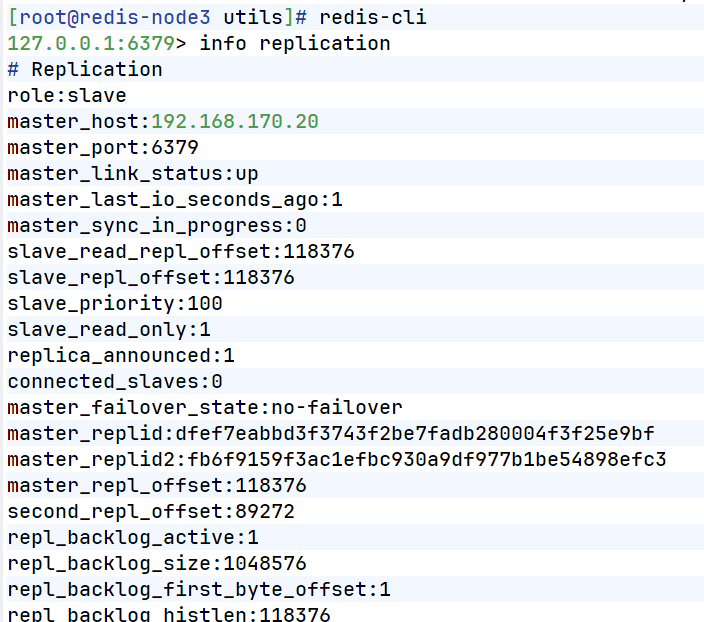
在30中查看信息
bash
#恢复10redis
[root@redis-node1 6379]# /etc/init.d/redis_6379 start
Starting Redis server...

#在20查看信息
[root@redis-node2 ~]# redis-cli
127.0.0.1:6379> info replication
# Replication
role:master
connected_slaves:1
slave0:ip=192.168.170.30,port=6379,state=online,offset=130264,lag=1
slave1:ip=192.168.170.10,port=6379,state=online,offset=135673,lag=0
master_failover_state:no-failover
master_replid:dcd9e887a20f05380a448cca1f332ec2501e5477
master_replid2:d4caee184d2c8ffdf82d30fc7267ec6cedbf08f8
master_repl_offset:130405
second_repl_offset:113351
repl_backlog_active:1
repl_backlog_size:1048576
repl_backlog_first_byte_offset:91236
repl_backlog_histlen:39170
四、Redis-cluster集群
搭建3 主 3 从分布式集群 ,通过哈希槽分片 实现数据分布式存储,支持横向扩容、缩容、故障自动转移,解决单机 Redis 容量不足、性能瓶颈的问题,实现企业级大规模缓存服务。
1.修改所有节点配置文件
[root@redis-node1 ~]# vim /etc/redis/6379.conf     #实际不用加上中文注解
masterauth "123456"					#集群主从认证
cluster-enabled yes					#开启cluster集群功能
cluster-config-file nodes-6379.conf	#指定集群配置文件
cluster-node-timeout 15000			#节点加入集群的超时时间单位是ms

[root@redis-node1 ~]# /etc/init.d/redis_6379 stop
2.启动集群
[root@redis-node1 ~]# redis-cli --cluster create \
192.168.170.10:6379 \
192.168.170.20:6379 \
192.168.170.30:6379 \
192.168.170.40:6379 \
192.168.170.50:6379 \
192.168.170.60:6379 \
--cluster-replicas 1
>>> Performing hash slots allocation on 6 nodes...
Master[0] -> Slots 0 - 5460
Master[1] -> Slots 5461 - 10922
Master[2] -> Slots 10923 - 16383
Adding replica 192.168.170.50:6379 to 192.168.170.10:6379
Adding replica 192.168.170.60:6379 to 192.168.170.20:6379
Adding replica 192.168.170.40:6379 to 192.168.170.30:6379
M: 4f91a2b2056f31fb08e30e4e35f380a8454bf6bd 192.168.170.10:6379
   slots:[0-5460] (5461 slots) master
M: 71147d42f50988c0ffb652f08e12ec6b4d08e3e0 192.168.170.20:6379
   slots:[5461-10922] (5462 slots) master
M: df737ba97f5cd3ecbb13d5579eb509784349274f 192.168.170.30:6379
   slots:[10923-16383] (5461 slots) master
S: bed09b0fad8d9f706cac6509b6269f6777740f23 192.168.170.40:6379
   replicates df737ba97f5cd3ecbb13d5579eb509784349274f
S: 06ed0e352d91a520fd604ee29184f6583a1b2b8b 192.168.170.50:6379
   replicates 4f91a2b2056f31fb08e30e4e35f380a8454bf6bd
S: c34810709e6fe07ad080e9cfb8b23b3eac5f58bd 192.168.170.60:6379
   replicates 71147d42f50988c0ffb652f08e12ec6b4d08e3e0
Can I set the above configuration? (type 'yes' to accept): yes     #输入内容
>>> Nodes configuration updated
>>> Assign a different config epoch to each node
>>> Sending CLUSTER MEET messages to join the cluster
Waiting for the cluster to join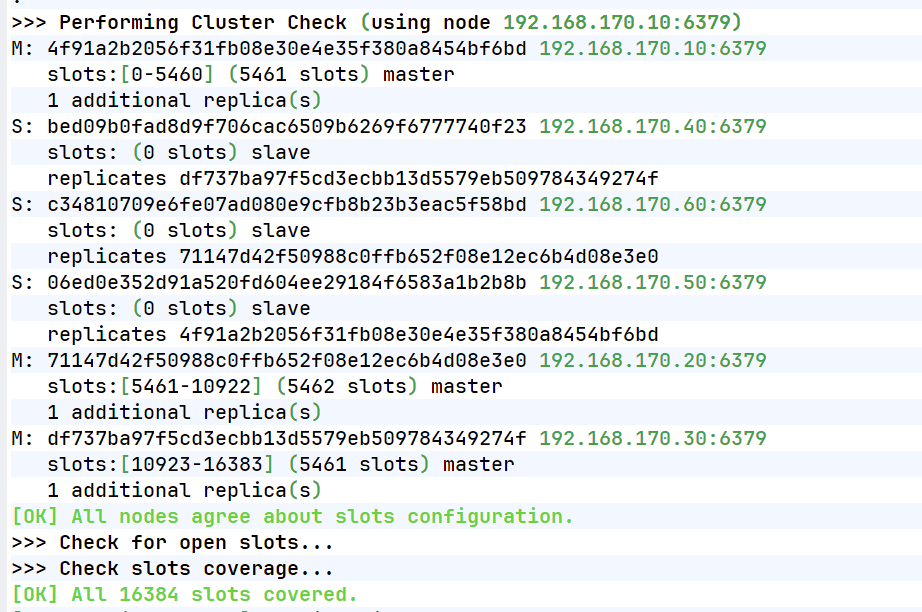
查看集群状态
[root@redis-node1 ~]# redis-cli  --cluster info 192.168.170.10:6379
192.168.170.10:6379 (4f91a2b2...) -> 0 keys | 5461 slots | 1 slaves.
192.168.170.20:6379 (71147d42...) -> 0 keys | 5462 slots | 1 slaves.
192.168.170.30:6379 (df737ba9...) -> 0 keys | 5461 slots | 1 slaves.
[OK] 0 keys in 3 masters.
0.00 keys per slot on average.
查看集群信息
[root@redis-node1 ~]# redis-cli  cluster info
cluster_state:ok
cluster_slots_assigned:16384
cluster_slots_ok:16384
cluster_slots_pfail:0
cluster_slots_fail:0
cluster_known_nodes:6
cluster_size:3
cluster_current_epoch:6
cluster_my_epoch:1
cluster_stats_messages_ping_sent:1399
cluster_stats_messages_pong_sent:2466
cluster_stats_messages_sent:3865
cluster_stats_messages_ping_received:2461
cluster_stats_messages_pong_received:1148
cluster_stats_messages_meet_received:5
cluster_stats_messages_received:3614
total_cluster_links_buffer_limit_exceeded:0
检测当前集群
[root@redis-node1 ~]# redis-cli --cluster check 192.168.170.10:6379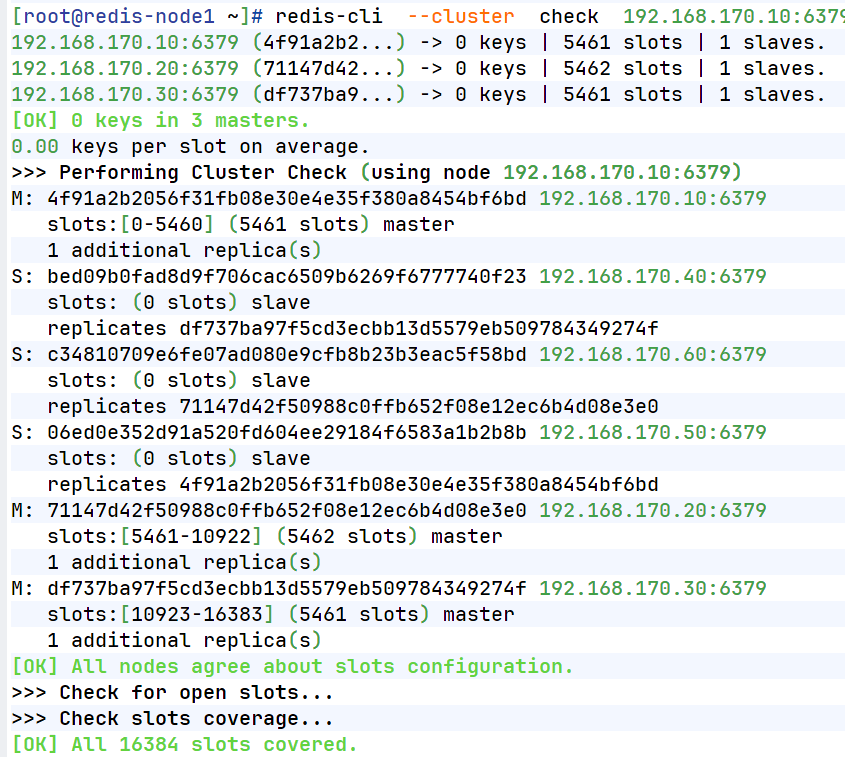
2.集群扩容
bash
#添加master
[root@redis-node1 ~]# redis-cli --cluster  add-node 192.168.170.70:6379 192.168.170.10:6379

[root@redis-node1 ~]# redis-cli  --cluster  check  192.168.170.10:6379
192.168.170.10:6379 (8db833f3...) -> 0 keys | 5461 slots | 1 slaves.
192.168.170.70:6379 (dfabfe07...) -> 0 keys | 0 slots | 0 slaves.
192.168.170.30:6379 (d9300173...) -> 0 keys | 5461 slots | 1 slaves.
192.168.170.20:6379 (ca599940...) -> 1 keys | 5462 slots | 1 slaves.
[OK] 1 keys in 4 masters.
0.00 keys per slot on average.
>>> Performing Cluster Check (using node 192.168.170.10:6379)
M: 8db833f3c3bc6b8f93e87111f13f56d366f833a0 192.168.170.10:6379
   slots:[0-5460] (5461 slots) master
   1 additional replica(s)
M: dfabfe07170ac9b5d20a5a7a70c836877bd64504 192.168.170.70:6379
   slots: (0 slots) master
S: c939a04358edc1ce7a1c1a44561d77fb402025fd 192.168.170.60:6379
   slots: (0 slots) slave
   replicates ca599940209f55c07d06951480703bb0a5d8873a
M: d9300173b75149d3056f0ee3edec063f8ec66e9a 192.168.170.30:6379
   slots:[10923-16383] (5461 slots) master
   1 additional replica(s)
M: ca599940209f55c07d06951480703bb0a5d8873a 192.168.170.20:6379
   slots:[5461-10922] (5462 slots) master
   1 additional replica(s)
S: ba6ef067c63d30c213493eb48d43427015018898 192.168.170.50:6379
   slots: (0 slots) slave
   replicates 8db833f3c3bc6b8f93e87111f13f56d366f833a0
S: 32d797eb30094b77edb896abcc0b0fc91ccdb4fd 192.168.170.40:6379
   slots: (0 slots) slave
   replicates d9300173b75149d3056f0ee3edec063f8ec66e9a
[OK] All nodes agree about slots configuration.
>>> Check for open slots...
>>> Check slots coverage...
[OK] All 16384 slots covered.


#分配solt给新加入的主机
[root@redis-node1 ~]# redis-cli  --cluster  reshard  192.168.170.10:6379
>>> Performing Cluster Check (using node 192.168.170.10:6379)
M: 8db833f3c3bc6b8f93e87111f13f56d366f833a0 192.168.170.10:6379
   slots:[0-5460] (5461 slots) master
   1 additional replica(s)
M: dfabfe07170ac9b5d20a5a7a70c836877bd64504 192.168.170.70:6379
   slots: (0 slots) master
S: c939a04358edc1ce7a1c1a44561d77fb402025fd 192.168.170.60:6379
   slots: (0 slots) slave
   replicates ca599940209f55c07d06951480703bb0a5d8873a
M: d9300173b75149d3056f0ee3edec063f8ec66e9a 192.168.170.30:6379
   slots:[10923-16383] (5461 slots) master
   1 additional replica(s)
M: ca599940209f55c07d06951480703bb0a5d8873a 192.168.170.20:6379
   slots:[5461-10922] (5462 slots) master
   1 additional replica(s)
S: ba6ef067c63d30c213493eb48d43427015018898 192.168.170.50:6379
   slots: (0 slots) slave
   replicates 8db833f3c3bc6b8f93e87111f13f56d366f833a0
S: 32d797eb30094b77edb896abcc0b0fc91ccdb4fd 192.168.170.40:6379
   slots: (0 slots) slave
   replicates d9300173b75149d3056f0ee3edec063f8ec66e9a
[OK] All nodes agree about slots configuration.
>>> Check for open slots...
>>> Check slots coverage...
[OK] All 16384 slots covered.
How many slots do you want to move (from 1 to 16384)? 4096			#分配solt的数量
What is the receiving node ID? dfabfe07170ac9b5d20a5a7a70c836877bd64504
Please enter all the source node IDs.
  Type 'all' to use all the nodes as source nodes for the hash slots.
  Type 'done' once you entered all the source nodes IDs.
Source node #1: all			#solt来源

Ready to move 4096 slots.


#给新主机添加slave
[root@redis-node1 ~]# redis-cli  --cluster  add-node 192.168.170.80:6379 192.168.170.10:6379 --cluster-slave --cluster-master-id dfabfe07170ac9b5d20a5a7a70c836877bd64504


[root@redis-node1 ~]# redis-cli  --cluster  check  192.168.170.10:6379                                              192.168.170.10:6379 (8db833f3...) -> 0 keys | 4096 slots | 1 slaves.
192.168.170.70:6379 (dfabfe07...) -> 1 keys | 4096 slots | 1 slaves.
192.168.170.30:6379 (d9300173...) -> 0 keys | 4096 slots | 1 slaves.
192.168.170.20:6379 (ca599940...) -> 0 keys | 4096 slots | 1 slaves.
[OK] 1 keys in 4 masters.
0.00 keys per slot on average.
>>> Performing Cluster Check (using node 192.168.170.10:6379)
M: 8db833f3c3bc6b8f93e87111f13f56d366f833a0 192.168.170.10:6379
   slots:[1365-5460] (4096 slots) master
   1 additional replica(s)
S: 1176ee294e6b5071ca57e93374d04ac22028daed 192.168.170.80:6379
   slots: (0 slots) slave
   replicates dfabfe07170ac9b5d20a5a7a70c836877bd64504
M: dfabfe07170ac9b5d20a5a7a70c836877bd64504 192.168.170.70:6379
   slots:[0-1364],[5461-6826],[10923-12287] (4096 slots) master
   1 additional replica(s)
S: c939a04358edc1ce7a1c1a44561d77fb402025fd 192.168.170.60:6379
   slots: (0 slots) slave
   replicates ca599940209f55c07d06951480703bb0a5d8873a
M: d9300173b75149d3056f0ee3edec063f8ec66e9a 192.168.170.30:6379
   slots:[12288-16383] (4096 slots) master
   1 additional replica(s)
M: ca599940209f55c07d06951480703bb0a5d8873a 192.168.170.20:6379
   slots:[6827-10922] (4096 slots) master
   1 additional replica(s)
S: ba6ef067c63d30c213493eb48d43427015018898 192.168.170.50:6379
   slots: (0 slots) slave
   replicates 8db833f3c3bc6b8f93e87111f13f56d366f833a0
S: 32d797eb30094b77edb896abcc0b0fc91ccdb4fd 192.168.170.40:6379
   slots: (0 slots) slave
   replicates d9300173b75149d3056f0ee3edec063f8ec66e9a
[OK] All nodes agree about slots configuration.
>>> Check for open slots...
>>> Check slots coverage...
[OK] All 16384 slots covered.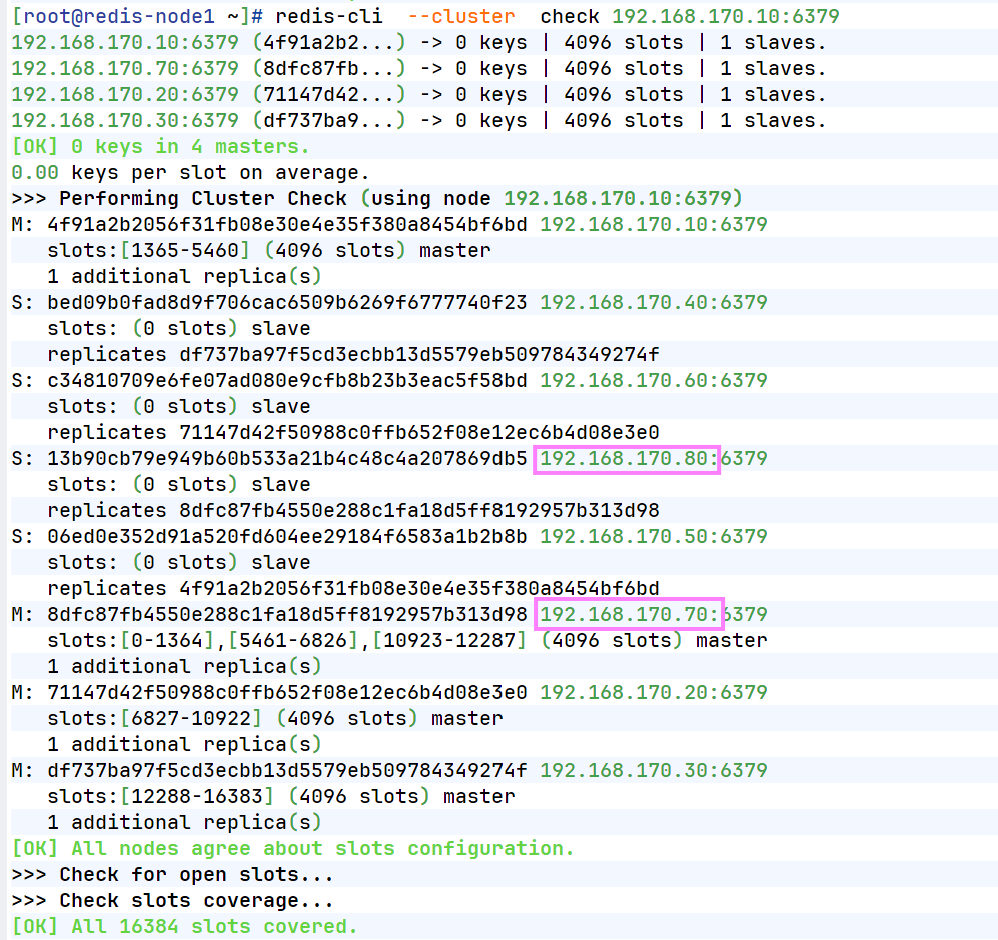
4.集群缩容
bash
#集群槽位回收到10主机中
[root@redis-node1 ~]# redis-cli  --cluster reshard 192.168.170.10:6379
>>> Performing Cluster Check (using node 192.168.170.10:6379)
M: 4f91a2b2056f31fb08e30e4e35f380a8454bf6bd 192.168.170.10:6379
   slots:[1365-5460] (4096 slots) master
   1 additional replica(s)
S: 13b90cb79e949b60b533a21b4c48c4a207869db5 192.168.170.80:6379
   slots: (0 slots) slave
   replicates dfabfe07170ac9b5d20a5a7a70c836877bd64504
M: 8dfc87fb4550e288c1fa18d5ff8192957b313d98 192.168.170.70:6379
   slots:[0-1364],[5461-6826],[10923-12287] (4096 slots) master
   1 additional replica(s)
S: c34810709e6fe07ad080e9cfb8b23b3eac5f58bd 192.168.170.60:6379
   slots: (0 slots) slave
   replicates ca599940209f55c07d06951480703bb0a5d8873a
M: df737ba97f5cd3ecbb13d5579eb509784349274f 192.168.170.30:6379
   slots:[12288-16383] (4096 slots) master
   1 additional replica(s)
M: 71147d42f50988c0ffb652f08e12ec6b4d08e3e0 192.168.170.20:6379
   slots:[6827-10922] (4096 slots) master
   1 additional replica(s)
S: 06ed0e352d91a520fd604ee29184f6583a1b2b8b 192.168.170.50:6379
   slots: (0 slots) slave
   replicates 8db833f3c3bc6b8f93e87111f13f56d366f833a0
S: bed09b0fad8d9f706cac6509b6269f6777740f23 192.168.170.40:6379
   slots: (0 slots) slave
   replicates d9300173b75149d3056f0ee3edec063f8ec66e9a
[OK] All nodes agree about slots configuration.
>>> Check for open slots...
>>> Check slots coverage...
[OK] All 16384 slots covered.
How many slots do you want to move (from 1 to 16384)? 4096
What is the receiving node ID? 8db833f3c3bc6b8f93e87111f13f56d366f833a0  #10id
Please enter all the source node IDs.
  Type 'all' to use all the nodes as source nodes for the hash slots.
  Type 'done' once you entered all the source nodes IDs.
Source node #1: 8dfc87fb4550e288c1fa18d5ff8192957b313d98		#70id
Source node #2: done


#删除70和80节点
[root@redis-node1 ~]# redis-cli --cluster del-node  192.168.170.10:6379 8dfc87fb4550e288
c1fa18d5ff8192957b313d98
>>> Removing node 8dfc87fb4550e288c1fa18d5ff8192957b313d98 from cluster 192.168.170.10:6379
>>> Sending CLUSTER FORGET messages to the cluster...
>>> Sending CLUSTER RESET SOFT to the deleted node.


[root@redis-node1 ~]# redis-cli  --cluster  check  192.168.170.10:6379
192.168.170.10:6379 (4f91a2b2...) -> 0 keys | 8192 slots | 2 slaves.
192.168.170.20:6379 (71147d42...) -> 0 keys | 4096 slots | 1 slaves.
192.168.170.30:6379 (df737ba9...) -> 0 keys | 4096 slots | 1 slaves.
[OK] 0 keys in 3 masters.
0.00 keys per slot on average.
>>> Performing Cluster Check (using node 192.168.170.10:6379)
M: 4f91a2b2056f31fb08e30e4e35f380a8454bf6bd 192.168.170.10:6379
   slots:[0-6826],[10923-12287] (8192 slots) master
   2 additional replica(s)
S: bed09b0fad8d9f706cac6509b6269f6777740f23 192.168.170.40:6379
   slots: (0 slots) slave
   replicates df737ba97f5cd3ecbb13d5579eb509784349274f
S: c34810709e6fe07ad080e9cfb8b23b3eac5f58bd 192.168.170.60:6379
   slots: (0 slots) slave
   replicates 71147d42f50988c0ffb652f08e12ec6b4d08e3e0
S: 13b90cb79e949b60b533a21b4c48c4a207869db5 192.168.170.80:6379
   slots: (0 slots) slave
   replicates 4f91a2b2056f31fb08e30e4e35f380a8454bf6bd
S: 06ed0e352d91a520fd604ee29184f6583a1b2b8b 192.168.170.50:6379
   slots: (0 slots) slave
   replicates 4f91a2b2056f31fb08e30e4e35f380a8454bf6bd
M: 71147d42f50988c0ffb652f08e12ec6b4d08e3e0 192.168.170.20:6379
   slots:[6827-10922] (4096 slots) master
   1 additional replica(s)
M: df737ba97f5cd3ecbb13d5579eb509784349274f 192.168.170.30:6379
   slots:[12288-16383] (4096 slots) master
   1 additional replica(s)
[OK] All nodes agree about slots configuration.
>>> Check for open slots...
>>> Check slots coverage...
[OK] All 16384 slots covered.

[root@redis-node1 ~]# redis-cli --cluster del-node  172.25.254.10:6379 4f91a2b2056f31fb08e30e4e35f380a8454bf6bd
>>> Removing node 1176ee294e6b5071ca57e93374d04ac22028daed from cluster 172.25.254.10:6379
>>> Sending CLUSTER FORGET messages to the cluster...
>>> Sending CLUSTER RESET SOFT to the deleted node.