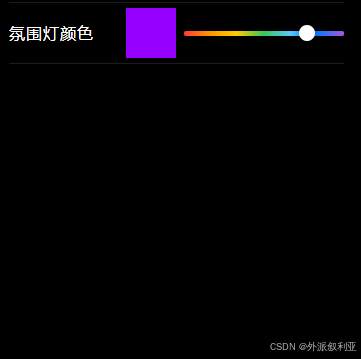
1:创建组件HueColorBar.vue
javascript
<template>
	<view class="hueBarWrap">
		<view
			:id="barId"
			class="hueBar"
			@touchstart.stop.prevent="onTouch"
			@touchmove.stop.prevent="onTouch"
			@tap="onTap"
			@mousedown.stop.prevent="onMouseDown"
		>
			<view class="thumb" :style="{ left: thumbLeftPx + 'px', backgroundColor: thumbColor }"></view>
		</view>
	</view>
</template>

<script>
	export default {
		name: 'HueColorBar',
		props: {
			// Vue2 v-model: value + input
			value: {
				type: String,
				default: '#FF00FF'
			},
			// 圆点大小(px)
			thumbSize: {
				type: Number,
				default: 14
			}
		},
		data() {
			return {
				barId: `hue_bar_${Math.random().toString(16).slice(2)}`,
				barLeft: 0,
				barWidth: 0,
				hue: 0,
				thumbLeftPx: 0,
				mouseDragging: false
			}
		},
		computed: {
			thumbColor() {
				// 圆点保持白色描边更贴近截图,这里用纯白
				return '#FFFFFF'
			}
		},
		watch: {
			value: {
				immediate: true,
				handler(v) {
					const hue = this.hexToHue(v)
					if (Number.isFinite(hue)) {
						this.hue = hue
						this.syncThumb()
					}
				}
			}
		},
		mounted() {
			this.$nextTick(() => {
				this.measure()
			})
			// H5 下支持鼠标拖拽
			if (typeof window !== 'undefined') {
				window.addEventListener('mousemove', this.onMouseMove, { passive: false })
				window.addEventListener('mouseup', this.onMouseUp, { passive: true })
				window.addEventListener('mouseleave', this.onMouseUp, { passive: true })
			}
		},
		beforeDestroy() {
			if (typeof window !== 'undefined') {
				window.removeEventListener('mousemove', this.onMouseMove)
				window.removeEventListener('mouseup', this.onMouseUp)
				window.removeEventListener('mouseleave', this.onMouseUp)
			}
		},
		methods: {
			measure() {
				const query = uni.createSelectorQuery().in(this)
				query.select(`#${this.barId}`).boundingClientRect((rect) => {
					if (!rect) return
					this.barLeft = rect.left || 0
					this.barWidth = rect.width || 0
					this.syncThumb()
				}).exec()
			},
			onTap(e) {
				// 小程序/H5 点击都走这里
				this.updateFromEvent(e)
			},
			onMouseDown(e) {
				this.mouseDragging = true
				this.updateFromEvent(e)
			},
			onMouseMove(e) {
				if (!this.mouseDragging) return
				if (e && e.preventDefault) e.preventDefault()
				this.updateFromEvent(e)
			},
			onMouseUp() {
				this.mouseDragging = false
			},
			onTouch(e) {
				this.updateFromEvent(e)
			},
			updateFromEvent(e) {
				if (!this.barWidth) this.measure()
				let x = null
				const t = (e && e.touches && e.touches[0]) || (e && e.changedTouches && e.changedTouches[0])
				if (t && typeof t.clientX === 'number') x = t.clientX
				else if (e && typeof e.clientX === 'number') x = e.clientX
				// 某些端 tap 事件没有 clientX,退化为不处理
				if (x === null) return

				const half = this.thumbSize / 2
				const raw = x - this.barLeft
				const clamped = Math.max(0, Math.min(this.barWidth, raw))
				const ratio = this.barWidth ? clamped / this.barWidth : 0
				this.hue = Math.round(ratio * 360)
				this.thumbLeftPx = Math.max(-half, Math.min(this.barWidth - half, clamped - half))

				const hex = this.hsvToHex(this.hue, 100, 100)
				this.$emit('input', hex)
				this.$emit('change', { hex, hue: this.hue })
			},
			syncThumb() {
				if (!this.barWidth) return
				const half = this.thumbSize / 2
				const ratio = Math.max(0, Math.min(1, this.hue / 360))
				const x = ratio * this.barWidth
				this.thumbLeftPx = Math.max(-half, Math.min(this.barWidth - half, x - half))
			},
			hsvToHex(h, s, v) {
				const { r, g, b } = this.hsvToRgb(h, s, v)
				return this.rgbToHex(r, g, b)
			},
			hsvToRgb(h, s, v) {
				const _s = Math.max(0, Math.min(100, s)) / 100
				const _v = Math.max(0, Math.min(100, v)) / 100
				let _h = ((h % 360) + 360) % 360
				const c = _v * _s
				const x = c * (1 - Math.abs(((_h / 60) % 2) - 1))
				const m = _v - c
				let rp = 0, gp = 0, bp = 0
				if (_h < 60) { rp = c; gp = x; bp = 0 }
				else if (_h < 120) { rp = x; gp = c; bp = 0 }
				else if (_h < 180) { rp = 0; gp = c; bp = x }
				else if (_h < 240) { rp = 0; gp = x; bp = c }
				else if (_h < 300) { rp = x; gp = 0; bp = c }
				else { rp = c; gp = 0; bp = x }
				return {
					r: Math.round((rp + m) * 255),
					g: Math.round((gp + m) * 255),
					b: Math.round((bp + m) * 255)
				}
			},
			rgbToHex(r, g, b) {
				const toHex = (n) => {
					const s = Math.max(0, Math.min(255, n)).toString(16).toUpperCase()
					return s.length === 1 ? '0' + s : s
				}
				return `#${toHex(r)}${toHex(g)}${toHex(b)}`
			},
			hexToHue(hex) {
				if (!hex || typeof hex !== 'string') return 0
				const m = hex.trim().match(/^#?([0-9a-fA-F]{6})$/)
				if (!m) return 0
				const v = m[1]
				const r = parseInt(v.slice(0, 2), 16)
				const g = parseInt(v.slice(2, 4), 16)
				const b = parseInt(v.slice(4, 6), 16)
				return this.rgbToHue(r, g, b)
			},
			rgbToHue(r, g, b) {
				const rp = r / 255, gp = g / 255, bp = b / 255
				const max = Math.max(rp, gp, bp)
				const min = Math.min(rp, gp, bp)
				const d = max - min
				if (d === 0) return 0
				let h = 0
				if (max === rp) h = ((gp - bp) / d) % 6
				else if (max === gp) h = (bp - rp) / d + 2
				else h = (rp - gp) / d + 4
				h = Math.round(h * 60)
				if (h < 0) h += 360
				return h
			}
		}
	}
</script>

<style lang="scss" scoped>
	.hueBarWrap {
		width: 100%;
		display: flex;
		justify-content: flex-end;
	}

	.hueBar {
		position: relative;
		width: 100%;
		height: 10rpx;
		border-radius: 999rpx;
		background: linear-gradient(90deg,
				#FF3B30 0%,
				#FF9500 16%,
				#FFCC00 33%,
				#34C759 50%,
				#5AC8FA 66%,
				#007AFF 83%,
				#AF52DE 100%);
	}

	.thumb {
		position: absolute;
		top: 50%;
		transform: translateY(-50%);
		width: 28rpx;
		height: 28rpx;
		border-radius: 50%;
		border: 2rpx solid rgba(255, 255, 255, 0.9);
		box-shadow: 0 2rpx 10rpx rgba(0, 0, 0, 0.35);
	}
</style>
2:在需要的页面引用组件HueColorBar.vue
javascript
<HueColorBar v-model="ambientColor" @change="onAmbientColorChange" />


import HueColorBar from '@/components/HueColorBar.vue'

components: {
			HueColorBar
		},

ambientColor: '#AF52DE'

	onAmbientColorChange({ hex }) {
				console.log(hex,'hex');
				this.ambientColor = hex
				try {
					// uni.setStorageSync('ambientLightColor', hex)
				} catch (e) {}
			},