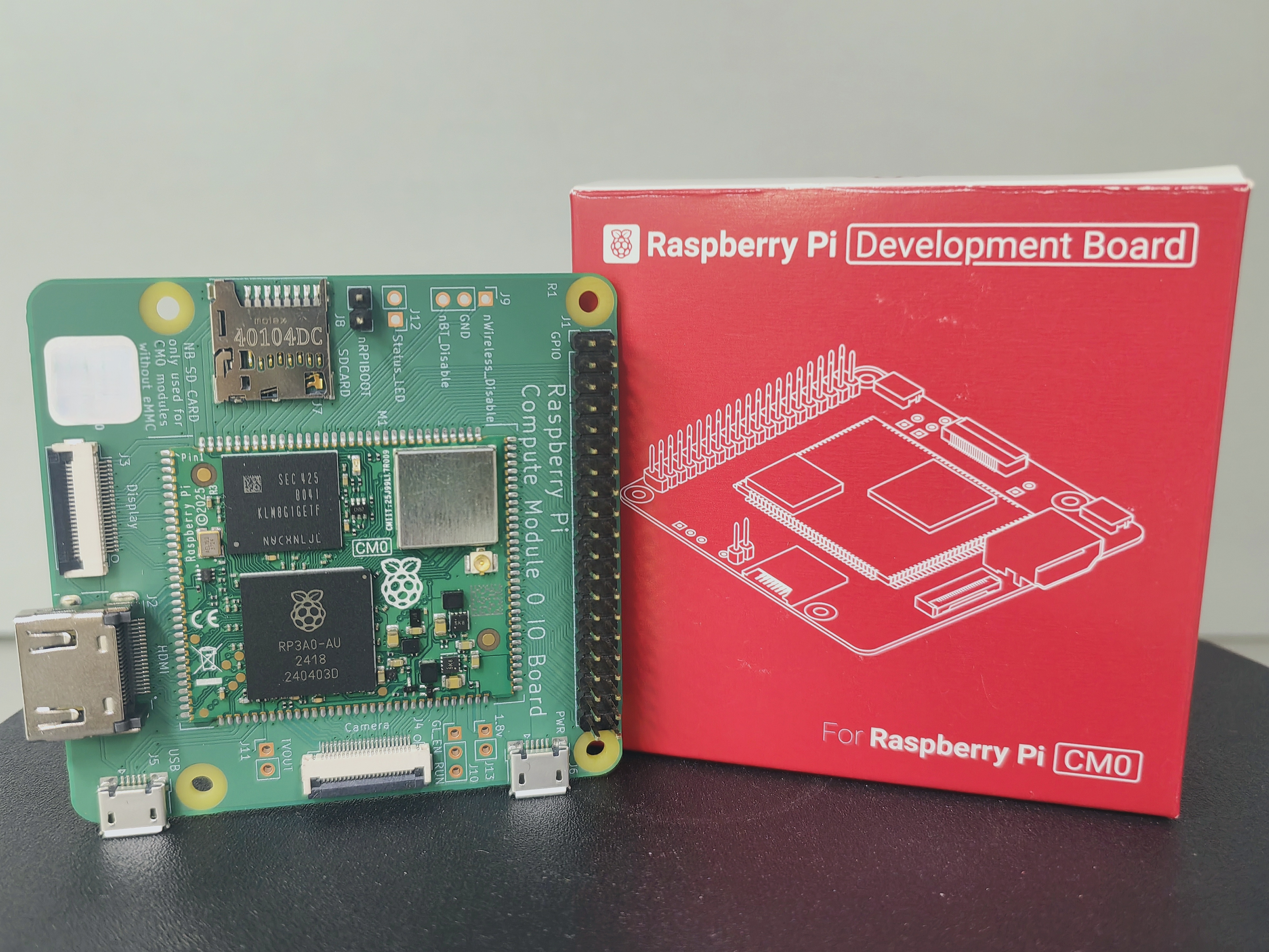
(七)Raspberry Pi Compute Module Zero Development Board 部署 PicoClaw
关于 PicoClaw

PicoClaw: 基于Go语言的超高效 AI 助手
🦐 PicoClaw 是一个受 nanobot 启发的超轻量级个人 AI 助手。它采用 Go 语言 从零重构,经历了一个"自举"过程------即由 AI Agent 自身驱动了整个架构迁移和代码优化。
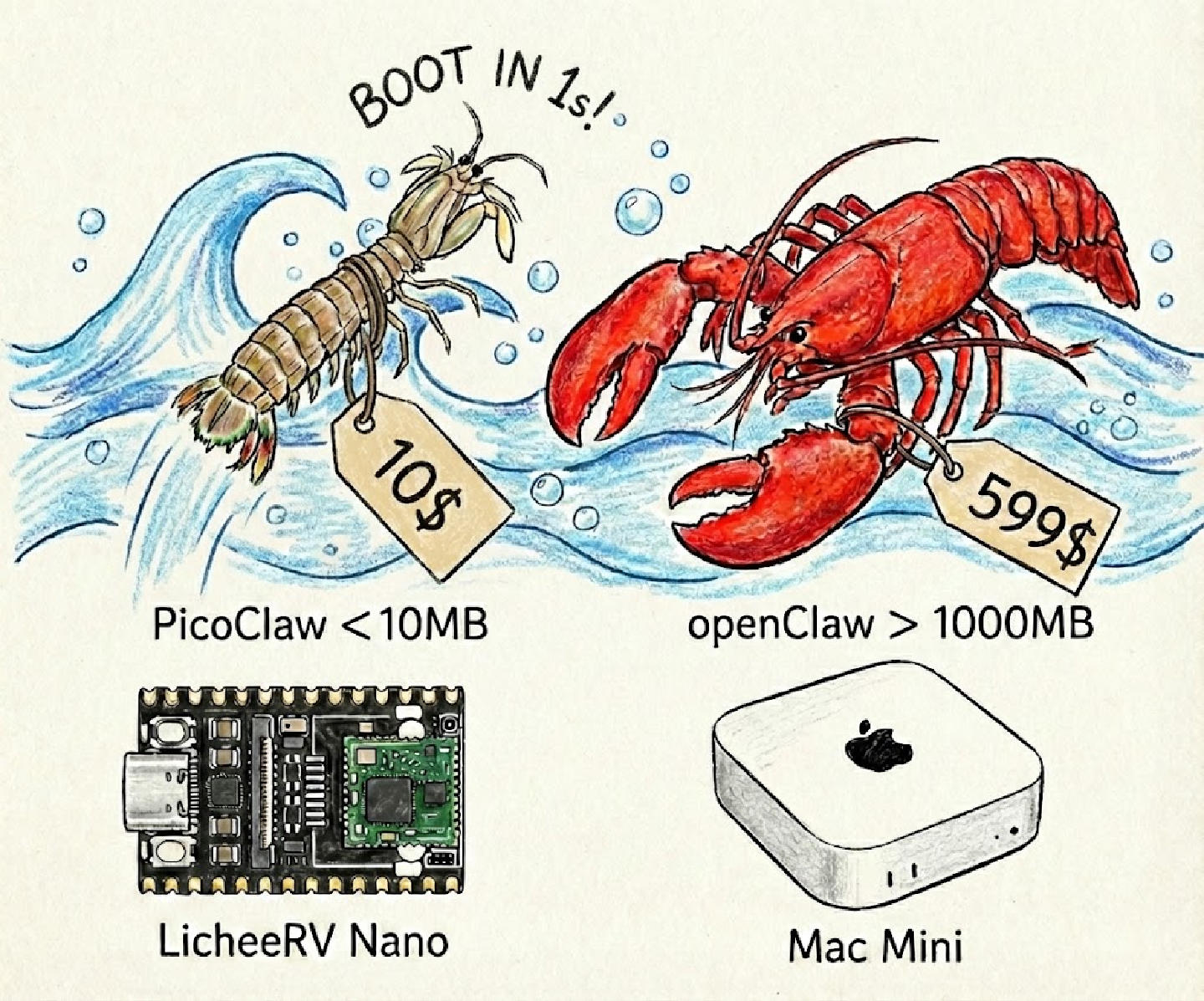
⚡️ 极致轻量:可在 10 美元 的硬件上运行,内存占用不到 10MB。这意味着比 OpenClaw 节省 99% 的内存,比 Mac mini 便宜 98%!
主要特性
| 特性 |
描述 |
| 🪶 超轻量级 |
内存占用不到 10MB --- 比同类产品小 99% |
| 💰 极低成本 |
可在 $10 硬件上运行 --- 比 Mac mini 便宜 98% |
| ⚡️ 闪电启动 |
启动速度快 400 倍,即使在 0.6GHz 单核上也能 1 秒内启动 |
| 🌍 真正可移植 |
跨 RISC-V、ARM64 和 x86_64 的单二进制文件 |
| 🤖 AI 自举 |
95% 核心代码由 AI Agent 生成,经人机回环微调 |
| 💬 多通道支持 |
支持 Telegram、Discord、Slack、钉钉、飞书、企业微信、LINE、QQ 等 |
对比
|
OpenClaw |
NanoBot |
PicoClaw |
| 语言 |
TypeScript |
Python |
Go |
| RAM |
超过 1GB |
超过 100MB |
不到 10MB |
| 启动时间 (0.8GHz) |
超过 500s |
超过 30s |
不到 1s |
| 成本 |
Mac Mini $599 |
~$50 Linux 开发板 |
任意 Linux 开发板,低至 $10 |
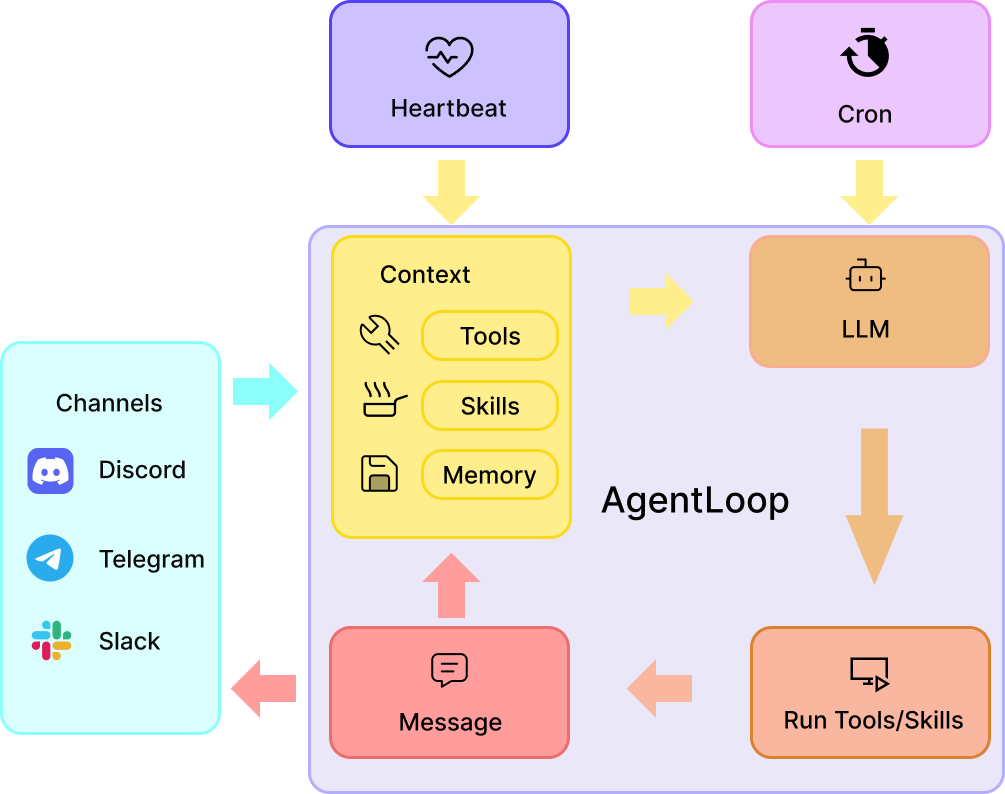
架构图
(以上内容源自PicoClaw官方Github仓库:https://github.com/sipeed/picoclaw)
更多内容可以参考PicoClaw官方网站:https://picoclaw.io/
Raspberry Pi Compute Module Zero Development Board 安装 PicoClaw
操作系统选择
预编译二进制文件选择
从 Releases 页面 下载最新版本。所有版本打包为 .tar.gz(Linux/macOS/FreeBSD)或 .zip(Windows)。
| 平台 |
架构 |
下载 |
| 🐧 Linux |
x86_64 |
picoclaw_Linux_x86_64.tar.gz |
| 🐧 Linux |
ARM64 |
picoclaw_Linux_arm64.tar.gz |
| 🐧 Linux |
ARMv6(32 位) |
picoclaw_Linux_armv6.tar.gz |
| 🐧 Linux |
RISC-V 64 |
picoclaw_Linux_riscv64.tar.gz |
| 🐧 Linux |
LoongArch64 |
picoclaw_Linux_loong64.tar.gz |
| 🍎 macOS |
ARM64 (Apple Silicon) |
picoclaw_Darwin_arm64.tar.gz |
| 🍎 macOS |
x86_64 |
picoclaw_Darwin_x86_64.tar.gz |
| 🪟 Windows |
x86_64 |
picoclaw_Windows_x86_64.zip |
| 🪟 Windows |
ARM64 |
picoclaw_Windows_arm64.zip |
| 😈 FreeBSD |
x86_64 |
picoclaw_Freebsd_x86_64.tar.gz |
| 😈 FreeBSD |
ARM64 |
picoclaw_Freebsd_arm64.tar.gz |
| 😈 FreeBSD |
ARMv6 |
picoclaw_Freebsd_armv6.tar.gz |
一键安装 PicoClaw
wget https://github.com/sipeed/picoclaw/releases/latest/download/picoclaw_Linux_arm64.tar.gz
tar -xzf picoclaw_Linux_arm64.tar.gz
./picoclaw onboard

██████╗ ██╗ ██████╗ ██████╗  ██████╗██╗      █████╗ ██╗    ██╗
██╔══██╗██║██╔════╝██╔═══██╗██╔════╝██║     ██╔══██╗██║    ██║
██████╔╝██║██║     ██║   ██║██║     ██║     ███████║██║ █╗ ██║
██╔═══╝ ██║██║     ██║   ██║██║     ██║     ██╔══██║██║███╗██║
██║     ██║╚██████╗╚██████╔╝╚██████╗███████╗██║  ██║╚███╔███╔╝
╚═╝     ╚═╝ ╚═════╝ ╚═════╝  ╚═════╝╚══════╝╚═╝  ╚═╝ ╚══╝╚══╝

Config already exists at /home/picoclaw/.picoclaw/config.json
Overwrite? (y/n):
显示上述内容即为安装成功。
Raspberry Pi Compute Module Zero Development Board 配置 PicoClaw
工作区布局
PicoClaw 将数据存储在工作区中(默认:~/.picoclaw/workspace):
~/.picoclaw/workspace/
├── sessions/          # 对话会话和历史
├── memory/           # 长期记忆 (MEMORY.md)
├── state/            # 持久化状态 (最后一次频道等)
├── cron/             # 定时任务数据库
├── skills/           # 自定义技能
├── AGENTS.md         # Agent 行为指南
├── HEARTBEAT.md      # 周期性任务提示词 (每 30 分钟检查一次)
├── IDENTITY.md       # Agent 身份设定
├── SOUL.md           # Agent 灵魂/性格
└── USER.md           # 用户偏好
模型配置
sudo nano .picoclaw/config.json

#修改下述内容
  "model_list": [
    {
      "model_name": "ark-code-latest",
      "model": "volcengine/ark-code-latest",
      "api_key": "sk-your-volcengine-key"
    },
    {
      "model_name": "gpt-5.4",
      "model": "openai/gpt-5.4",
      "api_key": "sk-your-openai-key",
      "api_base": "https://api.openai.com/v1"
    },
    {
      "model_name": "claude-sonnet-4.6",
      "model": "anthropic/claude-sonnet-4.6",
      "api_key": "sk-ant-your-key",
      "api_base": "https://api.anthropic.com/v1"
    },
    {
      "model_name": "gemini",
      "model": "antigravity/gemini-2.0-flash",
      "auth_method": "oauth"
    },
    {
      "model_name": "deepseek",
      "model": "deepseek/deepseek-chat",
      "api_key": "sk-your-deepseek-key"
    },
    {
      "model_name": "loadbalanced-gpt-5.4",
      "model": "openai/gpt-5.4",
      "api_key": "sk-key1",
      "api_base": "https://api1.example.com/v1"
    },
    {
      "model_name": "loadbalanced-gpt-5.4",
      "model": "openai/gpt-5.4",
      "api_key": "sk-key2",
      "api_base": "https://api2.example.com/v1"
    }
  ],
| 字段 |
类型 |
必填 |
说明 |
| model_name |
string |
是 |
别名(在 agents.defaults.model_name 中引用) |
| model |
string |
是 |
vendor/model-id 格式 |
| api_key |
string |
视情况 |
提供商 API Key |
| api_base |
string |
否 |
覆盖默认 API 地址 |
| auth_method |
string |
否 |
认证方式(如 oauth) |
| proxy |
string |
否 |
该模型 API 调用的 HTTP/SOCKS 代理 |
| request_timeout |
int |
否 |
请求超时时间(秒),默认 120 |
| rpm |
int |
否 |
速率限制 --- 每分钟请求数 |
聊天通道配置
sudo nano .picoclaw/config.json

#修改下述内容
  "channels": {
    "telegram": {
      "enabled": false,
      "token": "YOUR_TELEGRAM_BOT_TOKEN",
      "base_url": "",
      "proxy": "",
      "allow_from": ["YOUR_USER_ID"],
      "reasoning_channel_id": ""
    },
    "discord": {
      "enabled": false,
      "token": "YOUR_DISCORD_BOT_TOKEN",
      "proxy": "",
      "allow_from": [],
      "group_trigger": {
        "mention_only": false
      },
      "reasoning_channel_id": ""
    },
    "qq": {
      "enabled": false,
      "app_id": "YOUR_QQ_APP_ID",
      "app_secret": "YOUR_QQ_APP_SECRET",
      "allow_from": [],
      "reasoning_channel_id": ""
    },
    "maixcam": {
      "enabled": false,
      "host": "0.0.0.0",
      "port": 18790,
      "allow_from": [],
      "reasoning_channel_id": ""
    },
    "whatsapp": {
      "enabled": false,
      "bridge_url": "ws://localhost:3001",
      "use_native": false,
      "session_store_path": "",
      "allow_from": [],
      "reasoning_channel_id": ""
    },
    "feishu": {
      "enabled": false,
      "app_id": "",
      "app_secret": "",
      "encrypt_key": "",
      "verification_token": "",
      "allow_from": [],
      "reasoning_channel_id": ""
    },
    "dingtalk": {
      "enabled": false,
      "client_id": "YOUR_CLIENT_ID",
      "client_secret": "YOUR_CLIENT_SECRET",
      "allow_from": [],
      "reasoning_channel_id": ""
    },
    "slack": {
      "enabled": false,
      "bot_token": "xoxb-YOUR-BOT-TOKEN",
      "app_token": "xapp-YOUR-APP-TOKEN",
      "allow_from": [],
      "reasoning_channel_id": ""
    },
    "line": {
      "enabled": false,
      "channel_secret": "YOUR_LINE_CHANNEL_SECRET",
      "channel_access_token": "YOUR_LINE_CHANNEL_ACCESS_TOKEN",
      "webhook_path": "/webhook/line",
      "allow_from": [],
      "reasoning_channel_id": ""
    },
    "onebot": {
      "enabled": false,
      "ws_url": "ws://127.0.0.1:3001",
      "access_token": "",
      "reconnect_interval": 5,
      "group_trigger_prefix": [],
      "allow_from": [],
      "reasoning_channel_id": ""
    },
    "wecom": {
      "enabled": false,
      "token": "YOUR_TOKEN",
      "encoding_aes_key": "YOUR_43_CHAR_ENCODING_AES_KEY",
      "webhook_url": "https://qyapi.weixin.qq.com/cgi-bin/webhook/send?key=YOUR_KEY",
      "webhook_path": "/webhook/wecom",
      "allow_from": [],
      "reply_timeout": 5,
      "reasoning_channel_id": ""
    },
    "wecom_app": {
      "enabled": false,
      "corp_id": "YOUR_CORP_ID",
      "corp_secret": "YOUR_CORP_SECRET",
      "agent_id": 1000002,
      "token": "YOUR_TOKEN",
      "encoding_aes_key": "YOUR_43_CHAR_ENCODING_AES_KEY",
      "webhook_path": "/webhook/wecom-app",
      "allow_from": [],
      "reply_timeout": 5,
      "reasoning_channel_id": ""
    },
    "wecom_aibot": {
      "enabled": false,
      "token": "YOUR_TOKEN",
      "encoding_aes_key": "YOUR_43_CHAR_ENCODING_AES_KEY",
      "webhook_path": "/webhook/wecom-aibot",
      "max_steps": 10,
      "welcome_message": "你好!我是你的 AI 助手,有什么可以帮你的吗?",
      "reasoning_channel_id": ""
    },
    "matrix": {
      "enabled": false,
      "homeserver": "https://matrix.org",
      "user_id": "@your-bot:matrix.org",
      "access_token": "YOUR_MATRIX_ACCESS_TOKEN",
      "device_id": "",
      "join_on_invite": true,
      "allow_from": [],
      "group_trigger": {
        "mention_only": true
      },
      "placeholder": {
        "enabled": true,
        "text": "正在思考..."
      },
      "reasoning_channel_id": ""
    }
  },
工具配置
sudo nano .picoclaw/config.json

#修改下述内容
  "tools": {
    "web": {
      "brave": {
        "enabled": false,
        "api_key": "YOUR_BRAVE_API_KEY",
        "max_results": 5
      },
      "duckduckgo": {
        "enabled": true,
        "max_results": 5
      },
      "perplexity": {
        "enabled": false,
        "api_key": "pplx-xxx",
        "max_results": 5
      },
      "proxy": ""
    },
MCP配置
sudo nano .picoclaw/config.json

#修改下述内容
    "mcp": {
      "enabled": false,
      "servers": {
        "context7": {
          "enabled": false,
          "type": "http",
          "url": "https://mcp.context7.com/mcp"
        },
        "filesystem": {
          "enabled": false,
          "command": "npx",
          "args": ["-y", "@modelcontextprotocol/server-filesystem", "/tmp"]
        },
        "github": {
          "enabled": false,
          "command": "npx",
          "args": ["-y", "@modelcontextprotocol/server-github"],
          "env": { "GITHUB_PERSONAL_ACCESS_TOKEN": "YOUR_TOKEN" }
        }
      }
    },
心跳任务配置
sudo nano .picoclaw/config.json

#修改下述内容
  "heartbeat": {
    "enabled": true,
    "interval": 30
  },
- Agent 会每隔 30 分钟读取文件,并使用可用工具执行其中的任务。
- 新建心跳任务
sudo nano .picoclaw/workspace/HEARTBEAT.md

#添加心跳任务内容
# 周期任务
- 检查我的邮件中是否有重要消息
- 查看日历中即将到来的日程
- 查询今天的天气预报
安全沙箱
sudo nano .picoclaw/config.json

#修改下述内容
{
  "agents": {
    "defaults": {
      "workspace": "~/.picoclaw/workspace",
      "restrict_to_workspace": true,
      "model_name": " ",
      "max_tokens": 32768,
      "max_tool_iterations": 50
    }
  },
| 配置项 |
默认值 |
说明 |
| workspace |
~/.picoclaw/workspace |
Agent 的工作目录 |
| restrict_to_workspace |
true |
将文件/命令访问限制在工作目录内 |
| allow_read_outside_workspace |
false |
即使开启了限制,也允许读取工作目录以外的文件 |
完整配置参考
{
  "agents": {
    "defaults": {
      "workspace": "~/.picoclaw/workspace",
      "restrict_to_workspace": true,
      "model_name": "gpt-5.4",
      "max_tokens": 32768,
      "max_tool_iterations": 50
    }
  },

  "model_list": [
    {
      "model_name": "ark-code-latest",
      "model": "volcengine/ark-code-latest",
      "api_key": "sk-your-volcengine-key"
    },
    {
      "model_name": "gpt-5.4",
      "model": "openai/gpt-5.4",
      "api_key": "sk-your-openai-key",
      "api_base": "https://api.openai.com/v1"
    },
    {
      "model_name": "claude-sonnet-4.6",
      "model": "anthropic/claude-sonnet-4.6",
      "api_key": "sk-ant-your-key",
      "api_base": "https://api.anthropic.com/v1"
    },
    {
      "model_name": "gemini",
      "model": "antigravity/gemini-2.0-flash",
      "auth_method": "oauth"
    },
    {
      "model_name": "deepseek",
      "model": "deepseek/deepseek-chat",
      "api_key": "sk-your-deepseek-key"
    },
    {
      "model_name": "loadbalanced-gpt-5.4",
      "model": "openai/gpt-5.4",
      "api_key": "sk-key1",
      "api_base": "https://api1.example.com/v1"
    },
    {
      "model_name": "loadbalanced-gpt-5.4",
      "model": "openai/gpt-5.4",
      "api_key": "sk-key2",
      "api_base": "https://api2.example.com/v1"
    }
  ],

  "channels": {
    "telegram": {
      "enabled": false,
      "token": "YOUR_TELEGRAM_BOT_TOKEN",
      "base_url": "",
      "proxy": "",
      "allow_from": ["YOUR_USER_ID"],
      "reasoning_channel_id": ""
    },
    "discord": {
      "enabled": false,
      "token": "YOUR_DISCORD_BOT_TOKEN",
      "proxy": "",
      "allow_from": [],
      "group_trigger": {
        "mention_only": false
      },
      "reasoning_channel_id": ""
    },
    "qq": {
      "enabled": false,
      "app_id": "YOUR_QQ_APP_ID",
      "app_secret": "YOUR_QQ_APP_SECRET",
      "allow_from": [],
      "reasoning_channel_id": ""
    },
    "maixcam": {
      "enabled": false,
      "host": "0.0.0.0",
      "port": 18790,
      "allow_from": [],
      "reasoning_channel_id": ""
    },
    "whatsapp": {
      "enabled": false,
      "bridge_url": "ws://localhost:3001",
      "use_native": false,
      "session_store_path": "",
      "allow_from": [],
      "reasoning_channel_id": ""
    },
    "feishu": {
      "enabled": false,
      "app_id": "",
      "app_secret": "",
      "encrypt_key": "",
      "verification_token": "",
      "allow_from": [],
      "reasoning_channel_id": ""
    },
    "dingtalk": {
      "enabled": false,
      "client_id": "YOUR_CLIENT_ID",
      "client_secret": "YOUR_CLIENT_SECRET",
      "allow_from": [],
      "reasoning_channel_id": ""
    },
    "slack": {
      "enabled": false,
      "bot_token": "xoxb-YOUR-BOT-TOKEN",
      "app_token": "xapp-YOUR-APP-TOKEN",
      "allow_from": [],
      "reasoning_channel_id": ""
    },
    "line": {
      "enabled": false,
      "channel_secret": "YOUR_LINE_CHANNEL_SECRET",
      "channel_access_token": "YOUR_LINE_CHANNEL_ACCESS_TOKEN",
      "webhook_path": "/webhook/line",
      "allow_from": [],
      "reasoning_channel_id": ""
    },
    "onebot": {
      "enabled": false,
      "ws_url": "ws://127.0.0.1:3001",
      "access_token": "",
      "reconnect_interval": 5,
      "group_trigger_prefix": [],
      "allow_from": [],
      "reasoning_channel_id": ""
    },
    "wecom": {
      "enabled": false,
      "token": "YOUR_TOKEN",
      "encoding_aes_key": "YOUR_43_CHAR_ENCODING_AES_KEY",
      "webhook_url": "https://qyapi.weixin.qq.com/cgi-bin/webhook/send?key=YOUR_KEY",
      "webhook_path": "/webhook/wecom",
      "allow_from": [],
      "reply_timeout": 5,
      "reasoning_channel_id": ""
    },
    "wecom_app": {
      "enabled": false,
      "corp_id": "YOUR_CORP_ID",
      "corp_secret": "YOUR_CORP_SECRET",
      "agent_id": 1000002,
      "token": "YOUR_TOKEN",
      "encoding_aes_key": "YOUR_43_CHAR_ENCODING_AES_KEY",
      "webhook_path": "/webhook/wecom-app",
      "allow_from": [],
      "reply_timeout": 5,
      "reasoning_channel_id": ""
    },
    "wecom_aibot": {
      "enabled": false,
      "token": "YOUR_TOKEN",
      "encoding_aes_key": "YOUR_43_CHAR_ENCODING_AES_KEY",
      "webhook_path": "/webhook/wecom-aibot",
      "max_steps": 10,
      "welcome_message": "你好!我是你的 AI 助手,有什么可以帮你的吗?",
      "reasoning_channel_id": ""
    },
    "matrix": {
      "enabled": false,
      "homeserver": "https://matrix.org",
      "user_id": "@your-bot:matrix.org",
      "access_token": "YOUR_MATRIX_ACCESS_TOKEN",
      "device_id": "",
      "join_on_invite": true,
      "allow_from": [],
      "group_trigger": {
        "mention_only": true
      },
      "placeholder": {
        "enabled": true,
        "text": "正在思考..."
      },
      "reasoning_channel_id": ""
    }
  },

  "tools": {
    "web": {
      "brave": {
        "enabled": false,
        "api_key": "YOUR_BRAVE_API_KEY",
        "max_results": 5
      },
      "duckduckgo": {
        "enabled": true,
        "max_results": 5
      },
      "perplexity": {
        "enabled": false,
        "api_key": "pplx-xxx",
        "max_results": 5
      },
      "proxy": ""
    },
    "mcp": {
      "enabled": false,
      "servers": {
        "context7": {
          "enabled": false,
          "type": "http",
          "url": "https://mcp.context7.com/mcp"
        },
        "filesystem": {
          "enabled": false,
          "command": "npx",
          "args": ["-y", "@modelcontextprotocol/server-filesystem", "/tmp"]
        },
        "github": {
          "enabled": false,
          "command": "npx",
          "args": ["-y", "@modelcontextprotocol/server-github"],
          "env": { "GITHUB_PERSONAL_ACCESS_TOKEN": "YOUR_TOKEN" }
        }
      }
    },
    "cron": {
      "exec_timeout_minutes": 5
    },
    "exec": {
      "enable_deny_patterns": true,
      "custom_deny_patterns": [],
      "custom_allow_patterns": []
    },
    "skills": {
      "registries": {
        "clawhub": {
          "enabled": true,
          "base_url": "https://clawhub.ai",
          "search_path": "/api/v1/search",
          "skills_path": "/api/v1/skills",
          "download_path": "/api/v1/download"
        }
      }
    }
  },

  "heartbeat": {
    "enabled": true,
    "interval": 30
  },

  "devices": {
    "enabled": false,
    "monitor_usb": true
  },

  "gateway": {
    "host": "127.0.0.1",
    "port": 18790
  }
}
| 字段 |
类型 |
默认值 |
说明 |
| workspace |
string |
~/.picoclaw/workspace |
Agent 工作目录(受 PICOCLAW_HOME 影响) |
| restrict_to_workspace |
bool |
true |
限制文件/命令访问在工作目录内 |
| allow_read_outside_workspace |
bool |
false |
允许读取工作目录以外的文件(restrict_to_workspace 为 true 时生效) |
| model_name |
string |
--- |
默认模型名(必须在 model_list 中存在) |
| model |
string |
--- |
已废弃:请使用 model_name |
| model_fallbacks |
array |
\[\] |
备用模型名列表,主模型失败时按顺序尝试 |
| max_tokens |
int |
32768 |
每次响应最大 token 数 |
| temperature |
float |
--- |
LLM 温度(省略则使用提供商默认值) |
| max_tool_iterations |
int |
50 |
每次请求最多工具调用次数 |
| max_media_size |
int |
20971520 |
最大媒体文件大小(字节),默认 20MB |
| image_model |
string |
--- |
图片生成使用的模型名 |
| image_model_fallbacks |
array |
\[\] |
图片生成备用模型 |
| routing |
object |
--- |
智能模型路由设置(见下方) |
routing
| 字段 |
类型 |
默认值 |
说明 |
| enabled |
bool |
false |
启用智能模型路由 |
| light_model |
string |
--- |
用于简单任务的模型名(需在 model_list 中存在) |
| threshold |
float |
--- |
复杂度评分阈值 0,1;评分 >= 阈值使用主模型,低于阈值使用 light_model |
启用后,PicoClaw 会根据消息的结构特征(长度、代码块、工具调用历史、对话深度、附件)对每条消息评分,将简单消息路由到更轻量/低成本的模型。
| 字段 |
类型 |
必填 |
说明 |
| model_name |
string |
是 |
别名(在 agents.defaults.model_name 中引用) |
| model |
string |
是 |
vendor/model-id 格式 |
| api_key |
string |
视情况 |
提供商 API Key |
| api_base |
string |
否 |
覆盖默认 API 地址 |
| auth_method |
string |
否 |
认证方式(如 oauth) |
| proxy |
string |
否 |
该模型的 HTTP/SOCKS 代理 |
| request_timeout |
int |
否 |
请求超时时间(秒),默认 120 |
| rpm |
int |
否 |
速率限制(每分钟请求数) |
| max_tokens_field |
string |
否 |
覆盖 API 请求中的 max tokens 字段名 |
| connect_mode |
string |
否 |
连接模式覆盖 |
| workspace |
string |
否 |
模型级工作目录覆盖 |
| thinking_level |
string |
否 |
扩展思考级别:off、low、medium、high、xhigh 或 adaptive |
| 字段 |
类型 |
默认值 |
说明 |
| host |
string |
127.0.0.1 |
网关监听地址 |
| port |
int |
18790 |
网关监听端口 |
设置 host: "0.0.0.0" 可让网关对外开放。
所有渠道均支持以下字段:
| 字段 |
类型 |
说明 |
| enabled |
bool |
启用/禁用该渠道 |
| allow_from |
array |
允许使用机器人的用户 ID(空数组 = 允许所有人) |
| reasoning_channel_id |
string |
专用于输出推理过程的频道/群组 ID |
| group_trigger |
object |
群聊触发设置(见下方) |
| placeholder |
object |
占位消息设置(见下方) |
| typing |
object |
输入状态指示器设置(见下方) |
| 字段 |
类型 |
说明 |
| mention_only |
bool |
仅在群聊中被 @ 时响应 |
| prefixes |
array |
群聊中触发机器人的关键词前缀 |
| 字段 |
类型 |
说明 |
| enabled |
bool |
启用占位消息 |
| text |
string |
处理期间显示的占位文本(如"正在思考...") |
支持的通道:飞书、Slack、Matrix。
| 字段 |
类型 |
说明 |
| enabled |
bool |
处理期间显示"正在输入"状态 |
支持的通道:Slack、Matrix。
Raspberry Pi Compute Module Zero Development Board 使用 PicoClaw
| 命令 |
描述 |
| picoclaw onboard |
初始化配置和工作目录 |
| picoclaw agent -m "..." |
单次对话 |
| picoclaw agent |
交互式对话模式 |
| picoclaw gateway |
启动网关(用于聊天应用) |
| picoclaw status |
显示状态 |
| picoclaw cron list |
列出所有定时任务 |
| picoclaw cron add ... |
添加定时任务 |
Raspberry Pi Compute Module Zero Development Board 使用 PicoClaw WEB管理
Raspberry Pi Compute Module Zero Development Board 输入;
./picoclaw-launcher -public


██████╗ ██╗ ██████╗ ██████╗  ██████╗██╗      █████╗ ██╗    ██╗
██╔══██╗██║██╔════╝██╔═══██╗██╔════╝██║     ██╔══██╗██║    ██║
██████╔╝██║██║     ██║   ██║██║     ██║     ███████║██║ █╗ ██║
██╔═══╝ ██║██║     ██║   ██║██║     ██║     ██╔══██║██║███╗██║
██║     ██║╚██████╗╚██████╔╝╚██████╗███████╗██║  ██║╚███╔███╔╝
╚═╝     ╚═╝ ╚═════╝ ╚═════╝  ╚═════╝╚══════╝╚═╝  ╚═╝ ╚══╝╚══╝

  Open the following URL in your browser:

    >> http://localhost:18800 <<
    >> http://192.168.2.200:18800 <<

2026/03/17 00:00:00 Started picoclaw gateway (PID: 2291) from /home/picoclaw/picoclaw_Linux_arm64/picoclaw
2026/03/17 00:00:00 Gateway auto-started (PID: 2291)
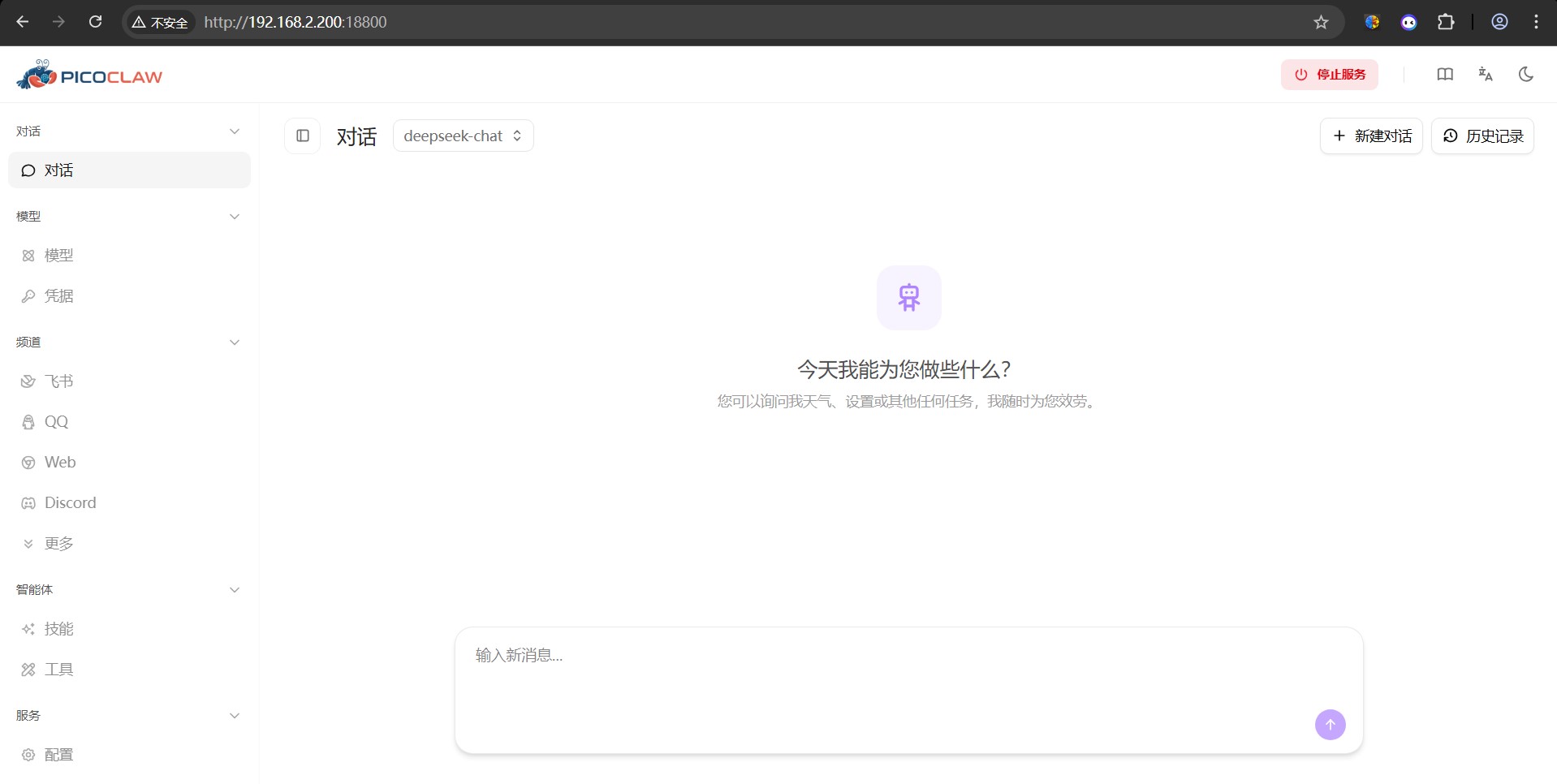
Raspberry Pi Compute Module Zero Development Board 使用 PicoClaw QQ 管理
Raspberry Pi Compute Module Zero Development Board 输入;
./picoclaw gateway


██████╗ ██╗ ██████╗ ██████╗  ██████╗██╗      █████╗ ██╗    ██╗
██╔══██╗██║██╔════╝██╔═══██╗██╔════╝██║     ██╔══██╗██║    ██║
██████╔╝██║██║     ██║   ██║██║     ██║     ███████║██║ █╗ ██║
██╔═══╝ ██║██║     ██║   ██║██║     ██║     ██╔══██║██║███╗██║
██║     ██║╚██████╗╚██████╔╝╚██████╗███████╗██║  ██║╚███╔███╔╝
╚═╝     ╚═╝ ╚═════╝ ╚═════╝  ╚═════╝╚══════╝╚═╝  ╚═╝ ╚══╝╚══╝

2026/03/17 00:00:00 [2026-03-17T00:00:00Z] [INFO] agent: Created implicit main agent (no agents.list configured)

📦 Agent Status:
  • Tools: 15 loaded
  • Skills: 6/6 available
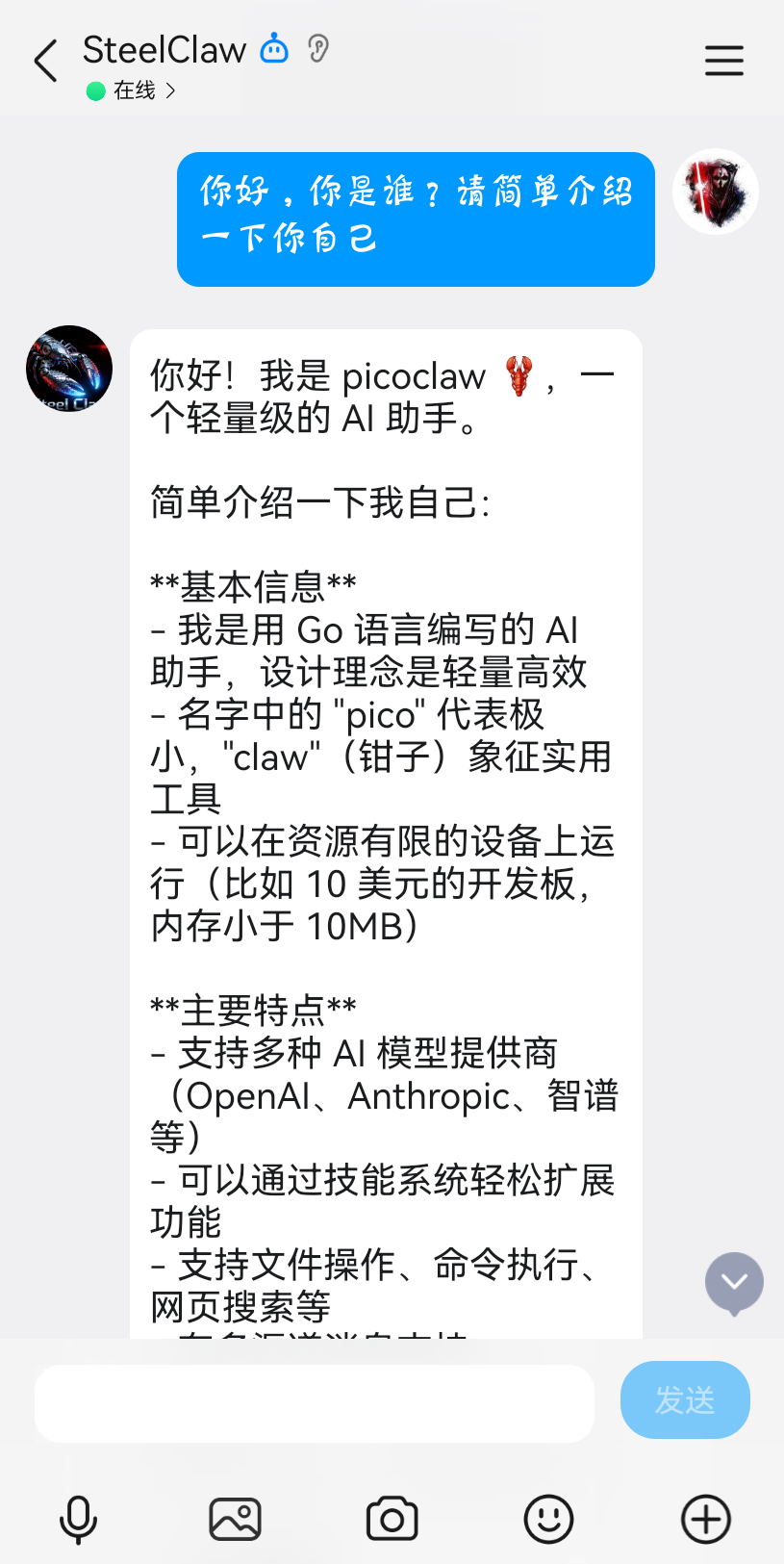
在手机QQ中选择对应QQ机器人输入内容,如下图所示即为成功。