接上文# 告别冗余代码!Cesium点位图标模糊、重叠?自适应参数调优攻略,一次封装终身复用!,在地图上创建图标是基础操作,但是当地图上的图标过多的时候展示效果其实并不好。
毕竟谁也不想看到密密麻麻的图标,所以部分距离相近的图标应该聚合 在一起,形成一个聚合图标展示出来。

在Cesium开发中,图标聚合能够解决海量图标重叠、界面杂乱、性能卡顿等问题。
尤其在智慧安防、智慧园区、设备监控等场景,几十个甚至上百个摄像头/设备图标挤在一块,不仅看不清,还会严重影响地图流畅度。
解决方案
通过监听相机高度,高度超过阈值,自动开启聚合。
根据计算屏幕像素距离,把三维坐标转成屏幕坐标,算两点多远,距离小于设定值,归为一组。
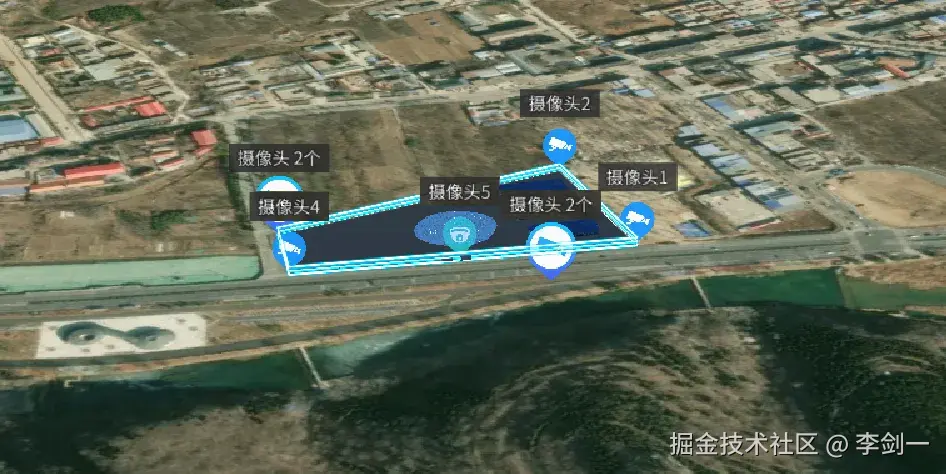
这时候隐藏原始图标,只显示聚合图标。
生成聚合点:显示图标+数量,拉近后自动散开。
实现代码
计算屏幕距离 + 判断是否在屏幕内。是聚合的核心基础:把三维坐标转屏幕坐标,再算距离。
javascript
/**
 * 计算两点在屏幕上的像素距离
 */
const calculateScreenDistance = (pos1, pos2) => {
    if (!viewer.value || !viewer.value.scene) return Infinity

    const scene = viewer.value.scene
    try {
        // 世界坐标 → 屏幕坐标
        const screenPos1 = Cesium.SceneTransforms.worldToWindowCoordinates(scene, pos1)
        const screenPos2 = Cesium.SceneTransforms.worldToWindowCoordinates(scene, pos2)

        if (!screenPos1 || !screenPos2) return Infinity

        // 勾股定理算像素距离
        const dx = screenPos1.x - screenPos2.x
        const dy = screenPos1.y - screenPos2.y
        return Math.sqrt(dx * dx + dy * dy)
    } catch (error) {
        return Infinity
    }
}

/**
 * 检查点是否在屏幕上可见
 */
const isPositionOnScreen = (position) => {
    if (!viewer.value || !viewer.value.scene) return false
    try {
        const screenPos = Cesium.SceneTransforms.worldToWindowCoordinates(viewer.value.scene, position)
        return screenPos != null
    } catch (error) {
        return false
    }
}生成聚合点,图标更大、创建label显示当前标签 及数量更明显。
javascript
/**
 * 创建聚合图标
 */
const createClusterIcon = (clusterData) => {
    if (!viewer.value) return null
    const { icons, type, center } = clusterData
    const count = icons.length

    // 坐标转换
    const cartographic = Cesium.Cartographic.fromCartesian(center)
    const longitude = Cesium.Math.toDegrees(cartographic.longitude)
    const latitude = Cesium.Math.toDegrees(cartographic.latitude)

    // 创建聚合实体
    const clusterId = `cluster_${type}_${Date.now()}`
    const entity = viewer.value.entities.add({
        id: clusterId,
        position: center,
        billboard: {
            image: getClusterIconUrl(type),
            scale: 1.2,
            width: 40,
            height: 40,
            verticalOrigin: Cesium.VerticalOrigin.BOTTOM,
            disableDepthTestDistance: Number.POSITIVE_INFINITY
        }
    })

    // 聚合数量标签
    const typeName = getTypeDisplayName(type)
    entity.label = {
        text: `${typeName} ${count}个`,
        font: '14px sans-serif',
        fillColor: Cesium.Color.WHITE,
        outlineColor: Cesium.Color.BLACK,
        outlineWidth: 2,
        pixelOffset: new Cesium.Cartesian2(0, -50),
        showBackground: true,
        disableDepthTestDistance: Number.POSITIVE_INFINITY
    }

    // 存入聚合列表
    clusterEntities.set(clusterId, { entity, icons, type, center })
    return entity
}
动态计算聚合阈值,通过遍历图标 → 分组 → 合并/显示,自动隐藏原始图标,显示聚合点。
javascript
/**
 * 更新图标聚合状态
 */
const updateClustering = () => {
    if (!viewer.value || iconEntities.size === 0) return
    clearClusters()

    // 关闭聚合 = 显示全部
    if (!isClusteringEnabled.value) {
        showAllIcons()
        return
    }

    // 动态阈值:相机越高,聚合越明显
    const cameraHeight = viewer.value.camera.positionCartographic.height
    const dynamicClusterDistance = Math.min(
        MAX_SCREEN_CLUSTER_DISTANCE,
        SCREEN_CLUSTER_DISTANCE + (cameraHeight - CLUSTER_THRESHOLD) / 50
    )

    // 收集所有图标
    const allIcons = []
    iconEntities.forEach((iconData, id) => {
        const position = iconData.entity.position.getValue(Cesium.JulianDate.now())
        allIcons.push({ id, entity: iconData.entity, position, type: iconData.type })
    })

    // 先隐藏所有图标
    allIcons.forEach(icon => icon.entity.show = false)

    // 聚类算法
    const clusters = []
    const visited = new Set()

    for (let i = 0; i < allIcons.length; i++) {
        if (visited.has(i)) continue
        const current = allIcons[i]
        if (!isPositionOnScreen(current.position)) continue

        const cluster = [current]
        visited.add(i)

        // 寻找附近图标
        for (let j = i + 1; j < allIcons.length; j++) {
            if (visited.has(j)) continue
            const other = allIcons[j]
            if (!isPositionOnScreen(other.position)) continue

            const dist = calculateScreenDistance(current.position, other.position)
            if (dist <= dynamicClusterDistance) {
                cluster.push(other)
                visited.add(j)
            }
        }
        clusters.push(cluster)
    }

    // 生成聚合点 / 显示单个图标
    clusters.forEach(cluster => {
        if (cluster.length === 1) {
            cluster[0].entity.show = true
        } else {
            // 计算中心点
            let centerX = 0, centerY = 0, centerZ = 0
            cluster.forEach(icon => {
                centerX += icon.position.x
                centerY += icon.position.y
                centerZ += icon.position.z
            })
            const center = new Cesium.Cartesian3(
                centerX / cluster.length,
                centerY / cluster.length,
                centerZ / cluster.length
            )

            createClusterIcon({
                icons: cluster.map(c => c.id),
                type: 'camera',
                center
            })
        }
    })
}
总结
Cesium 图标聚合原理上很简单:
算距离 → 分组 → 隐藏/显示 → 生成聚合点。
在园区级别的模型上其实启不启用影响不大,但是在城市级别,或者是多地区复杂情况的模型上还是有必要的。
能够极大的提升加载的流畅度,减少操作的卡顿。