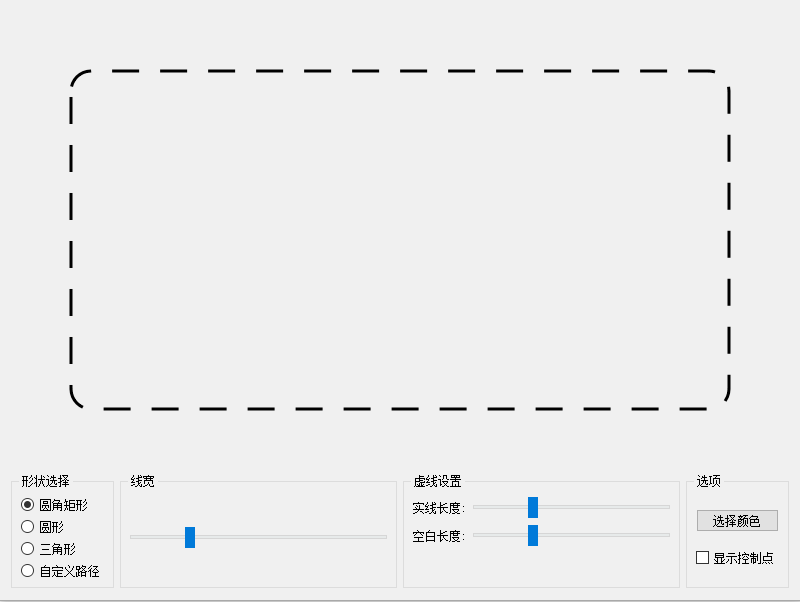
(1) 头文件
cpp
#ifndef ANTLINEWIDGET_H
#define ANTLINEWIDGET_H

#include <QWidget>
#include <QColor>
#include <QTimer>
#include <QPainterPath>

// 继承 QWidget 并启用 Qt 元对象系统
class AntLineWidget : public QWidget {
    Q_OBJECT

public:
    // 构造函数
    explicit AntLineWidget(QWidget *parent = nullptr);

    // Getter 函数
    QColor getLineColor() const;

public slots:
    // 槽函数声明 (用于接收信号)
    void setShape(int shapeType);
    void setLineWidth(int width);
    void setDashSize(int size);
    void setGapSize(int size);
    void setLineColor(const QColor &color);
    void setShowControlPoints(bool show);

protected:
    // 重绘事件
    void paintEvent(QPaintEvent *event) override;

private:
    // 成员变量
    QTimer *timer;
    int offset;
    int lineWidth;
    int dashSize;
    int gapSize;
    QColor lineColor;
    int shape;
    bool showControlPoints;
};

#endif // ANTLINEWIDGET_H
(2) 源文件
cpp
#include "antlinewidget.h"
#include <QPainter>
#include <QVector>
#include <QtMath>
#include <QPointF>

AntLineWidget::AntLineWidget(QWidget *parent)
    : QWidget(parent),
    offset(0),
    lineWidth(3),
    dashSize(8),
    gapSize(8),
    lineColor(Qt::black),
    shape(0),
    showControlPoints(false)
{
    // 初始化定时器
    timer = new QTimer(this);
    connect(timer, &QTimer::timeout, [this]() {
        // 更新偏移量以实现动画
        offset = (offset + 1) % (dashSize + gapSize);
        update(); // 触发重绘
    });

    /*80ms 刷新一次*/
    timer->start(80);

    setMinimumSize(500, 400);
}

QColor AntLineWidget::getLineColor() const {
    return lineColor;
}

void AntLineWidget::setShape(int shapeType) {
    shape = shapeType;
    update();
}

void AntLineWidget::setLineWidth(int width) {
    lineWidth = width;
    update();
}

void AntLineWidget::setDashSize(int size) {
    dashSize = size;
    update();
}

void AntLineWidget::setGapSize(int size) {
    gapSize = size;
    update();
}

void AntLineWidget::setLineColor(const QColor &color) {
    lineColor = color;
    update();
}

void AntLineWidget::setShowControlPoints(bool show) {
    showControlPoints = show;
    update();
}

void AntLineWidget::paintEvent(QPaintEvent *) {
    QPainter painter(this);
    painter.setRenderHint(QPainter::Antialiasing, true); // 开启抗锯齿

    QPainterPath path;
    int margin = 60;

    // 边界检查,防止窗口过小时计算出错
    if (width() <= 2 * margin || height() <= 2 * margin) {
        return;
    }

    // 根据形状类型绘制路径
    switch(shape) {
    case 0: // 圆角矩形
        path.addRoundedRect(margin, margin,
                            width() - 2*margin, height() - 2*margin,
                            20, 20);
        break;
    case 1: // 圆形
        path.addEllipse(margin, margin,
                        width() - 2*margin, height() - 2*margin);
        break;
    case 2: // 三角形
        path.moveTo(width()/2, margin);
        path.lineTo(width() - margin, height() - margin);
        path.lineTo(margin, height() - margin);
        path.closeSubpath();
        break;
    case 3: // 自定义贝塞尔曲线
        path.moveTo(width()/4, height()/4);
        path.cubicTo(width()/2, margin,
                     width() - margin, height()/3,
                     width()/2, height() - margin);
        path.cubicTo(margin, height() - margin,
                     width()/4, height()/2,
                     width()/4, height()/4);
        break;
    }

    // 设置画笔属性 (颜色、宽度、虚线样式)
    QPen pen(lineColor, lineWidth);
    QVector<qreal> dashPattern;
    dashPattern << dashSize << gapSize;
    pen.setDashPattern(dashPattern);
    pen.setDashOffset(offset); // 应用动态偏移
    painter.setPen(pen);

    // 绘制路径
    painter.drawPath(path);

    // 如果开启了控制点显示且是自定义形状,绘制控制点
    if (showControlPoints && shape == 3) {
        painter.setPen(Qt::red);
        painter.setBrush(Qt::red);

        // 起点
        painter.drawEllipse(QPointF(width()/4, height()/4), 5, 5);
        // 控制点 1
        painter.drawEllipse(QPointF(width()/2, margin), 5, 5);
        // 控制点 2
        painter.drawEllipse(QPointF(width() - margin, height()/3), 5, 5);
        // 中间点/控制点 3
        painter.drawEllipse(QPointF(width()/2, height() - margin), 5, 5);
        // 控制点 4
        painter.drawEllipse(QPointF(margin, height() - margin), 5, 5);
        // 控制点 5
        painter.drawEllipse(QPointF(width()/4, height()/2), 5, 5);
    }
}
(3) 应用示例
cpp
#include "widget.h"
#include <QtWidgets>
#include "antlinewidget.h"

CWidget::CWidget(QWidget *parent)
    : QWidget(parent)
{
    this->setWindowTitle("Qt 蚂蚁线效果演示 (分离版)");
    this->resize(800, 600);

    QVBoxLayout *mainLayout = new QVBoxLayout(this);

    // 实例化自定义控件
    AntLineWidget *antWidget = new AntLineWidget;
    mainLayout->addWidget(antWidget, 1);

    // --- 控制面板布局 ---
    QHBoxLayout *controlsLayout = new QHBoxLayout;

    // 1. 形状选择
    QGroupBox *shapeGroup = new QGroupBox("形状选择");
    QVBoxLayout *shapeLayout = new QVBoxLayout;
    QRadioButton *rectBtn = new QRadioButton("圆角矩形");
    QRadioButton *circleBtn = new QRadioButton("圆形");
    QRadioButton *triangleBtn = new QRadioButton("三角形");
    QRadioButton *customBtn = new QRadioButton("自定义路径");

    rectBtn->setChecked(true);
    shapeLayout->addWidget(rectBtn);
    shapeLayout->addWidget(circleBtn);
    shapeLayout->addWidget(triangleBtn);
    shapeLayout->addWidget(customBtn);
    shapeGroup->setLayout(shapeLayout);
    controlsLayout->addWidget(shapeGroup);

    QButtonGroup *shapeGroupBtns = new QButtonGroup(this);
    shapeGroupBtns->addButton(rectBtn, 0);
    shapeGroupBtns->addButton(circleBtn, 1);
    shapeGroupBtns->addButton(triangleBtn, 2);
    shapeGroupBtns->addButton(customBtn, 3);

    QObject::connect(shapeGroupBtns, &QButtonGroup::idToggled,
                     [antWidget](int id, bool checked) {
                         if (checked) antWidget->setShape(id);
                     });

    // 2. 线宽控制
    QGroupBox *widthGroup = new QGroupBox("线宽");
    QSlider *widthSlider = new QSlider(Qt::Horizontal);
    widthSlider->setRange(1, 10);
    widthSlider->setValue(3);
    QVBoxLayout *widthLayout = new QVBoxLayout;
    widthLayout->addWidget(widthSlider);
    widthGroup->setLayout(widthLayout);
    controlsLayout->addWidget(widthGroup);

    // 3. 虚线设置
    QGroupBox *dashGroup = new QGroupBox("虚线设置");
    QFormLayout *dashLayout = new QFormLayout;
    QSlider *dashSlider = new QSlider(Qt::Horizontal);
    dashSlider->setRange(3, 20);
    dashSlider->setValue(8);
    QSlider *gapSlider = new QSlider(Qt::Horizontal);
    gapSlider->setRange(3, 20);
    gapSlider->setValue(8);

    dashLayout->addRow("实线长度:", dashSlider);
    dashLayout->addRow("空白长度:", gapSlider);
    dashGroup->setLayout(dashLayout);
    controlsLayout->addWidget(dashGroup);

    // 4. 选项
    QGroupBox *optionsGroup = new QGroupBox("选项");
    QVBoxLayout *optionsLayout = new QVBoxLayout;
    QPushButton *colorBtn = new QPushButton("选择颜色");
    QCheckBox *controlPoints = new QCheckBox("显示控制点");

    optionsLayout->addWidget(colorBtn);
    optionsLayout->addWidget(controlPoints);
    optionsGroup->setLayout(optionsLayout);
    controlsLayout->addWidget(optionsGroup);

    mainLayout->addLayout(controlsLayout);

    // --- 信号连接 ---
    QObject::connect(widthSlider, &QSlider::valueChanged, antWidget, &AntLineWidget::setLineWidth);
    QObject::connect(dashSlider, &QSlider::valueChanged, antWidget, &AntLineWidget::setDashSize);
    QObject::connect(gapSlider, &QSlider::valueChanged, antWidget, &AntLineWidget::setGapSize);

    QObject::connect(colorBtn, &QPushButton::clicked, [antWidget, colorBtn]() {
        QColor currentColor = antWidget->getLineColor();
        QColor color = QColorDialog::getColor(currentColor, colorBtn, "选择线条颜色");
        if (color.isValid()) {
            antWidget->setLineColor(color);
        }
    });

    QObject::connect(controlPoints, &QCheckBox::toggled, antWidget, &AntLineWidget::setShowControlPoints);
}

CWidget::~CWidget() {

}