cs
<UserControl x:Class="Zhaoxi.DeviceDashboard.Components.WaterProgress"
             xmlns="http://schemas.microsoft.com/winfx/2006/xaml/presentation"
             xmlns:x="http://schemas.microsoft.com/winfx/2006/xaml"
             xmlns:mc="http://schemas.openxmlformats.org/markup-compatibility/2006"
             xmlns:d="http://schemas.microsoft.com/expression/blend/2008"
             xmlns:local="clr-namespace:Zhaoxi.DeviceDashboard.Components"
             mc:Ignorable="d"
             d:DesignHeight="200" d:DesignWidth="200">
    <UserControl.Triggers>
        <EventTrigger RoutedEvent="UserControl.Loaded">
            <BeginStoryboard>
                <Storyboard>
                    <DoubleAnimation Duration="0:0:1"
                                     From="0" To="-166"
                                     Storyboard.TargetName="tt1"
                                     Storyboard.TargetProperty="X"
                                     RepeatBehavior="Forever"/>
                    <DoubleAnimation Duration="0:0:2.5"
                                     From="0" To="-166"
                                     Storyboard.TargetName="tt2"
                                     Storyboard.TargetProperty="X"
                                     RepeatBehavior="Forever"/>
                    <DoubleAnimation Duration="0:0:4"
                                     From="0" To="-166"
                                     Storyboard.TargetName="tt3"
                                     Storyboard.TargetProperty="X"
                                     RepeatBehavior="Forever"/>
                </Storyboard>
            </BeginStoryboard>
        </EventTrigger>
    </UserControl.Triggers>
    <Viewbox>
        <Grid>
            <Border Width="166" Height="166" CornerRadius="90">
                <Border.Clip>
                    <EllipseGeometry Center="83,83" RadiusX="83" RadiusY="83"/>
                </Border.Clip>

                <Canvas>
                    <Canvas.RenderTransform>
                        <TranslateTransform Y="70" x:Name="tth"/>
                    </Canvas.RenderTransform>
                    <Path Data="M0 10A80 80 0 0 1 83 10A80 80 0 0 0 166 10A80 80 0 0 1 249 10A80 80 0 0 0 332 10L332 182 0 182Z"
Fill="#4C0b3d90">
                        <Path.RenderTransform>
                            <TranslateTransform X="-50" x:Name="tt1"/>
                        </Path.RenderTransform>
                    </Path>
                    <Path Data="M0 5A80 40 0 0 1 83 5A80 40 0 0 0 166 5A80 40 0 0 1 249 5A80 40 0 0 0 332 5L332 182 0 182Z"
Fill="#7F0b3d90">
                        <Path.RenderTransform>
                            <TranslateTransform X="-150" x:Name="tt2"/>
                        </Path.RenderTransform>
                    </Path>
                    <Path Data="M0 15A80 120 0 0 1 83 15A80 120 0 0 0 166 15A80 120 0 0 1 249 15A80 120 0 0 0 332 15L332 182 0 182Z"
Fill="#0b3d90">
                        <Path.RenderTransform>
                            <TranslateTransform X="-30" x:Name="tt3"/>
                        </Path.RenderTransform>
                    </Path>
                </Canvas>
            </Border>

            <Border Width="175" Height="175" CornerRadius="90"
                BorderThickness="5" BorderBrush="#1FDCF5">
                <Border.Background>
                    <RadialGradientBrush>
                        <GradientStop Color="#44FFFFFF" Offset="1"/>
                        <GradientStop Color="#22FFFFFF" Offset="0.528"/>
                        <GradientStop Color="Transparent"/>
                    </RadialGradientBrush>
                </Border.Background>
            </Border>
        </Grid>
    </Viewbox>
</UserControl>
cs
 /// <summary>
 /// WaterProgress.xaml 的交互逻辑
 /// </summary>
 public partial class WaterProgress : UserControl
 {
     public double Value
     {
         get { return (double)GetValue(ValueProperty); }
         set { SetValue(ValueProperty, value); }
     }
     public static readonly DependencyProperty ValueProperty =
         DependencyProperty.Register("Value", typeof(double),
             typeof(WaterProgress),
             new PropertyMetadata(0.0, new PropertyChangedCallback(OnValueChanged)));

     private static void OnValueChanged(DependencyObject d, DependencyPropertyChangedEventArgs e)
     {
         double newValue = (double)e.NewValue;
         (d as WaterProgress).tth.Y = 160 - newValue * 160 / 100;
     }

     public WaterProgress()
     {
         InitializeComponent();
     }
 }
如何使用
先引入该控件
cs
xmlns:c="clr-namespace:Zhaoxi.DeviceDashboard.Components"然后直接给值
cs
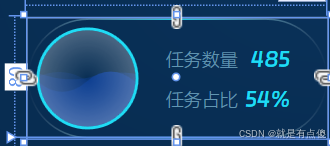
<c:WaterProgress Value="54" HorizontalAlignment="Left" Margin="5"/>效果如下: