参考视频:【狂神说Java】Spring5最新完整教程IDEA版通俗易懂 点击观看
文章目录
依赖注入
环境搭建
java
package com.findx.pojo;

public class Address {
    private String address;
    //get和set方法
    public String getAddress() {
        return address;
    }
    public void setAddress(String address) {
        this.address = address;
    }
    @Override
    public String toString() {
        return "Address [address=" + address + "]";
    }
}
java
package com.findx.pojo;

import java.util.List;
import java.util.Map;
import java.util.Properties;
import java.util.Set;

public class Student {
    private String name;
    private Address address;
    private String[] books;
    private List<String> hobbys;
    private Map<String, String> card;
    private Set<String> games;
    private String wife;
    private Properties info;

    public String getName() {
        return name;
    }

    public void setName(String name) {
        this.name = name;
    }

    public Address getAddress() {
        return address;
    }

    public void setAddress(Address address) {
        this.address = address;
    }

    public String[] getBooks() {
        return books;
    }

    public void setBooks(String[] books) {
        this.books = books;
    }

    public List<String> getHobbys() {
        return hobbys;
    }

    public void setHobbys(List<String> hobbys) {
        this.hobbys = hobbys;
    }

    public Map<String, String> getCard() {
        return card;
    }

    public void setCard(Map<String, String> card) {
        this.card = card;
    }

    public Set<String> getGames() {
        return games;
    }

    public void setGames(Set<String> games) {
        this.games = games;
    }

    public String getWife() {
        return wife;
    }

    public void setWife(String wife) {
        this.wife = wife;
    }

    public Properties getInfo() {
        return info;
    }

    public void setInfo(Properties info) {
        this.info = info;
    }
    @Override
    public String toString() {
        return "Student [name=" + name + ", address=" + address + ", books=" +
                java.util.Arrays.toString(books) + ", hobbys=" + hobbys +
                ", card=" + card + ", games=" + games + ", wife=" + wife +
                ", info=" + info + "]";
    }
}
xml
<?xml version="1.0" encoding="UTF-8"?>
<beans xmlns="http://www.springframework.org/schema/beans"
       xmlns:xsi="http://www.w3.org/2001/XMLSchema-instance"
       xsi:schemaLocation="http://www.springframework.org/schema/beans
        http://www.springframework.org/schema/beans/spring-beans.xsd">

    <bean id="student" class="com.findx.pojo.Student">
        <property name="name" value="张三"/>
    </bean>
</beans>
java
package com.findx;

import org.springframework.context.ApplicationContext;
import org.springframework.context.support.ClassPathXmlApplicationContext;
import com.findx.pojo.Student;

public class MyTest {
    public static void main(String[] args) {
        ApplicationContext applicationContext = new ClassPathXmlApplicationContext("beans.xml");
        //student
        Student student = (Student) applicationContext.getBean("student");
        System.out.println(student.getName());
    }
}
Set方式注入(重点)
依赖:bean对象的创建依赖于容器
注入:bean对象中的所有属性由容器来注入
xml
<?xml version="1.0" encoding="UTF-8"?>
<beans xmlns="http://www.springframework.org/schema/beans"
       xmlns:xsi="http://www.w3.org/2001/XMLSchema-instance"
       xsi:schemaLocation="http://www.springframework.org/schema/beans
        http://www.springframework.org/schema/beans/spring-beans.xsd">

    <bean id="address" class="com.findx.pojo.Address">
            <property name="address" value="杭州"/>
    </bean>
    <bean id="student" class="com.findx.pojo.Student">
        <!--普通值注入value-->
        <property name="name" value="张三"/>
        <!--bean注入ref-->
        <property name="address" ref="address"/>
        <!--数组注入-->
        <property name="books">
            <array>
                <value>java</value>
                <value>c</value>
                <value>c++</value>
            </array>
        </property>
        <!--list注入-->
        <property name="hobbys">
            <list>
                <value>football</value>
                <value>basketball</value>
                <value>swimming</value>
            </list>
        </property>
        <!--map注入-->
        <property name="card">
            <map>
                <entry key="身份证" value="123456789"/>
                <entry key="银行卡" value="987654321"/>
                <entry key="驾驶证" value="123456789"/>
            </map>
        </property>
        <!--set注入-->
        <property name="games">
            <set>
                <value>LOL</value>
                <value>DOTA</value>
                <value>CSGO</value>
            </set>
        </property>
        <!--null注入-->
        <property name="wife">
            <null/>
        </property>
        <!--properties注入-->
        <property name="info">
            <props>
                <prop key="name">张三</prop>
                <prop key="age">18</prop>
            </props>
        </property>
    </bean>
</beans>
p命名空间注入
java
package com.findx.pojo;

public class User {
    private String name;
    private int age;

    public String getName() {
        return name;
    }

    public void setName(String name) {
        this.name = name;
    }

    public int getAge() {
        return age;
    }

    public void setAge(int age) {
        this.age = age;
    }
    @Override
    public String toString() {
        return "User [name=" + name + ", age=" + age + "]";
    }
}
xml
<?xml version="1.0" encoding="UTF-8"?>
<beans xmlns="http://www.springframework.org/schema/beans"
       xmlns:xsi="http://www.w3.org/2001/XMLSchema-instance"
       xmlns:p="http://www.springframework.org/schema/p"
       xsi:schemaLocation="http://www.springframework.org/schema/beans
        http://www.springframework.org/schema/beans/spring-beans.xsd">
    <!--p命名空间注入:可以直接注入属性的值:property-->
    <bean id="user" class="com.findx.pojo.User"
          p:name="zfx"
          p:age="18"
    />
</beans>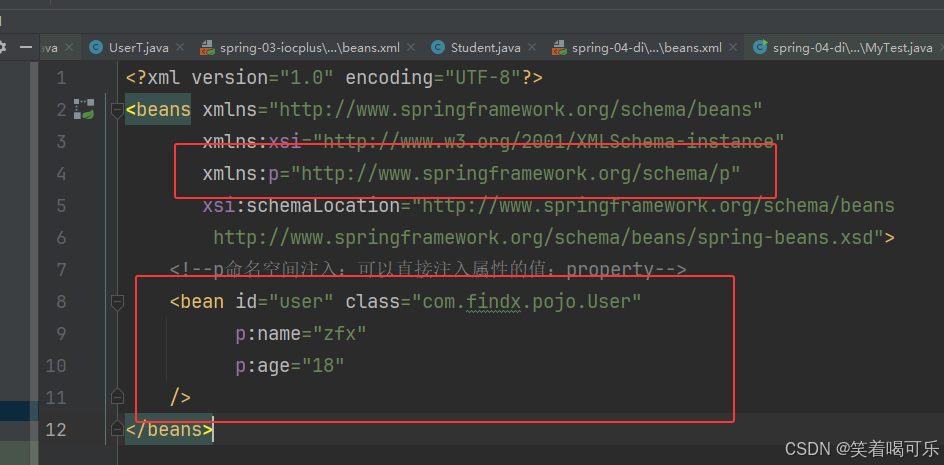
java
package com.findx;

import com.findx.pojo.User;
import org.springframework.context.ApplicationContext;
import org.springframework.context.support.ClassPathXmlApplicationContext;

public class MyTest {
    public static void main(String[] args) {
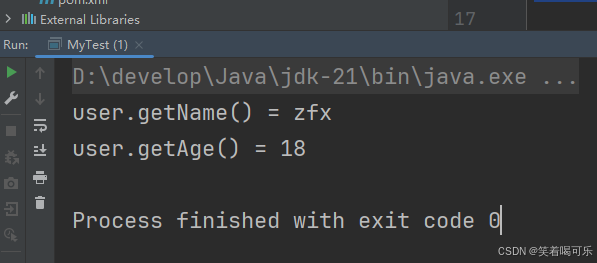
        ApplicationContext applicationContext = new ClassPathXmlApplicationContext("userbeans.xml");
        //获取User对象
        User user = (User)applicationContext.getBean("user");
        System.out.println("user.getName() = " + user.getName());
        System.out.println("user.getAge() = " + user.getAge());

    }
}
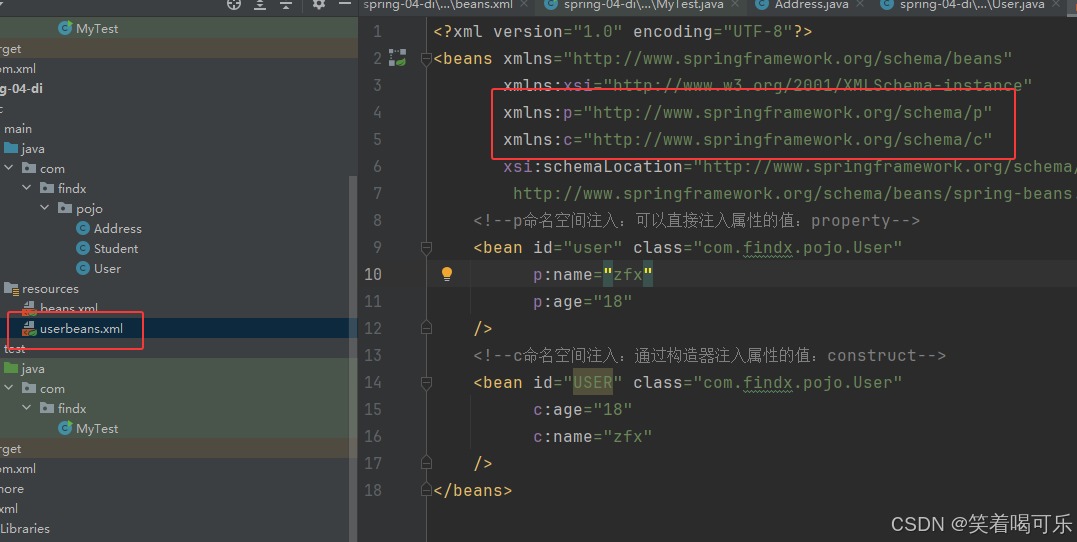
c命名空间注入
java
package com.findx.pojo;

public class User {
    private String name;
    private int age;
    //无参构造方法
    public User() {
    }
    //加上有参构造器
    public User(String name, int age) {
        this.name = name;
        this.age = age;
    }
    public String getName() {
        return name;
    }

    public void setName(String name) {
        this.name = name;
    }

    public int getAge() {
        return age;
    }

    public void setAge(int age) {
        this.age = age;
    }
    @Override
    public String toString() {
        return "User [name=" + name + ", age=" + age + "]";
    }
}
xml
<?xml version="1.0" encoding="UTF-8"?>
<beans xmlns="http://www.springframework.org/schema/beans"
       xmlns:xsi="http://www.w3.org/2001/XMLSchema-instance"
       xmlns:p="http://www.springframework.org/schema/p"
       xmlns:c="http://www.springframework.org/schema/c"
       xsi:schemaLocation="http://www.springframework.org/schema/beans
        http://www.springframework.org/schema/beans/spring-beans.xsd">
    <!--p命名空间注入:可以直接注入属性的值:property-->
    <bean id="user" class="com.findx.pojo.User"
          p:name="zfx"
          p:age="18"
    />
    <!--c命名空间注入:通过构造器注入属性的值:construct-->
    <bean id="USER" class="com.findx.pojo.User"
          c:age="18"
          c:name="zfx"
    />
</beans>
java
package com.findx;

import com.findx.pojo.User;
import org.springframework.context.ApplicationContext;
import org.springframework.context.support.ClassPathXmlApplicationContext;

public class MyTest {
    public static void main(String[] args) {
        ApplicationContext applicationContext = new ClassPathXmlApplicationContext("userbeans.xml");
        //获取User对象
        User user = (User)applicationContext.getBean("USER");
        System.out.println(user.toString());
    }
}
p命名空间和c命名空间不能直接使用需要导入约束
xmlns:p="http://www.springframework.org/schema/p"
xmlns:c="http://www.springframework.org/schema/c"