第16次:课程列表页面
课程列表是用户浏览和选择学习内容的主要入口。本次课程将实现课程 Tab 的完整功能,包括按难度分组展示、模块列表项设计等。
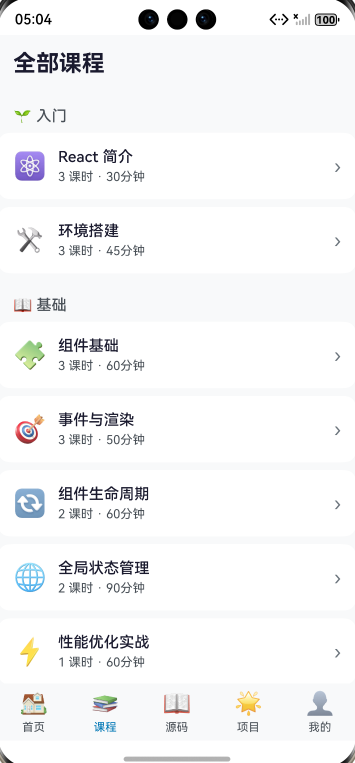
列表效果
学习目标
- 掌握列表分组展示技巧
- 学会设计模块列表项
- 实现课程数量与时长显示
- 优化列表滚动性能
- 完成课程列表页面开发
16.1 按难度分组展示
分组设计
将课程按难度等级分为 5 组:
🌱 入门 (beginner)
├── React 简介
└── 环境搭建

📖 基础 (basic)
├── 组件基础
├── 事件与渲染
└── ...

🚀 进阶 (intermediate)
├── Hooks 基础三剑客
└── ...

👑 高级 (advanced)
├── React 渲染原理
└── ...

🌐 生态 (ecosystem)
├── Next.js 框架
└── ...
实现代码
typescript
@Builder
CourseContent() {
  Scroll() {
    Column() {
      // 标题
      Text('全部课程')
        .fontSize(24)
        .fontWeight(FontWeight.Bold)
        .fontColor(this.isDarkMode ? '#ffffff' : '#1a1a2e')
        .padding({ left: 16, top: 16, bottom: 16 })
        .width('100%')

      // 按难度分组显示
      ForEach(
        ['beginner', 'basic', 'intermediate', 'advanced', 'ecosystem'],
        (difficulty: string) => {
          this.DifficultySection(difficulty)
        }
      )
    }
    .padding({ bottom: 20 })
  }
  .width('100%')
  .height('100%')
  .scrollBar(BarState.Off)
}
16.2 难度分组区域
分组标题
typescript
private getDifficultyTitle(difficulty: string): string {
  const titles: Record<string, string> = {
    'beginner': '🌱 入门',
    'basic': '📖 基础',
    'intermediate': '🚀 进阶',
    'advanced': '👑 高级',
    'ecosystem': '🌐 生态'
  };
  return titles[difficulty] ?? difficulty;
}
分组区域实现
typescript
@Builder
DifficultySection(difficulty: string) {
  Column() {
    // 难度标题
    Text(this.getDifficultyTitle(difficulty))
      .fontSize(16)
      .fontWeight(FontWeight.Medium)
      .fontColor(this.isDarkMode ? '#d1d5db' : '#495057')
      .padding({ left: 16, top: 16, bottom: 8 })
      .width('100%')

    // 该难度下的模块列表
    ForEach(
      this.modules.filter(m => m.difficulty === difficulty),
      (module: LearningModule) => {
        this.ModuleListItem(module)
      }
    )
  }
}
16.3 模块列表项设计
列表项布局
┌─────────────────────────────────────────┐
│  📚  │  模块标题                    │ › │
│      │  3 课时 · 30分钟             │   │
└─────────────────────────────────────────┘
实现代码
typescript
@Builder
ModuleListItem(module: LearningModule) {
  Row() {
    // 图标
    Text(module.icon)
      .fontSize(28)

    // 信息区域
    Column() {
      Text(module.title)
        .fontSize(16)
        .fontWeight(FontWeight.Medium)
        .fontColor(this.isDarkMode ? '#ffffff' : '#1a1a2e')

      Text(`${module.lessonCount} 课时 · ${module.estimatedTime}`)
        .fontSize(13)
        .fontColor(this.isDarkMode ? '#d1d5db' : '#495057')
        .margin({ top: 4 })
    }
    .alignItems(HorizontalAlign.Start)
    .margin({ left: 12 })
    .layoutWeight(1)

    // 箭头
    Text('›')
      .fontSize(20)
      .fontColor(this.isDarkMode ? '#9ca3af' : '#6c757d')
  }
  .width('100%')
  .padding(16)
  .margin({ left: 16, right: 16, bottom: 8 })
  .backgroundColor(this.isDarkMode ? '#282c34' : '#ffffff')
  .borderRadius(12)
  .onClick(() => {
    router.pushUrl({
      url: 'pages/ModuleDetail',
      params: { moduleId: module.id }
    });
  })
}
16.4 添加进度指示
显示学习进度
typescript
@Builder
ModuleListItem(module: LearningModule) {
  Row() {
    Text(module.icon)
      .fontSize(28)

    Column() {
      Row() {
        Text(module.title)
          .fontSize(16)
          .fontWeight(FontWeight.Medium)
          .fontColor(this.isDarkMode ? '#ffffff' : '#1a1a2e')

        // 完成标记
        if (ProgressService.isModuleCompleted(module.id, this.progress)) {
          Text('✓')
            .fontSize(14)
            .fontColor('#51cf66')
            .margin({ left: 8 })
        }
      }

      Text(`${module.lessonCount} 课时 · ${module.estimatedTime}`)
        .fontSize(13)
        .fontColor(this.isDarkMode ? '#d1d5db' : '#495057')
        .margin({ top: 4 })

      // 进度条
      if (this.getModuleProgress(module) > 0 &&
          !ProgressService.isModuleCompleted(module.id, this.progress)) {
        Row() {
          Progress({
            value: this.getModuleProgress(module),
            total: 100,
            type: ProgressType.Linear
          })
            .width('60%')
            .height(3)
            .color(this.isDarkMode ? '#61DAFB' : '#0077b6')
            .backgroundColor(this.isDarkMode ? '#3d3d5c' : '#e9ecef')

          Text(`${this.getModuleProgress(module)}%`)
            .fontSize(11)
            .fontColor(this.isDarkMode ? '#61DAFB' : '#0077b6')
            .margin({ left: 8 })
        }
        .margin({ top: 8 })
      }
    }
    .alignItems(HorizontalAlign.Start)
    .margin({ left: 12 })
    .layoutWeight(1)

    Text('›')
      .fontSize(20)
      .fontColor(this.isDarkMode ? '#9ca3af' : '#6c757d')
  }
  .width('100%')
  .padding(16)
  .margin({ left: 16, right: 16, bottom: 8 })
  .backgroundColor(this.isDarkMode ? '#282c34' : '#ffffff')
  .borderRadius(12)
  .onClick(() => {
    router.pushUrl({
      url: 'pages/ModuleDetail',
      params: { moduleId: module.id }
    });
  })
}

// 获取模块进度
private getModuleProgress(module: LearningModule): number {
  return ProgressService.getCompletionPercentage(module, this.progress);
}
16.5 列表滚动优化
LazyForEach 懒加载
对于大量数据,使用 LazyForEach 优化性能:
typescript
// 定义数据源
class ModuleDataSource implements IDataSource {
  private modules: LearningModule[] = [];

  constructor(modules: LearningModule[]) {
    this.modules = modules;
  }

  totalCount(): number {
    return this.modules.length;
  }

  getData(index: number): LearningModule {
    return this.modules[index];
  }

  registerDataChangeListener(listener: DataChangeListener): void {}
  unregisterDataChangeListener(listener: DataChangeListener): void {}
}

// 使用 LazyForEach
LazyForEach(this.moduleDataSource, (module: LearningModule) => {
  this.ModuleListItem(module)
}, (module: LearningModule) => module.id)
列表项复用
使用 @Reusable 装饰器标记可复用组件:
typescript
@Reusable
@Component
struct ModuleListItemComponent {
  @Prop module: LearningModule = {} as LearningModule;
  @Prop progress: number = 0;
  @Prop isCompleted: boolean = false;
  @StorageLink('isDarkMode') isDarkMode: boolean = false;
  onTap?: () => void;

  build() {
    // 列表项内容...
  }
}
16.6 完整课程列表代码
typescript
@Builder
CourseContent() {
  Scroll() {
    Column() {
      // 页面标题
      Row() {
        Text('全部课程')
          .fontSize(24)
          .fontWeight(FontWeight.Bold)
          .fontColor(this.isDarkMode ? '#ffffff' : '#1a1a2e')

        Blank()

        // 统计信息
        Text(`${this.modules.length} 个模块`)
          .fontSize(14)
          .fontColor(this.isDarkMode ? '#61DAFB' : '#0077b6')
      }
      .width('100%')
      .padding({ left: 16, right: 16, top: 16, bottom: 16 })

      // 按难度分组显示
      ForEach(
        ['beginner', 'basic', 'intermediate', 'advanced', 'ecosystem'],
        (difficulty: string) => {
          // 只显示有模块的难度分组
          if (this.modules.some(m => m.difficulty === difficulty)) {
            this.DifficultySection(difficulty)
          }
        }
      )
    }
    .padding({ bottom: 20 })
  }
  .width('100%')
  .height('100%')
  .scrollBar(BarState.Off)
}

@Builder
DifficultySection(difficulty: string) {
  Column() {
    // 分组标题
    Row() {
      Text(this.getDifficultyTitle(difficulty))
        .fontSize(16)
        .fontWeight(FontWeight.Medium)
        .fontColor(this.isDarkMode ? '#d1d5db' : '#495057')

      Blank()

      // 该难度模块数量
      Text(`${this.modules.filter(m => m.difficulty === difficulty).length} 个`)
        .fontSize(12)
        .fontColor(this.isDarkMode ? '#9ca3af' : '#6c757d')
    }
    .width('100%')
    .padding({ left: 16, right: 16, top: 16, bottom: 8 })

    // 模块列表
    ForEach(
      this.modules.filter(m => m.difficulty === difficulty),
      (module: LearningModule) => {
        this.ModuleListItem(module)
      }
    )
  }
}

@Builder
ModuleListItem(module: LearningModule) {
  Row() {
    Text(module.icon)
      .fontSize(28)

    Column() {
      Row() {
        Text(module.title)
          .fontSize(16)
          .fontWeight(FontWeight.Medium)
          .fontColor(this.isDarkMode ? '#ffffff' : '#1a1a2e')
          .maxLines(1)
          .textOverflow({ overflow: TextOverflow.Ellipsis })

        if (ProgressService.isModuleCompleted(module.id, this.progress)) {
          Text('✓')
            .fontSize(14)
            .fontColor('#51cf66')
            .margin({ left: 8 })
        }
      }
      .width('100%')

      Text(`${module.lessonCount} 课时 · ${module.estimatedTime}`)
        .fontSize(13)
        .fontColor(this.isDarkMode ? '#d1d5db' : '#495057')
        .margin({ top: 4 })

      // 进度条(未完成且有进度时显示)
      if (this.getModuleProgress(module) > 0 &&
          !ProgressService.isModuleCompleted(module.id, this.progress)) {
        Row() {
          Progress({
            value: this.getModuleProgress(module),
            total: 100,
            type: ProgressType.Linear
          })
            .width('60%')
            .height(3)
            .color(this.isDarkMode ? '#61DAFB' : '#0077b6')
            .backgroundColor(this.isDarkMode ? '#3d3d5c' : '#e9ecef')

          Text(`${this.getModuleProgress(module)}%`)
            .fontSize(11)
            .fontColor(this.isDarkMode ? '#61DAFB' : '#0077b6')
            .margin({ left: 8 })
        }
        .margin({ top: 8 })
      }
    }
    .alignItems(HorizontalAlign.Start)
    .margin({ left: 12 })
    .layoutWeight(1)

    Text('›')
      .fontSize(20)
      .fontColor(this.isDarkMode ? '#9ca3af' : '#6c757d')
  }
  .width('100%')
  .padding(16)
  .margin({ left: 16, right: 16, bottom: 8 })
  .backgroundColor(this.isDarkMode ? '#282c34' : '#ffffff')
  .borderRadius(12)
  .onClick(() => {
    router.pushUrl({
      url: 'pages/ModuleDetail',
      params: { moduleId: module.id }
    });
  })
}

private getDifficultyTitle(difficulty: string): string {
  const titles: Record<string, string> = {
    'beginner': '🌱 入门',
    'basic': '📖 基础',
    'intermediate': '🚀 进阶',
    'advanced': '👑 高级',
    'ecosystem': '🌐 生态'
  };
  return titles[difficulty] ?? difficulty;
}

private getModuleProgress(module: LearningModule): number {
  return ProgressService.getCompletionPercentage(module, this.progress);
}
本次课程小结
通过本次课程,你已经:
✅ 掌握了列表分组展示技巧
✅ 学会了设计模块列表项
✅ 实现了课程数量与时长显示
✅ 了解了列表滚动优化方法
✅ 完成了课程列表页面开发
课后练习
-
添加筛选功能:实现按难度筛选模块
-
添加排序功能:支持按进度、课时数排序
-
添加搜索功能:在列表顶部添加搜索框
下次预告
第17次:模块详情页面
我们将开发模块详情页面:
- 页面路由与参数传递
- 模块信息展示
- 课程列表组件 LessonItem
- 完成状态标记
进入详情页面开发!