问题描述
在使用 Docker 部署 Dify AI 平台时,api、worker、worker_beat 三个核心服务一直处于重启状态,无法正常启动。同时,localhost 页面无法访问,出现 502 Bad Gateway 错误。
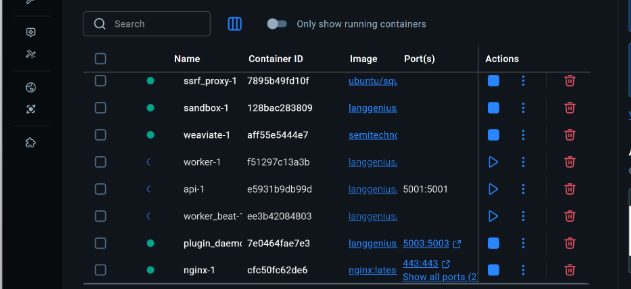
问题现象
1. 容器状态异常
$ docker ps -a | grep -E "api|worker" 4c5fdb72f16b langgenius/dify-api:1.13.1 "/bin/bash /entrypoi..." 46 minutes ago Restarting (1) 43 seconds ago docker-api-1 02886958ca3d langgenius/dify-api:1.13.1 "/bin/bash /entrypoi..." 46 minutes ago Restarting (1) 43 seconds ago docker-worker-1 e57de0eeaa0b langgenius/dify-api:1.13.1 "/bin/bash /entrypoi..." 46 minutes ago Restarting (1) 45 seconds ago docker-worker_beat-1 三个容器状态显示为 Restarting (1),退出码为 1,说明容器启动失败后不断重启。
2. Web 访问异常
访问 http://localhost 时页面无法打开,nginx 日志显示大量 502 错误:
connect() failed (111: Connection refused) while connecting to upstream, upstream: "http://172.18.0.5:5001/console/api/system-features" 问题排查过程
第一步:查看容器日志
$ docker logs docker-api-1 --tail 50 日志显示以下错误:
pydantic_core._pydantic_core.ValidationError: 1 validation error for DifyConfig REDIS_MAX_CONNECTIONS Input should be a valid integer, unable to parse string as an integer [type=int_parsing, input_value='', input_type=str] 关键发现 :REDIS_MAX_CONNECTIONS 环境变量的值为空字符串,但配置要求是一个整数。
第二步:检查 .env 配置文件
$ grep -n "REDIS_MAX_CONNECTIONS" .env 发现 .env 文件第 354 行:
# Optional: limit total Redis connections used by API/Worker (unset for default) # Align with API's REDIS_MAX_CONNECTIONS in configs REDIS_MAX_CONNECTIONS= 配置项虽然存在,但值为空。
第三步:分析配置加载机制
检查 docker-compose.yaml 中的环境变量配置:
x-shared-env: &shared-api-worker-env REDIS_HOST: ${REDIS_HOST:-redis} REDIS_PORT: ${REDIS_PORT:-6379} REDIS_MAX_CONNECTIONS: ${REDIS_MAX_CONNECTIONS:-} # 默认值为空字符串 问题定位:
.env文件中REDIS_MAX_CONNECTIONS=被设置为空值或被注释docker-compose.yaml中${REDIS_MAX_CONNECTIONS:-}的默认值是空字符串(而不是 null)- Pydantic 验证器虽然设计了将空字符串转为 None 的逻辑,但由于某种原因未能生效
- 导致配置验证失败,服务启动时抛出异常
第四步:验证代码中的验证器
查看 api/configs/middleware/cache/redis_config.py 中的验证器代码:
REDIS_MAX_CONNECTIONS: PositiveInt | None = Field( description="Maximum connections in the Redis connection pool (unset for library default)", default=None, ) @field_validator("REDIS_MAX_CONNECTIONS", mode="before") @classmethod def _empty_string_to_none_for_max_conns(cls, v): """Allow empty string in env/.env to mean 'unset' (None).""" if v is None: return None if isinstance(v, str) and v.strip() == "": return None return v 验证器逻辑看起来正确,但在实际运行中空字符串仍然导致了验证失败。
解决方案
方案一:设置合理的整数值(推荐)
修改 .env 文件,为 REDIS_MAX_CONNECTIONS 设置一个合理的整数值:
# Optional: limit total Redis connections used by API/Worker (unset for default) # Align with API's REDIS_MAX_CONNECTIONS in configs REDIS_MAX_CONNECTIONS=50 方案二:使用 docker-compose.yaml 模板
由于 docker-compose.yaml 文件头部声明为自动生成文件:
# ================================================================== # WARNING: This file is auto-generated by generate_docker_compose # Do not modify this file directly. Instead, update the .env.example # or docker-compose-template.yaml and regenerate this file. # ================================================================== 可以修改 docker-compose-template.yaml 模板文件,将默认值改为不设置该环境变量,然后运行 ./generate_docker_compose 重新生成配置文件。
实施修复
# 1. 修改 .env 文件 vim .env # 将 REDIS_MAX_CONNECTIONS= 改为 REDIS_MAX_CONNECTIONS=50 # 2. 重启服务 docker compose down api worker worker_beat docker compose up -d api worker worker_beat 验证服务启动
$ docker logs docker-api-1 --tail 20 Running migrations Warning! You didn't set docs_url, redoc_url or openapi_url. API Documentation will be skipped. Preparing database migration... Database migration skipped gRPC patched with gevent. psycopg2 patched with gevent. [2026-03-20 02:32:05 +0000] [1] [INFO] Starting gunicorn 25.1.0 [2026-03-20 02:32:05 +0000] [1] [INFO] Listening at: http://0.0.0.0:5001 (1) [2026-03-20 02:32:05 +0000] [1] [INFO] Using worker: gevent [2026-03-20 02:32:05 +0000] [37] [INFO] Booting worker with pid: 37 服务启动成功!
第二个问题:Web 页面 502 错误
问题现象
API 服务启动成功后,访问 http://localhost 仍显示 502 错误:
$ curl -s -o /dev/null -w '%{http_code}' http://localhost/console/api/setup 502 nginx 日志显示:
connect() failed (111: Connection refused) while connecting to upstream, upstream: "http://172.18.0.5:5001/..." 问题原因
nginx 容器缓存了旧 API 容器的 IP 地址(172.18.0.5),但重启后 API 容器的 IP 变成了 172.18.0.10。
虽然 nginx 配置使用的是主机名 http://api:5001,且从容器内部可以正确解析到新 IP,但 nginx 进程可能缓存了旧的连接。
解决方案
重启 nginx 服务使其重新建立连接:
$ docker compose restart nginx 验证修复
$ curl -s -o /dev/null -w '%{http_code}' http://localhost/console/api/setup 200 $ docker logs docker-nginx-1 --tail 5 172.18.0.1 - - [20/Mar/2026:02:37:36 +0000] "GET /console/api/setup HTTP/1.1" 200 38 "-" "curl/7.87.0" "-" 访问成功!返回 200 状态码。
最终服务状态
$ docker ps --format "table {{.Names}}\t{{.Status}}" NAMES STATUS docker-api-1 Up 5 minutes docker-worker-1 Up 5 minutes docker-worker_beat-1 Up 5 minutes docker-nginx-1 Up 57 minutes docker-web-1 Up 59 minutes 所有服务正常运行!
总结
问题根因
- 配置验证失败 :
REDIS_MAX_CONNECTIONS环境变量为空字符串,导致 Pydantic 配置验证失败 - 连接缓存问题:nginx 缓存了旧的 API 容器 IP 地址
解决方法
- 设置环境变量值 :在
.env文件中将REDIS_MAX_CONNECTIONS设置为合理的整数值(如 50) - 重启 nginx 服务:API 容器重启后,需要重启 nginx 以刷新连接
经验教训
- 环境变量配置 :Docker Compose 的
${VAR:-default}语法中,空字符串和 null 是不同的。如果配置项允许为空,建议在模板中使用 null 或直接不设置该变量 - 容器网络变化:容器重启后 IP 地址可能发生变化,依赖容器间通信的服务(如 nginx)可能需要重启
- 日志优先:遇到容器重启问题,首先查看容器日志,通常能快速定位问题
- 配置验证:Pydantic 等配置验证库的错误信息通常很详细,可以根据错误信息快速定位问题字段
相关命令参考
# 查看容器状态 docker ps -a # 查看容器日志 docker logs <container-name> --tail 50 # 查看特定环境变量 grep -n "KEYWORD" .env # 测试服务可用性 curl -s -o /dev/null -w '%{http_code}' http://localhost/api/endpoint # 重启特定服务 docker compose restart <service-name> # 完全重建服务 docker compose down <service-name> docker compose up -d <service-name> 软件版本 :Dify 1.13.1
部署方式 :Docker Compose
操作系统:Windows 11 / Git Bash