目录
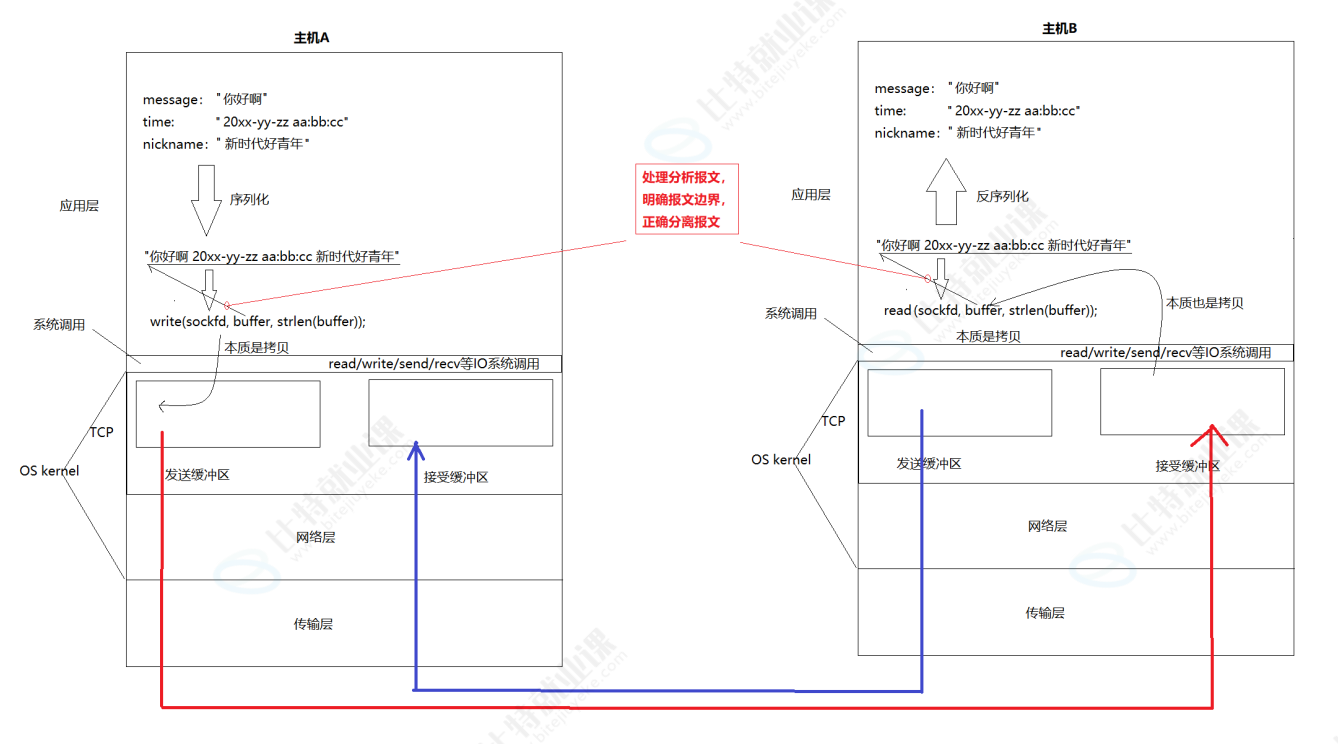
2>重新理解read/write/recv/send和tcp为什么支持全双工
1>应用层
我们程序员写的⼀个个解决我们实际问题,满⾜我们⽇常需求的⽹络程序,都是在应⽤层
a.再谈"协议"
协议是⼀种 "约定"。socket api的接⼝,在读写数据时,都是按 "字符串" 的⽅式来发送接收的,那如果我们要传输⼀些 "结构化的数据" 怎么办呢?
其实,协议就是双⽅约定好的结构化的数据
b.网络版计算器
例如,我们需要实现⼀个服务器版的加法器,我们需要客⼾端把要计算的两个加数发过去,然后由服务器进⾏计算,最后再把结果返回给客⼾端
约定⽅案⼀:
• 客⼾端发送⼀个形如"1+2"的字符串
• 这个字符串中有两个操作数,都是整形
• 两个数字之间会有⼀个字符是运算符,运算符只能是 +
• 数字和运算符之间没有空格
• ...
约定⽅案⼆:
• 定义结构体来表⽰我们需要交互的信息
• 发送数据时将这个结构体按照⼀个规则转换成字符串,接收到数据的时候再按照相同的规则把字符串转化回结构体
• 这个过程叫做 "序列化" 和 "反序列化"
注意,可以直接发送二进制对象吗?答案是可以的,毕竟client和server双方都认识这个结构体,但是不建议这么做,因为可能会涉及到内存对齐问题等(而在OS内部,协议基本都是直接传递结构体对象,因为OS是用C语言写的,无论在哪里都一样)
c.序列化和反序列化
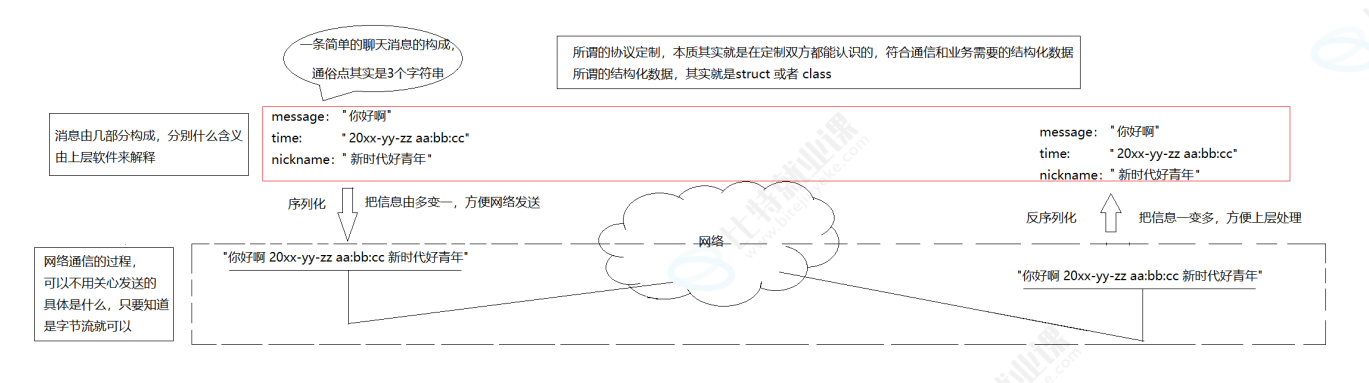
⽆论我们采⽤⽅案⼀,或⽅案⼆,还是其它的⽅案,只要保证,⼀端发送时构造的数据,在另⼀端能够正确的进⾏解析,就是ok的。这种约定就是"应⽤层协议" !
接下来就来自定义实现一下协议,这个过程能够让我们深刻理解协议
• 我们采⽤⽅案2,我们也要体现协议定制的细节
• 我们要引⼊序列化和反序列化,这里直接采⽤现成的⽅案 -- jsoncpp库
• 我们要对socket进⾏字节流的读取处理
2>重新理解read/write/recv/send和tcp为什么支持全双工
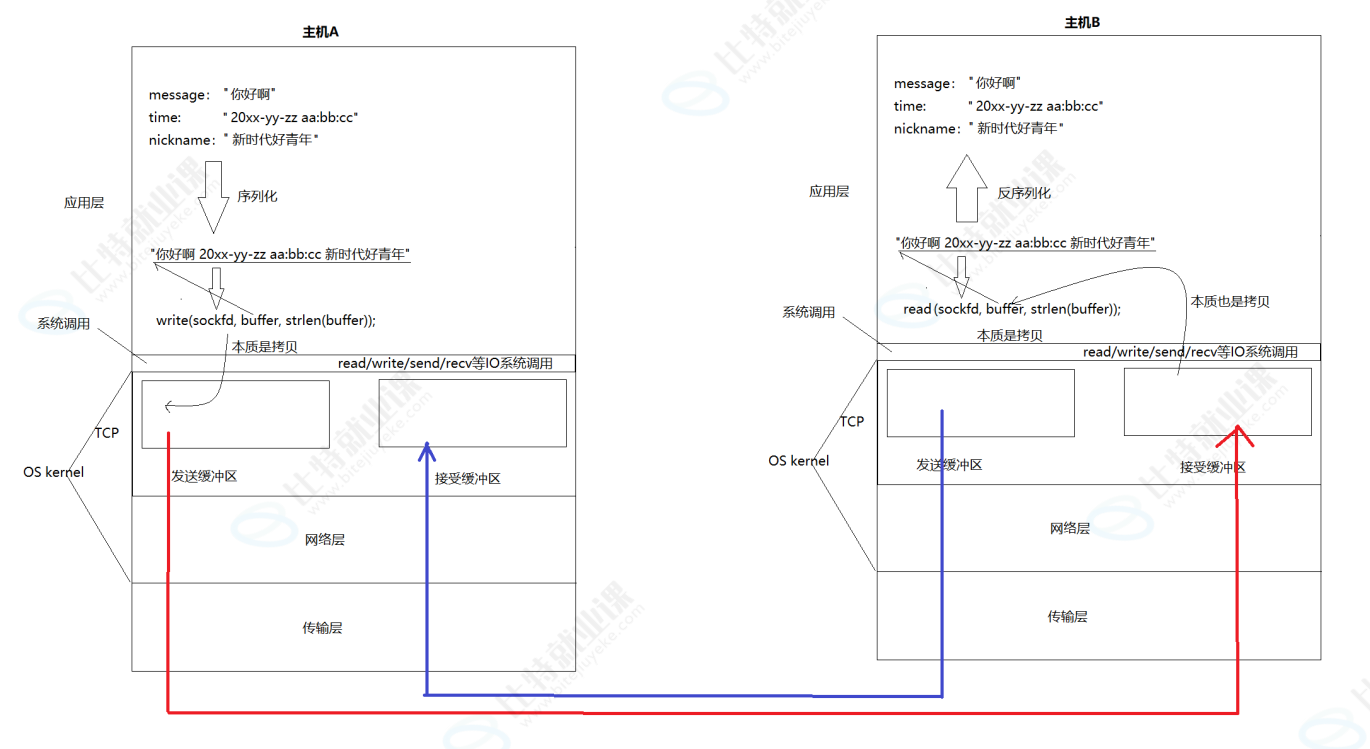
所以:
在任何⼀台主机上,TCP连接既有发送缓冲区,⼜有接受缓冲区,所以,在内核中,可以在发消息的同时,也可以收消息,即全双⼯!
这就是为什么⼀个tcp sockfd读写都是它的原因 !
实际数据什么时候发,发多少,出错了怎么办,由TCP控制,所以TCP叫做传输控制协议!
write和read就是收发信息,就拿write来说,它并不是直接将数据发送到网络中,而是写到本机的发送缓冲区!
主机间通信的本质:把发送方的发送缓冲区内部的数据,拷贝到对端的接受缓冲区!(OS把数据发送到网络中,本质也是拷贝)
3>代码实现
这里有一点需要注意的是,因为TCP是面向字节流的,所以当读取方在读取的时候,可能读到一个完整的json请求,也可能会读到半个、一个半等等,也就意味着read本身并不保证读取到的报文的完整性!它只保证有数据的话就读上来,那这时就需要应用层程序员自己保证!
当我们tcp中读取数据的时候,读取到的报文不完整,或者多读了,导致下一个报文不完整了,这个问题就叫"粘报问题"!
a.代码结构
cpp
 NetCal.hpp  Protocol.hpp  TcpServer.hpp  Socket.hpp
Daemon.hpp TcpClient.cc TcpServer.cc Makefile 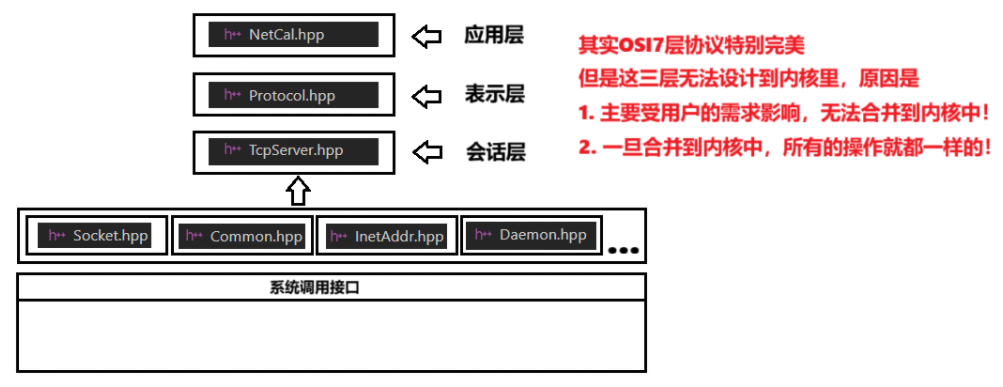
①功能实现
cpp
// NetCal.hpp
#pragma once
#include <iostream>
#include "Protocol.hpp"
class NetCal
{
public:
NetCal() {}
Response Execute(Request &req)
{
Response resp(0, 0);
switch (req.Oper())
{
case '+':
resp.SetResult(req.X() + req.Y());
break;
case '-':
resp.SetResult(req.X() - req.Y());
break;
case '*':
resp.SetResult(req.X() * req.Y());
break;
case '/':
{
if(req.Y() == 0)
resp.SetCode(1); // 1. 除零错误
else
resp.SetResult(req.X() / req.Y());
}
break;
case '%':
{
if(req.Y() == 0)
resp.SetCode(2); // 2. 模零错误
else
resp.SetResult(req.X() % req.Y());
}
break;
default:
resp.SetCode(3); // 3. 非法操作
break;
}
return resp;
}
~NetCal() {}
};②协议定制
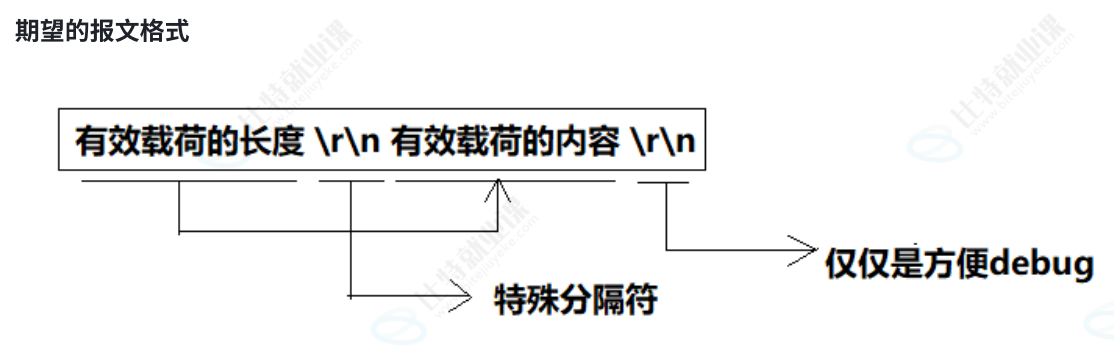
Request和Response就是定制基本的结构化字段,这个就是协议
通过定制的报文格式,可以有效避免因为字节流IO可能会导致的问题
cpp
// Protocol.hpp
#pragma once
#include <iostream>
#include <string>
#include <memory>
#include "Socket.hpp"
#include <jsoncpp/json/json.h>
#include <functional>
// 实现一个自定义的网络版本的计算器
using namespace SocketModule;
// 约定好各个字段的含义,本质就是约定好协议!
// client -> server
// 如何要做序列化和反序列化:
// 1. 我们自己写(怎么做) ---> 往往不具备很好的扩展性
// 2. 使用现成的方案(这个是我们要写的) ---> json -> jsoncpp
class Request
{
public:
Request() {}
Request(int x, int y, char oper)
: _x(x),
_y(y),
_oper(oper)
{
}
std::string Serialization()
{
Json::Value root;
root["x"] = _x;
root["y"] = _y;
root["oper"] = _oper;
Json::FastWriter writer;
std::string s = writer.write(root);
return s;
}
bool Deserialization(std::string &in)
{
Json::Reader reader;
Json::Value root;
bool ok = reader.parse(in, root);
if (ok)
{
_x = root["x"].asInt();
_y = root["y"].asInt();
_oper = root["oper"].asInt();
}
return ok;
}
int X() { return _x; }
int Y() { return _y; }
char Oper() { return _oper; }
~Request() {}
private:
int _x;
int _y;
char _oper;
};
// server -> client
class Response
{
public:
Response() {}
Response(int result, int code) : _result(result), _code(code)
{
}
std::string Serialization()
{
Json::Value root;
root["result"] = _result;
root["code"] = _code;
Json::FastWriter wirter;
std::string s = wirter.write(root);
return s;
}
bool Deserialization(std::string &in)
{
Json::Reader reader;
Json::Value root;
bool ok = reader.parse(in, root);
if (ok)
{
_result = root["result"].asInt();
_code = root["code"].asInt();
}
return ok;
}
void SetResult(int result)
{
_result = result;
}
void SetCode(int code)
{
_code = code;
}
void ShowResult()
{
std::cout << "计算结果是: " << _result << "[" << _code << "]" << std::endl;
}
~Response() {}
private:
int _result; // 运算结果,无法区分清楚应答是计算结果,还是异常值
int _code; // 0:sucess, 1,2,3,4->不同的运算异常的情况
};
const std::string sep = "/r/n";
using func_t = std::function<Response(Request &req)>;
// 协议(基于TCP的)需要解决两个问题:
// 1. request和response必须得有序列化和反序列化功能
// 2. 你必须保证,读取的时候,读到完整的请求(针对TCP, 而UDP不用考虑)
class Protocol
{
public:
Protocol() {}
Protocol(func_t func) : _func(func) {}
// 50\r\n{"x": 10, "y" : 20, "oper" : '+'}\r\n
std::string Encode(const std::string &jsonstr)
{
std::string jsonstr_len = std::to_string(jsonstr.size());
return jsonstr_len + sep + jsonstr + sep;
}
// 50\r\n{"x": 10, "
// 50\r\n{"x": 10, "y" : 20, "oper" : '+'}\r\n
// packge故意是&
// 1. 判断报文完整性
// 2. 如果包含至少一个完整请求,提取它, 并从移除它,方便处理下一个
bool Decode(std::string &buffer, std::string *package)
{
ssize_t pos = buffer.find(sep);
if (pos == std::string::npos)
return false; // 让调用方继续从内核中读取数据
std::string package_len_str = buffer.substr(0, pos);
int package_len_int = std::stoi(package_len_str);
// buffer 一定有长度,但是一定有完整的报文吗?
int taget_len = package_len_str.size() + package_len_int + 2 * sep.size();
if (buffer.size() < taget_len)
return false;
// buffer一定至少有一个完整的报文!
*package = buffer.substr(pos + sep.size(), package_len_int);
buffer.erase(0, taget_len);
return true;
}
void GetRequest(std::shared_ptr<Socket> &sock, InetAddr &client)
{
// 读取
std::string buffer_queue;
while (true)
{
int n = sock->Recv(&buffer_queue);
if (n > 0)
{
std::string json_package;
// 1. 解析报文,提取完整的json请求,如果不完整,就让服务器继续读取
while (Decode(buffer_queue, &json_package))
{
LOG(LogLevel::DEBUG) << client.StringAddr() << " 请求: " << json_package;
// 我敢100%保证,我一定拿到了一个完整的报文
// {"x": 10, "y" : 20, "oper" : '+'} -> 你能处理吗?
// 2. 请求json串,反序列化
Request req;
bool ok = req.Deserialization(json_package);
if (!ok)
continue;
// 3. 我一定得到了一个内部属性已经被设置了的req了
// 通过req->resp, 不就是要完成计算功能嘛!!业务
Response resp = _func(req);
// 4. 序列化
std::string json_str = resp.Serialization();
// 5. 添加自定义长度
std::string send_str = Encode(json_str);
// 6. 直接发送
sock->Send(send_str);
}
}
else if (n == 0)
{
LOG(LogLevel::INFO) << "client:" << client.StringAddr() << " Quit!";
break;
}
else
{
LOG(LogLevel::WARNING) << "client:" << client.StringAddr() << " recv error";
break;
}
}
}
std::string BuildRequestString(int x, int y, char oper)
{
// 1. 构建一个完整的请求
Request req(x, y, oper);
// 2. 序列化
std::string json_req = req.Serialization();
// 3. 添加长度报头
return Encode(json_req);
}
bool GetResponse(std::shared_ptr<Socket> &client, std::string &resp_buffer, Response *resp)
{
// 面向字节流,你怎么保证,你的client读到的 一个网络字符串,就一定是一个完整的请求呢??
while (true)
{
ssize_t n = client->Recv(&resp_buffer);
if (n > 0)
{
std::string json_package;
// 1. 解析报文,提取完整的json请求,如果不完整,就让服务器继续读取
while (Decode(resp_buffer, &json_package))
{
// 走到这里,我能保证,我一定拿到了一个完整的应答json报文
// 2. 反序列化
resp->Deserialization(json_package);
}
return true;
}
else if (n == 0)
{
std::cout << "server quit " << std::endl;
return false;
}
else
{
std::cout << "recv error" << std::endl;
return false;
}
}
}
~Protocol() {}
private:
func_t _func;
};③服务器
cpp
// TcpServer.hpp
#pragma once
#include "Socket.hpp"
#include <iostream>
#include <memory>
#include <sys/wait.h>
#include <functional>
using namespace SocketModule;
using namespace LogModule;
using ioservice_t = std::function<void(std::shared_ptr<Socket> &sock, InetAddr &client)>;
// 主要解决:连接的问题,IO通信的问题
// 细节: TcpServer,需不需要关心自己未来传递的信息是什么?不需要关心!!
// 网络版本的计算器,长服务
class TcpServer
{
public:
TcpServer(uint16_t port, ioservice_t service)
: _port(port),
_listensockptr(std::make_unique<TcpSocket>()),
_isrunning(false),
_service(service)
{
_listensockptr->BuildTcpSocketMethod(_port);
}
void Start()
{
_isrunning = true;
while (_isrunning)
{
InetAddr client;
auto sock = _listensockptr->Accept(&client); // 1. 和client通信sockfd 2. client 网络地址
if(sock == nullptr)
{
continue;
}
LOG(LogLevel::DEBUG) << "accept success ...";
pid_t id = fork();
if(id < 0)
{
LOG(LogLevel::FATAL) << "fork error ...";
exit(FORK_ERR);
}
else if(id == 0)
{
// 子进程 -> listensock
_listensockptr->Close();
if(fork() > 0)
exit(OK);
// 孙子进程在执行任务,已经是孤儿了
_service(sock, client);
sock->Close();
exit(OK);
}
else
{
// 父进程 -> sock
sock ->Close();
pid_t rid = ::waitpid(id, nullptr, 0);
(void)rid;
}
}
_isrunning = false;
}
~TcpServer() {}
private:
uint16_t _port;
std::unique_ptr<Socket> _listensockptr;
bool _isrunning;
ioservice_t _service;
};④Socket封装
cpp
// socket.hpp
#pragma once
#include <iostream>
#include <string>
#include <sys/socket.h>
#include <sys/types.h>
#include <netinet/in.h>
#include <arpa/inet.h>
#include <cstdlib>
#include "Common.hpp"
#include "Log.hpp"
#include "InetAddr.hpp"
namespace SocketModule
{
using namespace LogModule;
const static int gbacklog = 16;
// 模版方法模式
// 基类socket, 大部分方法,都是纯虚方法
class Socket
{
public:
virtual ~Socket(){}
virtual void SocketOrDie() = 0;
virtual void BindOrDie(uint16_t port) = 0;
virtual void ListenOrDie(int backlog) = 0;
virtual std::shared_ptr<Socket> Accept(InetAddr *client) = 0;
virtual void Close() = 0;
virtual int Recv(std::string *out) = 0;
virtual int Send(const std::string &message) = 0;
virtual int Connect(const std::string &server_ip, uint16_t port) = 0;
void BuildTcpSocketMethod(uint16_t port, int backlog = gbacklog)
{
SocketOrDie();
BindOrDie(port);
ListenOrDie(backlog);
}
void BuildTcpClientSocketMethod()
{
SocketOrDie();
}
};
const static int defaultfd = -1;
class TcpSocket : public Socket
{
public:
TcpSocket() : _sockfd(defaultfd)
{
}
TcpSocket(int fd) : _sockfd(fd)
{
}
void SocketOrDie() override
{
_sockfd = ::socket(AF_INET, SOCK_STREAM, 0);
if (_sockfd < 0)
{
LOG(LogLevel::FATAL) << "socket error";
exit(SOCKET_ERR);
}
LOG(LogLevel::INFO) << "socket success";
}
void BindOrDie(uint16_t port) override
{
InetAddr localaddr(port);
int n = ::bind(_sockfd, localaddr.NetAddrPtr(), localaddr.NetAddrLen());
if (n < 0)
{
LOG(LogLevel::FATAL) << "bind error";
exit(BIND_ERR);
}
LOG(LogLevel::INFO) << "bind success";
}
void ListenOrDie(int backlog) override
{
int n = ::listen(_sockfd, backlog);
if (n < 0)
{
LOG(LogLevel::FATAL) << "listen error";
exit(LISTEN_ERR);
}
LOG(LogLevel::INFO) << "listen success";
}
std::shared_ptr<Socket> Accept(InetAddr *client) override
{
sockaddr_in peer;
socklen_t len = sizeof(peer);
int fd = ::accept(_sockfd, CONV(peer), &len);
if (fd < 0)
{
LOG(LogLevel::WARNING) << "accept warning ...";
return nullptr;
}
client->SetAddr(peer);
return std::make_shared<TcpSocket>(fd);
}
int Recv(std::string *out) override
{
// 流式读取,不关心读到的是什么
char buffer[1024];
ssize_t n = ::recv(_sockfd, buffer, sizeof(buffer) - 1, 0);
if (n > 0)
{
buffer[n] = 0;
*out += buffer;
}
return n;
}
int Send(const std::string &message) override
{
return ::send(_sockfd, message.c_str(), message.size(), 0);
}
int Connect(const std::string &server_ip, uint16_t port) override
{
InetAddr server(server_ip, port);
return ::connect(_sockfd, server.NetAddrPtr(), server.NetAddrLen());
}
void Close() override
{
if (_sockfd >= 0)
::close(_sockfd);
}
~TcpSocket() {}
private:
int _sockfd;
};
}⑤TcpServer.cc
cpp
#include "NetCal.hpp"
#include "Protocol.hpp"
#include "TcpServer.hpp"
#include <memory>
void Usage(std::string proc)
{
std::cerr << "Usage: " << proc << " port" << std::endl;
}
// ./tcpserver 8080
int main(int argc, char *argv[])
{
if (argc != 2)
{
Usage(argv[0]);
exit(USAGE_ERR);
}
// 1. 顶层
std::unique_ptr<NetCal> cal = std::make_unique<NetCal>();
// 2. 协议层
std::unique_ptr<Protocol> protocol = std::make_unique<Protocol>([&cal](Request& req)->Response{
return cal->Execute(req);
});
// 3. 服务器层
std::unique_ptr<TcpServer> tsvr = std::make_unique<TcpServer>(std::stoi(argv[1]),
[&protocol](std::shared_ptr<Socket>& sock, InetAddr& client){
protocol->GetRequest(sock, client);
});
tsvr->Start();
return 0;
}⑥Tcpclient.cc
cpp
#include "Socket.hpp"
#include "Common.hpp"
#include "Protocol.hpp"
#include <iostream>
#include <string>
#include <memory>
using namespace SocketModule;
void GetDataFromStdin(int *x, int *y, char *oper)
{
std::cout << "Please Enter x: ";
std::cin >> *x;
std::cout << "Please Enter y: ";
std::cin >> *y;
std::cout << "Please Enter oper: ";
std::cin >> *oper;
}
void Usage(std::string proc)
{
std::cerr << "Usage: " << proc << " serverip serverport" << std::endl;
}
// ./tcpclient server_ip server_port
int main(int argc, char *argv[])
{
if (argc != 3)
{
Usage(argv[0]);
exit(USAGE_ERR);
}
std::string serverip = argv[1];
uint16_t serverport = std::stoi(argv[2]);
std::shared_ptr<Socket> client = std::make_unique<TcpSocket>();
client->BuildTcpClientSocketMethod();
if (client->Connect(serverip, serverport) != 0)
{
std::cerr << "connect error" << std::endl;
exit(CONNECT_ERR);
}
std::unique_ptr<Protocol> protocol = std::make_unique<Protocol>();
std::string resp_buffer;
// 连接服务器成功
while (true)
{
// 1. 从标准输入当中获取数据
int x, y;
char oper;
GetDataFromStdin(&x, &y, &oper);
// 2. 构建一个请求-> 可以直接发送的字符串
std::string req_str = protocol->BuildRequestString(x, y, oper);
// 3. 发送请求
client->Send(req_str);
// 4. 获取应答
Response resp;
bool res = protocol->GetResponse(client, resp_buffer, &resp);
if(res == false)
break;
// 5. 显示结果
resp.ShowResult();
}
client->Close();
return 0;
}4>关于流式数据的处理
• 你如何保证你每次读取就能读完请求缓冲区的所有内容?
• 你怎么保证读取完毕或者读取没有完毕的时候,读到的就是⼀个完整的请求呢?
• 所以处理TCP缓冲区中的数据,⼀定要保证正确处理请求
cpp
const std::string sep = "/r/n";
// 50\r\n{"x": 10, "y" : 20, "oper" : '+'}\r\n
std::string Encode(const std::string &jsonstr)
{
std::string jsonstr_len = std::to_string(jsonstr.size());
return jsonstr_len + sep + jsonstr + sep;
}
// 50\r\n{"x": 10, "
// 50\r\n{"x": 10, "y" : 20, "oper" : '+'}\r\n
// packge故意是&
// 1. 判断报文完整性
// 2. 如果包含至少一个完整请求,提取它, 并从移除它,方便处理下一个
bool Decode(std::string &buffer, std::string *package)
{
ssize_t pos = buffer.find(sep);
if (pos == std::string::npos)
return false; // 让调用方继续从内核中读取数据
std::string package_len_str = buffer.substr(0, pos);
int package_len_int = std::stoi(package_len_str);
// buffer 一定有长度,但是一定有完整的报文吗?
int taget_len = package_len_str.size() + package_len_int + 2 * sep.size();
if (buffer.size() < taget_len)
return false;
// buffer一定至少有一个完整的报文!
*package = buffer.substr(pos + sep.size(), package_len_int);
buffer.erase(0, taget_len);
return true;
}所以,完整的处理过程应该是:
5>Jsoncpp
Jsoncpp 是⼀个⽤于处理 JSON 数据的 C++ 库。它提供了将 JSON 数据序列化为字符串以及从字符串反序列化为 C++ 数据结构的功能。Jsoncpp 是开源的,⼴泛⽤于各种需要处理 JSON 数据的 C++ 项⽬中
a.特性
简单易⽤:Jsoncpp 提供了直观的 API,使得处理 JSON 数据变得简单
⾼性能:Jsoncpp 的性能经过优化,能够⾼效地处理⼤量 JSON 数据
全⾯⽀持:⽀持 JSON 标准中的所有数据类型,包括对象、数组、字符串、数字、布尔值和 null
错误处理:在解析 JSON 数据时,Jsoncpp 提供了详细的错误信息和位置,⽅便开发者调试
当使⽤Jsoncpp库进⾏JSON的序列化和反序列化时,确实存在不同的做法和⼯具类可供选择
b.安装
cpp
ubuntu:sudo apt-get install libjsoncpp-dev
Centos: sudo yum install jsoncpp-devel
c.序列化
序列化指的是将数据结构或对象转换为⼀种格式,以便在⽹络上传输或存储到⽂件中
①toStyledString
使⽤ Json::Value 的 toStyledString ⽅法
优点:将 Json::Value 对象直接转换为格式化的JSON字符串
示例:
cpp
#include <iostream>
#include <string>
#include <jsoncpp/json/json.h>

int main()
{
    Json::Value root;
    root["name"] = "joe";
    root["sex"] = "男";

    std::string s = root.toStyledString();
    std::cout << s << std::endl;

    return 0;
}

$./test.exe
{
    "name" : "joe",
    "sex" : "男"
}
②StreamWriter
使⽤ Json::StreamWriter
优点:提供了更多的定制选项,如缩进、换⾏符等
示例:
cpp
#include <iostream>
#include <string>
#include <sstream>
#include <memory>
#include <jsoncpp/json/json.h>

int main()
{
    Json::Value root;
    root["name"] = "joe";
    root["sex"] = "男";

    Json::StreamWriterBuilder wbuilder; // StreamWriter的⼯⼚
    std::unique_ptr<Json::StreamWriter> writer(wbuilder.newStreamWriter());

    std::stringstream ss;
    writer->write(root, &ss);
    std::cout << ss.str() << std::endl;

    return 0;
}

$./test.exe
{
    "name" : "joe",
    "sex" : "男"
}
③FastWriter
使⽤ Json::FastWriter
优点:⽐ StyledWriter 更快,因为它不添加额外的空格和换⾏符
示例:
cpp
#include <iostream>
#include <string>
#include <sstream>
#include <memory>
#include <jsoncpp/json/json.h>

int main()
{
    Json::Value root;
    root["name"] = "joe";
    root["sex"] = "男";

    Json::FastWriter writer;
    // Json::StyledWriter writer;

    std::string s = writer.write(root);
    std::cout << s << std::endl;

    return 0;
}

$./test.exe
{"name":"joe","sex":"男"}

// $./test.exe
// {
//    "name" : "joe",
//    "sex" : "男"
// }
d.反序列化
反序列化指的是将序列化后的数据重新转换为原来的数据结构或对象
①Reader
使⽤ Json::Reader
优点:提供详细的错误信息和位置,⽅便调试
示例:
cpp
#include <iostream>
#include <string>
#include <jsoncpp/json/json.h>

int main() {
    // JSON 字符串
    std::string json_string = "{\"name\":\"张三\", \"age\":30, \"city\":\"北京\"}";

    // 解析 JSON 字符串
    Json::Reader reader;
    Json::Value root;

    // 从字符串中读取 JSON 数据
    bool parsingSuccessful = reader.parse(json_string, root);

    if (!parsingSuccessful) {
    	// 解析失败,输出错误信息
    	std::cout << "Failed to parse JSON: " << reader.getFormattedErrorMessages() << std::endl;
    	return 1;
    }

    // 访问 JSON 数据
    std::string name = root["name"].asString();
    int age = root["age"].asInt();
    std::string city = root["city"].asString();

    // 输出结果
    std::cout << "Name: " << name << std::endl;
    std::cout << "Age: " << age << std::endl;
    std::cout << "City: " << city << std::endl;

    return 0;
}

$./test.exe
Name: 张三
Age: 30
City: 北京
②CharReader
使⽤ Json::CharReader 的派⽣类 (不推荐,上面的就够用了)
• 在某些情况下,你可能需要更精细地控制解析过程,可以直接使⽤ Json::CharReader 的派⽣类
• 但通常情况下,使⽤ Json::parseFromStream 或 Json::Reader 的 parse ⽅法就⾜够了
e.总结
• toStyledString 、 StreamWriter 和 FastWriter 提供了不同的序列化选项,你可以根据具体需求选择使⽤
• Json::Reader 和 parseFromStream 函数是Jsoncpp中主要的反序列化⼯具,它们提供了强⼤的错误处理机制
• 在进⾏序列化和反序列化时,请确保处理所有可能的错误情况,并验证输⼊和输出的有效性
6>Json::Value
Json::Value 是 Jsoncpp 库中的⼀个重要类,⽤于表⽰和操作 JSON 数据结构,以下是⼀些常⽤的 Json::Value 操作列表
a.构造函数
• Json::Value() :默认构造函数,创建⼀个空的 Json::Value 对象
• Json::Value(ValueType type, bool allocated = false) :根据给定的 ValueType(如 nullValue , intValue , stringValue 等)创建⼀个 Json::Value 对象
b.访问元素
•
Json::Value& operator[](const char* key):通过键(字符串)访问对象中的元素。如果键不存在,则创建⼀个新的元素•
Json::Value& operator[](const std::string& key):同上,但使⽤ std::string 类型的键•
Json::Value& operator[](ArrayIndex index):通过索引访问数组中的元素。如果索引超出范围,则创建⼀个新的元素• Json::Value& at(const char* key) :通过键访问对象中的元素,如果键不存在则抛出异常
• Json::Value& at(const std::string& key) :同上,但使⽤ std::string 类型的键
c.类型检查
• bool isNull() :检查值是否为 null
• bool isBool() :检查值是否为布尔类型
• bool isInt() :检查值是否为整数类型
• bool isInt64() :检查值是否为 64 位整数类型
• bool isUInt() :检查值是否为⽆符号整数类型
• bool isUInt64() :检查值是否为 64 位⽆符号整数类型
• bool isIntegral() :检查值是否为整数或可转换为整数的浮点数
• bool isDouble() :检查值是否为双精度浮点数
• bool isNumeric() :检查值是否为数字(整数或浮点数)
• bool isString() :检查值是否为字符串
• bool isArray() :检查值是否为数组
• bool isObject() :检查值是否为对象(即键值对的集合)
d.赋值和类型转换
• Json::Value& operator=(bool value) :将布尔值赋给 Json::Value 对象
• Json::Value& operator=(int value) :将整数赋给 Json::Value 对象
• Json::Value& operator=(unsigned int value) :将⽆符号整数赋给 Json::Value 对象
• Json::Value& operator=(Int64 value) :将64位整数赋给 Json::Value 对象
• Json::Value& operator=(UInt64 value) :将64位⽆符号整数赋给 Json::Value 对象
• Json::Value& operator=(double value) :将双精度浮点数赋给 Json::Value 对象
• Json::Value& operator=(const char* value) :将C字符串赋给 Json::Value 对象
• Json::Value& operator=(const std::string& value) :将 std::string 赋给 Json::Value 对象
• bool asBool() :将值转换为布尔类型(如果可能)
• int asInt() :将值转换为整数类型(如果可能)
• Int64 asInt64() :将值转换为 64 位整数类型(如果可能)
• unsigned int asUInt() :将值转换为⽆符号整数类型(如果可能)
• UInt64 asUInt64() :将值转换为 64 位⽆符号整数类型(如果可能)
• double asDouble() :将值转换为双精度浮点数类型(如果可能)
• std::string asString() :将值转换为字符串类型(如果可能)
e.数组和对象操作
• size_t size() :返回数组或对象中的元素数量
• bool empty() :检查数组或对象是否为空
• void resize(ArrayIndex newSize) :调整数组的⼤⼩
• void clear() :删除数组或对象中的所有元素
• void append(const Json::Value& value) :在数组末尾添加⼀个新元素
•
Json::Value& operator[](const char* key, const Json::Value& defaultValue = Json::nullValue):在对象中插⼊或访问⼀个元素,如果键不存在则使⽤默认值•
Json::Value& operator[](const std::string& key, const Json::Value& defaultValue = Json::nullValue):同上,但使⽤ std::string 类型的
本篇文章到这里就结束啦,希望这些内容对大家有所帮助!
下篇文章见,希望大家多多来支持一下!
感谢大家的三连支持!