目录
1>HTTP协议
虽然我们说,应⽤层协议是我们程序猿⾃⼰定的。但实际上,已经有⼤佬们定义了⼀些现成的,⼜⾮常好⽤的应⽤层协议,供我们直接参考使⽤。HTTP(超⽂本传输协议)就是其中之⼀
在互联⽹世界中,HTTP(HyperText Transfer Protocol,超⽂本传输协议)是⼀个⾄关重要的协议。它定义了客⼾端(如浏览器)与服务器之间如何通信,以交换或传输超⽂本(如HTML⽂档)
HTTP协议是客⼾端与服务器之间通信的基础。客⼾端通过HTTP协议向服务器发送请求,服务器收到请求后处理并返回响应。HTTP协议是⼀个**⽆连接、⽆状态**的协议,即每次请求都需要建⽴新的连接,且服务器不会保存客⼾端的状态信息
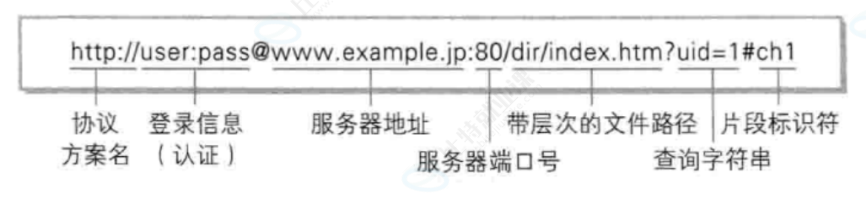
2>认识URL
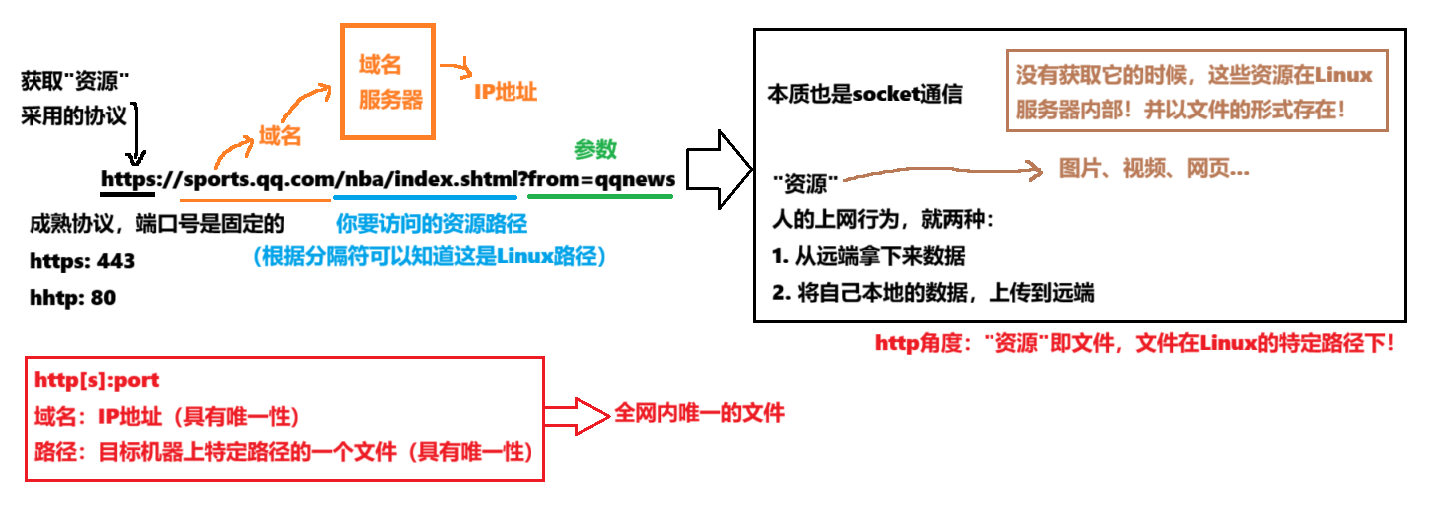
平时我们俗称的 "⽹址" 其实就是说的 URL
进一步分析
3>urlencode和urldecode
像
/ ? :等这样的字符,已经被url当做特殊意义理解了,因此这些字符不能随意出现如果某个参数中需要带有这些特殊字符,就必须先对特殊字符进⾏转义
转义规则:将需要转码的字符转为16进制,然后从右到左,取4位(不⾜4位直接处理),每2位做⼀位,前⾯加上%,编码成%XY格式
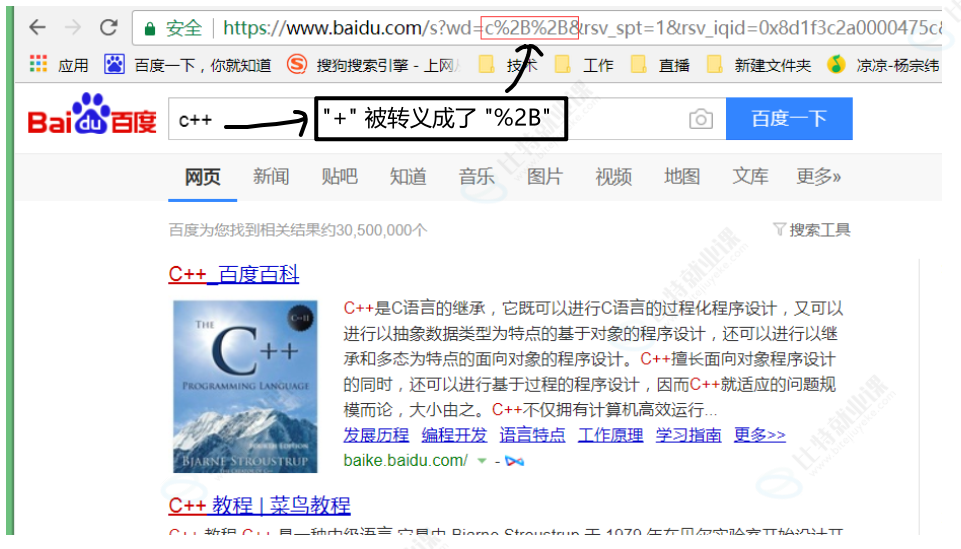
客户端(一般是浏览器)请求的时候,url中如果有特殊字符,会自动给我们进行对特殊字符进行编码,因为这些字符是具有特殊用途的字符,若直接在url中出现,会导致url解析失败
可以通过下面这个工具帮助我们对特殊字符的转义
4>HTTP协议请求与响应格式
a.HTTP请求
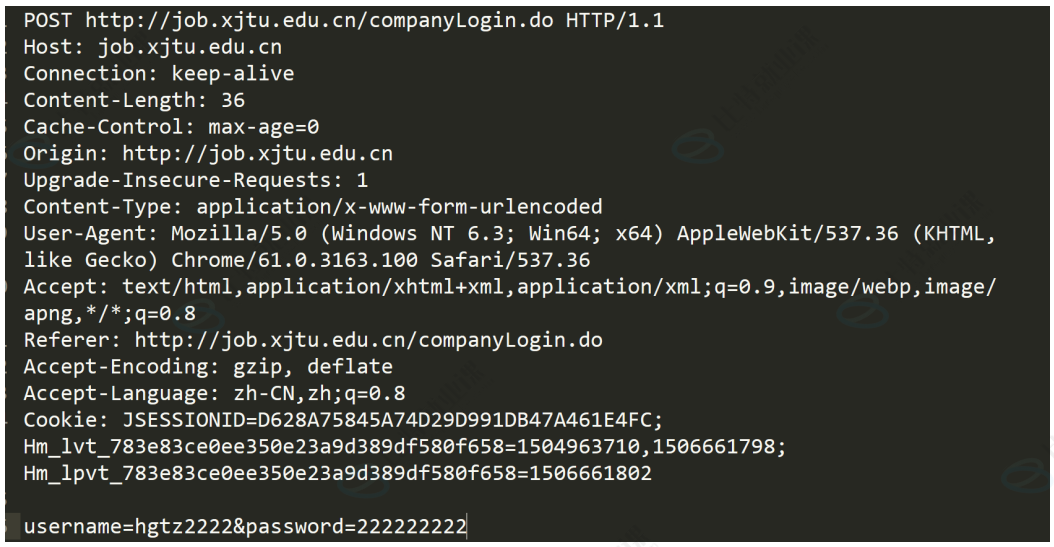
• ⾸⾏:⽅法 + url + 版本
• Header:请求的属性,冒号分割的键值对,每组属性之间使⽤ \r\n 分隔,遇到空⾏表⽰ Header部分结束
• Body:空⾏后⾯的内容都是Body,Body允许为空字符串,如果Body存在,则在Header中会有⼀个Content-Length属性来标识Body的⻓度
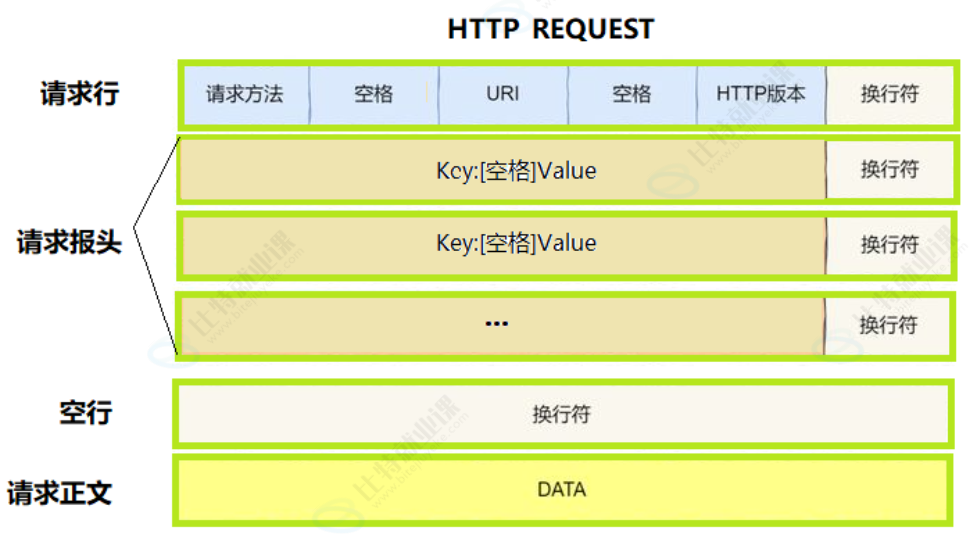
通过浏览器来访问我们的服务器
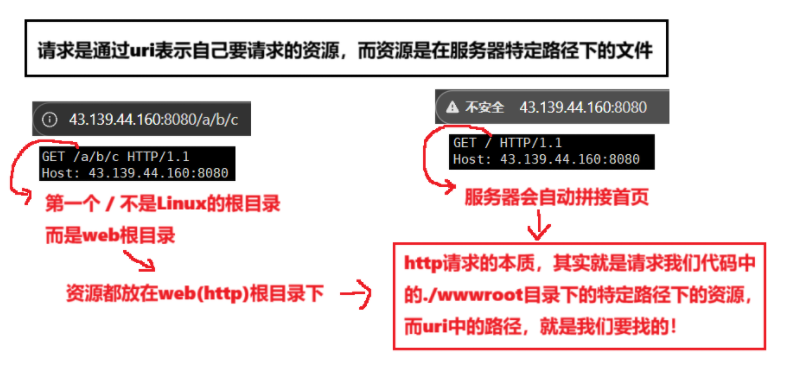
还有一点就是,如何保证我们能够读到完整的请求
-
读取到完整的请求报头通过判断是否读到空行
-
对报头进行反序列化,提取一个属性:Content-Length: 有效载荷的长度
-
在从剩余的字符串内容中,提取Content-Length个字符
我们在浏览器端请求的时候,首页作为站点的入口,一个网站就是一颗多叉树,点击网站里的链接的时候,浏览器会形成新的访问地址,发起二次请求(我们请求的资源,都是通过http request的uri表示的)
b.HTTP响应
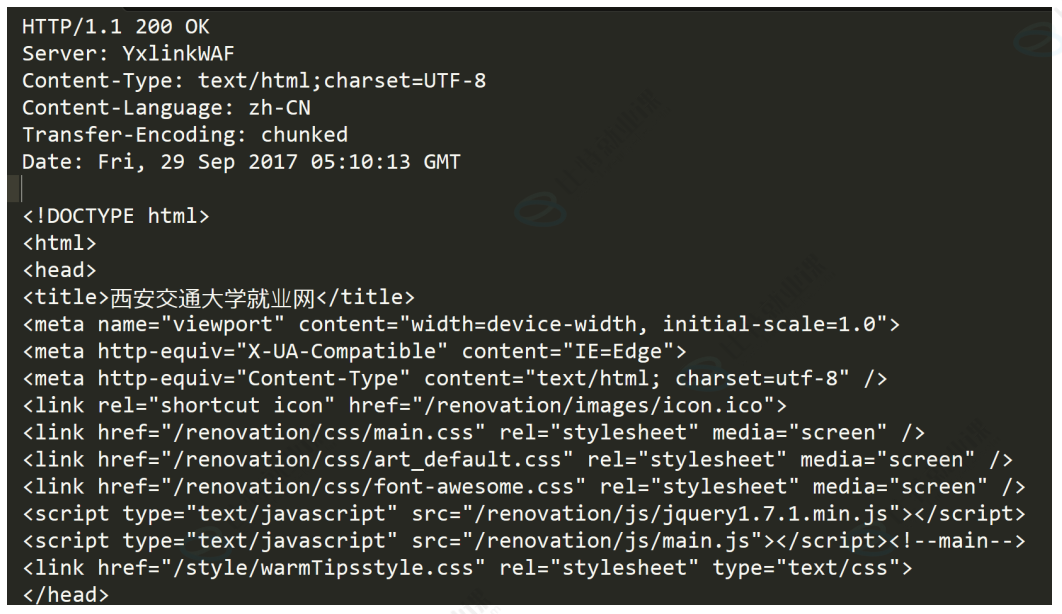
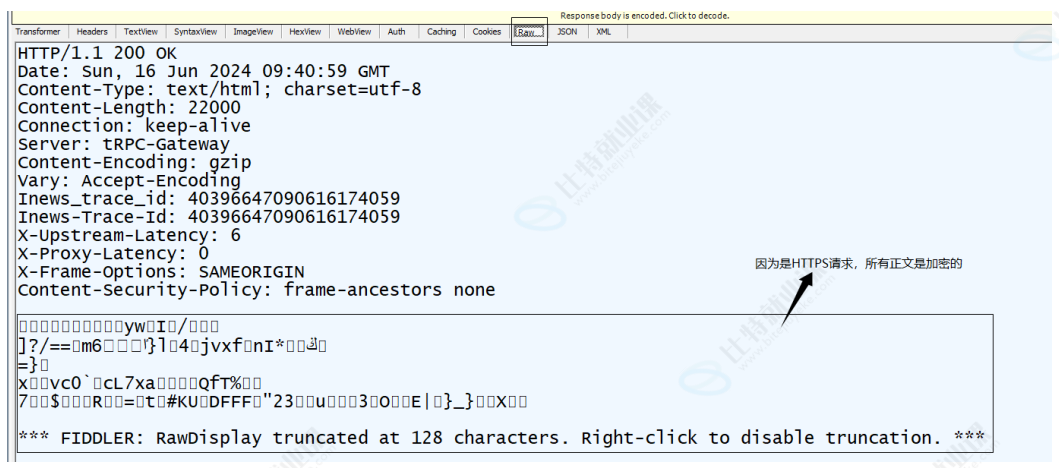
• ⾸⾏:版本号 + 状态码 + 状态码解释
• Header:请求的属性,冒号分割的键值对,每组属性之间使⽤ \r\n 分隔,遇到空⾏表⽰ Header部分结束
• Body:空⾏后⾯的内容都是Body,Body允许为空字符串,如果Body存在,则在Header中会有⼀个Content-Length属性来标识Body的⻓度
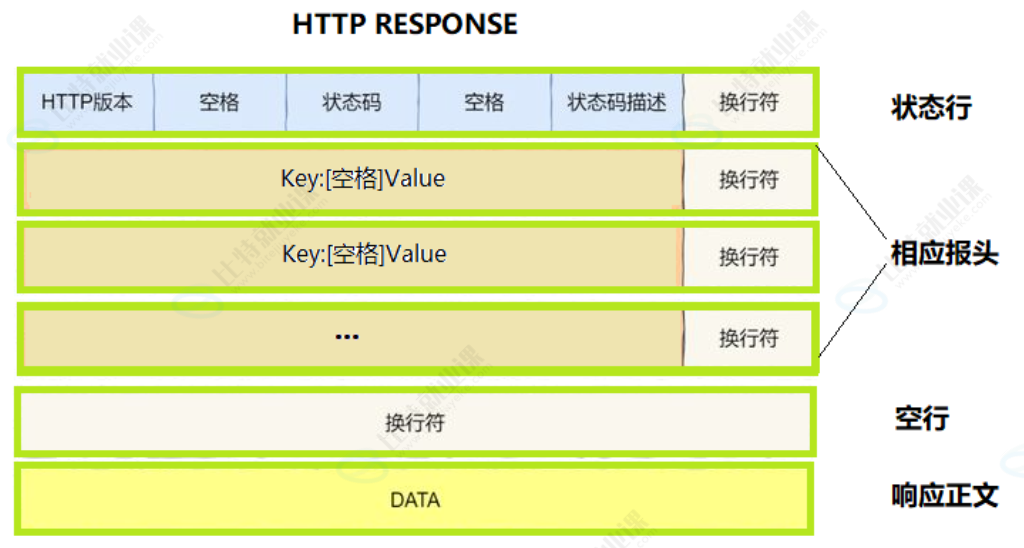
c.基本应答格式
5>HTTP的方法
其中最常⽤的就是GET⽅法和POST⽅法
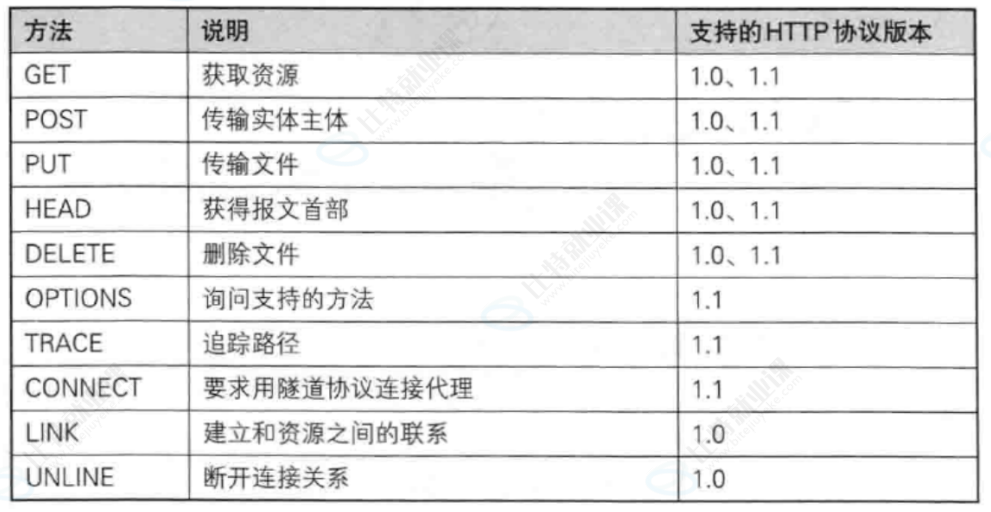
a.HTTP常见方法
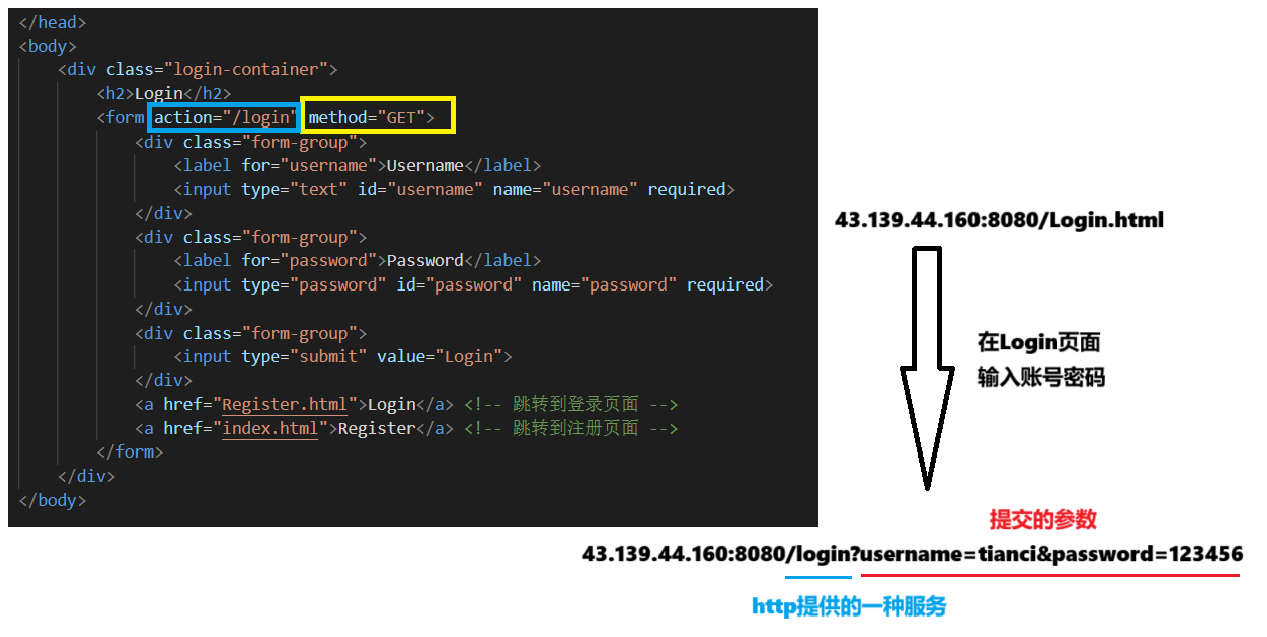
①GET方法
⽤途:⽤于请求URL指定的资源
⽰例: GET /index.html HTTP/1.1
特性:指定资源经服务器端解析后返回响应内容
form表单:HTML 表单 | 菜鸟教程
cpp
static int FileSize(const std::string &filename)
{
std::ifstream in(filename, std::ios::binary);
if(!in.is_open())
return -1;
in.seekg(0, in.end);
int filesize = in.tellg();
in.seekg(0, in.beg);
in.close();
return filesize;
}
static bool ReadFileContent(const std::string &filename, std::string *out)
{
// 以二进制方式进行读取文件
int filesize = FileSize(filename);
if(filesize > 0)
{
std::ifstream in(filename);
if(!in.is_open())
return false;
out->resize(filesize);
in.read((char*)out->c_str(), filesize);
in.close();
}
else
{
return false;
}
return true;
}
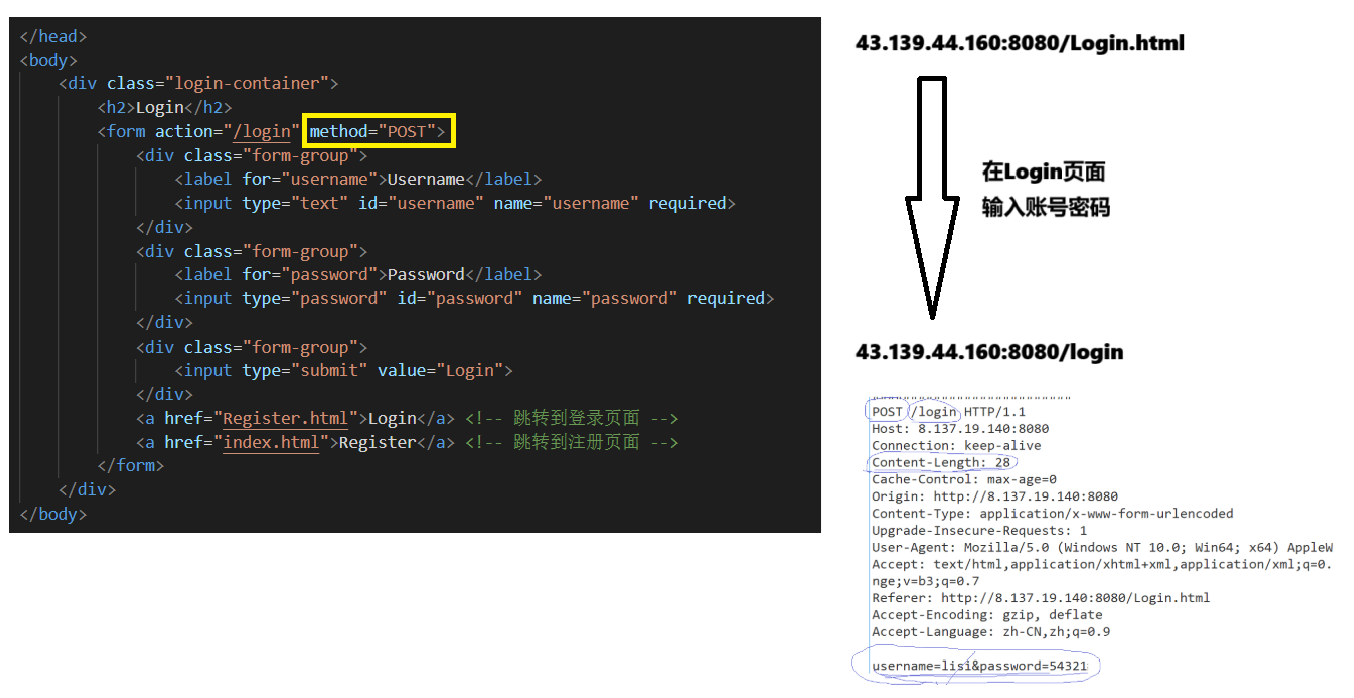
②POST方法
⽤途:⽤于传输实体的主体,通常⽤于提交表单数据
⽰例: POST /submit.cgi HTTP/1.1
特性:可以发送⼤量的数据给服务器,并且数据包含在请求体中
form表单:HTML 表单 | 菜鸟教程
③总结
GET:
-
获取静态网页或资源
-
提交参数,以uri方式提交
POST:
- 提交参数,以http request正文进行提交
GET vs POST
-
GET提交参数,建议提的参数不要过长,因为uri长度一般都是有限的
-
POST正文传参,意味着可以传递长数据
-
GET会回显参数,而POST不会,相对来说私密更好
b.HTTP其它方法
③PUT方法
⽤途:⽤于传输⽂件,将请求报⽂主体中的⽂件保存到请求URL指定的位置
⽰例: PUT /example.html HTTP/1.1
特性:不太常⽤,但在某些情况下,如RESTful API中,⽤于更新资源
④HEAD方法
⽤途:与GET⽅法类似,但不返回报⽂主体部分,仅返回响应头
⽰例: HEAD /index.html HTTP/1.1
特性:⽤于确认URL的有效性及资源更新的⽇期时间等
cpp
// curl -i 显示
$ curl -i www.baidu.com
HTTP/1.1 200 OK
Accept-Ranges: bytes
Cache-Control: private, no-cache, no-store, proxy-revalidate, no-transform
Connection: keep-alive
Content-Length: 2381
Content-Type: text/html
Date: Sun, 16 Jun 2024 08:38:04 GMT
Etag: "588604dc-94d"
Last-Modified: Mon, 23 Jan 2017 13:27:56 GMT
Pragma: no-cache
Server: bfe/1.0.8.18
Set-Cookie: BDORZ=27315; max-age=86400; domain=.baidu.com; path=/
<!DOCTYPE html>
...
// 使用head方法,只会返回响应头
$ curl --head www.baidu.com
HTTP/1.1 200 OK
Accept-Ranges: bytes
Cache-Control: private, no-cache, no-store, proxy-revalidate, no-transform
Connection: keep-alive
Content-Length: 277
Content-Type: text/html
Date: Sun, 16 Jun 2024 08:43:38 GMT
Etag: "575e1f71-115"
Last-Modified: Mon, 13 Jun 2016 02:50:25 GMT
Pragma: no-cache
Server: bfe/1.0.8.18⑤DELETE方法
⽤途:⽤于删除⽂件,是PUT的相反⽅法
⽰例: DELETE /example.html HTTP/1.1
特性:按请求URL删除指定的资源
⑥OPTIONS方法
⽤途:⽤于查询针对请求URL指定的资源⽀持的⽅法
⽰例: OPTIONS * HTTP/1.1
特性:返回允许的⽅法,如GET、POST等
⽀持的效果
cpp
HTTP/1.1 200 OK
Allow: GET, HEAD, POST, OPTIONS
Content-Type: text/plain
Content-Length: 0
Server: nginx/1.18.0 (Ubuntu)
Date: Sun, 16 Jun 2024 09:04:44 GMT
Access-Control-Allow-Origin: *
Access-Control-Allow-Methods: GET, POST, OPTIONS
Access-Control-Allow-Headers: Content-Type, Authorization
// 注意:这里没有响应体,因为Content-Length为06>HTTP的状态码
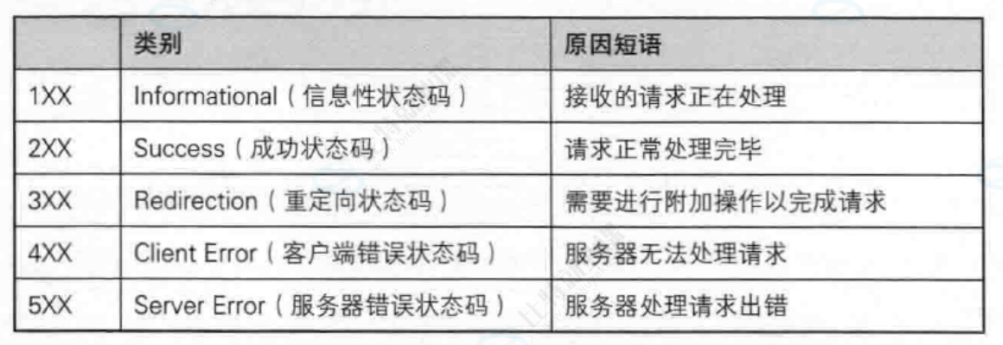
最常⻅的状态码,⽐如 200(OK),404(Not Found),403(Forbidden),302(Redirect,重定向),504(Bad Gateway)
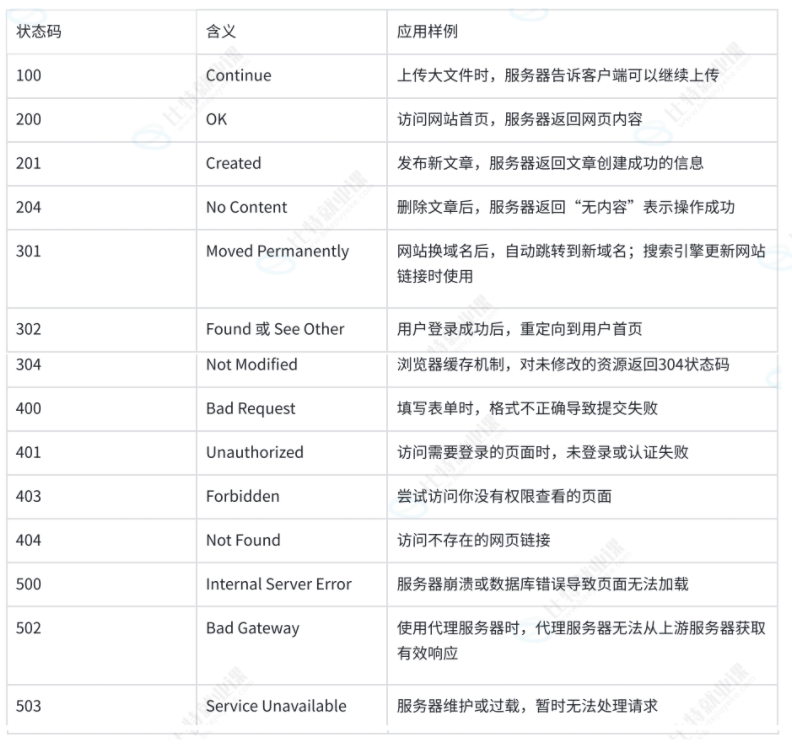
a.重定向
以下是仅包含重定向相关状态码的表格
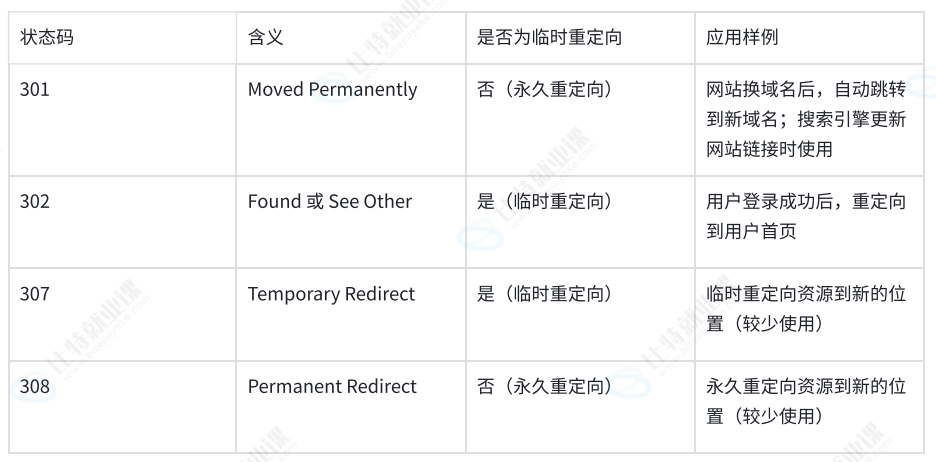
**HTTP状态码301(永久重定向)和302(临时重定向)都依赖Location选项。**以下是关于两者依赖Location选项的详细说明
①301永久重定向
• 当服务器返回HTTP 301状态码时,表⽰请求的资源已经被永久移动到新的位置
• 在这种情况下,服务器会在响应中添加⼀个Location头部,⽤于指定资源的新位置。这个Location头部包含了新的URL地址,浏览器会⾃动重定向到该地址
• 例如,在HTTP响应中,可能会看到类似于以下的头部信息:
cpp
 HTTP/1.1 301 Moved Permanently\r\n
 Location: https://www.new-url.com\r\n
②302临时重定向
• 当服务器返回HTTP 302状态码时,表⽰请求的资源临时被移动到新的位置
• 同样地,服务器也会在响应中添加⼀个Location头部来指定资源的新位置。浏览器会暂时使⽤新的URL进⾏后续的请求,但不会缓存这个重定向
• 例如,在HTTP响应中,可能会看到类似于以下的头部信息:
cpp
 HTTP/1.1 302 Found\r\n
 Location: https://www.new-url.com\r\n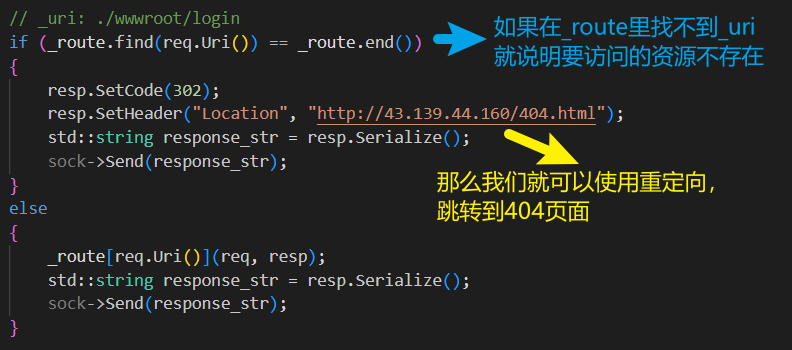
③总结
⽆论是HTTP 301还是HTTP 302重定向,都需要依赖Location选项来指定资源的新位置。这个Location选项是⼀个标准的HTTP响应头部,⽤于告诉浏览器应该将请求重定向到哪个新的URL地址
7>HTTP常见Header
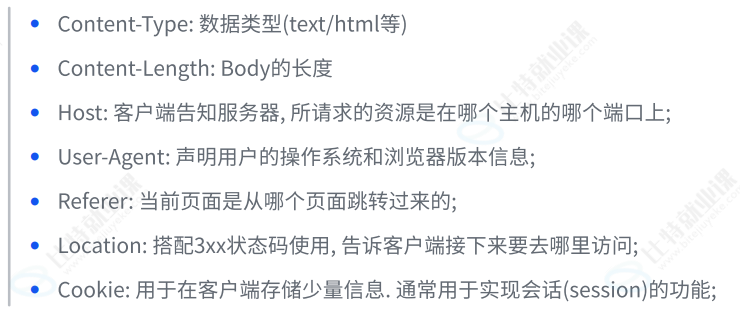
a.connection报头
HTTP中的 Connection 的连接状态字段是HTTP报⽂头的⼀部分,它主要⽤于控制和管理客⼾端与服务器之间
①核心作用
**管理持久连接:**Connection 字段还⽤于管理持久连接(也称为⻓连接)。持久连接允许客⼾端和服务器在请求/响应完成后不⽴即关闭TCP连接,以便在同⼀个连接上发送多个请求和接收多个响应
②持久连接(长连接)
**HTTP/1.1:**在HTTP/1.1协议中,默认使⽤持久连接。当客⼾端和服务器都不明确指定关闭连接时,连接将保持打开状态,以便后续的请求和响应可以复⽤同⼀个连接
**HTTP/1.0:**在HTTP/1.0协议中,默认连接是⾮持久的。如果希望在HTTP/1.0上实现持久连接,需要在请求头中显式设置Connection: keep-alive
③语法格式
Connection: keep-alive:表⽰希望保持连接以复⽤TCP连接
Connection: close:表⽰请求/响应完成后,应该关闭TCP连接
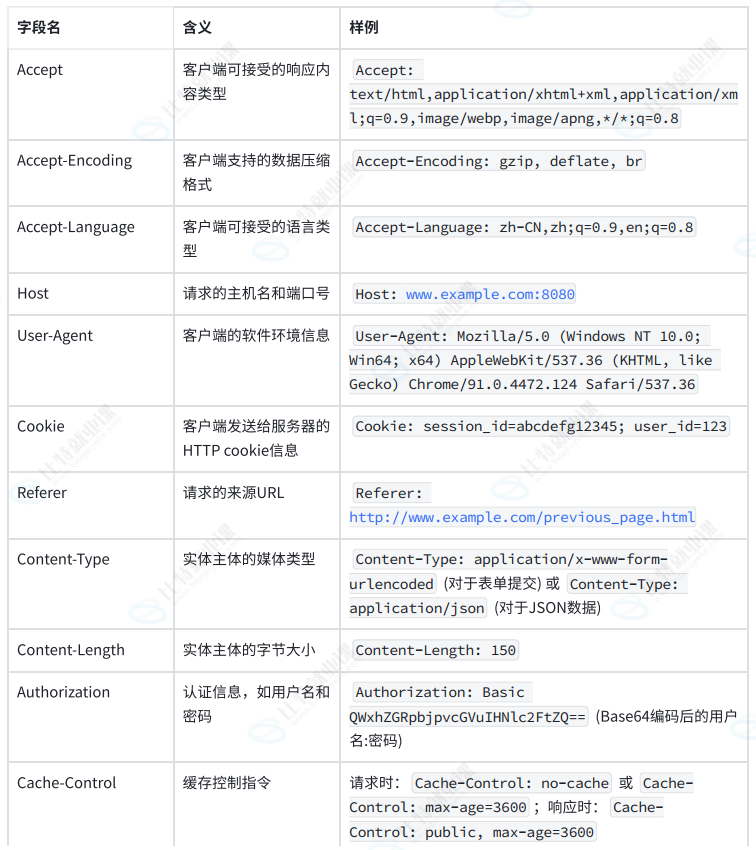
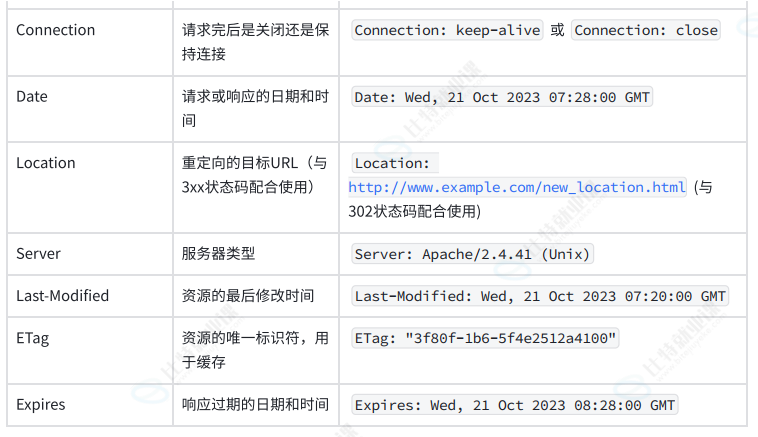
下⾯附上⼀张关于HTTP常⻅header的表格
8>HTTP服务器
①Http.hpp
cpp
#pragma once
#include "Socket.hpp"
#include "TcpServer.hpp"
#include "Util.hpp"
#include "Log.hpp"
#include <iostream>
#include <string>
#include <sstream>
#include <memory>
#include <functional>
#include <unordered_map>
using namespace SocketModule;
using namespace LogModule;
const std::string gspace = " ";
const std::string glinespace = "\r\n";
const std::string glinesep = ": ";
const std::string webroot = "./wwwroot";
const std::string homepage = "index.html";
const std::string page_404 = "404.html";
class HttpRequest
{
public:
HttpRequest() : _is_interact(false)
{
}
std::string Serialize()
{
return std::string();
}
void ParseReqLine(std::string &reqline)
{
// GET / HTTP/1.1
std::stringstream ss(reqline);
ss >> _method >> _uri >> _version;
}
// 实现, 我们今天认为, reqstr是一个完整的http request string
bool Deserialize(std::string &reqstr)
{
// 1. 提取请求行
std::string reqline;
bool res = Util::ReadOneLine(reqstr, &reqline, glinespace);
LOG(LogLevel::DEBUG) << reqline;
// 2. 对请求行进行反序列化
ParseReqLine(reqline);
if (_uri == "/")
_uri = webroot + _uri + homepage; // ./wwwroot/index.html
else
_uri = webroot + _uri; // ./wwwroot/a/b/c.html\
// if(_method == "POST")
// {
// _is_interact = true;
// while(true)
// {
// Util::ReadOneLine(reqstr, &reqline, glinespace);
// if(reqline != glinespace)
// {
// // 获得了request header -> key value
// // Content-Length;
// }
// else
// {
// break;
// }
// }
// Util::ReadOneLine(reqstr, &reqline, glinespace); // 正文数据
// }
LOG(LogLevel::DEBUG) << "_method" << _method;
LOG(LogLevel::DEBUG) << "_uri" << _uri;
LOG(LogLevel::DEBUG) << "_version" << _version;
// _uri: ./wwwroot/login?username=zhangsan&password=123456
std::string temp = "?";
auto pos = _uri.find(temp);
if (pos == std::string::npos)
{
return true;
}
// _uri: ./wwwroot/login
// username=zhangsan&password=123456
_args = _uri.substr(pos + temp.size());
_uri = _uri.substr(0, pos);
_is_interact = true;
return true;
}
std::string Uri() { return _uri; }
bool isInteract() { return _is_interact; }
std::string Args() { return _args; }
~HttpRequest() {}
private:
std::string _method;
std::string _uri;
std::string _version;
std::unordered_map<std::string, std::string> _headers;
std::string _blankline;
std::string _text;
std::string _args;
bool _is_interact;
};
class HttpResponse
{
public:
HttpResponse() : _blankline(glinespace), _version("Http/1.0")
{
}
// 实现: 成熟的http,应答做序列化,不要依赖任何第三方库!
std::string Serialize()
{
std::string status_line = _version + gspace + std::to_string(_code) + gspace + _desc + glinespace;
std::string resp_header;
for (auto &header : _headers)
{
std::string line = header.first + glinesep + header.second + glinespace;
resp_header += line;
}
return status_line + resp_header + _blankline + _text;
}
bool Deserialize(std::string &reqstr)
{
return true;
}
void SetTargetFile(const std::string &target)
{
_targetfile = target;
}
void SetCode(int code)
{
_code = code;
switch (code)
{
case 200:
_desc = "OK";
break;
case 404:
_desc = "404 not found";
break;
case 301:
_desc = "Moved Permanently";
break;
case 302:
_desc = "See Other";
default:
break;
}
}
void SetHeader(const std::string &key, const std::string &value)
{
auto pos = _headers.find(key);
if (pos != _headers.end())
return;
_headers.insert(std::make_pair(key, value));
}
std::string Uri2Suffix(const std::string &targetfile)
{
// ./wwwroot/a/b/c.html
auto pos = targetfile.rfind(".");
if (pos == std::string::npos)
{
return "text/html";
}
std::string suffix = targetfile.substr(pos);
if (suffix == "html" || suffix == "htm")
return "text/html";
else if (suffix == ".jpg")
return "image/jpeg";
else if (suffix == "png")
return "image/png";
else
return "";
}
void SetText(const std::string &t)
{
_text = t;
}
bool MakeResponse()
{
if (_targetfile == "./wwwroot/favicon.ico")
{
LOG(LogLevel::DEBUG) << "用户请求: " << _targetfile << "忽略它";
return false;
}
if (_targetfile == "./wwwroot/redir_test")
{
SetCode(301);
SetHeader("Location", "https://www.qq.com/");
return true;
}
int filesize = 0;
bool res = Util::ReadFileContent(_targetfile, &_text);
if (!res)
{
_text = "";
LOG(LogLevel::WARNING) << "client want get: " << _targetfile << " but not found";
SetCode(404);
_targetfile = webroot + page_404;
Util::ReadFileContent(_targetfile, &_text);
filesize = Util::FileSize(_targetfile);
std::string suffix = Uri2Suffix(_targetfile);
SetHeader("Content-Type", suffix);
SetHeader("Content-Length", std::to_string(filesize));
// SetCode(302);
// SetHeader("Location", "http://43.139.44.160/404.html");
// return true;
}
else
{
LOG(LogLevel::DEBUG) << "读取文件" << _targetfile;
SetCode(200);
filesize = Util::FileSize(_targetfile);
std::string suffix = Uri2Suffix(_targetfile);
SetHeader("Content-Type", suffix);
SetHeader("Content-Length", std::to_string(filesize));
}
return true;
}
~HttpResponse()
{
}
// private:
std::string _version;
int _code;
std::string _desc;
std::unordered_map<std::string, std::string> _headers;
std::string _blankline;
std::string _text;
// 其它属性
std::string _targetfile;
};
using http_func_t = std::function<void(HttpRequest &req, HttpResponse &resp)>;
// 1. 返回静态资源
// 2. 提供动态交互的能力
class Http
{
public:
Http(uint16_t port) : tsvrp(std::make_unique<TcpServer>(port))
{
}
void HandlerHttpRquest(std::shared_ptr<Socket> &sock, InetAddr &client)
{
std::string httpreqstr;
int n = sock->Recv(&httpreqstr);
if (n > 0)
{
std::cout << "##########################" << std::endl;
std::cout << httpreqstr;
std::cout << "##########################" << std::endl;
// 对报文完整性进行审核 -- 缺
// 所以, 今天, 我们就不在担心, 用户访问一个服务器上不存在的资源了
// 我们更加不担心, 给用户返回任何网页资源(html, css, js, 图片,视频)..., 这种资源,静态资源!!
HttpRequest req;
req.Deserialize(httpreqstr);
HttpResponse resp;
if (req.isInteract())
{
// _uri: ./wwwroot/login
if (_route.find(req.Uri()) == _route.end())
{
resp.SetCode(302);
resp.SetHeader("Location", "http://43.139.44.160/404.html");
std::string response_str = resp.Serialize();
sock->Send(response_str);
}
else
{
_route[req.Uri()](req, resp);
std::string response_str = resp.Serialize();
sock->Send(response_str);
}
}
else
{
resp.SetTargetFile(req.Uri());
if (resp.MakeResponse())
{
std::string response_str = resp.Serialize();
sock->Send(response_str);
}
}
}
// // 收到请求
// std::string httpreqstr;
// int n = sock->Recv(&httpreqstr);
// if (n > 0)
// {
// // 对报文完整性进行审核 -- 缺
// HttpRequest req;
// req.Deserialize(httpreqstr);
// std::string filename = req.Uri();
// HttpResponse resp;
// resp._version = "Http/1.1";
// resp._code = 200;
// resp._desc = "OK";
// bool res = Util::ReadFileContent(filename, &(resp._text));
// (void)res;
// LOG(LogLevel::DEBUG) << "用户请求: " << filename;
// std::string response_str = resp.Serialize();
// sock->Send(response_str);
// }
// #ifndef DEBUG
// #define DEBUG
#ifdef DEBUG
// 收到请求
std::string httpreqstr;
// 假设: 很大概率, 读到了完整的请求
sock->Recv(&httpreqstr); // 浏览器给我发过来的是一个大的http字符串, 其实我们的recv也是有问题的, 因为tcp是面向字节流的
std::cout << httpreqstr;
// 直接构建http应答 (内存级别+固定)
HttpResponse resp;
resp._version = "HTTP/1.1";
resp._code = 200; // success
resp._desc = "OK";
std::string filename = webroot + homepage; // "./wwwroot/index.html";
bool res = Util::ReadFileContent(filename, &(resp._text));
(void)res;
std::string response_str = resp.Serialize();
sock->Send(response_str);
#endif
}
void RegisterService(const std::string &name, http_func_t h)
{
std::string key = webroot + name; // ./wwwroot/login
auto iter = _route.find(key);
if (iter == _route.end())
{
_route.insert(std::make_pair(key, h));
}
}
void Start()
{
tsvrp->Start([this](std::shared_ptr<Socket> &sock, InetAddr &client)
{ this->HandlerHttpRquest(sock, client); });
}
~Http() {}
private:
std::unique_ptr<TcpServer> tsvrp;
std::unordered_map<std::string, http_func_t> _route;
};②Main.cc
cpp
#include "Http.hpp"
void Login(HttpRequest &req, HttpResponse &resp)
{
LOG(LogLevel::DEBUG) << req.Args() << ", 我们成功进入到了处理数据的逻辑";
std::string text = "hello: " + req.Args();
// 登录认证
resp.SetCode(200);
resp.SetHeader("Content-Type","text/plain");
resp.SetHeader("Content-Length", std::to_string(text.size()));
resp.SetText(text);
}
void Register(HttpRequest &req, HttpResponse &resp)
{
LOG(LogLevel::DEBUG) << req.Args() << ", 我们成功进入到了处理数据的逻辑";
std::string text = "hello: " + req.Args();
resp.SetCode(200);
resp.SetHeader("Content-Type","text/plain");
resp.SetHeader("Content-Length", std::to_string(text.size()));
resp.SetText(text);
}
void VipCheck(HttpRequest &req, HttpResponse &resp)
{
LOG(LogLevel::DEBUG) << req.Args() << ", 我们成功进入到了处理数据的逻辑";
std::string text = "hello: " + req.Args();
resp.SetCode(200);
resp.SetHeader("Content-Type","text/plain");
resp.SetHeader("Content-Length", std::to_string(text.size()));
resp.SetText(text);
}
int main(int argc, char* argv[])
{
if(argc != 2)
{
std::cout << "Usage: " << argv[0] << " port" << std::endl;
exit(USAGE_ERR);
}
uint16_t port = std::stoi(argv[1]);
std::unique_ptr<Http> httpsvr = std::make_unique<Http>(port);
httpsvr->RegisterService("/login", Login);
httpsvr->RegisterService("/register", Register);
httpsvr->RegisterService("/vipcherk", VipCheck);
httpsvr->Start();
return 0;
}③Util.hpp
cpp
#pragma once
#include <iostream>
#include <fstream>
#include <string>
class Util
{
public:
static bool ReadFileContent(const std::string &filename, std::string *out)
{
// version1: 默认是以文本方式读取文件的
// std::ifstream in(filename);
// if(!in.is_open())
// return false;
// std::string line;
// while(std::getline(in, line))
// {
// *out += line;
// }
// in.close();
// version1: 以二进制方式进行读取, 图片是二进制的
int filesize = FileSize(filename);
if(filesize > 0)
{
std::ifstream in(filename);
if(!in.is_open())
return false;
out->resize(filesize);
in.read((char*)out->c_str(), filesize);
in.close();
}
else
{
return false;
}
return true;
}
static bool ReadOneLine(std::string &bigstr, std::string *out, const std::string &sep/*\r\n*/)
{
auto pos = bigstr.find(sep);
if(pos == std::string::npos)
return false;
*out = bigstr.substr(0, pos);
bigstr.erase(0, pos + sep.size());
return true;
}
static int FileSize(const std::string &filename)
{
std::ifstream in(filename, std::ios::binary);
if(!in.is_open())
return -1;
in.seekg(0, in.end);
int filesize = in.tellg();
in.seekg(0, in.beg);
in.close();
return filesize;
}
};9>HTTP历史及版本核心技术与时代背景
HTTP(Hypertext Transfer Protocol,超⽂本传输协议)作为互联⽹中浏览器和服务器间通信的基⽯,经历了从简单到复杂、从单⼀到多样的发展过程。以下将按照时间顺序,介绍HTTP的主要版本、核⼼技术及其对应的时代背景
①HTTP/0.9
核⼼技术:
• 仅⽀持GET请求⽅法
• 仅⽀持纯⽂本传输,主要是HTML格式
• ⽆请求和响应头信息
时代背景:
• 1991年,HTTP/0.9版本作为HTTP协议的最初版本,⽤于传输基本的超⽂本HTML内容。 • 当时的互联⽹还处于起步阶段,⽹⻚内容相对简单,主要以⽂本为主
②HTTP/1.0
核⼼技术:
• 引⼊POST和HEAD请求⽅法
• 请求和响应头信息,⽀持多种数据格式(MIME)
• ⽀持缓存(cache)
• 状态码(status code)、多字符集⽀持等
时代背景:
• 1996年,随着互联⽹的快速发展,⽹⻚内容逐渐丰富,HTTP/1.0版本应运⽽⽣
• 为了满⾜⽇益增⻓的⽹络应⽤需求,HTTP/1.0增加了更多的功能和灵活性
• 然⽽,HTTP/1.0的⼯作⽅式是每次TCP连接只能发送⼀个请求,性能上存在⼀定局限
③HTTP/1.1
核⼼技术:
• 引⼊持久连接(persistent connection),⽀持管道化(pipelining)
• 允许在单个TCP连接上进⾏多个请求和响应,提⾼了性能
• 引⼊分块传输编码(chunked transfer encoding)
• ⽀持Host头,允许在⼀个IP地址上部署多个Web站点
时代背景:
• 1999年,随着⽹⻚加载的外部资源越来越多,HTTP/1.0的性能问题愈发突出
• HTTP/1.1通过引⼊持久连接和管道化等技术,有效提⾼了数据传输效率
• 同时,互联⽹应⽤开始呈现出多元化、复杂化的趋势,HTTP/1.1的出现满⾜了这些需求
④HTTP/2.0
核⼼技术:
• 多路复⽤(multiplexing),⼀个TCP连接允许多个HTTP请求
• ⼆进制帧格式(binary framing),优化数据传输
• 头部压缩(header compression),减少传输开销
• 服务器推送(server push),提前发送资源到客⼾端
时代背景:
• 2015年,随着移动互联⽹的兴起和云计算技术的发展,⽹络应⽤对性能的要求越来越⾼
• HTTP/2.0通过多路复⽤、⼆进制帧格式等技术,显著提⾼了数据传输效率和⽹络性能
• 同时,HTTP/2.0还⽀持加密传输(HTTPS),提⾼了数据传输的安全性
⑤HTTP/3.0
核⼼技术:
• 使⽤QUIC协议替代TCP协议,基于UDP构建的多路复⽤传输协议
• 减少了TCP三次握⼿及TLS握⼿时间,提⾼了连接建⽴速度
• 解决了TCP中的线头阻塞问题,提⾼了数据传输效率
时代背景:
• 2022年,随着5G、物联⽹等技术的快速发展,⽹络应⽤对实时性、可靠性的要求越来越⾼。
• HTTP/3.0通过使⽤QUIC协议,提⾼了连接建⽴速度和数据传输效率,满⾜了这些需求
• 同时,HTTP/3.0还⽀持加密传输(HTTPS),保证了数据传输的安全性
本篇文章到这里就结束啦,希望这些内容对大家有所帮助!
下篇文章见,希望大家多多来支持一下!
感谢大家的三连支持!