应用场景
贝塞尔曲线的基本概念,大家可以自行了解:简单来说就是由n个点最终确定1个点的运动轨迹。
本文重点介绍贝塞尔曲线的两个应用场景:1.绘制一条cubic-bezier曲线, 2.实现cubic-bezier动画。
如何绘制一条贝塞尔曲线
我们知道,canvas提供了 bezierCurveTo等相关绘制贝塞尔曲线的api,实际上只要涉及到直线的基本都会用该api实现,例如react-signature-canvas绘制的笔迹, Rough.js官网的demo,你能看到的直线基本都是贝塞尔曲线。那么如何不借助api实现一条贝塞尔曲线呢?
贝塞尔曲线的本质就是借用积分思想绘制某个点的坐标轨迹
直接套贝塞尔曲线的轨迹方程P = (1−t)3P1 + 3(1−t)2tP2 +3(1−t)t2P3 + t3P4开始实现:
html
<!doctype html>
<html lang="en">

<head>
	<meta charset="utf-8">
	<meta name="viewport" content="width=device-width, minimum-scale=1, initial-scale=1, user-scalable=yes">
	<title>Bezier Demo</title>
</head>

<body>
<canvas width="800" height="800"></canvas>
<script>
    const canvas = document.querySelector('canvas');
    const w = canvas.offsetWidth;
    const h = canvas.offsetHeight;
    const dpr = window.devicePixelRatio;
    canvas.width = w * dpr;
    canvas.height = h * dpr;
    canvas.style.cssText = 'width:' + w + 'px;' + 'height:' + h + 'px;';
    const ctx = canvas.getContext('2d');
    ctx.scale(window.devicePixelRatio, window.devicePixelRatio);
    // api绘制
    ctx.beginPath();
    ctx.save();
    ctx.lineWidth = 10;
    ctx.moveTo(100, 100);
    ctx.bezierCurveTo(200, 50, 300, 150, 400, 100);
    ctx.stroke();
    ctx.restore();
    // 手动绘制
    ctx.beginPath();
    ctx.save();
    ctx.strokeStyle = 'red';
    ctx.lineWidth = 5;
    ctx.moveTo(100, 100);
    for (let t = 0; t <= 1; t += 0.01) {
        let x = (1 - t) ** 3 * 100 + (1 - t) ** 2 * t * 3 * 200 + t ** 2 * (1 - t) * 3 * 300 + t ** 3 * 400;
        let y = (1 - t) ** 3 * 100 + (1 - t) ** 2 * t * 3 * 50 + t ** 2 * (1 - t) * 3 * 150 + t ** 3 * 100;
        ctx.lineTo(x, y);
    }
    ctx.stroke();
</script>
</body>

</html>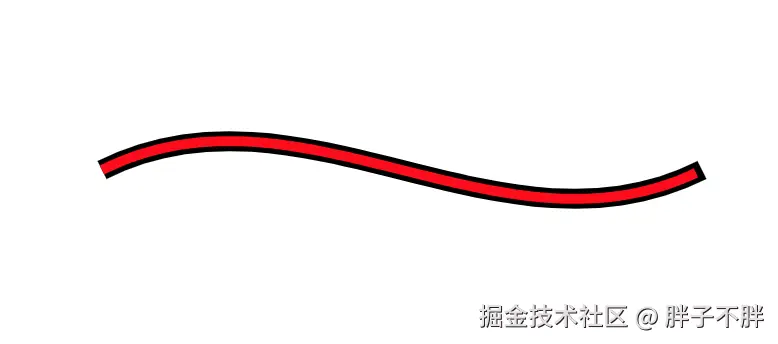
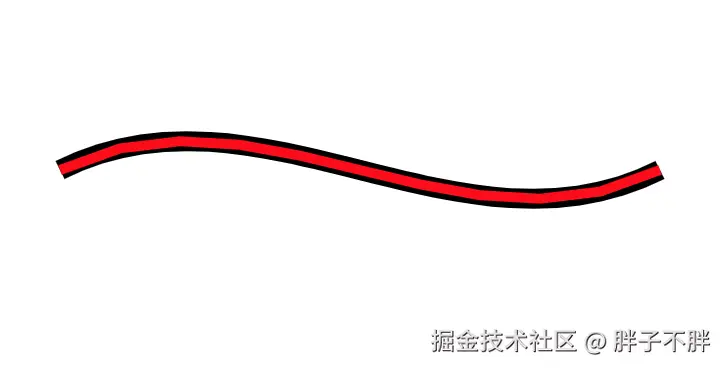
可以看到效果基本一致,如果我们设置t += 0.1,曲线平滑度会明显降低:
贝塞尔动画曲线
相对来说,运动轨迹是贝塞尔曲线的情况要稍许复杂。首先我们通过任意4个点很难想象运动轨迹,其次,还需要把运动轨迹理解成动画。只有理解了前面两步才能实现一个贝塞尔运动曲线。
我们可以通过贝塞尔曲线调试工具来调试贝塞尔曲线
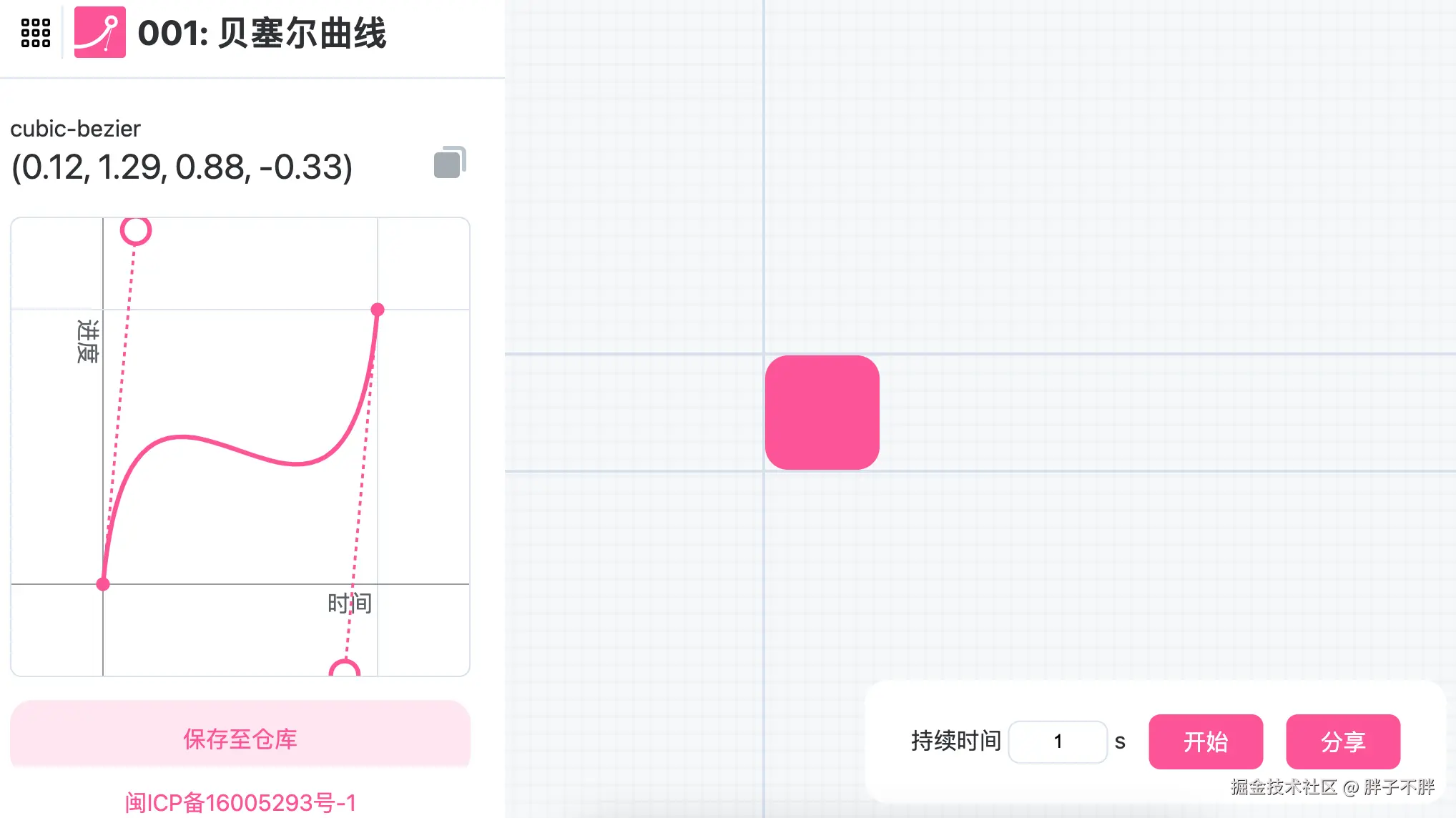
如何理解上图中的cubic-bezier(0.12, 1.29, 0.88, -0.33), 实际上完整的贝塞尔曲线应该是cubic-bezier(0.12, 1.29, 0.88, -0.33, 1, 1), 横坐标是时间, 纵坐标是动画属性目标值。假如这个动画属性是marginLeft,那么该图表示的是marginLeft从0开始,随时间变化的轨迹: 先变大,再变小,再变大。
贝塞尔曲线的本质是用贝塞尔方程求出每一个时刻所对应的进度
下面开始用代码实现:
html
<!doctype html>
<html lang="en">

<head>
    <meta charset="utf-8">
    <meta name="viewport" content="width=device-width, minimum-scale=1, initial-scale=1, user-scalable=yes">
    <title>Bezier Demo</title>
    <style>
        .app {
            width: 100px;
            height: 100px;
            background: red;
            margin-bottom: 20px;
        }
        .move1 {
            animation: act1 cubic-bezier(0.12, 1.29, 0.88, -0.33) 3s forwards;
        }
        .move2 {
            animation: act2 cubic-bezier(0.12, 1.29, 0.88, -0.33) 3s forwards;
        }
        @keyframes act1 {
            0% {
                margin-left: 0;
            }

            100% {
                margin-left: 200px;
            }
        }
        @keyframes act2 {
            0% {
                margin-left: 200px;
            }

            100% {
                margin-left: 0;
            }
        }
	</style>
</head>

<body>
<div id="app" class="app"></div>
<div id="app2" class="app"></div>
<script>
    const start = 0; // 要执行动画属性起始值
    const end = 200; // 要执行动画属性结束值
    let current = 0; // 区分正/反向动画
    let timeDuration = 3000; // 动画总时间
    const p1 = [0.12, 1.29]; // 贝塞尔曲线第一个控制点
    const p2 = [0.88, -0.33]; // 贝塞尔曲线第二个控制点
    document.onclick = () => {
        // css 贝塞尔动画曲线
        if (app.classList.contains('move1')) {
            app.classList.remove('move1');
            app.classList.add('move2');
        } else {
            app.classList.remove('move2');
            app.classList.add('move1');
        }
        // 手动实现一个贝塞尔动画曲线
        let points = [];
        if (current === start) {
            current = end;
            // 比例换算成真实坐标轴的值
            points = [
                [0, start],
                [p1[0] * timeDuration, p1[1] * end],
                [p2[0] * timeDuration, p2[1] * end],
                [timeDuration, end]
            ];
        } else {
            current = start;
            points = [
                [0, end],
                [(1 - p2[0]) * timeDuration, p2[1] * end],
                [(1 - p1[0]) * timeDuration, p1[1] * end],
                [timeDuration, start],
            ];
        }
        let beginTime = performance.now();
        function cb() {
            const duration = performance.now() - beginTime;
            if (duration >= timeDuration) {
                app2.style.marginLeft = points[points.length - 1][1] + 'px';
                return;
            }
            // duration = (1 - t) ** 3 * points[0][0] + (1 - t) ** 2 * t * 3 * points[1][0] + t ** 2 * (1 - t) * 3 * points[2][0] + t ** 3 * points[3][0];
            // 根据duration求出t后、在求出y坐标,即动画属性的值
            // 我们采用二分查找
            let t = 0;
            let r = 1;
            while (t < r) {
                let mid = t + (r - t) / 2;
                let d = (1 - mid) ** 3 * points[0][0] + (1 - mid) ** 2 * t * 3 * points[1][0] + t ** 2 * (1 - mid) * 3 * points[2][0] + mid ** 3 * points[3][0];
                if (Math.abs(d - duration) <= 1e-2) {
                    break;
                } else if (d < duration) {
                    t = mid + 0.05;
                } else if (d > duration) {
                    r = mid - 0.05;
                }
            }
            t = Math.min(1, Math.max(0, t));
            let y = (1 - t) ** 3 * points[0][1] + (1 - t) ** 2 * t * 3 * points[1][1] + t ** 2 * (1 - t) * 3 * points[2][1] + t ** 3 * points[3][1];
            console.log(t + ';' + y);
            app2.style.marginLeft = y + 'px';
            requestAnimationFrame(cb);
        }
        requestAnimationFrame(cb);
    }
</script>
</body>
</html>
这里的实际轨迹有不少误差,原因是求解精度不够高
最终实现
下面是改进版、动画轨迹能完全保持一致、大家可结合注释阅读:
html
<!doctype html>
<html lang="en">

<head>
<meta charset="utf-8">
<meta name="viewport" content="width=device-width, minimum-scale=1, initial-scale=1, user-scalable=yes">
<title>Bezier Demo</title>
<style>
    .app {
        width: 100px;
        height: 100px;
        background: red;
        margin-bottom: 20px;
    }

    .move1 {
        animation: act1 cubic-bezier(0.12, 1.29, 0.88, -0.33) 3s forwards;
    }

    @keyframes act1 {
        0% {
            margin-left: 0;
        }

        100% {
            margin-left: 200px;
        }
    }

    .move2 {
        animation: act2 cubic-bezier(0.13, 1.13, 0.54, 1.34) 3s forwards;
    }


    @keyframes act2 {
        0% {
            margin-left: 200px;
        }

        100% {
            margin-left: 0;
        }
    }
</style>
</head>

<body>
    <div id="app" class="app"></div>
    <div id="app2" class="app"></div>
    <script>
    const end = 200; // 要执行动画属性结束值
    const duration = 3000; // 动画总时间
    document.onclick = () => {
        // css 贝塞尔动画曲线
        if (app.classList.contains('move1')) {
            app.classList.remove('move1');
            app.classList.add('move2');
            const p2 = [0.13, 1.13, 0.54, 1.34]; // 贝塞尔曲线控制点
            generateBeizer(...p2, duration, (percent) => {
                app2.style.marginLeft = end * (1 - percent) + 'px';
            })
        } else {
            app.classList.remove('move2');
            app.classList.add('move1');
            const p1 = [0.12, 1.29, 0.88, -0.33]; // 贝塞尔曲线控制点
            generateBeizer(...p1, duration, (percent) => {
                app2.style.marginLeft = end * percent + 'px';
            })
        }
    }
    function generateBeizer(p1x, p1y, p2x, p2y, duration, callback) {
        // 初始化
        const sampleTable = [];
        const sampleTableSize = 10;
        const sampleStep = 1 / sampleTableSize;
        const MIN_SLOPE = 0.001;
        const ITERATOR_COUNT = 4;
        const B_MAX_CONUT = 10;
        const B_PRECIOUS = 0.0000001;
        let startTime;
        for (let i = 0; i < sampleTableSize; i++) {
            sampleTable.push(calcBezier(i * sampleStep, p1x, p2x));
        }
        /**
         * 二次贝塞尔曲线公式:B(t) = (1-t)³P₀ + 3(1-t)²tP₁ + 3(1-t)t²P₂ + t³P₃
         * 因为P₀ = 0 && P₃ = 1、所以: B(t) = 3(1-t)²tP₁ + 3(1-t)t²P₂ + t³
         * 化简可得:B(t) = 3tP₁ + 3t³P₁ - 6t²P₁ + 3t²P₂ - 3t³P₂ + t³
         * 最终: B(t) = (3P₁ - 3P₂ + 1) t³ + (3P₂ - 6P₁)t² + 3P₁t
         * */
        function calcBezier(aT, p1, p2) {
            return (1 - 3 * p2 + 3 * p1) * aT ** 3 + (3 * p2 - 6 * p1) * aT ** 2 + 3 * p1 * aT;
        }
        /**
         * 斜率
         * 求 B(t) = (3P₁ - 3P₂ + 1) t³ + (3P₂ - 6P₁)t² + 3P₁t在 aT 处的导数
         * */
        function getSlope(aT, p1, p2) { // 求导
            return 3 * (1 - 3 * p2 + 3 * p1) * aT ** 2 + 2 * (3 * p2 - 6 * p1) * aT + 3 * p1;
        }

        /**
         * 令 f(t) = (1-t)³P₀ + 3(1-t)²tP₁ + 3(1-t)t²P₂ + t³P₃  - X; 求 解 f(t) = 0 时的 t
         * 牛顿迭代法求解:
         * 任意一点[t, f(t)]:导函数 y = f'(t) * x + b;
         * 因为经过 [t, f(t)] 可以求出 b = f(t) - f'(t) * t;
         * 代入求出 导函数为 : y = f'(t) * x + f(t) - f'(t) * t;
         * 令 y = 0 可以求出与x轴交点 x = (f'(t) * t  - f(t)) / f'(t);
         * 化简后得出 x = t - f(t) / f'(t);
         * */
        function newtonGetTForX(aT, aX, p1, p2) {
            for (let i = 0; i < ITERATOR_COUNT; i++) {
                    const slope = getSlope(aT, p1, p2);
                    if (slope == 0) { // 斜率为0
                        return aT;
                    }
                    aT -= (calcBezier(aT, p1, p2) - aX) / slope;
            }
            return aT;
        }

        function binarySearch(aX, left, right, p1, p2) {
            let i = 0;
            let mid = left + (right - left) / 2;
            let curr = calcBezier(mid, p1, p2);
            while (Math.abs(curr - aX) > B_PRECIOUS && i++ < B_MAX_CONUT) {
                if (curr > aX) {
                    right = mid;
                } else {
                    left = mid;
                }
                mid = left + (right - left) / 2;
                curr = calcBezier(mid, p1, p2);
            } ;
            return left + (right - left) / 2;
        }

        function getTForX(aX, p1, p2) {
            if (aX >= 1 || aX <= 0) return aX;
            let i = 1;
            let left = 0;
            while (i < sampleTableSize && sampleTable[i++] <= aX) {
                left += sampleStep;
            }
            // X 转化为 T
            let guessT = left + (aX - sampleTable[i - 1]) / (sampleTable[i] - sampleTable[i - 1]) * sampleStep;
            let initialSlope = getSlope(guessT, p1x, p2x);
            // 斜率太小不适合用牛顿迭代法
            if (initialSlope > MIN_SLOPE) {
                return newtonGetTForX(guessT, aX, p1x, p2x);
            } else if (initialSlope == 0) { // 斜率为0相等
                return guessT;
            } else {
                // 二分查找
                return binarySearch(aX, left, left + sampleStep, p1x, p2x);
            }
        }

        function raf(current) {
            if (startTime == null) {
                startTime = current;
            }
            let progress = Math.min(1, (current - startTime) / duration);
            let x = getTForX(progress, p1x, p2x);
            let y = calcBezier(x, p1y, p2y);
            callback(y);
            if (progress >= 1) {
                return;
            }
            requestAnimationFrame(raf);
        }
        requestAnimationFrame(raf);
    }
    </script>
</body>

</html>